NexusFi: Find Your Edge


Home Menu


NT chart question


Discussion in NinjaTrader

Updated
      Top Posters
    1. looks_one with 1 posts (0 thanks)
    2. looks_two Granddaddy with 1 posts (0 thanks)
    3. looks_3 bobwest with 1 posts (0 thanks)
    4. looks_4 Conceptzx with 1 posts (1 thanks)
    1. trending_up 1,061 views
    2. thumb_up 1 thanks given
    3. group 2 followers
    1. forum 3 posts
    2. attach_file 1 attachments


Search this Thread
  #1 (permalink)
Tikitrades
 
Posts: n/a since

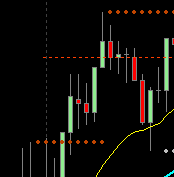
Just started working with Ninja, anybody know how to make the (X) closeout bigger? As seen in attachment. Its microscopic, i had to zoom in to get this pic. Any help is greatly appreciated.


Attached Thumbnails
Click image for larger version

Name:	Screenshot 2023-11-29 150628.png
Views:	116
Size:	3.5 KB
ID:	336550  
Edit/Delete Message Reply With Quote

Can you help answer these questions
from other members on NexusFi?
Iran Airspace Collapses 18 Points to 15.5% While Hormuz …
Prediction Markets & Event Contracts
UCL Final Kicks Off at Noon ET: PSG at 56.5% as Iran May …
Prediction Markets & Event Contracts
US Navy Blockade of Hormuz Starts Today -- Oil Surges 8p …
Prediction Markets & Event Contracts
CME Group Fee Schedule Changes Hit All Four Exchanges -- …
Traders Hideout
May 26 Deadline Dies at 7.5% as US Strikes Iran During C …
Prediction Markets & Event Contracts
 
Best Threads (Most Thanked)
in the last 7 days on NexusFi
Sober Journey With S&P
24 thanks
2026 Jlab journal
10 thanks
Algo automated / semi-automated trading anyone?
6 thanks
Lady Vols Primer: Trading Volatility Journal
6 thanks
2026 Fire Horse
5 thanks
  #2 (permalink)
 
bobwest's Avatar
 bobwest 
Western Florida
Site Moderator
 
Experience: Advanced
Platform: Sierra Chart
Trading: ES, YM
Frequency: Several times daily
Duration: Minutes
Posts: 8,174 since Jan 2013
Thanks Given: 57,989
Thanks Received: 26,406


Tikitrades View Post
Just started working with Ninja, anybody know how to make the (X) closeout bigger? As seen in attachment. Its microscopic, i had to zoom in to get this pic. Any help is greatly appreciated.

Hi @Tikitrades,

I copied your question here from the "ask any question" thread.

I don't use NT any more, but I expect someone who uses NT will be able to help.

Good luck with NT. It's a powerful platform, and like anything else, it does take some getting used to.

Bob.


When one door closes, another opens.
-- Cervantes, Don Quixote
Reply With Quote
  #3 (permalink)
 
Granddaddy's Avatar
 Granddaddy 
Johnson City, TN
 
Experience: Master
Platform: NinjaTrader
Broker: Ninja
Trading: Day Trading: ES-NQ-CL-NG
Posts: 13 since Oct 2020
Thanks Given: 17
Thanks Received: 17


Tikitrades View Post
Just started working with Ninja, anybody know how to make the (X) closeout bigger? As seen in attachment. Its microscopic, i had to zoom in to get this pic. Any help is greatly appreciated.

I've used NT for years (since 6 through 7 and now into 8). I don't really understand what you're asking. When you create a new chart, it's usually big enough to fill about half your screen. You can drag and enlarge. I see you're running a simulator or actual trades and if the protective stop and farthest profit target are widely separated like yours appear to be it will stretch the chart and shrink the bars/candles. You can also edit the default properties to provide more (or less) of a right edge.

If I've totally missed what you're asking, let me know.

Good Luck!


PS -- NT also has a pretty helpful support staff I peppered with questions years ago as I learned the software.


Reply With Quote
  #4 (permalink)
 Conceptzx   is a Vendor
 
Posts: 111 since May 2022
Thanks Given: 25
Thanks Received: 77

I believe you've got to increase the size of the text. Might be in the settings when you right click under the order entry section. Unsure offhand where exactly it is, but I remember it changing when I played with font sizes.


Reply With Quote
Thanked by:


Last Updated on December 16, 2023


© 2026 NexusFi®, s.a., All Rights Reserved.
Av Ricardo J. Alfaro, Century Tower, Panama City, Panama, Ph: +507 833-9432 (Panama and Intl), +1 888-312-3001 (USA and Canada)
All information is for educational use only and is not investment advice. There is a substantial risk of loss in trading commodity futures, stocks, options and foreign exchange products. Past performance is not indicative of future results.
About Us - Contact Us - Site Rules, Acceptable Use, and Terms and Conditions - Downloads - Top
no new posts