Dark Theme
Light Theme
Welcome to NexusFi: the best trading community on the planet, with over 200,000 members Sign Up Now for Free
Genuine reviews from real traders, not fake reviews from stealth vendors
Quality education from leading professional traders
We are a friendly, helpful, and positive community
We do not tolerate rude behavior, trolling, or vendors advertising in posts
We are here to help, just let us know what you need
You'll need to
register in order to view the content of the threads and start contributing to our community.
It's free for basic access, or support us by becoming an Elite Member -- discounts are available after registering.
-- The NexusFi team
(If you already have an account, login at the top of the page)
January 27th, 2012, 09:30 AM
In the heat
Posts: 3,166 since Mar 2010
Thanks Given: 6,339
Thanks Received: 13,416
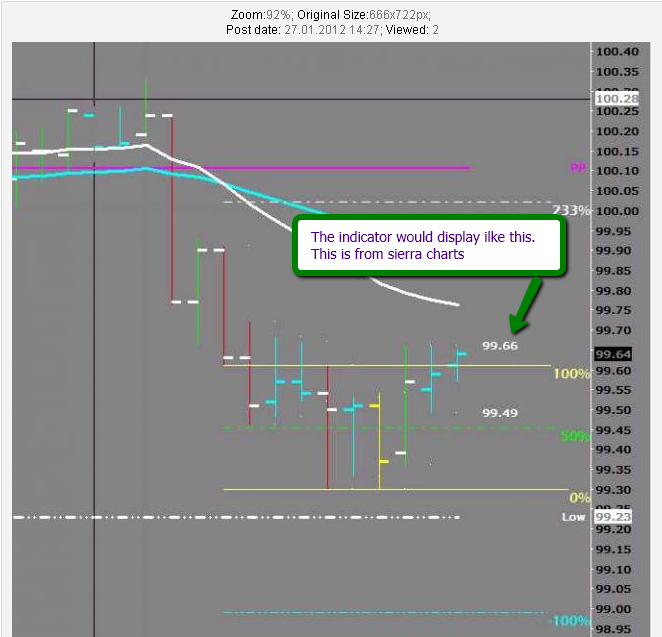
is there an indicator for ninja that measures the range for the previous closed time based bar in real time and displays that information on the screen to the right of the current bar.
Can you help answer these questions
Best Threads (Most Thanked)
January 27th, 2012, 10:09 AM
Quebec Canada
Experience: Intermediate
Platform: NinjaTrader
Broker: AMP/CQG
Trading: ES, NQ, YM
Frequency: Daily
Duration: Minutes
Posts: 4,581 since Oct 2009
Thanks Given: 4,267
Thanks Received: 6,212
Have you tried the Range indicator that comes with ? The info is displayed in a panel but it may serve you well.
January 27th, 2012, 10:42 AM
In the heat
Posts: 3,166 since Mar 2010
Thanks Given: 6,339
Thanks Received: 13,416
trendisyourfriend
Have you tried the Range indicator that comes with Ninjatrader ? The info is displayed in a panel but it may serve you well.
Simplicity is the ultimate sophistication, Leonardo da Vinci Most people chose unhappiness over uncertainty, Tim Ferris
January 27th, 2012, 10:54 AM
virginia
Experience: Intermediate
Platform: ninja
Trading: NQ
Posts: 6,099 since Jun 2009
Thanks Given: 877
Thanks Received: 8,098
January 27th, 2012, 10:59 AM
Milan (I)
Experience: Advanced
Platform: Ninjatrader
Broker: Kinetick
Trading: FDAX,6E,CL,YM,NQ,ES
Posts: 1,648 since Oct 2010
Thanks Given: 1,216
Thanks Received: 2,090
PandaWarrior
is there an indicator for ninja that measures the range for the previous closed time based bar in real time and displays that information on the screen to the right of the current bar.
Code
base.DrawText("txt" + CurrentBar,(Range()[0]/TickSize).ToString(),0,price,Color.Lime);
Instead of plotting the number of the bar it will plot the Range of each bar
Attached Files
Elite Membership required to download: RangeBarsSinceSession.zip
January 27th, 2012, 11:27 AM
In the heat
Posts: 3,166 since Mar 2010
Thanks Given: 6,339
Thanks Received: 13,416
redratsal
This is what you are looking for (I hope), I modified a version of the barssincesession from Bukkan
, all I did is change the Draw object at line 51:
Code
base.DrawText("txt" + CurrentBar,(Range()[0]/TickSize).ToString(),0,price,Color.Lime);
Instead of plotting the number of the bar it will plot the Range of each bar
It is a good approach as the range of a time based bar is important for interpreting PA.
Simplicity is the ultimate sophistication, Leonardo da Vinci Most people chose unhappiness over uncertainty, Tim Ferris
January 27th, 2012, 11:29 AM
Milan (I)
Experience: Advanced
Platform: Ninjatrader
Broker: Kinetick
Trading: FDAX,6E,CL,YM,NQ,ES
Posts: 1,648 since Oct 2010
Thanks Given: 1,216
Thanks Received: 2,090
PandaWarrior
That looks pretty good, but can it print just the prices of the previous bar and not the actual range of the bar?
January 27th, 2012, 11:31 AM
In the heat
Posts: 3,166 since Mar 2010
Thanks Given: 6,339
Thanks Received: 13,416
redratsal
Yes it can but it is not what you originally asked
, let me work on it
Simplicity is the ultimate sophistication, Leonardo da Vinci Most people chose unhappiness over uncertainty, Tim Ferris
January 27th, 2012, 12:51 PM
Milan (I)
Experience: Advanced
Platform: Ninjatrader
Broker: Kinetick
Trading: FDAX,6E,CL,YM,NQ,ES
Posts: 1,648 since Oct 2010
Thanks Given: 1,216
Thanks Received: 2,090
PandaWarrior
Ok, I thought I had then I read my original post and I said nothing about that...sorry.
https://nexusfi.com/download/vip_elite_circle/556-download.html?view
Last Updated on January 27, 2012













 , let me work on it