NexusFi: Find Your Edge


Home Menu


Chart Values/Tool Values Window is missing


Discussion in Sierra Chart

Updated
      Top Posters
    1. looks_one Big Mike with 9 posts (0 thanks)
    2. looks_two ktrader with 6 posts (5 thanks)
    3. looks_3 omaha786 with 1 posts (0 thanks)
    4. looks_4 ejtrader with 1 posts (0 thanks)
    1. trending_up 7,630 views
    2. thumb_up 5 thanks given
    3. group 3 followers
    1. forum 17 posts
    2. attach_file 2 attachments


Search this Thread
  #1 (permalink)
 
Big Mike's Avatar
 Big Mike 
Manta, Ecuador
Site Administrator
Developer
Swing Trader
 
Experience: Advanced
Platform: Custom solution
Broker: IBKR
Trading: Stocks & Futures
Frequency: Every few days
Duration: Weeks
Posts: 50,669 since Jun 2009
Thanks Given: 33,669
Thanks Received: 102,557

Hi guys,

For a long time now, my Sierra "Chart Values Window" is gone. No where to be found. I have over 20 charts across six monitors and don't want to use the "reset windows", I am hoping there is another way...

Any suggestions?

Basically, when I right click on a chart and select "Chart Values Window", nothing happens.

If I go to main control panel and do Window - Chart Values Window (F3), nothing happens.

If I do "Chart Window Always Visible", nothing happens.

The same is true of "Tool Values Window". MIA, can't find it anywhere.

Mike


We're here to help: just ask the community or contact our Help Desk

Quick Links: Change your Username or Register as a Vendor
Searching for trading reviews? Review this list
Lifetime Elite Membership: Sign-up for only $149 USD
Exclusive money saving offers from our Site Sponsors: Browse Offers
Report problems with the site: Using the NexusFi changelog thread
Follow me on X Visit my NexusFi Trade Journal Started this thread Reply With Quote

Can you help answer these questions
from other members on NexusFi?
Orban at 29pct as Hungary Votes Tomorrow -- McIlroy Surg …
Prediction Markets & Event Contracts
The 50/50 Paradox: Peace and Invasion Each at 20% -- Ira …
Prediction Markets & Event Contracts
Iran Ceasefire Surges to 19.5% on US 15-Point Plan -- 82 …
Prediction Markets & Event Contracts
Double Deadlock: Rubio Calls Hormuz Tolls "Unfeasib …
Traders Hideout
Irans Answer Due Today: Peace Surges to 33.5%, Invasion …
Prediction Markets & Event Contracts
 
Best Threads (Most Thanked)
in the last 7 days on NexusFi
Sober Journey With S&P
21 thanks
2026 Jlab journal
10 thanks
Trying to learn Volume and price action correlation
8 thanks
Algo automated / semi-automated trading anyone?
6 thanks
Hello Im new here
5 thanks
  #2 (permalink)
 ejtrader 
Portland, OR
 
Experience: Intermediate
Platform: Sierra Chart
Trading: ES
Posts: 269 since Jan 2011
Thanks Given: 327
Thanks Received: 180

What happens - if you select window -> chart values window from the top menu options?


Reply With Quote
  #3 (permalink)
 
Big Mike's Avatar
 Big Mike 
Manta, Ecuador
Site Administrator
Developer
Swing Trader
 
Experience: Advanced
Platform: Custom solution
Broker: IBKR
Trading: Stocks & Futures
Frequency: Every few days
Duration: Weeks
Posts: 50,669 since Jun 2009
Thanks Given: 33,669
Thanks Received: 102,557


ejtrader View Post
What happens - if you select window -> chart values window from the top menu options?

Same, nothing happens.

Mike


We're here to help: just ask the community or contact our Help Desk

Quick Links: Change your Username or Register as a Vendor
Searching for trading reviews? Review this list
Lifetime Elite Membership: Sign-up for only $149 USD
Exclusive money saving offers from our Site Sponsors: Browse Offers
Report problems with the site: Using the NexusFi changelog thread
Follow me on X Visit my NexusFi Trade Journal Started this thread Reply With Quote
  #4 (permalink)
 
ktrader's Avatar
 ktrader 
glostrup, denmark
 
Experience: Advanced
Platform: Custom platform
Broker: CQG
Trading: Futures, Options, Stocks
Posts: 249 since Aug 2011
Thanks Given: 152
Thanks Received: 275


Big Mike View Post
Same, nothing happens.

Mike

you can open spy++ or winspector and find it and resize/move it from there.

--ktrader


Reply With Quote
Thanked by:
  #5 (permalink)
 
Big Mike's Avatar
 Big Mike 
Manta, Ecuador
Site Administrator
Developer
Swing Trader
 
Experience: Advanced
Platform: Custom solution
Broker: IBKR
Trading: Stocks & Futures
Frequency: Every few days
Duration: Weeks
Posts: 50,669 since Jun 2009
Thanks Given: 33,669
Thanks Received: 102,557


ktrader View Post
you can open spy++ or winspector and find it and resize/move it from there.

--ktrader

Can you tell me the title of the window, so I can use Search within spy++?

Mike


We're here to help: just ask the community or contact our Help Desk

Quick Links: Change your Username or Register as a Vendor
Searching for trading reviews? Review this list
Lifetime Elite Membership: Sign-up for only $149 USD
Exclusive money saving offers from our Site Sponsors: Browse Offers
Report problems with the site: Using the NexusFi changelog thread
Follow me on X Visit my NexusFi Trade Journal Started this thread Reply With Quote
  #6 (permalink)
 
ktrader's Avatar
 ktrader 
glostrup, denmark
 
Experience: Advanced
Platform: Custom platform
Broker: CQG
Trading: Futures, Options, Stocks
Posts: 249 since Aug 2011
Thanks Given: 152
Thanks Received: 275


Big Mike View Post
Can you tell me the title of the window, so I can use Search within spy++?

Mike

Mine is named either "Chart Values for Last Column" (this is when the sierra main window is focused )or chartsymbol timeframe number - Chart Value (example NQ-201209-CME 233 tick #1 - Chart Values". (when a chart is active)

By the way the exact same thing happened to me after an upgrade and the chart values window was very small (but border could be grabbed and resized) in the upper left corner of the main monitor.

--ktrader


Reply With Quote
  #7 (permalink)
 
Big Mike's Avatar
 Big Mike 
Manta, Ecuador
Site Administrator
Developer
Swing Trader
 
Experience: Advanced
Platform: Custom solution
Broker: IBKR
Trading: Stocks & Futures
Frequency: Every few days
Duration: Weeks
Posts: 50,669 since Jun 2009
Thanks Given: 33,669
Thanks Received: 102,557


ktrader View Post
Mine is named either "Chart Values for Last Displayed Column" or chartsymbol timeframe number - Chart Value (example NQ-201209-CME 233 tick #1 - Chart Values".

By the way the exact same thing happened to me after an upgrade and the chart values window was very small (but border could be grabbed and resized) in the upper right corner of the main monitor.

--ktrader

OK, I think I found it.


Tried "highlight", does nothing. How can I maximize it or resize it?

Mike


We're here to help: just ask the community or contact our Help Desk

Quick Links: Change your Username or Register as a Vendor
Searching for trading reviews? Review this list
Lifetime Elite Membership: Sign-up for only $149 USD
Exclusive money saving offers from our Site Sponsors: Browse Offers
Report problems with the site: Using the NexusFi changelog thread
Follow me on X Visit my NexusFi Trade Journal Started this thread Reply With Quote
  #8 (permalink)
 
Big Mike's Avatar
 Big Mike 
Manta, Ecuador
Site Administrator
Developer
Swing Trader
 
Experience: Advanced
Platform: Custom solution
Broker: IBKR
Trading: Stocks & Futures
Frequency: Every few days
Duration: Weeks
Posts: 50,669 since Jun 2009
Thanks Given: 33,669
Thanks Received: 102,557


ktrader View Post
By the way the exact same thing happened to me after an upgrade and the chart values window was very small (but border could be grabbed and resized) in the upper left corner of the main monitor.

--ktrader

I looked there, I can't find anything anywhere.


Mike


We're here to help: just ask the community or contact our Help Desk

Quick Links: Change your Username or Register as a Vendor
Searching for trading reviews? Review this list
Lifetime Elite Membership: Sign-up for only $149 USD
Exclusive money saving offers from our Site Sponsors: Browse Offers
Report problems with the site: Using the NexusFi changelog thread
Follow me on X Visit my NexusFi Trade Journal Started this thread Reply With Quote
  #9 (permalink)
 
ktrader's Avatar
 ktrader 
glostrup, denmark
 
Experience: Advanced
Platform: Custom platform
Broker: CQG
Trading: Futures, Options, Stocks
Posts: 249 since Aug 2011
Thanks Given: 152
Thanks Received: 275


Big Mike View Post
OK, I think I found it.


Tried "highlight", does nothing. How can I maximize it or resize it?

Mike

You have to grab the window handle and do a sendmessage to it, theres a free tool that can do it: SendMessage. (by sending the message SetWindowPos)

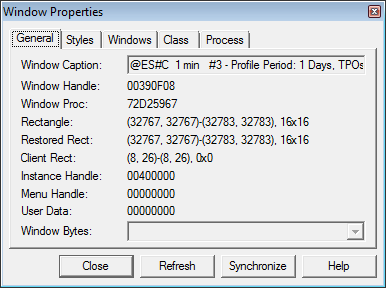
But first you can right click, do properties and see what the properties:

rectangle
restored rect
and client rect

that might give a hint to where it is.

--ktrader


Reply With Quote
  #10 (permalink)
 
ktrader's Avatar
 ktrader 
glostrup, denmark
 
Experience: Advanced
Platform: Custom platform
Broker: CQG
Trading: Futures, Options, Stocks
Posts: 249 since Aug 2011
Thanks Given: 152
Thanks Received: 275


Big Mike View Post
I looked there, I can't find anything anywhere.


Mike

It seems the size is 0x0, i think you will have to send the message to it.

--ktrader


Reply With Quote


Last Updated on August 24, 2012


© 2026 NexusFi®, s.a., All Rights Reserved.
Av Ricardo J. Alfaro, Century Tower, Panama City, Panama, Ph: +507 833-9432 (Panama and Intl), +1 888-312-3001 (USA and Canada)
All information is for educational use only and is not investment advice. There is a substantial risk of loss in trading commodity futures, stocks, options and foreign exchange products. Past performance is not indicative of future results.
About Us - Contact Us - Site Rules, Acceptable Use, and Terms and Conditions - Downloads - Top
no new posts