NexusFi: Find Your Edge


Home Menu


Overlay breadth onto chart


Discussion in Sierra Chart

Updated
    1. trending_up 2,828 views
    2. thumb_up 6 thanks given
    3. group 2 followers
    1. forum 5 posts
    2. attach_file 0 attachments


Search this Thread
  #1 (permalink)
 
Big Mike's Avatar
 Big Mike 
Manta, Ecuador
Site Administrator
Developer
Swing Trader
 
Experience: Advanced
Platform: Custom solution
Broker: IBKR
Trading: Stocks & Futures
Frequency: Every few days
Duration: Weeks
Posts: 50,669 since Jun 2009
Thanks Given: 33,669
Thanks Received: 102,584

I am trying to overlay some breadth (ie PREM or S&P TICK) onto some of my charts, but it is not working properly.

IQFeed supports 1 second resolution for breadth. I created a new chart using intraday 1 second resolution for my breadth, and that works fine.

Then I want to overlay that into a new panel on my existing charts, like a 100k volume chart.

When I use the Overlay study (tried regular overlay, and overlay non-sync) none of them work properly. The data does not match what is shown on the separate breadth chart. At first glance it looks like it worked, but upon closer examination you can see the data is not aligned properly at all. It's like it is counting by bar # (perhaps) instead of looking at the time code and plotting the value that way.

Can someone help me figure out what I am doing wrong? Does Overlay not work for non-time based charts?

Mike


We're here to help: just ask the community or contact our Help Desk

Quick Links: Change your Username or Register as a Vendor
Searching for trading reviews? Review this list
Lifetime Elite Membership: Sign-up for only $149 USD
Exclusive money saving offers from our Site Sponsors: Browse Offers
Report problems with the site: Using the NexusFi changelog thread
Follow me on X Visit my NexusFi Trade Journal Started this thread Reply With Quote
Thanked by:

Can you help answer these questions
from other members on NexusFi?
April FOMC Minutes: Most Divided Fed Since 1992 -- Many …
Traders Hideout
US Navy Blockade of Hormuz Starts Today -- Oil Surges 8p …
Prediction Markets & Event Contracts
Iran Talks Final Stages -- Two VLCCs Exit Hormuz, Record …
Traders Hideout
Memorandum Watch: How the 60-Day MOU Framework Makes May …
Prediction Markets & Event Contracts
El Clasico Draws $9.2M in Prediction Market Action -- Bi …
Prediction Markets & Event Contracts
 
Best Threads (Most Thanked)
in the last 7 days on NexusFi
Big Mike in Ecuador
205 thanks
Sober Journey With S&P
21 thanks
30 Sessions
20 thanks
Volume Indicators
8 thanks
Thanks Mike. Godspeed.
7 thanks
  #2 (permalink)
 Sawtooth 
Prescott AZ USA
 
Experience: Advanced
Platform: SierraChart
Broker: EdgeClear, FCM:Phillip, Data:Denali, Routing:Teton
Trading: YM RTY ES NQ
Posts: 480 since Nov 2009
Thanks Given: 222
Thanks Received: 608


Big Mike View Post
I am trying to overlay some breadth (ie PREM or S&P TICK) onto some of my charts, but it is not working properly.

IQFeed supports 1 second resolution for breadth. I created a new chart using intraday 1 second resolution for my breadth, and that works fine.

Then I want to overlay that into a new panel on my existing charts, like a 100k volume chart.

When I use the Overlay study (tried regular overlay, and overlay non-sync) none of them work properly. The data does not match what is shown on the separate breadth chart. At first glance it looks like it worked, but upon closer examination you can see the data is not aligned properly at all. It's like it is counting by bar # (perhaps) instead of looking at the time code and plotting the value that way.

Can someone help me figure out what I am doing wrong? Does Overlay not work for non-time based charts?

Mike


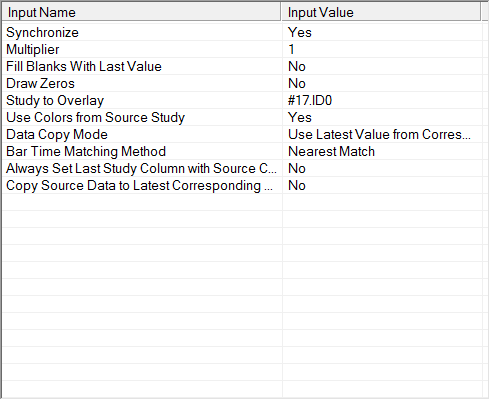
Try the Study/Price Overlay study. Sync set to No will give bars not tied to the destination chart's bars, set to Yes will have empty spaces between bars, unless Fill Blanks With Last Value is Yes.


Reply With Quote
Thanked by:
  #3 (permalink)
 
Big Mike's Avatar
 Big Mike 
Manta, Ecuador
Site Administrator
Developer
Swing Trader
 
Experience: Advanced
Platform: Custom solution
Broker: IBKR
Trading: Stocks & Futures
Frequency: Every few days
Duration: Weeks
Posts: 50,669 since Jun 2009
Thanks Given: 33,669
Thanks Received: 102,584


tomgilb View Post
Try the Study/Price Overlay study. Sync set to No will give bars not tied to the destination chart's bars, set to Yes will have empty spaces between bars, unless Fill Blanks With Last Value is Yes.

Appears to have same problem as regular Overlay or regular Overlay non-sync, meaning that the data is not correct. The current data on last bar as it updates seems right, but historical bars are wrong data.


Do you have IQFeed? If so you can test easily, I am using:

- SP-PREM @ 1 second resolution, chart #17
- Chart #9 is 100k volume chart of @ES#C

Trying to overlay the PREM from #17 into panel #2 of chart #9. Once I get correct values, I will hide the overlay study and use a fast moving average on it and display that.

Just to make sure I am not wrong (as reading 1-second values for PREM can move a lot) I will try a simpler overlay later. I've used overlays many times in the past with success, but always on time based charts. This is the first time I've tried to do it on non-time based charts or charts that don't have the same underlying time frame.

Mike


We're here to help: just ask the community or contact our Help Desk

Quick Links: Change your Username or Register as a Vendor
Searching for trading reviews? Review this list
Lifetime Elite Membership: Sign-up for only $149 USD
Exclusive money saving offers from our Site Sponsors: Browse Offers
Report problems with the site: Using the NexusFi changelog thread
Follow me on X Visit my NexusFi Trade Journal Started this thread Reply With Quote
Thanked by:
  #4 (permalink)
 
Big Mike's Avatar
 Big Mike 
Manta, Ecuador
Site Administrator
Developer
Swing Trader
 
Experience: Advanced
Platform: Custom solution
Broker: IBKR
Trading: Stocks & Futures
Frequency: Every few days
Duration: Weeks
Posts: 50,669 since Jun 2009
Thanks Given: 33,669
Thanks Received: 102,584

OK maybe that one is actually working. I need to look more closely after close, too distracted right now.

The simple test I was using earlier was having two separate charts, say 100k vol and 25k vol, and before the Overlay panel looked identical between the two (impossible). Now it looks different, so maybe it is actually working.

I don't understand the difference between 'Overlay' and 'Study/Price Overlay'.

Mike


We're here to help: just ask the community or contact our Help Desk

Quick Links: Change your Username or Register as a Vendor
Searching for trading reviews? Review this list
Lifetime Elite Membership: Sign-up for only $149 USD
Exclusive money saving offers from our Site Sponsors: Browse Offers
Report problems with the site: Using the NexusFi changelog thread
Follow me on X Visit my NexusFi Trade Journal Started this thread Reply With Quote
Thanked by:
  #5 (permalink)
 
Big Mike's Avatar
 Big Mike 
Manta, Ecuador
Site Administrator
Developer
Swing Trader
 
Experience: Advanced
Platform: Custom solution
Broker: IBKR
Trading: Stocks & Futures
Frequency: Every few days
Duration: Weeks
Posts: 50,669 since Jun 2009
Thanks Given: 33,669
Thanks Received: 102,584

Tom,

I switched to JT6T.Z (S&P TICK) and a smaller chart (2500 volume on ES) and it was much easier to read. I confirmed that the "Study/Price Overlay" is working.

Thanks so much!

The only remaining thing is I wish it were possible to see the current reading, so the last bar on the chart would show the most recent value (updating once per second to match chart #17). Right now I have to wait for the bar to close on the chart to see the value.

Mike


We're here to help: just ask the community or contact our Help Desk

Quick Links: Change your Username or Register as a Vendor
Searching for trading reviews? Review this list
Lifetime Elite Membership: Sign-up for only $149 USD
Exclusive money saving offers from our Site Sponsors: Browse Offers
Report problems with the site: Using the NexusFi changelog thread
Follow me on X Visit my NexusFi Trade Journal Started this thread Reply With Quote
Thanked by:
  #6 (permalink)
 
Big Mike's Avatar
 Big Mike 
Manta, Ecuador
Site Administrator
Developer
Swing Trader
 
Experience: Advanced
Platform: Custom solution
Broker: IBKR
Trading: Stocks & Futures
Frequency: Every few days
Duration: Weeks
Posts: 50,669 since Jun 2009
Thanks Given: 33,669
Thanks Received: 102,584


Big Mike View Post
The only remaining thing is I wish it were possible to see the current reading, so the last bar on the chart would show the most recent value (updating once per second to match chart #17). Right now I have to wait for the bar to close on the chart to see the value.

Mike

Solved that too... simply turned on the value label... duh!

Mike


We're here to help: just ask the community or contact our Help Desk

Quick Links: Change your Username or Register as a Vendor
Searching for trading reviews? Review this list
Lifetime Elite Membership: Sign-up for only $149 USD
Exclusive money saving offers from our Site Sponsors: Browse Offers
Report problems with the site: Using the NexusFi changelog thread
Follow me on X Visit my NexusFi Trade Journal Started this thread Reply With Quote
Thanked by:


Last Updated on March 21, 2013


© 2026 NexusFi®, s.a., All Rights Reserved.
Av Ricardo J. Alfaro, Century Tower, Panama City, Panama, Ph: +507 833-9432 (Panama and Intl), +1 888-312-3001 (USA and Canada)
All information is for educational use only and is not investment advice. There is a substantial risk of loss in trading commodity futures, stocks, options and foreign exchange products. Past performance is not indicative of future results.
About Us - Contact Us - Site Rules, Acceptable Use, and Terms and Conditions - Downloads - Top
no new posts