NexusFi: Find Your Edge


Home Menu


Coloring based on value in Sierra Chart


Discussion in Sierra Chart

Updated
    1. trending_up 2,993 views
    2. thumb_up 4 thanks given
    3. group 1 followers
    1. forum 4 posts
    2. attach_file 0 attachments


Search this Thread
  #1 (permalink)
 
Big Mike's Avatar
 Big Mike 
Manta, Ecuador
Site Administrator
Developer
Swing Trader
 
Experience: Advanced
Platform: Custom solution
Broker: IBKR
Trading: Stocks & Futures
Frequency: Every few days
Duration: Weeks
Posts: 50,669 since Jun 2009
Thanks Given: 33,669
Thanks Received: 102,584

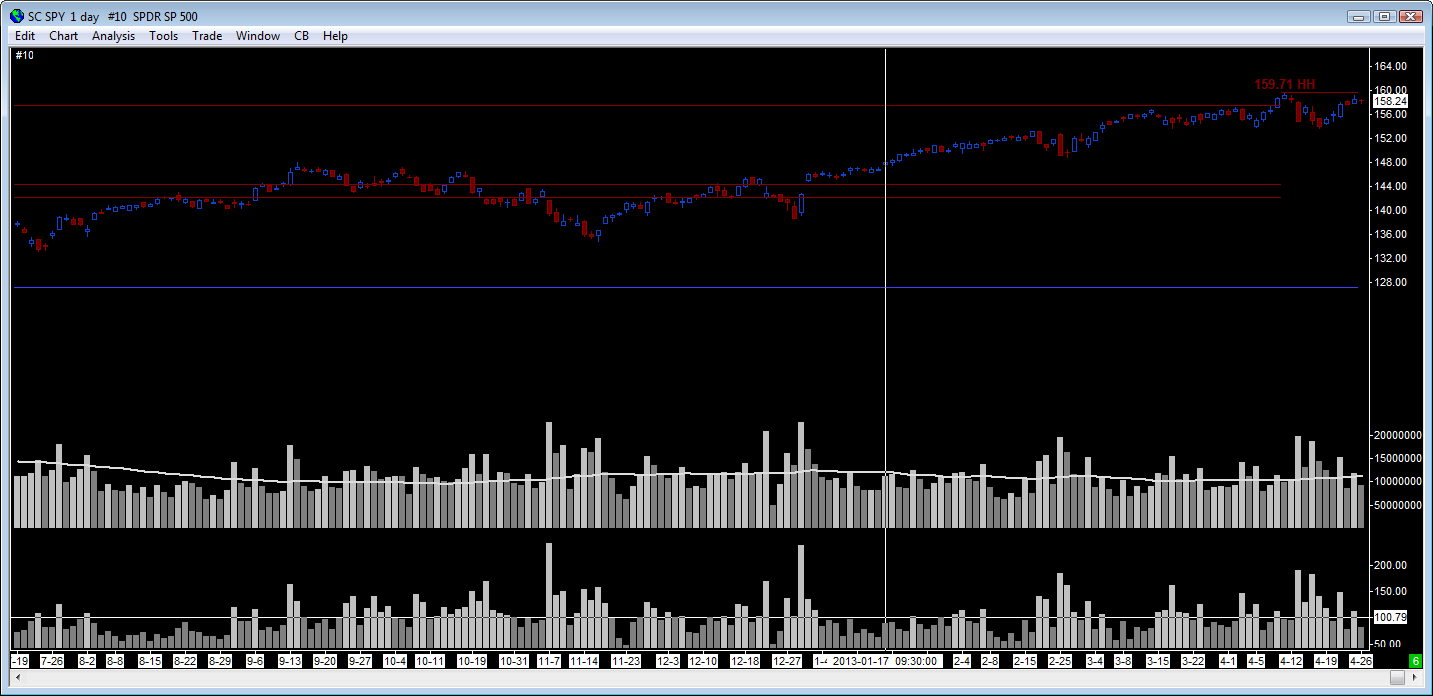
I would like to color a bar based on whether or not the value is above or below 100. 100 or above = one color, below 100 is another color. The slope does not matter.

Can someone tell me how to do this? I know it is possible, something to do with using the alerts I think?

Mike


We're here to help: just ask the community or contact our Help Desk

Quick Links: Change your Username or Register as a Vendor
Searching for trading reviews? Review this list
Lifetime Elite Membership: Sign-up for only $149 USD
Exclusive money saving offers from our Site Sponsors: Browse Offers
Report problems with the site: Using the NexusFi changelog thread
Follow me on X Visit my NexusFi Trade Journal Started this thread Reply With Quote

Can you help answer these questions
from other members on NexusFi?
Kharg Island at 6%, Regime Fall at 1.5% -- The Black Swa …
Prediction Markets & Event Contracts
Trump Truth Social Fires Hormuz From 10% to 59% -- Arsen …
Prediction Markets & Event Contracts
One Wallet Made $200K in Hours: AP Probes Polymarket Cea …
Prediction Markets & Event Contracts
Iran Lebanon Problem Kills Switzerland Talks, Brent at $ …
Prediction Markets & Event Contracts
CFTC Opens First COT Report Review in 20 Years -- Asks W …
Traders Hideout
 
Best Threads (Most Thanked)
in the last 7 days on NexusFi
Big Mike in Ecuador
205 thanks
Sober Journey With S&P
21 thanks
30 Sessions
20 thanks
Volume Indicators
8 thanks
Thanks Mike. Godspeed.
7 thanks
  #2 (permalink)
 Sawtooth 
Prescott AZ USA
 
Experience: Advanced
Platform: SierraChart
Broker: EdgeClear, FCM:Phillip, Data:Denali, Routing:Teton
Trading: YM RTY ES NQ
Posts: 480 since Nov 2009
Thanks Given: 222
Thanks Received: 608


Big Mike View Post
I would like to color a bar based on whether or not the value is above or below 100. 100 or above = one color, below 100 is another color. The slope does not matter.

Can someone tell me how to do this? I know it is possible, something to do with using the alerts I think?

Mike

Add two instances of the Color Bar Based On Alert Condition study, one for each color.

In each instance, use formulas like this:

=ID1.SG1>100

=ID1.SG1<100

where ID1 is the study and SG1 is the subgraph that produces the 100. Edit as needed.


Reply With Quote
Thanked by:
  #3 (permalink)
 
Big Mike's Avatar
 Big Mike 
Manta, Ecuador
Site Administrator
Developer
Swing Trader
 
Experience: Advanced
Platform: Custom solution
Broker: IBKR
Trading: Stocks & Futures
Frequency: Every few days
Duration: Weeks
Posts: 50,669 since Jun 2009
Thanks Given: 33,669
Thanks Received: 102,584


tomgilb View Post
Add two instances of the Color Bar Based On Alert Condition study, one for each color.

In each instance, use formulas like this:

=ID1.SG1>100

=ID1.SG1<100

where ID1 is the study and SG1 is the subgraph that produces the 100. Edit as needed.

This does seem to work, but it colors price bars in panel 1. I am trying to color the output bars from the study (in this case, panel 4). Sorry for not being more clear the first time.

Mike


We're here to help: just ask the community or contact our Help Desk

Quick Links: Change your Username or Register as a Vendor
Searching for trading reviews? Review this list
Lifetime Elite Membership: Sign-up for only $149 USD
Exclusive money saving offers from our Site Sponsors: Browse Offers
Report problems with the site: Using the NexusFi changelog thread
Follow me on X Visit my NexusFi Trade Journal Started this thread Reply With Quote
  #4 (permalink)
 Sawtooth 
Prescott AZ USA
 
Experience: Advanced
Platform: SierraChart
Broker: EdgeClear, FCM:Phillip, Data:Denali, Routing:Teton
Trading: YM RTY ES NQ
Posts: 480 since Nov 2009
Thanks Given: 222
Thanks Received: 608


Big Mike View Post
This does seem to work, but it colors price bars in panel 1. I am trying to color the output bars from the study (in this case, panel 4). Sorry for not being more clear the first time.

Mike

In each color bar study:
-set the Based On to the study you want to color
-set the Chart Region to the same as the study you want to color
-set the Output When Condition True to Use Input Data
-set the Input Data to the subgraph you want to color
-set the Draw Style to Bar, and the width to the same as the study you want to color
-use the same formulas
-the color bar studies might need to be below the study you want to color (in the Studies to Graphs list)


Reply With Quote
Thanked by:
  #5 (permalink)
 
Big Mike's Avatar
 Big Mike 
Manta, Ecuador
Site Administrator
Developer
Swing Trader
 
Experience: Advanced
Platform: Custom solution
Broker: IBKR
Trading: Stocks & Futures
Frequency: Every few days
Duration: Weeks
Posts: 50,669 since Jun 2009
Thanks Given: 33,669
Thanks Received: 102,584


tomgilb View Post
In each color bar study:
-set the Based On to the study you want to color
-set the Chart Region to the same as the study you want to color
-set the Output When Condition True to Use Input Data
-set the Input Data to the subgraph you want to color
-set the Draw Style to Bar, and the width to the same as the study you want to color
-use the same formulas
-the color bar studies might need to be below the study you want to color (in the Studies to Graphs list)

Works perfectly, thank you


Mike


We're here to help: just ask the community or contact our Help Desk

Quick Links: Change your Username or Register as a Vendor
Searching for trading reviews? Review this list
Lifetime Elite Membership: Sign-up for only $149 USD
Exclusive money saving offers from our Site Sponsors: Browse Offers
Report problems with the site: Using the NexusFi changelog thread
Follow me on X Visit my NexusFi Trade Journal Started this thread Reply With Quote


Last Updated on April 27, 2013


© 2026 NexusFi®, s.a., All Rights Reserved.
Av Ricardo J. Alfaro, Century Tower, Panama City, Panama, Ph: +507 833-9432 (Panama and Intl), +1 888-312-3001 (USA and Canada)
All information is for educational use only and is not investment advice. There is a substantial risk of loss in trading commodity futures, stocks, options and foreign exchange products. Past performance is not indicative of future results.
About Us - Contact Us - Site Rules, Acceptable Use, and Terms and Conditions - Downloads - Top
no new posts