NexusFi: Find Your Edge


Home Menu


How to duplicate chartbook for different symbol


Discussion in Sierra Chart

Updated
    1. trending_up 4,052 views
    2. thumb_up 2 thanks given
    3. group 3 followers
    1. forum 4 posts
    2. attach_file 0 attachments


Search this Thread
  #1 (permalink)
 sw88 
New Haven, CT/USA
 
Experience: Beginner
Platform: MT4, thinkorswim
Trading: stocks
Posts: 34 since Jul 2015
Thanks Given: 5
Thanks Received: 3

How can I duplicate a chartbook, then change the symbol in all charts. It seems I have to change symbol one chart by the other. Any short cut? thanks


Started this thread Reply With Quote

Can you help answer these questions
from other members on NexusFi?
Iran Lebanon Problem Kills Switzerland Talks, Brent at $ …
Prediction Markets & Event Contracts
Iran Forward Curve: June 30 at 56% vs June 15 at 28% -- …
Prediction Markets & Event Contracts
Day 96 Missiles Hit Kuwait and Bahrain: June 15 Peace at …
Prediction Markets & Event Contracts
Prediction Markets Expiry Day: Trump Eyes War Exit, $230 …
Prediction Markets & Event Contracts
Kharg Island at 6%, Regime Fall at 1.5% -- The Black Swa …
Prediction Markets & Event Contracts
 
Best Threads (Most Thanked)
in the last 7 days on NexusFi
Big Mike in Ecuador
205 thanks
30 Sessions
21 thanks
Sober Journey With S&P
21 thanks
Volume Indicators
8 thanks
Thanks Mike. Godspeed.
7 thanks
  #2 (permalink)
 hobart 
charlotte nc
 
Experience: Master
Platform: Sierra Chart, TOS, Tradestation, NinjaTrader
Trading: energy
Posts: 114 since Jul 2012
Thanks Given: 81
Thanks Received: 172

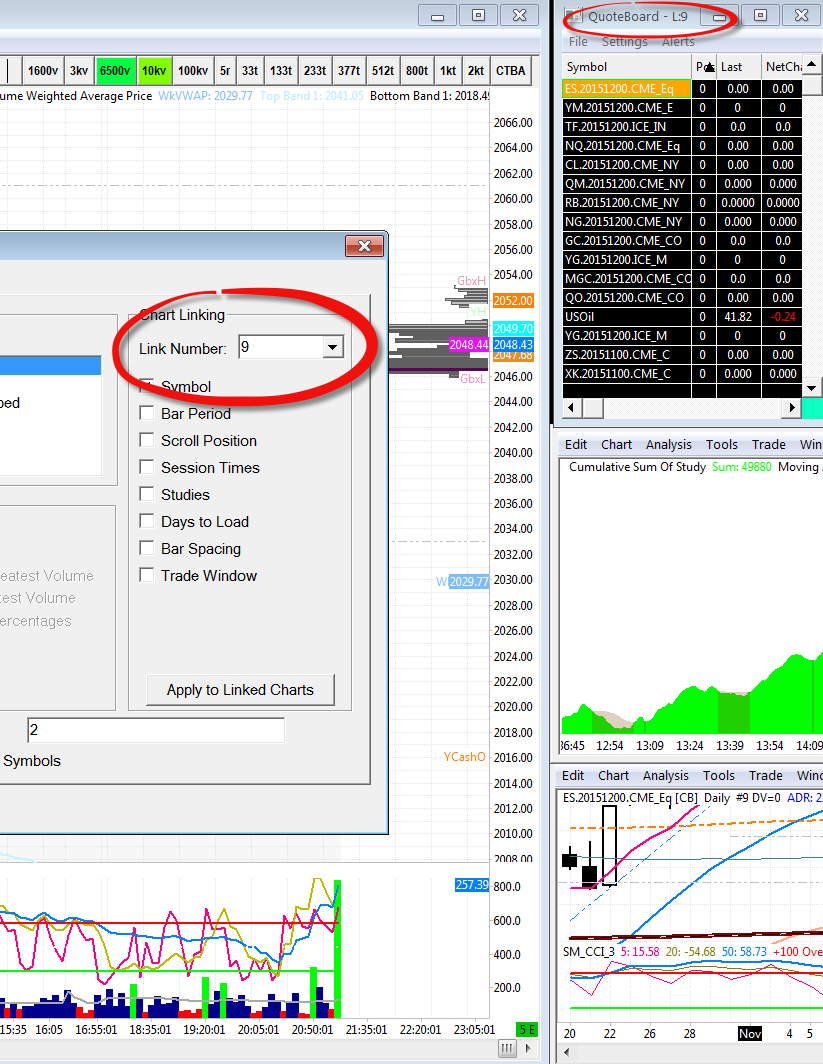
under Chart-Chart settings set them to link symbol.

What i do is that i have a quoteboard setup with all my symbols, then it informs what symbols i want all the charts to switch to. One click on the NQ line in the quoteboard will flip all linked charts to NQ


Reply With Quote
Thanked by:
  #3 (permalink)
 sandptrader 
Valdosta, GA. U.S.A
 
Experience: Advanced
Platform: Sierra , TOS
Trading: 6E, ES, CL, GC
Posts: 498 since Sep 2010
Thanks Given: 1,881
Thanks Received: 472


You can use the Quote Board to do this in Sierra Chart.
here is a Good Video for learning more about Sierra Chart:
1.

2.

3.


The First video is very informative, but the title is offensive
Second video also covers the Quote Board which will allow you to switch All Charts to other Symbol with one click, if they are linked...videos explain.
Third video is on Customizing your Interface.


Reply With Quote
  #4 (permalink)
 sw88 
New Haven, CT/USA
 
Experience: Beginner
Platform: MT4, thinkorswim
Trading: stocks
Posts: 34 since Jul 2015
Thanks Given: 5
Thanks Received: 3

thanks


Started this thread Reply With Quote
  #5 (permalink)
 sandptrader 
Valdosta, GA. U.S.A
 
Experience: Advanced
Platform: Sierra , TOS
Trading: 6E, ES, CL, GC
Posts: 498 since Sep 2010
Thanks Given: 1,881
Thanks Received: 472

Also if you notice @hobart post above.... you can see the Customization of the Types of Charts hobart has chosen to be able to view with combinations of Volume, Range, Tick size charts.
You can choose many type of Charts other than just Time based.
So once you get everything set up you can scan through Charts Quickly viewing All types of price bars on each Symbol.
As well as one click in Quote Board to change all linked charts to other symbols Fast!


Reply With Quote


Last Updated on November 16, 2015


© 2026 NexusFi®, s.a., All Rights Reserved.
Av Ricardo J. Alfaro, Century Tower, Panama City, Panama, Ph: +507 833-9432 (Panama and Intl), +1 888-312-3001 (USA and Canada)
All information is for educational use only and is not investment advice. There is a substantial risk of loss in trading commodity futures, stocks, options and foreign exchange products. Past performance is not indicative of future results.
About Us - Contact Us - Site Rules, Acceptable Use, and Terms and Conditions - Downloads - Top
no new posts