NexusFi: Find Your Edge


Home Menu


Removing Indicator labels on chart


Discussion in NinjaTrader

Updated
    1. trending_up 1,965 views
    2. thumb_up 7 thanks given
    3. group 2 followers
    1. forum 4 posts
    2. attach_file 0 attachments


Search this Thread
  #1 (permalink)
 rb55 
Manchester England
 
Experience: Intermediate
Platform: NT8, Tradingview, mt4/5
Trading: RTY, ES, YM, NQ, CL, DAX, FTSE, GC, NG
Posts: 49 since Oct 2016
Thanks Given: 8
Thanks Received: 33

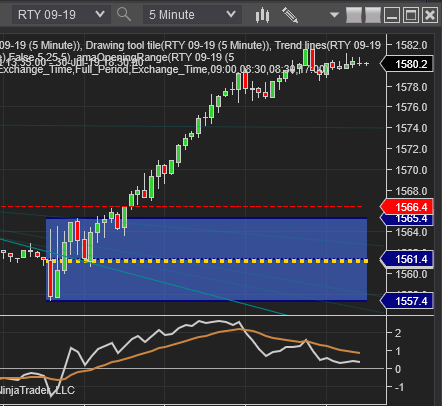
I'm brand new to NT8 and trying to find out how to turn off the indicator labels at the top of the charts.

As you can see it's just a mess and getting in the way but I can't for the life of me find a setting that switches them off.

Any advice appreciated.


Started this thread Reply With Quote
Thanked by:

Can you help answer these questions
from other members on NexusFi?
Iran Talks Final Stages -- Two VLCCs Exit Hormuz, Record …
Traders Hideout
Iran Peace Expired NO: Ceasefire on Life Support, OPEC a …
Prediction Markets & Event Contracts
MegaETH Proves the Crowd Right: Prediction Markets Calle …
Prediction Markets & Event Contracts
Probability Collapse: Bitcoin $150k Craters from 15% to …
Prediction Markets & Event Contracts
CME Cuts Precious Metals Margins Up to 21% Starting Toda …
Commodities
 
Best Threads (Most Thanked)
in the last 7 days on NexusFi
Sober Journey With S&P
21 thanks
2026 Jlab journal
10 thanks
Trying to learn Volume and price action correlation
8 thanks
Algo automated / semi-automated trading anyone?
6 thanks
Hello Im new here
5 thanks
  #2 (permalink)
 crossover 
Brussels Belgium
 
Experience: Intermediate
Platform: ninja
Frequency: Every few days
Duration: Minutes
Posts: 142 since Jun 2009
Thanks Given: 403
Thanks Received: 328

Hi,

right click in the chart and select the tab indicators.
On the left below you see all the indicators you have on your chart
Click on the top indicator and at your left you have the properties of that indicator
Find the tab " label" where the name of the indicator is mentioned
Delete that name so there is no name as label
Continue with all other indicators to do the same.
When every indicator is done click OK and if all is good you wont see any " text" above.

This is what i do, maby there is a faster or better way as solution.

just my 2cents

All the best

Crossover


Reply With Quote
Thanked by:
  #3 (permalink)
 rb55 
Manchester England
 
Experience: Intermediate
Platform: NT8, Tradingview, mt4/5
Trading: RTY, ES, YM, NQ, CL, DAX, FTSE, GC, NG
Posts: 49 since Oct 2016
Thanks Given: 8
Thanks Received: 33


crossover View Post
Hi,

right click in the chart and select the tab indicators.
On the left below you see all the indicators you have on your chart
Click on the top indicator and at your left you have the properties of that indicator
Find the tab " label" where the name of the indicator is mentioned
Delete that name so there is no name as label
Continue with all other indicators to do the same.
When every indicator is done click OK and if all is good you wont see any " text" above.

This is what i do, maby there is a faster or better way as solution.

just my 2cents

All the best

Crossover


Brilliant, thank you. I was looking for a little checkbox to untick didn't think of deleting the actual label name. Cheers.


Started this thread Reply With Quote
Thanked by:
  #4 (permalink)
ycomp
Europe-ish
 
Posts: 177 since Sep 2013
Thanks Given: 12
Thanks Received: 60


crossover View Post
Hi,

This is what i do, maby there is a faster or better way as solution.

just my 2cents

All the best

Crossover

one "faster" way is to make a chart template so you don't have to do this for each instance of the same kind of chart

or you can set blank names as the default indicator templates for the indicator


Reply With Quote
Thanked by:
  #5 (permalink)
 crossover 
Brussels Belgium
 
Experience: Intermediate
Platform: ninja
Frequency: Every few days
Duration: Minutes
Posts: 142 since Jun 2009
Thanks Given: 403
Thanks Received: 328

Ycomp,

Thats absolutely true. However before making the template you have to build the chart. Ones that is done you can make the template and go further with optimising the chart..ones optimised can can make another template and delete the old template........

Testing the chart in sim and finally, if you are confident, with real money.

All the best.

crossover


Reply With Quote
Thanked by:


Last Updated on July 31, 2019


© 2026 NexusFi®, s.a., All Rights Reserved.
Av Ricardo J. Alfaro, Century Tower, Panama City, Panama, Ph: +507 833-9432 (Panama and Intl), +1 888-312-3001 (USA and Canada)
All information is for educational use only and is not investment advice. There is a substantial risk of loss in trading commodity futures, stocks, options and foreign exchange products. Past performance is not indicative of future results.
About Us - Contact Us - Site Rules, Acceptable Use, and Terms and Conditions - Downloads - Top
no new posts