NexusFi: Find Your Edge


Home Menu


Macros for flatten and reverse


Discussion in TradeStation

Updated
    1. trending_up 4,684 views
    2. thumb_up 1 thanks given
    3. group 2 followers
    1. forum 1 posts
    2. attach_file 3 attachments


Search this Thread
  #1 (permalink)
 sgjohnson 
Kingsport, Tennessee
 
Experience: None
Posts: 38 since Apr 2020
Thanks Given: 13
Thanks Received: 13

So in TradeStation (10 or 9.5) does one have to write their own macros to implement a hotkey solution for reversing or flattening a position? If so, anybody have any they can share?


Started this thread Reply With Quote

Can you help answer these questions
from other members on NexusFi?
No book, only a stair: journaling fills where price move …
Cryptocurrency
EA
Platforms and Indicators
I developed a free AI-powered (Kronos) forecasting indic …
The Elite Circle
My Rant with AMP Futures
Trading Reviews and Vendors
[WTS] ATAS Lifetime ULTRA license – EU buyers only – …
Platforms and Indicators
 
Best Threads (Most Thanked)
in the last 7 days on NexusFi
Would you consider buying or leasing an algo?
4 thanks
Big Mike in Ecuador
4 thanks
Trading Journal (Neural Network Production Pipeline Mode …
4 thanks
Trading psychology articles
4 thanks
The Scalpers Journey
2 thanks
  #2 (permalink)
 
vmodus's Avatar
 vmodus 
Somewhere, Delaware, USA
Legendary Systematic Algo Trader
 
Experience: Intermediate
Platform: MultiCharts
Broker: Barchart.com
Trading: Everything, it all tastes like chicken
Posts: 1,270 since Feb 2017
Thanks Given: 2,960
Thanks Received: 2,856

In TS, from the toolbar, go to View > Shortcuts > Macros...
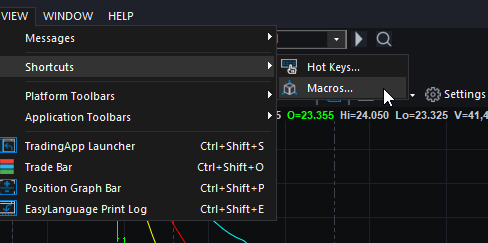


Click the Create button to create a new macro. You should check the reference guide for the macro syntax, as these are considered 'command line' commands. Once you create the macro, you can assign a hot key.

In the online help, look for:
  • Order Execution Commands
  • .ReversePosition
  • .CloseAllPositions


I don't generally use macros, I just know how to create them and assign hot keys. You should play around with these in your SIM account to make sure the commands you are sending are doing what you want.

I hope this helps.


~vmodus

Enjoy everything!
Attached Thumbnails
Click image for larger version

Name:	SNAG-0504.png
Views:	233
Size:	26.1 KB
ID:	305406  
Follow me on X Visit my NexusFi Trade Journal Reply With Quote
Thanked by:


Last Updated on October 1, 2020


© 2026 NexusFi®, s.a., All Rights Reserved.
Av Ricardo J. Alfaro, Century Tower, Panama City, Panama, Ph: +507 833-9432 (Panama and Intl), +1 888-312-3001 (USA and Canada)
All information is for educational use only and is not investment advice. There is a substantial risk of loss in trading commodity futures, stocks, options and foreign exchange products. Past performance is not indicative of future results.
About Us - Contact Us - Site Rules, Acceptable Use, and Terms and Conditions - Downloads - Top
no new posts