NexusFi: Find Your Edge


Home Menu


Difference between "Sell" and "Close"? Newb here.


Discussion in NinjaTrader

Updated
      Top Posters
    1. looks_one Koepisch with 1 posts (0 thanks)
    2. looks_two ImActuallyStupid with 1 posts (0 thanks)
    3. looks_3 forrestang with 1 posts (0 thanks)
    4. looks_4 bobwest with 1 posts (1 thanks)
    1. trending_up 1,584 views
    2. thumb_up 1 thanks given
    3. group 2 followers
    1. forum 3 posts
    2. attach_file 2 attachments


Search this Thread
  #1 (permalink)
ImActuallyStupid
Dallas, TX
 
Posts: 14 since Feb 2021
Thanks Given: 1
Thanks Received: 7

Using simulation, after I bought a contract in a market, the chart stopped moving so that was a little concerning. I clicked "Sell" since I couldn't see anything and closed the program out and am checking with support on what more I've got to figure out with all this craziness.
I come back a few hours later and notice the Continuum demo account is showing a green number on unrealized PnL so I thought to click "Accounts" and select what was in there and "close".
It then audibly said order fulfilled and back on the chart i see a "Close".
So can someone help me understand the difference between the two? I guess I got lucky on this "trade" but this could have been bad if it was a real account and went down.

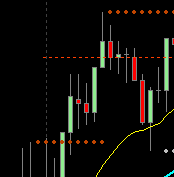
screenshot:


Reply With Quote

Can you help answer these questions
from other members on NexusFi?
South Korea Suspends Bithumb for Six Months Over AML Fai …
Cryptocurrency
Zytrade: Devin Brady, CEO - Ask Me Anything (AMA)
Brokers
Tradeify 3.0 Overhauls Futures Prop Firm Model -- One-Ti …
Funded Trading Evaluation Firms
Iran Update May 8: Still Reviewing MOU, Demands Reparati …
Traders Hideout
Post-Summit Scorecard: $36M in May 15 Bets Settle Near-Z …
Prediction Markets & Event Contracts
 
Best Threads (Most Thanked)
in the last 7 days on NexusFi
Sober Journey With S&P
23 thanks
2026 Jlab journal
10 thanks
Algo automated / semi-automated trading anyone?
6 thanks
Lady Vols Primer: Trading Volatility Journal
6 thanks
2026 Fire Horse
5 thanks
  #2 (permalink)
 
forrestang's Avatar
 forrestang 
Chicago IL
Legendary Urban Samurai
 
Experience: None
Platform: Ninja, MT4, Matlab
Broker: CQG, AMP, MB, DTN
Trading: E/U, G/U
Posts: 1,345 since Jun 2010
Thanks Given: 357
Thanks Received: 1,060

I dunno if this is your problem, but do you have any of this stuff checked off?

It's Under Tools -> Options


2021-02-02_172049


Reply With Quote
  #3 (permalink)
 Koepisch 
@ Germany
 
Experience: Beginner
Platform: NinjaTrader
Broker: Mirus Futures/Zen-Fire
Trading: FDAX
Posts: 568 since Nov 2011
Thanks Given: 440
Thanks Received: 518


You bought 2 Lots but sell only 1 Lot, so you were still long with 1 Lot. At the end you closed the open 1 Lot long position.


ImActuallyStupid View Post
Using simulation, after I bought a contract in a market, the chart stopped moving so that was a little concerning. I clicked "Sell" since I couldn't see anything and closed the program out and am checking with support on what more I've got to figure out with all this craziness.
I come back a few hours later and notice the Continuum demo account is showing a green number on unrealized PnL so I thought to click "Accounts" and select what was in there and "close".
It then audibly said order fulfilled and back on the chart i see a "Close".
So can someone help me understand the difference between the two? I guess I got lucky on this "trade" but this could have been bad if it was a real account and went down.

screenshot:


Reply With Quote
  #4 (permalink)
 
bobwest's Avatar
 bobwest 
Western Florida
Site Moderator
 
Experience: Advanced
Platform: Sierra Chart
Trading: ES, YM
Frequency: Several times daily
Duration: Minutes
Posts: 8,174 since Jan 2013
Thanks Given: 57,989
Thanks Received: 26,406


ImActuallyStupid View Post
Using simulation, after I bought a contract in a market, the chart stopped moving so that was a little concerning. I clicked "Sell" since I couldn't see anything and closed the program out and am checking with support on what more I've got to figure out with all this craziness.
I come back a few hours later and notice the Continuum demo account is showing a green number on unrealized PnL so I thought to click "Accounts" and select what was in there and "close".
It then audibly said order fulfilled and back on the chart i see a "Close".
So can someone help me understand the difference between the two? I guess I got lucky on this "trade" but this could have been bad if it was a real account and went down.

screenshot:

Look at the quantities for each trade, as shown on the chart.

You didn't buy "a" contract, you bought 2 ("Buy 2 @ 13235.50"). Then when you sold the first time, marked by the arrow, you sold one of them ("Sell 1 @ 13284.75") . That gave you 1 left, as @Koepisch pointed out. Since you still had an open position (1 contract), when you hit "Close," it closed you out by selling that additional contract, with "Close 1 @ 13315.75."

The difference between the two is that you had lost track of how many contracts you had in your position. The final "Close" was also a final "Sell" that closed your position.

So, two things about this:

(1) This happens to everybody sometimes, leaving part of a position open because of a simple error. Probably when you clicked "Sell" the first time, you didn't notice that it had an amount listed, probably the default of 1. You probably assumed it was going to sell out everything. (I'm not using NT, but most platforms will have a button labeled something like "Flatten" or "Close All" -- that's your way to just get out without specifying how many to sell.)

(2) This simple mistake can be disastrous.

Don't worry about the fact that you did it, since it's on sim. But pay attention when you click that mouse. Those little clicks can be dangerous.

Bob.


When one door closes, another opens.
-- Cervantes, Don Quixote

Reply With Quote
Thanked by:


Last Updated on February 3, 2021


© 2026 NexusFi®, s.a., All Rights Reserved.
Av Ricardo J. Alfaro, Century Tower, Panama City, Panama, Ph: +507 833-9432 (Panama and Intl), +1 888-312-3001 (USA and Canada)
All information is for educational use only and is not investment advice. There is a substantial risk of loss in trading commodity futures, stocks, options and foreign exchange products. Past performance is not indicative of future results.
About Us - Contact Us - Site Rules, Acceptable Use, and Terms and Conditions - Downloads - Top
no new posts