Welcome to NexusFi: the best trading community on the planet, with over 200,000 members Sign Up Now for Free
Genuine reviews from real traders, not fake reviews from stealth vendors
Quality education from leading professional traders
We are a friendly, helpful, and positive community
We do not tolerate rude behavior, trolling, or vendors advertising in posts
We are here to help, just let us know what you need
You'll need to register in order to view the content of the threads and start contributing to our community. It's free for basic access, or support us by becoming an Elite Member -- discounts are available after registering.
-- The NexusFi team
(If you already have an account, login at the top of the page)
The conversion from different timezones does not work for .Net 2.0 / NinjaTrader 6.5. However, .Net 3.5 / NinjaTrader 7.0 are capable of doing the conversion. the session manager of Ninjatrader 7.0 uses this timezone conversion capability.
These are the steps to convert between different timezones:
(1) Define TimeZoneInfo variables which contain the timezoneinfo information. Here is an example to create a timezoneinfo variable for the Asian session (Tokyo time)
(2) Next use the TimeZoneInfo variables for conversion. Let us assume that you have defined four variables tstZone, cetZone, gmtZone, estZone and that they contain the correct information collected from the class library. Now you also need your local timezone and the timezone of your session template:
Local timezone can be found as: TimeZoneInfo.Local
Session template timezone can be found as: Bars.Session.TimeZoneInfo
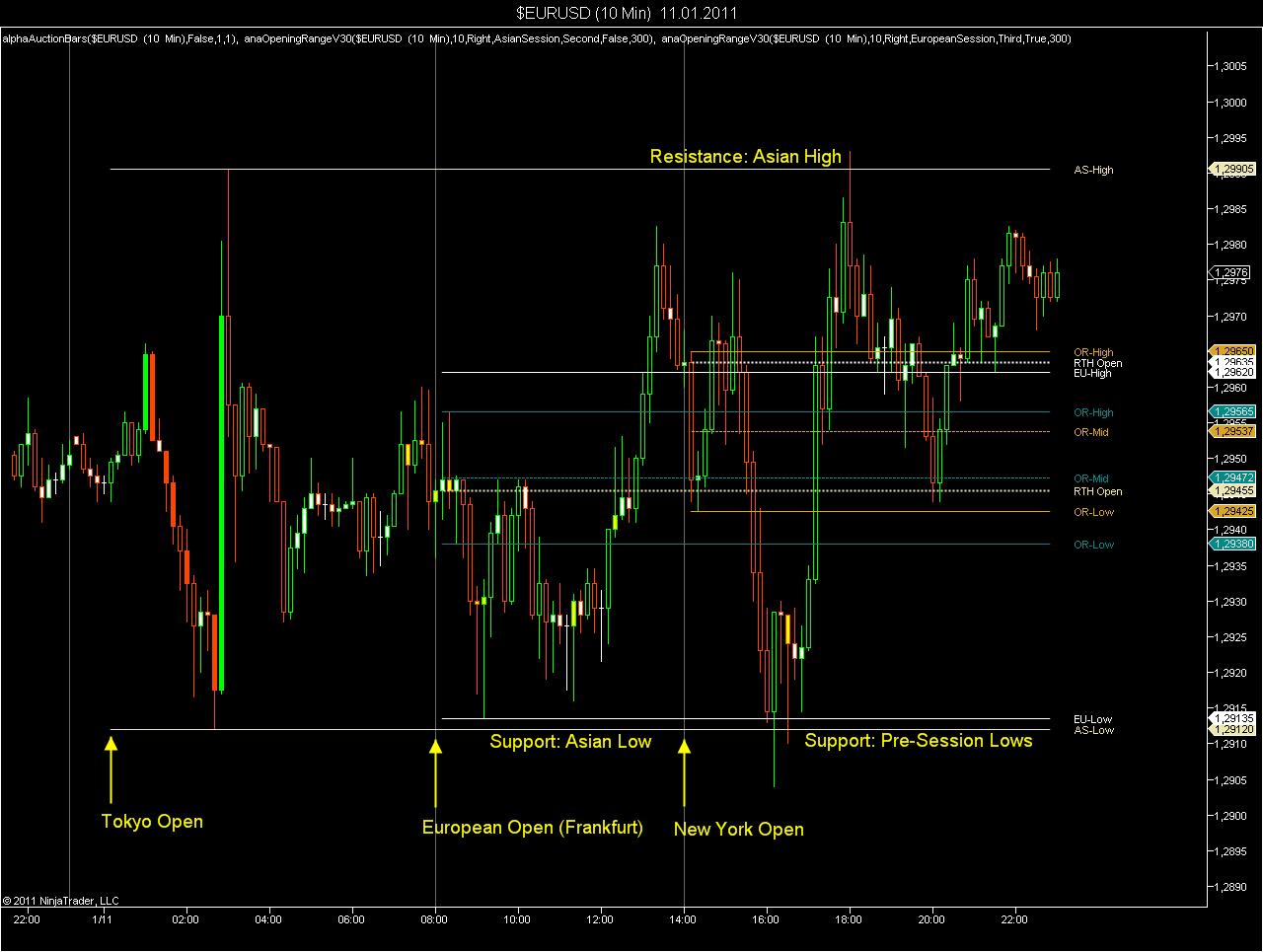
Here you can find an example, how to apply this. The chart shows today's FOREX sessions:
Session template (in Eastern Time): 3 sessions, Asian, European and US session. The Asian session includes Sydney and Tokio. The European session starts at 2:00 AM Est, which is correct for 49 weeks out of 52 weeks per year. The US session starts at 8:00 AM EST, the Asian session starts at 5:00 PM Est.
European open and London open is collected from the session template. The Tokyo open is generated via indicator, as the session template does only use EST, and is not aware of TST.
The opening range indicator uses TST for the Asian pre-session and CET for the European pre-session.
Created by applying the indicator twice to display both European and US opening range. The indicator is available here:
Interestingly I saw the source code for trading platform that did a similar thing, and it was billed as a performance enhancement (math on ints being less expensive than math on DateTimes, I guess), but I wonder if it merely code that originated back during .NET 2.0. Interesting factoid, Fat Tails. Thanks.