NexusFi: Find Your Edge


Home Menu


FootPrintV2 Chart for NT8


Discussion in NinjaTrader

Updated
      Top Posters
    1. looks_one mk77ch with 71 posts (323 thanks)
    2. looks_two trymph with 32 posts (29 thanks)
    3. looks_3 zt379 with 22 posts (16 thanks)
    4. looks_4 brettji with 20 posts (17 thanks)
      Best Posters
    1. looks_one mk77ch with 4.5 thanks per post
    2. looks_two trymph with 0.9 thanks per post
    3. looks_3 brettji with 0.9 thanks per post
    4. looks_4 zt379 with 0.7 thanks per post
    1. trending_up 610,382 views
    2. thumb_up 499 thanks given
    3. group 176 followers
    1. forum 352 posts
    2. attach_file 140 attachments


Search this Thread
  #301 (permalink)
 
Falco11's Avatar
 Falco11 
Vienna,Europe
 
Experience: Advanced
Platform: NT
Broker: NT
Trading: ES,6E
Frequency: Many times daily
Duration: Minutes
Posts: 78 since Dec 2010
Thanks Given: 250
Thanks Received: 71


mk77ch View Post
Well the problem might be that the historical data provided by NinjaTrader are much less accurate than the actual live data.
So if you have the chart open, all new ticks are processed by OnMarketData which is accurate. But when you reload the chart, the data is handled as historical.
I had a few issues while developing the bar data indicator because the timestamps on the actual tick-data from NinjaTrader were crap.
When mentioned with the NT Support, they just recommend to use Tick-Replay, what i personally don't think can be the only solution.
Another problem could be that your local system time is slightly out of sync with the microsoft time servers and during historical processing, some ticks are misaligned due to this.
There is a little Tool here: https://www.timesynctool.com which can be configured to check your local machine time all few minutes and adjust the local time if the difference is more than 50ms or something like this.

The calculation of the "Patterns" itself should not lead to any "repainting" issues because i collect all average data which is used for the calculation from already completed bars.
I will have a closer look at it on my side and let you know if i find any issues.

Thanks, i have TimeSync running on my machine, my Datafeed is Rithmic


Reply With Quote

Can you help answer these questions
from other members on NexusFi?
Iran Lebanon Problem Kills Switzerland Talks, Brent at $ …
Prediction Markets & Event Contracts
Irans Answer Due Today: Peace Surges to 33.5%, Invasion …
Prediction Markets & Event Contracts
Trump Truth Social Fires Hormuz From 10% to 59% -- Arsen …
Prediction Markets & Event Contracts
Iran Fired a Missile at Israel Last Night. The $8M June …
Prediction Markets & Event Contracts
S&P 500 Holds the Line: No Fast Track for SpaceX, Op …
Stocks and ETFs
 
Best Threads (Most Thanked)
in the last 7 days on NexusFi
NexusFi site changelog and issues/problem reporting
1 thanks
Darmok and Jalad at Tanagra
1 thanks
  #302 (permalink)
 Dezroch 
Toronto, Ontario
 
Experience: Beginner
Platform: Tv, bookmap, NT
Trading: Futures
Frequency: Every few days
Duration: Hours
Posts: 6 since Jun 2023
Thanks Given: 2
Thanks Received: 0

Hey Mike I love this footprint add on thank you very much, could you briefly talk about the pattern recognition, what it looks for and what it will look like on the chart? Thanks alot.


Reply With Quote
  #303 (permalink)
 
mk77ch's Avatar
 mk77ch 
Switzerland
 
Experience: Advanced
Platform: NinjaTrader
Broker: Dorman
Trading: Currency Futures, ES
Posts: 162 since Oct 2010
Thanks Given: 30
Thanks Received: 425


Dezroch View Post
Hey Mike I love this footprint add on thank you very much, could you briefly talk about the pattern recognition, what it looks for and what it will look like on the chart? Thanks alot.

Yes sure.
With the latest version of the indicator, i've implemented a pattern detector class. This class has access to all the indicator properties and values to detect and visualize orderflow patterns. Detected patterns have a mouse-over event on the chart to display and/or explain the detected patterns.

Currently the only "pattern" that is detected are high volume nodes which are displayed as a colored rectangle at the center of the candle, but the idea is to add a few more real patterns which are displayed based on context to really be of value.

As i don't like to use fixed values, for example to check for high volume, i calculate the average volume/bid/ask/etc. over the last 10 completed bars and then use a multiplier (for example 3x) of that average to check for high volume/bid/ask. This has the advantage that you can put the indicator on another instrument without having to re-configure all the threshold values.

The current state of the pattern detector integration is more like a test or a first glimpse. There should be a lot more to come.


I never lose. I either win or learn.
Nelson Mandela

The Potion | Konje | Pride | Stick Season | Breathe
Started this thread Reply With Quote
Thanked by:
  #304 (permalink)
 toulouse-lautrec 
Europe
 
Experience: Beginner
Platform: NinjaTrader
Posts: 75 since Jun 2009
Thanks Given: 15
Thanks Received: 53

Gruezi Mike,
i'd like to thank you for your great work.

It seems the defaults have changed quite a bit in the latest version, e.g. Midas on by default, Previous Session Profile With is 0, etc.
I found the old defaults a bit more practical. Not sure if this was intentional?


Reply With Quote
  #305 (permalink)
 
mk77ch's Avatar
 mk77ch 
Switzerland
 
Experience: Advanced
Platform: NinjaTrader
Broker: Dorman
Trading: Currency Futures, ES
Posts: 162 since Oct 2010
Thanks Given: 30
Thanks Received: 425


toulouse-lautrec View Post
Gruezi Mike,
i'd like to thank you for your great work.

It seems the defaults have changed quite a bit in the latest version, e.g. Midas on by default, Previous Session Profile With is 0, etc.
I found the old defaults a bit more practical. Not sure if this was intentional?

Grüezi

Yes i've changed them a bit but you can configure the indicator to your default needs and then click on the right bottom on "template" => "save" => "Save as Default". So you have "your" settings as default on each new instance of the indicator.


I never lose. I either win or learn.
Nelson Mandela

The Potion | Konje | Pride | Stick Season | Breathe
Started this thread Reply With Quote
  #306 (permalink)
 
EDGE's Avatar
 EDGE 
Saint Louis, Mo., USA
 
Experience: Advanced
Platform: NinjaTrader, Tradestation
Broker: Amp/CQG, Velocity/TT, Kinetick, TS
Trading: Anything That Moves..
Frequency: Daily
Duration: Minutes
Posts: 221 since Aug 2010
Thanks Given: 100
Thanks Received: 409


mk77ch View Post
Another problem could be that your local system time is slightly out of sync with the microsoft time servers and during historical processing, some ticks are misaligned due to this.

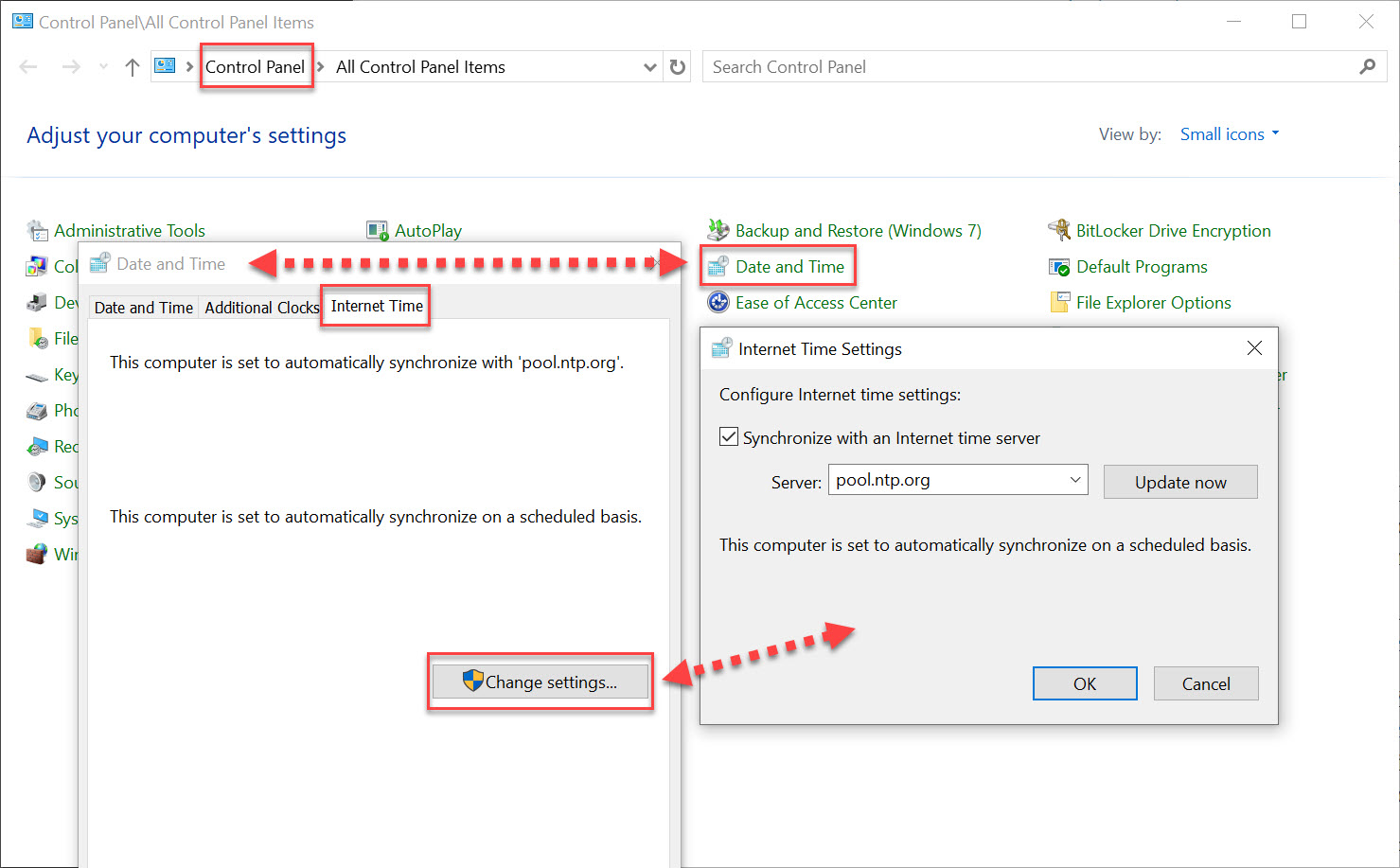
Just a suggestion, but I'd sync to the same time server that CME uses.
Syncing to Windows Time Server might still produce slight differences.

CME is using NTP to sync time for CME Globex and it's Clearing systems.
https://cmegroupclientsite.atlassian.net/wiki/spaces/EPICSANDBOX/pages/457217083/Network+Time+Protocol

More info for United States — "us.pool.ntp.org" - found here:
https://www.ntppool.org/zone/us

Very Simple to Check/Change/Verify within Windows 10/11:
Control Panel | Date Time | Internet Time | Change Settings


Be Safe In this Crazy World!


Reply With Quote
Thanked by:
  #307 (permalink)
 
EDGE's Avatar
 EDGE 
Saint Louis, Mo., USA
 
Experience: Advanced
Platform: NinjaTrader, Tradestation
Broker: Amp/CQG, Velocity/TT, Kinetick, TS
Trading: Anything That Moves..
Frequency: Daily
Duration: Minutes
Posts: 221 since Aug 2010
Thanks Given: 100
Thanks Received: 409


mk77ch View Post
but you can configure the indicator to your default needs and then click on the right bottom on "template" => "save" => "Save as Default". So you have "your" settings as default on each new instance of the indicator.

While this does seem like a convenient way of setting defaults,
this can and might cause issues when you update your indicator.

When you add and/or remove properties to an indicator update:
Default might try to load properties that are no longer there.
(Depending on properties, I've seen this throw errors on load)

And None of the New Properties will be loaded by the template.
While I've not experienced new properties causing any issues.
(definitely need to re-save the template to include them)

Just my observations, tend to not use Default for Indicators.
But also easy enough to delete template if it causes errors.
(Something to keep in mind when you're updating anything!)

Be Safe in the Crazy World!


Reply With Quote
  #308 (permalink)
 
mk77ch's Avatar
 mk77ch 
Switzerland
 
Experience: Advanced
Platform: NinjaTrader
Broker: Dorman
Trading: Currency Futures, ES
Posts: 162 since Oct 2010
Thanks Given: 30
Thanks Received: 425


EDGE View Post
Just a suggestion, but I'd sync to the same time server that CME uses.
Syncing to Windows Time Server might still produce slight differences.

CME is using NTP to sync time for CME Globex and it's Clearing systems.
https://cmegroupclientsite.atlassian.net/wiki/spaces/EPICSANDBOX/pages/457217083/Network+Time+Protocol

More info for United States — "us.pool.ntp.org" - found here:
https://www.ntppool.org/zone/us

Very Simple to Check/Change/Verify within Windows 10/11:
Control Panel | Date Time | Internet Time | Change Settings


Be Safe In this Crazy World!

Great suggestion, thank you very much!


I never lose. I either win or learn.
Nelson Mandela

The Potion | Konje | Pride | Stick Season | Breathe
Started this thread Reply With Quote
Thanked by:
  #309 (permalink)
 
EDGE's Avatar
 EDGE 
Saint Louis, Mo., USA
 
Experience: Advanced
Platform: NinjaTrader, Tradestation
Broker: Amp/CQG, Velocity/TT, Kinetick, TS
Trading: Anything That Moves..
Frequency: Daily
Duration: Minutes
Posts: 221 since Aug 2010
Thanks Given: 100
Thanks Received: 409


mk77ch View Post
Great suggestion, thank you very much!

Anytime, we should probably talk sometime,
although V2 doesn't compile in NT 8.0.28.0.

Rather than clutter up your thread w/off-topic.
Uploaded a Lag Timer for Market Analyzer here:

Nothing Special, just easy way to keep eye on Lag.


Be Safe in this Crazy World!


Reply With Quote
  #310 (permalink)
 
mk77ch's Avatar
 mk77ch 
Switzerland
 
Experience: Advanced
Platform: NinjaTrader
Broker: Dorman
Trading: Currency Futures, ES
Posts: 162 since Oct 2010
Thanks Given: 30
Thanks Received: 425


EDGE View Post
Anytime, we should probably talk sometime,
although V2 doesn't compile in NT 8.0.28.0.

Rather than clutter up your thread w/off-topic.
Uploaded a Lag Timer for Market Analyzer here:

Nothing Special, just easy way to keep eye on Lag.


Be Safe in this Crazy World!

Great, thank you! Sure, anytime.
And have a wonderful 4th of july.


I never lose. I either win or learn.
Nelson Mandela

The Potion | Konje | Pride | Stick Season | Breathe
Started this thread Reply With Quote
Thanked by:


Last Updated on June 16, 2026


© 2026 NexusFi®, s.a., All Rights Reserved.
Av Ricardo J. Alfaro, Century Tower, Panama City, Panama, Ph: +507 833-9432 (Panama and Intl), +1 888-312-3001 (USA and Canada)
All information is for educational use only and is not investment advice. There is a substantial risk of loss in trading commodity futures, stocks, options and foreign exchange products. Past performance is not indicative of future results.
About Us - Contact Us - Site Rules, Acceptable Use, and Terms and Conditions - Downloads - Top
no new posts