NexusFi: Find Your Edge


Home Menu


UniRenko, Universal Renko Bar Type


Discussion in NinjaTrader

Updated
      Top Posters
    1. looks_one MWinfrey with 27 posts (120 thanks)
    2. looks_two Tasker_182 with 27 posts (83 thanks)
    3. looks_3 jmcg618 with 21 posts (2 thanks)
    4. looks_4 Big Mike with 20 posts (54 thanks)
      Best Posters
    1. looks_one monpere with 33.5 thanks per post
    2. looks_two dstrader with 8 thanks per post
    3. looks_3 MWinfrey with 4.4 thanks per post
    4. looks_4 Tasker_182 with 3.1 thanks per post
    1. trending_up 1,301,340 views
    2. thumb_up 1,701 thanks given
    3. group 229 followers
    1. forum 698 posts
    2. attach_file 122 attachments


Search this Thread
  #351 (permalink)
 
WolfieWolf's Avatar
 WolfieWolf 
Charlottetown, Prince Edward Island
 
Experience: Advanced
Platform: Ninja
Broker: Optimus - Rithmic
Trading: GC
Posts: 232 since Jul 2010
Thanks Given: 100
Thanks Received: 272


traderdavidt View Post
Tasker, so at a session break, on resume of a session, for the first bar, how is the previous Close calculated? As far as I understand, UniRenko uses previous Close as the point of all calculations.

Thanks and kindly

David

From my understanding of the code, the UniRenko bars are closed using either the greatest of the close and high or lowest of the close and low.

thisClose = maxExceeded ? Math.Min(close, barMax) : minExceeded ? Math.Max(close, barMin) : close;// thisClose is the minimum of BarMax and close (maxExceeded)

//### Close Current Bar
UpdateBar(bars, bar.Open, (maxExceeded ? thisClose : bar.High), (minExceeded ? thisClose : bar.Low), thisClose, time, volume, isRealtime);


/W


Reply With Quote
Thanked by:

Can you help answer these questions
from other members on NexusFi?
April FOMC Minutes: Most Divided Fed Since 1992 -- Many …
Traders Hideout
March Jobs Report Update: 178K Beat vs 59K Expected, Wag …
Traders Hideout
Coinbase Launches Regulated Crypto Futures Across 26 Eur …
Cryptocurrency
Tradeify 3.0 Overhauls Futures Prop Firm Model -- One-Ti …
Funded Trading Evaluation Firms
Third Circuit Backs Kalshi in Landmark Ruling -- Predict …
Prediction Markets & Event Contracts
 
Best Threads (Most Thanked)
in the last 7 days on NexusFi
Sober Journey With S&P
21 thanks
2026 Jlab journal
10 thanks
Trying to learn Volume and price action correlation
8 thanks
Algo automated / semi-automated trading anyone?
6 thanks
Hello Im new here
5 thanks
  #352 (permalink)
 HighDesertTrader 
Albuquerque, New Mexico/USA
 
Experience: Intermediate
Platform: NinjaTrader-Continuum(Mirus)
Trading: emini Currency and Index Futures
Posts: 104 since Jan 2011
Thanks Given: 291
Thanks Received: 108

I would greatly appreciate if someone could tell me how to remove UniRenko and BetterRenko bar types from NinjaTrader. I see them listed on the Bar Type menu under "Data Series," but nowhere else, anywhere, folders , etc...


Reply With Quote
  #353 (permalink)
 
Tasker_182's Avatar
 Tasker_182 
Cedar Rapids, iowa
Legendary Market Wizard
 
Experience: Intermediate
Platform: Ninjatrader
Broker: Ninjatrader - Continuum
Posts: 716 since Aug 2009
Thanks Given: 476
Thanks Received: 1,405


HighDesertTrader View Post
I would greatly appreciate if someone could tell me how to remove UniRenko and BetterRenko bar types from NinjaTrader. I see them listed on the Bar Type menu under "Data Series," but nowhere else, anywhere, folders , etc...

1) Shutdown NinjaTrader
2) go to documents>NinjaTrader7>BIN>Custom>Type
3) Delete or move out of the folder, UniRenkoBarsType.cs and BetterRenkoBarsType.cs

When you start Ninja, they should be gone.


Be yourself; everyone else is already taken. Oscar Wilde
Reply With Quote
Thanked by:
  #354 (permalink)
 HighDesertTrader 
Albuquerque, New Mexico/USA
 
Experience: Intermediate
Platform: NinjaTrader-Continuum(Mirus)
Trading: emini Currency and Index Futures
Posts: 104 since Jan 2011
Thanks Given: 291
Thanks Received: 108


Tasker_182 View Post
1) Shutdown NinjaTrader
2) go to documents>NinjaTrader7>BIN>Custom>Type
3) Delete or move out of the folder, UniRenkoBarsType.cs and BetterRenkoBarsType.cs

When you start Ninja, they should be gone.

Tasker,

Thanks for your quick response. Neither of these files appear in my Type folder. Yet, these bar types are "stuck" in the "Custom 5" and "Custom 4" Period Type positions, respectively, and are "working" fine with no trace of them in any folder within NinjaTrader.

HDT


Reply With Quote
  #355 (permalink)
 
Big Mike's Avatar
 Big Mike 
Manta, Ecuador
Site Administrator
Developer
Swing Trader
 
Experience: Advanced
Platform: Custom solution
Broker: IBKR
Trading: Stocks & Futures
Frequency: Every few days
Duration: Weeks
Posts: 50,669 since Jun 2009
Thanks Given: 33,669
Thanks Received: 102,557


HighDesertTrader View Post
Tasker,

Thanks for your quick response. Neither of these files appear in my Type folder. Yet, these bar types are "stuck" in the "Custom 5" and "Custom 4" Period Type positions, respectively, and are "working" fine with no trace of them in any folder within NinjaTrader.

HDT

There is a cache folder. I can't remember specifically which one, but check that, and always make a backup of the files first if you aren't 100% sure of what you are doing. Make sure NT is closed when you modify the file system, then reopen it after.

Mike


We're here to help: just ask the community or contact our Help Desk

Quick Links: Change your Username or Register as a Vendor
Searching for trading reviews? Review this list
Lifetime Elite Membership: Sign-up for only $149 USD
Exclusive money saving offers from our Site Sponsors: Browse Offers
Report problems with the site: Using the NexusFi changelog thread
Follow me on X Visit my NexusFi Trade Journal Reply With Quote
  #356 (permalink)
 
Tasker_182's Avatar
 Tasker_182 
Cedar Rapids, iowa
Legendary Market Wizard
 
Experience: Intermediate
Platform: Ninjatrader
Broker: Ninjatrader - Continuum
Posts: 716 since Aug 2009
Thanks Given: 476
Thanks Received: 1,405


Big Mike View Post
There is a cache folder. I can't remember specifically which one, but check that, and always make a backup of the files first if you aren't 100% sure of what you are doing. Make sure NT is closed when you modify the file system, then reopen it after.

Mike

Yeah, what HE said. You may have to start/stop ninja a couple of times.


Be yourself; everyone else is already taken. Oscar Wilde
Reply With Quote
Thanked by:
  #357 (permalink)
 HighDesertTrader 
Albuquerque, New Mexico/USA
 
Experience: Intermediate
Platform: NinjaTrader-Continuum(Mirus)
Trading: emini Currency and Index Futures
Posts: 104 since Jan 2011
Thanks Given: 291
Thanks Received: 108


Big Mike View Post
There is a cache folder. I can't remember specifically which one, but check that, and always make a backup of the files first if you aren't 100% sure of what you are doing. Make sure NT is closed when you modify the file system, then reopen it after.

Mike

Thanks Big Mike,

There is nothing in the Cache Folder even remotely resembling "UniRenko" or "BetterRenko."

HDT


Reply With Quote
  #358 (permalink)
 
Big Mike's Avatar
 Big Mike 
Manta, Ecuador
Site Administrator
Developer
Swing Trader
 
Experience: Advanced
Platform: Custom solution
Broker: IBKR
Trading: Stocks & Futures
Frequency: Every few days
Duration: Weeks
Posts: 50,669 since Jun 2009
Thanks Given: 33,669
Thanks Received: 102,557


HighDesertTrader View Post
Thanks Big Mike,

There is nothing in the Cache Folder even remotely resembling "UniRenko" or "BetterRenko."

HDT

The caching doesn't work like that, if I recall you would need to delete the entire subfolder. Again, make sure you have a backup, or don't take my advice at all...

Mike


We're here to help: just ask the community or contact our Help Desk

Quick Links: Change your Username or Register as a Vendor
Searching for trading reviews? Review this list
Lifetime Elite Membership: Sign-up for only $149 USD
Exclusive money saving offers from our Site Sponsors: Browse Offers
Report problems with the site: Using the NexusFi changelog thread
Follow me on X Visit my NexusFi Trade Journal Reply With Quote
Thanked by:
  #359 (permalink)
 HighDesertTrader 
Albuquerque, New Mexico/USA
 
Experience: Intermediate
Platform: NinjaTrader-Continuum(Mirus)
Trading: emini Currency and Index Futures
Posts: 104 since Jan 2011
Thanks Given: 291
Thanks Received: 108


Tasker_182 View Post
1) Shutdown NinjaTrader
2) go to documents>NinjaTrader7>BIN>Custom>Type
3) Delete or move out of the folder, UniRenkoBarsType.cs and BetterRenkoBarsType.cs

When you start Ninja, they should be gone.

Tasker, Mike,

Just to close the loop on this, I went to NinjaTrader Support for help on this. I had, in the distant past, done essentially what Tasker had recommended. But, NinjaTrader didn't complete the process. It turns out that the UniRenko and BetterRenko chart types were still "stuck" in the NinjaTrader.Custom files. What they did was delete these files (NinjaTrader.Custom (XML) and NinjaTrader.Custom.dll (App Extension) located in the NinjaTrader>bin>Custom folder) by renaming them _.old for safety sake.

Once NinjaTrader was restarted, these files were recreated and the UniRenko and BetterRenko chart types were gone.

HDT


Reply With Quote
  #360 (permalink)
 mzabarain   is a Vendor
 
Posts: 26 since May 2013
Thanks Given: 30
Thanks Received: 18


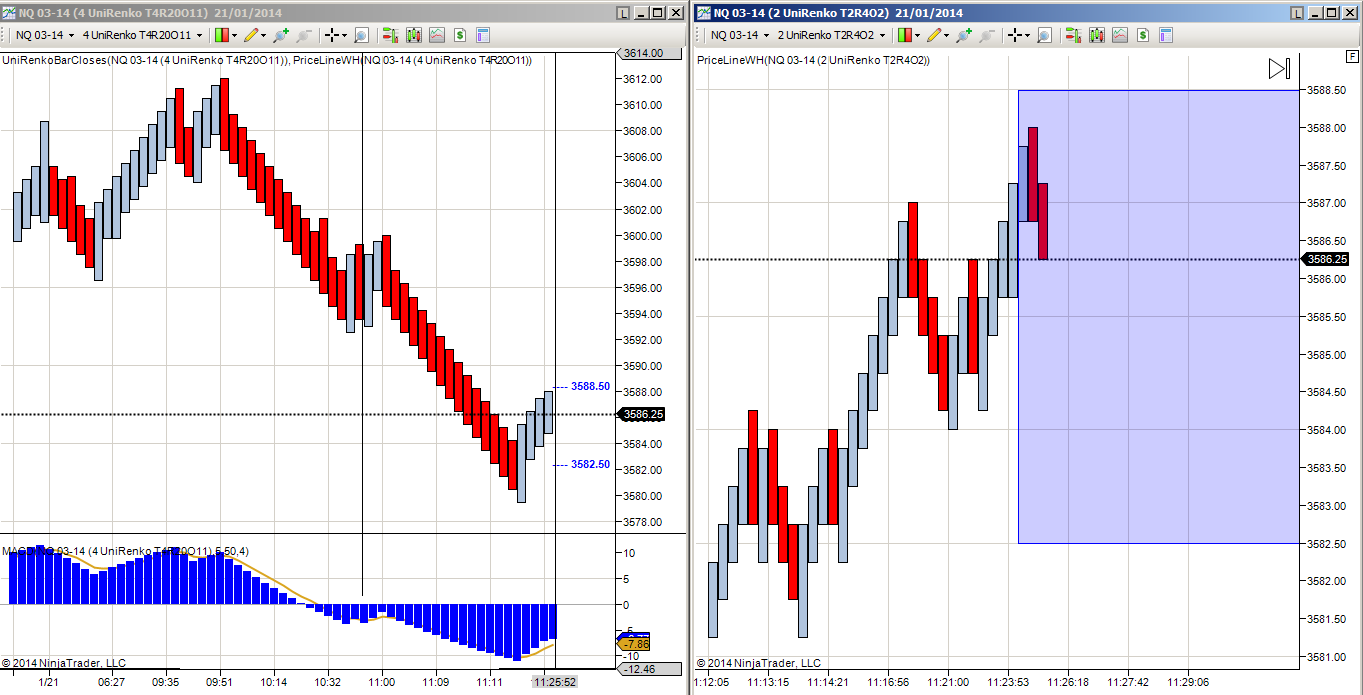
UnirenkoBarCloses.zip allows to view the posible close levels for the current unirenkobar.
I´m using two charts of same instrument; the first chart (see attached image) is a T4R20O11; the second is a T2R40O2.
The first chart is using the UnirenkoBarCloses indicator.


Could It be posible to have an indicator on the other chart that automatically / Programatically creates a rectangle each time a new bar is created in the left more chart (T4R20O11). The boundaries of the rectangle should be:
Upper line = UnirenkoBarCloses high
lower line = UnirenkoBarCloses low
left line = at the same position of the bar in T2R40O2 that touched the previous UnirenkoBarCloses high
right line = 20 or 30 bars to the right from left line.

I know that this could be done in a blink of an aye for the great programmers of this fórum, so I apreciate in advance the help you can provide.

Good trading to all.


Reply With Quote


Last Updated on March 6, 2026


© 2026 NexusFi®, s.a., All Rights Reserved.
Av Ricardo J. Alfaro, Century Tower, Panama City, Panama, Ph: +507 833-9432 (Panama and Intl), +1 888-312-3001 (USA and Canada)
All information is for educational use only and is not investment advice. There is a substantial risk of loss in trading commodity futures, stocks, options and foreign exchange products. Past performance is not indicative of future results.
About Us - Contact Us - Site Rules, Acceptable Use, and Terms and Conditions - Downloads - Top
no new posts