NexusFi: Find Your Edge


Home Menu


Strategy Automation Option Grayed Out


Discussion in TradeStation

Updated
    1. trending_up 7,014 views
    2. thumb_up 1 thanks given
    3. group 3 followers
    1. forum 5 posts
    2. attach_file 0 attachments


Search this Thread
  #1 (permalink)
EyesOnly
Seattle Washington
 
Posts: 4 since Apr 2019
Thanks Given: 1
Thanks Received: 0

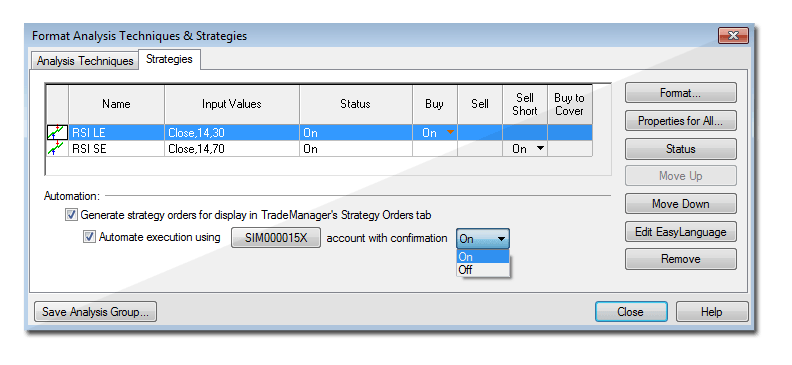
I'm having an issue where I can't enable automation for my strategies, both on simulated and live accounts. I added a strategy to a chart, and got to the following dialogue box (not mine, just an example I found online):


For me, I can check the "Generate strategy orders for display in TradeManager's Strategy Orders tab" box, but when I do so the "Automate execution using [...] account with confirmation [Off]" stays grayed out, and I am unable to select it.

Is there an account-level setting I need to set, or is there something in a strategy I have to set to make it automate? I've tried both a custom strategy and some of the built-in ones, but none let me check the second box.

I'm using TradeStation 10 on both a Windows 7 desktop and a Windows 10 laptop. Is there a particular add-on or update I need to get?


Reply With Quote

Can you help answer these questions
from other members on NexusFi?
requesting .nrd replay files from 2026 spy and qqq
The Elite Circle
My Rant with AMP Futures
Trading Reviews and Vendors
Datafeed for Atas
Platforms and Indicators
No book, only a stair: journaling fills where price move …
Cryptocurrency
Trump Media to sell instant access to market-moving soci …
Traders Hideout
 
Best Threads (Most Thanked)
in the last 7 days on NexusFi
BERN ALGOS algo trading journal
3 thanks
NexusFi site changelog and issues/problem reporting
2 thanks
TopStep Trader disappointment
2 thanks
Want your NinjaTrader indicator created, free?
1 thanks
Running trading strategies on a VPS
1 thanks
  #2 (permalink)
 
vmodus's Avatar
 vmodus 
Somewhere, Delaware, USA
Legendary Systematic Algo Trader
 
Experience: Intermediate
Platform: MultiCharts
Broker: Barchart.com
Trading: Everything, it all tastes like chicken
Posts: 1,270 since Feb 2017
Thanks Given: 2,960
Thanks Received: 2,856

I'm not sure if you figured this out, but I see this when I am working offline. Make sure you are online and those should appear. If you are online and those options are grayed, then I would contact TS support.

Remember, you can only be online on one of your computers at a time, unless you have more than one TS account.

I hope this helps.

~vmodus


Follow me on X Visit my NexusFi Trade Journal Reply With Quote
  #3 (permalink)
leader108
nottingham
 
Posts: 5 since Mar 2020
Thanks Given: 0
Thanks Received: 1


Hi All,

I have this same issue, did you manage to figure it out?

Thanks!


Reply With Quote
  #4 (permalink)
 
vmodus's Avatar
 vmodus 
Somewhere, Delaware, USA
Legendary Systematic Algo Trader
 
Experience: Intermediate
Platform: MultiCharts
Broker: Barchart.com
Trading: Everything, it all tastes like chicken
Posts: 1,270 since Feb 2017
Thanks Given: 2,960
Thanks Received: 2,856


leader108 View Post
Hi All,

I have this same issue, did you manage to figure it out?

Thanks!

This should work without any changes or additional configuration. I use TS on Windows 10, with TradeStation as my broker and data provider. Consider a couple of things:
  • You must be online, connected to either your sim or live account.
  • You cannot trade on delayed data. You will see a (D) next to the symbol name if the data is delayed.

In either of those two cases, the options shown will be grayed out. I hope this helps.

~vmodus


Follow me on X Visit my NexusFi Trade Journal Reply With Quote
  #5 (permalink)
leader108
nottingham
 
Posts: 5 since Mar 2020
Thanks Given: 0
Thanks Received: 1


vmodus View Post
This should work without any changes or additional configuration. I use TS on Windows 10, with TradeStation as my broker and data provider. Consider a couple of things:
  • You must be online, connected to either your sim or live account.
  • You cannot trade on delayed data. You will see a (D) next to the symbol name if the data is delayed.

In either of those two cases, the options shown will be grayed out. I hope this helps.

~vmodus

Hi buddy, thanks for coming back to me, TS had messsed up my data plan?! All sorted now thanks for your help!


Reply With Quote
Thanked by:
  #6 (permalink)
 
vmodus's Avatar
 vmodus 
Somewhere, Delaware, USA
Legendary Systematic Algo Trader
 
Experience: Intermediate
Platform: MultiCharts
Broker: Barchart.com
Trading: Everything, it all tastes like chicken
Posts: 1,270 since Feb 2017
Thanks Given: 2,960
Thanks Received: 2,856

Glad to help!

~vmodus


Follow me on X Visit my NexusFi Trade Journal Reply With Quote


Last Updated on April 1, 2020


© 2026 NexusFi®, s.a., All Rights Reserved.
Av Ricardo J. Alfaro, Century Tower, Panama City, Panama, Ph: +507 833-9432 (Panama and Intl), +1 888-312-3001 (USA and Canada)
All information is for educational use only and is not investment advice. There is a substantial risk of loss in trading commodity futures, stocks, options and foreign exchange products. Past performance is not indicative of future results.
About Us - Contact Us - Site Rules, Acceptable Use, and Terms and Conditions - Downloads - Top
no new posts