NexusFi: Find Your Edge


Home Menu


Strategy Automation Option Grayed Out


Discussion in TradeStation

Updated
    1. trending_up 6,807 views
    2. thumb_up 1 thanks given
    3. group 3 followers
    1. forum 5 posts
    2. attach_file 0 attachments


Search this Thread
  #1 (permalink)
EyesOnly
Seattle Washington
 
Posts: 4 since Apr 2019
Thanks Given: 1
Thanks Received: 0

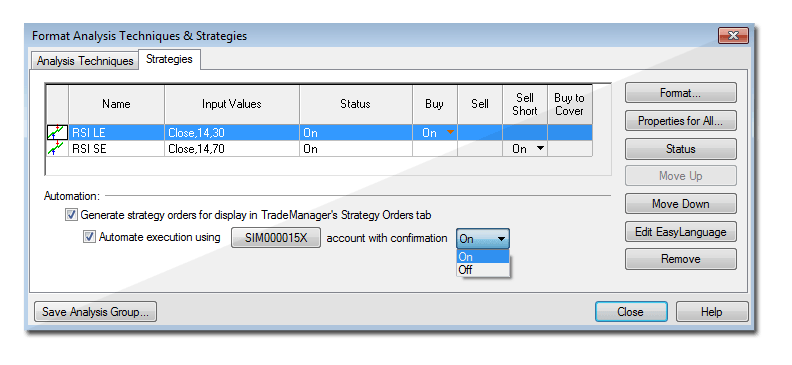
I'm having an issue where I can't enable automation for my strategies, both on simulated and live accounts. I added a strategy to a chart, and got to the following dialogue box (not mine, just an example I found online):


For me, I can check the "Generate strategy orders for display in TradeManager's Strategy Orders tab" box, but when I do so the "Automate execution using [...] account with confirmation [Off]" stays grayed out, and I am unable to select it.

Is there an account-level setting I need to set, or is there something in a strategy I have to set to make it automate? I've tried both a custom strategy and some of the built-in ones, but none let me check the second box.

I'm using TradeStation 10 on both a Windows 7 desktop and a Windows 10 laptop. Is there a particular add-on or update I need to get?


Reply With Quote

Can you help answer these questions
from other members on NexusFi?
Hormuz Surges From 14% to 26.5% Intraday as Irans Answer …
Prediction Markets & Event Contracts
CFTC Rewrites the Rulebook -- Kalshi Cracks $1B Non-Spor …
Prediction Markets & Event Contracts
Thursday May 28: GDP + Core PCE + Jobless Claims All at …
Traders Hideout
UCL Final Kicks Off at Noon ET: PSG at 56.5% as Iran May …
Prediction Markets & Event Contracts
Iran Peace Expired NO: Ceasefire on Life Support, OPEC a …
Prediction Markets & Event Contracts
 
Best Threads (Most Thanked)
in the last 7 days on NexusFi
NexusFi site changelog and issues/problem reporting
16 thanks
Darmok and Jalad at Tanagra
3 thanks
Big Mike in Ecuador
1 thanks
30 Sessions
1 thanks
  #2 (permalink)
 
vmodus's Avatar
 vmodus 
Somewhere, Delaware, USA
Legendary Systematic Algo Trader
 
Experience: Intermediate
Platform: MultiCharts
Broker: Barchart.com
Trading: Everything, it all tastes like chicken
Posts: 1,270 since Feb 2017
Thanks Given: 2,960
Thanks Received: 2,856

I'm not sure if you figured this out, but I see this when I am working offline. Make sure you are online and those should appear. If you are online and those options are grayed, then I would contact TS support.

Remember, you can only be online on one of your computers at a time, unless you have more than one TS account.

I hope this helps.

~vmodus


Follow me on X Visit my NexusFi Trade Journal Reply With Quote
  #3 (permalink)
leader108
nottingham
 
Posts: 5 since Mar 2020
Thanks Given: 0
Thanks Received: 1


Hi All,

I have this same issue, did you manage to figure it out?

Thanks!


Reply With Quote
  #4 (permalink)
 
vmodus's Avatar
 vmodus 
Somewhere, Delaware, USA
Legendary Systematic Algo Trader
 
Experience: Intermediate
Platform: MultiCharts
Broker: Barchart.com
Trading: Everything, it all tastes like chicken
Posts: 1,270 since Feb 2017
Thanks Given: 2,960
Thanks Received: 2,856


leader108 View Post
Hi All,

I have this same issue, did you manage to figure it out?

Thanks!

This should work without any changes or additional configuration. I use TS on Windows 10, with TradeStation as my broker and data provider. Consider a couple of things:
  • You must be online, connected to either your sim or live account.
  • You cannot trade on delayed data. You will see a (D) next to the symbol name if the data is delayed.

In either of those two cases, the options shown will be grayed out. I hope this helps.

~vmodus


Follow me on X Visit my NexusFi Trade Journal Reply With Quote
  #5 (permalink)
leader108
nottingham
 
Posts: 5 since Mar 2020
Thanks Given: 0
Thanks Received: 1


vmodus View Post
This should work without any changes or additional configuration. I use TS on Windows 10, with TradeStation as my broker and data provider. Consider a couple of things:
  • You must be online, connected to either your sim or live account.
  • You cannot trade on delayed data. You will see a (D) next to the symbol name if the data is delayed.

In either of those two cases, the options shown will be grayed out. I hope this helps.

~vmodus

Hi buddy, thanks for coming back to me, TS had messsed up my data plan?! All sorted now thanks for your help!


Reply With Quote
Thanked by:
  #6 (permalink)
 
vmodus's Avatar
 vmodus 
Somewhere, Delaware, USA
Legendary Systematic Algo Trader
 
Experience: Intermediate
Platform: MultiCharts
Broker: Barchart.com
Trading: Everything, it all tastes like chicken
Posts: 1,270 since Feb 2017
Thanks Given: 2,960
Thanks Received: 2,856

Glad to help!

~vmodus


Follow me on X Visit my NexusFi Trade Journal Reply With Quote


Last Updated on April 1, 2020


© 2026 NexusFi®, s.a., All Rights Reserved.
Av Ricardo J. Alfaro, Century Tower, Panama City, Panama, Ph: +507 833-9432 (Panama and Intl), +1 888-312-3001 (USA and Canada)
All information is for educational use only and is not investment advice. There is a substantial risk of loss in trading commodity futures, stocks, options and foreign exchange products. Past performance is not indicative of future results.
About Us - Contact Us - Site Rules, Acceptable Use, and Terms and Conditions - Downloads - Top
no new posts