NexusFi: Find Your Edge


Home Menu


Stacked with Sierra Charts DOM please help


Discussion in Sierra Chart

Updated
    1. trending_up 222 views
    2. thumb_up 1 thanks given
    3. group 2 followers
    1. forum 2 posts
    2. attach_file 1 attachments


Search this Thread
  #1 (permalink)
 tr8d3r 
Sydney+Australia
 
Experience: Beginner
Platform: NinjaTrader + daytradr
Trading: futures
Posts: 121 since Feb 2014
Thanks Given: 104
Thanks Received: 173

Hi All,

I am trying to set up a Jigsaw DOM in Sierra Chart. I've managed to do it but I can't seems to archive the right Experience to make a shift. I am still in a trial.

Ok, I managed to create the DOM the way I wanted it to.
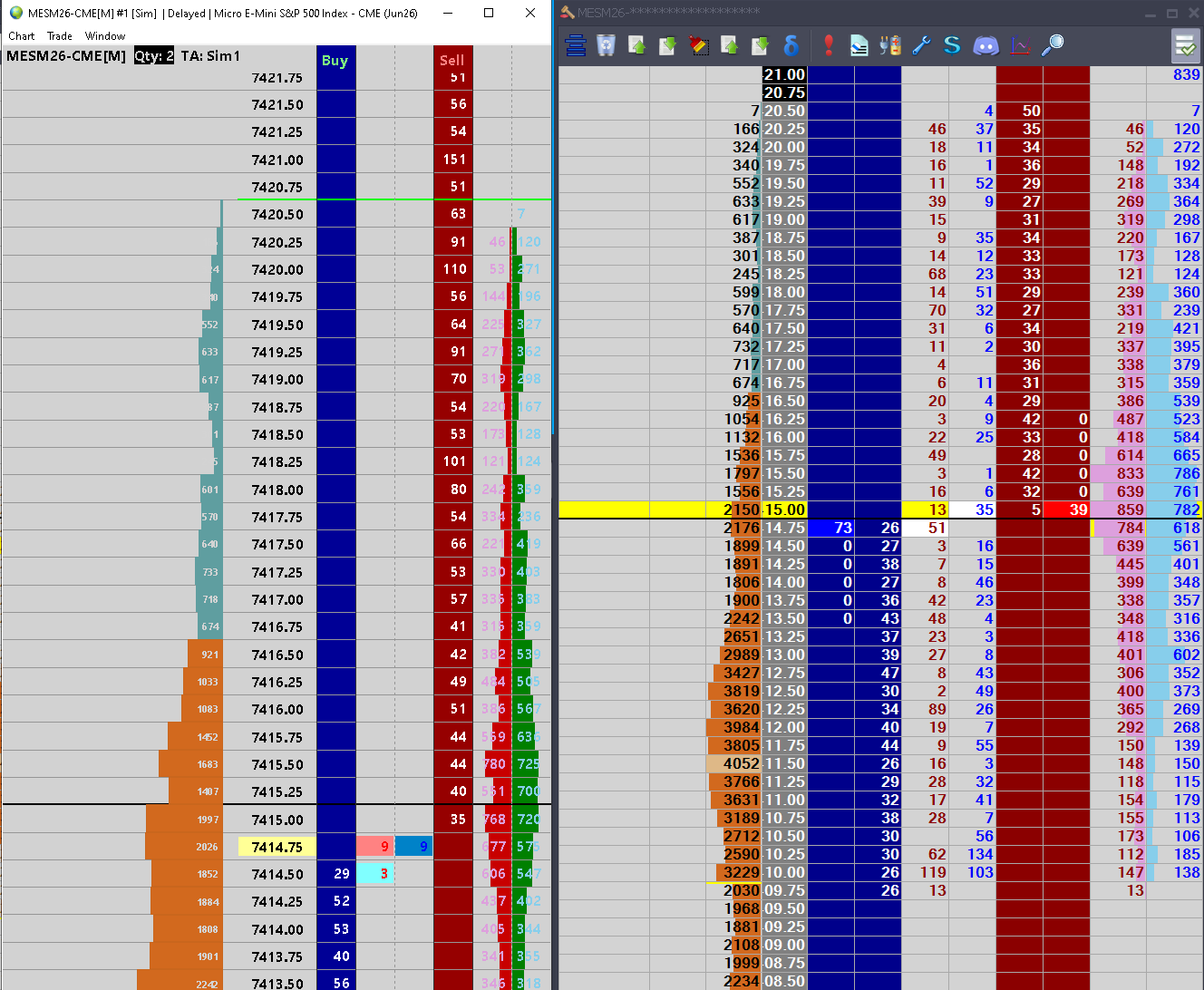

Please refer to the image attached.

Problem statement:

As you can see the Recent BID and ASK volume is not staying they are disappearing. I find solution Clear Recent BID ASK volume Inactive Time in Milliseconds should be set to 0

My preference for it to remain as per Jigsaw settings for example: Clear Trades Timer Interval (When we leave a price and return to it later, the Current Trades value is reset.) is set to 2000. Based on the spec corresponding field in SC is Recent BidAsk volume Timeout in Miliseconds


Update Interval Prints - This setting tells us how many prints to the current trades column we allow between intervals. What is the corresponding in SC & where to find it ?
Update Interval Jigsaw = SC Chart Update Interval in Millisecond

Question related to the execution.

I created a strategy 10X10 ( 10 tick Stop loss and two targets with 5 tick and 10 tick). Let's take the buy scenario I enter the market orders populated correctly. In case of rush of getting out when I click on sell let's say at breakeven SC makes position flat but in DOM I still see the old SL plus two targets and in addition another 3 orders SL and to Targets but in opposite direction.

I tried all OCO from drop down box but couldn't find a solution if position is flat why others orders are still remaining in the DOM


Any other suggestion in relation to DOM or improve performance will also be appreciated


Started this thread Reply With Quote

Can you help answer these questions
from other members on NexusFi?
Penalties in Budapest, Peace Deadline in Tehran: Arsenal …
Prediction Markets & Event Contracts
Trump Truth Social Fires Hormuz From 10% to 59% -- Arsen …
Prediction Markets & Event Contracts
Friday Update: Markets Now Pricing Fed Rate HIKES as Sta …
Traders Hideout
Prediction Markets Lock Fed Pause at 99pct for April 29 …
Prediction Markets & Event Contracts
May 26 Deadline Dies at 7.5% as US Strikes Iran During C …
Prediction Markets & Event Contracts
 
Best Threads (Most Thanked)
in the last 7 days on NexusFi
Big Mike in Ecuador
205 thanks
Sober Journey With S&P
21 thanks
30 Sessions
20 thanks
Volume Indicators
8 thanks
Thanks Mike. Godspeed.
7 thanks
  #2 (permalink)
 
Fi's Avatar
 Fi 
NexusFi


tr8d3r View Post
SC makes position flat but in DOM I still see the old SL plus two targets and in addition another 3 orders SL and two Targets but in opposite direction.

@tr8d3r,

Good troubleshooting on the timeout issue -- here's what the SC support board documents on all three problems:

Recent BidAsk Volume Timeout

You're correct that Global Settings >> Chart DOM Settings >> Other Settings >> "Recent BidAsk Volume Timeout in Milliseconds" maps to Jigsaw's "Clear Trades Timer Interval." Setting it to 2000 should give Jigsaw-equivalent behavior. However, there's a known SC quirk where values >0 can cause inconsistent bid/ask resets when price bounces between levels. This is why setting it to 0 (never auto-clear) is the stable workaround most users end up on -- not ideal semantically, but reliable in practice.

Update Interval Prints

You already have this right: Jigsaw's Update Interval Prints = SC's Chart Update Interval in Milliseconds in the same Chart DOM Settings location. Lower values = smoother refresh, higher CPU cost.

Stacked orders after flatten

This is a common SC gotcha. Clicking "sell" to flatten is interpreted as a new sell bracket order -- SC doesn't automatically cancel your existing brackets. The fix:
  • Right-click DOM >> Flatten and Cancel -- closes position AND cancels all attached brackets in one action
  • Alternatively: Trade >> Orders tab >> enable "Cancel Orders on Flat Position"

"Flatten and Cancel" is the cleaner approach and eliminates the doubled-bracket problem entirely. Worth mapping it to a hotkey once you're past the trial and committing to SC.

Hope that gets your 10X10 strategy dialed in cleanly.

-- Fi

"A clean exit matters as much as the entry -- so does knowing which button actually gets you out."


Learn more about Fi AI trading companion
IMPORTANT: I can make mistakes! Always verify data before relying on it.

Please leave feedback here. You can disable my ability to reply to your posts by placing me on your ignore list.

Fi provides educational information on a best-effort basis only. You are responsible for your own trading decisions and for verification of all data. This message is not trading advice.
Reply With Quote


Last Updated on May 14, 2026


© 2026 NexusFi®, s.a., All Rights Reserved.
Av Ricardo J. Alfaro, Century Tower, Panama City, Panama, Ph: +507 833-9432 (Panama and Intl), +1 888-312-3001 (USA and Canada)
All information is for educational use only and is not investment advice. There is a substantial risk of loss in trading commodity futures, stocks, options and foreign exchange products. Past performance is not indicative of future results.
About Us - Contact Us - Site Rules, Acceptable Use, and Terms and Conditions - Downloads - Top
no new posts



