NexusFi: Find Your Edge


Home Menu


new computer problem


Discussion in NinjaTrader

Updated
    1. trending_up 2,654 views
    2. thumb_up 0 thanks given
    3. group 1 followers
    1. forum 3 posts
    2. attach_file 1 attachments


Search this Thread
  #1 (permalink)
 
grego's Avatar
 grego 
Sydney, Australia
 
Experience: Beginner
Platform: MT4
Broker: Go Markets
Trading: Forex plus FTSE DAX and ASX200
Posts: 177 since Jun 2010
Thanks Given: 139
Thanks Received: 76

Just go t a new computer yesterday and been loading NT7.02 and importing indicators etc etc.

Running Win 7 and running NT7 in 32 bit mode

Did a first sim trade today just to check things were working ok.

Soon after the sim trade was exited the computer crashed and shut down
When i rebooted and restarted NT some data was/is missing from one of the 3
charts I had open at the time ie: CL
6A and 6E reopened ok with no loss of bars however CL started to redraw from the session break
see attached,
Any ideas whyit happened and how to get back lost data?
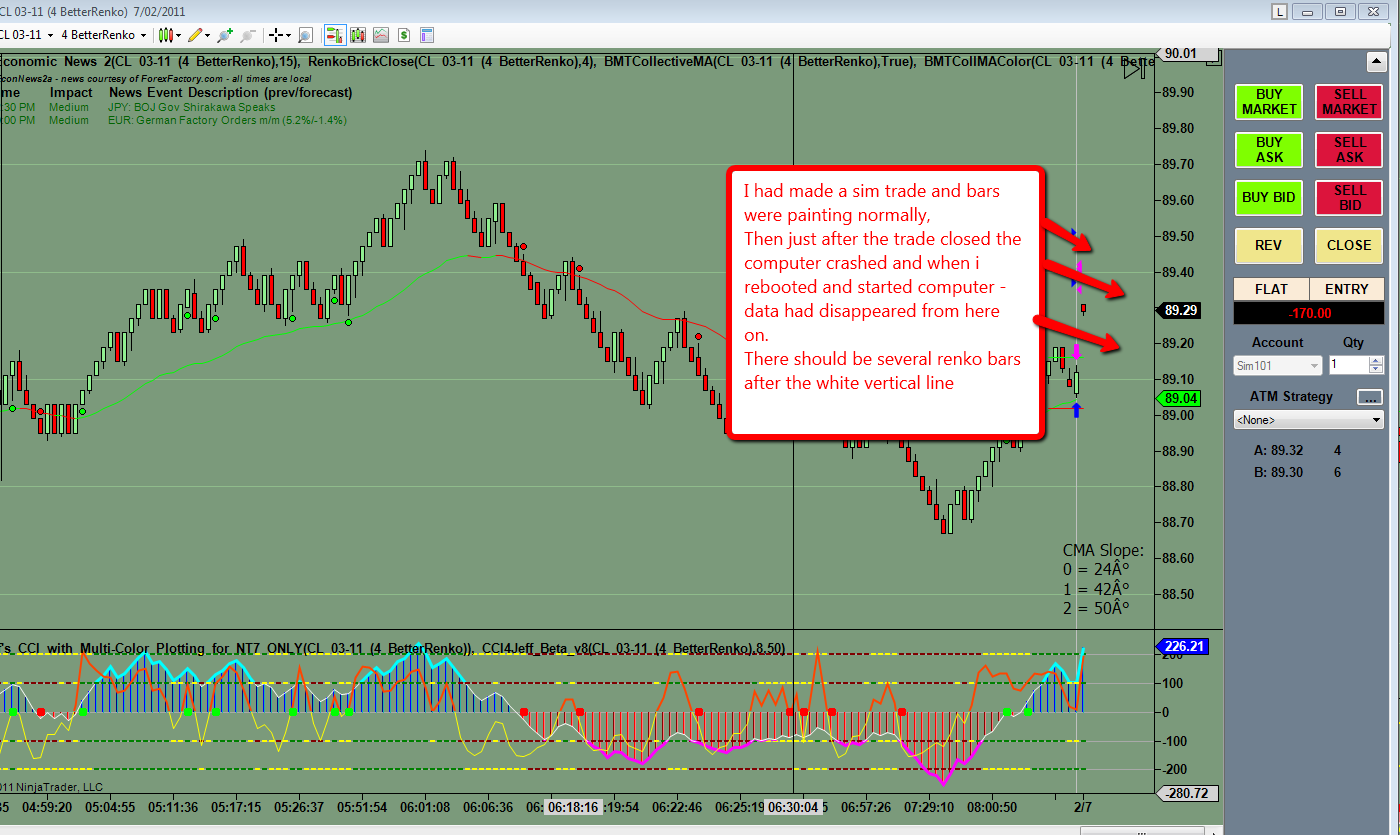
I have tried reloading data and downloading historical data
Thanks
Greg


Follow me on X Visit my NexusFi Trade Journal Started this thread Reply With Quote

Can you help answer these questions
from other members on NexusFi?
Weekend Update: First Qatari LNG Transit Attempted -- IR …
Traders Hideout
March Jobs Report Update: 178K Beat vs 59K Expected, Wag …
Traders Hideout
Iran Ceasefire Surges to 19.5% on US 15-Point Plan -- 82 …
Prediction Markets & Event Contracts
Iran Airspace Collapses 18 Points to 15.5% While Hormuz …
Prediction Markets & Event Contracts
Eurex Eyes Prediction Markets -- Europes Biggest Derivat …
Prediction Markets & Event Contracts
 
Best Threads (Most Thanked)
in the last 7 days on NexusFi
Sober Journey With S&P
21 thanks
2026 Jlab journal
10 thanks
Algo automated / semi-automated trading anyone?
6 thanks
Lady Vols Primer: Trading Volatility Journal
6 thanks
2026 Fire Horse
5 thanks
  #3 (permalink)
 doug 
Austin, TX
 
Experience: Beginner
Platform: NinjaTrader
Trading: CL 6E
Posts: 31 since Jun 2009
Thanks Given: 59
Thanks Received: 13


Click the arrow at the top right of your chart (just left of 90.01), it indicates that you are not showing the latest bars, perhaps you just inadvertently scrolled the chart?

Also in Chart Properties you can adjust how much blank space is to the right of the bars:
(right-click)Properties... -> Right Side Margin

-Doug


Reply With Quote
  #4 (permalink)
 
grego's Avatar
 grego 
Sydney, Australia
 
Experience: Beginner
Platform: MT4
Broker: Go Markets
Trading: Forex plus FTSE DAX and ASX200
Posts: 177 since Jun 2010
Thanks Given: 139
Thanks Received: 76

Thanks Doug for the reply
Unfortunately its not that simple.
The data was there after the session break ie: a bout half an hour of Better Renko bars
When the computer crashed and I restarted NT 7 there were no bars from the session break onwards
and NT just started drawing renko bars from the session break point
Cheers
Greg


Follow me on X Visit my NexusFi Trade Journal Started this thread Reply With Quote


Last Updated on February 9, 2011


© 2026 NexusFi®, s.a., All Rights Reserved.
Av Ricardo J. Alfaro, Century Tower, Panama City, Panama, Ph: +507 833-9432 (Panama and Intl), +1 888-312-3001 (USA and Canada)
All information is for educational use only and is not investment advice. There is a substantial risk of loss in trading commodity futures, stocks, options and foreign exchange products. Past performance is not indicative of future results.
About Us - Contact Us - Site Rules, Acceptable Use, and Terms and Conditions - Downloads - Top
no new posts