



Slope Angle in Indicators
Overview #
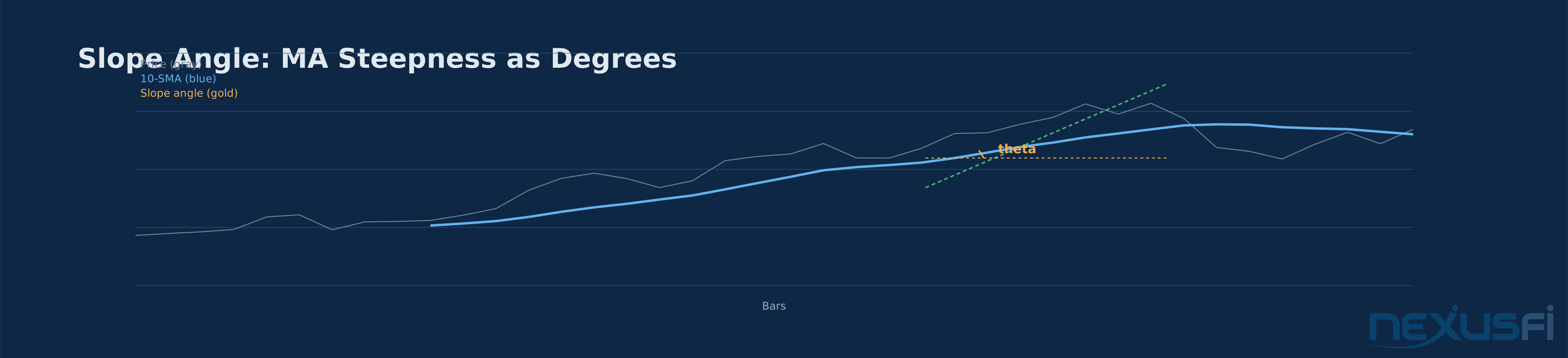
Slope angle is one of those concepts that sounds more complicated than it is. At its core, you're measuring how steep an indicator line is
The idea goes back to the floor trading days when traders would literally draw trend lines with a protractor and ruler. A steep line meant strong momentum. A flat line meant the trend was dying. The geometry hasn't changed
The key insight
As NexusFi community member @Fat Tails [explained in a detailed discussion] [1]: "The geometrical angle depends on both the horizontal and the vertical scale. This exercise will yield you an artificial angle, which can be used as a proxy for momentum." That distinction between visual angle and calculated angle is fundamental to using slope angle correctly.
Key Concepts #
Slope
Slope Angle
Synthetic Angle
MA Slope
Slope Acceleration
Lookback Period
How Slope Angle Works #
The Basic Calculation #
The math is straightforward. Take any indicator
slope = (MA[current_bar] - MA[current_bar - lookback]) / lookback
angle_degrees = atan(slope) * 57.2958
That 57.2958 is just 180 / pi
For a 20-period SMA with a 5-bar lookback, if the SMA went from 4500.00 to 4503.75 over 5 bars, the slope is 0.75 points per bar. The angle is atan(0.75) * 57.3 = 36.9 degrees. That's a steep uptrend.
Why Arctangent? #
The arctangent function maps any slope value to a bounded range between -90 and +90 degrees. This is useful because:
- Small slopes produce small angles (near-flat)
- Moderate slopes produce moderate angles (15-30 degrees)
- Very large slopes compress toward 90 degrees (vertical moves and gaps)
This compression at the extremes prevents outliers from distorting the reading. A limit-up move and a strong trend both show up as steep angles, but neither breaks the scale.
The Scaling Problem #
Here's where most traders get confused. @Fat Tails addressed this directly on [NexusFi] [2]: "Slope is just a visualization of momentum, nothing else. With electronic charting software nobody needs angles and slope boxes, you just need to measure momentum."
The problem is that the raw geometric angle on your screen depends on:
- How wide your chart window is (horizontal compression)
- How tall your chart window is (vertical compression)
- Your zoom level
- Your screen resolution
The same 10-point move in ES looks like a 60-degree ramp on a compressed chart and a 15-degree drift on a stretched chart. This is why you need to calculate the angle mathematically rather than eyeball it.
Normalization: Making Angles Comparable #
To compare slope angles across different instruments and timeframes, you need to normalize. The most practical method for futures is ATR normalization:
normalized_slope = raw_slope / ATR(14)
angle = atan(normalized_slope) * 57.2958
This converts the slope into "ATR units per bar" before computing the angle. Now a 30-degree angle in ES means the same thing as a 30-degree angle in CL
Without normalization, a 30-degree angle in ES (where ATR might be 50 points) represents a completely different trading condition than a 30-degree angle in ZB (where ATR might be 1.5 points). The ATR-adjusted angle puts both on the same scale.

Practical Application #
Trend Regime Classification #
The single most valuable use of slope angle is classifying the current market regime. Here's a practical framework:
| Angle Range | Classification | Trading Implication |
|---|
|
| > +30 degrees | Strong uptrend | Trend-following entries, buy dips |
|---|
| +5 to +15 | Weak uptrend | Cautious
| -5 to +5 | Flat / ranging | Mean-reversion setups, avoid trend trades |
|---|
| -15 to -5 | Weak downtrend | Cautious
| -30 to -15 | Moderate downtrend | Trend-following shorts with confirmation |
|---|
These thresholds aren't universal
Entry Filtering #
A common application is using slope angle as a filter for other entry signals. For example, an ES day trader using a 9 EMA might require:
- 9 EMA slope > 25 degrees (strong short-term momentum)
- 21 EMA slope > 10 degrees (intermediate trend confirmation)
- Price above both MAs
Only when all three conditions align does the trader take long entries on pullbacks. This eliminates a huge number of whipsaw trades in choppy conditions where the angle is oscillating around zero.
Momentum Acceleration and Deceleration #
Watching how the angle changes over time is more informative than the angle itself. Momentum acceleration (angle increasing) and deceleration (angle decreasing) provide early warning signals:
- Angle increasing while positive: Momentum building. Good for adding to positions.
- Angle decreasing while still positive: Momentum fading. Time to tighten stops or take partial profits. Don't initiate new longs.
- Angle crossing zero from positive to negative: Trend reversal in progress. Exit longs.
- Angle decreasing while negative: Bearish momentum building. Potential for sharp continuation.
This second-derivative analysis catches trend exhaustion before the MA actually flattens out
Multi-Timeframe Slope Alignment #
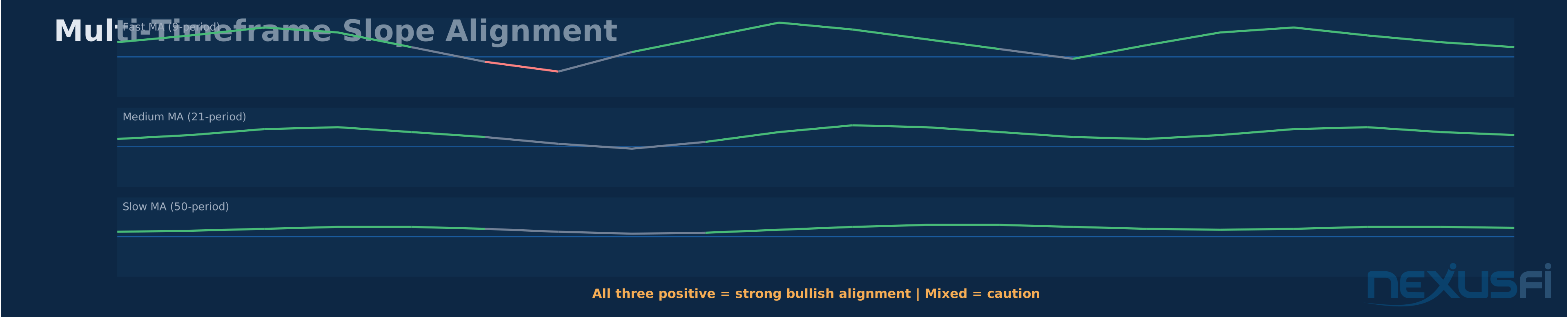
Checking slope angle across multiple timeframes gives you a consensus reading. If the daily, 4-hour, and 1-hour MA slopes all show positive angles above 10 degrees, that's a strong directional consensus. If the daily slope is positive but the 1-hour slope just turned negative, you might be seeing a pullback within a larger uptrend
The practical rule: trade in the direction that the most timeframes agree on. Three positive slopes aligned = high-confidence trend following. Mixed slopes = reduce size or sit on your hands.
Color-Coded Moving Averages #
One of the most popular implementations is simply color-coding a moving average based on its slope angle. @Fat Tails created extensive NinjaTrader indicators for this on NexusFi, including [detailed coloring techniques] [3] where "angles were used as a proxy for momentum. A steep angle indicated high momentum, a flat angle low momentum."
The typical color scheme:
- Green when angle > threshold (bullish momentum)
- Red when angle < -threshold (bearish momentum)
- Gray/neutral when angle is between thresholds (no clear direction)
This gives you instant visual feedback on trend state without needing a separate oscillator panel. A green MA means "momentum is with the bulls." A red MA means the opposite. Gray means don't trade trends.

Relationship to Other Momentum Indicators #
Slope angle doesn't exist in isolation. Understanding how it relates to other indicators helps you decide when to use it and when something else works better.
Rate of Change (ROC): ROC is essentially slope expressed as a percentage: (close - close[n]) / close[n] * 100. Slope angle adds the arctangent transformation, which compresses extreme values and puts the output on a degree scale. For most purposes, they carry the same information
MACD Histogram: The MACD histogram width correlates with the MA slope magnitude. When the MACD histogram is expanding, the slope angle between the fast and slow MAs is increasing. Slope angle can be a more direct, less lagging proxy.
ADX: ADX measures trend strength regardless of direction. Slope angle gives you both direction and rate. A high ADX with a positive slope angle = strong uptrend. A high ADX with a negative slope angle = strong downtrend. A high ADX with a near-zero slope angle = something strange is happening (possibly a volatility expansion without directional bias).
RSI: When price MA slope is steep positive but RSI is making lower highs, that's a classic divergence. The slope angle adds precision: if the angle was 35 degrees at the first peak and 22 degrees at the second peak despite higher prices, momentum is clearly weakening.
Implementation Notes #
Lookback Selection #
As @sam028 shared in a [NexusFi discussion on slope calculation] [4]: "You can just use a variable, which stores the current slope, computed using the 3 previous values of the 'thing' you want to apply/compute the slope."
For practical implementation:
- 1-bar lookback: Fastest reaction, most noise. Works for tick charts and scalping.
- 3-bar lookback: Good balance for day trading timeframes (1-5 minute charts).
- 5-bar lookback: Smooth enough for swing trading while still responsive.
- 10-bar lookback: Best for daily charts and position trading.
A common approach is to apply the slope calculation to an already-smoothed series (like an EMA), which gives you two layers of smoothing
Linear Regression Slope vs. Simple Difference #
The simple two-point slope (value[0] - value[n]) / n is fast and intuitive. But it uses only two data points, making it sensitive to outliers at either end.
Linear regression slope fits a best-fit line through all N data points in the lookback window. This is more strong because every bar contributes to the slope estimate, not just the endpoints. The trade-off is slightly more computation (though modern platforms handle this without any perceptible lag).
For most applications, the difference is marginal. But if you're running the slope on raw price rather than a smoothed MA, the regression approach is much better at filtering noise.
Edge Cases #
A few practical gotchas:
Gap moves: A large overnight gap can push the slope angle to near 90 degrees on the first bar of the session. If you're using angle-based entry filters, you'll want to either skip the first few bars or use a longer lookback that dilutes the gap impact.
Low volatility compression: In very quiet markets (lunch hour in ES, for example), slopes compress toward zero and the angle oscillates in a tiny band. Don't interpret these micro-readings as real signals.
Instrument-specific scaling: Without ATR normalization, angle readings aren't comparable across instruments. A 20-degree angle in ES has different implications than a 20-degree angle in NQ because their ATR profiles differ.
Common Mistakes #
Trusting the visual angle on screen. The angle you see on your chart changes every time you resize the window. Always use the calculated angle.
Using fixed degree thresholds without calibration. A 30-degree "strong trend" threshold might work for ES on 5-minute charts but not for ZB on daily charts. Calibrate your thresholds to the specific instrument and timeframe you're trading.
Treating slope angle as a standalone system. Slope angle is a filter, not a complete trading system. It tells you the market's current directional velocity
Ignoring the lookback parameter. A 1-bar lookback on a 20 EMA gives wildly different readings than a 5-bar lookback on the same EMA. The choice of lookback at the core changes the signal's character. Test it.
Summary #
Slope angle converts the rate of change of an indicator into a degree measurement, giving you an intuitive read on trend steepness and momentum intensity. The math is simple: compute the slope over a lookback period, then convert with arctangent. The nuance is in normalization (ATR-adjust for cross-instrument comparison), lookback selection (shorter = faster but noisier), and integration with your broader trading framework.
The concept is best used as a regime filter (trending vs. ranging), a momentum confirmation tool (angle acceleration vs. deceleration), and a multi-timeframe alignment check. It's not a standalone signal, and the visual angle on your chart screen is irrelevant
For NexusFi community members looking to implement this, the NinjaTrader threads by @Fat Tails on [slope indicators][1] and [indicator coloring by slope][2] remain some of the best practical references available.
Citations
- — Slope of an indicator, frustrating =/ (2012) 👍 8“Slope is a geometrical concept that was useful, when people had their daily charts printed out with ever the same time scale on the x-axis and the same price scale on the y-axis. The geometrical concept of slope was simply used to describe momentum.”
- — Coloring an IndicatorLine by Slope: Questions for Optimal Coding (2012) 👍 14“"Slope" does not exist on scalable charts. The concept "Slope" refers to print outs and was used 50 years ago when charts were printed and neither the time scale nor the price scale were ever changed.”
- — Coloring an IndicatorLine by Slope: Questions for Optimal Coding (2013) 👍 3“When charts were printed, angles were used as a proxy for momentum. A steep angle indicated high momentum, a flat angle low momentum.”
- — Using slope of an indicator in an auto-strategy (2010) 👍 8“In your .zip, a DataSeries is used to store the slope, but it's not always needed. You can just use a variable, which stores the current slope, computed using the 3 previous values of the "thing" you want to apply/compute the slope.”