



VPS and Cloud Trading Infrastructure: Hosting Futures Systems for Execution, Reliability, and Security
Overview #
VPS and Cloud Trading Infrastructure
Your trading strategy can be perfect and still lose money. Not because the logic is wrong — because the infrastructure failed. A dropped connection during a fast move, a latency spike that turns your limit fill into a market order three ticks worse, or a VPS reboot that leaves an unmanaged position open overnight. Infrastructure isn't sexy. But it's the difference between a strategy that works on paper and one that works in production.
This is the practical guide to hosting futures trading systems — VPS, dedicated servers, co-location, and cloud — written for traders who already know what a fill is and why slippage matters.
Why Infrastructure Is a Risk Management Decision #
Most traders think of risk management as position sizing and stop losses. Infrastructure belongs in the same conversation. A server outage during a volatile session is functionally identical to losing your stop — your risk is unmanaged.
Here's the math that makes it concrete: If your automated system runs on a VPS with 99.9% uptime, that's 8.76 hours of downtime per year. If one of those hours hits during a CPI release or an FOMC announcement, and you're holding ES with a 10-point stop, you're looking at potential losses far exceeding what the strategy's drawdown model anticipated. The strategy didn't fail. The infrastructure did.
Infrastructure decisions map directly to three trading risks:
Execution risk — will your orders reach the exchange fast enough to get the fill you expect? Latency determines this.
Availability risk — will your system be running when the market is open? Uptime guarantees and failover design determine this.
If one of those hours hits during a CPI release or an FOMC announcement, and you're holding ES with a 10-point stop, you're looking at potential losses far exceeding what the strategy's drawdown model anticipated.
Security risk — can someone compromise your trading server and execute unauthorized trades? Network hardening determines this.
Every infrastructure choice you make is a risk/reward tradeoff. Cheaper hosting means higher execution risk. Single-server setups mean higher availability risk. Convenience shortcuts mean higher security risk. That's the game.
Infrastructure Options: VPS vs Dedicated vs Co-Location #
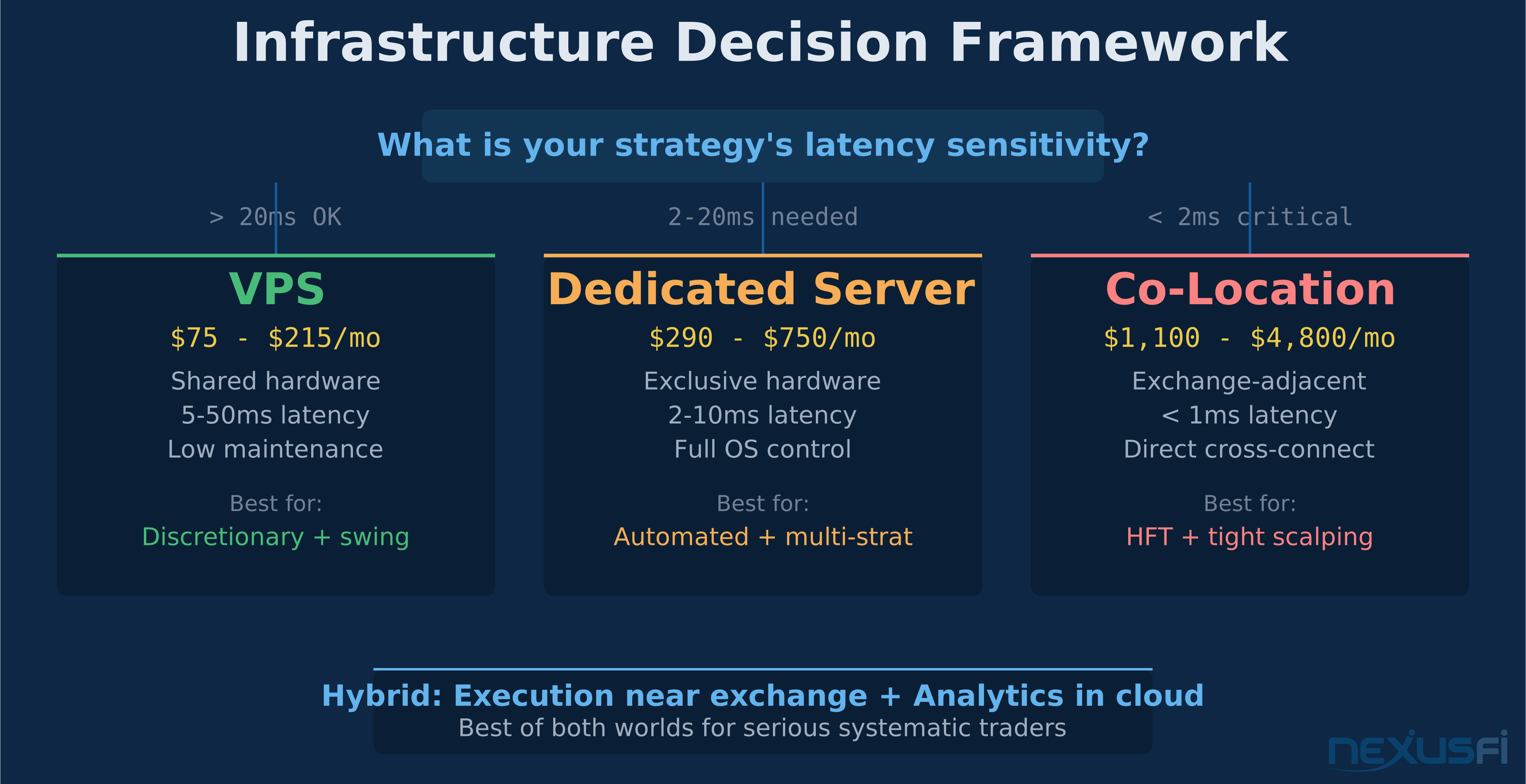
Three tiers of infrastructure, each with different latency profiles, cost structures, and operational complexity. The right choice depends on your strategy's sensitivity to execution speed and your tolerance for operational overhead.
VPS (Virtual Private Server) #
A VPS gives you a virtual machine on shared physical hardware. You get your own OS instance, dedicated RAM and CPU allocation, but you're sharing the underlying server with other tenants.
Best for: Discretionary traders running platforms remotely, semi-automated systems executing a few dozen orders per day, and anyone whose strategy's edge isn't measured in milliseconds.
Typical specs: 4-8 vCPU, 16-32GB RAM, NVMe SSD storage, 1Gbps network.
Cost: $30-150/month depending on specs and provider.
The catch: Noisy neighbors. Other tenants on the same physical machine can cause CPU scheduling jitter and network latency spikes. You can't control the network path between your VPS and the exchange. The provider might migrate your VM to different hardware during maintenance. None of this matters if you're placing 10 trades per day with wide stops. All of it matters if you're scalping ES on a 4-tick target.
Community member @SMCJB laid it out clearly on NexusFi: the real question isn't VPS vs dedicated — it's where your execution software sits relative to the broker's gateway and ultimately the exchange matching engine. A VPS in the same data center as your broker's servers will outperform a dedicated machine on the wrong coast every time.
Dedicated Server #
A dedicated server means the physical hardware is yours alone. No shared resources, no noisy neighbors, predictable performance characteristics.
Best for: Automated systems running multiple strategies simultaneously, traders who need consistent sub-5ms latency to their broker, and setups where CPU scheduling predictability matters.
Typical specs: 8-16 cores (high clock speed — 4.0GHz+ turbo matters more than core count), 32-64GB RAM, NVMe SSD with >30k IOPS, 10Gbps NIC.
Cost: $150-500/month depending on hardware and data center location.
The advantage: You control the entire operating environment. Pin trading threads to specific CPU cores. Tune NIC interrupt handling. Strip the OS down to the minimum required services. None of this is possible on a shared VPS where the hypervisor controls resource allocation.
The limitation: You still don't control the network path to the exchange. Your dedicated server in a Chicago data center gets you close to CME, but "close" in networking terms can still mean 2-10ms of round-trip latency depending on routing, peering agreements, and how many network hops sit between your rack and the exchange.
Co-Location #
Co-location means placing your hardware — or renting rack space — in the same data center as the exchange's matching engine. For CME-traded futures, that means CME's data center in Aurora, Illinois (formerly Cermak).
Best for: High-frequency strategies, latency-sensitive scalping, and any approach where consistent sub-millisecond execution timing is a genuine edge.
Typical latency: Under 1ms round-trip to CME matching engine via direct cross-connect.
Cost: $2,000-10,000+/month for rack space, power, cooling, and cross-connect fees. Plus hardware costs.
The reality check: Co-location only makes sense if your strategy's edge depends on execution speed. If you're swing trading crude oil or holding ES positions for 20+ minutes, co-location is burning money. The latency difference between co-location (0.5ms) and a good VPS in Chicago (3-5ms) is irrelevant to your fill quality on anything but the fastest strategies.
The Hybrid Model #
The smartest infrastructure setups separate execution from everything else. Run your execution engine close to the exchange (dedicated server or co-loc) and run analytics, backtesting, monitoring, and development in the cloud. This keeps execution latency tight while giving you elastic compute for research workloads that don't need proximity.
A typical hybrid: execution server in a Chicago data center with a direct connection to your broker's gateway, paired with an AWS instance running your analytics pipeline, risk monitoring dashboard, and strategy development environment. The execution server is lean and purpose-built. The cloud instance handles everything that doesn't touch live orders.
CME Proximity Tiers #
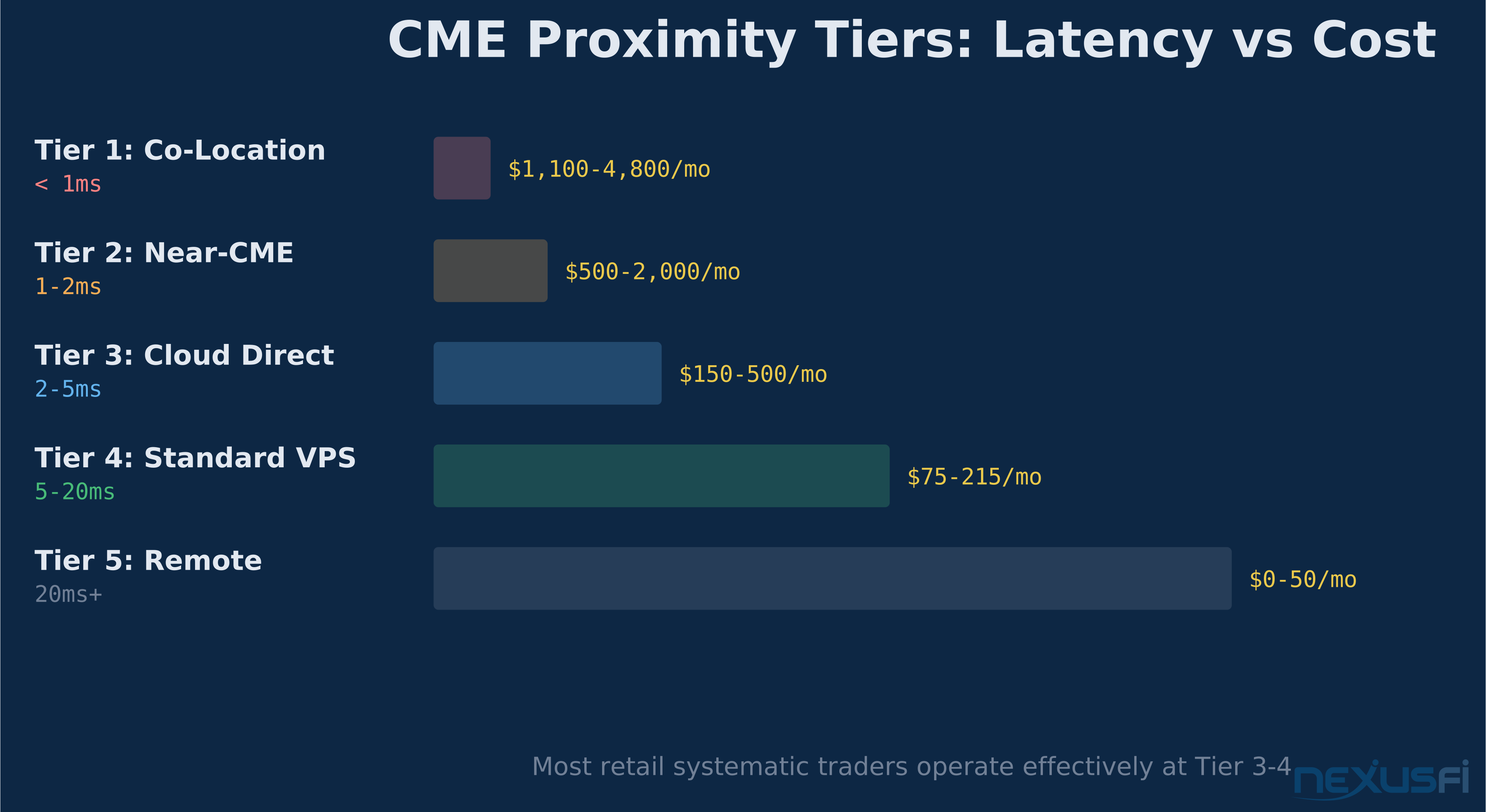
Not all "Chicago" is equal. The network path between your server and the CME matching engine determines your execution latency. Here's the reality:
| Tier | Round-Trip Latency | Hosting Type | Use Case |
|---|---|---|---|
| Tier 1 | Under 1ms | Co-location in CME Aurora data center, direct cross-connect | HFT, latency-sensitive scalping |
| Tier 2 | 1-2ms | Near-CME facilities (Equinix Chicago), CME Direct or CME Connect services | Serious automated trading, tight scalps |
| Tier 3 | 2-5ms | Major cloud regions with direct connect (AWS us-east-1, Azure East US) | Most automated strategies, semi-automated |
| Tier 4 | 5-20ms | Standard VPS/cloud, no dedicated network path | Discretionary trading, swing trading, position trading |
| Tier 5 | 20ms+ | Remote locations, residential internet | Not recommended for any active futures trading |
Key insight: The latency that matters isn't ping time to your broker's website. It's the round-trip time from your order submission to the exchange acknowledgment — and that path goes through your broker's gateway, their risk engine, and then to the matching engine. Test the actual order path, not synthetic pings.
For most retail futures traders running systematic strategies on ES, NQ, or CL, Tier 3-4 is perfectly adequate. The fill difference between 3ms and 30ms on a 50-lot limit order sitting in the book is negligible. Where it matters: market orders during fast moves, and any strategy where you're racing other participants for queue position.
Server Specifications: What counts #
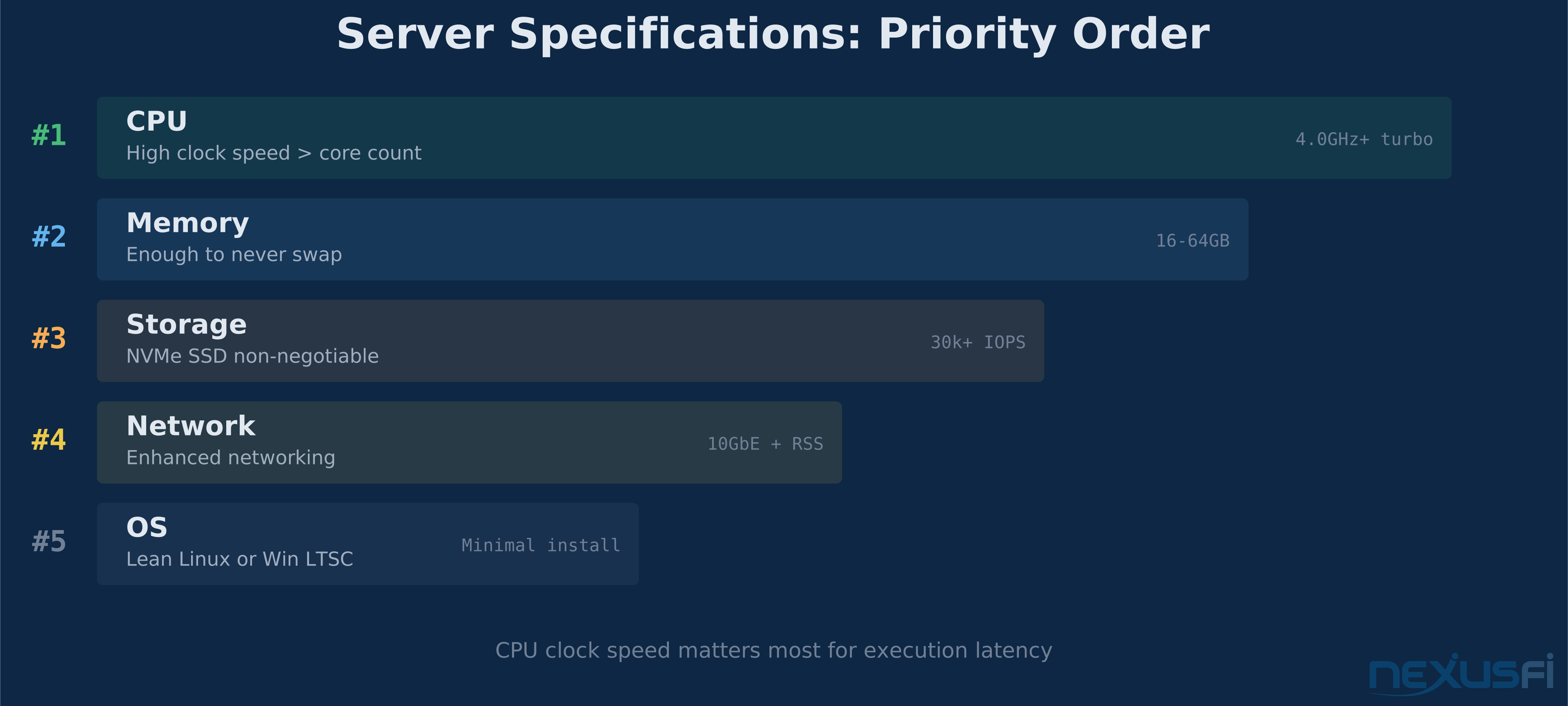
Here's what to prioritize for a futures trading server, in order of importance:
CPU: Clock Speed Over Core Count #
Your trading engine's hot path — the code that processes market data ticks and submits orders — runs on a single thread. A 4-core CPU at 4.5GHz single-thread turbo will outperform a 16-core CPU at 3.0GHz for order execution. Core count matters for backtesting and parallel analytics, not for live execution.
For VPS/cloud, look for compute-optimized instances: AWS C-series (c5n, c6i), Azure F-series, GCP C2/C2D. These prioritize clock speed over memory or storage.
Memory: Enough to Never Swap #
16GB handles most single-strategy deployments comfortably. 32-64GB for multi-strategy setups or if you're keeping deep historical data in memory. The rule: check your peak memory usage during the busiest market sessions and add 50% headroom. If your system ever touches swap, you're already losing.
Storage: NVMe SSD, Non-Negotiable #
Spinning disks have no place in a trading server. NVMe SSDs with 30k+ IOPS handle logging, tick data storage, and strategy state snapshots without becoming a bottleneck. Encrypt at rest — either full-disk encryption (LUKS on Linux) or provider-managed encryption (EBS encryption on AWS).
Network: Enhanced Networking Features #
Standard 1Gbps is fine for most setups. What matters more than raw bandwidth is NIC quality and driver optimization:
- Enhanced networking on cloud providers (AWS Elastic Network Adapter, Azure Accelerated Networking) reduces virtualization overhead
- Jumbo frames (9000 MTU) reduce packet processing overhead for high-throughput data feeds
- Receive-side scaling (RSS) distributes network processing across CPU cores
Operating System: Lean Linux #
Ubuntu 22.04 LTS or Rocky Linux 9 with a minimal install. Strip everything you don't need — no GUI, no bluetooth stack, no printing services, no automatic updates during market hours. Every unnecessary service is a potential source of CPU jitter and a potential security vulnerability.
Windows Server is an option if your platform requires it (NinjaTrader, for example), but expect higher resource overhead and less granular performance tuning capability. Use Windows Server LTSC (Long-Term Servicing Channel) to avoid feature update disruptions.
Network Optimization: The Practical Checklist #
These settings make a measurable difference on a Linux trading server:
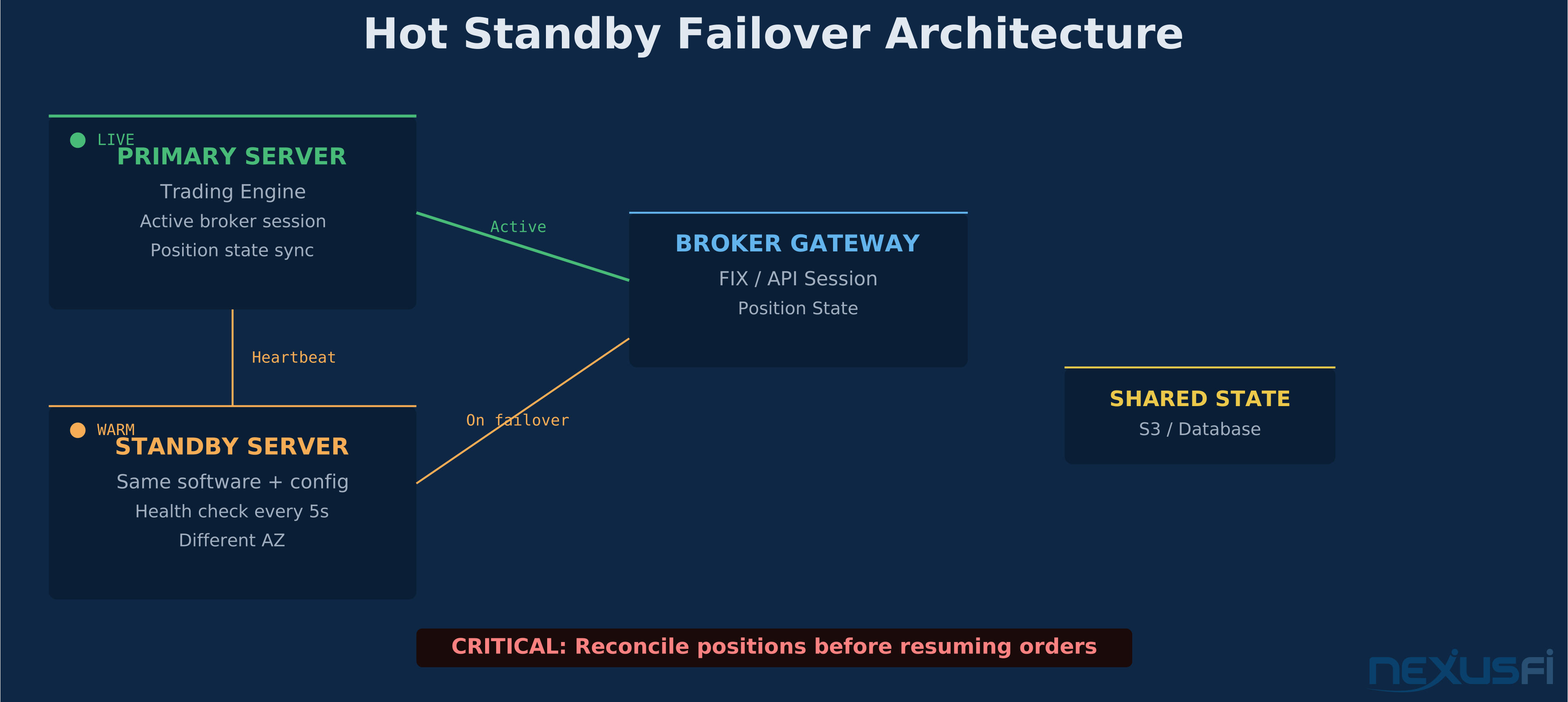
TCP tuning — adjust kernel parameters for trading workloads:
net.core.somaxconn = 65535— increase connection backlognet.ipv4.tcp_tw_reuse = 1— faster socket recyclingnet.ipv4.tcp_fastopen = 3— reduce connection setup latencynet.ipv4.tcp_nodelay— disable Nagle's algorithm (reduce small packet buffering)
CPU isolation — pin your trading process to dedicated cores and isolate them from OS scheduling:
- Use
isolcpuskernel parameter to reserve cores - Set IRQ affinity to route NIC interrupts to non-trading cores
- Disable CPU frequency scaling on trading cores (or set to performance governor)
NIC optimization:
- Disable large receive offload (LRO) and generic receive offload (GRO) — they add latency in exchange for throughput
- Enable TCP segmentation offload (TSO) — reduces CPU load for outbound traffic
- Enable checksum offload — removes per-packet computation
Disable jitter sources:
- Turn off unnecessary services: avahi-daemon, cups, bluetooth, cloud-init (after initial setup)
- Disable transparent huge pages (THP) — causes unpredictable memory allocation pauses
- Set up a proper NTP or Chrony configuration with stratum-1 sources for accurate timestamps
Time Synchronization: Get This Right #
Accurate timestamps aren't just for logging — they're essential for latency measurement, trade audit trails, and correlating events across distributed systems. If your clock drifts by 10ms, your latency measurements are meaningless.
Chrony is the recommended NTP client for Linux trading servers. Configure it with multiple stratum-1 sources and set makestep for initial correction only. Target sub-millisecond clock accuracy.
For co-located setups, PTP (Precision Time Protocol) with hardware timestamping can achieve sub-microsecond accuracy — overkill for most strategies but required if you're doing any serious latency analysis.
On cloud providers, use their internal time sync services (AWS Time Sync Service, Google's internal NTP) as primary sources — they're typically more reliable than public NTP pools due to network proximity.
Failover and Redundancy #
A single server is a single point of failure. Here's how to build redundancy that actually works for futures trading:
The Critical Rule: Reconcile Before Resuming #
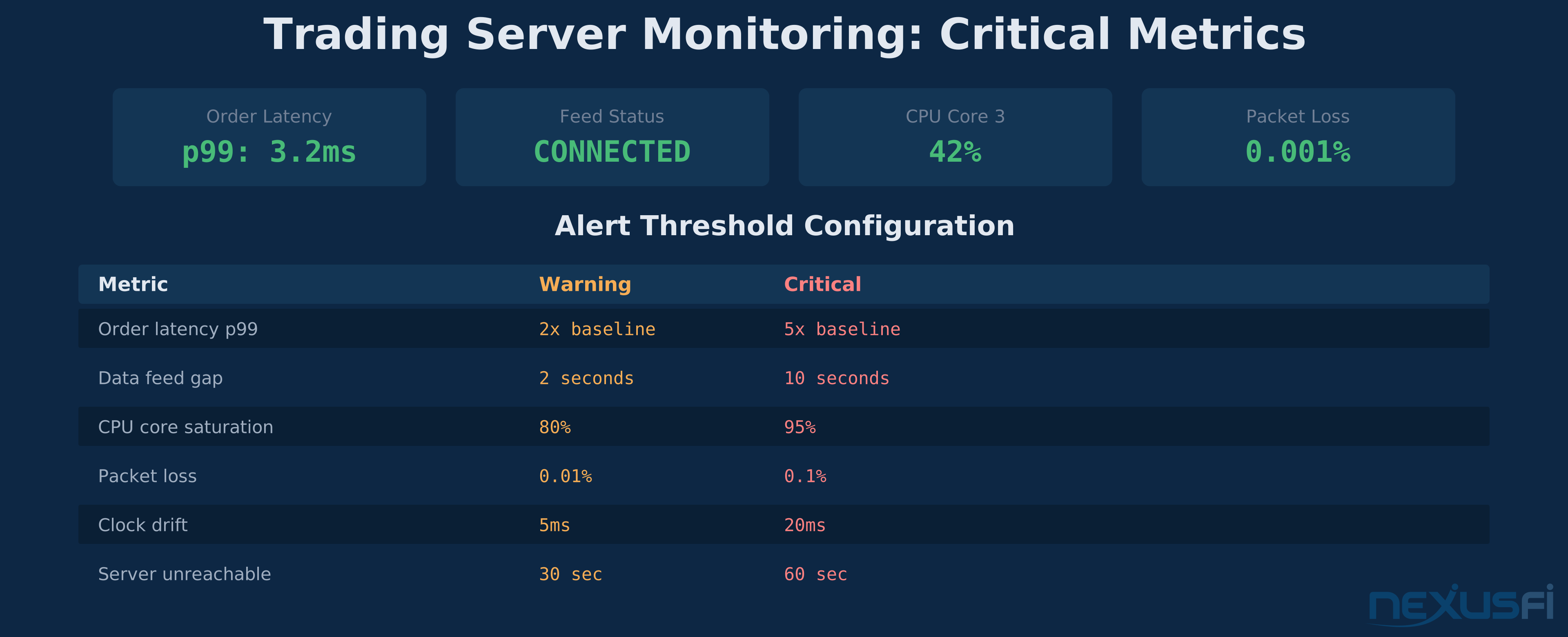
If your primary server goes down and you fail over to a backup, never assume the system didn't trade while you were down. Always reconcile your position with the broker before submitting any new orders. Blind order resubmission after a failover is how you end up double-positioned or flat when you should be long.
Hot Standby Architecture #
The most practical approach for retail/semi-institutional traders:
- Primary server runs the trading engine, connected to the broker
- Standby server in a different availability zone, pre-configured with the same software, broker credentials loaded
- Health check script on the standby pings the primary every 5-10 seconds
- On failure detection: standby establishes broker session, queries positions, reconciles state, then resumes strategy logic
Implementation detail: If using cloud with elastic IPs (AWS), the failover script swaps the IP from primary to standby. This redirects any monitoring or external connections automatically. Target: under 60 seconds from detection to resumed trading.
What to Back Up #
- Strategy configuration and parameters — version-controlled in Git, never stored only on the trading server
- Position state snapshots — written to a shared store (S3, database) every fill
- API credentials — stored in a secrets manager (AWS Secrets Manager, HashiCorp Vault), not in config files on the server
- Log files — streamed to centralized storage for post-mortem analysis
Failover Drills #
Run a failover drill monthly. Shut down the primary during a non-trading session, verify the standby picks up correctly, measure the switchover time, and document any issues. A failover plan you've never tested is a failover plan that won't work.
Security: Trading-Specific Hardening #
A compromised trading server isn't just an IT incident — it's a financial disaster. Someone with access to your broker API credentials can liquidate your account, submit unauthorized trades, or front-run your orders. Lock it down.
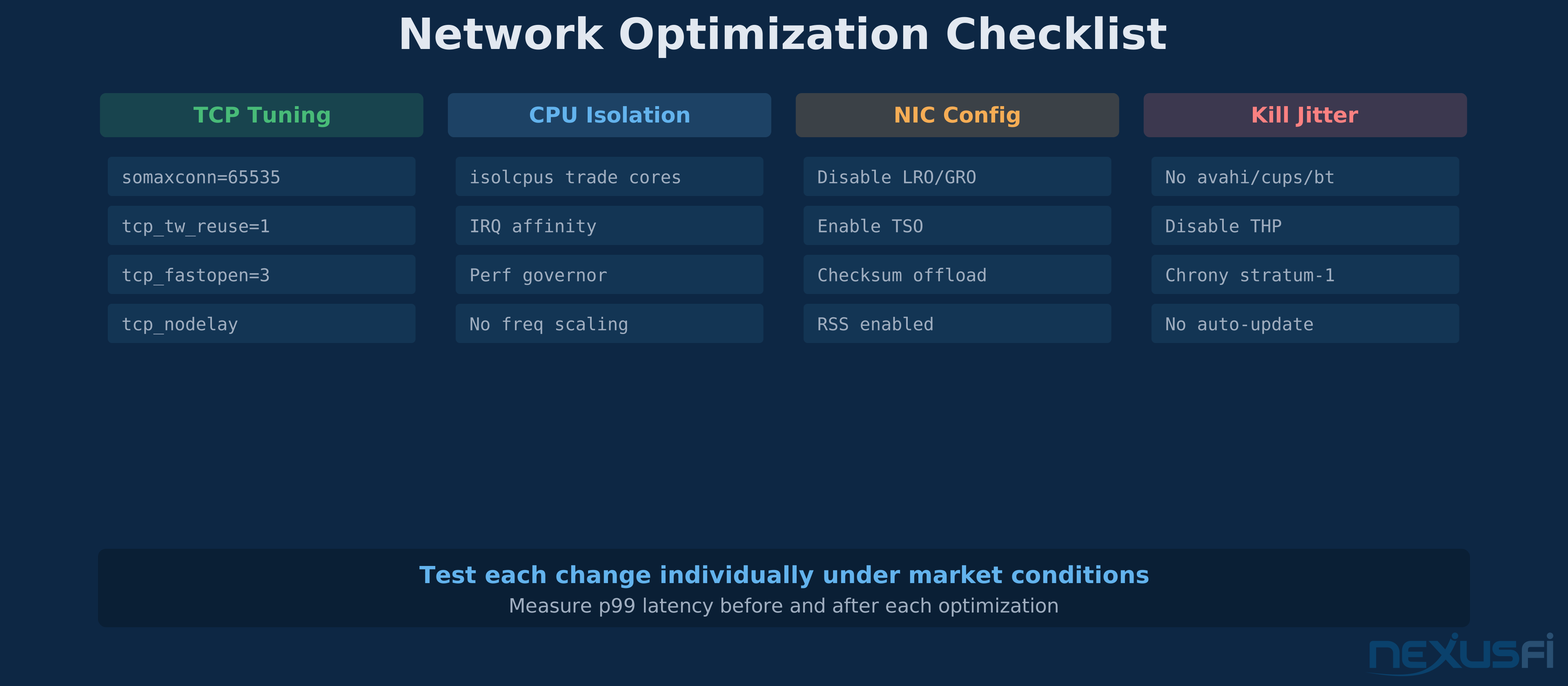
Network Isolation #
- Place the trading server in a dedicated VPC/subnet with no other workloads
- Firewall rules allow only: broker API endpoints (inbound/outbound), data feed sources (inbound), your management IP (inbound SSH/RDP), monitoring endpoints (outbound)
- Block everything else. No web browsing from the trading server. No email. No "just quickly checking something."
Access Control #
- SSH key authentication only — disable password authentication entirely
- Multi-factor authentication for any administrative access
- Separate service accounts: the trading engine runs as a dedicated user with minimal permissions, not as root
- Bastion host for management access — don't expose the trading server's SSH port directly to the internet
Secrets Management #
- Never store API keys, broker passwords, or FIX session credentials in plaintext config files
- Use environment variables loaded from an encrypted secrets store
- Rotate credentials on a schedule — quarterly at minimum
- Audit who accessed credentials and when
Patching Strategy #
- Apply security patches during non-market hours only
- Test patches on the standby server before applying to primary
- Keep a rollback plan — snapshot the server before any OS update
- Subscribe to security advisories for your OS and critical dependencies
Monitoring: What to Watch and When to Act #
Monitoring a trading server is different from monitoring a web server. You're not watching for slow page loads — you're watching for conditions that could lose money.
Critical Metrics #
Execution health:
- Order-to-acknowledgment latency (track p50, p95, p99)
- FIX/API session connectivity status
- Order rejection rate and reject reasons
- Position reconciliation status (does your internal state match the broker's?)
Data feed health:
- Sequence gap detection (missing ticks = stale signals)
- Stale data alerts (no new ticks for N seconds during market hours)
- Feed switchover status (if using redundant data sources)
System health:
- CPU usage per core (not just aggregate — one saturated core matters)
- NIC packet drops, retransmits, error counters
- Memory usage and swap activity (any swap = red flag)
- Clock drift from NTP/PTP sources
- Disk I/O latency (spikes = logging bottleneck)
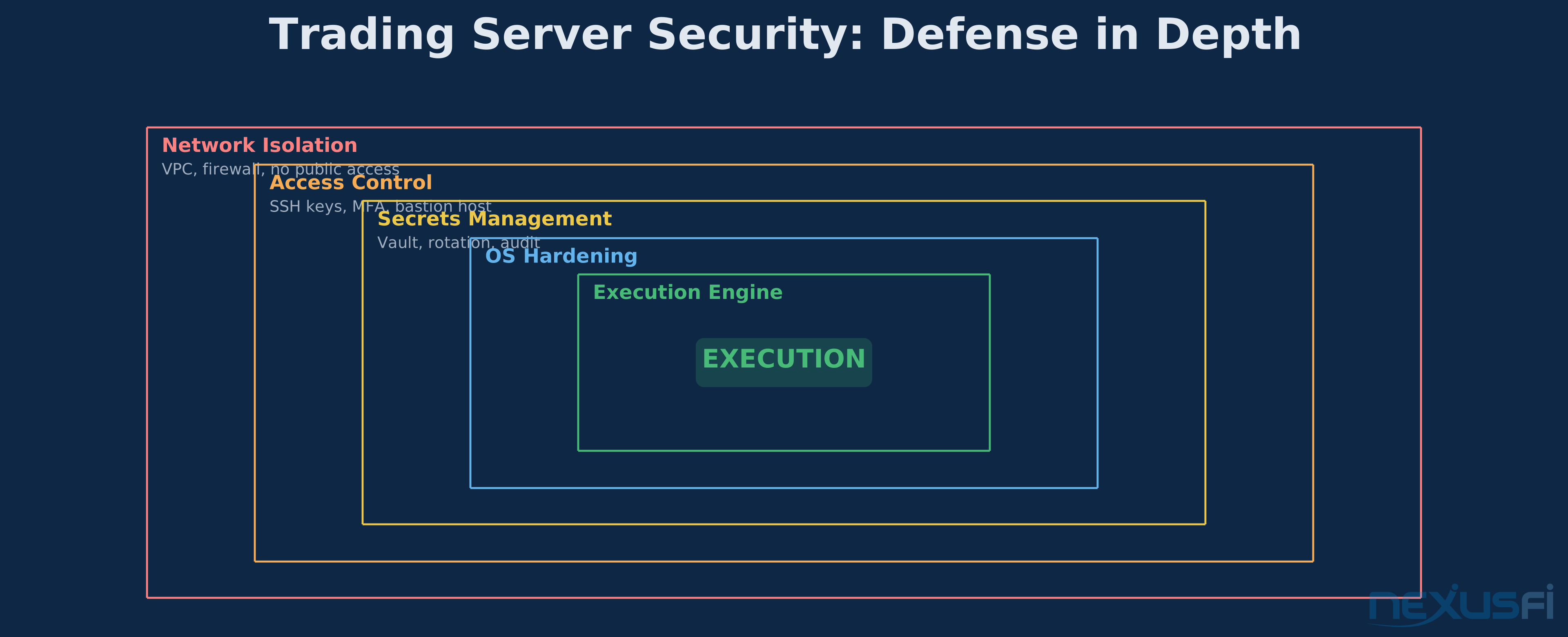
Alert Thresholds #
Set these based on your strategy's requirements, not arbitrary numbers:
| Metric | Warning | Critical | Action |
|---|---|---|---|
| Order latency p99 | 2x baseline | 5x baseline | Investigate network path, check for CPU contention |
| Data feed gap | 2 seconds | 10 seconds | Switch to backup feed, evaluate position management |
| CPU core saturation | 80% sustained | 95% sustained | Identify runaway process, evaluate strategy load |
| Packet loss | 0.01% | 0.1% | Contact provider, evaluate network path |
| Clock drift | 5ms | 20ms | Restart NTP client, check time source health |
| Server unreachable | 30 seconds | 60 seconds | Trigger failover sequence |
Runbooks #
For every alert, document what to do. During a market session, you don't have time to troubleshoot from scratch. Your runbook should answer: What's the symptom? What's the likely cause? What's the immediate mitigation? When do you escalate?
Cost Analysis: Total Cost of Ownership #
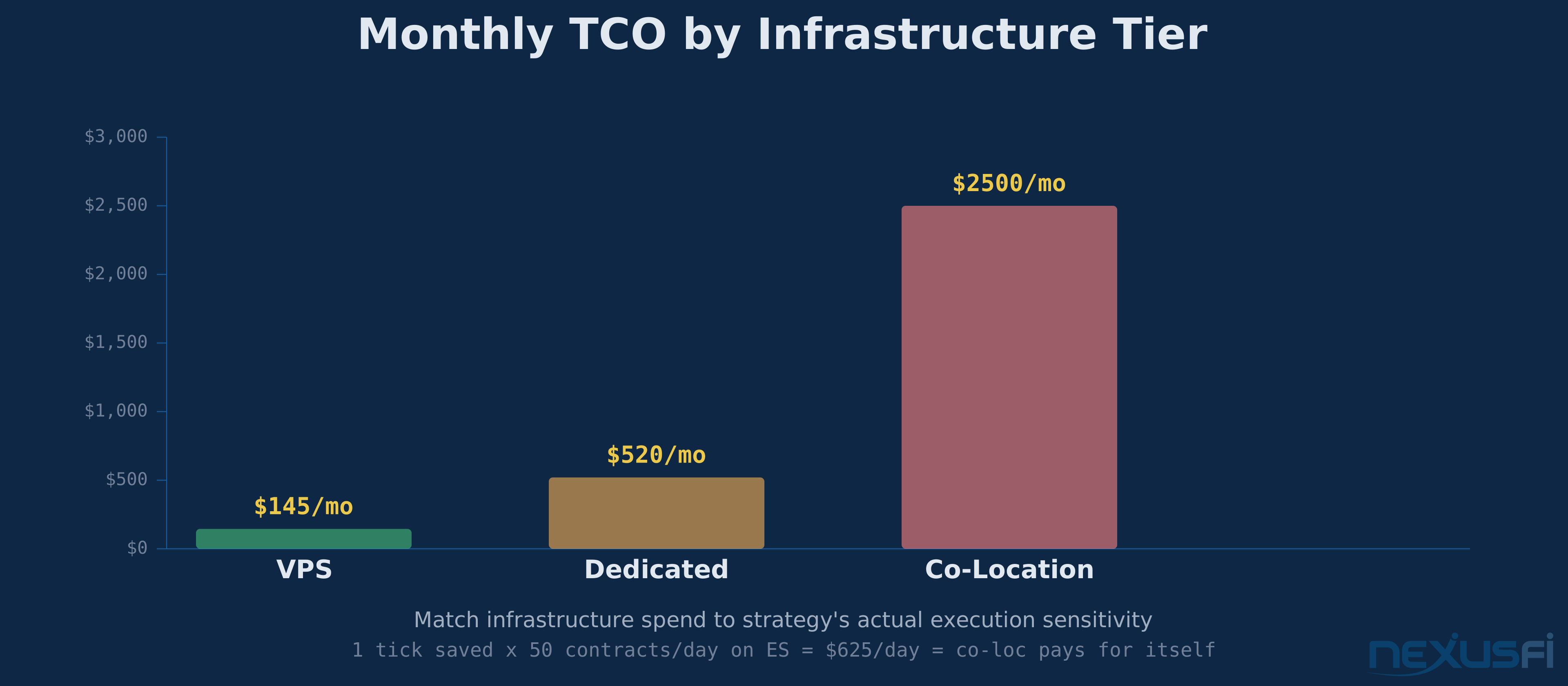
The monthly hosting bill is the smallest part of infrastructure cost. Here's what the full picture looks like:
VPS Setup #
| Component | Monthly Cost |
|---|---|
| Compute (8 vCPU, 32GB RAM) | $60-150 |
| Data transfer/egress | $10-30 |
| Monitoring tools | $0-20 |
| Backup storage | $5-15 |
| Total | $75-215/month |
Dedicated Server #
| Component | Monthly Cost |
|---|---|
| Server lease (managed) | $200-500 |
| Network / bandwidth | $20-100 |
| Monitoring and management | $20-50 |
| Backup and redundancy | $50-100 |
| Total | $290-750/month |
Co-Location #
| Component | Monthly Cost |
|---|---|
| Rack space + power + cooling | $500-3,000 |
| Cross-connect fees | $200-500 |
| Hardware amortization | $200-500 |
| Network services | $100-500 |
| Remote hands support | $100-300 |
| Total | $1,100-4,800/month |
The Opportunity Cost Calculation #
Infrastructure cost should be weighed against the cost of not having it. If better infrastructure saves you 1 tick per trade on average, and you trade 50 contracts per day on ES at $12.50/tick, that's $625/day or roughly $13,000/month. Even co-location pays for itself at that scale.
Conversely, if you trade 2 contracts of NQ twice a day, the fill quality difference between a $100/month VPS and a $3,000/month co-loc is likely zero. Match your infrastructure investment to your strategy's actual sensitivity to execution quality.
Choosing a Provider: Decision Framework #
Don't pick a provider based on marketing claims. Test the actual network path to your broker. Here's the process:
- Identify your broker's data center location — ask their support team directly
- Provision a test instance at the candidate provider (most offer hourly billing)
- Run your actual trading platform and measure order round-trip times during market hours, not synthetic pings
- Test during volatile periods — latency under load is what matters, not latency at 3 AM on a Sunday
- Monitor for 2 full weeks before committing — one good day doesn't mean consistent performance
Trading-Specific Providers Worth Evaluating #
Several providers cater specifically to traders and offer optimized network paths to major exchanges. NexusFi community members have shared extensive reviews of providers including Speedy Trading Servers, Commercial Network Services, and Ninja Mobile Trader. Search the NexusFi forums under "Trading Reviews and Vendors" for first-hand experiences — community reviews from traders running live systems are worth more than any provider's spec sheet.
Cloud Providers for Trading #
AWS, Azure, and Google Cloud all work for trading infrastructure. Key considerations:
- AWS us-east-1 (Northern Virginia) has the best connectivity to major financial data centers
- Azure East US offers Accelerated Networking with low-latency NIC drivers
- GCP us-central1 (Iowa) provides Compute-Optimized instances with high single-thread performance
For any cloud provider, use reserved instances for your production trading server (1-year commitment saves 30-40% vs on-demand) and on-demand or spot instances for backtesting workloads only. Never run live trading on spot instances — they can be reclaimed with 2 minutes notice.
Common Failure Scenarios #
Learn from other traders' infrastructure failures so you don't repeat them:
The unmanaged position: Your VPS reboots for maintenance during RTH. Your strategy had a 5-lot ES long on with a 10-point stop. The stop was software-managed, not a native exchange stop. Your position rides unprotected through a selloff. Prevention: Use exchange-native stop orders (server-side stops) for any position that must be protected regardless of software availability.
The stale data decision: Your data feed drops packets and your strategy sees price sitting flat at yesterday's close. It interprets this as low volatility and increases position size. Price was actually moving fast — you just couldn't see it. Prevention: Stale data detection with automatic strategy pause. If no new ticks arrive for N seconds during market hours, flatten and alert.
The failover that doubled the position: Primary goes down mid-trade. Standby starts up, doesn't reconcile with the broker, and enters the same trade again. Now you're 2x sized going into a reversal. Prevention: Position reconciliation is step one of any failover procedure. Query the broker for current positions before submitting any orders.
The security breach: Trader stores broker API keys in a plaintext config file. Server gets compromised through an unpatched vulnerability. Attacker uses the keys to submit unauthorized trades. Prevention: Secrets management, minimal attack surface, regular patching, and monitoring for unauthorized API activity.
Implementation Checklist #
For a trader ready to deploy, here's the sequence:
- Choose a hosting tier based on your strategy's latency sensitivity and budget — use the decision framework above
- Select a provider in a region with good connectivity to your broker's data center — test before committing
- Provision the server with appropriate specs — prioritize CPU clock speed and NVMe storage
- Harden the OS — minimal install, SSH keys only, firewall allow-lists for broker and data feed IPs
- Configure time sync — Chrony with stratum-1 sources, verify sub-millisecond accuracy
- Apply network tuning — TCP parameters, IRQ affinity, NIC offloads, CPU isolation
- Deploy your trading software — with latency logging enabled from day one
- Set up monitoring — execution latency, data feed health, system metrics, with actionable alerts
- Configure backups — strategy state to shared storage, configs in Git, credentials in secrets manager
- Test failover — if using redundancy, run a drill before going live
Infrastructure isn't a one-time setup. Review your monitoring data weekly. Run failover drills monthly. Test latency after any provider maintenance or OS update. The market doesn't care about your uptime SLA — it only cares whether your orders arrive.
Knowledge Map
References This Article
Articles that build on this topicCitations
- — Discussion
- — Discussion
- — Discussion
- — Discussion
- — Discussion
- — Discussion
- — Discussion