NexusFi: Find Your Edge


Home Menu


conversion of CCI pivot zones


Discussion in Sierra Chart

Updated
      Top Posters
    1. looks_one vegasfoster with 3 posts (9 thanks)
    2. looks_two FKtrader with 3 posts (1 thanks)
    3. looks_3 kennanoate with 1 posts (0 thanks)
    4. looks_4 Big Mike with 1 posts (1 thanks)
    1. trending_up 3,696 views
    2. thumb_up 11 thanks given
    3. group 4 followers
    1. forum 7 posts
    2. attach_file 2 attachments


Search this Thread
  #1 (permalink)
 FKtrader 
WA Europe
 
Experience: None
Platform: Various
Trading: FUTURES
Posts: 118 since Mar 2013
Thanks Given: 44
Thanks Received: 53

Hello traders,
Can any person convert the CCI pivot zones to SC.
Thanks in advance


Started this thread Reply With Quote
Thanked by:

Can you help answer these questions
from other members on NexusFi?
The Backwardation Signal: How the CL Futures Curve Tells …
Commodities
CME Launches Bitcoin Volatility Futures June 1 -- First …
Cryptocurrency
Prediction Markets Expiry Day: Trump Eyes War Exit, $230 …
Prediction Markets & Event Contracts
CPI Eve: Fed Hike Odds Hold at 52% for the First Time, I …
Prediction Markets & Event Contracts
Peace Deal Forward Curve: May 22%, June 51%, December 81 …
Prediction Markets & Event Contracts
 
Best Threads (Most Thanked)
in the last 7 days on NexusFi
Big Mike in Ecuador
205 thanks
Sober Journey With S&P
21 thanks
30 Sessions
20 thanks
Volume Indicators
8 thanks
Thanks Mike. Godspeed.
7 thanks
  #2 (permalink)
 vegasfoster 
las vegas
 
Experience: Intermediate
Platform: Sierra Chart
Broker: Velocity/IB
Trading: 6E
Posts: 1,145 since Feb 2010
Thanks Given: 304
Thanks Received: 845

I can do it, but I am pretty jammed for a couple days, so if someone else wants to do it, feel free. PM me at the end of the week if no one else does and/or I don't respond, cuz it probably means I forgot.


Reply With Quote
Thanked by:
  #3 (permalink)
 vegasfoster 
las vegas
 
Experience: Intermediate
Platform: Sierra Chart
Broker: Velocity/IB
Trading: 6E
Posts: 1,145 since Feb 2010
Thanks Given: 304
Thanks Received: 845


Only thing is not sure if the MC highest and lowest calculates the same as the SC functions. Also I changed entry criteria so that close > open and close < open in case you were using time, volume, or tick charts, but this will have no affect on range and renko bars. Haven't tested or validated, so let me know any issues.


Attached Files
Elite Membership required to download: CCIPivotZones.dll
Elite Membership required to download: CCIPivotZones.cpp
Reply With Quote
  #4 (permalink)
 FKtrader 
WA Europe
 
Experience: None
Platform: Various
Trading: FUTURES
Posts: 118 since Mar 2013
Thanks Given: 44
Thanks Received: 53


vegasfoster View Post
Only thing is not sure if the MC highest and lowest calculates the same as the SC functions. Also I changed entry criteria so that close > open and close < open in case you were using time, volume, or tick charts, but this will have no affect on range and renko bars. Haven't tested or validated, so let me know any issues.

Thanks for ur reply.
I cant open the fils.
i save it in SC data fils and try to open it fils>open new/open historical chart but i dont get anything.
Im new in using SC and i hope im not missing something


Started this thread Reply With Quote
  #5 (permalink)
 vegasfoster 
las vegas
 
Experience: Intermediate
Platform: Sierra Chart
Broker: Velocity/IB
Trading: 6E
Posts: 1,145 since Feb 2010
Thanks Given: 304
Thanks Received: 845

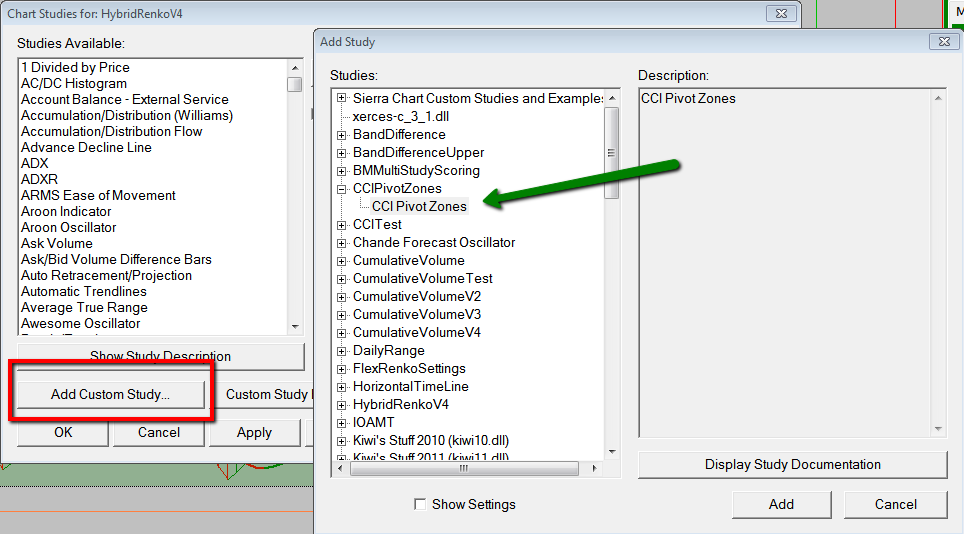
Put the dll file in your data folder. The cpp file is the source code, provided for anyone to make changes. Open a new chart, then press F6 then click on "Add Custom Study" and select the CCI Pivot Zones. Then change the parameters how you like. The default "Strength" is 3, which means it will use the highest high or lowest low of the last 3 bars. You may need to set this higher, e.g. 5 to 10, to catch the swing high or low, I am not really sure.


Reply With Quote
Thanked by:
  #6 (permalink)
 FKtrader 
WA Europe
 
Experience: None
Platform: Various
Trading: FUTURES
Posts: 118 since Mar 2013
Thanks Given: 44
Thanks Received: 53


vegasfoster View Post
Put the dll file in your data folder. The cpp file is the source code, provided for anyone to make changes. Open a new chart, then press F6 then click on "Add Custom Study" and select the CCI Pivot Zones. Then change the parameters how you like. The default "Strength" is 3, which means it will use the highest high or lowest low of the last 3 bars. You may need to set this higher, e.g. 5 to 10, to catch the swing high or low, I am not really sure.


HI,
Thanks a lot @vegasfoster,your indi work perfectly.I was contacting a programmer which SC recommend to me and he want 200 dollar to do this.
Thanks a lot man


Started this thread Reply With Quote
  #7 (permalink)
 
Big Mike's Avatar
 Big Mike 
Manta, Ecuador
Site Administrator
Developer
Swing Trader
 
Experience: Advanced
Platform: Custom solution
Broker: IBKR
Trading: Stocks & Futures
Frequency: Every few days
Duration: Weeks
Posts: 50,669 since Jun 2009
Thanks Given: 33,669
Thanks Received: 102,584


adamribica View Post
HI,
Thanks a lot @vegasfoster,your indi work perfectly.I was contacting a programmer which SC recommend to me and he want 200 dollar to do this.
Thanks a lot man

Don't forget to use the thanks button.

Mike


We're here to help: just ask the community or contact our Help Desk

Quick Links: Change your Username or Register as a Vendor
Searching for trading reviews? Review this list
Lifetime Elite Membership: Sign-up for only $149 USD
Exclusive money saving offers from our Site Sponsors: Browse Offers
Report problems with the site: Using the NexusFi changelog thread
Follow me on X Visit my NexusFi Trade Journal Reply With Quote
Thanked by:
  #8 (permalink)
 kennanoate 
Moscow
 
Posts: 5 since Sep 2013


vegasfoster View Post
Put the dll file in your data folder. The cpp file is the source code, provided for anyone to make changes. Open a new chart, then press F6 then click on "Add Custom Study" and select the CCI Pivot Zones. Then change the parameters how you like. The default "Strength" is 3, which means it will use the highest high or lowest low of the last 3 bars. You may need to set this higher, e.g. 5 to 10, to catch the swing high or low, I am not really sure.

hey can you convert from ninja trader to MT4?


Reply With Quote


Last Updated on May 28, 2014


© 2026 NexusFi®, s.a., All Rights Reserved.
Av Ricardo J. Alfaro, Century Tower, Panama City, Panama, Ph: +507 833-9432 (Panama and Intl), +1 888-312-3001 (USA and Canada)
All information is for educational use only and is not investment advice. There is a substantial risk of loss in trading commodity futures, stocks, options and foreign exchange products. Past performance is not indicative of future results.
About Us - Contact Us - Site Rules, Acceptable Use, and Terms and Conditions - Downloads - Top
no new posts