



Strategy Development Languages for Futures Trading: Choosing the Right Tool for Every Trading Style
Overview #
Strategy Development Languages for Futures Trading
Every automated futures strategy starts as an idea. Turning that idea into code that actually places orders requires choosing a language — and that choice shapes everything about how your strategy behaves, how fast you can iterate, and how stuck you'll be if you want to switch platforms later.
This isn't a theoretical comparison. Each language here has real consequences for execution, debugging, and whether your strategy does what you think it does when real money is on the line.
The Five Languages That Matter #
Five development environments dominate futures automation. Each one comes with a platform, an ecosystem, and a set of tradeoffs you'll live with for years.
EasyLanguage / PowerLanguage powers TradeStation and MultiCharts. It's a domain-specific language built by traders for traders — the syntax reads like English instructions for placing trades. Buy next bar at market is valid code. That readability comes at a cost: you're locked into the TradeStation/MultiCharts ecosystem, and complex state management gets ugly fast.
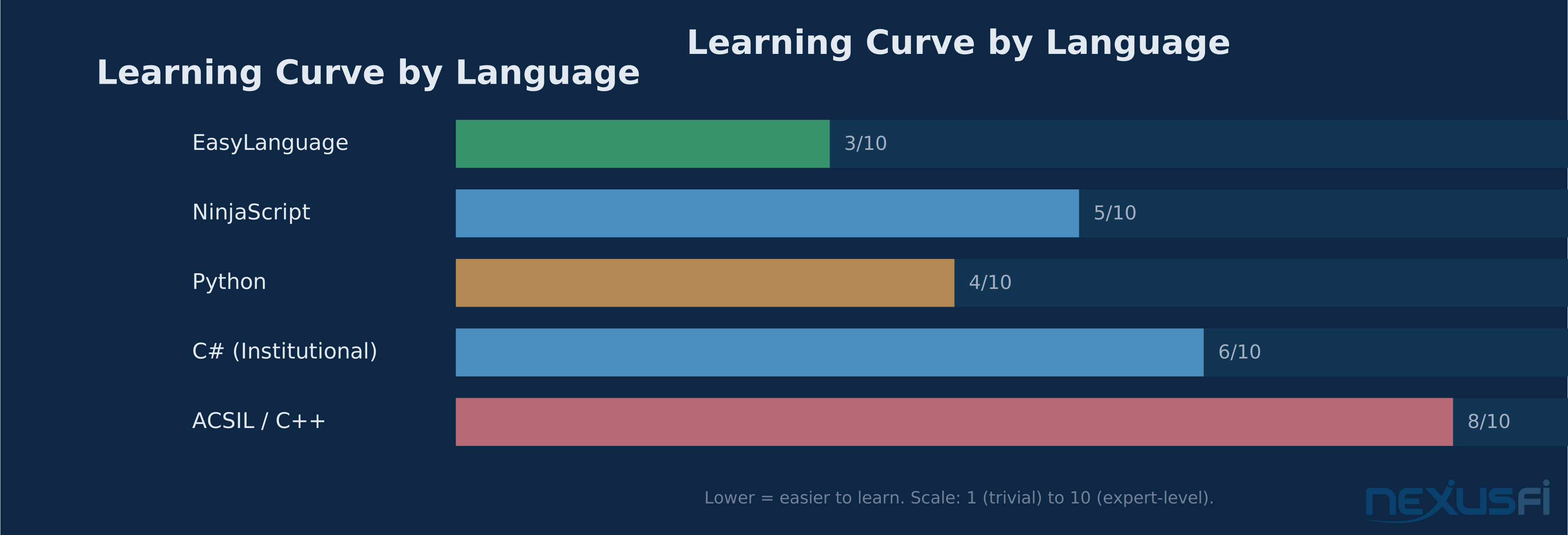
NinjaScript is NinjaTrader's C#-based framework. You get the full power of a general-purpose language with trading-specific abstractions layered on top. Object-oriented design, strong typing, Visual Studio debugging — it's a real development environment. The tradeoff is a steeper learning curve and NinjaTrader's specific lifecycle model that trips up even experienced C# developers.
ACSIL (Advanced Custom Study Interface and Language) is Sierra Chart's C/C++ API. It's the most powerful option for low-level market data control, DOM manipulation, and execution performance. @Trembling Hand built an entire beginner-to-advanced ACSIL tutorial series on NexusFi that remains the definitive resource for getting started. The learning curve is the steepest of any charting platform, but the control you get is unmatched.
Python is the research and analytics powerhouse. pandas, numpy, scikit-learn, and dozens of trading-specific libraries make it the fastest path from idea to backtest. But Python's role in futures automation is usually as a research layer — you prototype and validate in Python, then deploy execution in something compiled. Running latency-sensitive futures execution directly in Python is possible but demands careful engineering.
C# (outside NinjaTrader) is the institutional choice. Custom OMS/EMS systems, multi-strategy portfolio engines, and production-grade execution infrastructure almost always use C# or Java. You're building everything from scratch, but you're also not constrained by any platform's assumptions about how trading works.
Execution Models: Bar-Close vs Event-Driven #
This is the single most important architectural decision in futures automation, and most beginners get it wrong by not even knowing there's a choice.
Bar-Close Execution #
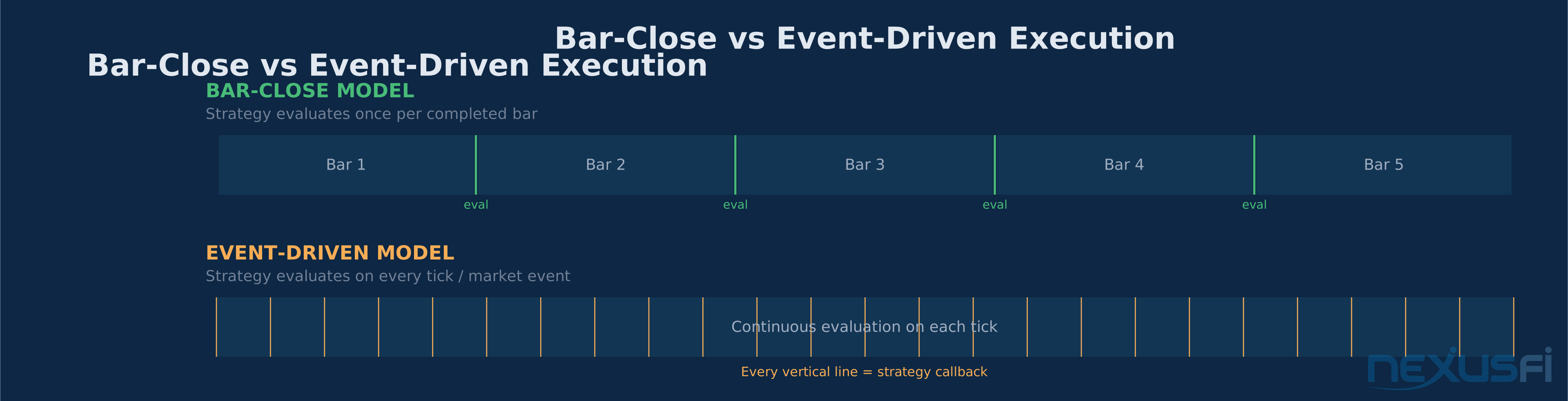
Your strategy evaluates once per completed bar. When the 5-minute candle closes, your code runs, checks conditions, and places orders for the next bar. EasyLanguage and PowerLanguage default to this model. Many NinjaScript and ACSIL strategies start here too.
Bar-close execution is clean. Backtests are deterministic — same data produces the same results every time. Logic is simple: one evaluation per bar, one decision point, no ambiguity about when your code runs. For swing trading on 60-minute or daily charts, bar-close execution is fine. The delay between a signal and your order doesn't matter when you're holding for days.
The problem shows up on shorter timeframes. A 1-minute bar-close strategy checking for a breakout above a level can miss the move entirely if price breaks out and reverses within the same bar. Your code never saw the breakout because it only looked at the close. As @Big Mike demonstrated in his MultiCharts vs NinjaTrader comparison, the way each platform handles intrabar order evaluation directly affects strategy performance — "the language behind the strategy" matters as much as the features.
Event-Driven / Tick-Level Execution #
Your code reacts to individual market events: every tick, every order book update, every fill confirmation. This is how professional futures execution works. NinjaScript, ACSIL, and custom C# systems all support event-driven architecture.
Event-driven execution is essential for:
- Scalping — you can't wait for a bar to close when your holding period is 30 seconds
- Order flow strategies — reacting to DOM changes, large prints, or delta shifts requires tick-level granularity
- Precision stop placement — a stop-loss that evaluates on each tick fires immediately, not at bar close
- Bracket order management — adjusting targets and stops based on real-time market behavior
The cost is complexity. Event-driven code must handle partial fills, order rejections, feed disconnections, and state management across thousands of callbacks per minute. A bug in bar-close code gives you a bad backtest. A bug in event-driven code gives you runaway orders at 3 AM.
Which Model for Which Strategy #
| Strategy Type | Execution Model | Why |
|---|---|---|
| Daily/weekly swing | Bar-close | Signal timing doesn't require intrabar precision |
| 5-15 minute intraday | Bar-close with intrabar stops | Balance of simplicity and protection |
| 1-minute scalping | Event-driven | Must react to price movement within bars |
| Order flow / DOM | Event-driven | Requires tick-by-tick data processing |
| Spread / pairs | Event-driven | Leg execution timing is critical |
Compiled vs Interpreted: What counts #
Compiled Languages #
NinjaScript compiles to .NET assemblies. ACSIL compiles to native C++ DLLs. EasyLanguage and PowerLanguage compile within their platforms' runtimes. Compiled code runs faster, catches type errors at compile time, and generally produces more predictable execution behavior.
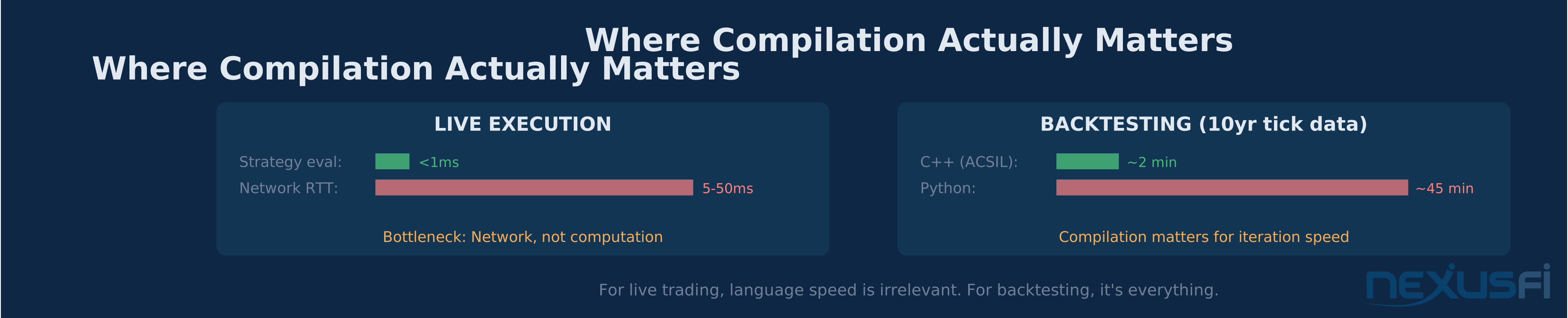
For most futures strategies, the speed difference between compiled and interpreted code is irrelevant. Your bottleneck is the network round-trip to the exchange, not the microseconds your strategy takes to evaluate. Where compilation matters is in backtesting: running 10 years of tick data through a compiled C++ study on Sierra Chart is materially faster than the same logic in Python.
Interpreted Languages #
Python is interpreted (with JIT alternatives like PyPy and Cython). The development speed advantage is real — you can modify code and re-run without a compile step. For research, data analysis, and strategy prototyping, this fast iteration cycle is worth more than raw execution speed.
The practical recommendation: use Python for research and backtesting, deploy execution in a compiled language. @Rovo27's thread on automated MNQ strategies demonstrates this pattern — sophisticated analysis and development work feeding into platform-native execution code.
Real-Time Data Access #
How your language accesses market data determines what strategies are possible.
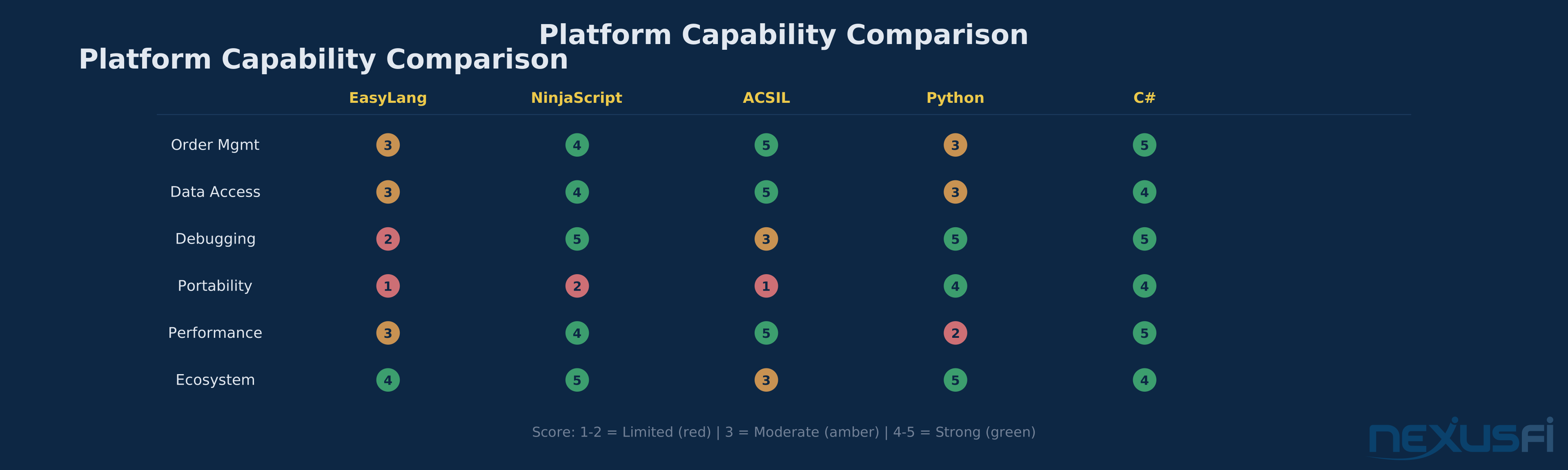
EasyLanguage/PowerLanguage accesses data through platform-managed data series. You get Close, Open, High, Low, Volume, and Ticks for each bar. Real-time tick data is available but constrained by the platform's update model. For most bar-based strategies, the data access is sufficient and well-abstracted.
NinjaScript provides market data through event handlers. OnMarketData() fires on each tick when configured for real-time processing. You can access bid/ask, last price, volume, and historical data series simultaneously. NinjaTrader's data management handles reconnection and gap-filling, which is infrastructure you'd otherwise build yourself.
ACSIL gives you the most granular data access of any charting platform. Sierra Chart's data model exposes full tick data, time and sales, order book depth, and chart update events through C++ callback functions. As @Trembling Hand explains in the ACSIL beginner series, "Sierra Chart calls your study function once for every bar or column in the chart when the study is initially calculated. After that, your study function is called each time the chart updates." This level of control is why order flow traders and DOM-centric strategies gravitate to Sierra Chart.
Python data access depends entirely on your broker API and data feed. Interactive Brokers, CQG, and Rithmic all have Python SDKs with varying quality and latency characteristics. You're responsible for connection management, reconnection logic, and data normalization. The flexibility is enormous, but so is the engineering burden.
C# institutional systems typically connect to data feeds through dedicated adapters — often wrapping native C/C++ feed handlers in managed code. The architecture separates data ingestion from strategy logic, which means your strategy code is clean but the infrastructure is significant.
Order Management #
Order handling is where platform differences create real P&L impact.
EasyLanguage / PowerLanguage #
Straightforward entry/exit functions: Buy, Sell, SellShort, BuyToCover, SetStopLoss, SetProfitTarget. These map directly to trading concepts, which is why EasyLanguage is the fastest path from idea to live orders. The limitation appears when you need complex order state tracking — partial fills, OCO modifications, or conditional bracket adjustments become difficult to express cleanly.
NinjaScript: Managed vs Unmanaged #
NinjaTrader gives you a choice that matters. Managed mode handles order lifecycle automatically — EnterLong(), SetStopLoss(), SetProfitTarget(). The platform tracks positions, manages stops, and prevents conflicting orders. For standard strategies, managed mode is reliable and saves enormous development time.
Unmanaged mode gives you direct control over every order. You create, modify, and cancel orders explicitly. You handle fill events, partial fills, and order state transitions yourself. @NJAMC's NinjaTrader auto-trading guide walks through the fundamentals of strategy setup, but the gap between "hello world strategy" and "production-grade unmanaged order management" is months of work. @traderpards built an entire thread around creating free NinjaTrader strategies, demonstrating how the NinjaScript event model handles OnBarUpdate, order state transitions, and execution callbacks.
ACSIL #
Sierra Chart's order routing API provides granular control over order attributes, routing destinations, and execution behavior. You can build sophisticated bracket orders, contingent logic, and position management — but you're building it in C++, which means memory management and pointer discipline matter. The payoff is execution control that matches professional trading infrastructure.
Python #
Order management in Python depends on the broker API. Interactive Brokers' ib_insync library provides event-driven order management with fill callbacks and status updates. CQG's Python SDK offers similar capabilities. The challenge is that each API has different semantics for order states, fill events, and error handling. Building a broker-agnostic order management layer in Python is possible but requires significant abstraction work.
Debugging and Development Tools #
Debugging a live trading strategy is at the core different from debugging normal software. Your code runs in real-time, market conditions change continuously, and a bug discovered in production can cost real money before you can fix it.
NinjaScript has the best debugging experience among platform-specific languages. Full Visual Studio integration means breakpoints, watch windows, step-through execution, IntelliSense code completion, and refactoring tools. You can pause a strategy mid-execution and inspect every variable. This matters enormously when your managed order suddenly isn't filling and you need to understand why.
ACSIL debugging is possible through Visual Studio but requires more setup. The workflow is less plug-and-play than NinjaScript — you're building DLLs and loading them into Sierra Chart. Once configured, standard C++ debugging applies. @Trembling Hand's tutorial covers the compilation workflow: configure output directories, build the DLL, and Sierra Chart picks it up automatically from the Data folder.
EasyLanguage relies primarily on print/log statements and platform-integrated strategy insights. The debugging experience is more limited than modern IDE-based workflows, but it's adequate for the complexity level that EasyLanguage typically handles. Where it falls short is complex state debugging — when your strategy is in an unexpected state and you need to trace how it got there.
Python has the richest general debugging ecosystem: pdb, pytest, logging frameworks, Jupyter notebooks for interactive analysis, and profiling tools. For strategy research and backtesting, this is unmatched. The challenge is debugging real-time event-driven code — async race conditions and threading issues are harder to reproduce and diagnose.
C# in Visual Studio provides the best overall debugging experience for production systems. ETW tracing, structured logging, performance profiling, and memory diagnostics give you forensic-level insight into production behavior. For institutional systems running 24/5, these tools are essential.
Code Portability: The Lock-In Question #
Platform lock-in is real, and most traders underestimate it until they want to switch.
What You Can Port #
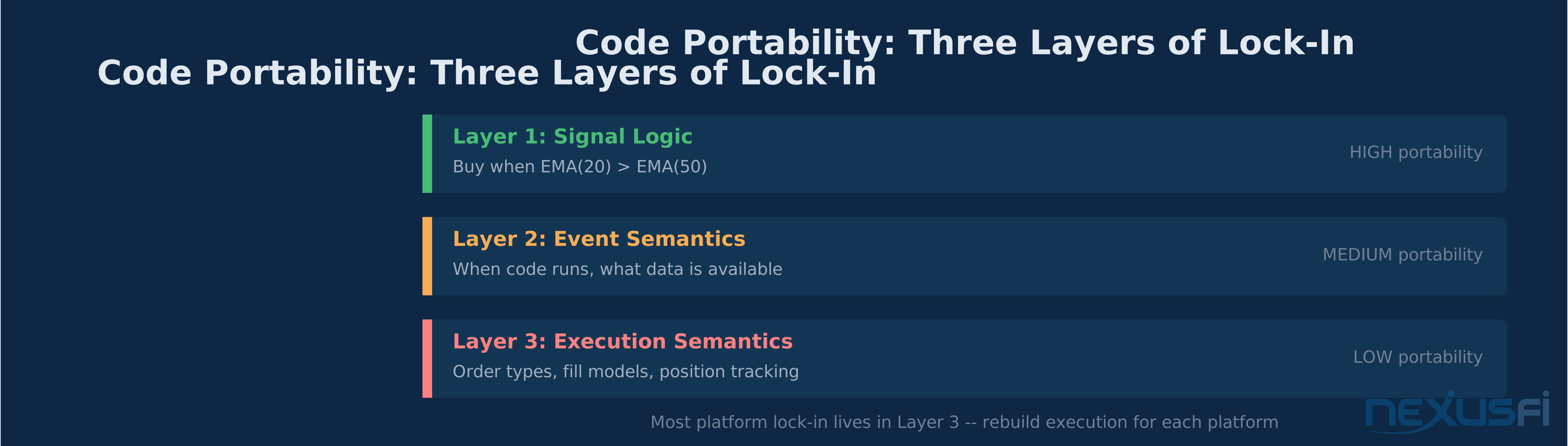
Signal logic transfers well between any two languages. "Buy when the 20-period EMA crosses above the 50-period EMA" is the same concept in EasyLanguage, NinjaScript, Python, and C++. Converting the conditional logic is mechanical work.
What You Can't Port #
Execution semantics — how orders are placed, how fills are reported, how positions are tracked — differs at the core across platforms. An EasyLanguage strategy using SetStopLoss(500) doesn't map 1:1 to NinjaScript's SetStopLoss(CalculationMode.Ticks, 20). The parameter interpretation, order timing, and fill behavior are platform-specific.
Event semantics — when your code runs, what data is available, how the platform handles historical vs real-time mode transitions — these are architectural differences that can't be papered over with syntax conversion.
As @kevinkdog discovered when evaluating switching from NinjaTrader to TradeStation, "the strategy backtest engine can act differently for some situations for both platforms AND depending on your data provider, the continuous contract data with futures can differ." Same strategy logic, different platforms, different results. That's not a bug — it's fundamental architectural differences in how each platform models execution.
Portability Ranking #
| Language | Signal Logic | Event Semantics | Execution Semantics | Overall |
|---|---|---|---|---|
| Python | High | Medium | Low | Medium-High |
| C# | High | Medium | Medium | Medium |
| NinjaScript | High | Low | Low | Low-Medium |
| EasyLanguage | Medium | Low | Low | Low |
| ACSIL | Medium | Low | Low | Low |
Learning Curve and Community #
Where to Start #
If you're a trader who wants to automate: start with EasyLanguage (if you use TradeStation/MultiCharts) or NinjaScript (if you use NinjaTrader). Both have extensive community resources on NexusFi and elsewhere. @Big Mike's video tutorial on creating advanced MultiCharts EasyLanguage strategies walks through the complete workflow from indicator to strategy with real code examples.
If you're a programmer who wants to trade: start with Python for research, then learn the execution language for your chosen platform. Your programming skills transfer — the domain knowledge about market microstructure, order types, and execution behavior is what takes time.
If you're building institutional infrastructure: C# is the standard choice. You'll need strong software engineering discipline — not because C# is hard, but because building reliable trading infrastructure requires handling every edge case that will eventually happen at 2 AM when no one is watching.
Community Ecosystem #
NexusFi hosts active communities for every major platform. The NinjaTrader forum has thousands of strategy examples and discussions. The Sierra Chart forum features deep technical threads from power users like @Trembling Hand. The EasyLanguage Programming forum contains decades of indicator and strategy code. @kevinkdog's bot trading thread in the EasyLanguage forum shows a complete live trading strategy with "crazy simple stupid" logic that produces real results — a good reminder that strategy complexity and profitability have zero correlation.
The Python trading community is massive but fragmented across general programming forums, quant finance communities, and broker-specific documentation. NexusFi's algorithmic trading forums bridge this gap with futures-specific Python discussions.
The Architecture Decision Tree #
Here's the decision framework that matters for futures traders:
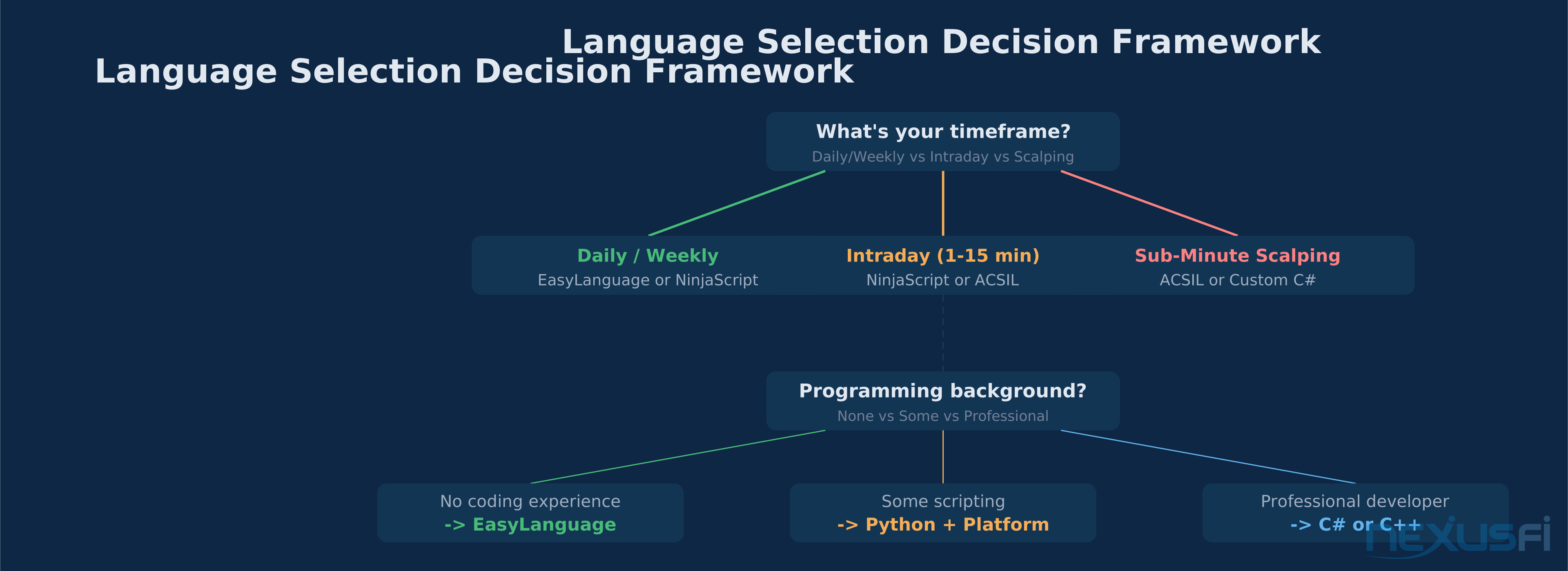
1. What's your timeframe?
- Daily/weekly charts -> EasyLanguage or NinjaScript (bar-close is fine)
- 1-15 minute intraday -> NinjaScript or ACSIL (need configurable update frequency)
- Sub-minute scalping -> ACSIL or custom C# (need tick-level event handling)
2. What's your data dependency?
- Price and volume only -> Any platform handles this
- DOM / order book depth -> ACSIL (Sierra Chart) or custom C# with direct feed
- Order flow / footprint -> ACSIL excels, NinjaScript with add-ons works
3. How much do you value portability?
- Don't care (committed to one platform) -> Use the platform's native language
- Want to switch later -> Python for research + minimize platform-specific code
- Building multi-platform -> C# with abstraction layers
4. What's your programming background?
- None -> EasyLanguage (lowest barrier, reads like English)
- Some scripting -> Python (most readable general-purpose language)
- Professional developer -> C# or C++ (leverage existing skills)
The Production Reality #
Every language can build a strategy that works in backtesting. The gap between "works in backtesting" and "runs reliably with real money" is where language choice actually matters.
Event sequencing errors, partial fill handling, feed disconnections at 3 AM, contract rollovers mid-position, exchange maintenance windows, and order rejections from risk limits — these production realities eat strategies alive regardless of the underlying language. But some languages give you better tools to handle them.
C# and ACSIL give you the most control over error handling and state recovery. NinjaScript's managed mode handles many edge cases automatically but limits your control when the automatic behavior isn't what you want. EasyLanguage abstracts away most production complexity, which works until it doesn't. Python requires you to build every safety net yourself.
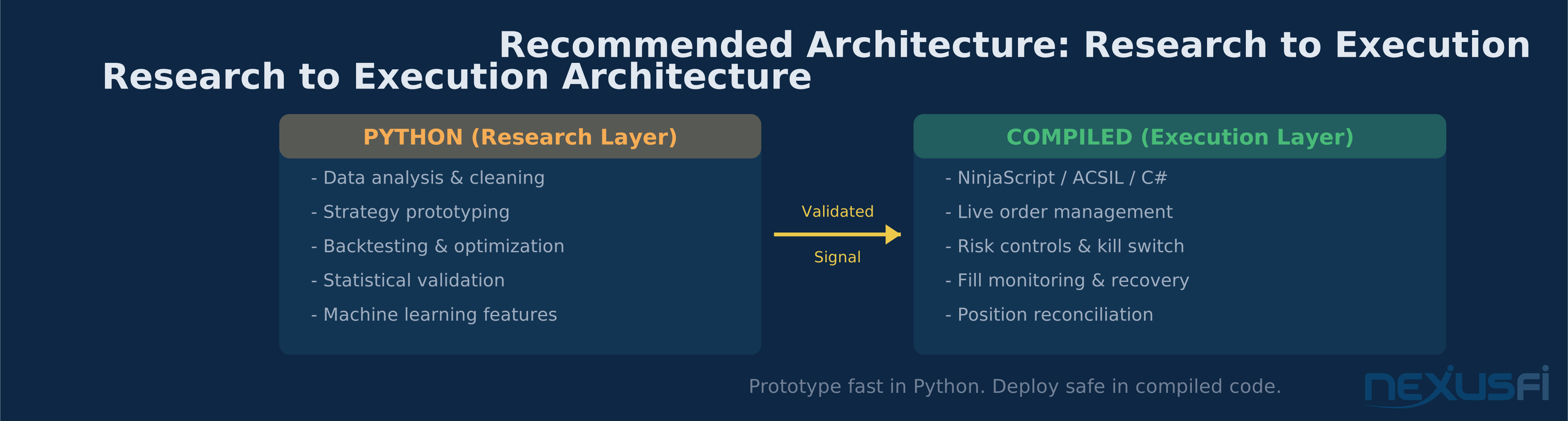
The best architecture for most futures traders: prototype in Python, backtest extensively, then deploy in your platform's native language with conservative risk limits and a kill switch you can trigger from your phone.
That's the game. Choose the language that matches your trading style, accept the tradeoffs, and invest the time to learn it properly. A simple strategy running reliably beats a sophisticated strategy crashing at the open.
Knowledge Map
Prerequisites
Understand these firstReferences This Article
Articles that build on this topicCitations
- — Sierra Chart ACSIL for Beginners. (2020) 👍 43“Hi I'm starting two threads on steps to get started using Sierra Charts Advanced Custom Study/System Interface and Language (ACSIL).”
- — VIDEO TUTORIAL: How to create an advanced MultiCharts EasyLanguage Strategy (2011) 👍 42“Last year I did a video tutorial on creating an advanced NinjaTrader strategy, and you guys liked it. So I thought that since I don't use NT any more it would be a good idea to do the same strategy as an example in EasyLanguage with MultiCharts.”
- — VIDEO: MultiCharts vs. NinjaTrader strategy backtesting and optimization (2010) 👍 35“In this video I conducted a head-to-head comparison of MultiCharts and NinjaTrader evaluating which performed better for backtesting and optimization.”
- — Automated Strategy for MNQ (2023) 👍 32“Hello everyone, I have decided after some thought to provide for free the current strategy that I use for my trading firm out of the hundreds that I have developed before.”
- — Auto-Trading with NinjaTrader 7 - For newbies (2011) 👍 13“Getting Started with NT7 Strategies To start new strategy with NT from the Control Center, go to the "Tools" Menu, Select "New NinjaScript", then select "Strategy...". NEW STRATEGY: Tools -> New NinjaScript -> Strategy...”
- — Bot Trading - MCL Futures (2022) 👍 7“Free, but many people do not like the only roughly 12 trades per year... Flat periods are just sitting on your hands... https://nexusfi.com/attachment.php?attachmentid=326374 https://nexusfi.com/attachment.”
- — Has anyone switched from Ninjatrader? (2018) 👍 7“That's BS. cory, usually your responses are very helpful and insightful, not sure what happened here... People switch all the time from Ninja to TS. People also switch from TS to Ninja.”
- — Want your NinjaTrader STRATEGY created for free? (2014) 👍 2“It just so happens that someone asked me to do this very thing and I don't mind sharing what I did. This Martingale thing is very interesting - I had never heard of it. But I gotta tell you, there might be something to this.”