



Multi-Broker Platform Access for Futures Trading: Connectivity, Risk, and the Operational Reality
Overview #
Running multiple brokerage accounts from a single trading platform is one of those capabilities that sounds straightforward until you're actually doing it. The concept is simple — connect to more than one broker, manage accounts, route orders. The execution is full of hidden complexity that can cost you money if you don't understand it.
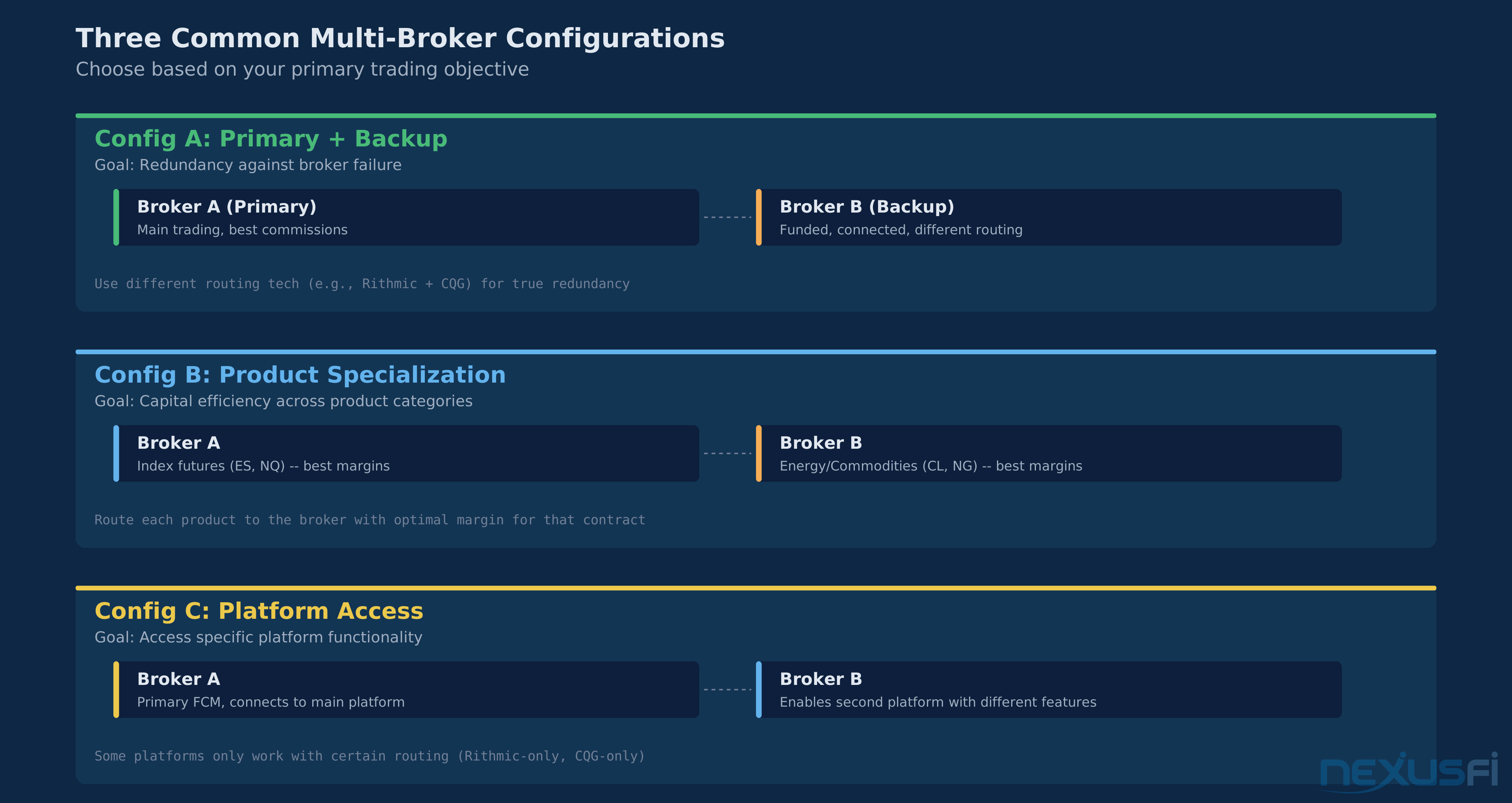
Why do futures traders use multi-broker setups? Three reasons dominate. First, capital diversification — spreading funds across multiple FCMs so a single broker failure doesn't wipe you out. The PFG Best scandal in 2012 taught the futures community that lesson in the most painful way possible, and the ripple effects shaped how an entire generation of traders thinks about broker risk. Second, access — different brokers offer different exchange access, commission structures, and margin requirements. You might want AMP's low commissions on ES but Interactive Brokers' access to European exchanges. Third, the prop firm explosion — traders running personal accounts alongside multiple funded evaluation accounts need multi-broker connectivity just to operate.
This article covers the practical mechanics of using one trading platform to connect to, route orders across, and manage multiple futures brokerage accounts. It doesn't cover strategy design, broker selection, custom API development, or detailed clearing and margin engineering.
Decision Framework: Do You Actually Need Multi-Broker? #
Before diving into the mechanics, answer this honestly: does your situation require multi-broker access? The added complexity has real costs.
Use multi-broker if:
- Your account balance exceeds $100,000 and you want FCM-level capital diversification
- You trade instruments across exchanges that require different broker relationships (e.g., CME through one broker, Eurex through another)
- You run a personal account alongside one or more prop firm funded accounts
- You need separate data feed and execution paths for latency or redundancy reasons
Don't use multi-broker if:
- Your total trading capital is under $50,000 — the operational complexity outweighs the diversification benefit at this size
- You trade a single instrument (ES only, for example) — there's no access advantage, only added failure surface
- You can't actively monitor during market hours — multi-broker reconnection issues require real-time attention
- You're running automated strategies and haven't tested order semantics per broker — each broker's cancel/replace behavior must be validated per strategy, which multiplies your QA burden much
The honest truth: for most retail futures traders with a single account under $50K trading 1-3 instruments, a single well-capitalized broker with strong risk controls is the superior setup. Multi-broker solves specific problems. If you don't have those problems, you're adding complexity for no benefit.
Priority Ladder: What Matters Most #
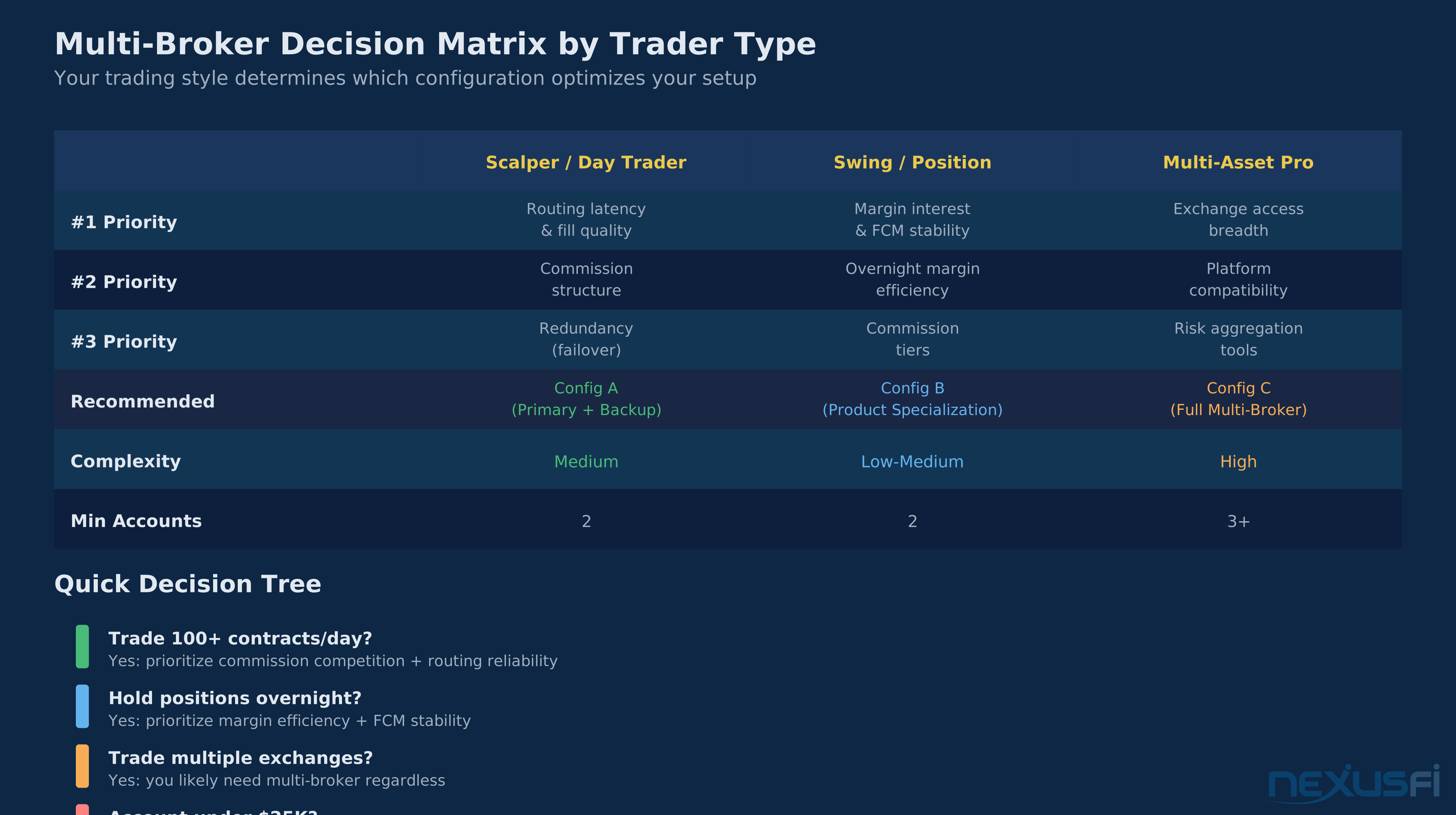
When building a multi-broker setup, these issues matter in this order. Don't improve item 5 while item 1 is broken.
- Account and symbol mapping correctness — if orders go to the wrong account or wrong contract, nothing else matters. This is existential.
- Margin and risk reality at the clearing level — understand what your FCM actually calculates, not what your platform displays. A margin mismatch can blow up an account.
- Order lifecycle semantics — know how cancel/replace, brackets, and OCO behave at each broker. Differences here cause real losses.
- Reconnection and state synchronization — your plan for what happens when a connection drops with working orders.
- Workflow optimization — account groups, trade copiers, automation routing, and latency tuning. Only pursue after 1-4 are solid.
Connectivity Architecture #
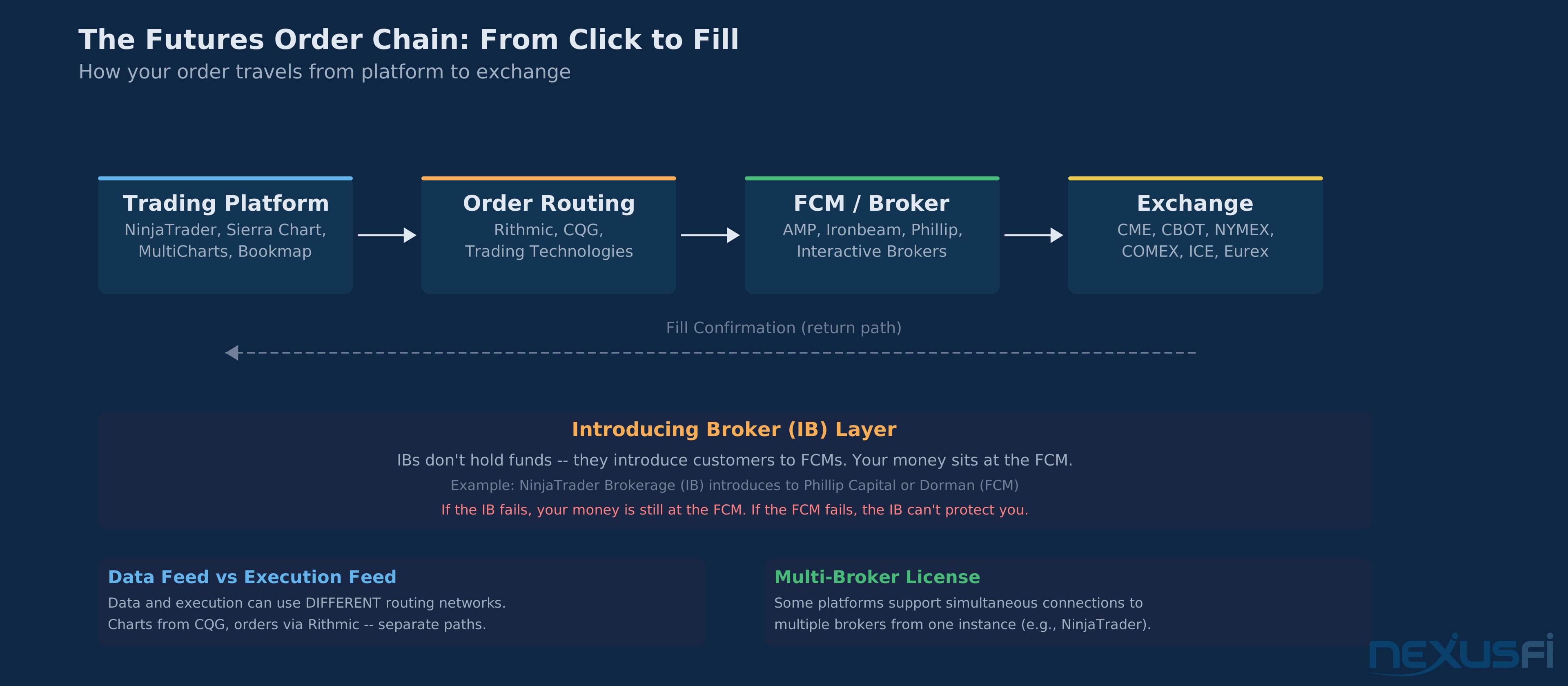
Every multi-broker setup starts with connectivity — how your platform talks to each broker's infrastructure. In futures, two connectivity paths dominate: proprietary APIs and the FIX protocol.
Proprietary APIs #
Most retail futures traders connect through proprietary APIs without even knowing it. When NinjaTrader connects to Rithmic, it uses Rithmic's proprietary protocol. When it connects to CQG, it uses CQG's API. Each broker technology stack has its own session management, rate limits, message formats, and quirks.
The critical distinction here: market data and order execution often travel through separate paths. You can receive market data from Rithmic while routing orders through CQG. As @NinjaTrader explains, "you can purchase a Multi-Broker license... this will allow you to have multiple data and broker connections in a single instance of NinjaTrader." [1] This data/execution separation is one of the most powerful features in multi-broker platforms — you can choose the best data feed independently from the best execution venue.
Session lifecycle matters here. When your platform logs in to a broker, it establishes a persistent session. Heartbeats keep the connection alive — typically every 30 seconds for Rithmic, configurable for CQG. If connectivity drops, the platform attempts reconnection and resubscription to market data streams. During that reconnection window, your working orders at that broker are still live on the exchange — but your platform might not see their status updates until the session recovers.
FIX Protocol #
FIX (Financial Information Exchange) is the industry standard for electronic trading communication. It's a structured messaging protocol that handles order submission, execution reports, and market data. In futures, the FIX protocol standardizes how orders are submitted (New Order Single - FIX tag 35=D), how fills are reported (Execution Report - 35=8), and how cancels work (Order Cancel Request - 35=F).
The advantage of FIX: it's a common language. The disadvantage: every broker speaks a slightly different dialect. Session configuration varies by broker — heartbeat intervals, sequence number management, and reconnection behavior all differ. A bracket order that works perfectly through one broker's FIX implementation might fail at another because they don't support the contingent order tags.
For most retail and semi-institutional futures traders, proprietary API connections are the practical reality. FIX becomes relevant when you're building custom middleware or connecting institutional-grade systems.
Account Identity and Mapping #
How a platform represents multiple brokers, accounts, and sub-accounts is Priority #1 in the ladder above. Get this wrong and orders go to the wrong account — and that mistake can be catastrophic.
The Account Model #
Every platform maintains an internal model of connected accounts. When you connect to Broker A (via Rithmic) and Broker B (via CQG), the platform sees two separate connection contexts, each with its own account identifiers. Within each connection, there may be multiple sub-accounts — a personal account, a retirement account, a prop firm funded account.
@Big Mike laid out the key differences between broker technologies: "For Zen Fire and Rithmic, each order submitted from any platform is available globally to all other platforms with their concurrent login feature. For TradingTechnologies, this is not possible, as they don't allow multiple logins with a single account. You have to create multiple subaccounts." [2] This single observation captures one of the fundamental architectural differences — some broker technologies allow concurrent sessions seeing the same orders, others force account segmentation.
Symbol Normalization #
Different brokers identify the same futures contract differently. ES on Rithmic might be ESM6 while CQG calls it EP. CL on one platform might be CLK6 while another uses QCL. Your platform must normalize these symbols so when you look at an ES chart and click the DOM, the order goes to the right contract at the right broker.
Validation test: Before going live, place a small limit order through each broker connection and verify the contract specs match — same tick size, same multiplier, same expiration. If your platform maps a symbol incorrectly, you could be trading a different contract month or even a different product entirely.
Account Targeting Rules #
When you click buy on your DOM, which account does that order go to? This depends on your platform's account targeting configuration:
- Manual selection — you pick the target account from a dropdown on each chart or order entry window. Simple but error-prone across many accounts.
- Per-instrument routing — ES orders always go to Broker A, CL orders to Broker B. Set it once, forget it. Works well when you use different brokers for different products.
- Account groups — the platform sends the same order to every account in a defined group simultaneously. This is the trade copier use case.
- Strategy-level assignment — automated strategies specify which account they trade. Each strategy knows its broker.
Order Management Across Accounts #
Managing orders across multiple broker connections is where multi-broker setups get genuinely complex. This is Priority #3 in the ladder — validate it before going live.
Order Lifecycle #
A standard order lifecycle: new order, acknowledgement, working, partial fill, complete fill (or cancel). In a single-broker setup, this is linear and predictable. In multi-broker, each broker processes orders independently. An ES limit order at Broker A and an NQ stop at Broker B are on completely separate execution paths. They don't interact at all — no cross-broker contingency is possible.
When you submit a bracket order (entry + stop + target), that entire bracket is handled by one broker's OMS. You can't have the entry at Broker A and the stop at Broker B. The bracket lives and dies within a single broker relationship.
Cancel/Replace Semantics #
This is where broker differences bite hardest. A cancel/replace (modify) of a working order has different semantics at different brokers:
- Atomic modification — the order changes in place, maintaining queue position. Rithmic supports this for certain order types.
- Cancel and resubmit — the broker cancels the original and submits a new order. You lose time priority. TradingTechnologies typically works this way.
- Not supported — some broker/order-type combinations don't support modification at all. You must cancel and manually re-enter.
The operational risk: during the gap between cancel and resubmit, you're briefly unprotected. If your stop was at 4500 on ES and you're modifying it to 4495, there's a window where you have no stop at all. In a fast market, that window can cost money.
Test protocol: Before live trading, submit a working limit order through each broker. Modify it. Time the round-trip. Note whether queue priority is preserved. Do this for every order type you plan to use — limit, stop, stop-limit, bracket, and OCO.
State Synchronization #
Here's a real failure narrative that illustrates why this matters:
Scenario: A trader runs a 5-lot ES long position at Broker A with a stop at 4480. The platform's connection to Broker A drops for 45 seconds during a volatile sell-off. During the disconnect, ES drops to 4475 and the stop fills at 4479.50.
What the trader sees: When the platform reconnects, it shows two conflicting states — the position blotter still shows 5 ES long (stale data), but the P&L has jumped (partial update). The platform's reconciliation process queries the broker's execution reports and discovers the fill. In a well-built platform, the position updates within 2-3 seconds of reconnection. In a less strong platform, the trader sees a "phantom position" — an open position that doesn't exist — until they manually refresh or restart.
The mitigation: After any disconnection event, verify your positions directly with the broker (web portal, phone desk, or secondary platform) before placing new orders. Don't trust the platform display until reconciliation completes.
Bulk Operations #
Mass cancel (flatten all) behaves differently in multi-broker. When you hit the "flatten" button, the platform must send cancel requests and closing orders to every connected broker. These requests are dispatched in parallel or serial depending on implementation — and even parallel dispatch doesn't mean simultaneous execution. Network latency to each broker differs.
Failure case: You hit flatten-all during a spike. Broker A cancels your working orders and closes your position in 200ms. Broker B's connection is slightly delayed — your cancel request arrives 800ms later, during which Broker B's stop has already triggered. Now you have an unexpected fill at Broker B that the platform hasn't processed yet. Result: you think you're flat, but you have a new position at Broker B that you didn't intend.
Execution Routing #
A common misconception: that multi-broker platforms "route" orders between brokers the way a smart order router selects exchanges. In reality, most retail futures platforms don't do smart routing between brokers. They send orders to whichever broker owns the target account. The "routing" is your account selection, not algorithmic broker comparison.
@djkiwi flagged this gap: "One of the most important functions in multi-broker trading software should be to make it easy to help trade across multiple brokers but this important feature is missing." He described wanting to direct orders automatically by instrument — stocks to TD Ameritrade, oil to Interactive Brokers, FDAX to AMP — but the platform required manual broker selection on each chart. [4]
Failover #
What happens when your primary broker's connection drops mid-session? In most platforms: nothing automatic. Your orders at that broker are still live on the exchange, but you lose visibility and control until reconnection. Your failover options:
- Wait for reconnection (typically 5-30 seconds, but can be minutes)
- Call the broker's trade desk (minutes — potentially too slow in a fast market)
- Log in to the broker's web portal (if available)
- Route a closing order through a different broker — but only if you hold the same contract at that second broker. If not, you create an opposing position at a different broker, doubling your margin and creating a reconciliation nightmare
Risk Aggregation #
Platform Risk vs Broker Risk #
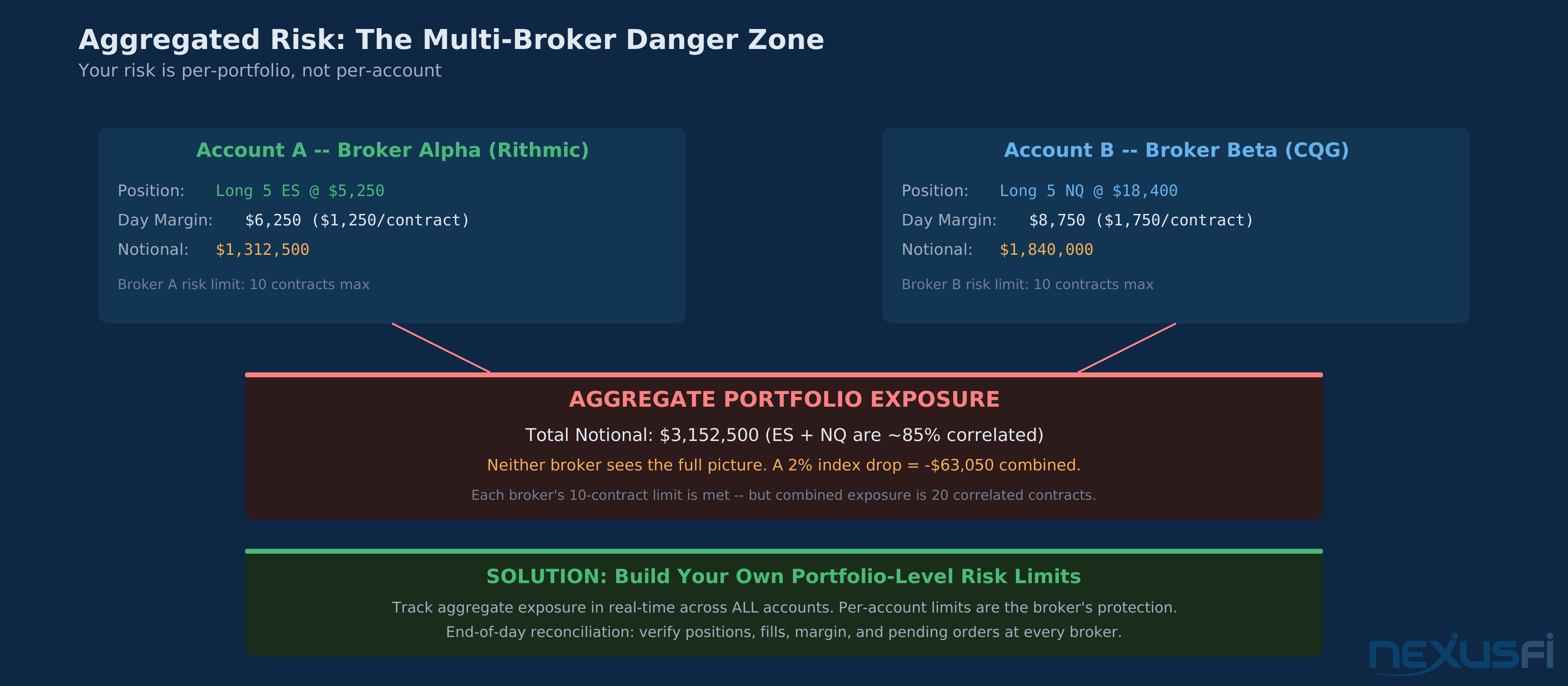
Your trading platform shows you a consolidated view of all connected accounts — total P&L, total position count, aggregate exposure. This is useful for monitoring but it's not how risk is actually managed.
Each broker enforces its own risk controls independently. Broker A doesn't know what positions you hold at Broker B. If you're long 10 ES at Broker A and short 10 ES at Broker B, your platform might show you "flat" overall. But each broker sees a 10-contract directional position and charges margin so. You're paying double margin for a net-flat position.
Operational KPIs to Track #
When running multi-broker, measure these regularly:
- Reconnection handling time: from disconnect to full state synchronization. Target under 5 seconds. Anything over 30 seconds is a problem.
- Cancel acknowledgment latency: time from cancel request to confirmed cancel, per broker. Test during market hours, not just simulation.
- Position reconciliation delta: difference between platform-displayed and broker-confirmed positions. Target: always zero. Any nonzero delta requires immediate investigation.
- Flatten completion time: from flatten command to all positions confirmed closed across all brokers. Test under simulated volatility.
Margin: Consolidation vs Separate Margin #
This is the single most misunderstood aspect of multi-broker trading. Priority #2 in the ladder. The platform makes it look consolidated. The clearing system says otherwise.
The Default Reality: Separate Margin #
When you have accounts at two different brokers (FCMs), each broker calculates margin independently using SPAN methodology. Your $50,000 at Broker A and $50,000 at Broker B are two completely separate margin pools. There is no cross-margining benefit between them.
If you hold a long ES position at Broker A and a short ES position at Broker B — a perfectly hedged pair — each broker still charges full initial margin on its respective position. That's roughly $12,500 per side on ES, so $25,000 in margin for a net-flat position. At a single broker, the spread would require near-zero margin.
@bobwest clarified the clearing infrastructure: clearing brokers "are part of the basic infrastructure of the futures market. The term 'clearing' is often used loosely (sometimes by FCMs or IBs). But it's a very specific function." [6]
The Platform Display Trap #
Here's where traders get burned: your platform shows you "total margin used" by summing margin across all connected accounts. This looks like consolidated margin but it isn't. If your platform shows $30,000 total margin used across three accounts, each account is using $10,000 in margin independently. If one account has only $12,000 and uses $10,000 in margin, it's at 83% utilization — dangerously close to a margin call — even though the "aggregate" view looks comfortable.
@liquidcci raised this concern regarding FCM clearing structures: understanding whether your broker operates as a clearing FCM (under more stringent rules for segregating accounts) or non-clearing FCM directly impacts how your margin is calculated and how your funds are protected. [7]
Platform Capabilities #
Major futures trading platforms handle multi-broker access differently. Here's the operational reality.
NinjaTrader #
NinjaTrader requires a multi-broker license (paid upgrade) to connect to more than one broker technology simultaneously. Supports Rithmic, CQG, Interactive Brokers, and NinjaTrader Brokerage connections.
@tderrick documented the setup: "You can e-mail sales@NinjaTrader.com your NinjaTrader license key — and upgrade it to the multi-broker version. This will allow you to have multiple data and broker connections in a single copy of NinjaTrader." [8]
Key limitation: Account Groups (order replication across accounts) were available in NinjaTrader 7 but missing in NinjaTrader 8 for years. Without account groups, mirroring trades requires third-party trade copier add-ons.
Sierra Chart #
Sierra Chart uses a "Trading Service" architecture where each broker connection is an independently configurable service. Supports multiple simultaneous trading services without a separate license upgrade. More granular control over data/execution routing per service, but configuration is more technical than GUI-driven platforms.
CQG #
CQG operates as both a platform and a broker technology gateway. Many brokers use CQG as their back-end, so connecting through CQG gives you access to multiple brokers within the CQG ecosystem. Unified data and execution architecture. Trade-off: less flexibility to mix CQG with non-CQG broker technologies.
MultiCharts #
MultiCharts supports connections to Rithmic, CQG, Interactive Brokers, and others simultaneously. Strategy-to-broker assignment allows automated strategies to target specific broker connections — the strongest native automation-to-broker mapping of the platforms listed here.
The Prop Firm Use Case #
The rise of prop firm evaluation accounts has created the most common multi-broker use case. Traders run a personal live account alongside one or more funded evaluation accounts (Apex, TopStep, Earn2Trade). Each funded account typically connects through Rithmic but under different login credentials.
The operational challenge: placing the same trade in your personal account and funded accounts simultaneously. Account groups (where available) solve this elegantly. Where they're not available, traders use trade copier add-ons that listen for fills on a master account and replicate them to slave accounts.
Latency between the master fill and the replicated order matters. On ES during a 10-tick spike, a 500ms copier delay could mean 2-3 ticks of slippage per contract on the copied account. Over 20 trades per day, that's 40-60 ticks of cumulative slippage — roughly $500-750 per day on a single ES contract. That adds up fast.
Regulatory Considerations #
Position Limit Aggregation #
CFTC Rule 150 requires position limits to be calculated across all accounts you control. Running close to limits? Your multi-broker setup doesn't give you additional room. The limit applies to your aggregate net position across all brokers, all accounts. Failure to aggregate correctly is a compliance violation.
Fund Segregation #
Each FCM holds customer funds in segregated accounts. Spreading capital across brokers diversifies your exposure to any single FCM's segregated fund pool.
Production Checklist #
Before running a multi-broker setup live, validate each of these with explicit pass/fail criteria:
- Connectivity test — connect to each broker independently. Verify login, market data subscription, and order entry access. Pass: all connections stable for 30+ minutes.
- Symbol normalization — for every instrument you trade, verify the contract specs match across brokers. Same tick size, same multiplier, same expiration date. Pass: zero discrepancies.
- Account targeting — submit a small limit order (well away from market) to each account. Verify it arrives at the intended broker. Pass: 100% correct routing.
- Order type compatibility — test limit, stop, stop-limit, bracket, and OCO orders at each broker. Note which types are supported, which have different semantics. Pass: documented behavior matrix per broker.
- Cancel/replace test — modify a working order at each broker. Time the round-trip. Note if queue priority is preserved. Pass: behavior documented and acceptable.
- Reconnection simulation — disconnect your network for 30 seconds with working orders. Reconnect. Verify position state synchronizes correctly. Pass: positions match within 5 seconds of reconnection.
- Margin verification — compare platform-displayed margin per account with broker-reported margin. Pass: numbers match within rounding tolerance.
- Flatten-all test — with small positions at multiple brokers, execute flatten-all. Verify all positions close and all working orders cancel. Pass: confirmed flat at all brokers within 3 seconds.
When Multi-Broker Setups Fail #
Multi-broker isn't always the right answer. The added complexity creates failure modes that single-broker setups don't have:
- Reconnection cascades — when your internet drops, every broker connection goes down simultaneously. Reconnecting to 3 brokers takes longer than reconnecting to 1, and if one broker's session recovery triggers a resubscription storm, it can delay the others
- Configuration drift — account assignments, symbol mappings, and risk settings can silently change after platform updates. You won't know until an order goes to the wrong account
- Margin fragmentation — splitting $100,000 across three brokers means each account has $33,000 in margin. You can't trade the same size per account that you could with consolidated capital at one broker
- Operational complexity — more connections means more points of failure, more credentials to manage, more statements to reconcile, more customer support numbers to have on speed dial
For many traders, a single well-capitalized account at a reliable broker with strong risk controls is superior to a complex multi-broker setup. Multi-broker access is a tool for specific situations — capital diversification, exchange access, and prop firm management. Use it when you need it, not because you can.
Knowledge Map
Go Deeper
Build on this knowledgeCitations
- — Introducing Brokers and FCMs (2021) 👍 12“Hi awesomizer, To be clear, your account is held by the FCM. "Held" means that they have the money and they are responsible for your trades. If you have a trade inquiry, you would normally contact the support people at your IB, but they would then...”
- — NinjaTrader Multi-Broker License (2020) 👍 1“Understood. If I understand correctly, you want to use Rithmic feed while routing orders through CQG. If this is correct, then you can purchase a Multi-Broker license (this is a option available in the drop down menu on our platform purchase page of...”
- — FCM vs IB Structure (2021) 👍 4“It's really the other way around. NinjaTrader has dropped Phillip. NinjaTrader Brokerage, which has used Phillip and Dorman as their FCM's, has gotten their own FCM up and running, "NinjaTrader Clearing," and is transferring all their accounts to the...”
- — IB-FCM Account Setup (2022) 👍 14“OK, I can understand that. I hope this is not too basic, but let's get back to the basics of what each player does. There may be variations on this, but I think this will be a decent outline, and it's going to be complicated enough, anyway. :) 1.”
- — Broker Intermediary Structure (2023) 👍 7“Hi HarryNguyen. This comes up now and then. Perhaps we should just write up something to refer people to, since it's a natural question. To start, the term "broker" has more meanings than the way you are using it. There are: 1.”
- — Need Help: Urgent Broker Problem (2021) 👍 4“Also same problem. I use Ninja brokerage/Ninja/ Continuum(CQG)/Phillip Capital. I managed to avoid the Phillip Capital disaster, but today I'm stuck dealing with this CQG outage.”
- — Ironbeam Review (2026)“Fr33B1rd, smart question -- where your money sits matters more than most new traders realize. The biggest distinction here isn't really about size -- it's about how each firm handles your funds: Ironbeam is a registered FCM and a CME Group clearing m...”
- — Need Broker (2024) 👍 5“The response I've seen on r/Futures is AMP and EdgeClear are the best of either end of the spectrum, and I tend to agree. I have accounts at these two and only use them anymore, tho I have accounts open elsewhere too. AMP.”
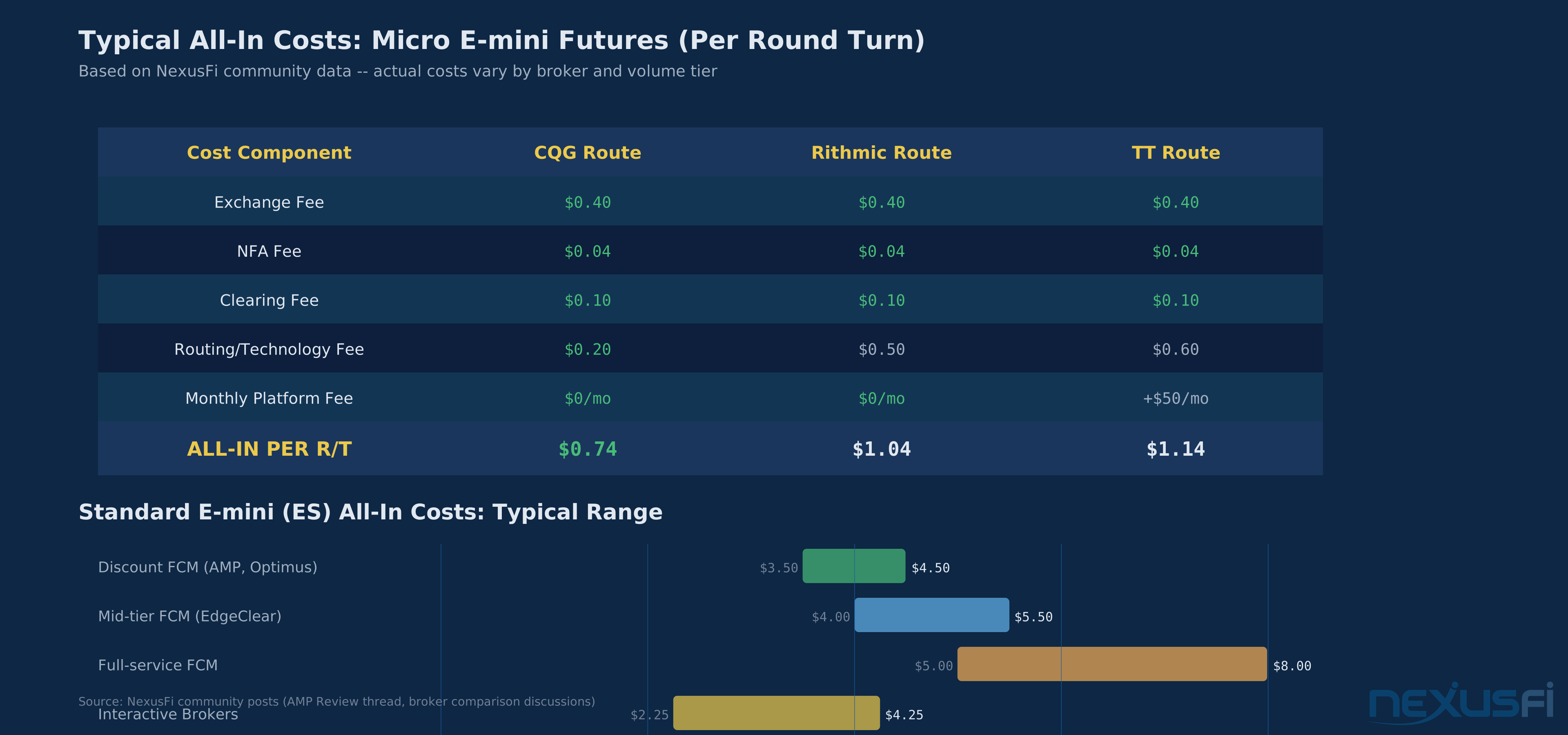
- — AMP Futures / AMP Global Review (2020) 👍 4“To be explicit -- it depends on the data provider. The cost per R/T for flat-tier pricing is: 0.40 - Exchange 0.04 - NFA 0.10 - clearing + either: 0.20 for CQG, 0.50 for Rithmic, 0.60 for TT (+$50/month for TT) So, on the flat tier it's either $0.”
- — Costs associated with trading futures? (2020) 👍 7“No, this is incorrect, at least for ES (Edit: looking over the past few posts, I'm not clear if you are looking for ES or the smaller MES contract, or if you've definitely decided. I responded based on your original post regarding ES.”