



Parabolic SAR: The Accelerating Stop That Forces You Out of Stalling Trades
Overview #
Overview #
The Parabolic SAR (Stop and Reverse) is one of those indicators that does exactly what it says — it gives you a stop level, and when that stop gets hit, it reverses direction. Welles Wilder introduced it in his 1978 book New Concepts in Technical Trading Systems alongside RSI and ADX, and it remains one of the cleanest trend-following tools available to futures traders.
As @Fat Tails noted on NexusFi, some platform implementations -- including NinjaTrader's default PSAR -- don't perfectly follow Wilder's original logic, especially around reversal-day handling where the stop gets breached on the same bar that sets a new extreme.
Here's what makes it different from a simple trailing stop: the SAR accelerates. The longer a trend runs and the further price extends, the faster the stop catches up. That acceleration is the entire design philosophy — it forces you out of trades that stall and keeps you in trades that keep moving. No discretion required.
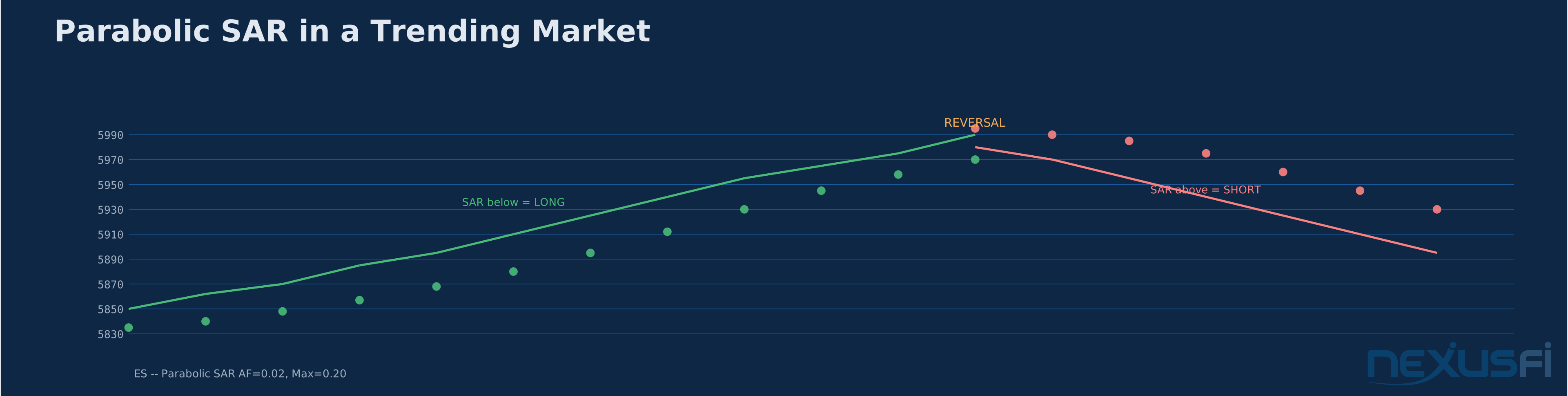
For futures traders running ES, NQ, or CL on intraday timeframes, the Parabolic SAR serves two purposes: it defines your trailing stop in real time, and it provides objective trend direction. Dots below price mean long. Dots above price mean short. When the dots flip, you flip. That simplicity is both its greatest strength and its biggest limitation.
Key Concepts #
The SAR Formula
The calculation is deceptively simple:
SAR(tomorrow) = SAR(today) + AF x (EP - SAR(today))
Three variables drive everything:
- SAR(today) -- the current stop level. This is the dot on your chart.
- EP (Extreme Point) -- the highest high since the long trade started, or the lowest low since the short trade started. EP only moves in the direction of the trade -- it ratchets, never retracts.
- AF (Acceleration Factor) -- starts at 0.02 and increases by 0.02 each time price makes a new EP, capping at 0.20. That's a maximum of 10 acceleration steps before the stop is moving at full speed.

The math works like this: on each bar, the SAR moves toward the EP by the percentage defined by AF. At AF=0.02, the stop closes 2% of the gap between itself and the extreme point. At AF=0.20, it closes 20% of the gap per bar. That's a 10x difference in tracking speed.
One critical rule from Wilder's original specification that many implementations get wrong: the SAR for a long trade can never be placed above the lowest low of the current or prior bar. For a short trade, the SAR can never be placed below the highest high of the current or prior bar. As @Fat Tails noted on NexusFi, some platform implementations — including NinjaTrader's default PSAR — don't perfectly follow Wilder's original logic, especially around reversal-day handling where the stop gets breached on the same bar that sets a new extreme.
The Acceleration Factor in Practice
The AF is where all the action happens. Understanding it separates competent PSAR users from everyone who just slaps dots on a chart and wonders why they get whipsawed.
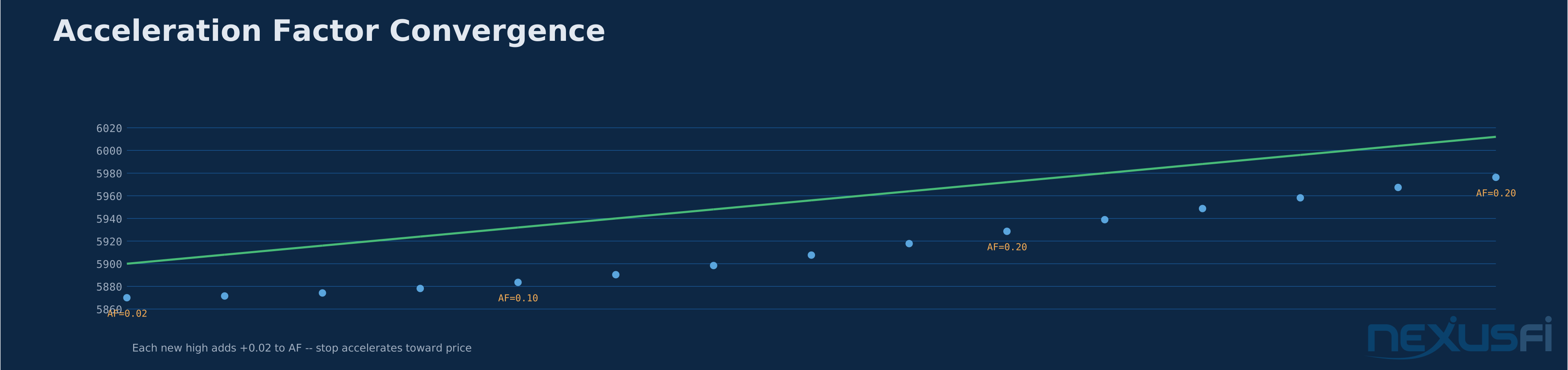
Here's the critical nuance: AF only increases when price makes a new extreme point. If price is trending but pulling back slightly without making new highs (in a long), AF stays frozen. The stop doesn't accelerate during pullbacks — it just keeps moving at its current pace. This is Wilder's solution to the problem of stops that tighten too aggressively during minor retracements.
As @Inletcap explained in The Scalper's Path, "Supertrend does not have an acceleration like Parabolic SAR — also, it will chop when breached." That acceleration behavior is exactly what distinguishes PSAR from simpler trailing stop approaches. Inletcap shared a modified implementation that freezes the SAR entirely during minor pullbacks (when close is below open in a long trade), adding an additional layer of whipsaw protection beyond Wilder's original.
The default parameters (AF step=0.02, AF max=0.20) work for daily charts on most instruments. For intraday futures, many traders adjust these. Inletcap reported using "an AfStep of .035 and AfLimit of .195 on the renko charts — really wicked on a 6t unirenko." Faster timeframes often benefit from a slightly larger step (faster initial acceleration) or a lower max (preventing the stop from catching up too quickly during extended runs).
The Reversal Mechanism
When price hits the SAR level, three things happen simultaneously:
- The current position closes (the "Stop" part)
- A new position opens in the opposite direction (the "Reverse" part)
- AF resets to its initial value (0.02), and EP resets to the current bar's extreme
This makes PSAR an always-in-the-market system. You're either long or short, never flat. That design choice is intentional — Wilder built it for trend traders who want continuous market exposure. For futures traders who prefer selective engagement, you'd need to add a filter (more on that below) to decide which reversals to take and which to ignore.
How It Works #
Reading PSAR on a Chart
The visual is straightforward. Green (or white) dots below price indicate a long bias. Red (or colored) dots above price indicate a short bias. The distance between the dots and price tells you how much room the trend has before the stop catches up.
Wide gaps early in a trend (low AF) mean the stop gives price plenty of room. Tight gaps late in a trend (high AF) mean the stop is about to get hit unless price keeps moving aggressively. When you see the dots converging rapidly toward price, one of two things is about to happen: price accelerates away (extending the trend) or the dots catch up and trigger a reversal.
Calculate On Bar Close vs. Tick-by-Tick
This is a practical implementation detail that matters enormously for intraday futures. As @Fat Tails detailed in his analysis of NinjaTrader's Parabolic code: setting the indicator to calculate only on bar close (COBC=true) means the stop breach won't signal until the current bar completes. For a 5-minute chart, that could mean 4+ minutes of delayed reaction. Setting COBC=false recalculates with every tick, which is more responsive but takes much more CPU resources.
For PSAR specifically, tick-by-tick calculation makes more sense than for most indicators. The SAR is at the core a stop level — you want to know the moment price breaches it, not 5 minutes later. The trade-off is performance, especially if you're running multiple instruments or timeframes simultaneously.
Practical Application #
Using PSAR as a Trailing Stop
The most common application in futures: use PSAR dots as your trailing stop level on an existing trade that was entered using a different method. You enter the trade based on your setup (order flow, support/resistance, whatever your edge is) and then use PSAR to manage the exit.
Concrete example on ES:
- Enter long at 5880 based on a VWAP bounce with delta confirmation
- Initial stop at 5870 (your setup's invalidation level)
- Once PSAR dots move above your initial stop level, switch to PSAR as the trailing stop
- As the trade runs to 5920, PSAR has accelerated from 5868 to 5905
- Exit when price retraces and touches the SAR at 5905 -- locking in 25 points
This approach solves a common problem: traders who can get into good trades but don't know when to get out. PSAR gives you an objective, calculated exit that tightens as the trend matures.
As @trendisyourfriend discussed in the Elite NinjaTrader Trading thread, you can improve PSAR trade management by combining the stop-and-reverse logic with additional position management rules. The PSAR provides the baseline exit level while supplementary conditions handle scale-outs or profit-taking along the way.
PSAR as a Trend Direction Filter
Second application: use PSAR position (above or below price) as a trend direction filter for other signals. When SAR is below price, only take long setups. When SAR is above price, only take short setups. This is especially effective on higher timeframes (30-minute, hourly) to filter lower-timeframe entries.
The setup looks like this:
- 30-minute PSAR shows dots below price (bullish bias)
- On the 5-minute chart, wait for pullbacks to support levels
- Take only long entries with VWAP or delta confirmation
- If the 30-minute PSAR flips, stop taking longs and switch to short setups
Limitations and Failure Modes #
The Whipsaw Problem
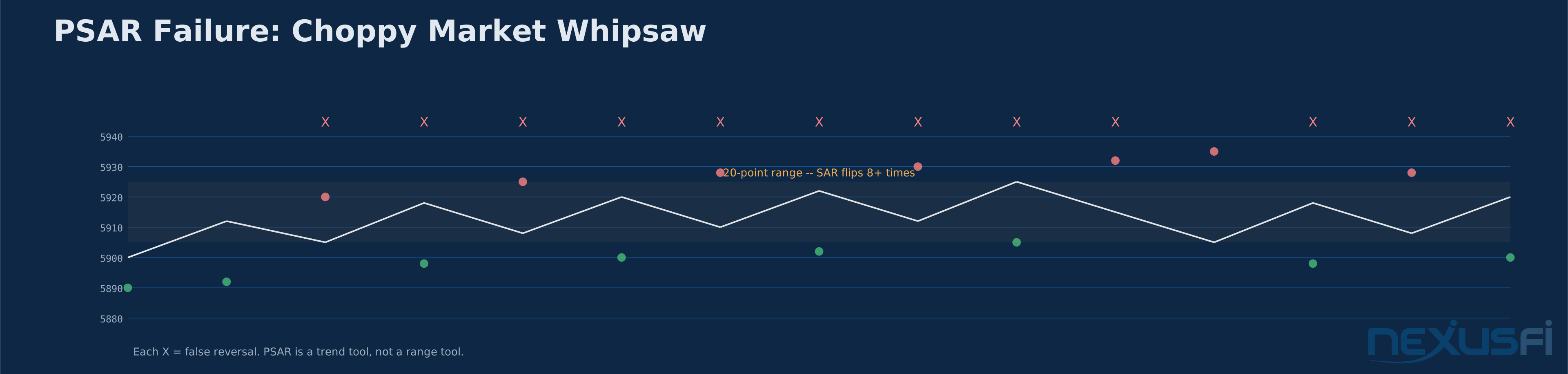
PSAR fails — badly — in range-bound markets. This isn't a minor limitation; it's the indicator's Achilles heel.
When price oscillates in a 20-30 point range on ES, the SAR flips direction constantly. Each flip represents a losing trade if you're using it as an always-in system. In a typical 2-hour chop zone, you can accumulate 6-8 false reversals, each costing 5-15 ticks plus commissions and slippage. That's 30-120 ticks of losses before the market finally picks a direction.
The math is brutal. If PSAR generates 8 false signals in a chop session at an average cost of 8 ticks each on ES ($12.50/tick), that's 64 ticks = $800 per contract. Even if the eventual breakout trend captures 40 points ($500/contract), you're net negative for the session. This is why PSAR should never be used as a standalone system without a trend filter.
Gap Risk in Futures
Futures gap between sessions. If you're holding a PSAR-based long position overnight and ES gaps down 50 points on bad news, the SAR was at 5905 and the opening print is 5850 — you're not getting out at 5905. You're getting out at 5850 (or worse, depending on liquidity). The SAR value is just a number on a chart; in the real world, you get filled at the market price, not the indicator price.
Wilder addressed this in his original work: when price gaps beyond the stop, the position reverses at the open. But the damage is done. For overnight holders in futures, PSAR provides a false sense of precision about exit levels that the gap reality destroys.
Parameter Sensitivity
The default AF step of 0.02 and max of 0.20 are arbitrary choices that worked well on daily commodity charts in the 1970s. They are not optimized for 2024-era ES micro-scalping or CL day trading. Faster instruments on shorter timeframes often need larger step sizes (0.025-0.04) to keep up, while volatile instruments like CL might need smaller max values (0.15) to prevent the stop from catching up too quickly during normal retracements.
There's no universal "best" parameter set. Any parameter optimization is curve-fitted to the sample period. The real value of PSAR is in the mechanism (accelerating stop) not in any specific parameter combination.
Integration with Other Tools #
PSAR + ADX: The Essential Trend Filter
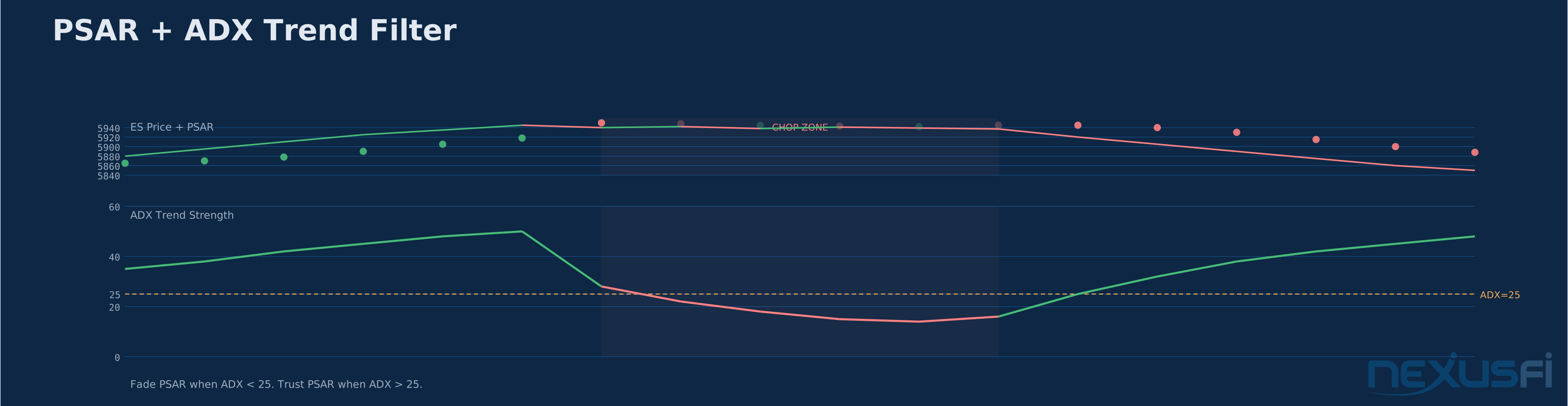
The single most effective improvement to PSAR: filter signals by ADX (Average Directional Index). Wilder developed both indicators and they complement each other by design.
The rule is straightforward: only follow PSAR reversals when ADX is above 25 (indicating a trending market). When ADX is below 25 (range-bound), ignore PSAR signals entirely or flatten your position. This single filter eliminates the majority of whipsaw losses.
Backtesting this combination on ES 30-minute bars shows approximately 40-60% reduction in false signals compared to raw PSAR, depending on the period and market regime. The trade-off is delayed entries — you'll miss the first portion of some trends while waiting for ADX to confirm. In practice, that's a trade most professionals are happy to make.
PSAR + ATR: Volatility-Adjusted Stops
Some traders replace PSAR entirely with ATR-based trailing stops, but a hybrid approach works better: use PSAR for the acceleration logic and ATR for the minimum distance. The rule: the SAR can never be closer to price than 1.5x ATR(14). This prevents the stop from tightening into normal noise during volatile sessions.
On CL (crude oil), where intraday volatility regularly swings 2-3%, a raw PSAR stop might sit 15 cents from price during a fast move. An ATR floor of $0.30-$0.40 (1.5x a typical 14-period ATR on 5-minute bars) keeps you in the trade through normal retracements while still capturing the trend exit when momentum genuinely fades.
PSAR + Volume Confirmation
PSAR reversals on high volume carry more weight than reversals on light volume. When the SAR flips from long to short and that bar shows 2x average volume with aggressive selling delta, the reversal signal is strong. When the SAR flips on a thin, low-volume bar that barely breached the stop level, treat it as suspect.
This isn't built into the indicator — you have to overlay the judgment yourself. But it's a practical filter that separates genuine trend changes from noise-driven stop triggers.
PSAR Modifications: Beyond Wilder's Original #
Several meaningful modifications exist in the NexusFi community:
Pullback-Pausing SAR: @Inletcap's modification freezes the SAR during minor pullbacks (bars where close is below open in a long trade). The standard PSAR keeps advancing during pullbacks; the modified version only advances when price is moving in the trade direction. This much reduces whipsaw but slightly delays the stop during genuine reversals.
Median-Price SAR: Instead of using high/low for EP calculation, use (H+L)/2 or (O+H+L+C)/4. This smooths the extreme point and reduces the impact of single-bar spikes. Inletcap reported using this approach with "a median price and highest high/lowest low since transition to somewhat smooth volatility."
SMA-Smoothed SAR: @Hansen demonstrated on NexusFi wrapping the PSAR in a 1-period SMA and using the cross of this smoothed value for exit signals rather than the raw SAR level. This adds a bar of lag but eliminates tick-level noise that can trigger premature exits.
Parameter Guidelines by Instrument #
These are starting points, not gospel. Backtest everything on your specific timeframe.
| Instrument | Timeframe | AF Step | AF Max | Notes |
|---|---|---|---|---|
| ES (E-mini S&P) | 5-min | 0.02 | 0.20 | Defaults work well in trending sessions |
| ES | 30-min | 0.02 | 0.20 | Best as trend filter, not trade trigger |
| NQ (E-mini Nasdaq) | 5-min | 0.025 | 0.20 | Slightly faster step for NQ's higher beta |
| CL (Crude Oil) | 5-min | 0.02 | 0.15 | Lower max prevents premature stop-out during CL's wide swings |
| CL | Tick/Renko | 0.035 | 0.195 | Per @Inletcap's renko optimization |
| ZB (Treasury Bonds) | 15-min | 0.015 | 0.18 | Slower-moving instrument needs gentler acceleration |
| GC (Gold) | 5-min | 0.02 | 0.18 | Standard step, slightly reduced max for gold's tendency to spike and retrace |
When NOT to Use Parabolic SAR #
Don't use PSAR when:
- Markets are range-bound (ADX below 20) -- you'll get chopped to pieces
- During major news events (FOMC, NFP, CPI) -- the gap and spike behavior makes the calculated stop meaningless
- As your only indicator -- PSAR is a trend management tool, not a complete trading system
- On very short timeframes without modification -- 1-minute charts generate too many false reversals with default parameters
- For mean-reversion strategies -- PSAR is a trend tool. Using it in a mean-reversion context is using a hammer on screws
The indicator does one thing well: it trails a stop that accelerates. Build your system around that strength and filter around that limitation.