



Getting Started on Polymarket: The Decentralized Prediction Market for Crypto-Native Traders
How to set up your account, fund with USDC, understand smart contract resolution, and start trading on Polymarket — the world's largest decentralized prediction market.
Overview #
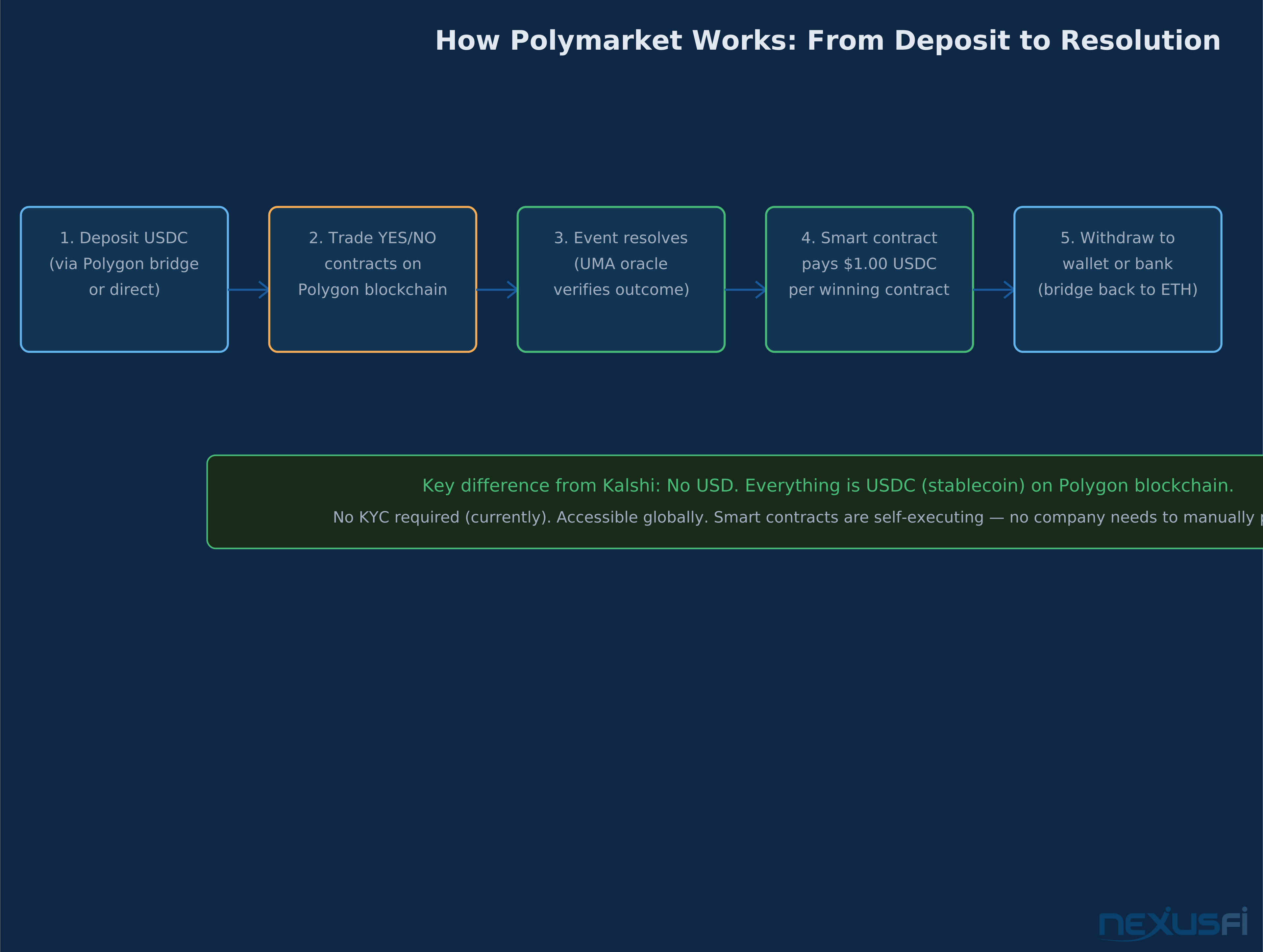
Polymarket is a prediction market that runs on the Polygon blockchain. Unlike Kalshi, which is a CFTC-regulated US exchange, Polymarket uses smart contracts and a decentralized oracle to resolve events automatically. Settlement is in USDC (a dollar-pegged stablecoin), not USD.
This guide covers everything you need to get started: wallet setup, USDC funding, navigating the interface, placing your first trade, and the critical differences between Polymarket and traditional prediction markets.
How to set up your account, fund with USDC, understand smart contract resolution, and start trading on Polymarket — the world's largest decentralized prediction market.
What Makes Polymarket Different #
Before walking through setup, understand Polymarket's fundamental design choices and how they affect your experience.
Blockchain-native settlement: Polymarket runs on Polygon (an Ethereum Layer 2 network). All trades are recorded on-chain. Winning contracts pay out automatically via smart contracts — no company has to manually process your withdrawal.
USDC, not USD: You deposit and withdraw USDC (USD Coin), a stablecoin pegged 1:1 to the US dollar. USDC is issued by Circle and backed by USD-denominated assets. For practical purposes, 1 USDC = $1.00, but you need crypto infrastructure to hold it.
No KYC (currently): As of 2026, Polymarket does not require identity verification for most users. This creates accessibility for global users who can't open Kalshi accounts, but also means US restrictions are enforced only via geofencing (and cannot be relied upon as a legal compliance mechanism).
UMA Oracle for resolution: Polymarket uses the UMA (Universal Market Access) oracle to verify event outcomes. UMA token holders can dispute resolutions within a 2-day window. This decentralized resolution system is more transparent than centralized alternatives but occasionally produces resolution delays or disputes.
Setup: Wallet and Account #
Step 1: Get a Crypto Wallet #
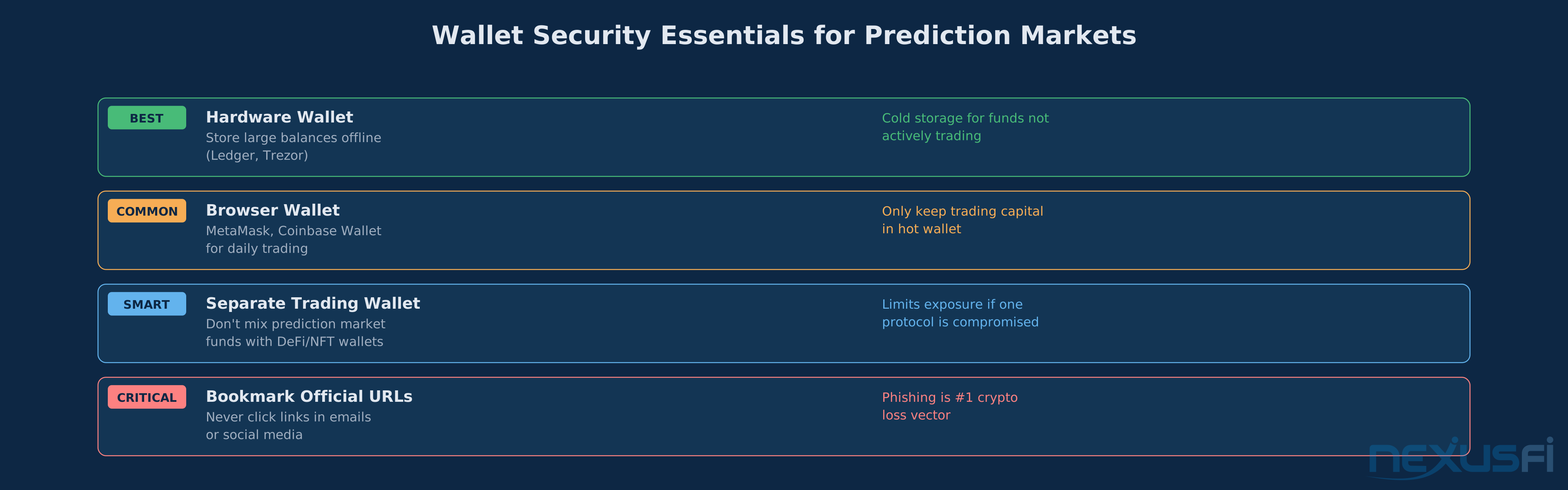
To use Polymarket, you need a cryptocurrency wallet that supports Polygon. The most commonly used options:
MetaMask (browser extension or mobile app): The most widely supported Ethereum/Polygon wallet. Install from metamask.io, create a new wallet, and back up your seed phrase. This is your master key — losing it means losing all funds permanently.
Coinbase Wallet (separate from Coinbase exchange): Integrated with the Coinbase ecosystem if you already use it. Similar setup to MetaMask.
Rabby (desktop): Newer wallet with better transaction previews and security checks. Recommended for traders who want to understand what they're signing.
Avoid: exchange wallets (Coinbase, Binance, Kraken custodial accounts) — these don't allow direct smart contract interaction.
Step 2: Add Polygon Network #
Your wallet needs to be connected to the Polygon network. In MetaMask:
- Click the network selector (shows "Ethereum Mainnet" by default)
- Click "Add a network"
- Add Polygon: Network Name: Polygon, RPC URL: https://polygon-rpc.com, Chain ID: 137, Symbol: MATIC
Or visit chainlist.org, find Polygon Mainnet, and click "Add to MetaMask" — this auto-populates the details.
Step 3: Connect to Polymarket #
Work through to polymarket.com and click "Connect Wallet." Approve the connection in MetaMask. Your wallet address becomes your Polymarket identity — no username or password required.
Step 4: Get USDC on Polygon #
This is the most friction-intensive step. You need USDC that lives on the Polygon network. Options:
Option A: Via Coinbase (easiest for US users who can't use Polymarket directly): Buy USDC on Coinbase, then transfer to Polygon network using Coinbase's bridge. Note: this option may not be available to US users due to Polymarket's US restrictions.
Option B: Bridge from Ethereum: Buy USDC on Ethereum (e.g., from Uniswap or Coinbase), then bridge to Polygon using the official Polygon Bridge (wallet.polygon.technology). Bridging takes 7-10 minutes and costs Ethereum gas fees (~$2-5 depending on network congestion).
Option C: Buy MATIC first, swap for USDC: Purchase MATIC tokens (Polygon's native currency) from an exchange, transfer to your Polygon wallet, then swap for USDC on a Polygon DEX like Quickswap.
Option D: Direct Polygon USDC purchase: Some on-ramp services (Transak, MoonPay, Ramp Network) sell USDC directly on Polygon via debit/credit card. This is often the cleanest path for first-time users.
The Polymarket Interface #
Once connected with USDC, Polymarket's interface presents prediction market contracts organized by category.
Navigating Markets #
The home page shows trending markets, recently added contracts, and category filters. Use the search bar to find specific markets.
Market categories: Politics, Crypto, Sports, Pop Culture, Economics, Technology, Science. Kalshi focuses heavily on economics and US politics; Polymarket has broader global coverage, especially for international politics and crypto.
Market detail page: Each market shows:
- The question and resolution criteria
- Current price (probability)
- Order book (bid/ask for YES and NO)
- Total outstanding positions (open interest)
- Activity chart showing price history
- Recent trades
- UMA oracle resolution details
Understanding the Order Book #
Polymarket uses an order book model similar to Kalshi. You can place limit orders at any price, or take available liquidity immediately with market orders.
Limit order: "I'll buy YES at 65¢ or better." Your order sits in the book until matched. Market order: "I'll buy YES at whatever the current ask is." Fills immediately but at the ask price.
In thin Polymarket markets, market orders can fill at much worse prices than the displayed mid-price. Use limit orders for any contract where the spread exceeds 3¢.
Placing Your First Trade #
- Select a market you've researched and have a probability estimate for
- Read the resolution criteria completely — this is more critical on Polymarket where interpretation disputes happen
- Compare your estimate to the market price — is there genuine edge after fees?
- Enter your position: Select YES or NO, enter size in USDC, choose limit or market order
- Approve the transaction in MetaMask: Polymarket will prompt a MetaMask approval. Review the transaction details before confirming. This costs a small MATIC gas fee (typically $0.01-0.05).
The transaction confirms on Polygon within 2-5 seconds. Your position appears immediately in your portfolio.
Fees on Polymarket #
Polymarket charges a fee of 2% of winnings (not of position size). The fee structure:
- You buy YES at 60¢ for 100 USDC
- If YES wins, you receive 100/0.60 = 166.67 USDC minus the 2% fee on winnings
- Winnings = 66.67 USDC. Fee = 1.33 USDC. Net = 165.33 USDC.
For comparison, Kalshi charges fees based on contract price. In general, fee structures are similar for small retail trades; Polymarket may be slightly cheaper for large positions in liquid markets.
Resolution: The UMA Oracle System #
Polymarket contracts resolve through UMA, a decentralized oracle:
- Initial resolution: When the event occurs, anyone can propose the resolution outcome with a USDC bond
- Dispute window: Other participants have 2 days to dispute with their own bond
- Voting: If disputed, UMA token holders vote on the correct resolution
- Payout: Smart contracts execute the payout automatically once resolution is finalized
This system is generally reliable for clear outcomes (did X happen or not?). It occasionally produces delays or errors for ambiguous criteria. The key protection for traders: payout requires no counterparty action — smart contracts execute automatically when the oracle confirms resolution.
Risk Considerations Unique to Polymarket #
Smart contract risk: Polymarket's smart contracts could theoretically contain bugs or be exploited. Historical track record (launched 2020) has been clean, but this is a different risk profile than trading on a regulated exchange.
USDC depeg risk: USDC is highly stable but experienced a brief depeg in March 2023 when Silicon Valley Bank temporarily froze Circle's reserves. This is an extremely rare event, but prediction market traders holding large USDC positions should be aware it exists.
Oracle dispute risk: If a resolution is disputed, payouts can be delayed by days. This creates temporary liquidity risk for resolved positions.
US legal uncertainty: Polymarket's accessibility for US users has fluctuated based on regulatory pressure. If you're in the US, be aware that access may be restricted and the legal status is less clear than Kalshi.
Gas fees: Every trade requires MATIC for Polygon gas. Maintaining a small MATIC balance (~5-10 MATIC, approximately $3-6) in your wallet prevents failed transactions.
Polymarket vs Kalshi: When to Use Each #
Use Polymarket when:
- The event you want to trade isn't listed on Kalshi (global politics, crypto events)
- You want access without KYC verification
- You're comfortable with crypto infrastructure
- You want to trade from outside the US
Use Kalshi when:
- You want a fully regulated US exchange with customer fund protection
- You prefer USD settlement without crypto conversion
- You want to trade economic data, US elections, or sports with the deepest US liquidity
- You want the protection of CFTC dispute resolution mechanisms
Citations #
- @Fi: Kalshi, Polymarket, Prediction Markets etc — Community comparison of Kalshi vs Polymarket mechanics
- @Fi: CFTC Withdraws Prediction Market Ban, Signals New Rulemaking — Regulatory context affecting Polymarket's US accessibility
- How Does Polymarket Work? — PredScope
- Polymarket 101 — Polymarket Documentation
- Kalshi Fees 2026: Fee Schedule Explained — pm.wiki
This article is part of the NexusFi Academy Prediction Markets series. Full series at /a/prediction-markets/.
Knowledge Map
References This Article
Articles that build on this topicCitations
- — Kalshi, Polymarket, Prediction Markets etc (2025)
- — Kalshi Hits $1 Billion in Super Bowl Trading Volume (2026)
- — NFA Raises Concerns About Direct Clearing for Retail Derivatives Traders (2026) 👍 1
- — Kalshi Raises $1B Series E - $11B Valuation (2025)
- — Plus500 Futures Launches US Prediction Markets Through Kalshi Partnership (2026)