



MBO vs MBP: Market By Order vs Market By Price -- What Every Futures Trader Needs to Know
Overview #
Every DOM ladder you've ever stared at is lying to you. (If you're new to depth of market (DOM) mechanics, that guide covers the basics before diving into MBO/MBP granularity.) Not maliciously — by design. The standard depth-of-market display aggregates all resting orders at each price into a single number. When you see 847 contracts bid at 5800.00, you're looking at the sum of every order sitting there — but you have no idea if that's one institutional participant or 14 retail accounts, whether any of those orders have been there for 20 milliseconds or 20 minutes, or whether they're about to vanish before your limit order fills.
This is the fundamental difference between Market By Price (MBP) and Market By Order (MBO) data — two distinct ways of observing the same order book, and two completely different levels of intelligence about what's actually happening at any given price level.
For most active futures traders, MBP is what you see every day. For anyone doing serious microstructure research, building execution systems, or trying to detect institutional behavior, MBO is the dataset that reveals what MBP hides. Understanding which you need — and why — changes how you think about DOM, order flow, and execution quality.
What MBP and MBO Actually Are #
Market By Price: The Summary View
MBP aggregates all resting orders at each price level into a single size figure. Your DOM ladder shows you bid depth and ask depth — one number per side per tick. Updates arrive when the aggregate size at a level changes, whether from a fill, a cancel, or a new order. But you never see which specific event happened or how many distinct participants are involved.
In FIX market data terms, MBP represents price-level entries. When 300 contracts cancel at 5800.00 and 300 new contracts appear — same price, new participant — MBP shows exactly zero net change. The level reads unchanged. The liquidity has completely turned over, but from your DOM, nothing happened.
This is what @artemiso at NexusFi documented in a widely-referenced thread: Historical market depth and MBO data: Assess your latency, data and execution quality. The standard depth feed most retail platforms provide masks the granular order dynamics that matter most for understanding whether price levels are genuinely supported.
Market By Order: The Component View
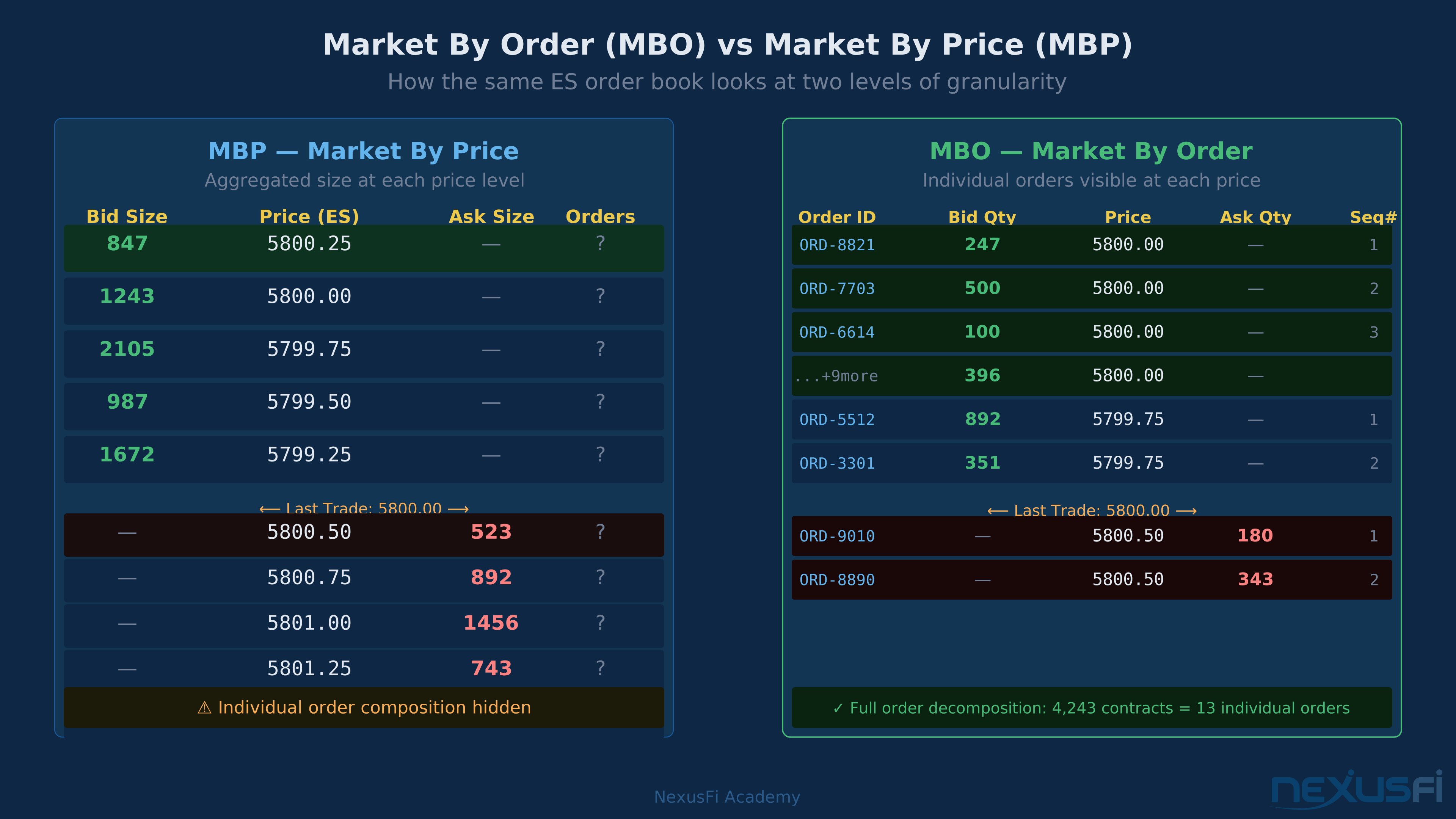
MBO shows individual orders. Each resting order has its own identifier, its own size, and a lifecycle: add, modify, cancel, fill. At 5800.00 on the ES, you don't just see "847 contracts bid" — you see that those 847 contracts come from 13 separate orders: ORD-8821 resting 247, ORD-7703 resting 500, ORD-6614 resting 100, and so on. Each order has a sequence position in the queue.
When ORD-8821 cancels, MBO shows a cancel event for that specific order. When a new order appears, MBO shows an add event with a new identifier. You know exactly how many distinct participants are active at a price, which orders are aging versus fresh, and whether the order queue is stable or churning rapidly.
As @iantg put it in the same NexusFi thread: "The MBO data is great! It contains more granularity than the market by price data feed that most retail platforms like NT have." That granularity is exactly the point — it transforms the depth of market from a summary into a live audit trail of participant activity.
@iantg Historical market depth and MBO data
The MBP Blind Spot: Churn Looks Like Stability #
When MBP Shows Zero Change But Everything Changed A price level can completely turn over its entire participant composition while showing zero net change in MBP. Three cancel-replace events later: same aggregate size, completely different orders. MBP reports stability. MBO shows the full picture. This is the fundamental blind spot that separates the two data types.
The most important concept to understand about MBP is what it cannot show you. Consider this sequence at a single price level:
T=0: Three orders resting — ORD-A (200 lots), ORD-B (150 lots), ORD-C (150 lots). Total: 500 contracts.
T=1: ORD-A and ORD-B cancel. Total drops to 150 contracts.
T=2: ORD-D added (350 lots). Total returns to 500 contracts.
MBP sees: Level at 500 → 150 → 500. Net change: zero. "Support held."
MBO sees: Complete liquidity turnover. The two largest orders vanished and were replaced by a single new order. The participant composition is entirely different.
Why does this matter? Because "500 contracts bid" from two experienced participants who've been sitting there for two minutes is categorically different from "500 contracts bid" from one new entrant who just appeared. MBP collapses that distinction. MBO preserves it.
@SMCJB explained the structural consequence in the NexusFi thread on data feeds: "Market by order is where the exchange sends you all the orders and you build your own price book — hence you have the complete price book with full information at every price level." Building your own book from order events is exactly how you capture these turnover signals that MBP silently discards.
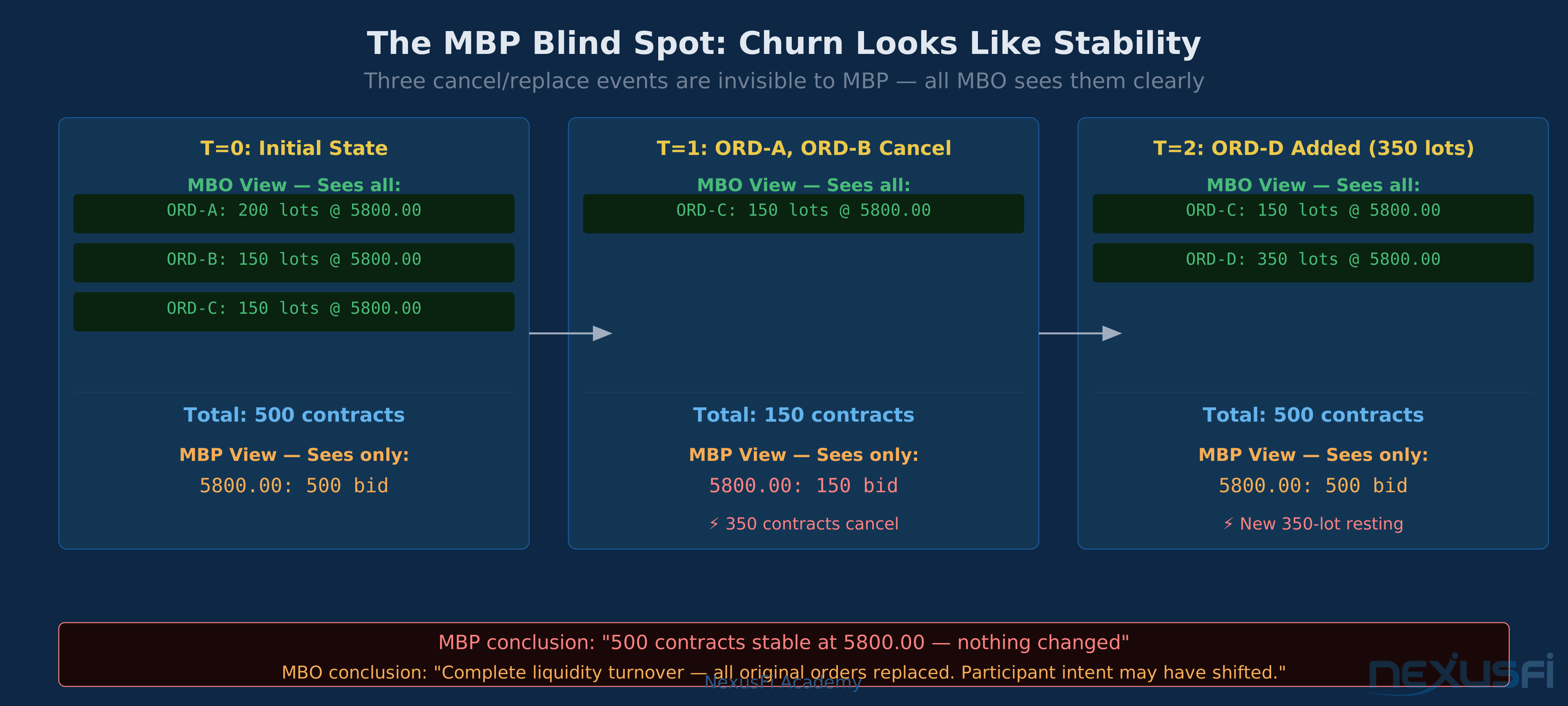
Three cancel/replace events that completely change the participant composition at a price level are completely invisible to MBP. The level reads 500 contracts throughout. MBO shows every event.
CME Group's Data Architecture: MDP 3.0 and How Feeds Reach Traders #
The CME Group, operating the world's largest derivatives exchange, uses MDP 3.0 (Market Data Platform 3.0) as its primary market data protocol. MDP 3.0 delivers data via SBE (Simple Binary Encoding) over UDP multicast — a high-speed binary format designed for latency-sensitive consumption rather than human readability.
CME's market data ecosystem supports both depth levels:
- Order-level data -- individual order events with identifiers, supporting true MBO reconstruction
- Aggregated depth -- price-level summaries that become the MBP feed most traders receive
The critical point is what happens between CME's raw feed and your trading screen. Most traders receive CME data through intermediary vendors — Rithmic, CQG, Denali, TT, Barchart — who normalize the raw exchange feed (see Futures Data Feed Technologies: CQG, Rithmic, and the Infrastructure Behind Every Tick for a full breakdown of each vendor's architecture) into something platforms can consume. This normalization almost always collapses MBO-capable data into MBP.
As @artemiso documented in a thread on feed differences (Rithmic vs Denali — Market Depth Difference): "Sierra and CTS probably using the (MBO +) MBP part of MDP 3.0 to aggregate the direct and implied depth." The implied depth component adds another layer — CME publishes both direct and implied market data (the latter derived from inter-market spreads), and how vendors handle these affects whether you're getting the full picture.
Practical rule of thumb: if your platform shows a standard DOM ladder with bid/ask sizes but no order count or order ID information, you're looking at MBP. If it shows individual orders with queue positions or order counts per level, the feed is providing MBO-grade data.
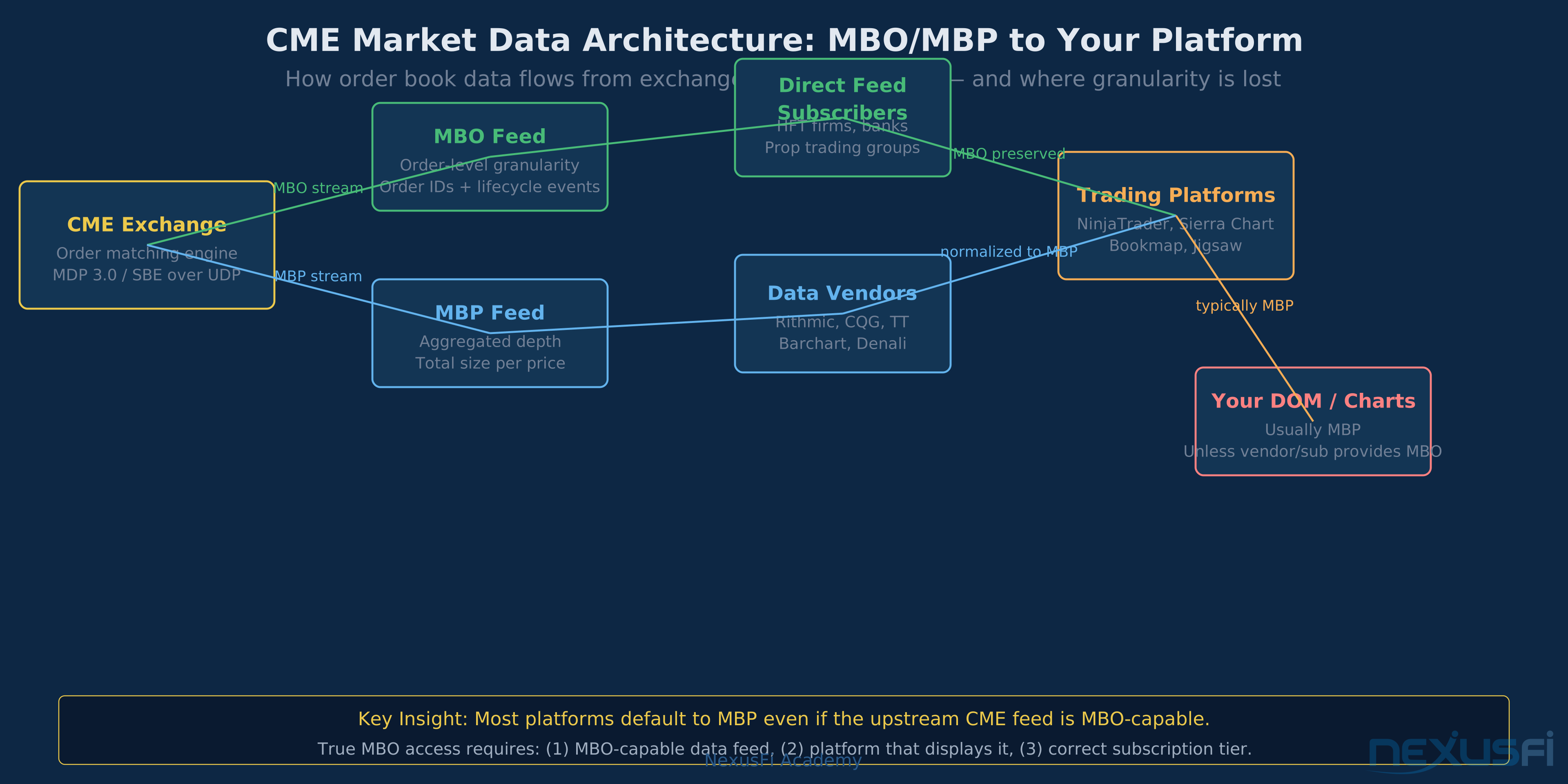
CME's MDP 3.0 feed delivers order-level data, but vendor normalization typically collapses it to MBP by the time it reaches retail trading platforms. Direct feed access or specialized data subscriptions are required for true MBO.
What "FIX" Has to Do With It (Almost Nothing)
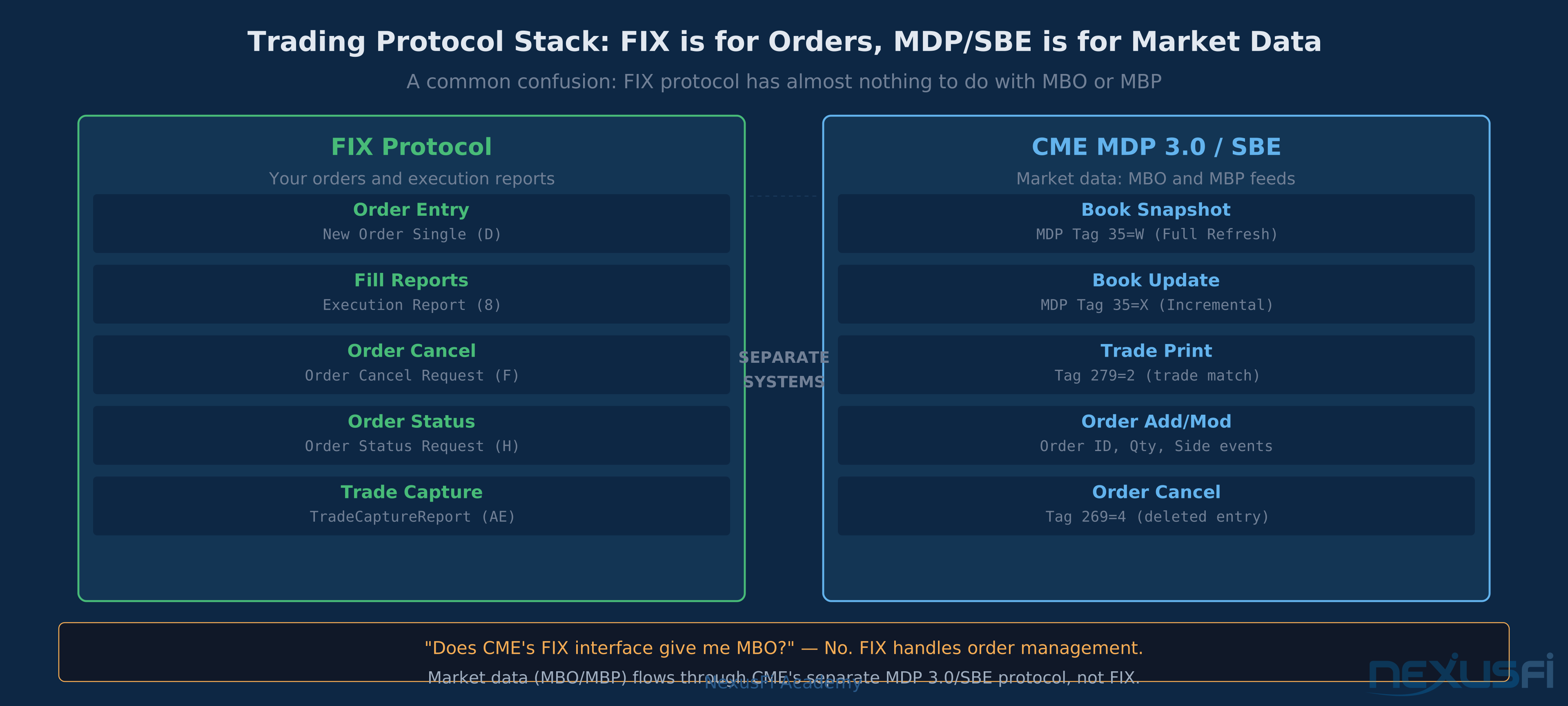
A persistent confusion in trader discussions conflates FIX protocol with market data format. FIX (Financial Information eXchange) is primarily an order entry and execution protocol — it handles your order submissions, fills, and order status. Market data (MBO or MBP) flows through CME's proprietary MDP protocols, not FIX.
When someone asks "does CME's FIX interface give me MBO?", the answer is effectively no — because market data delivery and order management are separate infrastructure. @Hulk noted in a NexusFi thread that alternative terms like "FOB (full order book)" and "Level 3 (L3)" are also used to describe MBO, while MBP maps to the familiar "Level 2" depth display: "L3 (or L3) etc are also used to separately offer MBO from MBP, which is also referred to as level 2 or L2."
Practical Implications for Order Flow Analysis #
What MBP Tells You (And Does Well)
Despite its limitations, MBP handles the majority of active trading workflows effectively:
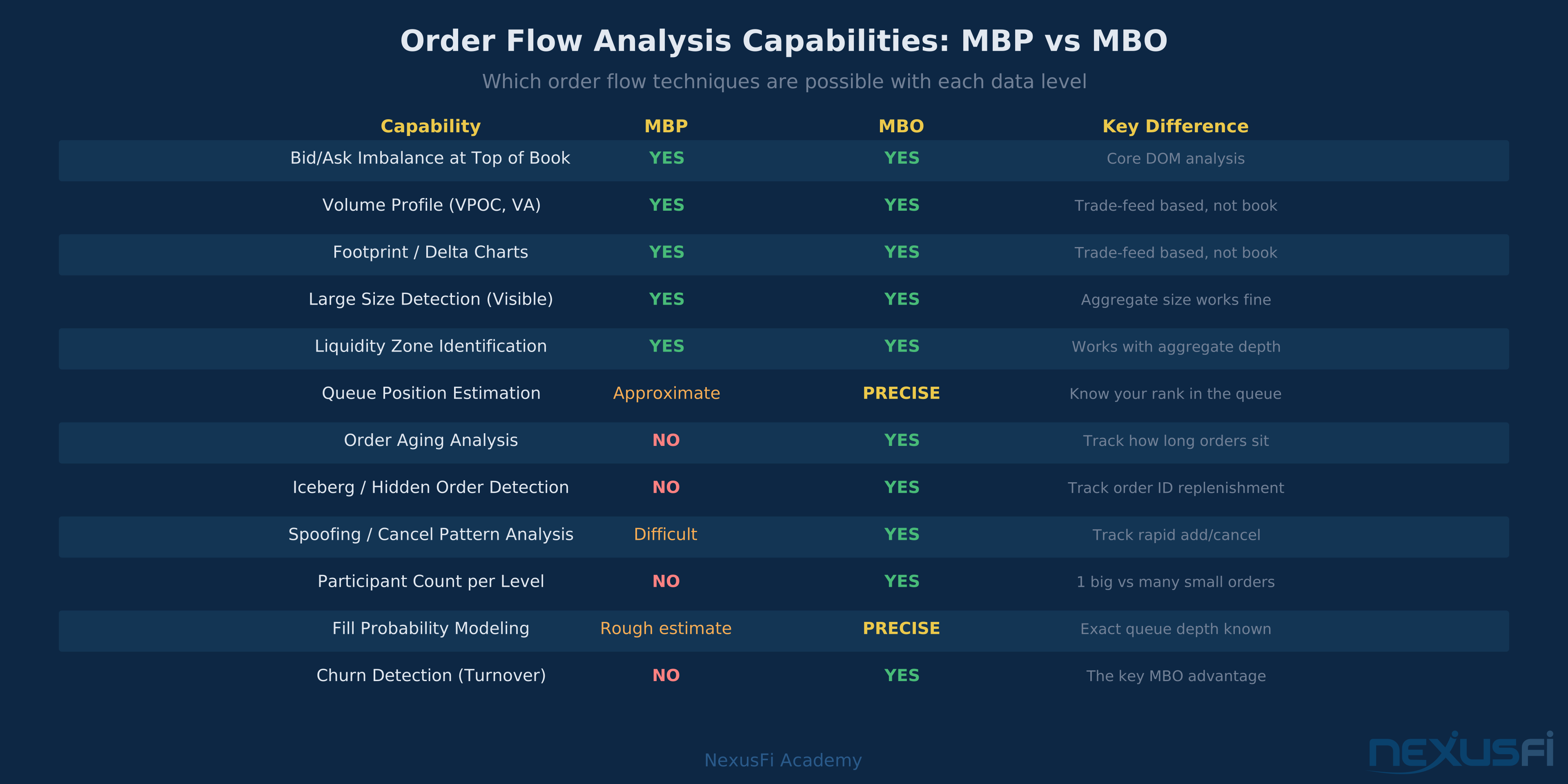
DOM scalping: Reading aggregate bid/ask imbalances, identifying where size is concentrated, timing entries around key levels — all of this works with MBP. The standard 5- or 10-level depth ladder is more than adequate for visual trading.
Footprint analysis: Footprint charts and order flow tools that track buying versus selling volume at each bar are at the core volume-at-price analysis. They work with the trade feed (print-level data), not depth-of-market, so MBP vs MBO doesn't directly affect them.
Volume profile and VWAP: These are derived from trades, not book state. MBP is completely irrelevant here — what matters is trade data, which is standardized across feeds.
Liquidity context: Seeing where large size sits, identifying stop runs and support/resistance zones based on visible depth — MBP provides all the information needed for this type of analysis.
The same ES order book at 5800.00 viewed through MBP (left, aggregate only) and MBO (right, 13 individual orders visible). MBP shows 847 contracts; MBO shows exactly who is resting and in what queue position.
Where MBO Changes the Analysis
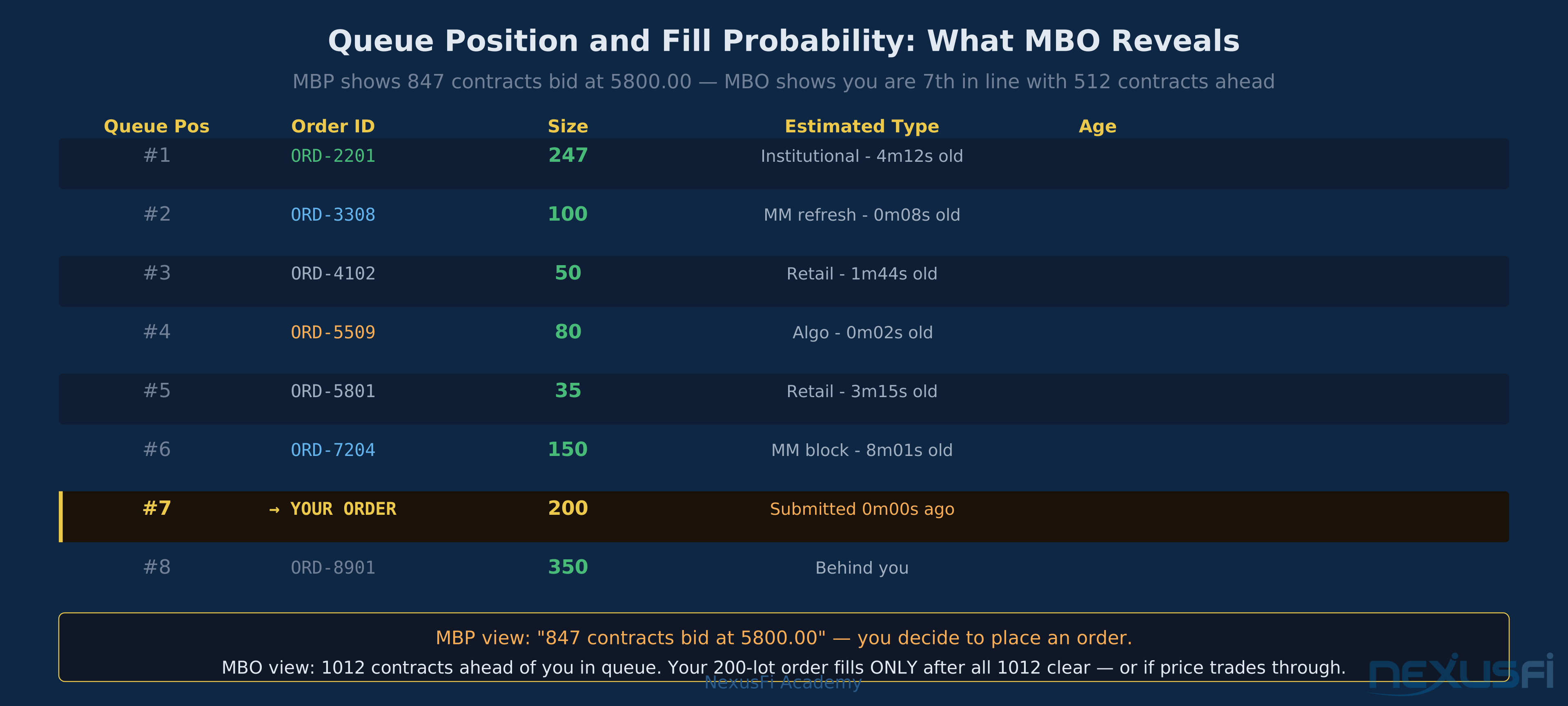
Queue position and fill probability: If you're a passive limit order trader — especially one building automated order flow systems — trying to estimate how likely you are to fill at your price, knowing how many orders are ahead of you in the queue matters. MBO lets you see the order sequence; MBP shows only total size. This distinction matters most for tight-market scalpers who are optimizing limit order placement.
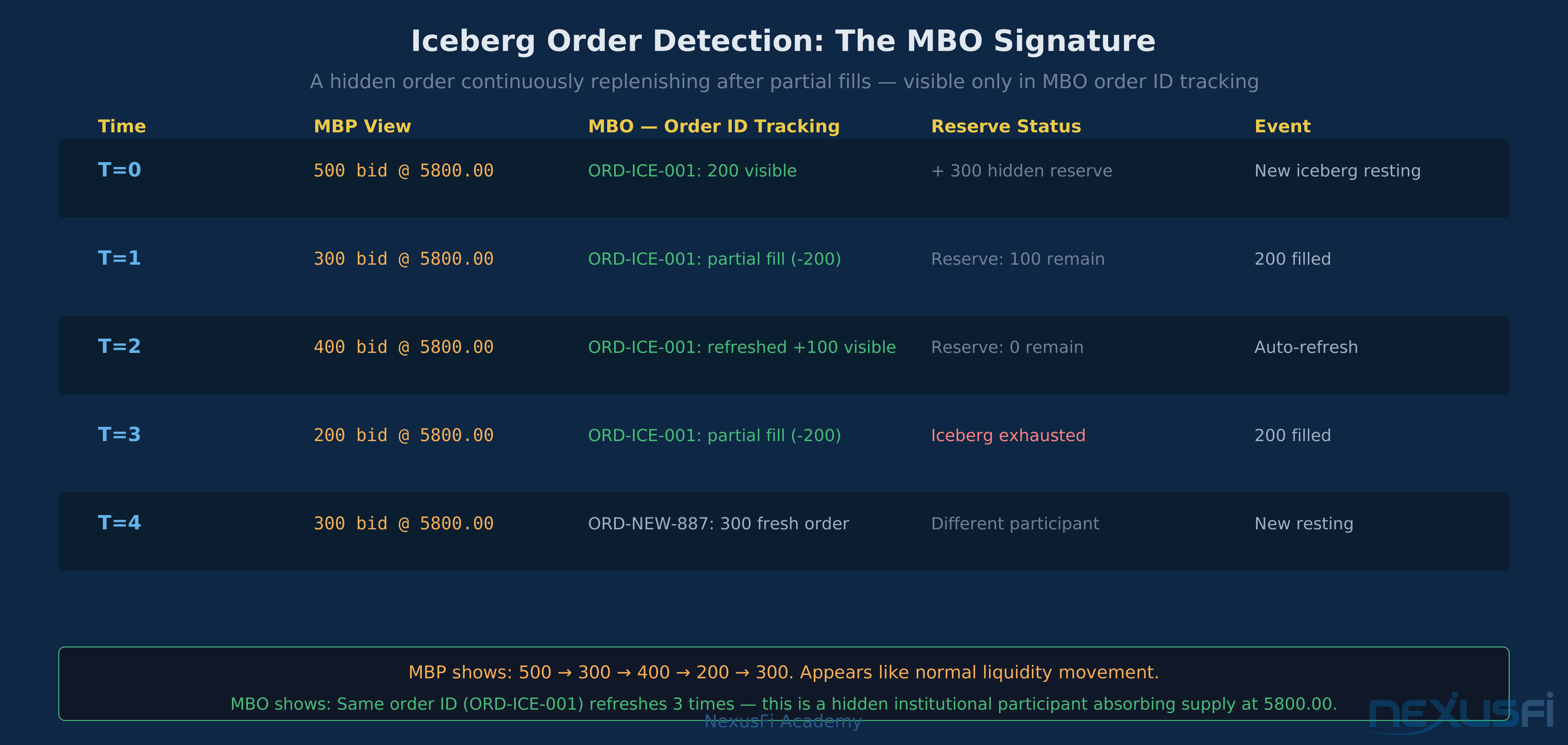
Iceberg detection: Large hidden orders that continuously replenish after partial fills leave footprints in MBO data — the same iceberg logic used in execution algorithms like smart order routing — the same order ID shows up repeatedly, partially filling and then showing a new quantity. This pattern is invisible in MBP, which just shows the aggregate level size.
Spoofing and layering identification: High-frequency cancel activity — orders appearing and disappearing rapidly at the same levels — is detectable in MBO through rapid add/cancel event sequences for the same order IDs. @artemiso documented the hidden order dynamics in this context: "an overwhelming portion of hidden orders on CME are attributable to net liquidity providers (market makers) with small size rather than net liquidity takers." MBO data makes this attribution possible.
Execution quality benchmarking: Measuring the difference between your limit order fill prices and what the order book showed at submission — a key component of futures order routing and execution quality requires knowing the exact book state at each moment — order by order. MBO data enables this level of execution analysis; MBP cannot provide it accurately because the book state reconstruction is incomplete.
The Jigsaw Trading Perspective on MBO for Retail Traders
Not everyone agrees MBO is worth the effort. @Jigsaw Trading, the company behind the popular DOM analysis platform, posted a contrarian view in the NexusFi MBO thread: "I think MBO is a red herring for retail traders." Their argument — which has merit — is that the additional complexity of MBO doesn't translate into better trading decisions for most discretionary traders. Reading aggregate depth, tape, and volume context is sufficient for the majority of trading styles.
This isn't a dismissal of MBO's value; it's a realistic assessment of where MBO data produces actionable edge. For a systematic trader building execution models or doing microstructure research, MBO is essential. For a discretionary scalper reading DOM flow, MBP is sufficient — and the cleaner display may actually help more than additional noise would.
DOM Display Differences in Practice #
The Standard MBP Ladder
What most futures traders see: bid size at each price, ask size at each price, color/heat indicating concentration. Updates when aggregate size changes. Fast, clean, visually scannable. Ten levels of depth covers the typical decision space for most scalping strategies.
MBP ladders are what platforms like NinjaTrader, Sierra Chart in standard configuration, and most other retail-accessible platforms display by default. The underlying data is simple enough that even low-cost data subscriptions deliver it reliably.
The MBO-Enhanced Display
With true MBO data, platforms that support it (Bookmap, Jigsaw Depth and Sales, Sierra Chart with Denali feed) can show individual order stacks per price, order counts, and queue-level information. This creates a visually richer but more complex display that requires interpretation skills beyond reading aggregate size.
In a NexusFi thread specifically about MBO-capable platforms and feeds, @Fi summarized the practical requirements: "you need the right data feed (Denali for SC, Rithmic for several others) to get actual Market By Order depth vs standard aggregated MBP. And yeah, $39/month on the annual package is pretty reasonable when you factor in what you're getting."
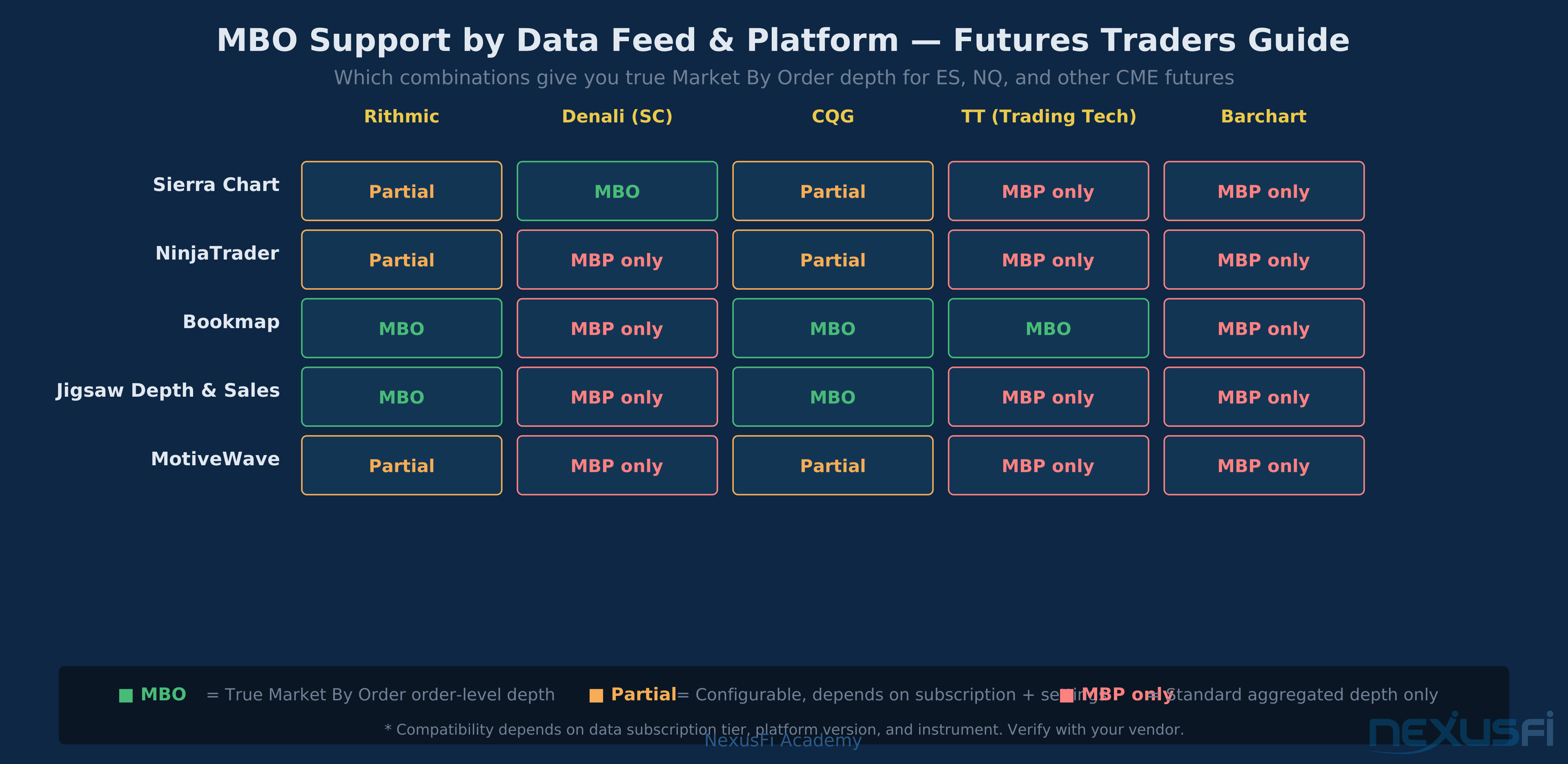
The feed-platform pairing matters. Sierra Chart with Denali feed gets closer to MBO-grade depth. NinjaTrader with Rithmic provides partial MBO capabilities depending on configuration. Bookmap with Rithmic or CQG provides strong MBO support. Getting the right combination requires verifying your specific setup against vendor documentation.
Which Data Feeds Support MBO #
Access to true MBO data for CME futures depends on three factors: the exchange data tier you subscribe to, the feed/API vendor you use, and whether your trading platform can consume and display order-level data.
Platform and feed compatibility for MBO access varies much. Getting true Market By Order depth requires both a compatible feed and a platform that surfaces the order-level data. Verify your specific combination with vendors.
Rithmic
Rithmic is widely available through NinjaTrader, Sierra Chart, Bookmap, Jigsaw, and other platforms. It provides order-level depth for CME futures, enabling MBO-capable displays on supported platforms. As @artemiso noted in research on feed differences: Rithmic uses the MBO feed and builds depth from order-level events.
Denali (Sierra Chart's Proprietary Feed)
Denali is Sierra Chart's own direct market data feed, designed to provide the highest-quality CME depth data to Sierra Chart users. It directly supports MBO-level granularity for Sierra Chart's DOM and depth displays.
CQG
CQG, used by platforms including MotiveWave and Bookmap, provides order-level data for CME futures with appropriate subscription tiers. CQG's infrastructure connects directly to exchange data centers, enabling true MBO-grade depth.
Barchart and Standard Aggregated Feeds
Many data vendors normalize CME data to MBP by the time it reaches your platform. This includes standard Barchart subscriptions and similar commodity-data providers. If you're trading through a platform that uses these feeds, you're working with MBP regardless of platform capabilities.
Infrastructure Reality: The Cost of MBO #
MBO data comes with real infrastructure overhead that's worth understanding before pursuing it:
Data volume: Order-level events generate substantially more messages than price-level aggregates. This infrastructure gap is central to why high-frequency trading firms build custom MBO pipelines rather than using retail data services. A busy ES trading session can produce millions of order events; the equivalent MBP stream is orders of magnitude smaller. This affects storage, processing, and bandwidth.
Processing complexity: Consuming MBO requires building and maintaining a live order book from discrete events — adds, modifies, cancels, fills. Book reconstruction logic must handle edge cases: out-of-order messages, duplicate events, sequence gaps. Getting this right is non-trivial.
Historical storage: Historical MBO data, useful for backtesting and research, is expensive — both to acquire and to store. Vendors offering historical MBO data typically charge significant premiums over standard historical price data.
Platform compatibility: Not all platforms that support MBO-capable data feeds actually display the order-level information. Check your specific platform's documentation rather than assuming that a "good" data feed automatically gives you MBO functionality in the UI.
As @artemiso documented with quantitative examples: streaming MBO data at full exchange scale involves 500,000+ tickers and millions of rows in arbitrary time slices — the data engineering requirements are significant at institutional scale.
Decision Framework: MBO or MBP for Your Trading #
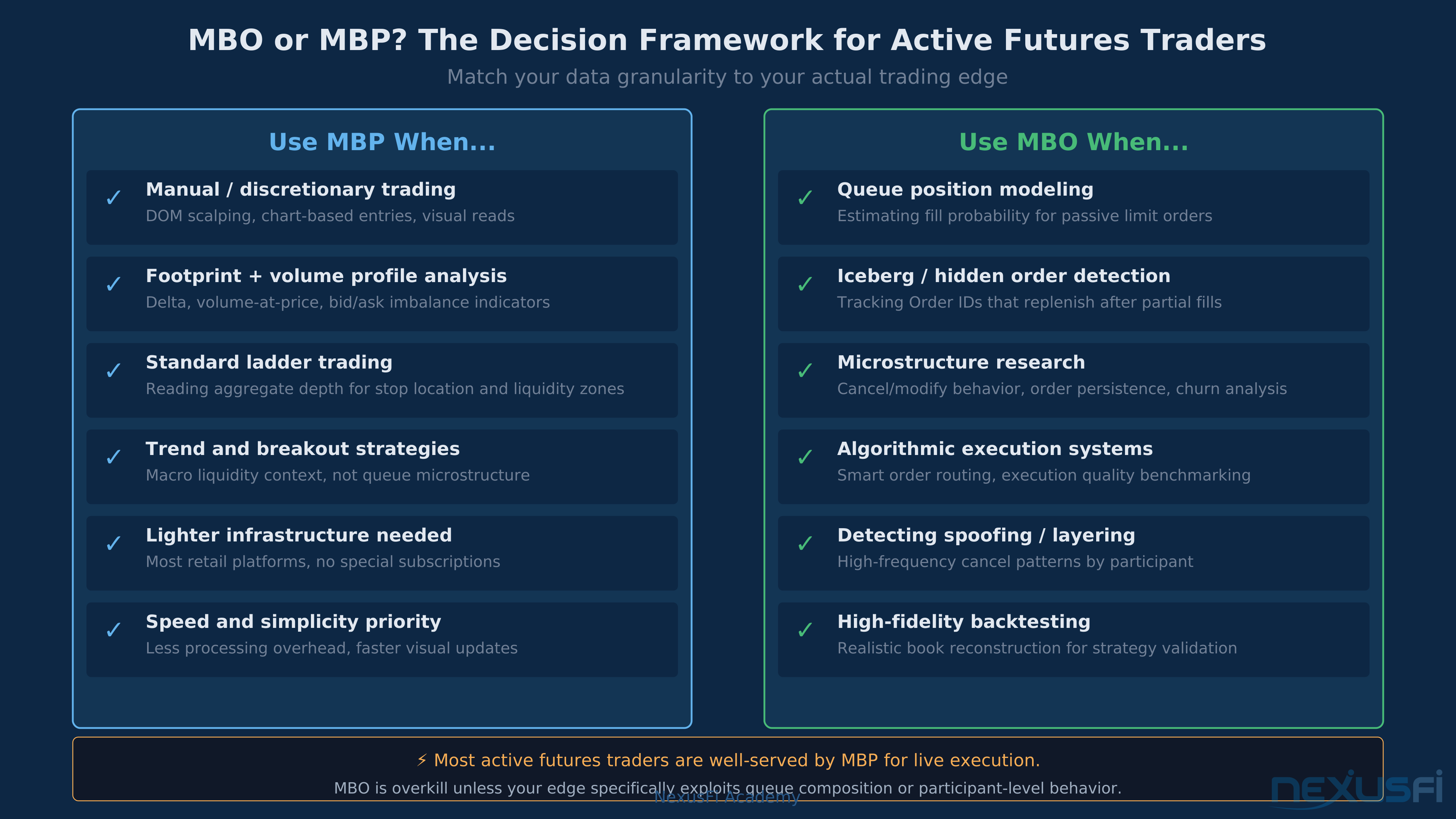
Match your data granularity to your actual trading edge. Most active discretionary futures traders find MBP sufficient. MBO earns its complexity overhead only when queue dynamics drive the trading thesis.
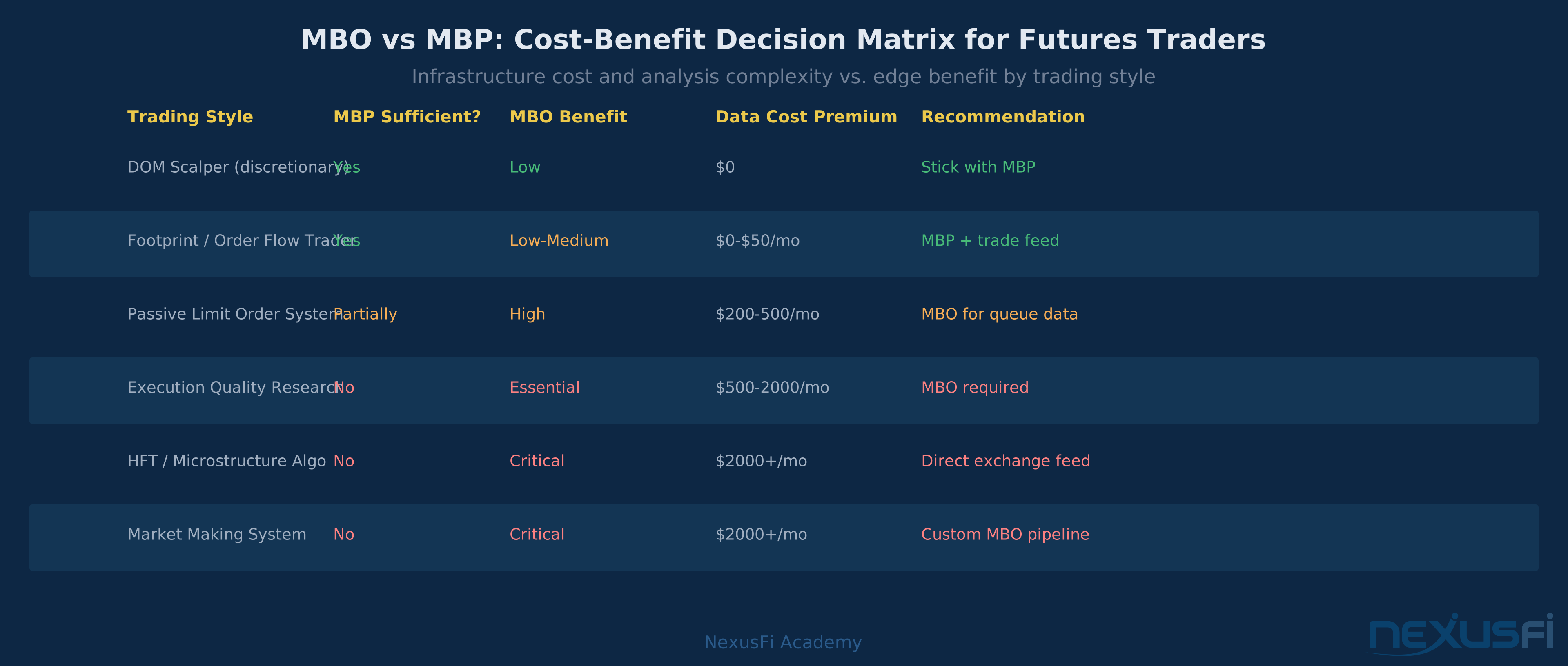
MBO cost-benefit by trading style: DOM scalpers and footprint traders get full value from MBP. Only passive limit order systems, execution research, and HFT strategies justify MBO's premium infrastructure costs.
The Majority Case: MBP Is Sufficient
For most active futures traders — discretionary scalpers, swing traders, DOM-based order flow readers — MBP provides everything needed for execution decisions. The aggregate depth tells you where size is concentrated, where stops likely cluster, and how liquidity is distributed around the current price.
If your strategy involves reading volume profile, VWAP, and price action; scalping from DOM size and bid/ask imbalance; identifying support and resistance from visible depth; footprint analysis and tape reading; or any manually-executed discretionary approach — then MBP is your working tool, and upgrading to MBO is unlikely to change your results.
When MBO Becomes Relevant
MBO earns its complexity premium when your edge genuinely depends on queue position estimation for passive limit order systems; execution quality measurement against theoretical optima; microstructure research on cancel behavior and order persistence; systematic detection of icebergs and hidden orders; or algorithmic execution that adapts to order queue dynamics.
The Honest Assessment
MBO is not a magic edge. It's a richer dataset that enables certain types of analysis that MBP cannot support. Whether that additional richness translates into better trading depends entirely on whether your strategy can exploit what MBO reveals. Most discretionary traders will find that refining their MBP-based analysis produces better returns than adding MBO complexity without a specific research thesis to apply it to.
MBO Does Not Automatically Improve Trading Results MBO data increases complexity and infrastructure cost much. Retail traders who upgrade to MBO without a specific, tested thesis for how to use it typically see no improvement — and often see degraded decision-making from information overload. Build your MBP skills first.
Start with MBP. Develop genuine questions about queue dynamics that MBP cannot answer. Then pursue MBO specifically to answer those questions — not as a general upgrade, but as a targeted data acquisition for a defined research goal.
Common Questions #
Does Bookmap use MBO?
Bookmap, designed specifically for order book visualization, supports MBO-grade depth when paired with compatible data feeds (Rithmic, CQG, TT). Its heatmap display, which shows size accumulation over time at each price, benefits much from order-level data that reveals when depth is stable versus churning.
Can NinjaTrader show MBO data?
NinjaTrader can display order-count information and some MBO-derived metrics with appropriate data feeds (Rithmic, CQG). However, its standard DOM display is MBP-based, and full MBO integration varies by version and feed configuration. Check NinjaTrader's documentation for your specific feed.
Is Sierra Chart with Denali actually MBO?
Sierra Chart's Denali feed provides one of the closer approximations to true MBO available to retail traders. Sierra Chart can display order counts per level and provides more granular depth data than most alternatives. Whether it constitutes "true MBO" depends on precise technical definitions, but in practical terms, Sierra Chart with Denali gives you much more information than standard MBP feeds.
How does this affect backtesting?
Backtesting strategies that depend on limit order fills requires realistic book simulation. MBP-based backtesting overestimates fill rates because it assumes all displayed size is available — in reality, orders ahead of yours in the queue fill first. MBO-based book reconstruction produces more accurate fill simulations by preserving queue position dynamics.
Summary: Two Views of the Same Truth #
MBP and MBO are not competing standards — they're different levels of resolution for observing the same order book. MBP is the practical working view for most live trading: clean, fast, sufficient for discretionary execution. MBO is the research-grade dataset for understanding the mechanics underneath the price action.
Most futures traders will never need MBO in their daily workflow. But understanding why it exists — and what MBP hides from you — makes you a better reader of the data you do have. When you see 1,243 contracts sitting at a price and it disappears without a print, you'll know: that could be one large participant deciding to step away, or a dozen small ones all canceling at once. MBP cannot tell you which. MBO can.
For the majority of active traders: get good at MBP first. Learn to read aggregate depth, tape flow, and imbalance with precision. If you reach the point where queue dynamics become the specific variable you need to understand — and you have the infrastructure to act on what MBO reveals — that's when the upgrade makes sense. Not before.
Knowledge Map
Go Deeper
Build on this knowledgeReferences This Article
Articles that build on this topicCitations
- — Historical market depth and MBO data: Assess your latency, data and execution quality (2019) 👍 16“I decided to start a thread to provide some samples of historical market depth and MBO data to consolidate a solution for different questions on execution quality, data integrity and latency. My main”
- — Historical market depth and MBO data: Assess your latency, data and execution quality (2020) 👍 4“I'm going to be really unpopular by posting this.... but I think MBO is a red herring for retail traders... Here's a cut and paste of an artilce I posted a short while back.... MBO - The new Holy Grai”
- — Webinar: Real-world Order Flow Strategies & Setups w/Scott Pulcini & Bookmap (2020) 👍 13“If it helps calm everyone down, I'll weigh in and assert that almost [i]everyone[/i] here in this thread is using "icebergs" incorrectly. I'm happy to be proved wrong, the world is a happier place whe”
- — Rithmic vs Denali - Market Depth Difference (2022) 👍 6“My best guess is that Rithmic must be using a pure MBO parser of MDP 3.0 so they are excluding implied depth from their book. This probably explains why it is strongly biased downwards from depths on”
- — Recommended DOM trading platform with MBO support (2026)“Unfortunately, for what you're looking for, SC seems to be as good as it will get as far as price and quality. I am unaware of any other options. I recommend you just buy the 12-month package from SC”
- — Which Data Feeds / platforms support MBO Data? (2022) 👍 5“Reading through the thread, I was wondering artemiso, if you're able to share a few months of historical data if you still have access to it? Cheers! Wow the post you quoted was from 4 years ago. How”
- — Which Data Feeds / platforms support MBO Data? (2022) 👍 2“Question 1: To re-state the OP's original question: Are there other platforms or add-ons to existing platforms (i.e. Ninja or MultiCharts), that effectively use and present MBO information in a way th”
- — Historical market depth and MBO data: Assess your latency, data and execution quality (2019) 👍 5“Hi artemiso, The MBO data is great! It contains more granularity than the market by price data feed that most retail platforms like NT have. The obvious advantages I have found so far are: 1. In addit”
- — Does the market know your positions? (2022) 👍 5“Yes its called Market by Order or MBO as opposed to Market by Price which is MBP. MBO is more calculation intensive because you have to build your own order book, which is why many software go the eas”
- — Which Data Feeds / platforms support MBO Data? (2020) 👍 3“I think the thread answers most of your questions but in summary Market-by-Price is what most platforms use. This is the standard 10 deep depth of market prices. Market-by-order is where the exchange”