



Clock Synchronization and NTP for Futures Trading Workstations: Why Your System Clock Is Lying and How to Fix It
Overview #
Your trading workstation's clock is probably wrong. Not by much — maybe a few seconds, maybe a few hundred milliseconds — but wrong enough to corrupt your trade logs, distort your latency measurements, and silently inject errors into every backtest you run. The default Windows Time service that ships with every PC was never designed for precision. It was designed for Active Directory authentication and email timestamps. Trading needs something better.
This guide covers everything a futures trader needs to know about clock synchronization: why it matters more than you think, how the Network Time Protocol actually works, why the built-in Windows service fails at trading-grade accuracy, and how to set up Meinberg NTP or a GPS-disciplined clock that keeps your system within milliseconds of UTC. Whether you're a discretionary trader who just wants accurate Time and Sales or an algo developer measuring fill latency down to the microsecond, getting your clock right is infrastructure that pays for itself the first time you need to trust your timestamps.
If you're building or upgrading a trading workstation, see Trading Workstation Hardware for the full hardware stack. Clock synchronization is a software-layer optimization that runs on top of whatever hardware you've chosen — get the hardware right first, then lock down your time source.
Why Accurate Time Matters for Trading #
Most traders never think about their system clock until something breaks. A chart that shows the wrong time on a bar. A fill timestamp that doesn't match the broker's records. A backtest that produces different results on different machines. These aren't random bugs — they're symptoms of a drifting clock.
Here's what's actually at stake:
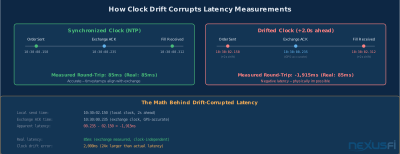
Trade timestamp integrity. Every order you submit, every fill you receive, every cancel/replace — all of these carry timestamps. When your clock drifts 2-3 seconds from the exchange's reference time (which is common with default Windows Time), your local logs disagree with your broker's logs. That disagreement makes post-trade analysis unreliable. You can't accurately measure how long it took from signal to fill if your clock was 1.5 seconds ahead when you logged the signal and 2.8 seconds ahead when you logged the fill.
Time and Sales accuracy. Your T&S feed shows exchange-stamped events rendered against your local clock. When those clocks diverge, you get visual misalignment — the price action on your chart and the timestamps on your T&S feed tell slightly different stories. For discretionary traders reading the tape, this matters. You're making split-second decisions about whether buying or selling aggression appeared before or after a price level broke. A drifted clock can reverse that apparent causality.
Latency measurement. If you're measuring round-trip latency on your orders, you're comparing your local submission timestamp to the exchange acknowledgment timestamp. The exchange clock is GPS-disciplined and accurate to microseconds. Your clock might be off by seconds. The resulting latency calculation is meaningless noise dressed up as data.
As @iantg explained when discussing Rithmic latency in NexusFi's Platforms and Indicators forum, "The bid and ask feed has a timestamp down to the microsecond from the exchange. You can test the delta between this timestamp and when your application receives the update." That delta measurement is only valid if your local clock is disciplined. If it's not, you're measuring clock drift plus latency — and you can't separate the two.
A drifted clock doesn't generate error messages. Your platform won't warn you. Your broker won't call. You'll simply have unreliable data that looks reliable — the most dangerous kind of infrastructure failure.
Backtesting data alignment. Historical tick data carries exchange timestamps. When you backtest, your engine replays those timestamps against your strategy's logic. If you recorded some of that historical data with a drifted local clock, those timestamps are contaminated. Your strategy appears to react to events at times that don't match reality. This is a subtle form of lookahead bias — your backtest clock says your system "saw" data before the exchange actually sent it.
As @aslan pointed out in a NexusFi discussion about charting consistency, "If you are using exchange based timestamps, there is no issue, as they are not going to change even when you reload historical data. If you are using PC based timestamps, then I agree you have issues to deal with." The same computer clock problem that creates different chart results between machines can create different backtest results between machines. Two identical strategy configs producing different P&L numbers purely because the clocks were different — that's not a trading problem, it's a time problem.
Risk controls and session boundaries. Automated systems often enforce session-based rules: don't trade before RTH open, flatten before the close, enforce daily loss limits that reset at midnight. These rules depend on your system clock. A clock that's off by 3 seconds means your "flatten at 3:59:55 PM" rule might execute at the wrong time relative to the exchange's session boundary.
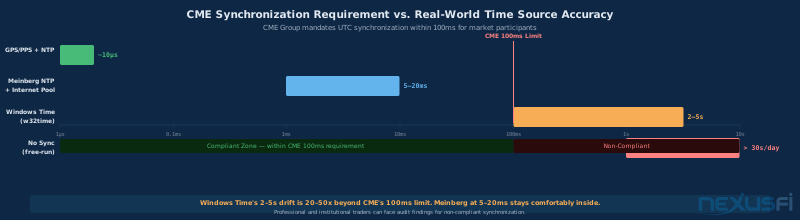
Regulatory compliance. For professional and institutional traders, exchanges require UTC synchronization within published thresholds. CME Group specifies synchronization within 100 milliseconds of UTC for market participants. Violating this standard can result in audit findings, rejected connections, or fines. Even retail traders benefit from meeting this standard — it means your records are defensible if you ever need to dispute a fill.
How NTP Works -- The Protocol Behind Every Synchronized Clock #
The Network Time Protocol has been the backbone of internet time synchronization since the 1980s. Understanding how it works explains why some implementations give you millisecond accuracy and others leave you seconds off.
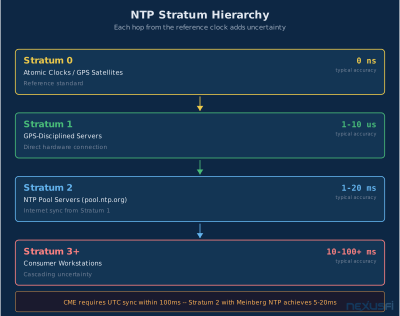
NTP operates in a hierarchical client-server model organized by "stratum" levels:
Stratum 0 — The reference clocks themselves. Atomic clocks at national laboratories (NIST, PTB), GPS satellite atomic clocks, cesium beam oscillators. These are the ground truth. You don't connect to them directly.
Stratum 1 — Servers with a direct hardware connection to a Stratum 0 source. A computer with a GPS receiver that has a Pulse Per Second (PPS) output is a Stratum 1 server. These are the highest-quality time sources you can access over a network.
Stratum 2 — Servers that synchronize from Stratum 1. Most public NTP pools (like pool.ntp.org) are Stratum 2. These are the standard sources for retail trading workstations.
Stratum 3 and beyond — Each hop adds uncertainty. By Stratum 3 or 4, you're typically 10-50 milliseconds from UTC at best. For trading, stick to Stratum 2 or better.
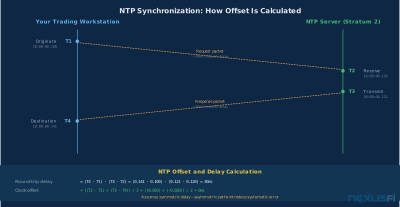
The synchronization process works by exchanging timestamped messages between client and server. Your NTP client sends a request, noting the exact time it was sent. The server receives it, notes the time, and sends a response with the server's current time. Your client receives the response and notes that time too. From these four timestamps (originate, receive, transmit, destination), the client calculates two things:
- Round-trip delay — how long the packet took to travel both ways
- Clock offset — how far your clock is from the server's clock
The critical assumption: network delay is roughly symmetric. If the round trip took 40ms total, NTP assumes 20ms each way. The offset calculation accounts for this. When the assumption holds, NTP achieves sub-millisecond accuracy on a local network.
NTP's accuracy depends entirely on network path symmetry. On a clean LAN with a local time server, expect sub-millisecond accuracy. On an ADSL connection where download speeds differ from upload speeds, the asymmetry alone can introduce 10-50ms of systematic error that NTP can't correct for. As @gomi discovered through extensive testing, "I requires symmetrical latency (not available on ADSL because of the A)." That single letter — the 'A' in ADSL — undermines the core assumption NTP relies on.
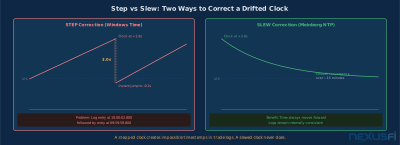
Slewing vs. stepping. When NTP detects that your clock is off, it has two correction strategies. "Stepping" jumps the clock instantly — one moment it reads 10:00:00 and the next it reads 9:59:58. This is disruptive. Programs that depend on monotonically increasing time can break. Log files show events that appear to travel backward in time.
"Slewing" adjusts the clock speed slightly — running it a fraction faster or slower until it converges on the correct time. This produces smooth, continuous time that never jumps backward. Every professional NTP implementation prefers slewing for normal corrections and reserves stepping for initial synchronization or large drifts (typically >128ms).
The difference between these two approaches is why professional NTP matters for trading. A stepped clock creates impossible timestamps in your trade log. A slewed clock converges smoothly and your logs remain internally consistent even during corrections.
Windows Time Service -- Why It Fails at Trading #
The Windows Time Service (w32time) ships with every Windows installation and synchronizes your clock automatically. For email timestamps and file dating, it's fine. For trading, it has fundamental limitations that no amount of configuration can fully fix.
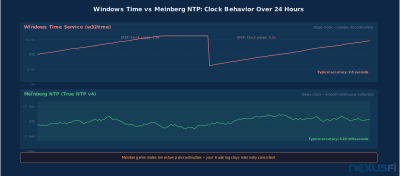
As Big Mike explained in NexusFi's forum, "Windows Time is not true NTP. It is only accurate to within a few seconds. You can sync every single second, and it still only be accurate to within a few seconds. Accuracy was not the goal of the Windows Time client." He continued: "Windows Time also does not use a drift clock. It means that when time is synced, time literally changes on your PC. Not great in production for serious servers."
That last point is critical. The Windows Time service uses the SNTP protocol (a simplified version of NTP) and relies on stepping rather than slewing. When it corrects your clock, it introduces a discontinuity. One moment your system time shows 10:00:00.000, and the next sync cycle it might jump to 9:59:57.200. Any program logging timestamps during that correction sees time go backward.
The specific problems for traders:
Accuracy ceiling. Microsoft's own documentation states that w32time targets accuracy of "1 second" for domain-joined machines and "2 seconds or better" for standalone workstations. In practice, drift between sync intervals commonly reaches 2-5 seconds. That's not a measurement tool — it's a rough estimate.
Step corrections. Every sync cycle introduces the possibility of a time discontinuity. If you're logging tick data with local timestamps, a step correction creates a hole or overlap in your data stream. Your charting platform may display these as bar alignment errors.
No drift estimation. True NTP daemons continuously model your hardware clock's drift rate and apply ongoing corrections. Windows Time doesn't do this. Between sync intervals, your clock drifts freely at whatever rate your motherboard's crystal oscillator happens to run. CPU load and temperature changes affect oscillator frequency, so the drift rate itself varies — something w32time can't track.
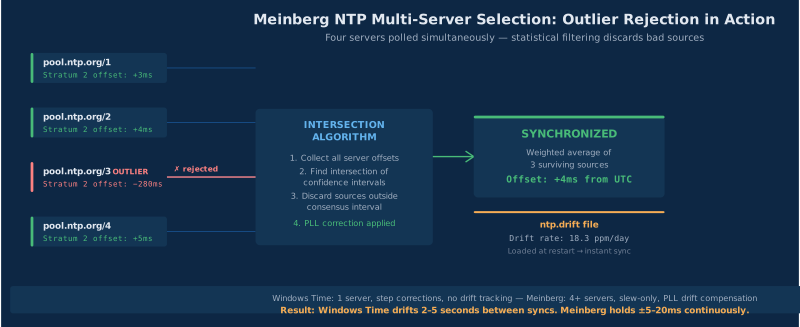
Limited server selection. Windows Time typically syncs to a single time source (time.windows.com by default). True NTP implementations poll multiple servers simultaneously, cross-reference their responses, and discard outliers using statistical analysis. One bad server won't corrupt your clock if you have four others agreeing.
The bottom line: if trading is your livelihood, don't rely on Windows Time. Disable it and install a proper NTP daemon.
Meinberg NTP -- The Trading Standard #
Meinberg NTP is the most widely recommended NTP client for Windows-based trading workstations. It's a full implementation of the NTP version 4 protocol, free for download, and brings professional-grade time synchronization to consumer hardware.
As @sam028 recommended in a highly-thanked NexusFi post on CME time synchronization, "A better option is to disable the genuine W32Time service and use something like Meinberg NTP. Then choose us.pool.ntp.org as main NTP server pool and you'll be good to go. The standard Windows time service with the default configuration is not good enough for trading purposes." That post received 19 thanks — a strong community validation of the recommendation.
@gomi, who did extensive time synchronization research and shared it with the NexusFi community, provided a detailed walkthrough of the Meinberg installation process. He explained the key advantage: "This system corrects both flaws: it uses multiple time sources to increase the precision of the time measurement, and it continually adjusts the local time clock using a PLL. It evaluates the hardware clock drift and keeps correcting it." That phase-locked loop (PLL) is the core technical difference: real NTP adjusts the clock rate continuously, while Windows Time fires a step correction and forgets about it.
What Meinberg NTP actually does differently:
Multi-source polling. Meinberg polls multiple NTP servers simultaneously. Its selection algorithm evaluates each source for reachability, delay, jitter, and stratum. It then combines the best sources using intersection and clustering algorithms to produce a more accurate time estimate than any single server could provide. If one server goes offline or starts reporting bad time, the others compensate automatically.
Drift estimation and PLL correction. The daemon continuously tracks your hardware clock's drift rate and writes it to a "drift file" (typically ntp.drift). On subsequent restarts, it reads this file and immediately applies the known drift correction, dramatically reducing initial convergence time. The PLL then makes ongoing micro-adjustments — speeding or slowing the clock by fractions of a PPM (parts per million) to hold alignment.
Slew-only corrections. Under normal operation (offsets under 128ms), Meinberg never steps your clock. It only adjusts the rate. Your timestamps remain monotonically increasing and internally consistent. The clock converges smoothly over minutes rather than jumping instantly.
Statistical health monitoring. The ntpq -p command shows real-time status for every configured server: offset in milliseconds, jitter, delay, stratum, and reachability history. You can verify at a glance that your clock is synchronized and that your sources are healthy.
Meinberg NTP installation checklist for traders:
- Download Meinberg NTP from meinbergglobal.com (stable release)
- During install, select "Local System Account" for the service
- Install to a simple path like
C:\\Tools\\NTPto avoid Program Files permission issues - Disable the Windows Time service:
net stop w32timethensc config w32time start=disabled - Edit
ntp.confto add 4-6 NTP servers (use your regional pool.ntp.org zone) - Start the NTP service and verify with
ntpq -pfrom the command line - Allow UDP port 123 through your firewall for NTP traffic
Typical accuracy. On a clean broadband connection syncing to Stratum 2 internet servers, Meinberg achieves 1-20ms accuracy depending on network jitter and path symmetry. On a local network with a Stratum 1 time server, sub-millisecond accuracy is routine. Big Mike noted in the NexusFi forum that Meinberg NTP "is usually accurate to within 20-50ms depending on the time sources available in your region."
For the vast majority of futures traders — discretionary or algorithmic — 20ms accuracy is more than sufficient. Your platform's processing latency alone is typically 50-250ms. Getting your clock within 20ms of UTC means your timestamps are reliable enough for any post-trade analysis, fill comparison, or latency measurement that makes practical sense.
GPS-Disciplined Clocks -- When Milliseconds Aren't Enough #
For traders who need microsecond-level accuracy — co-located algorithmic systems, multi-venue arbitrage, or anyone building their own market microstructure research tools — network NTP has a fundamental limitation. The network itself introduces uncertainty. No matter how well NTP estimates round-trip delay, the asymmetry problem persists.
The solution is to eliminate the network entirely by bringing the time reference directly into your machine.
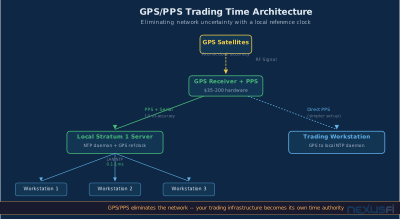
GPS receivers with Pulse Per Second (PPS) output provide exactly this. A $35 GPS board with a clear view of the sky provides a PPS signal — a hardware pulse that fires once per second, aligned to UTC with nanosecond precision. Connected to a serial port (which has direct interrupt access to the CPU), this pulse becomes your local Stratum 0 time source.
@gomi built exactly this setup and documented it in detail on NexusFi. Starting with a Meinberg NTP configuration, he discovered its limitations: "I tried lots of builds, selected specific NTP low stratum servers, but the NTP feedback loop never stabilized because of the PC and network non-ideal configurations." His solution was radical but effective — a $35 GPS board soldered with a PPS wire, connected via serial port, driving a custom clock discipline algorithm. The result: "10 microsecond jitter clock, for 35 USD." He later refined the approach using a custom C program: "if PC ahead of time then put clock in 'slow' mode, else put PC in 'fast' mode."
In a follow-up post, @gomi shared his latency measurement results using this GPS-disciplined clock as the reference, measuring data feed arrival times from exchange servers. With a properly synchronized clock, he could measure that "shortest lag on DAX is 200ms, shortest lag on ES is 170ms, mean network lag is 270ms" — measurements that would be meaningless with a drifting Windows Time clock.
GPS-disciplined clocks require a clear sky view for the antenna. @gomi eventually discontinued his GPS setup because he "moved the computer away from the window so I had no more GPS fix." If your trading desk is in a basement or interior room, this approach needs an antenna run to a window or rooftop — feasible but adds complexity.
The practical GPS/PPS architecture:
- GPS receiver with PPS output (USB GPS modules exist but legacy serial ports provide lower-latency interrupt handling)
- Antenna with clear sky view (window-mounted or roof-mounted for reliable satellite lock)
- NTP daemon configured to use the GPS receiver as a reference clock (refclock driver)
- The machine becomes a Stratum 1 time source for your entire trading network
Who actually needs this? Honestly, most retail futures traders don't. Meinberg NTP syncing to internet Stratum 2 servers gives you 5-20ms accuracy. That's inside CME's 100ms requirement and more than adequate for measuring platform-to-exchange latency in any meaningful way. GPS/PPS is for traders building custom market data infrastructure, running measurement-grade latency analysis, or operating multiple trading servers that need internally consistent time. As @gomi himself acknowledged, GPS-level precision "was not getting me improved fills in my trading. But it was fun!"
Configuration Best Practices for Trading Workstations #
Whether you're using Meinberg NTP with internet sources or running a local GPS-disciplined server, these configuration practices apply:
Use multiple NTP sources. Configure at least 4 servers. NTP's selection algorithm needs multiple sources to detect and reject outliers. With only one source, you can't distinguish between the server being wrong and your own clock being wrong. The NTP pool project (pool.ntp.org) provides regional server pools that automatically rotate through available Stratum 2 servers.
Choose geographically close servers. Lower network distance means lower delay, lower jitter, and better accuracy. Use your regional NTP pool zone (e.g., us.pool.ntp.org, europe.pool.ntp.org) rather than the global pool.
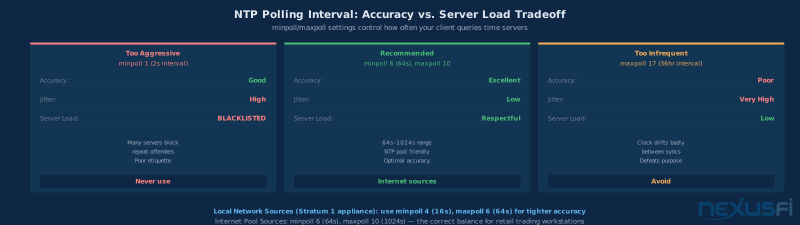
Set appropriate polling intervals. For local network sources, use minpoll 4 (16 seconds) and maxpoll 6 (64 seconds) to maintain tight synchronization. For internet sources, minpoll 6 (64 seconds) and maxpoll 10 (1024 seconds) balances accuracy against server load. Don't poll internet servers more frequently than every 64 seconds — it's considered poor netiquette and some servers will blacklist aggressive clients.
Disable Windows Time before installing NTP. Both services use UDP port 123 and will conflict. Disable w32time completely: net stop w32time && sc config w32time start=disabled. This is not optional — having both running simultaneously causes undefined behavior.
Monitor your synchronization health. Run ntpq -p periodically to check your offset, delay, jitter, and server reachability. Set up a simple scheduled task that logs NTP status to a file. When something goes wrong with your time sync, you want to know when it started — not discover it weeks later when your backtest results look odd.
Don't sync through a loaded network path. If your trading workstation is downloading large files, streaming video, or running backtest data transfers over the same connection used for NTP, the asymmetric traffic loads distort NTP's delay calculations. Keep NTP traffic on a clean network path — or at minimum, ensure your QoS settings prioritize NTP traffic.
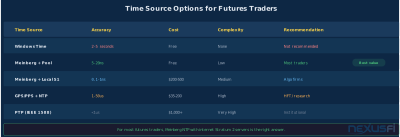
| Time Source | Typical Accuracy | Cost | Complexity | Trading Use Case |
|---|---|---|---|---|
| Windows Time (w32time) | 2-5 seconds | Free | Zero | Not recommended for trading |
| Meinberg NTP + internet pool | 5-20ms | Free | Low | Most futures traders |
| Meinberg NTP + local Stratum 1 | 0.1-1ms | $200-500 (appliance) | Medium | Algo trading firms |
| GPS/PPS + NTP daemon | 1-50 microseconds | $35-200 (hardware) | High | HFT, microstructure research |
Impact on Backtesting and Historical Data #
Clock synchronization isn't just a real-time concern. It has lasting effects on every piece of historical data you've ever recorded with a drifted clock.
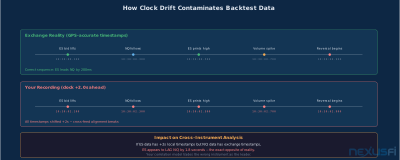
The contamination problem. If you recorded tick data using local timestamps from a Windows Time-synchronized clock, those timestamps have 2-5 seconds of drift baked in. That data is now permanent — you can't retroactively fix it without knowing what the drift was at every point in time (which requires NTP logs you probably weren't collecting).
Cross-feed alignment. If you record data from multiple sources — say, ES and NQ feeds on the same machine, or the same feed on two different machines — clock drift creates alignment errors. Events that happened simultaneously appear offset in time. Correlation analysis between instruments depends on timestamps being accurate. A 2-second clock drift can make a leading/lagging relationship between ES and NQ appear to be the opposite of what it actually is.
Backtest reproducibility. Two machines running the same backtest on the same data should produce identical results. But if those machines recorded parts of the historical dataset at different times with different clock drifts, the timestamps disagree. Strategy logic that depends on time-of-day rules, session boundaries, or event sequencing can produce different signals on different machines — not because the strategy is wrong, but because the data's time axis is wrong.
The fix is prevention. Install Meinberg NTP now. Configure your NTP daemon to log synchronization statistics. From this point forward, your recorded data will carry accurate timestamps. For historical data already contaminated, use exchange-provided timestamps (which are GPS-disciplined) wherever available rather than locally-recorded timestamps.
Exchange timestamps are always the gold standard. When your platform gives you the option to use exchange-reported trade times rather than local receipt times, use them. The exchange's clock is disciplined by GPS to microsecond accuracy. Yours, without NTP, could be off by seconds. The only reason to record local timestamps alongside exchange timestamps is to measure your own receive latency — and that measurement only makes sense if your local clock is also disciplined.
Precision Time Protocol -- The Institutional Alternative #
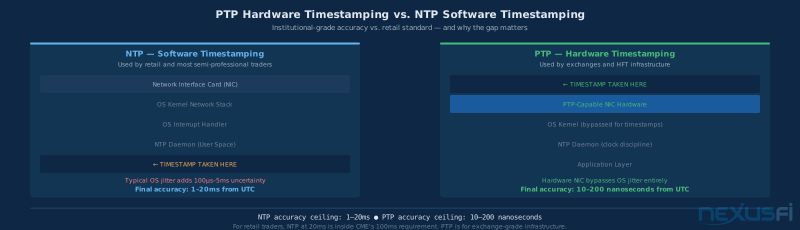
While NTP dominates retail and semi-professional trading infrastructure, institutional trading firms and exchanges increasingly use PTP (Precision Time Protocol, IEEE 1588). PTP achieves sub-microsecond synchronization using hardware timestamping in PTP-capable network interface cards (NICs) and PTP-aware network switches.
PTP eliminates software-level timestamping variability by having the NIC hardware stamp packets at the physical layer. This removes operating system jitter, interrupt latency, and context-switching delays from the measurement chain. The result is synchronization accuracy measured in nanoseconds rather than milliseconds.
For retail futures traders, PTP is overkill. The hardware requirements (PTP-capable NICs, PTP grandmaster clocks, PTP-aware switches at every hop) make it impractical for home or small-office setups. But it's worth understanding because the exchanges you trade on use PTP internally. When CME publishes a trade timestamp with microsecond precision, that precision is backed by PTP infrastructure within their matching engine complex. Your NTP-disciplined clock receiving that timestamp at 5-20ms accuracy is more than sufficient to trust the exchange's reported time — you just can't independently verify it to the same precision.
Knowledge Map
Go Deeper
Build on this knowledgeReferences This Article
Articles that build on this topicCitations
- — Rithmic Latency Calculations (Plus trading remotely) (2022) 👍 5“The bid and ask feed has a timestamp down to the microsecond from the exchange.”
- — PureLogikTrading (2010) 👍 4“If you are using exchange based timestamps, there is no issue.”
- — How to measure data feed latencies between continents? (2014) 👍 3“I requires symmetrical latency (not available on ADSL because of the A).”
- — Kinetick Real-Time Data Quality Issues (2011) 👍 2“Windows Time is not true NTP. It is only accurate to within a few seconds.”
- — Slow system clock when market is busy (2011)“A true NTP client will slowly adjust the drift of the clock to keep it accurate.”
- — Slow system clock when market is busy (2011) 👍 1“Windows Time service is only accurate to within 2-3 seconds.”
- — Do you synchronize your PC time exactly with CME? (2016) 👍 19“A better option is to disable the genuine W32Time service and use something like Meinberg NTP.”
- — Keep your pc clock synchronized (2010) 👍 8“It uses multiple time sources to increase the precision of the time measurement, and it continually adjusts the local time clock using a PLL.”
- — Keep your pc clock synchronized (2011) 👍 7“10 microsecond jitter clock, for 35 USD.”
- — NinjaTrader real time chart differs historical (2019) 👍 4“I ended up coding my own clock loop using a cheapo GPS receiver with PPS pulse.”
- — How to measure data feed latencies between continents? (2014) 👍 7“Shortest lag on DAX is 200ms, shortest lag on ES is 170ms.”