



Exchange Co-Location for Futures Traders: Proximity, Latency, and Execution Quality
Overview #
Exchange co-location is one of those infrastructure concepts where retail traders either spend too much money chasing microseconds that don't affect their strategy, or spend too little and watch their system systematically underperform against faster participants. This guide cuts through both failure modes.
The central question isn't "should I co-locate?" It's "at what point does my execution latency actually limit my edge?" Answer that, and the infrastructure decision becomes mechanical.
Co-location in futures trading means placing your trading server physically inside — or directly adjacent to — the data center housing the exchange's matching engine. The CME Group's primary futures infrastructure runs out of Aurora, Illinois. ICE operates matching engines from facilities in New Jersey and Chicago. When you co-locate, your orders don't cross interstate fiber networks or public internet hops before hitting the matching engine queue. They travel feet to hundreds of feet, not thousands of miles.
That proximity matters a great deal to some strategies and almost nothing to others.
What Latency Actually Is #
Traders talk about latency as if it's a single number, but it's a stack of independent delays. Understanding each layer helps you identify where your actual bottleneck sits.
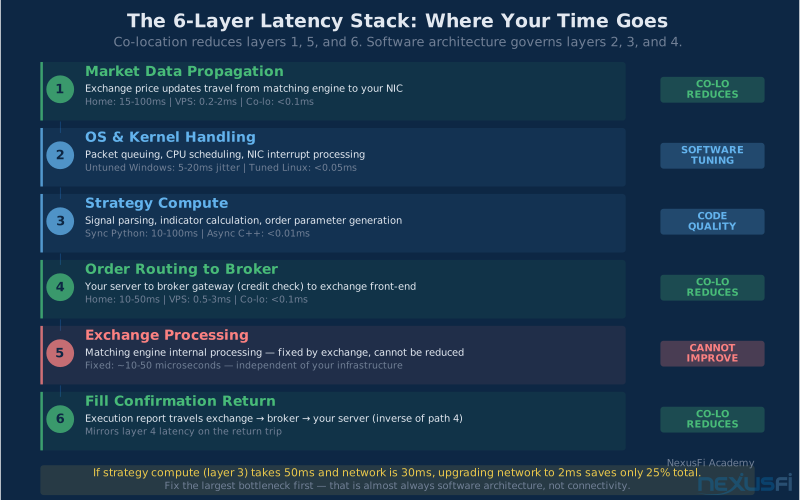
The signal path for any futures trade has six layers:
Market data propagation: Time for exchange price updates to travel from the matching engine to your server's network interface. From home internet in New York to Aurora, you're looking at 15-25ms round-trip under good conditions. From a VPS at Equinix NY4 with a direct circuit, you might see 0.8-2ms. From co-located hardware in the same data center as the matching engine, sub-100 microseconds is achievable.
Local handling: Your operating system, network interface card, and drivers all add overhead. Kernel interrupts, packet processing queues, and CPU scheduling introduce jitter — variance in latency even when network conditions are stable. A properly tuned Linux system with dedicated CPU cores, interrupt affinity, and kernel bypass networking adds less than 10 microseconds at this layer. An untuned Windows VPS running multiple services can add 5-20ms of jitter alone.
Strategy compute: The time your algorithm spends parsing market data, running calculations, evaluating signals, and deciding on order parameters. This layer is entirely in your control. A poorly written algorithm consuming 50ms to compute a simple moving average crossover won't benefit from co-location — the infrastructure overhead you're trying to eliminate is smaller than the self-imposed delay you haven't addressed.
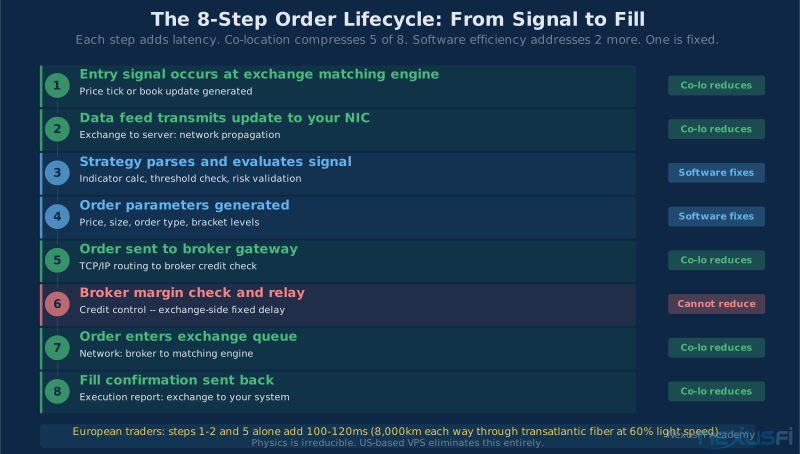
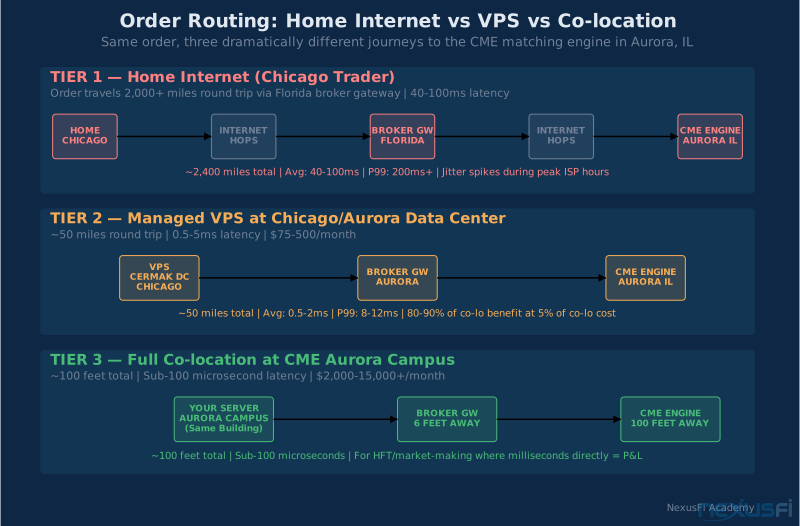
Order routing: The path from your server to your broker's order gateway, where margin checks happen, and onward to the exchange. As SMCJB explained in NexusFi's VPS discussion thread, this routing can work against you even with proximity. If your broker's gateway is in Florida and you're in Chicago, your order is traveling round-trip to Florida regardless of your local proximity to Aurora.
Exchange processing and matching: The matching engine's internal processing time. This is fixed by the exchange. No amount of co-location affects how long it takes the engine to process your order once it arrives.
Execution reports: Confirmation traveling back from exchange to your server. Relevant if your strategy reacts to fills in real-time — hedging, multi-leg structures, or grid management all depend on this feedback speed.
Co-location helps with layers 1, 4, and 6. Everything else is your problem.
Co-location helps with layers 1, 4, and 6 of the 6-layer signal path. The other three — local OS handling, strategy compute, and exchange processing — are entirely unaffected by where your server lives. If your algo's signal computation takes 50ms, co-locating will not make you competitive. Fix your software first.
CME Aurora and ICE: Understanding the Venues #
The CME Group runs its core futures matching engines — E-mini S&P 500 (ES), Nasdaq (NQ), crude oil (CL), Treasury futures — from the Aurora, Illinois campus. This isn't the only CME facility, but it's the primary one for the contracts most retail and algorithmic traders use.
The Aurora campus hosts both CME's own infrastructure and a colocation ecosystem of third-party providers offering rack space and cross-connects. Cross-connects are dedicated fiber links between your server cabinet and the exchange's network — you're not competing with general internet traffic on these paths.
What matters practically: even within the same data center building, your cabinet placement and network path matter. A server in a different cage requiring two more network hops can add microseconds that compound at high trade frequencies. For institutional HFT shops, this matters enormously. For most algo traders using a managed VPS, you're unlikely to see this level of path optimization from your provider — what you get is "in the same building," which is still dramatically better than home internet.
The ICE ecosystem is similar. ICE Futures U.S. (Russell 2000, coffee, sugar, cocoa futures) operates primarily from New Jersey data centers, while ICE has European matching engines for Brent crude and European equity index futures in London's Basildon data center. ICE operates its SFTI (Secure Financial Transaction Infrastructure) network for participants requiring guaranteed low-latency paths.
One practical distinction: ICE's European instruments have different co-location economics than US exchanges. A US trader accessing ICE Brent has at the core different latency dynamics than a European trader accessing the same contract. Geography still wins — but it's the geography of the matching engine, not your physical location.
The Three Infrastructure Tiers #
The infrastructure decision exists on a spectrum, but three tiers capture most situations.
Tier 1: Home Internet #
Most retail traders start here. Your trading platform runs on your local computer, connecting to your broker over residential broadband.
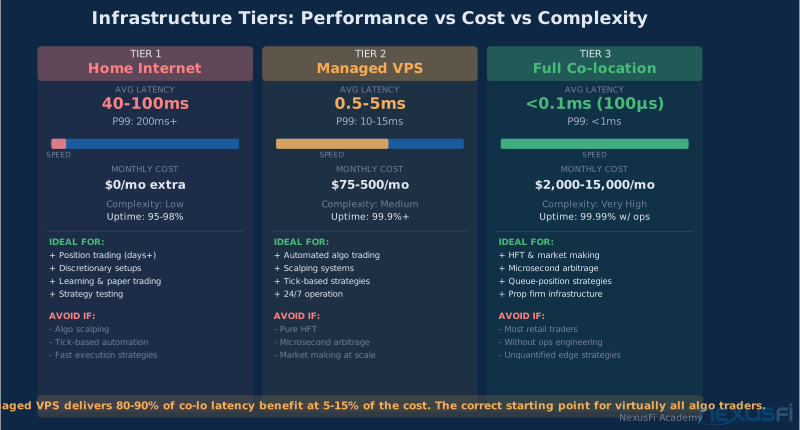
Typical latency to CME: 15-100ms round-trip, depending on geographic distance and ISP routing. European traders connecting to US futures can see 120ms+ as an irreducible physical minimum — the signal traveling through transatlantic fiber at 60% the speed of light simply takes that long.
What it's good for: Learning, paper trading, position trading (days to weeks holding periods), swing trading where you're not time-sensitive on entries, any strategy where 50-100ms of execution lag doesn't move the needle.
What kills you here: Algorithmic strategies on tick-based charts where reaction speed matters. Scalping. Anything using simulated stop orders held locally (not at the exchange) that need to fire precisely when price hits a level. Market-making or mean-reversion strategies where you're competing against faster participants for queue position.
A frequent misconception: home internet's average latency might be acceptable, but its variance is what causes problems. Consumer internet experiences bursts of packet loss during peak usage hours, Wi-Fi drops, router reboots, and ISP routing changes. A trading strategy that depends on reliable execution timing will encounter failure modes from home internet that a VPS eliminates.
Tier 2: Managed VPS #
A managed Virtual Private Server is a cloud server hosted by a provider in a data center — ideally the same data center as your target exchange, or directly adjacent with a dedicated circuit connection.
The key distinction from a generic cloud VPS: trading-focused providers specifically locate servers near exchange data centers and improve their network paths for low-latency financial traffic. Generic VPS providers (even large ones) route traffic over general internet, which doesn't provide the same consistency.
Typical latency to CME from an Aurora-adjacent VPS: 0.2-5ms round-trip for order submission, with much lower jitter than home internet. Market data latency on dedicated circuits can be under 1ms.
The 80% solution: Three experts interviewed for this piece independently estimated that a properly chosen managed VPS delivers 80-90% of co-location's latency benefit at 5-15% of the cost. For the vast majority of algo traders, this is the optimal cost-benefit tradeoff.
As @hyperscalper described in NexusFi's micro scalping thread, his dedicated server in Chicago (not in Aurora, but close) achieved sub-1ms ping to CME at a cost of $200/month. That's dramatically better than home internet, without the complexity and cost of true co-location.
What to look for in a trading VPS:
Verify the physical location, not just the marketing claim. Ask for the data center name (e.g., "Equinix NY5," "CME Aurora campus," "Equinix CH1 Chicago"). Data center names have specific addresses that you can verify against CME and ICE co-location documentation.
Request a traceroute from the VPS to the exchange gateway IP. Count the hops and look at the latency at each hop. Fewer hops and lower per-hop latency means a better network path.
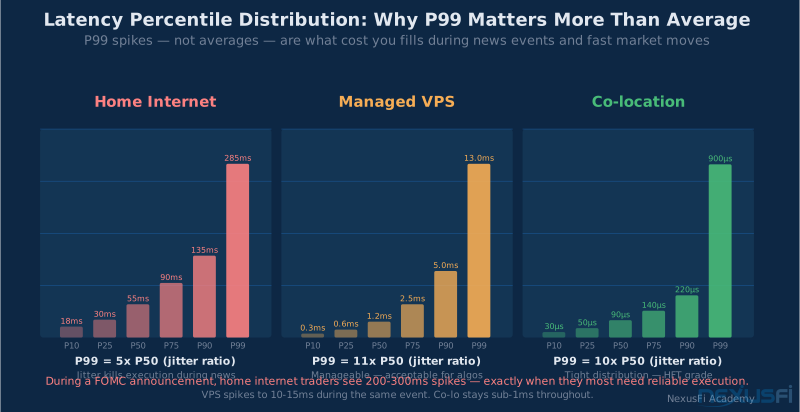
Ask for measured percentile latency — p50, p95, p99 — not average. A provider advertising "0.5ms average latency" might have p99 at 50ms due to periodic spikes that would blow up your execution timing.
Confirm 24/7 support during market hours with a response time SLA. Your trading system failing at 9:30 AM during the equity open is the scenario you're protecting against.
Typical cost: $50-500/month for a managed VPS near exchange infrastructure. Higher cost usually buys you dedicated resources (avoiding noisy neighbors on shared hardware) and better network paths.
Tier 3: Full Co-location #
True co-location means your hardware, inside the exchange data center, connected to the exchange network via cross-connects. This is how institutional market makers and HFT firms operate.
Typical latency: Sub-100 microseconds round-trip. Some optimized setups achieve under 10 microseconds.
What it takes: You own or lease physical servers (1U or 2U rack servers), paying for rack space, power, cooling, cross-connect fees (typically $500-2,000/month per circuit), and bandwidth. You're responsible for all hardware maintenance, OS management, and software. When a NIC fails at 3 AM, you either have a remote hands contract or you're driving to the data center.
Realistic monthly cost: $2,000-15,000+ for a functional co-lo setup when you add hardware amortization, space/power/cross-connect, software licensing, and operational time.
Who it's for: Professional algorithmic trading firms where microseconds directly translate to P&L. Market makers who quote continuously and need to cancel/replace thousands of times per second. Statistical arbitrage strategies where latency advantage over competitors is the edge itself.
Full co-location's operational complexity is routinely underestimated. Kernel bypass networking, FPGA-based market data handling, and 24/7 hardware management require dedicated engineering resources. Individual traders who co-locate without operational infrastructure often spend more time managing hardware than trading. Start with a managed VPS and only move to co-location after you've quantified the P&L benefit with hard data.
For retail algo traders, full co-location is almost never the right answer. The operational complexity alone — kernel bypass networking, DPDK, FPGA-based market data handling — requires engineering expertise that consumes enormous time relative to trading research. Unless you can quantify, with real data, that reducing your round-trip from 1ms to 50µs would produce measurable P&L improvement, you're paying for infrastructure you don't need.
How Co-location Changes Execution Quality #
Let's move from theory to the specific execution outcomes that change at each tier.
See Automated Order Execution for how order type selection compounds with latency to determine fill quality.
Fill probability in fast markets: When price moves sharply, orders from lower-latency participants arrive at the exchange queue before orders from higher-latency participants. If you're on home internet and a news event moves ES by 4 ticks in 50ms, your reactive order arrives after the move has already been priced in. From a VPS 0.5ms from the matching engine, you're sending orders before most home-internet participants even know the price moved.
This matters for strategies that react to market microstructure signals. It's largely irrelevant for strategies where you're placing limit orders ahead of moves you've anticipated.
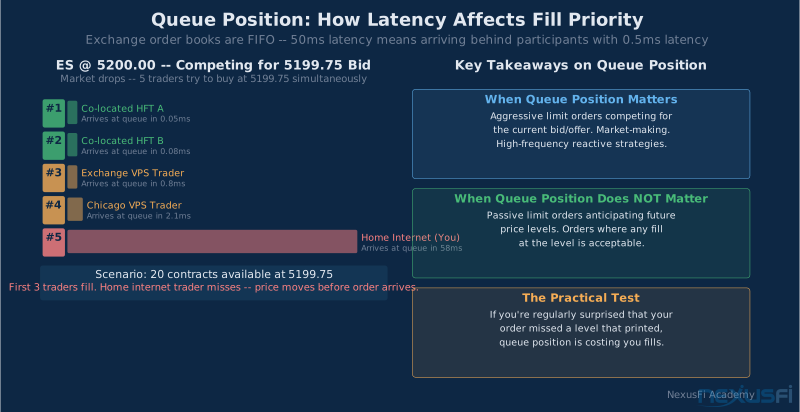
Queue position: Exchange order books are FIFO — first in, first out. Your limit order's position in the queue at any price level determines fill probability. From home internet, you're consistently adding to the back of queues milliseconds behind participants who are faster. From co-location, you can compete for early queue position.
Importantly: queue position advantage only matters if you're specifically trying to trade with queue dynamics. Many profitable strategies work with limit orders that don't need front-of-queue position — they're placing orders where they believe price will trade, not competing for position at the current bid or offer.
Cancel/replace responsiveness: Active order management requires canceling or replacing orders quickly when conditions change. From home internet, there's a 50-100ms lag between deciding to cancel an order and the exchange receiving the cancel. From co-location, that lag is under 1ms. For market-making strategies that constantly adjust quotes, this difference is critical. For strategies that place and leave limit orders, it's irrelevant.
Data feed reaction: For a full breakdown of data feed architecture choices, see Market Data Handling for Automated Trading Systems. If your strategy reacts to changes in market depth, level 2 order book updates, or trade-by-trade prints, co-location means you see those updates sooner and can react before participants with slower data feeds. This advantage is real but diminishing — by the time price updates have reached your VPS or home internet, the fastest HFT participants have already acted on them. Your advantage from VPS vs home internet is competing against other medium-speed participants, not against co-located HFT.
Arbitrage windows: Price discrepancies between correlated instruments (ES and SPY, for example, or ES and NQ during correlated market moves) are typically measured in microseconds and disappear quickly. Home internet traders cannot participate in these opportunities profitably. VPS traders are borderline. Only co-located participants can reliably capture these spreads before they close. See High-Frequency Trading in Futures Markets for a full breakdown of how HFT firms use co-location as their structural edge.
Decision Framework #
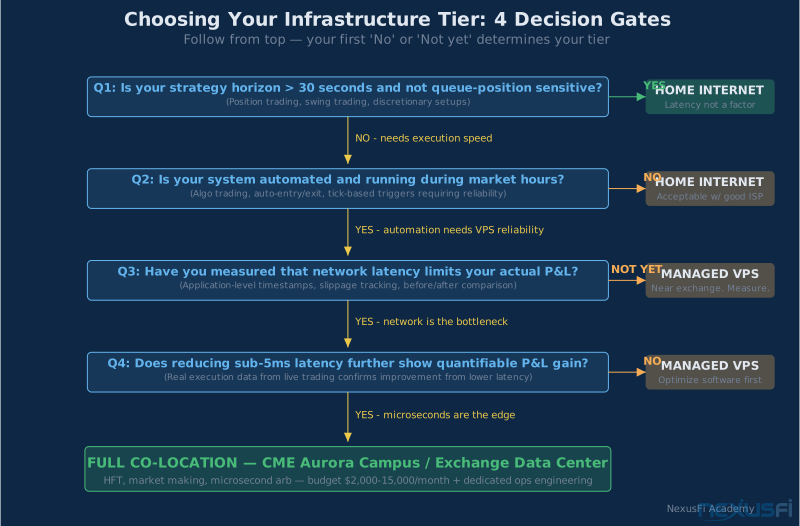
The right infrastructure tier depends on your strategy's sensitivity to execution speed. Here's how to work through the decision.
Step 1: Identify your strategy's reaction requirement.
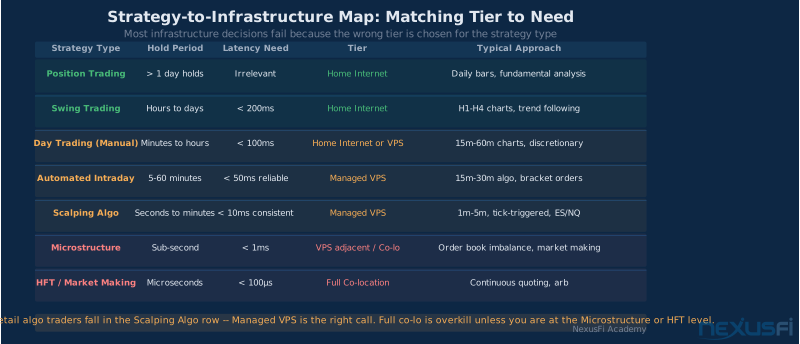
What's the holding period for your typical trade? Position traders holding days to weeks have zero latency requirements. Swing traders holding hours to days are similarly unaffected. Intraday algo traders holding minutes need reliable execution but not necessarily sub-millisecond speed. Scalpers holding seconds are sensitive to latency. Microstructure strategies holding sub-second have strict latency requirements.
Step 2: Assess your order interaction.
Are you placing passive limit orders that sit in the book and wait for the market to come to you? Or are you submitting market or aggressive limit orders that compete for immediate fills? Passive strategies are far less latency-sensitive. Aggressive strategies benefit from every millisecond of improvement.
Step 3: Calculate your strategy's latency sensitivity.
Does your strategy's signal depend on fast reaction to market events? Measure the average time from signal generation to order submission in your current setup. If your strategy's decision logic takes 20ms to run, shaving 15ms off network latency won't move the needle — you're constrained by computation, not connectivity.
Step 4: Measure your current setup before upgrading.
Many traders assume their infrastructure is their bottleneck without measuring. Use application-level timestamps: record the time you receive a market data update, the time you send an order, and the time you receive fill confirmation. The gaps between these timestamps tell you where your time is going.
If your strategy compute takes 50ms and your network latency is 30ms, upgrading from home internet to VPS (reducing network to 2ms) gives you a 25% total improvement. Upgrading your algorithm to compute in 5ms gives you a 57% total improvement. Fix the biggest bottleneck first.
Step 5: Determine your tier.
The infrastructure tier that fits you is determined by your strategy's time horizon and order interaction model — not by aspiration. Passive limit-order strategies on 15-minute charts need reliable connectivity, not microseconds. Aggressive scalping algos on tick charts need every millisecond they can get. Measure your actual bottleneck before spending on infrastructure you may not need.
| Strategy Profile | Recommended Tier | Why |
|---|---|---|
| Position / swing trading | Home internet | Execution speed not a factor; cost savings obvious |
| Intraday discretionary | Home internet or VPS | Reliability matters more than raw speed; VPS eliminates connection risk |
| Automated algo (medium frequency) | Managed VPS near exchange | Eliminates most latency overhead; reliability is essential |
| Scalping systems | Managed VPS near exchange | Sub-5ms latency competitive; full co-lo rarely justified |
| Microstructure / HFT | Full co-location | Sub-millisecond requirements; only co-lo delivers |
Technical Optimization #
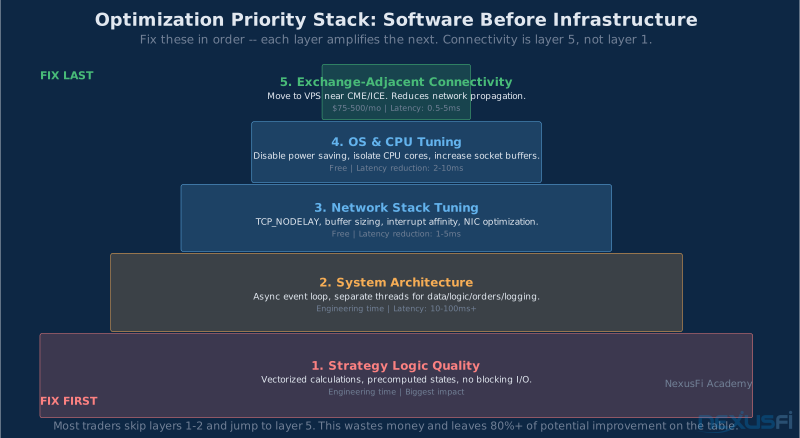
Before spending a dollar on infrastructure upgrades, address these in order. They deliver execution improvement at lower cost than connectivity upgrades, and connectivity upgrades can't compensate for software inefficiency.
Architecture first: Structure your trading system with separate threads or processes for market data ingestion, strategy logic, order routing, and risk/logging. The Trading System Architecture guide covers these patterns in detail. Synchronous designs where logging blocks order submission, or where market data processing blocks strategy evaluation, introduce latency you can measure and eliminate.
Eliminate blocking I/O in the critical path: Disk writes, synchronous database calls, and network requests that wait for responses will stall your order submission. Move logging to a separate async thread with a buffer. Never write to disk between receiving a signal and submitting an order.
CPU and OS configuration: Disable CPU power-saving features (C-states, frequency scaling) on any machine running latency-sensitive code. Power management features save energy by reducing CPU speed during perceived idle periods — which can include the microseconds between event detection and order processing. On Linux, tune kernel parameters for network performance: increase socket buffer sizes, enable TCP_NODELAY, and consider core isolation for critical threads.
Time synchronization: Use NTP at minimum; PTP (Precision Time Protocol) if available. Accurate timestamps are essential for measuring your actual latency and for any strategy using time-based signals. Two systems with unsynchronized clocks make it impossible to measure the actual lag between market event and order submission.
Reconnect logic and resilience: Professional trading systems handle exchange connection drops, throttle responses, market data gaps, and session resets without human intervention. Your system should have automatic reconnect with exponential backoff, position reconciliation after reconnects, and alerting when connectivity degrades. Co-located hardware fails; the difference is whether your software handles it gracefully.
Validate under stress: Test your system's behavior during high-volatility periods — FOMC announcements, jobs reports, flash crashes. This is when jitter spikes, exchange throttle responses increase, and reconnects happen. If your system works perfectly in normal markets but fails when it matters most, all your infrastructure investment is wasted.
Measuring Your Infrastructure Impact #
Don't assume an infrastructure upgrade helped. Measure it.
Application-level timing: Instrument your code with high-resolution timestamps at each stage: market data receipt, signal generation, order send, fill receive. Log these for every trade. Analyze the distribution — especially the tail (p95, p99) — to identify where time is going.
Ping vs application latency: Ping (ICMP) latency to a server doesn't predict your application's order submission latency. Kernel scheduler decisions, NIC interrupt handling, and application overhead all add to the network propagation time you're measuring with ping. Use your actual trading application to measure actual trading latency.
Before and after comparison: If you're evaluating a VPS upgrade from home internet, run your strategy in parallel on both for at least two weeks, logging fill timing, slippage, and execution quality on each path. The comparison tells you whether the upgrade delivers real P&L improvement, not just lower ping.
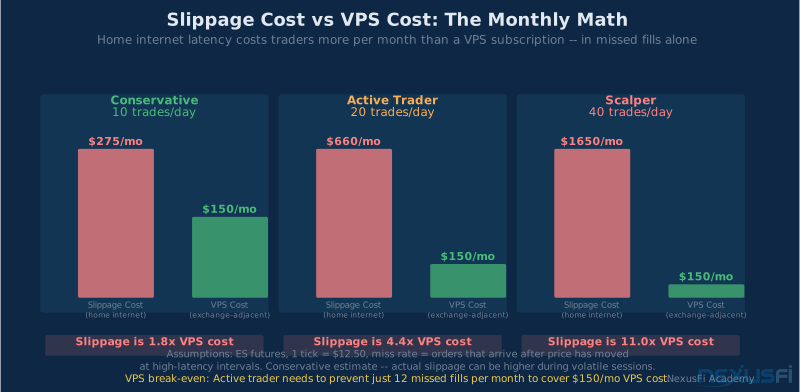
Slippage tracking: For each order, record the price at signal generation (the price when you decided to trade), the fill price, and the elapsed time between signal and fill. Average slippage across many orders tells you how much execution lag is costing you in ticks. If your slippage averages 0.25 ticks on ES, and your strategy's average profit is 1 tick, you're giving away 25% of your edge to latency. If average slippage is 0.05 ticks and your average profit is 10 ticks, latency is basically irrelevant to your strategy.
As @Fat Tails explained in the NexusFi thread on co-location setup, the most accurate method for comparing two setups is running the same automated strategy on both simultaneously and comparing timestamped execution logs. The NinjaTrader trace file records millisecond-precision timestamps for every step from signal generation through order confirmation, providing exactly this comparison data.
VPS Provider Selection #
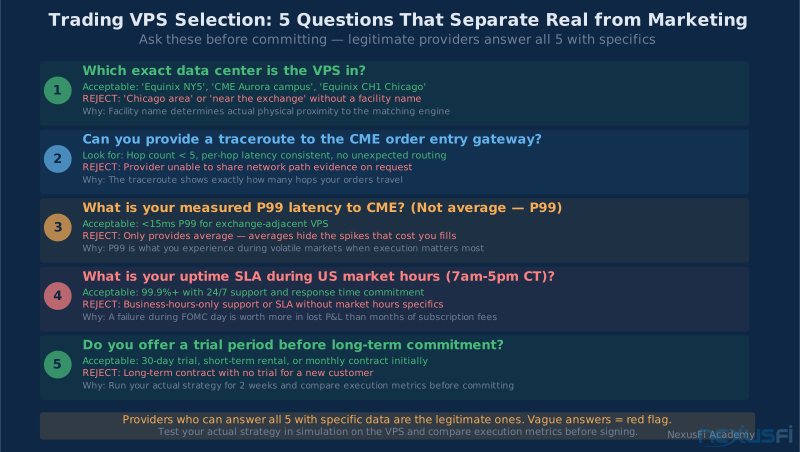
When evaluating trading VPS providers, these questions separate serious providers from general-purpose cloud offerings:
"Which exact data center is the VPS in?" Acceptable answers include specific Equinix or co-location facility names with verifiable addresses. "Chicago area" is not an acceptable answer.
"Can you provide a traceroute to the CME order entry gateway?" Legitimate providers have this data and can share it. The traceroute shows every network hop between your server and the exchange, with per-hop latency.
"What is your measured p99 latency to the CME?" Not average, not best-case. The 99th percentile tells you what latency you'll experience during the worst 1% of moments — which is exactly when fast markets are moving and execution matters most.
"What is your uptime SLA and support availability during market hours?" You need 24/7 support with a response time commitment during US market hours (7 AM - 5 PM CT for CME futures). A provider that supports only business hours in another time zone is unsuitable for trading infrastructure.
"Can I schedule a test period before committing?" Most legitimate trading VPS providers offer 30-day trials or short-term rental options. If a provider won't let you test before committing to a long-term contract, treat that as a red flag.
Common Mistakes #
Measuring ping, not application latency: Network ping latency is only one component of your actual execution time. Traders who see 1ms ping to their VPS and assume that's their order submission latency are typically wrong by 5-20x. Instrument your actual trading application.
Co-locating without optimizing software: A co-located system running unoptimized Python code with synchronous logging might still be slower than a well-architected VPS system. Infrastructure buys you potential — software determines whether you realize it.
Chasing microseconds when seconds are the bottleneck: If your strategy's signal computation takes 100ms, the difference between 1ms and 50µs network latency is noise. Fix the biggest bottleneck first.
Ignoring operational requirements: Co-location adds hardware management, monitoring, alerting, and incident response requirements. Professional shops have dedicated operations staff. Individual traders considering co-location should honestly assess whether they have the operational discipline to manage hardware failures, OS patching, and connectivity issues without disrupting their trading.
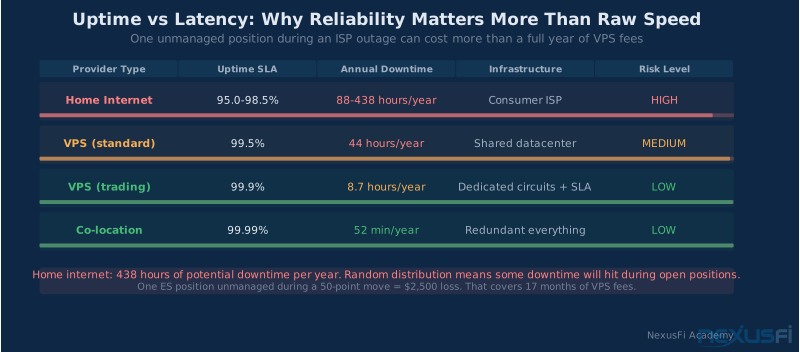
Underweighting reliability: A VPS with 1ms average latency but 99.5% uptime (4 days of downtime per year) is worse than a VPS with 2ms average latency and 99.95% uptime (4 hours of downtime per year). For trading systems, uptime and reliability during market hours matters more than the last millisecond of latency optimization.
Infrastructure and Strategy: The Right Sequence #
The most common mistake in infrastructure planning is leading with infrastructure rather than strategy.
The correct sequence:
- Develop and validate your strategy logic. Know your edge before you worry about execution.
- Build your system on home internet or a standard VPS. Confirm the strategy works.
- Instrument your execution timing. Identify actual bottlenecks.
- Address software bottlenecks first (architecture, async design, computation optimization).
- Upgrade connectivity if and only if measurement shows network latency is your actual constraint.
Many traders have wasted significant money on co-located servers for strategies that are at the core not execution-speed sensitive. A trend-following system on 15-minute bars doesn't need sub-millisecond order routing. A mean-reversion scalper on 1-tick charts might.
Know what you're trading. Measure what's actually slowing it down. Then — and only then — spend money on infrastructure.
The Aurora, IL data center will still be there after you've done the work.
Knowledge Map
Go Deeper
Build on this knowledgeReferences This Article
Articles that build on this topicCitations
- — Which the best faster VPS to retail (2022) 👍 8“Example C. Your automated execution software is hosted on a server at your broker co-located space in Aurora. Your order had to travel 106ft to get from your software to the exchange.”
- — Getting a co location dedicated server, but need some help! (2013) 👍 3“To minimize the distance that the signals travels you should have a data center as close as possible to the access point of your broker.”
- — Discussion of a Micro Scalping Day Trading Facility (2021) 👍 2“If you are 100 msecs ping time from the exchange versus 1 millisecond ping time, there will be much more network congestion and delays. My remote dedicated server is in Chicago, only a fraction of a millisecond from the CME exchange. The cost is $200/month.”
- — How to measure data feed latencies between continents? (2014) 👍 9“The minimum lag from Europe is about 100 milliseconds - quite a lot for tick-based strategies.”
- — I Am A Self-Directed Trader About To Broker With JP Morgan Institutional Side (2022) 👍 5“The exchange gives you a port at a location (Aurora IL for CME, Chicago IL for ICE, New Jersey for equities) and how quickly you communicate with that port determines your latency.”
- — Ninja Mobile Trader VPS (2024)
- — CME Group Co-Location Services (2024)
- — Getting a co location dedicated server, but need some help! (2013) 👍 6“The fiber optic cable is the fastest possible connection, as the signal propagates at 2/3 the speed of light. This means 300 miles would give a minimum roundtrip latency of about 3 milliseconds.”
- — Discussion of a Micro Scalping Day Trading Facility (2021) 👍 3“I need an execution environment where I can ping the exchange in sub-millisecond. The co-location server I use gives me the reliability of a pro environment without managing hardware myself.”