



Trading Workstation Hardware for Futures Traders: CPU, RAM, Storage, and Reliability
Overview #
Most traders approach hardware wrong — they either overspend chasing benchmarks that don't translate to better fills, or they underspend and then wonder why their system stutters during FOMC announcements. The right trading workstation isn't the fastest computer you can buy. It's the most reliable computer you can build, tuned for the specific demands of live market operation.
This guide covers every hardware decision that actually matters for futures and algorithmic trading: CPU selection, RAM sizing, storage configuration, GPU considerations, monitor setups, UPS requirements, network hardware, motherboard selection, and the operational discipline that keeps a trading PC running reliably 24/7. The goal is a system that boots reliably every time, maintains consistent performance under sustained load, and survives the failure modes that matter most — power fluctuations, network drops, and log floods during high-volatility events.
If you're running automated strategies and want to explore managed VPS as an alternative to dedicated hardware, see Trading VPS for NinjaTrader and Exchange Co-Location for Futures Traders. For most discretionary traders, a well-built local workstation remains the most practical and cost-effective option.
The Core Philosophy: Stability Over Performance #
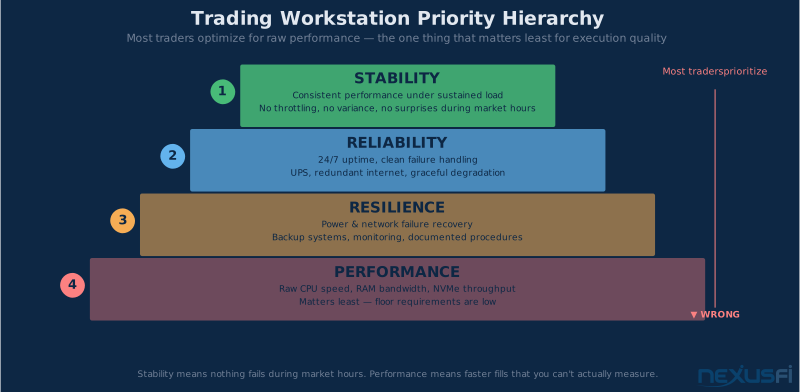
Here's what trading workstation hardware is optimizing for, in order of importance:
Consistency — A CPU that holds 4.2 GHz all day beats one that spikes to 5.0 GHz and throttles under sustained load. Trading platforms, DOM feeds, and strategy engines need predictable response times, not peak performance numbers.
Reliability — Uptime is binary. A system that fails during a volatile open costs more than any hardware savings. Every component choice should ask: what happens when this fails during market hours?
Resilience — Power, network, and software failures happen. Your hardware stack should gracefully handle each without corrupting data, missing fills, or forcing manual intervention.
Only after these three does raw performance matter, and for most trading applications, even a mid-range workstation built correctly outperforms an expensive gaming rig built for benchmarks.
Gaming PCs are built for peak performance, not sustained reliability. RGB lighting software, aggressive power management profiles, and GPU overlay services introduce background processes that cause latency spikes at the worst possible moments. If trading is your livelihood, use a dedicated trading workstation, not your gaming machine.
CPU Selection: Single-Thread Performance vs Core Count #
The CPU choice for a trading workstation breaks cleanly by use case. Get this wrong and you're either over-specced for your actual needs or under-specced for the workload you're actually running.
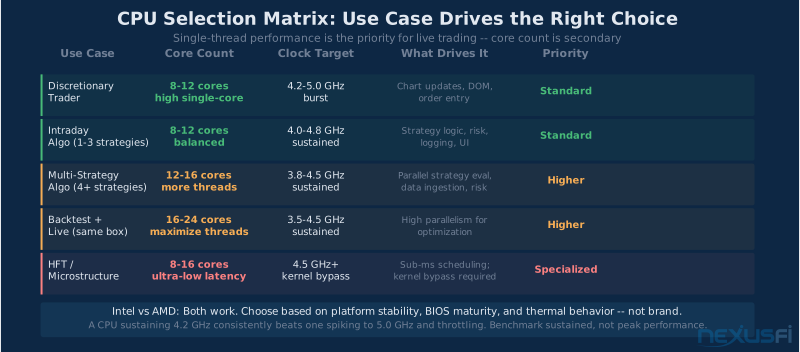
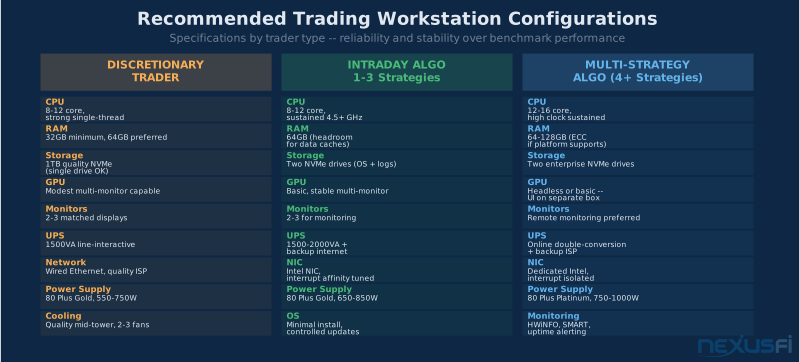
For manual discretionary trading: Your CPU is handling chart updates, order entry, DOM rendering, and background platform processes. These are single-threaded or lightly-threaded workloads. High per-core clock speed matters. An 8-core processor sustaining 4.5 GHz consistently handles all of this without breaking a sweat. You don't need 24 cores for this use case.
For algorithmic trading and strategy development: Now core count starts to matter more. Separate threads handle market data ingestion, strategy logic evaluation, order routing, risk monitoring, and logging. If you run multiple strategies across multiple instruments, more cores reduce thread contention. A 12-16 core processor makes sense here. But still: single-thread responsiveness for the critical path (signal generation → order submission) matters more than total core count.
For backtesting and optimization: This is where many cores pay off — parallel optimization across thousands of parameter combinations saturates high core counts. But note: backtesting and live trading should ideally run on separate machines, not the same box. Don't over-spec your live trading workstation for a workload it shouldn't be running.
Intel vs AMD: Both work. The real decision is platform stability, BIOS maturity, and thermal behavior for your specific build. Intel has historically had a slight single-core edge in some workloads; AMD often offers better multi-core value at a given price point. Either platform, from a reputable recent generation, works well for trading. What matters more than the brand is choosing a CPU that sustains its boost clocks under thermal load rather than throttling.
As @komoski shared in NexusFi's "Battlestations" thread, running a Ryzen 7 system with a 49-inch ultrawide plus two additional monitors worked reliably for full-time trading. The key: the system was built around sustained reliability, not peak benchmark scores.
Practical recommendation: 8-12 cores with strong single-thread performance for discretionary traders. 12-16 cores for serious algorithmic operations. Don't chase beyond 16 cores unless you're running parallel backtesting on the same machine as your live strategies — which you shouldn't be.
Thermal stability matters more than peak speed. A CPU throttling from 5.0 GHz to 3.8 GHz under load introduces latency variance that's worse for trading than a processor that runs a steady 4.2 GHz all day. Check sustained, not peak, performance when evaluating CPUs for trading.
RAM: 32GB vs 64GB #
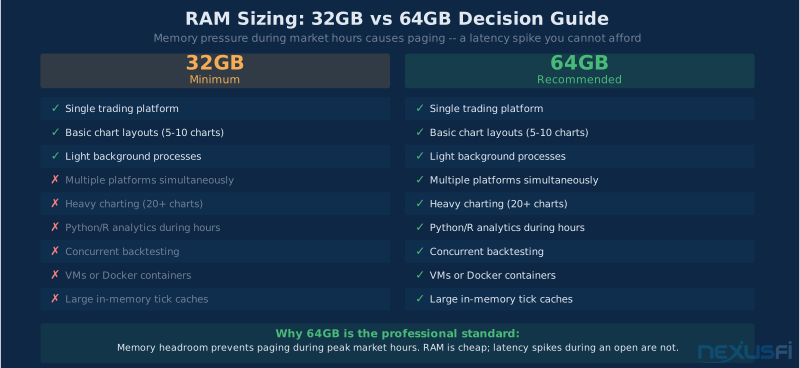
The decision is simpler than most guides make it: 64GB is the professional standard, and 32GB is the minimum you should accept.
Here's why 64GB matters:
When you're running NinjaTrader or Sierra Chart with 10-15 active charts, a Python analytics environment, a browser open to your broker's risk dashboard, Discord or Slack for trading alerts, and a logging process writing tick data — you're using 25-35GB of RAM on a typical session. Add a backtest running in the background, or a second trading platform for a correlated market, and 32GB fills up. When RAM fills up, the OS starts paging to disk. Paging introduces latency spikes that show up at exactly the wrong times.
64GB gives you headroom. That headroom translates to consistent performance even during high-utilization periods.
32GB is acceptable if:
- You run a single trading platform
- No concurrent backtesting or analytics
- Minimal browser and background process overhead
- You actively monitor and manage what's running
Choose 64GB if:
- Multiple trading platforms or instruments
- Heavy charting with many indicators
- Python, R, or Excel analytics during market hours
- Any concurrent backtesting or optimization
- VMs or Docker containers
- You want to set it and forget it without memory management overhead
On RAM speed and configuration: favor stability over maximum speed. Running at JEDEC-rated speeds is safer than pushing XMP profiles if you're targeting 24/7 reliability. Memory errors during sustained uptime are rare but catastrophic. ECC RAM provides protection against single-bit errors — relevant if you're running mission-critical algos and your platform supports it. Most consumer platforms don't support ECC, but if you're building on a workstation platform (AMD Threadripper Pro, Intel Xeon W), it's worth considering.
As @Cornbeefsoup described in the NexusFi Battlestations thread, a proper trading setup includes a UPS system to protect the investment — RAM reliability starts at the power delivery layer.
Storage: NVMe SSD Configuration #
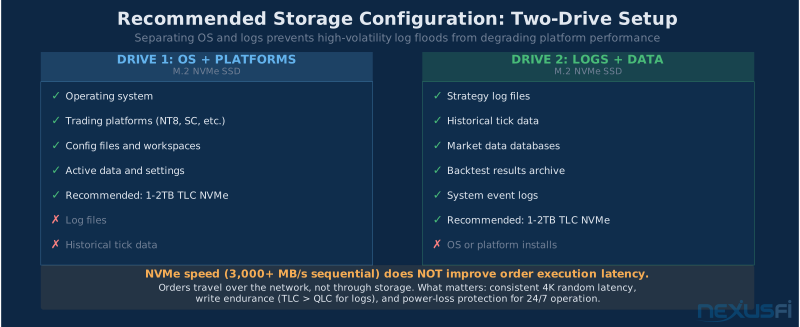
Storage doesn't affect order execution latency in any meaningful way — your orders travel over the network, not through your SSD. What storage does affect:
- Log write performance — high-frequency trading generates significant log volume; slow writes cause buffering issues
- Database performance — if you're running a local tick database or market data cache
- Platform startup time — matters when you need to restart quickly
- Crash recovery — a corrupted SSD during a stressful trading session is catastrophic
Recommended configuration: two NVMe drives.
Drive 1 (OS and platform): Fast NVMe for your operating system, trading platforms, and active data. This is where NinjaTrader, Sierra Chart, or whatever you're running lives. 1-2TB is typical. Choose a quality consumer NVMe with TLC NAND from a reputable vendor.
Drive 2 (logs and data): A second NVMe for tick data, strategy logs, backtest results, and backups. Separating logs from the OS drive prevents log floods from degrading platform performance during high-volatility periods. 1-2TB depending on your data retention policy.
What to avoid: QLC (Quad-Level Cell) NAND drives in write-heavy scenarios. They perform well until the SLC cache fills, then write speeds drop much. For sustained log writes, TLC holds up much better. Enterprise-grade NVMe (with power-loss protection and higher write endurance ratings) is worth the premium if you're running 24/7.
Reality check: NVMe sequential speeds (3,000+ MB/s) are mostly irrelevant for trading. What matters is queue latency (4K random read/write performance) and write endurance. A "slower" enterprise NVMe with better endurance is a better trading drive than a fast consumer drive with limited write life.
GPU: Less Is More #
For most trading workstations, the GPU is the most over-specified component. Unless you're driving 4K displays or running GPU-accelerated analytics, a mid-range GPU handles everything you need.
What trading actually requires from a GPU:
- Driving 2-4 monitors at 1080p or 1440p
- Hardware-accelerated chart rendering (most platforms benefit from this, but it's not demanding)
- Video decode for news feeds (if you watch them)
What trading does NOT require:
- High-end gaming performance
- Ray tracing or complex 3D rendering
- Compute shaders for ML (unless you're explicitly running GPU inference on-box)
Monitor count and GPU selection:
- 2-3 monitors at 1440p: Almost any discrete GPU from the last 4 years handles this
- 4-6 monitors: You need to check display output counts; some GPUs support more outputs than others; some require adapters
- 4K displays: More demanding; choose a mid-range or better GPU with confirmed 4K support
Priority: Choose a GPU with stable drivers, sufficient display outputs for your setup, and low power consumption relative to your system's thermal budget. A used mid-range GPU from 2-3 years ago is often the right answer.
Workstation GPUs (AMD Radeon Pro, NVIDIA Quadro/RTX Ada): Not necessary for most traders. The driver maturity and stability can be marginally better, but at significant cost premium. Unless you specifically need ECC VRAM or have enterprise software requirements, consumer GPUs work fine.
As @komoski described, running a 49-inch Samsung Super Ultrawide plus two additional monitors required careful GPU selection for display compatibility — verifying actual output support before purchase matters more than raw GPU performance.
Monitor Setups #
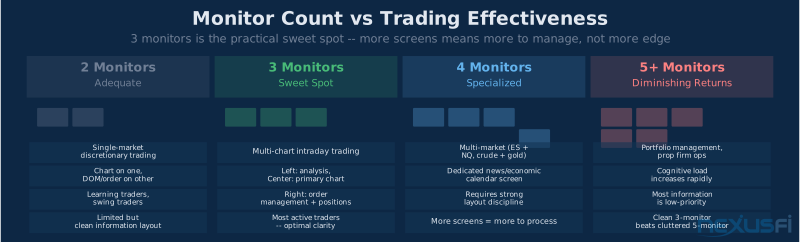
More monitors is not always better. The question is information density and cognitive load.
Two monitors: Adequate for many discretionary traders. Chart on one, DOM and order entry on the other. Clean and focused.
Three monitors: The practical sweet spot for most active traders. Primary chart center, secondary analysis left, order management and positions right. Keeps all critical information visible without requiring head movement.
Four monitors: Justified when trading multiple markets simultaneously — ES and NQ, for example — or when you need persistent news and external feeds. Four monitors is where desktop organization discipline matters; without it, information overload sets in.
Five or more: Diminishing returns unless you're trading many uncorrelated instruments or managing multiple strategies simultaneously. More monitors means more to process, not necessarily more edge.
Practical advice: Before adding monitors, improve how you use the ones you have. A well-organized three-monitor setup with meaningful information on each screen outperforms a cluttered six-monitor setup where half the screens show redundant or low-priority data.
Physical setup: Ergonomics matter for a job you do for hours every day. Center the most time-sensitive information at eye level. DOMs and order entry should be center-screen or slight right. Don't place your primary chart at an angle that requires head rotation — neck fatigue is real after six hours.
| Monitor Count | Best For | Trade-offs |
|---|---|---|
| 2 | Single-market discretionary, learning | Limited information density |
| 3 | Multi-chart discretionary, intraday algo | Sweet spot for most traders |
| 4 | Multi-market trading, separate news feed | Requires layout discipline |
| 5-6 | Multi-strategy, portfolio management | High cognitive load risk |
UPS / Battery Backup: Non-Negotiable #
This is the component that separates serious traders from hobbyists. A UPS is not optional for anyone trading real capital.
What a UPS protects you from:
- Power outages — gives you time to flatten positions or execute a clean shutdown
- Brownouts and power fluctuations — consumer power grids are noisy; voltage fluctuations cause hardware stress and can corrupt data mid-write
- Brief outages — most power interruptions are under 30 seconds; a properly sized UPS rides through them invisibly
- Clean shutdown capability — if the outage is extended, the UPS buys time to close positions and shut down cleanly, preventing state corruption
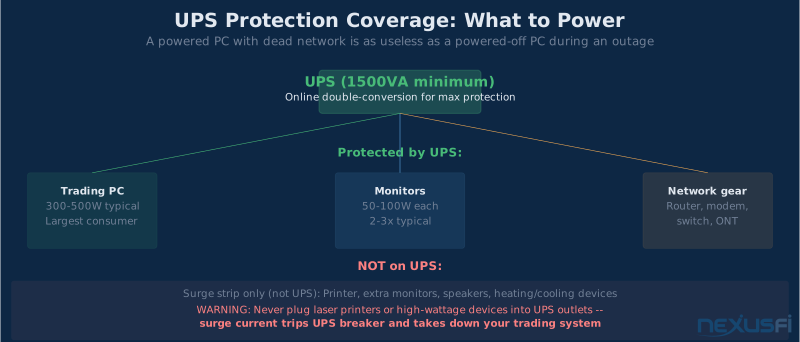
What to protect: Your PC is obvious. But also: your router, modem, network switch, and any cable or fiber equipment. Losing network connectivity during a market event when your PC is running is as bad as losing the PC itself. Put all your critical networking gear on the UPS.
UPS sizing: Calculate the wattage of your PC (roughly 300-500W for most trading workstations), monitors (50-100W each), networking gear, and add 25% headroom. A 1500VA UPS is appropriate for most setups. A 2000VA provides more runtime.
UPS type:
- Line-interactive (most common): Good protection against surges and brownouts; brief switchover time (4-8ms) on outage
- Online double-conversion: True zero-transfer-time; power always runs through the UPS inverter; better power conditioning; more expensive; appropriate for mission-critical setups
Monitoring: Choose a UPS with USB or network monitoring. Software can trigger automatic shutdown scripts when battery reaches a threshold — critical for 24/7 systems.
Testing: Test your UPS annually by pulling the plug while the system is running. Confirm it switches cleanly and the monitoring software reports the event correctly.
Never plug a laser printer, space heater, or other high-wattage device into a UPS. These appliances draw enormous surge current that can trip the UPS circuit breaker, taking down your trading system in the process.
Network: Wired, Stable, Redundant #
For trading, the network stack is infrastructure, not an afterthought.
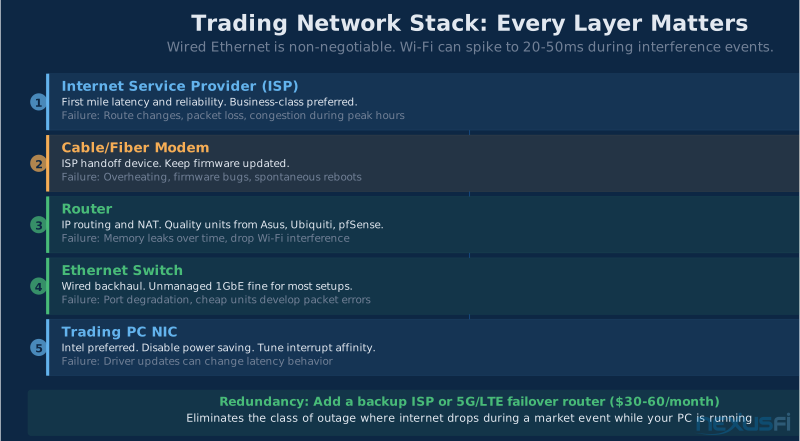
Ethernet only. Wi-Fi introduces variable latency from interference, contention, and frequency band switching. Consumer Wi-Fi can spike to 20-50ms latency during interference events. Wired Ethernet is deterministic and eliminates that class of problem entirely.
NIC selection: For most traders, the onboard NIC is adequate. Modern motherboards ship with quality Intel or Realtek controllers that handle trading workloads without issue. Where NIC quality matters:
- If your strategy is latency-sensitive (sub-10ms reaction time requirements)
- If you're experiencing driver-related packet loss or interrupt coalescing issues
- If you need multiple physical network connections (one for market data, one for order routing)
Intel NICs (I219-LM, I225-V, and higher) are widely recommended for driver maturity and stability. If your motherboard has an Intel NIC, it's probably fine. If it has a Realtek, it's usually fine but less battle-tested in professional environments.
Network configuration for latency:
- Disable NIC power saving features (adapter power management in Windows, or kernel module parameters in Linux)
- Adjust interrupt moderation settings if your platform gives you control
- Use a quality unmanaged or managed switch (not a consumer all-in-one combo device that shares resources between router and switch functions)
Backup internet: This is where single points of failure matter. A $30/month redundant ISP connection (or a LTE/5G backup router that auto-fails over) eliminates the class of outage where your internet drops at market open. @Shmo7 specifically mentioned using "high-speed internet connection for low latency" as a key setup feature — the point extends to redundancy.
Motherboard Selection #
The motherboard is the platform on which everything else runs. For trading workstations, three things matter: stability, BIOS quality, and power delivery.
Stability and BIOS maturity: Choose a board from a reputable manufacturer (ASUS, Gigabyte, MSI for consumer; Supermicro, Tyan for server-grade) with a mature BIOS revision history. Avoid first-week reviews of brand-new boards. Let the community shake out the bugs.
VRM quality (voltage regulator modules): For 24/7 operation, VRM quality determines whether your CPU runs at stable voltages under sustained load. Under-spec VRMs cause thermal throttling and voltage fluctuations. Reviews that specifically measure VRM quality under sustained load (not just peak benchmark loads) matter for trading boxes.
PCIe lane mapping: Understand which PCIe slots share bandwidth and which are full-bandwidth. If you're running multiple NVMe drives plus a dedicated NIC, check that your board doesn't throttle bandwidth when multiple slots are occupied.
BIOS power settings: A good motherboard gives you granular control over:
- C-states (CPU power states during brief idle periods)
- Frequency scaling behavior
- Memory speed and timing settings
- Fan control profiles
For trading, disabling aggressive C-states reduces CPU wake-up latency. This is a minor optimization but worth configuring.
Intel NIC on-board: If the choice between two similar boards comes down to one having an Intel NIC and one having something else, choose the Intel NIC. Driver stability matters.
Dedicated Trading PC vs Gaming PC #
The framing of "gaming PC vs trading PC" is really about discipline and operational focus.
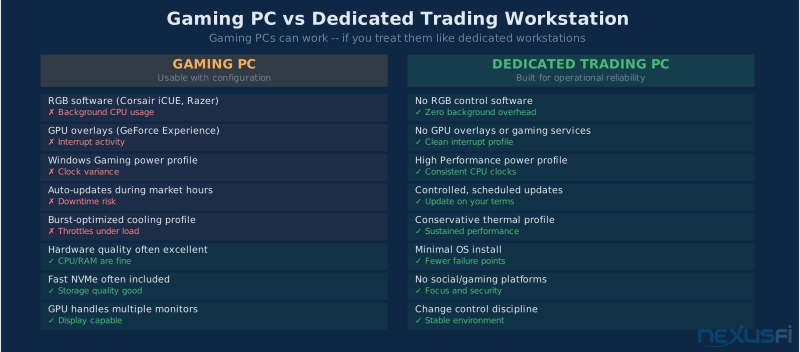
A gaming PC works for trading. The hardware is often excellent — high-quality CPUs, large RAM kits, fast NVMe drives. The problems are software and configuration:
Gaming PC problems for trading:
- RGB control software (ARGB controllers, Corsair iCUE, Razer Synapse, ASUS Aura) runs background services
- GPU overlays (GeForce Experience, Radeon Software) add interrupt activity
- Windows is typically set to "Gaming" or "Balanced" power profiles that introduce CPU clock variation
- Auto-update services for gaming software run during market hours
- Thermal profiles tuned for burst performance, not sustained stability
None of these problems are unfixable. A gaming PC, properly configured with RGB software removed, power profiles set to "High Performance," and auto-updates disabled during market hours, can be an excellent trading machine. But it requires active configuration discipline.
A dedicated trading PC, built to spec from the start, has none of these issues. It boots into a minimal Windows install, runs only the services it needs, and doesn't acquire gaming-oriented software that requires ongoing management.
Recommendation: If you're serious about trading, either build a dedicated machine or invest the time to properly configure a gaming PC as a dedicated trading workstation. Half-measures — using a gaming PC with all its gaming software running in the background — are where problems originate.
The 24/7 Reliability Stack #
For algorithmic trading that runs overnight or during extended hours, hardware reliability requires explicit planning.
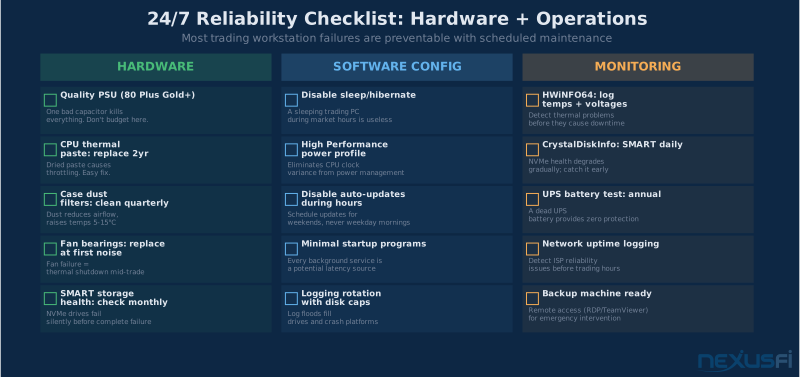
Power supply: A quality PSU is not the place to save money. Choose a unit rated at 80 Plus Gold or Platinum efficiency from a reputable manufacturer. Size it at 150-200W above your actual draw to keep it running in its efficiency sweet spot and extend its life.
Cooling: Reliable cooling for 24/7 operation means:
- Quality case fans (Noctua, be quiet!, Arctic) rated for extended operation
- Conservative fan curves — louder is fine, thermal throttling is not
- Adequate case airflow — positive pressure (more intake than exhaust) reduces dust accumulation
- CPU cooler sized appropriately for the CPU's TDP at sustained loads
Dust management: Dust accumulates over months and blocks airflow. Use case fans with dust filters. Clean filters quarterly. A dusty system runs hotter and throttles more often.
Monitoring: Use hardware monitoring software (HWiNFO64 on Windows, lm-sensors on Linux) to log:
- CPU temperatures under sustained load
- Drive temperatures (use CrystalDiskInfo or SMART monitoring)
- Fan RPMs to detect bearing wear before failure
- Voltage rails for stability verification
Operational discipline:
- Disable sleep and hibernate modes
- Schedule Windows updates and reboots for weekends, not weekday mornings
- Maintain a backup machine or remote access (TeamViewer, RDP) for emergency intervention
- Keep restore points or drive images of your working system configuration
The most reliable trading workstation is one that you never have to think about during market hours. Building for that outcome requires planning every failure mode before it happens — not after your system crashes during a trending market.
Knowledge Map
Prerequisites
Understand these firstGo Deeper
Build on this knowledgeReferences This Article
Articles that build on this topicCitations
- — Battlestations: Show us your trading desks! (2019) 👍 24“I have been trading futures full time for over 20 years. My trading setup is a few years old and is about to be updated with a new AMD spec machine.”
- — Battlestations: Show us your trading desks! (2019) 👍 33“The main trading setup runs a 49in Samsung Super Ultrawide, with a 34in LG Ultrawide, and 2 27in vertical Asus monitors.”
- — Battlestations: Show us your trading desks! (2021) 👍 22“High-speed internet connection for low latency. Six 24 inch Dell monitors used exclusively for trading. Desktop with Ryzen 7 2700.”
- — Battlestations: Show us your trading desks! (2021) 👍 8“Instead of a trading desk, I created a trading couch setup. Since we traders are sitting countless hours in front of the screen, I realized ergonomics matter enormously.”
- — Battlestations: Show us your trading desks! (2021) 👍 18“Back-Up Battery/UPS system next to computer tower: CyberPower CP1500PFCLCD PFC Sinewave UPS System, 1500VA/900W. Storage: SSD 970 EVO Plus NVMe M.2 1 TB.”
- — Battlestations: Show us your trading desks! (2019) 👍 23“Running Sierra Charts, Ninjatrader, Tradingview, Bookmap and Jigsaw. Trading ES, Bonds, Gold, Oil. One 65 inch UHD 4K TV plus additional monitors.”
- — Battlestations: Show us your trading desks! (2018) 👍 18“Jigsaw software running: left monitor CL, YM and NQ right monitor I have my ES setup. Deepcool TESSERACT SW Red ATX Mid Tower Computer Case.”
- — Battlestations: Show us your trading desks! (2017) 👍 12“I had a curved trading desk that I designed built for me that is 900mm deep so the distance to the monitors is comfortable. Key feature includes ergonomic monitor placement.”
- — Ninja Mobile Trader - Professional Trading VPS (2024)