



Internet Connection for Day Traders: Latency, ISP Selection, and Backup Setup
Overview #
Most traders approach their internet connection the same way they approach their trading platform: by chasing the highest number they can afford. 500 Mbps instead of 100 Mbps. "Business class" instead of residential. Fiber instead of cable — even when cable works fine.
This is mostly wrong. The internet requirements for trading are different from nearly every other demanding use case, and understanding exactly what matters — and what doesn't — changes how you evaluate and set up your connection.
This guide covers the complete picture: what metrics actually affect trade execution, how to measure them, how different connection types compare, what a proper trading network setup looks like, and how serious traders build redundancy into their internet infrastructure.
If you're running automated strategies that need to stay connected 24/7, a Trading VPS for NinjaTrader may be the more practical solution — the VPS is co-located close to the exchange with enterprise-grade redundancy already built in. For most discretionary traders, the home internet setup covered here is the right focus.
What counts: Latency, Not Bandwidth #
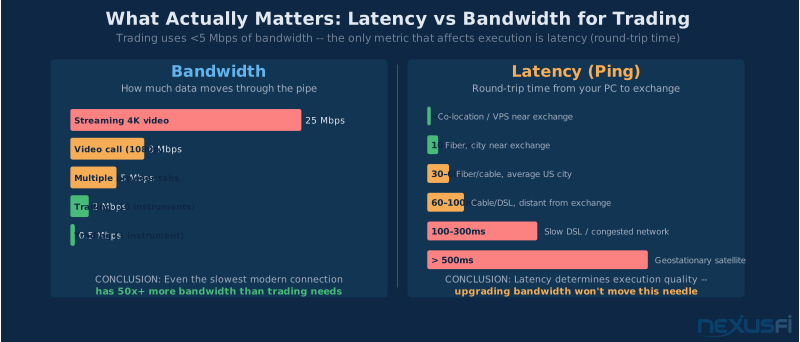
The single most important thing to understand about internet connections for trading: bandwidth is nearly irrelevant, latency is everything.
NexusFi founder Big Mike put it directly in his 2011 post on connection quality:
"I see a lot of people ask if their internet connection is fast enough for trading. The question is misunderstood, people equate bandwidth to 'fast'. More bandwidth is great for downloading or watching a movie — but bandwidth has no real benefit in trading. What matters more in trading is latency (ping times)."
That position held three years later in a 2014 thread on internet speeds:
"For trading, priorities are as follows: 1) Reliability/uptime 2) Minimum bandwidth of about 1 Mbps 3) Minimal latency. When people buy faster internet connections for their home office in order to have a better trading experience, it isn't really going to help... a 1 Mbps connection is enough for trading."
1 Mbps. Even a basic DSL line running at its minimum can be sufficient if it has good latency. Modern connections run at 50-500x that floor, so bandwidth simply isn't the constraint.
Why latency dominates:
When you submit an order, a small packet travels from your machine to your broker's server to the exchange and back. This round trip is what latency measures. Bandwidth determines how much data moves through the pipe simultaneously; latency determines how fast each individual packet makes the round trip.
As @SMCJB explained in a NexusFi discussion:
"Using the analogy of water in a pipe, bandwidth/capacity is how much water is moving through the pipe while latency is how fast that water is moving. For trading having a small very fast pipe (ie low latency connection) is more important than having a massive but slower pipe. I have both a Xfinity cable connection and an AT&T fiber connection. The cable connection has a lot higher capacity but the fiber connection has about half the latency."
The practical implication: a 50 Mbps fiber connection will generally outperform a 300 Mbps cable connection for trading, not because of the speed difference but because of the latency difference.
The three metrics that matter:
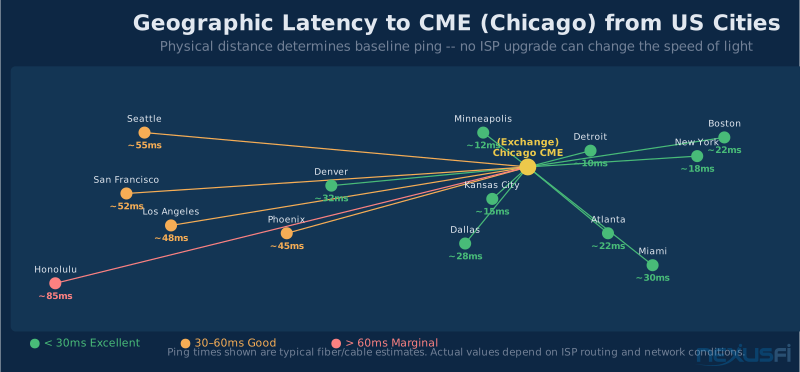
- Latency (ping time) — Round-trip time to your broker or exchange server, measured in milliseconds. Lower is better. 30-50ms from most US cities to Chicago-area exchanges is normal; above 100ms warrants investigation.
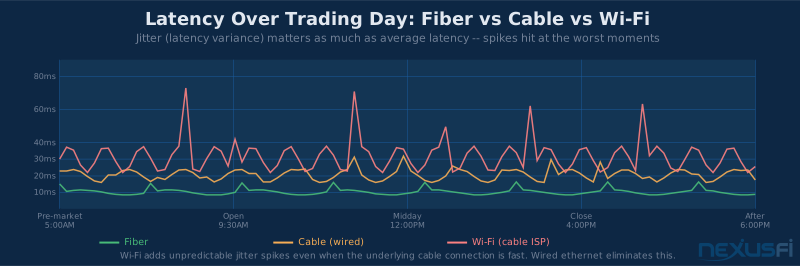
- Jitter — Variance in latency. If your ping time fluctuates from 30ms to 90ms unpredictably, that's worse than a steady 60ms connection. Jitter causes order timing inconsistency and makes charts "jump."
- Packet loss — Percentage of packets that don't complete the round trip. Even 1% packet loss degrades trading performance much. 0% should be the baseline expectation for any serious connection.
Bandwidth only matters for one trading use case: downloading large historical datasets. For live trading, 1-5 Mbps covers everything — DOM updates, order routing, market data feeds, and charting across multiple instruments simultaneously.
ISP Technology Comparison #
Big Mike's ranking from 2011 holds up well:
"In terms of DSL, Cable Modem, Satellite, and FiOS, I would rank it in order of preference like so: FiOS, DSL, Cable, Satellite. In fact, Satellite is not a viable option for a trader, the latency is just too huge. If you are able to get FiOS in your area, do it."
The ranking has evolved with newer technologies:
1. Fiber optic (best for most traders)
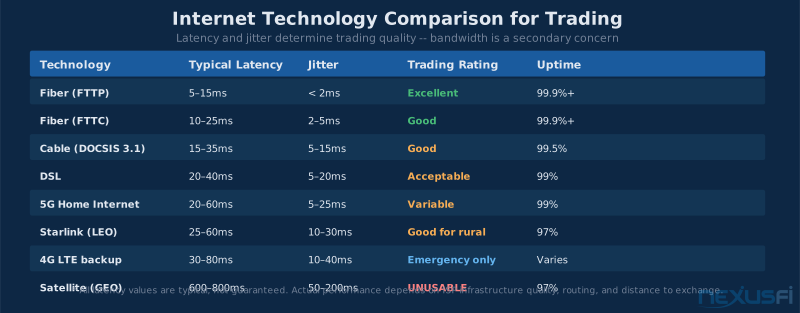
Fiber transmits data as pulses of light through glass or plastic fibers. The physics give it two advantages: pure latency (light travels faster than electrons) and no electromagnetic interference. A typical fiber connection delivers 5-20ms ping times to nearby servers, stable jitter, and zero packet loss under normal conditions.
Fiber is available in two forms: FTTP (fiber to the premises, running fiber all the way to your building) and FTTC (fiber to the curb or cabinet, with traditional copper for the last stretch). FTTP delivers full fiber benefits; FTTC degrades depending on how long the copper run is.
Providers vary by region: AT&T Fiber, Google Fiber, Frontier FiberOptic, Verizon FiOS, and local municipal fiber networks in some areas. As @SMCJB noted, AT&T fiber delivered roughly half the latency of Xfinity cable in a direct comparison.
2. Cable (acceptable, widely available)
Cable internet runs on coaxial cable — the same infrastructure as cable TV. Modern DOCSIS 3.1 cable delivers download speeds of 100-1000 Mbps, but the latency characteristics are worse than fiber: typical 15-35ms to local servers, with more jitter due to shared network segments.
The "shared" nature of cable infrastructure is its main limitation for trading. Your cable bandwidth is shared with neighbors on the same segment. During peak usage hours (evenings, when everyone is streaming), latency can increase and packet loss can appear. Mornings — when you're most likely trading — are typically less congested.
Cable is the most widely available fast internet in the US and works fine for most discretionary traders. The latency disadvantage versus fiber is real but not decisive unless you're doing high-frequency scalping where every millisecond matters.
3. DSL (adequate for low-frequency traders, suboptimal for scalpers)
DSL runs over telephone copper lines. Latency characteristics are similar to cable: 20-40ms typical, with more variance. The major DSL limitation is bandwidth — most DSL services max out below 25 Mbps, which while technically sufficient for trading creates problems when other household internet usage competes.
4. Fixed wireless and 5G home internet (emerging, variable)
Fixed wireless and T-Mobile/Verizon 5G home internet use cellular radio towers rather than physical cable. Latency varies much by distance to tower and network load: good 5G home internet can achieve 20-40ms latency, while congested cellular networks push 80-150ms.
5G home internet has become a viable option in some areas, especially where fiber isn't available. It's worth testing with a trial period before committing.
5. Low-Earth-orbit satellite (Starlink — viable for rural traders)
Traditional geostationary satellite (HughesNet, Viasat) operates from satellites 35,786 km above Earth. The speed-of-light round trip alone adds 600ms+ latency — completely unusable for any active trading.
Starlink's low-earth-orbit constellation changed the equation. With satellites at 550km altitude, latency is 20-60ms — comparable to cable in many cases. The practical results have been dramatic:
@redbarntrades shared before-and-after results switching from rural DSL to Starlink:
"Before Starlink: Ping: 456ms. Down: 13.48 Mbps. Up: 1.07 Mbps. Starlink: Ping: 32ms. Down: 213.22 Mbps. Up: 7.95 Mbps. Needless to say, I am very pleased considering we are out in the woods and no fiber within 3 miles and no hope of getting."
Going from 456ms to 32ms changes the picture entirely. For rural traders where fiber and cable aren't available, Starlink is now a legitimate trading internet option. The remaining caveats: latency can spike during high satellite demand periods, and heavy snow/rain can temporarily degrade signal.
6. Geostationary satellite (unusable for active trading)
Avoid for anything beyond position trading with multi-day holds.
Measuring Your Connection #
Before optimizing anything, establish baseline measurements. Many traders have never measured the actual metrics that matter.
Latency to your broker/exchange:
The most relevant test is measuring ping time to the servers your orders travel through — not a generic speed test server. Run from your trading workstation during market hours:
- Windows: Open Command Prompt, run
ping -n 20 [broker gateway IP]— broker provides gateway addresses in platform settings - Linux/Mac:
ping -c 20 [gateway]
Compare your results to @Big Mike's benchmark: from the continental US, 30-80ms to Chicago-area CME servers is typical. From Dallas, Big Mike measured sub-30ms.
Jitter measurement:
Standard ping shows average latency but not variance. Tools like PingPlotter (free tier available) run continuous ping tests and graph jitter over time, making it easy to identify connection quality patterns throughout the trading day.
Packet loss test:
An extended ping test reveals packet loss: ping -n 100 [server] in Windows. Any missed replies register as packet loss. Run this test during active market hours to catch the real-world conditions your trading connection faces.
Broadband quality tests:
Sites like Waveform's Broadband Test (not Speedtest.net, which optimizes for bandwidth) measure bufferbloat — a critical metric that standard speed tests miss. Bufferbloat causes latency spikes when simultaneous downloads compete with your trading traffic.
Wired Ethernet: Non-Negotiable #
This is the shortest section because it has no nuance: if you're trading on Wi-Fi, you're introducing unnecessary latency variance that serves no purpose.
Wi-Fi operates on shared radio frequencies. Multiple devices competing for the same channel, neighboring networks on the same frequency band, and interference from microwaves, Bluetooth devices, and building materials all introduce jitter. Consumer Wi-Fi can spike from 5ms to 50ms latency during interference events — variable latency that shows up as chart stuttering and inconsistent order execution timing.
Wired Ethernet (Cat5e minimum, Cat6 preferred) delivers:
- Consistent 0.1-1ms local network latency regardless of other device activity
- Zero electromagnetic interference
- Guaranteed full-duplex communication (simultaneous send/receive)
- No frequency competition or dropout risk
The counterargument — "my Wi-Fi 6 connection is as fast as Ethernet and never drops" — misses the point. The issue isn't average performance; it's the tail latency spikes and jitter events that happen at unpredictable intervals.
Run a cable from your router to your trading workstation. This single change is the highest-impact infrastructure improvement for any trader currently on Wi-Fi.
Home Network Stack Optimization #
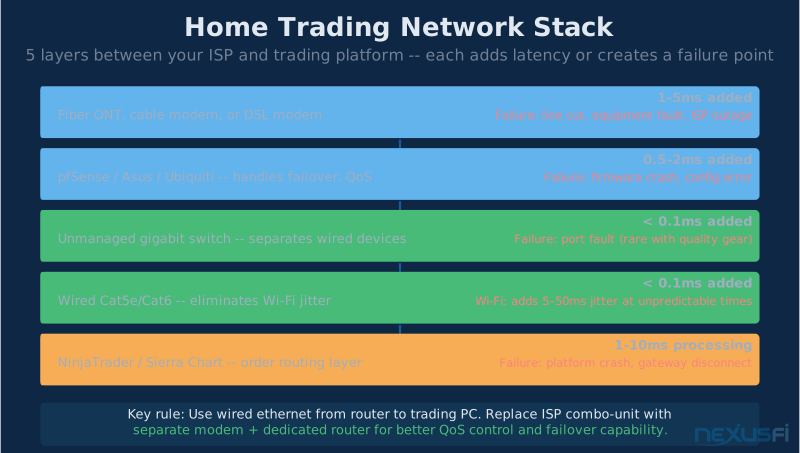
The physical path from your ISP to your trading workstation passes through several devices, each of which can introduce latency or create failure points.
Modem/gateway:
ISPs provide combination modem/router units ("gateways"). These convenience devices have limitations: their routing hardware is typically lower quality than dedicated routers, and they receive sporadic firmware updates. For serious traders, replacing the ISP gateway with:
- A separate modem/ONT (optical network terminal for fiber)
- A dedicated router with active firmware maintenance
...eliminates a source of both latency and failure.
Router selection:
For trading, router quality matters in two ways: routing performance (packet processing speed) and feature set (QoS, failover support). Prosumer routers from Asus, Netgear, or Ubiquiti handle these requirements well.
@Big Mike uses Ubiquiti infrastructure throughout his trading setup, noting it for its reliability and ability to handle complex network configurations including multi-ISP failover.
Switch:
A quality unmanaged gigabit switch (TP-Link, Netgear, Ubiquiti) cleanly separates wired devices. Combined router/switch units share processing resources; separating them keeps routing performance stable regardless of how many wired devices are active.
QoS (Quality of Service) configuration:
QoS lets your router prioritize certain traffic over others. For trading, configure your trading platform and order routing traffic as highest priority, ensuring that a background file download or video stream doesn't compete for bandwidth with your order submission.
Most prosumer routers include QoS settings. The practical configuration: mark trading platform traffic (by IP or application) as high priority, mark streaming and bulk downloads as low priority.
Backup Internet: The Setup That Prevents Catastrophic Failures #
A single internet connection is a single point of failure. For traders running positions that need monitoring, or automated strategies, that's an unacceptable risk.
@Big Mike described his redundant setup:
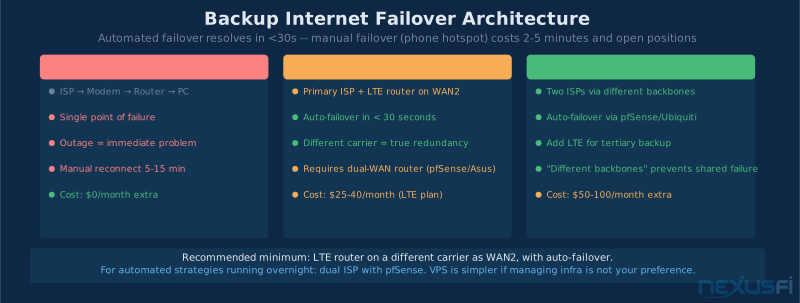
"Internet -> I have multiple Gigabit fiber optic uplinks via different ISP's that use different backbones. On top of that, I have 4G LTE backup in the event both fibers are down. Everything is handled by my own pfSense router, which handles the automatic load-balancing and failover/failback."
This is the professional-grade approach. The key phrase is "different backbones" — two fiber connections from the same provider might fail simultaneously if there's a problem at their regional hub. True redundancy uses different physical infrastructure.
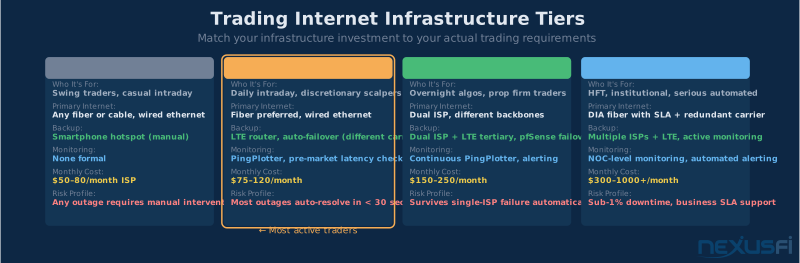
Practical backup internet options:
Tier 1 — 4G/5G cellular backup router: A $50-100 cellular router (GL.iNet, Cradlepoint, or similar) with a data SIM provides automatic failover when primary internet drops. Configuration: connect to main router as WAN2, set routing to prefer primary but auto-fail to cellular. Cost: $15-30/month for a 10GB cellular data plan, or a Visible/T-Mobile unlimited plan at $25/month.
The 4G backup should be on a different provider than your primary ISP. If Comcast has a regional outage, your AT&T LTE backup continues working.
Tier 2 — Second wired ISP: In competitive markets, you may have two cable or fiber providers. A secondary cable connection from a different provider is the most reliable backup — cellular networks also have outages. Cost: $30-50/month for a basic secondary broadband plan.
Tier 3 — Mobile hotspot: A smartphone on a strong cellular carrier makes an adequate emergency backup, even if it's not automated failover. Knowing you can instantly enable your phone hotspot and switch your PC to it keeps you connected during short outages. Not ideal for extended use but costs nothing additional.
The automation matters as much as the backup itself. A failover that requires manual intervention — plugging in a different cable, changing Wi-Fi network on your trading PC — costs minutes. An automated failover via pfSense or a dual-WAN router happens in seconds, often invisibly.
@artemiso noted the professionalism standard for traders operating as businesses:
"The decision-making here is quite similar to what you'd do for home internet, except you have an added requirement of a good service uptime SLA. A dedicated internet access (DIA) fiber circuit is usually typical if there's commercial services at your location."
DIA circuits (typically $150-500/month from commercial ISPs) offer committed bandwidth, 99.9%+ uptime SLAs, and 4-hour repair guarantees — appropriate for traders running institutional-level automated systems. Most retail traders don't need this, but the concept of treating internet connectivity as business-critical infrastructure applies at every level.
VPN Considerations #
A question that frequently comes up: should traders use a VPN?
The short answer for most: no, and using one for trading actively makes things worse.
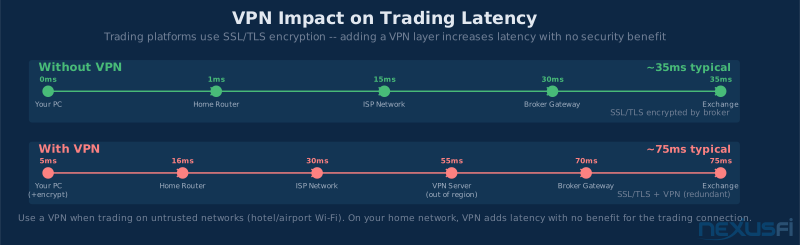
VPNs add latency in two ways: the additional routing hop to the VPN server, and the encryption/decryption overhead per packet. A VPN that routes through a server in a different city than your broker adds 20-40ms of round-trip latency to every order submission and market data update.
VPNs provide privacy and security for browsing and communications. Trading platforms communicate with your broker's servers over encrypted protocols (SSL/TLS) that the broker controls. The data is already encrypted. Adding a VPN layer adds latency without improving security for the trading connection itself.
Exceptions where a VPN might make sense:
- Trading while traveling on hotel or airport Wi-Fi where the network is untrusted
- Regulatory requirements in specific jurisdictions
- Accessing trading resources that geo-block your location
For home trading on your own network, VPN is latency overhead with no meaningful benefit for the trading connection.
Monitoring Your Connection #
The internet connection problems that hurt traders most aren't the obvious complete outages — those are visible immediately. The insidious problems are:
- Jitter spikes during market hours that cause order timing inconsistency
- Intermittent packet loss that drops occasional market data packets
- Gradual latency degradation as ISP infrastructure ages or becomes congested
These problems don't announce themselves. You need continuous monitoring to detect them.
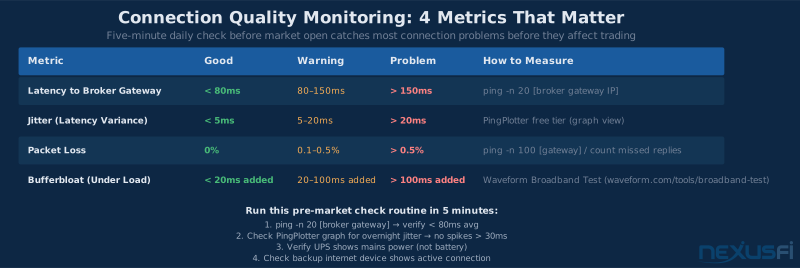
PingPlotter (free tier available) runs continuous latency tests to any host and graphs results over time. Running it pointed at your broker's servers during market hours produces a record of connection quality. Jitter spikes and packet loss appear as visual anomalies in the graph — allowing you to correlate poor trading conditions with actual connection issues, or rule out connection problems when performance is inconsistent.
Daily latency check: Before the market open, a quick ping -n 20 [broker gateway] from your trading workstation takes 30 seconds and confirms your connection is healthy. Building this into your pre-market routine catches problems before they cost you.
ISP responsiveness: When connection problems occur, having documented evidence (PingPlotter graphs showing packet loss and jitter spikes) makes ISP support conversations productive. "My internet is slow" gets nowhere; "PingPlotter shows 8% packet loss to my broker's Chicago server from 9:30-11:00 AM this morning" gets a real diagnosis.
The Full Infrastructure View #
The internet connection is one layer in a stack that includes power, hardware, and network infrastructure. @Big Mike articulated the complete failure mode list for professional home trading:
"Look at all the points of failure: Power. Wi-Fi. Internet. Platform. Computer."
His personal infrastructure addresses each layer: whole-house generator with UPS for power transitions, Ubiquiti mesh networking, multiple fiber ISPs plus 4G LTE backup, co-located servers for mission-critical applications.
The principle scales down for retail traders:
| Layer | Minimum Standard | Professional Grade |
|---|---|---|
| Power | UPS on PC and network gear | UPS + generator or whole-house backup |
| Network gear | Quality router, ethernet to trading PC | Ubiquiti/Netgear managed, redundant switches |
| Internet | Fiber or cable, 25+ Mbps | Dual ISP with auto-failover, 100+ Mbps each |
| Backup internet | Smartphone hotspot | LTE router with auto-failover |
| Monitoring | Manual daily ping check | PingPlotter continuous monitoring |
"I would recommend you look at a VPS first of all, instead of trying to make this work," @Big Mike noted for traders who don't want to manage infrastructure complexity. A VPS near the exchange sidesteps the home internet problem entirely — the VPS has data-center grade connectivity and your home internet connection only handles the remote desktop session, which is far more tolerant of moderate latency and brief disconnections.
Knowledge Map
Go Deeper
Build on this knowledgeReferences This Article
Articles that build on this topicCitations
- — Data Feed and Internet Connection Quality with ADSL 2+ (2011) 👍 7“Bandwidth has no real benefit in trading. What matters more in trading is latency (ping times). FiOS > DSL > Cable > Satellite.”
- — What is your internet speed? (2014) 👍 9“For trading: 1) Reliability/uptime 2) Minimum bandwidth of about 1 Mbps 3) Minimal latency. A 1 Mbps connection is enough for trading.”
- — Day Trading (Scalping) with Starlink satellite internet? (2024) 👍 4“For trading having a small very fast pipe (ie low latency connection) is more important than having a massive but slower pipe. The cable connection has a lot higher capacity but the fiber connection has about half the latency.”
- — Anyone using Starlink for Scalp Trading? (2023) 👍 3“Before Starlink: Ping: 456ms, Down: 13.48 Mbps. Starlink: Ping: 32ms, Down: 213.22 Mbps. Out in the woods, no fiber within 3 miles.”
- — Monitor Internet Connection for Overnight Hold (2021) 👍 1“I have multiple Gigabit fiber optic uplinks via different ISPs that use different backbones. On top of that, I have 4G LTE backup. Everything is handled by my own pfSense router for automatic failover/failback.”
- — Love of the Game: Former CME member starting over (2018) 👍 2“A dedicated internet access (DIA) fiber circuit is usually typical if there's commercial services at your location.”
- — upload, download, ping best to trade (2012) 👍 3“Generally speaking, the slowest broadband connection will be plenty fast for trading. Latency matters much more than throughput.”
- — Who trades Crude without slippage with which broker? (2011) 👍 7“The higher the latency, the more likely you will see slippage. Hit the Chicago server and look at your ping times. A good ping to Chicago from Dallas is approximately 30ms.”