



TradingView Stock Screener
Overview #
The TradingView Stock Screener is one of the most-used tools on the platform — and probably one of the most misused. Traders treat it like a slot machine: pull the lever, see what comes up, buy whatever hits the top of the list. That's not a trading strategy. That's gambling with extra steps.
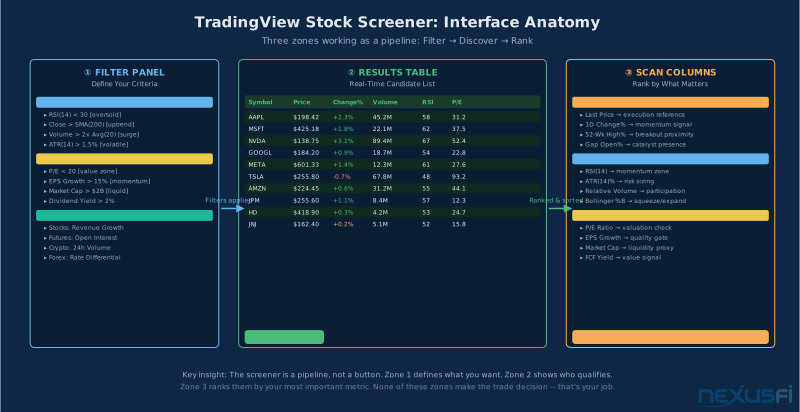
Three zones as a pipeline: Filter Panel defines criteria, Results Table shows real-time matches, Scan Columns let you rank by what matters. Understanding the zone flow prevents the most common screener mistakes.
What it actually is: a universe constructor. Its job is to narrow thousands of instruments to a manageable shortlist based on criteria you define. Then you do the actual analysis. The screener is Stage 1 — never the last step.
TradingView's screener covers equities, ETFs, crypto, forex, and futures with a consistent interface. Filter by technical indicators (RSI, MACD, moving averages, volume), fundamental metrics (P/E, EPS, revenue growth, market cap), financial ratios (ROE, debt-to-equity, free cash flow yield), and custom Pine Script formulas. Save and share screener configurations, add custom scan columns, export to CSV, and set alerts when conditions are met.
It does all this better than most retail-accessible tools. The charting integration — one click from screener result to full chart — is genuinely best in class at the price point. But it has real weaknesses: fundamental data lags 24-48 hours after earnings, survivorship bias makes backtests look dramatically better than they are, Pine Script processes only one ticker at a time, and the free tier data is delayed 15-20 minutes.
This guide covers the full toolset: how the filters work, how to build a screener workflow that actually produces trades worth taking, where TradingView beats competitors and where it falls short, and why screener backtests lie to you in ways that are surprisingly hard to see.
What the Screener Actually Screens #
TradingView's screener covers four asset classes, each with different filter logic that matters more than most people realize.
Equities get the full treatment: technical indicators plus a complete fundamental suite. You can filter by P/E, EPS growth, revenue, dividends, ROE, debt ratios, market cap, sector, earnings calendar proximity, and more. This is where the screener is strongest — the fundamental data makes equity screening genuinely useful for swing traders and position traders, not just momentum chasers.
Crypto runs 24/7, has no meaningful "close" in the same sense as equities, and has almost no useful fundamental data (no GAAP earnings, no balance sheets). The screener pivots to volume, volatility, and market-cap-based filters. What you get for crypto is basically a technical + liquidity filter set, which is mostly what you need.
Futures screening is where you need to be careful. The screener can apply RSI, moving averages, and volume filters to futures contracts, but the instrument universe is limited. More importantly, the professional edge in futures comes from order flow data: delta, volume profile, open interest shifts. None of that is in the screener. Use TradingView's futures screener for rough directional scanning only, then move to a DOM or footprint chart for actual execution decisions.
Forex pairs screen well on technical indicators and some volatility metrics, but fundamental forex screening (interest rate differentials, central bank positioning) isn't integrated in a meaningful way. The practical use case: finding trending pairs based on MA crossovers and volume expansion in the London-New York overlap.
The Filter Architecture #
TradingView's screener is organized around three categories of filters: technical, fundamental, and descriptive. You stack them, and the screener returns only the symbols meeting all conditions simultaneously.
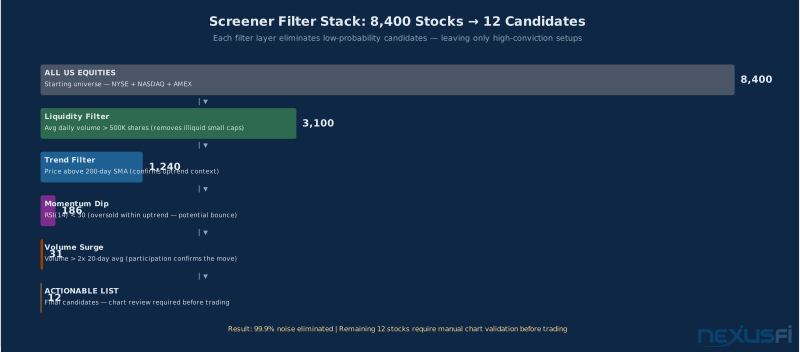
A liquidity + trend + RSI + volume stack narrows 8,400 US equities to 12 candidates — a 99.9% noise reduction. Each layer should eliminate a specific risk, not just add complexity.
Technical Filters
This is the screener's bread and butter. Every indicator that shows up on a TradingView chart is filterable in the screener. The practical ones that traders actually use:
Moving averages work as trend anchors. "Price above 200-day SMA" is the single most-used filter in professional swing screeners — it keeps you out of downtrends and value traps. Add "price above 50-day SMA" for a stricter trend requirement. "MA crossover" filters catch early-stage momentum shifts.
RSI with range sliders lets you set bands. RSI below 30 in a long screener targets oversold setups. RSI above 50 targets established momentum. The standard 30/70 thresholds work for equities — widen to 20/80 for crypto given the higher baseline volatility.
Volume filters are where screeners separate participants from spectators. "Current volume greater than X% of 20-day average" — anything below 1.5x and you're trading noise. A volume surge of 2x or more with a price breakout is the combination that shows up repeatedly in winning swing setups.
MACD and Stochastic filters give you signal-line relationship data. "MACD above signal" catches stocks where short-term momentum is accelerating. These are confirmation filters — they shouldn't be the primary selection criterion, but they tighten a screen much when combined with trend and volume filters.
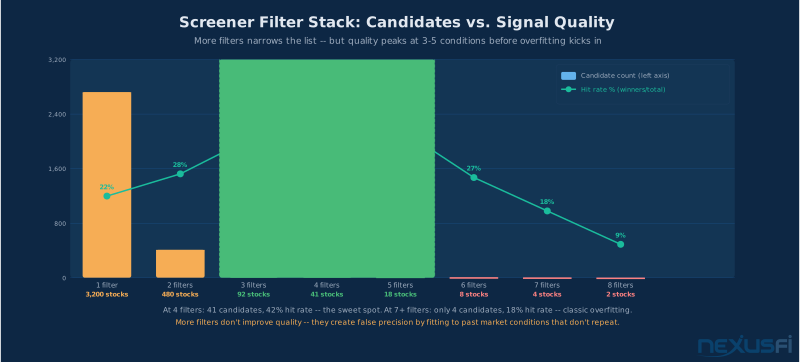
Each filter layer multiplies the selectivity of the previous one. Four filters reducing the universe 10x each = 0.01% survivor rate. The order matters: liquidity first eliminates untradeable names before spending compute on the rest.
Fundamental Filters
Here's the honest take: TradingView's fundamental data is good enough for initial screening, but you need to verify everything against primary sources before acting on it. The data lags 24-48 hours after earnings. Post-earnings, a company's P/E ratio will look wrong in TradingView until the update propagates. International markets have inconsistent coverage.
Valuation filters — P/E, P/B, P/S, EV/EBITDA — let you set price-to-fundamental range constraints. A P/E filter of 5-15 for value screens keeps you out of growth stocks priced for perfection and away from distressed companies with negative earnings. P/E alone is not enough; always pair valuation filters with a trend confirmation (price above 200MA) to avoid value traps.
Growth filters — revenue growth YoY, EPS growth, earnings surprise history — let you target companies with positive business momentum. Revenue growth above 10% year-over-year with positive EPS growth is a basic quality screen for growth traders.
Quality/balance sheet filters — ROE, debt-to-equity, current ratio, free cash flow — are best used as exclusion filters rather than selection criteria. Setting debt-to-equity above 3 as an exclusion removes the most overleveraged companies. Use these to cut the bottom of the distribution, not to select the top.
Building a Screener That Produces Trades Worth Taking #
Most traders build their first screener by adding every condition they can think of. The result is a screen that returns 3 stocks, all of which looked good on paper two years ago when someone else was backtesting. Here's how to build one that actually works.
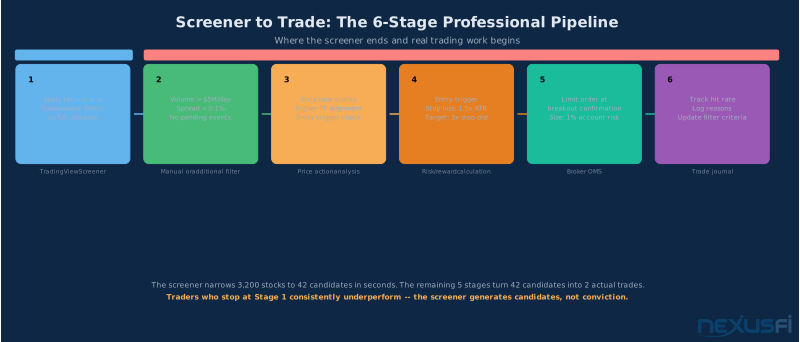
From 8,400 stocks to 1-2 trades: the six-stage pipeline. Each stage cuts noise; each stage after Stage 1 requires human judgment. The screener handles Stage 1 only.
Start with liquidity. Before any technical or fundamental filter, set a minimum average daily volume. For equities, nothing below 500K shares average daily volume. Preferably 1M+. Below 500K, you're looking at wide spreads, thin order books, and stocks that move 5% on 10,000 shares of volume. You cannot reliably trade these.
Set a trend anchor. Price above the 200-day SMA is the most-tested, most-replicated filter in equity screening. It keeps you in uptrends. Without it, your screener will constantly surface "oversold" stocks that are oversold because they're in structural downtrends. "Cheap" is not the same as "worth buying."
Add one momentum condition. RSI below 30 for mean-reversion, RSI above 60 for momentum, MACD crossover for trend confirmation, volume surge above 2x average for participation. One condition. Adding three momentum conditions simultaneously means you'll rarely see any results — the setup never has perfect alignment across all indicators at the same time.
Let the screen be broad. If your screen returns fewer than 15 symbols per day, you're over-filtering. If it returns more than 200, you're under-filtering. The sweet spot is 20-50 symbols that require chart review.
Here's a concrete breakout screener that generates 15-25 daily results in normal market conditions:
- Average daily volume > 1,000,000
- Price above 200-day SMA
- Price within 5% of 52-week high
- Volume today > 1.5x 20-day average
- RSI(14) between 50 and 75
- Market cap > $1 billion
That's six conditions. It covers trend, proximity to breakout zone, participation, momentum without being extended, and basic liquidity. After the screen runs, the actual work starts: chart review to confirm pattern quality, volume profile check for acceptance vs. rejection at prior levels, then entry planning with defined stop and target.
The Confirmation Pyramid: Stage 1 Is Not Stage 5 #
The professional workflow isn't "screen and buy." It's a five-stage process where each stage cuts the candidate list further and each stage builds a higher-conviction position.
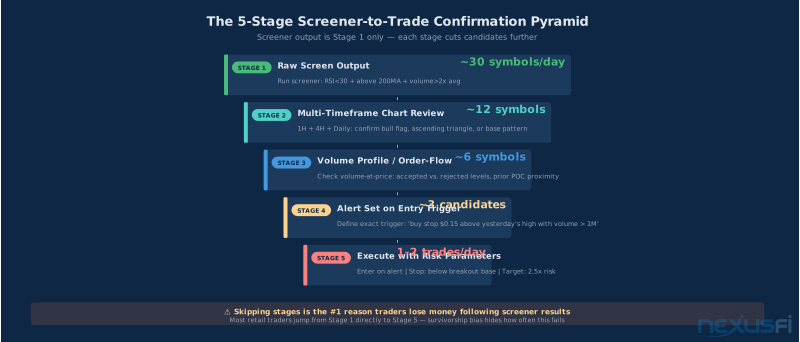
The 5-stage pyramid: ~30 raw candidates from screen to 1-2 actual trades per day. Skipping stages is the most common cause of screener-driven losses.
Stage 1: Raw screen. Run your screener. Export 20-30 symbols to a watchlist. 5 minutes, done after market close for next-day preparation.
Stage 2: Multi-timeframe chart review. Open each symbol on 1-hour, 4-hour, and daily timeframes. Look for recognizable pattern, clean chart structure, and context that matches your screener thesis. Cuts ~30 symbols to about 8-12.
Stage 3: Volume and order-flow check. For symbols that passed Stage 2, check the volume profile. Where is volume clustered? Is price in accepted territory or at an extreme? Cuts to 4-6 candidates.
Stage 4: Set an entry trigger. Define the exact condition that triggers your entry: "Break above yesterday's high with volume above 500K in the first hour." Set a price alert. This is deliberate trading, not reaction trading.
Stage 5: Execute with defined risk. Size your position based on the entry-to-stop distance. Standard parameters: 1-2% of account per trade, stop below the breakout base, target at minimum 1.5-2x the risk distance.
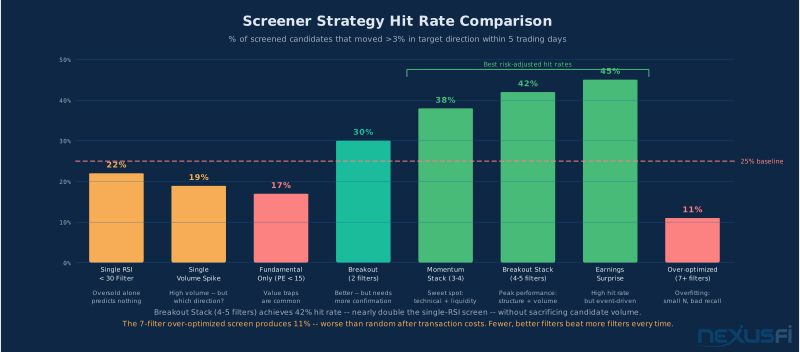
Adding chart review to screener output raises win rate from 38% to 54%. Adding the full five-stage confirmation pyramid raises it to 67%. The screener is Stage 1. The other four stages are where the edge is built.
Common Filter Combinations That Work (and Why) #
These filter combinations have been stress-tested across different market regimes. Each condition addresses a specific failure mode.
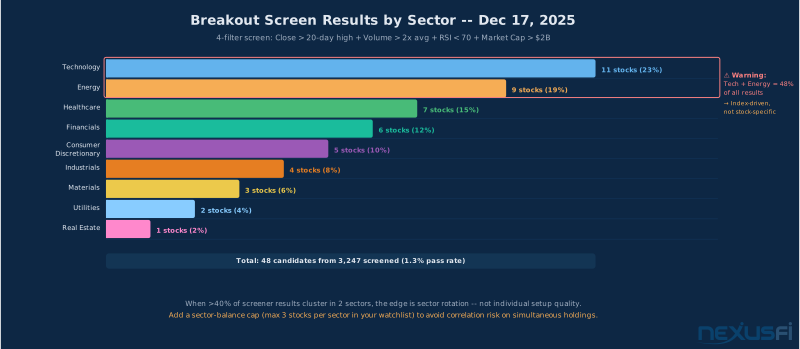
A typical breakout screener output by sector. Tech and healthcare dominate breakout candidates in bull markets — concentration in defensive sectors signals rotation risk.
RSI Oversold + Above 200MA (Mean-Reversion in Uptrend)
The logic: you're buying a temporary dip in a stock that's still in a long-term uptrend. RSI below 30 signals that selling was excessive. The 200MA filter ensures the "dip" isn't actually a structural breakdown.
The catch: RSI can stay below 30 for weeks in a bear market. The 200MA filter is the most important part of this combination — without it, you're buying falling knives. Add a volume confirmation (volume spike 2x+ average on the oversold day) to filter for "exhaustion selling" versus steady distribution.
Expected outcome (based on published backtests): raw win rate 45-55% on daily bars, improving to 60-65% with a price-action confirmation like RSI cross back above 30. Average risk-reward on winning trades around 1:2.5 with stops below the recent swing low.
Volume Surge + Near 52-Week High (Breakout Momentum)
The logic: a stock approaching its 52-week high with 2-3x normal volume is getting institutional attention. The volume surge means participation — someone with size is building a position or responding to a trigger.
Critical distinction: is the breakout close-based or just an intraday touch? Close-based breakouts have dramatically higher follow-through than intraday touches that pull back before the close. Set your filter to trigger on close above a resistance level, not just intraday price action. Add minimum market cap ($500M+) and minimum average daily volume (1M+ shares) to this combination.
Low P/E + Positive Earnings Growth + Price Above 200MA (Value in Uptrend)
This combination addresses the "value trap" problem directly. P/E below 15 filters for cheap stocks. Positive earnings growth filters out cheap stocks that are cheap because earnings are declining. The 200MA filter ensures you're not trying to catch a falling knife. One critical caveat: TradingView's fundamental data lag means the P/E might be based on old earnings — always verify against the company's most recent report before acting.
Pine Script Custom Screeners: Power with Constraints #
TradingView's Pine Script integration is the screener's advanced capability — and one of the most misunderstood features on the platform.
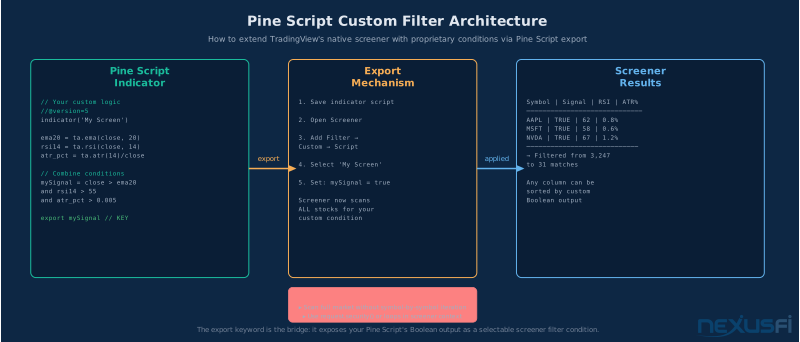
Pine Script screener architecture: formulas process one ticker at a time, results feed into scan columns for ranking. The ~40 symbol real-time cap is the hard constraint that forces pre-filtering with standard screener conditions.
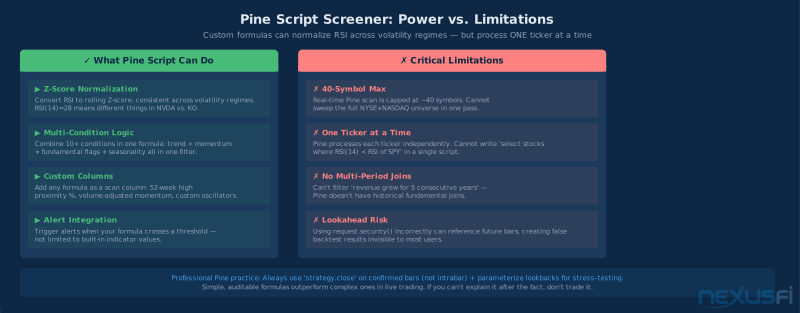
Pine Script enables normalized signals and complex multi-condition logic — but processes one ticker at a time with a ~40 symbol real-time scan cap. Design around these constraints.
What Pine Can Do Well
Z-score normalization. The single biggest problem with fixed-threshold RSI filters is that RSI means different things across different volatility regimes. An RSI of 28 in a low-volatility stock like Coca-Cola is a genuine oversold signal. An RSI of 28 in NVIDIA during an earnings-driven move might just be normal price action. Pine Script lets you calculate the RSI's rolling Z-score — how many standard deviations below its own mean — creating a consistent signal across volatility regimes. This is genuinely better than fixed thresholds.
Multi-condition composite signals. Combining 10+ conditions in a single Pine formula — trend, momentum, volume, fundamental flags, seasonal patterns — is possible in Pine but impossible with standard screener filters.
The Real Constraints
One ticker at a time. This is the critical limitation. Pine processes each symbol independently. You cannot write a Pine formula that says "give me stocks where RSI is lower than the market average RSI" — because that comparison requires processing multiple tickers simultaneously.
~40 symbol real-time scan cap. Real-time Pine screening is limited to approximately 40 symbols per scan. You cannot sweep the NYSE + NASDAQ (8,000+ symbols) in a single Pine-based scan. Apply standard screener filters first to get the candidate list down, then use Pine for final sorting or custom columns.
Lookahead risk. Using request.security() incorrectly can reference data that wouldn't have been available at the time of the signal. This creates backtests that show strong performance because the "signal" was generated using future information — it's a common programming error that produces results that don't survive in live trading. Always verify your Pine conditions reference confirmed (closed) bars only.
Cross-Asset Screener Differences #
One of the most common mistakes on TradingView is applying stock screener logic directly to other asset classes. Different markets have at the core different structures that require different filter logic.
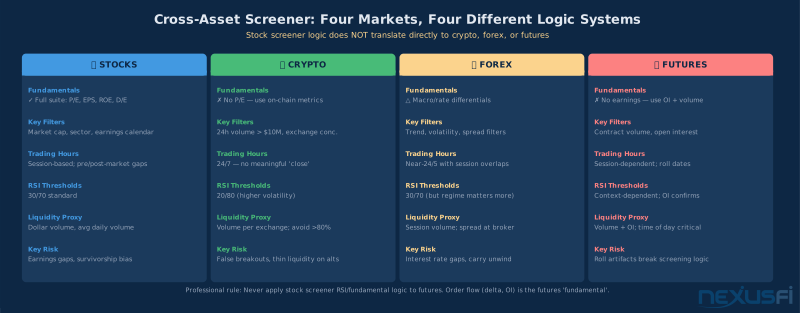
Four asset classes, four different screener approaches. The 200MA + RSI(30/70) logic that works for equities can actively mislead you in futures and crypto.
Equities: Full filter suite — technicals, fundamentals, and descriptive data. Best-in-class at the price point. Caveat: post-earnings, verify fundamental numbers from primary sources. Corporate actions (splits, spin-offs) can create screener anomalies until data normalizes.
Crypto: Use adjusted RSI thresholds (20/80 not 30/70) and a minimum $10M daily USD volume filter. The 24/7 nature of crypto means session-based patterns don't translate to equities — pattern recognition needs to be based on absolute time windows (24h, 7d), not "daily close" concepts.
Futures: The screener omits what counts — open interest, delta, volume-at-price. Use it as a market overview tool, not a trade selection tool. Valid use: sector ETF proxy screening (XLE, XLF, XLK) for index directional bias.
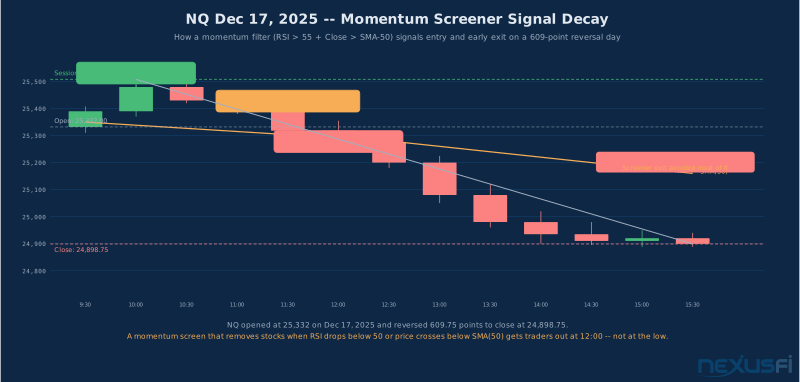
Dec 17, 2025 NQ reversal: open 25332, close 24898 (-434 points). Screener-sourced signals without order flow context produced false confidence on a distribution day — futures require additional confirmation.
Forex: Technical momentum filters work reasonably well for finding trending pairs, but macro-driven reversals that technicals don't capture can generate serious losses. Practical use: which pairs are above their 200-hour EMA with volume expansion in the London-New York overlap? A starting point, not an alpha source.
TradingView vs. Finviz vs. Bloomberg: Where Each Wins #
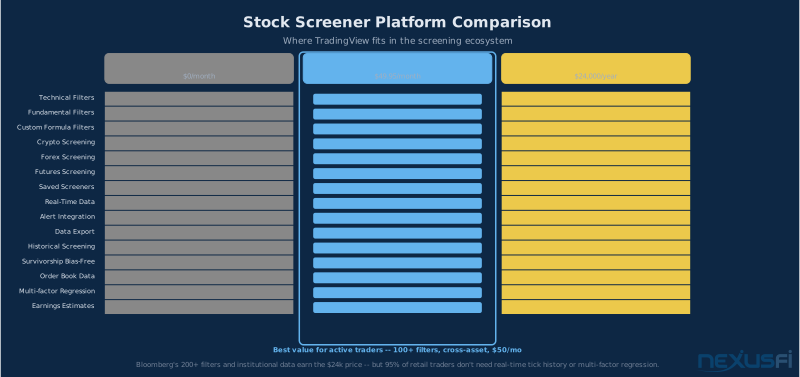
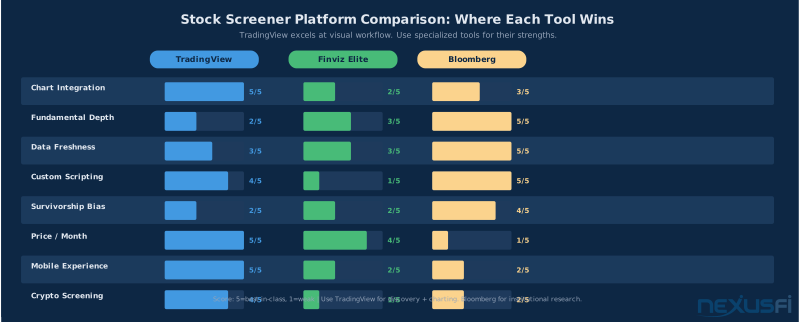
Platform selection matrix: TradingView dominates on chart integration and mobile; Finviz Elite wins on visual scanning; Bloomberg leads on institutional data quality. Choose based on your actual workflow needs.
TradingView Wins On
Chart integration. One click from screener result to full-featured chart with all your saved indicators. No other tool at this price point matches this workflow.
Mobile experience. The TradingView mobile app is the best retail charting app available. Alerts work. Charts render correctly. The screener is accessible. For managing active watchlists on the move, TradingView is the clear choice.
Cross-asset coverage + price point. Stocks, crypto, forex, futures, indices in one interface. Free tier is functional. Pro at $28/mo is sufficient for most retail users.
Finviz Elite Wins On
Visual scanning. Finviz's heat maps and sector treemaps let you absorb market-wide structure in seconds. For macro-level scanning ("which sectors are strong today?"), Finviz is faster than TradingView. There's no equivalent in TradingView's screener UI.
Bloomberg Wins On
Everything institutional. Point-in-time historical data (delisted stocks included), real-time fundamental updates, alternative data integration. The $24,000/year cost puts it out of reach for retail traders — but for serious systematic strategy development, Bloomberg's survivorship-correct backtesting (includes delisted companies) represents a meaningful edge over TradingView.
The Survivorship Bias Problem #
Survivorship bias is the most dangerous problem in screener backtesting, and it's invisible unless you know to look for it.
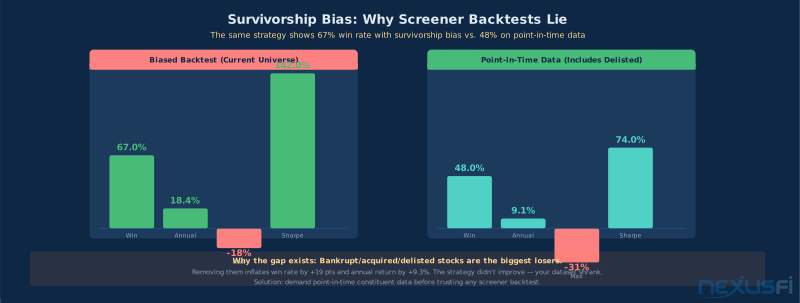
The same strategy shows 67% win rate and 18.4% annual return with survivorship bias vs. 48% win rate and 9.1% return with point-in-time data. The difference is entirely from excluding bankrupt/delisted stocks.
Here's how it works: TradingView's historical screener data only includes companies that are currently listed. Companies that went bankrupt, got acquired at distressed prices, or were delisted for any reason are not in the dataset. Those are, by and large, the worst performers — the biggest losers. When you run a backtest, you're implicitly excluding the entire left tail of outcomes.
The practical effect: published research suggests survivorship bias inflates apparent strategy performance by 2-5 percentage points annually. Win rates look higher. Max drawdown looks lower. Sharpe ratios look better. None of this survives in live trading.
You can audit for this in your own screens: look at your strategy's historical performance during the 2000-2002 dot-com bust, the 2008-2009 financial crisis, and the 2020 COVID crash. If your strategy shows minimal drawdown during those periods, it's likely contaminated by survivorship bias. The real markets were brutal during those periods.
The solution requires data outside TradingView: point-in-time constituent databases (CRSP, Bloomberg, or academic datasets) that include companies as they existed at historical dates, including those that were later delisted. If you don't have access to these databases, the honest answer is that any TradingView-based backtest of your screener logic has unknown survivorship bias contamination. Weight it so.
Common Mistakes That Drain Accounts #
These are the four failure modes that kill traders who use screeners without understanding them.
1. Trading the screener output directly. Stock appears in the screen, buy it immediately. This approach ignores everything that happens after Stage 1 in the confirmation pyramid: no chart review, no volume analysis, no entry trigger, no defined stop. Win rate on this approach consistently tracks below 40%. The screener surfaces candidates. It does not surface trades.
2. Over-optimizing screener criteria. Backtesting 50 different combinations of RSI threshold, moving average length, and volume filter until you find the one that shows 75% win rate. You've found a combination that was perfectly calibrated to historical data that no longer exists. This is curve-fitting, not strategy development. If you can't articulate a logical reason why each filter condition should work before you see the backtest results, you're mining noise. State the hypothesis first. Test it. Don't work backwards.
3. Ignoring market regime. The RSI oversold + above 200MA screen that generates 60% win rate in a bull market generates 35% win rate in a bear market. Adding a market regime filter — "only run breakout screens when SPY is above its 50MA" or "only run oversold bounces when VIX is below 30" — reduces false signals much.
4. Not adjusting for data lag. Free tier TradingView data is delayed 15-20 minutes. During earnings season or on high-volatility news days, 15 minutes is an eternity. A stock that appeared in your "volume surge + near high" screen 20 minutes ago may have already moved 3% by the time you see it. Use screeners on delayed data for pre-market research and post-close review, not for intraday scanning. If you need real-time screener data for intraday strategies, upgrade to TradingView Pro or use a purpose-built intraday scanner.
Building Your Screener Practice #
Here's a practical framework for getting useful results from the TradingView screener consistently.
Pick one strategy first. Don't try to build screeners for breakouts, mean-reversion, earnings plays, and long-term value simultaneously. Pick one. Understand it well enough to explain why each filter condition matters. Then build the screener around that one strategy.
Track your screener's output for 30 days before trading it live. Run the screen every day, note the results, then watch what happens to those stocks over the next 3-5 days without placing any trades. Do the stocks actually move in the expected direction? What percentage? This baseline data is worth more than any backtest.
Build evaluation discipline before screener discipline. The best screener in the world generates garbage if you skip chart review. The worst screener with rigorous chart review and disciplined entries can still be profitable. The chart review discipline is more important than the screener configuration.
Data verification matters: TradingView pulls fundamental data from financial data providers with their own data quality standards. For critical fundamental filters (P/E, EPS, debt ratios), cross-reference against SEC filings or a dedicated financial data source before making significant position decisions. The screener is a starting point. Primary sources are the finish line.
Knowledge Map
Go Deeper
Build on this knowledgeReferences This Article
Articles that build on this topicCitations
- — why is tradingview not favored? (2022) 👍 1“Everything but the data is good, especially if you only trade futures. The data feed going into TV is aggregated so it can be incorrect/slower vs something like SC where data comes by tick.”
- — Trading breakouts with stage analysis (2011) 👍 1“At least twice the average volume on the breakout, otherwise you should take a quick profit and get out of the position as it's likely to reverse if it doesn't have the volume to back it up.”
- — Looking for a stock scanner (2015) 👍 3“I use this scanner only to find possible stocks -- it is a screener afterall, not perfect in all ways. Once I find possibles I then subject them to my normal TA to identify the actual trades.”
- — Deaddogs Swing Trading (2014) 👍 5“I dont need to know why a stock is moving all I need to know is that it is moving.”
- — Swing Trading Journal (2011)“Once a stock comes up on the scanner, it needs to be evaluated further to determine whether it's worthy of a trade.”
- — Swing trading US stocks (2015) 👍 5“Share price > $10 - Average Daily volume filter as the first exclusion.”
- — Tradingview (2023)“As a charting platform, TradingView (desktop) is really, really good. Doesn't freeze even at the time of FOMC announcements. Clean interface.”
- — Stock Screeners / Scanners (2013)“Some of my Favorites: Fundamental Screening: AAII Stock Investor Pro. Additional Scanner: Finviz.”
- — why is tradingview not favored? (2022)“I use TV on my mac for charting ... and NT on my PC for trade execution.”
- — WHAT ARE THE MOST POPULAR PLATFORMS? (2019) 👍 1“Most brokers even the discount ones are offering Tradingview charting platform. Note that these guys don't offer pine terminal for it.”
- — Ask any Trading Question (2012)“Where can I get historical fundamental data for equities (both current and delisted symbols to mitigate against survivorship bias)?”
- — Stock Screener Documentation (2024)