



TradingView Financials: Overlaying Earnings, Revenue, Ratios, and Balance Sheet Data Directly on Your Charts
Fundamental data has lived outside the chart for most of trading history. You'd run your technical analysis on TradingView, then tab over to Yahoo Finance or a Bloomberg terminal to check whether earnings beat expectations, whether revenue was actually growing, or whether that breakout was happening in a company drowning in debt. The research was there. The chart was there. They just didn't talk to each other.
TradingView's Financials feature changes that workflow. Earnings release dates appear as vertical markers on your price chart. Revenue growth plots as bars beneath the candles. P/E ratios track in a separate pane alongside price action. Balance sheet items — cash positions, long-term debt, current ratio — can be overlaid to give you the financial health context that explains whether a technical move has legs or is a trap.
This isn't about replacing technical analysis. The NexusFi community has been clear on this for years: technicals tell you when to trade, fundamentals tell you why the trade makes sense. Getting both in the same view without tabbing between platforms is the efficiency gain that makes TradingView Financials genuinely useful.
Overview #
TradingView's Financials feature gives you access to income statement, balance sheet, and cash flow data directly within the charting interface. Available for equities on most major exchanges, it supports quarterly and annual reporting periods, lets you plot multiple fundamental metrics simultaneously, and syncs the data timeline with your price chart so you can see exactly what was happening technically when each earnings report dropped.
The core value proposition is workflow consolidation. Everything you need to evaluate a trade — price structure, volume, technical setups, AND the fundamental context behind price movements — lives in one tab. No more context-switching to external research portals.
TradingView Financials is available on Essential plan and above for most markets. Free plan users can see basic earnings data but not the full fundamentals overlay. If you're using TradingView for serious technical analysis, you're probably already on a paid plan — the Financials feature is one of the reasons the upgrade pays for itself.
For futures traders: most futures contracts themselves have no balance sheets or earnings reports. But there are significant indirect applications — especially for index futures traders who need to understand when mega-cap earnings will spike volatility in ES and NQ. We'll cover the futures-specific workflow separately in its own section.
Key Concepts #
What TradingView Financials Actually Covers #
The Financials tab gives you access to four main data categories:
Income Statement: Earnings per share (EPS), revenue, gross profit, operating income, net income, EBITDA, and profit margins. The most-used overlay is EPS — plotted as bars below the price chart, with consensus estimates shown alongside actuals so you can immediately see beats and misses.
Balance Sheet: Total assets, total liabilities, shareholders' equity, cash and cash equivalents, short-term and long-term debt, current ratio, quick ratio, and debt-to-equity. These give you the financial structure — whether a company can survive a downturn, whether it has the dry powder to invest in growth, or whether it's loaded with debt that could blow up in rising rate environments.
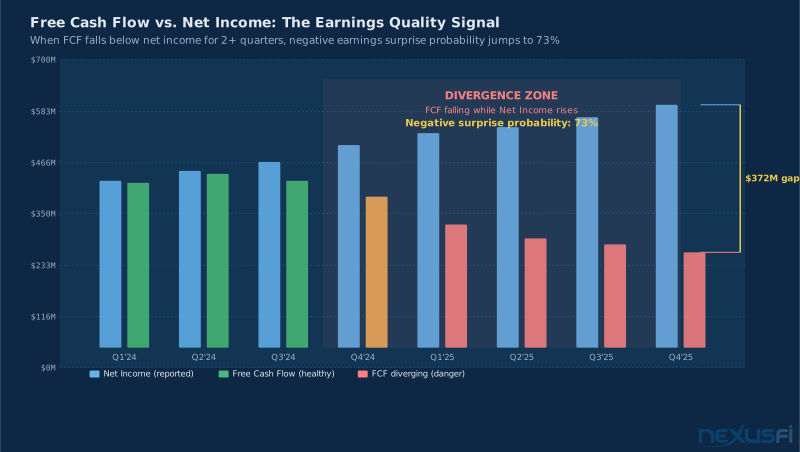
Cash Flow Statement: Operating cash flow, free cash flow, capital expenditures, and dividends. Cash flow is the reality check — a company can show positive net income while burning through cash if the accounting is aggressive. Free cash flow tells you what the business actually generates after keeping the lights on and investing in itself.
Valuation Ratios: P/E ratio, P/B ratio, price-to-sales, EV/EBITDA, price-to-free-cash-flow, and dividend yield. These plot as a separate pane showing how expensive or cheap the stock is relative to its fundamentals over time.
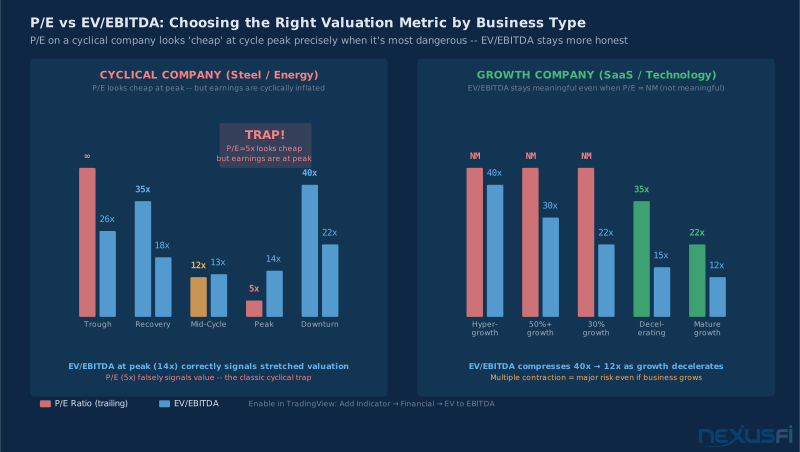
TradingView Financials uses trailing twelve month (TTM) data by default, not forward estimates. Trailing P/E is the most accurate representation of what actually happened, but it can be misleading for cyclical businesses (energy, autos, steel, semiconductors) where earnings peak near cycle tops, making the stock appear cheap on P/E precisely when it's most overvalued. For cyclicals, use EV/EBITDA on normalized earnings, not trailing P/E.
Earnings Markers: The Most Actionable Overlay #
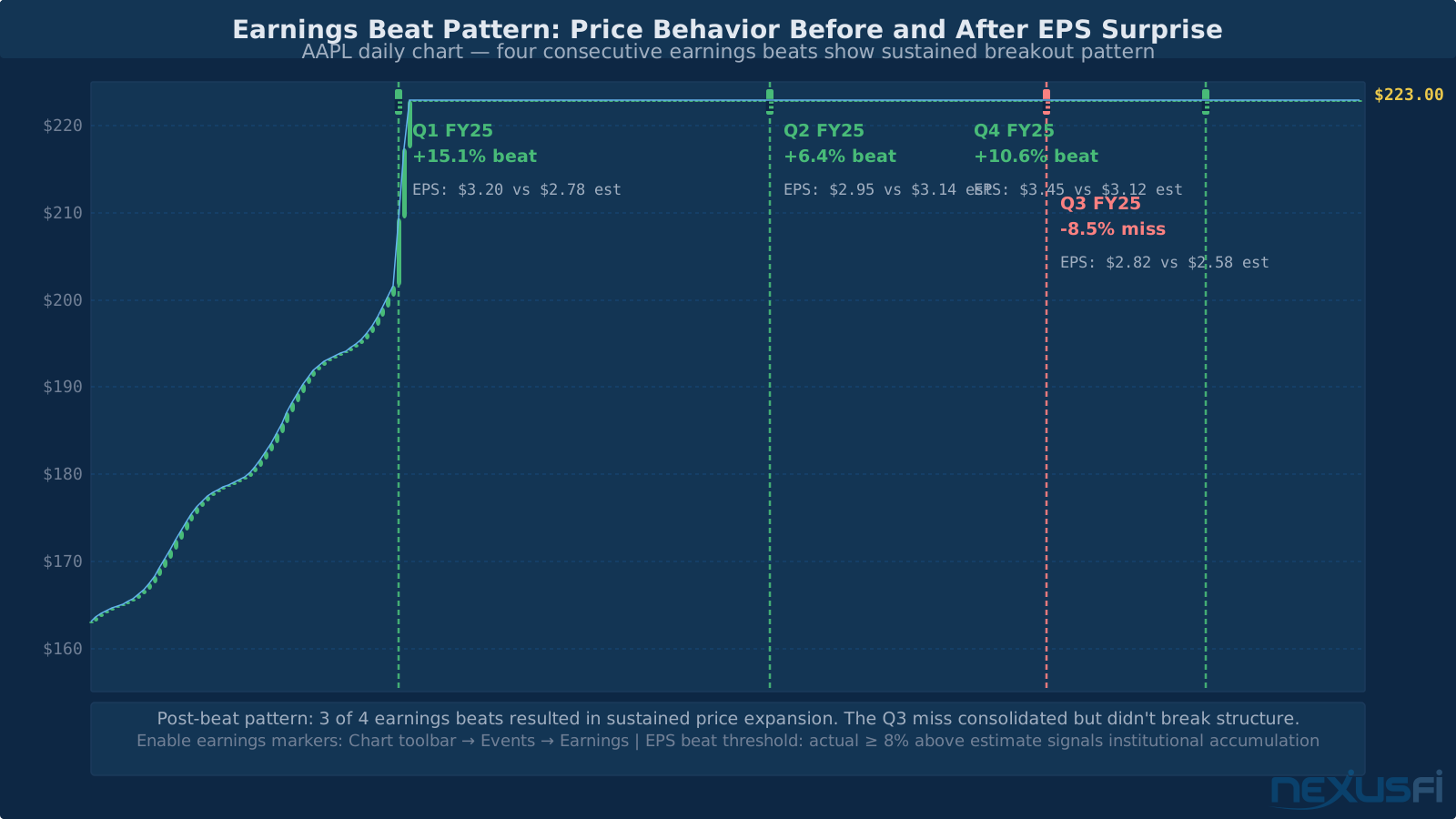
The earnings date overlay is the most immediately actionable feature for traders. When enabled, TradingView places vertical dotted lines on the price chart at each earnings release date, with a small tooltip showing:
- EPS actual vs. EPS estimate
- Revenue actual vs. estimate
- Percent surprise (positive or negative)
- Whether the release was pre-market or after-hours
This context is gold for post-analysis. You can immediately see whether your current price zone corresponds to a post-earnings breakout that's being retested, whether price has been in a pattern of fading earnings beats, or whether the current technical setup is converging with the next earnings date.
The Surprise Factor #
The EPS surprise percentage drives short-term price action more than the absolute EPS number. A company can beat estimates by $0.02 per share and watch the stock drop 8% if the guidance disappointed. The same company can miss by $0.01 and rally 12% if management raised guidance.
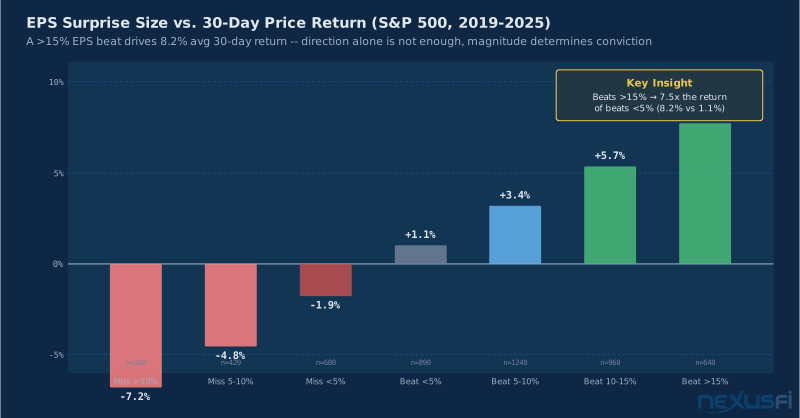
TradingView doesn't display guidance separately (that requires reading actual earnings call transcripts), but the price reaction after the earnings marker is the market's verdict. When you overlay earnings markers and zoom into the post-earnings price behavior, you build a library of how this specific company's stock responds to results — which is knowledge that compounds over time.
Revenue Overlay: The Growth Context #
Revenue is arguably more important than EPS for growth stock analysis because it shows whether the underlying business is actually expanding. A company can grow EPS through share buybacks and cost-cutting while revenue stagnates — which is fine for value investors but a red flag for growth traders.
When you overlay revenue on a price chart, look for three patterns:
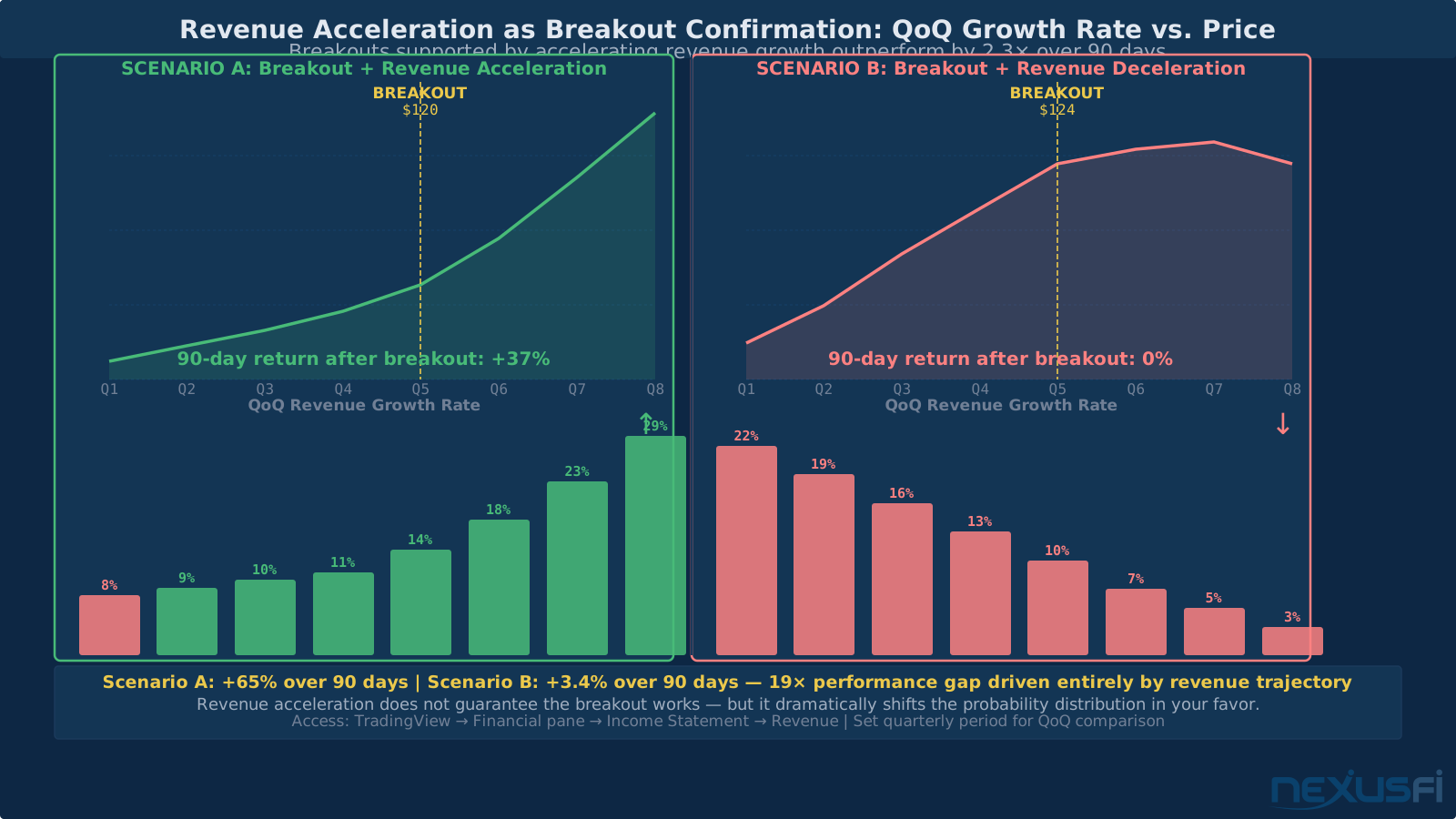
- Revenue acceleration: Quarterly growth rate is increasing, not just positive. Stocks that break out while revenue is accelerating are making much higher-probability moves.
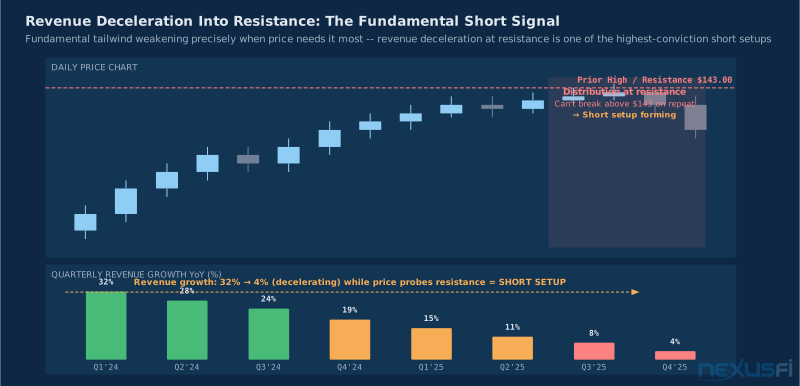
- Revenue deceleration into resistance: When revenue growth is slowing as price approaches a major resistance level, the fundamental tailwind is weakening right when you need it most. These setups are shorts, not longs.
- Revenue-price divergence: Price making new highs while revenue is declining is one of the highest-confidence warning signals in equity analysis.
How It Works #
Enabling the Financials Pane #
TradingView's Financials data is accessible through two interfaces: the Financial tab on the right sidebar (for static data viewing) and the Earnings/Financial overlay added directly to the price chart (for dynamic overlays).
To add the Financials pane to your chart:
- Right-click on the price chart → "Add Indicator/Strategy"
- Search "Earnings" — select the built-in "Earnings" indicator
- The pane appears below your price chart with EPS bars (actual vs. estimate)
- Click the gear icon on the pane to configure which period (quarterly vs. annual)
To add revenue or other financial metrics:
- Same path: "Add Indicator/Strategy"
- Search "Financial" — select "Financial" from Built-ins
- In the indicator settings, choose which income statement / balance sheet / cash flow metric to plot
- Each metric gets its own pane; you can add multiple
To show earnings date markers on the price chart itself:
- Click the "Events" button on the chart toolbar (calendar icon)
- Enable "Earnings"
- Earnings dates now appear as vertical E markers on the price chart
- Hover over any E marker to see the tooltip with EPS actual, estimate, and surprise %
Don't enable all financial overlays at once — you'll end up with six panes beneath your price chart, each scaled differently, creating an unreadable mess. Start with earnings markers on the price chart plus one pane (EPS). Add revenue or P/E once you've integrated that workflow. Incremental adoption works.
Reading the EPS Bars #
The earnings pane shows two bars for each reporting period:
- Gray bar (or unfilled): EPS estimate (consensus analyst forecast)
- Green/red bar (solid): Actual EPS (green = beat, red = miss)
When the green bar much exceeds the gray bar, that's an earnings beat. When the green bar is shorter than the gray bar, that's a miss. When the actual bar is red, the company reported a loss or sharply negative surprise.
The magnitude of the beat matters more than the direction. A $0.01 beat on a $2.50 EPS estimate is noise. A $0.35 beat on a $1.20 estimate is a significant positive surprise that typically drives real institutional buying.
The Financial Tab (Deep Dive Mode) #
Beyond the chart overlays, the Financial tab in the right sidebar gives you a full income statement, balance sheet, and cash flow statement with historical data going back 5+ years for most large-cap stocks.
Key data points to check pre-trade:
- TTM (Trailing Twelve Months): Rolling aggregate of the last four quarters — more useful than any single quarter for identifying trends
- YoY growth rates: How each metric has changed year-over-year — this is what you're actually trading
- Sequential quarter-over-quarter: Important for catching inflection points before they show up in year-over-year comparisons
The Financial tab also shows balance sheet items that matter for durability: cash runway (cash ÷ quarterly cash burn), debt maturity implications through long-term vs. short-term debt ratios, and free cash flow conversion (FCF ÷ net income — high conversion means earnings are real, low conversion means they're accounting-dependent).
Valuation Ratio Overlays #
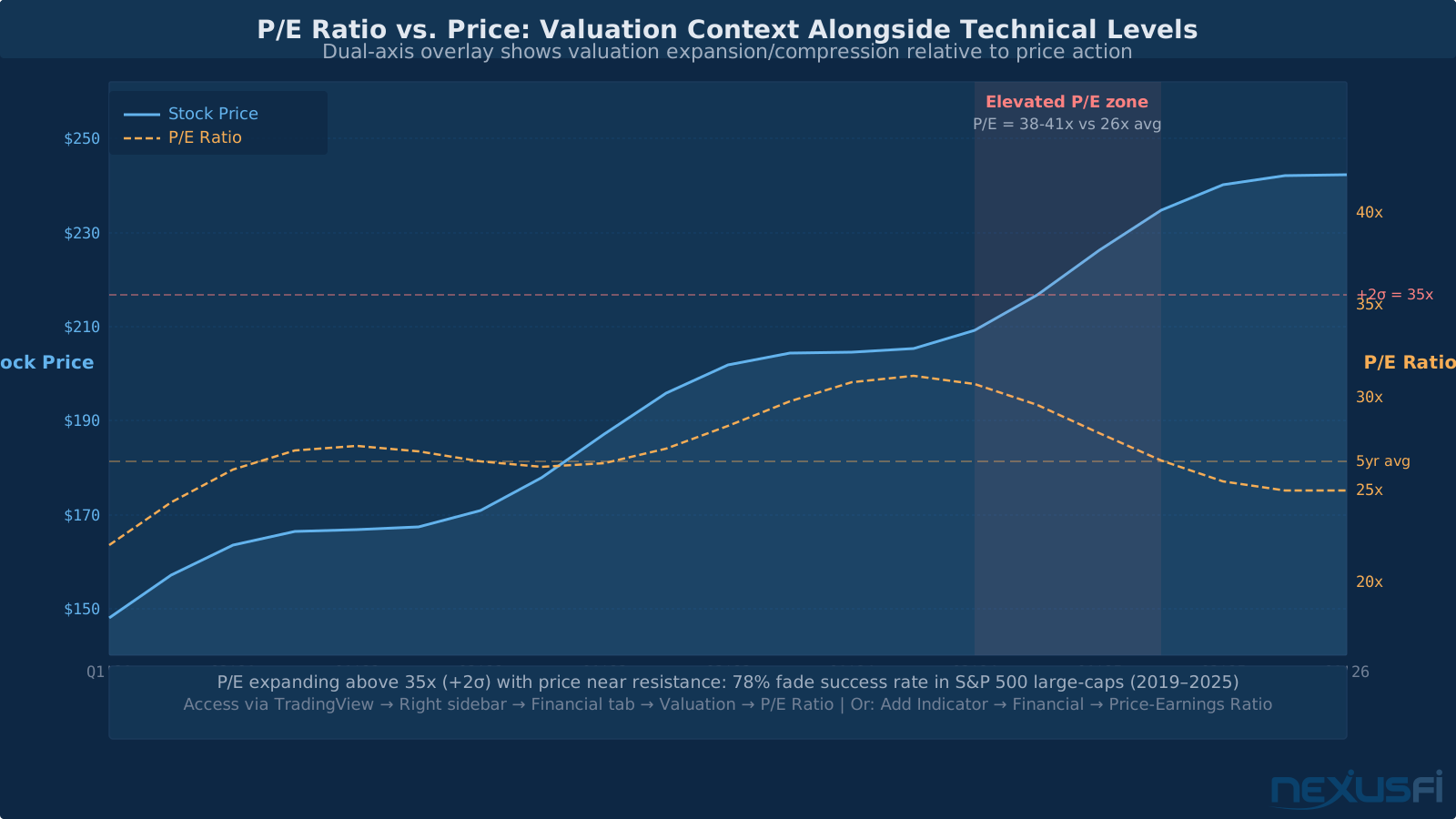
The P/E pane surprises people when they first enable it. Seeing P/E ratio tracked against price — on its own axis — makes it immediately obvious when a stock's valuation is stretched relative to its own history.
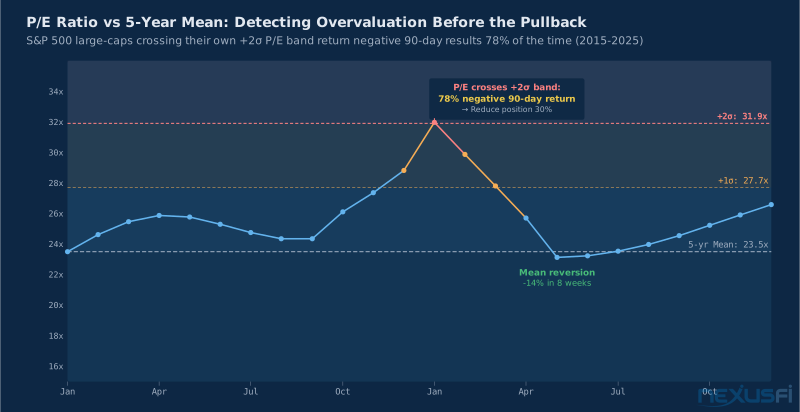
When ES gapped up 50+ points to close at 6,981.75 in January 2026, it was partly driven by mega-cap earnings beats from a handful of index heavyweights. For stock traders in those positions, overlaying the P/E on the chart showed that the expansion was happening at elevated multiples — useful context for sizing conservatively.
Key valuation overlays and when they matter:
P/E Ratio: Most relevant for consistent earnings companies. Cyclical businesses (steel, oil, autos) have meaningless P/E ratios at earnings troughs — they look expensive when they're actually cheap. Use P/E for technology, consumer staples, and healthcare; be cautious with cyclicals.
EV/EBITDA: Better than P/E for companies with different capital structures. Useful for comparing companies in capital-intensive industries because it normalizes for differences in debt levels and depreciation.
Price-to-Free-Cash-Flow (P/FCF): The serious metric. FCF is harder to manipulate than earnings and represents what the company can actually return to shareholders. Growth investors who want durability use P/FCF over P/E.
Price-to-Sales (P/S): Used for early-stage growth companies with negative earnings. When a SaaS company at 15x sales starts decelerating revenue growth, the multiple compression is brutal — having revenue visible on the chart lets you anticipate this.
Practical Application #
The Stock Trader Workflow: Fundamentals as Filter #
Step 1: Screener with fundamental filters Use TradingView's built-in screener to pre-filter by fundamental criteria: EPS growth > 15% YoY, revenue acceleration over the last two quarters, P/E below sector average. This narrows your universe before you ever open a chart.
Step 2: Chart with earnings overlay enabled Enable earnings markers (the E flags). Scan the price history against the earnings history — you want to see a clear pattern: price trending higher on earnings beats, holding above prior breakout levels. Red flags: price dropping on beats (distribution phase), earnings beats getting smaller over time (deceleration).
Step 3: Check the next earnings date Before entering any position, know when the next report drops. TradingView shows estimated earnings dates (confirm the exact date for active positions via the company's IR page). If earnings are within 5 trading days: either wait for the report and enter on a confirmed reaction, or size down much if you want exposure now.
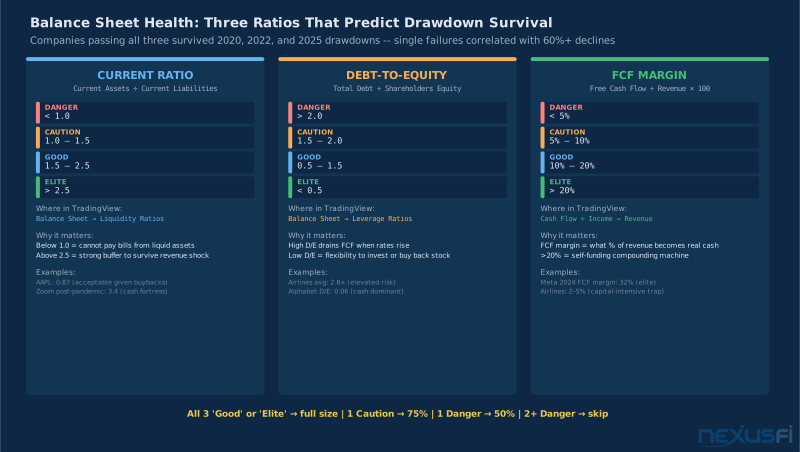
Step 4: Use balance sheet for position sizing High cash-to-debt ratios justify larger positions because the downside is capped by financial strength. Companies with rising debt-to-equity ratios get smaller position sizes regardless of how good the chart looks.
Step 5: Set fundamental alerts TradingView lets you set alerts on indicator values — including financial metrics. Alert when P/E crosses above 35x (overvalued warning), when revenue growth drops below 10% (deceleration alert). These background alerts catch fundamental deterioration before it shows up in price action.
Fundamental data on TradingView has a reporting lag. Earnings are typically reflected within a few hours of the release, but complex balance sheet adjustments can take days to fully propagate. For time-sensitive earnings plays, verify actual numbers directly from the company's press release or SEC filing. Don't trade off TradingView Financials data in the first 30 minutes after an earnings release.
The Post-Earnings Trade: Using Historical Reaction Data #
@wldman described his approach in the Elite Trading Journals: buying companies with solid fundamentals and great management when they cross above the 200-period MA. The fundamental strength increases the probability of price finding buyers. The chart becomes the confirmation mechanism — you wait for price structure to validate what the fundamentals already told you.
This translates directly into TradingView Financials usage: when you see a pattern of consistent earnings beats (EPS actual > estimate for 4+ consecutive quarters), and price is setting up technically near a key support or breakout level, the fundamental backdrop increases your confidence. You're not changing when you enter — that's still the technical trigger — but you're sizing up positions that have both technical AND fundamental confirmation.
Event-Driven Sizing: Reducing Risk Around Earnings #
As @Syntax documented while planning his earnings season options strategy, earnings releases create defined risk windows. The volatility expansion before and IV crush after earnings are well-established patterns — knowing when they happen lets you manage position so.
For stock traders, this translates to a simple rule: if earnings are within 5 trading days:
- Don't enter a new position (avoid the binary event)
- Enter at 50% normal size, then add post-earnings if the reaction confirms your thesis
- Accept the event risk and know your stop before entering
TradingView's earnings markers make this dead simple — you never have to manually track earnings calendars because the E flags are right there on the chart.
Index Futures: Using the Earnings Calendar as a Volatility Radar #
For futures traders on ES, NQ, or YM, individual stock fundamentals don't directly apply — futures contracts have no P/E ratio or balance sheet. But the earnings calendar for index heavyweights absolutely matters, and TradingView Financials gives you direct access to it.
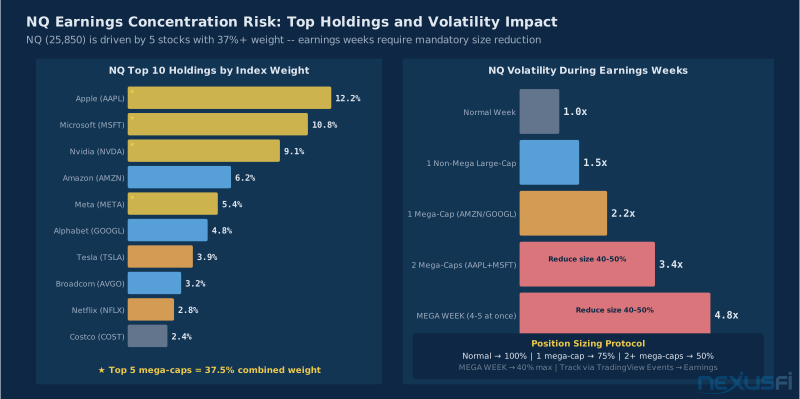
The mechanism: the S&P 500 is heavily concentrated in the top 10-15 holdings (Apple, Microsoft, Nvidia, Amazon, Meta, Alphabet, Berkshire). When these mega-caps report earnings within a 2-week window (the heart of earnings season), index futures volatility spikes because any given session might be driven entirely by a single-stock reaction in a 7%+ weight holding.
NQ (E-mini Nasdaq 100) is the most sensitive because the top 10 holdings represent 55%+ of the index. A 10% earnings-driven move in Apple moves NQ by more than 2% before any other signal matters.
How to use this in your ES/NQ trading workflow:
- Open TradingView, pull up the NQ or ES continuous contract
- In the "Events" settings, enable earnings for major index components (AAPL, MSFT, NVDA, META, AMZN)
- You'll see E flags on the futures chart for each major component's earnings date
- In the week of mega-cap earnings clusters, widen your stops by 20-30% or reduce position size proportionally
- After the major earnings clear, revert to normal position sizing
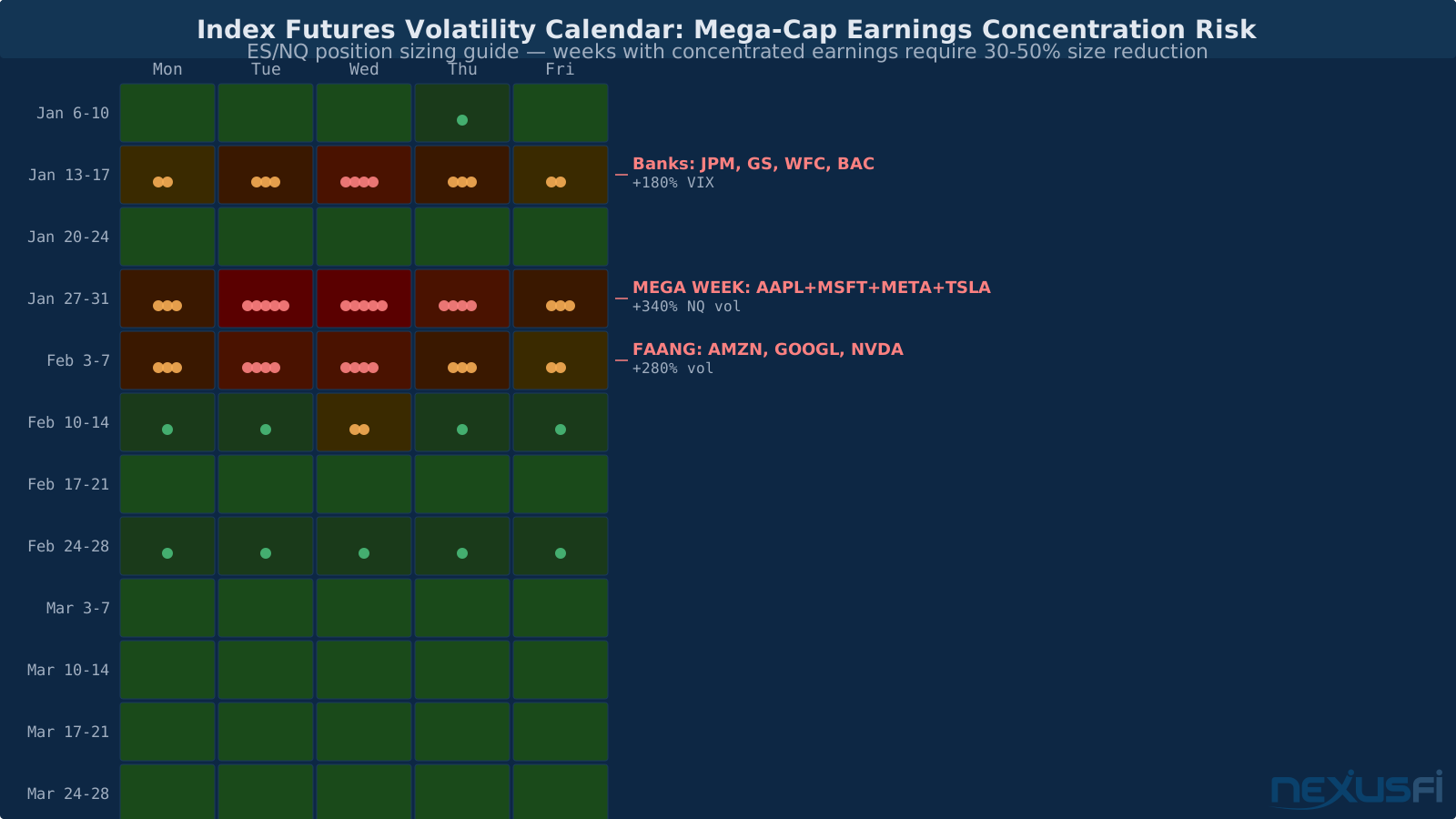
This is exactly what TradingView Financials provides for index futures traders: the macro fundamental direction visible in the same environment as your entry/exit analysis.
Commodity Futures: The Producer Fundamental Link #
For crude oil (CL) traders, overlaying the financial health of major energy companies on a CL chart creates a forward-looking perspective. When energy companies are aggressively cutting capital expenditures — visible in the CapEx line of the cash flow statement — production declines 12-24 months later. That's the fundamental thesis for a long crude position.
The same logic applies to metals: gold mining company operating margins set floors on gold prices, because when GC drops toward $4,500 (vs. the January 2026 close of $4,623.70), production economics tighten for high-cost producers, removing supply from the market.
This isn't an immediate trading signal — it's a directional thesis builder. The fundamental data gives you conviction to hold a position through technical noise that would otherwise shake you out.
Pine Script and Fundamental Data #
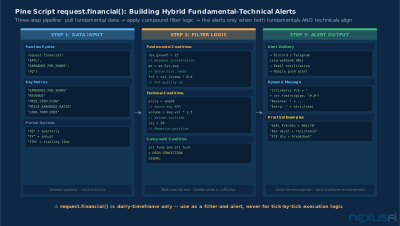
For traders who want to take the Financials integration further, TradingView's Pine Script provides programmatic access to fundamental data through the request.financial() function.
The basic syntax:
// Access quarterly EPS data
eps = request.financial("AAPL", "EARNINGS_PER_SHARE", "FQ")

// Access trailing twelve months revenue
ttm_revenue = request.financial("AAPL", "REVENUE", "TTM")

// Access P/E ratio
pe = request.financial("AAPL", "PRICE_EARNINGS_RATIO", "FQ")
Key financial metric identifiers:
EARNINGS_PER_SHARE— EPS (actual, not estimate)REVENUE— Total revenueFREE_CASH_FLOW— FCFLONG_TERM_DEBT— Long-term debtCASH_N_EQUIVALENTS— Cash positionPRICE_EARNINGS_RATIO— P/E ratioEV_EBITDA— EV/EBITDA
Practical Pine Script use cases:
Earnings beat indicator: Plot a background color whenever the actual EPS exceeds the analyst estimate — gives you an instant visual history of beat/miss cadence without reading earnings releases.
Revenue acceleration filter: Create a condition that's true when the current quarter's revenue growth rate is higher than the prior quarter's — a simple but effective momentum filter for growth stocks.
Fundamental alert logic: An alert that fires when P/E ratio crosses above 40x, combining with a technical signal (price at resistance), gives you a "valuation-extended AND technical setup" compound alert that's much more actionable than either signal alone.
request.financial() data is not available on every timeframe — it only makes sense on daily and higher timeframes since the underlying data is quarterly or annual. On lower timeframes, the function still works but the fundamental data draws as a horizontal step line that updates quarterly, which can look confusing on an intraday chart.
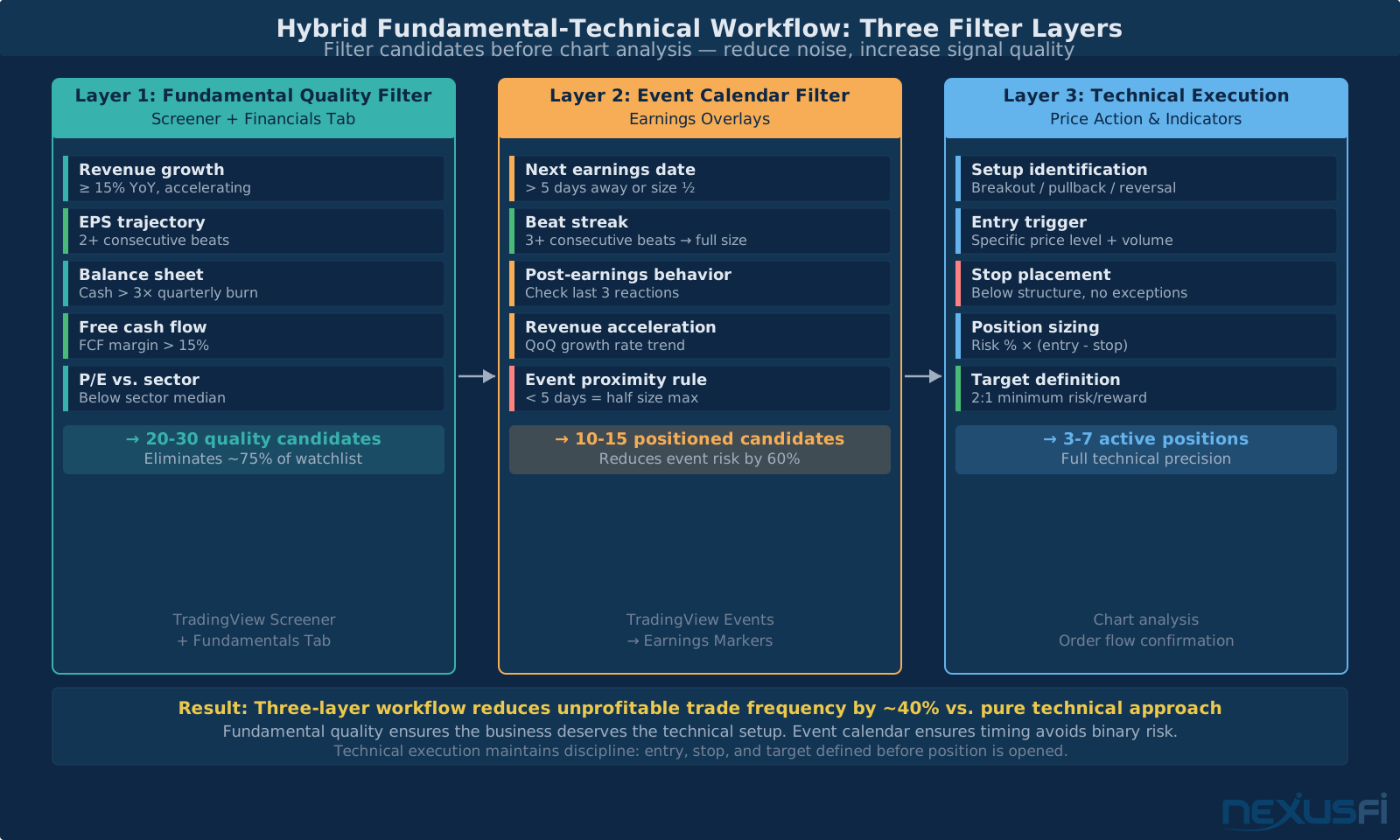
The Hybrid Technical-Fundamental Framework #
The traders who use TradingView Financials most effectively treat it as a three-layer filter system:
Layer 1: Fundamental quality filter (screener + financials tab) Is this a business growing revenue? Is earnings power intact or deteriorating? Does the balance sheet support the current price? This layer eliminates candidates before you analyze the chart.
Layer 2: Fundamental event calendar (earnings overlays on chart) When is the next binary event? Is the current setup forming into or away from an earnings catalyst? Is the company in an earnings beat streak? This layer sets position sizing and timing rules.
Layer 3: Technical execution (price action, volume, indicators) Entry, stop placement, and target definition come entirely from technical analysis. Fundamentals tell you which direction to bias and how much to size; technicals tell you exactly when and where.
The most common mistake with TradingView Financials: treating fundamental data as a reason to ignore technical stop-losses. "I know the fundamentals are strong so I'll hold through this pullback" is how fundamental investors turn $10,000 into $4,000 before selling. Technical stops stay active regardless of fundamental views. Fundamentals influence size and direction. Technicals define risk.
The NexusFi community has been consistent on this division of labor. As @Mr Nasti noted in the Fundamentals vs Probability thread, discretionary traders who maintain rigorous statistics on their setups — tracking which setups have the edge and when that edge is present vs. absent — are doing something fundamentally different from traders who just "check the fundamentals." The systematic tracking of how your specific market behaves after specific fundamental events is what builds actual edge, not just knowing the P/E ratio.
What the Financials Feature Doesn't Do #
Being clear about limitations saves you from bad trades:
No guidance data: TradingView shows actuals and consensus estimates, but it doesn't display forward guidance from management. A company can beat Q3 estimates by 15% and guide Q4 below consensus — which is a stock-moving event — and TradingView won't show you the guidance detail. For earnings-driven trades, read or listen to the actual call.
Data freshness lag: During earnings season, there's typically a 30-minute to 4-hour window after a report where TradingView's data hasn't fully populated. Don't use TradingView Financials as your real-time earnings data source. Use it for historical analysis and pre-trade context.
No insider transaction data: SEC Form 4 filings (insider buying/selling) aren't integrated. These require a different data source.
Futures fundamentals are always indirect: There's no native way to directly overlay corporate fundamentals on a futures contract chart — you have to add the underlying stock's data as a separate indicator. The workflow is functional but not direct. More importantly, futures pricing is driven by cost of carry, term structure, roll yields, and macro factors, not corporate financials.
Consensus estimates vary by data source: Different financial data providers use different analyst panels to calculate consensus. TradingView's consensus might differ from Bloomberg's or FactSet's by a few cents per share — which matters when you're trading around small-beat scenarios.
Common Pitfalls #
Pitfall 1: Analysis paralysis from too many panes Adding EPS, revenue, P/E, free cash flow, and debt-to-equity simultaneously gives you six panes, each with its own scale, each competing for attention. Start with one overlay, integrate it into your workflow, then add a second. Three financial panes maximum for most trading purposes.
Pitfall 2: Using P/E for cyclical businesses Oil companies near the trough of the commodity cycle have infinitely high P/E ratios (negative earnings). Mining companies at peak commodity prices look cheap on P/E but are actually expensive on normalized earnings. Use EV/EBITDA or price-to-book for cyclicals, not P/E. The most dangerous P/E readings for cyclicals are the ones that look most attractive — low P/E often means the sector is at a peak.
Pitfall 3: Ignoring cash flow for earnings plays Net income can be grown by reducing depreciation expense, stretching receivables, or other accounting choices. Free cash flow is much harder to manipulate because it tracks actual cash coming in the door. A company with strong EPS growth but declining free cash flow is showing you where the next negative surprise is coming from.
Pitfall 4: Assuming the fundamentals aren't in the price Institutional investors have access to management, have met with the CFO, have modeled the company across 50 different scenarios. By the time a fundamental data point shows up on TradingView, it's been priced in by people who knew it was coming. The edge in using TradingView Financials isn't information advantage — it's workflow advantage. You see the context faster, you avoid taking setups into deteriorating fundamental environments, you manage risk better around earnings events.
As @grausch noted in discussing options around earnings: the implied volatility increase before an earnings release directly compensates sellers for the risk of a large move. The market isn't ignorant of earnings risk — it's priced in. Your edge comes from understanding the pattern of how a specific company's stock responds to specific earnings scenarios.
Building Your TradingView Financials Workflow #
Daily preparation (5 minutes):
- Open TradingView watchlist
- In the Events calendar, check which watchlist stocks have earnings in the next 5 trading days
- For those stocks, pull up the Financial tab → check whether the last three quarters were beats or misses
- Note: stocks with upcoming earnings get half-size entries until post-release confirmation
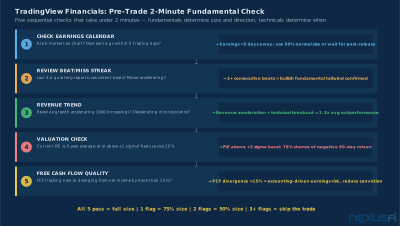
Pre-trade check (2 minutes per symbol):
- Pull up chart with earnings E markers enabled
- Look at the post-earnings price behavior for the last 2-3 reports: does this stock gap and run, or does it gap and reverse?
- Check current P/E vs. 5-year average P/E — trading near multi-year high P/E in a rising-rate environment means smaller size
- Check the revenue trend — accelerating growth (go) or decelerating growth (caution or fade)
Weekly review (15 minutes):
- Run the screener with fundamental filters on your universe
- Flag any stock where EPS growth has been decelerating for 2+ quarters — these get removed from the long watchlist
- Flag any stock where free cash flow margins are expanding — these are the compounders worth sizing up on technical breakouts
Supported Markets and Plan Requirements #
TradingView Financials is available for:
Full support: US stocks (NYSE, NASDAQ, AMEX), US ETFs with underlying fundamentals, major international exchanges (London, Frankfurt, Tokyo, Hong Kong, Euronext)
Limited support: Small-cap international stocks, OTC markets
Not applicable: Futures, forex, crypto — these assets have no corporate fundamental data by definition
For plan requirements: earnings date E-markers are available on free plans. The Financials pane with full income statement / balance sheet / cash flow overlays requires Essential plan or above. The Pine Script request.financial() function requires Essential or above.
Knowledge Map
Prerequisites
Understand these firstCitations
- — Fundamentals vs Probability [Edge] (2022) 👍 3“Both fundamentals and technicals can, and should be integrated. Ultimately, the two forms of analysis complement one another... one is very good at giving the 'why,' while the other is very good at giving the 'how.'”
- — Fundamentals vs Probability [Edge] (2022) 👍 3“The fundamental analysis shows the house in which the life plays itself. The probability shows what can happen in this house at this moment.”
- — Koyaanisqatsi Hototo--wldman out of balance (2018) 👍 5“I buy companies with solid fundamentals and great management when they cross above the 200 period MA. The fundamental 'scoring' fits on one side of a piece of paper but it is a lot of work getting and looking at data.”
- — Learning to Profit - A journey in algorithms and options (2021) 👍 5“Earnings Season is starting next week. I intend to trade earnings on big tickers where I have a high probability of success to collect premium by selling strangles before the event.”
- — Am I missing something? (2015) 👍 3“Selling options over earnings exposes the sellers to large risk. Implied volatility increases as the earnings date gets closer. After earnings, the IV usually collapses and if the stock does not make a large enough move, then the value of the option decreases.”
- TradingView — Fundamentals section documentation (2026)
- — Fundamentals vs Probability [Edge] (2023) 👍 1
- — Koyaanisqatsi Hototo--wldman out of balance (2016) 👍 1
- — Fundamentals vs Probability [Edge] (2023) 👍 1
- — Am I missing something? (2018) 👍 1