



Sierra Chart ACSIL: Building Automated Futures Strategies in C++
Overview #
Sierra Chart's Advanced Custom Study Interface and Language — ACSIL — is the deepest automation layer available to retail futures traders. You're writing native C++ that compiles to a Windows DLL and runs directly inside the Sierra Chart process. No interpreter overhead. No scripting layer between your logic and the exchange. When ES is moving 10 points in 30 seconds and your strategy needs to submit, cancel, and replace orders in that window, the difference between ACSIL and a scripted platform matters.
This isn't the right tool for every trader. If you're running a simple moving average crossover and want something to fire market orders, NinjaScript or TradeStation EasyLanguage will serve you fine. But if you need tick-level precision, tight state management, or custom risk controls that respond to real-time conditions — ACSIL is where that work gets done. The NexusFi Sierra Chart community has spent years developing ACSIL frameworks precisely because the other options hit walls that ACSIL doesn't.
What follows is the practical blueprint for getting from idea to running automated strategy. Not the Sierra Chart documentation (read that too — it's thorough). The part they can't tell you: what actually breaks in live trading and why, how to design your state machine so it doesn't spray orders when your data feed glitches, and how to build the circuit breakers that keep a coding mistake from becoming a catastrophic loss.
The ACSIL Execution Model #
ACSIL strategy code lives inside a single C++ function — the scsf_ function (Sierra Chart Study Function). Sierra Chart calls this function every time something relevant happens: a bar closes, a new tick comes in, an order status changes, a position updates. Your job is to write code that handles each of those events correctly regardless of order.
The most important thing to internalize early: Sierra Chart calls your function constantly. On a 5-minute ES chart, that's every tick during bar construction, then again at bar close. On a tick chart, it's every trade. The function is stateless between calls in one specific way — local variables reset each call. Everything you need to persist across calls has to be stored in persistent variables.

SetDefaults is your initialization block. Sierra Chart runs it once when you add the study. Everything you configure here — max position size, whether reversals are allowed, how many entries per direction per bar — gets set at study load time. Get these settings wrong and no amount of clever logic in the main block fixes it.
sc.AutoLoop = 1 tells Sierra Chart to iterate through all bars automatically. When it's set, SC calls your function once per bar from bar 0 through the most recent bar. The current bar being processed is sc.Index. When sc.Index == sc.ArraySize - 1, you're on the live bar. That distinction matters enormously — you don't want to trigger live orders while processing historical data.
The Historical-to-Realtime Transition
This is where a lot of strategies blow up on day one. The function processes every historical bar before it ever sees live data. If you have entry logic that fires on a condition present in historical bars, it'll "enter" those historical trades. In backtest mode, that's intentional. In live mode, you need to know you're on the live bar before sending orders to the exchange.
// Only trade on the live bar
if (sc.Index != sc.ArraySize - 1)
    return;

// Only trade in real-time, not historical replay
if (sc.IsFullRecalculation)
    return;
sc.IsFullRecalculation is true during the initial historical processing sweep. When Sierra Chart finishes that sweep and starts receiving live data, it becomes false. This flag is your gate between "doing historical analysis" and "actually sending orders." Miss this and you'll wonder why your strategy tried to enter 47 trades before the market opened.
State Management: The Source of Most Bugs #
The single most common failure mode in ACSIL — and in automated trading generally — is state desynchronization. Your code's internal representation of what's happening diverges from what's actually happening in the market. You think you're flat but you have a working order. You think you're long but Sierra Chart shows you flat because the fill didn't come back yet. Your code fires another entry because it thinks the position doesn't exist.
This isn't a Sierra Chart bug. It's a design problem. The fix is treating your state machine as the primary source of truth and reconciling it against actual positions and orders at every function call.
Persistent Variables for State Tracking
ACSIL provides sc.GetPersistentInt(), sc.GetPersistentDouble(), and sc.GetPersistentPointer() for storing state that survives between function calls. Use these for entry order IDs, stop and target order IDs, "in trade" flags, daily P&L tracking, and session state.

The integer argument is the index — think of it as a named slot. Pick consistent indices and document them. If you use slot 1 for two different variables in different code paths, you'll get corrupted state that's nearly impossible to debug.
int& EntryOrderID  = sc.GetPersistentInt(1);
int& StopOrderID   = sc.GetPersistentInt(2);
int& TargetOrderID = sc.GetPersistentInt(3);
int& IsInTrade     = sc.GetPersistentInt(4);
int& DailyLimitHit = sc.GetPersistentInt(5);The Order State Machine #
This is the section that separates working automated strategies from ones that randomly fire extra entries or leave the position unhedged after an unusual fill sequence. An order state machine tracks every order through its complete lifecycle and only takes new actions based on confirmed state transitions.

Every order moves through states: Unsubmitted → Submitted/Working → Filled or Canceled/Rejected. Your code needs to handle all of them, including the failure paths. The s_SCTradeOrder struct gives you the complete order status via sc.GetOrderByOrderID(). Check it. Don't assume the fill came through because you submitted the order three seconds ago.
The "emergency flatten" path is not optional. When something unexpected happens — two fills on the same order, a fill that doesn't match your expected position size — the correct response is to immediately flatten and investigate. The worst outcome is losing a fraction of a percent to slippage. The worst outcome of ignoring it is a runaway position.
Preventing Duplicate Entries
The most common order management bug: entry logic fires on every function call instead of once per signal. On a 1-minute ES chart with tick resolution, that's potentially hundreds of order submissions per bar while the entry condition is true. The two-part gate prevents this:
// Gate 1: Only enter if we have no working or filled position
if (IsInTrade || EntryOrderID != 0)
    return;

// Gate 2: Check actual order status (not just our flag)
s_SCTradeOrder ExistingOrder;
if (sc.GetOrderByOrderID(EntryOrderID, ExistingOrder) > 0)
{
    if (ExistingOrder.OrderStatusCode != SCT_OSC_CANCELLED &&
        ExistingOrder.OrderStatusCode != SCT_OSC_REJECTED)
        return;  // Order still active -- don't submit another
}
ES Live Trade: One Entry, One Stop, One Target

Futures-Specific Data Handling #
ES, NQ, CL — each instrument has characteristics that break naively designed strategies. If your code doesn't account for these explicitly, you'll discover them live at 9:45 AM during the opening range.
Bar vs tick granularity: ACSIL gives you a choice — run your logic at bar close (sc.AutoLoop = 1) or run it on every tick. Bar-based logic is simpler to reason about and faster to backtest. But if your entry condition uses bar close prices and your live strategy sees those prices only at bar close, slippage from signal-to-fill can be material. On a 1-minute ES chart, "bar close at 6,961.00" means you're submitting a market order one minute after the signal formed — and the market has moved.
Bar-based backtest results can diverge much from tick replay results precisely because the fill assumptions differ. If your strategy is tick-sensitive, test it with tick replay data. (Source: NexusFi, t=47162)
Bid/Ask vs Last price: In futures — especially around the open, economic releases, or during fast moves — your actual fill price on a market order is the ask if you're buying, the bid if you're selling. For ES the spread is typically 0.25 (1 tick). For CL it can widen to 3-5 ticks during news. Use sc.Bid and sc.Ask for execution logic that depends on where the market will actually fill you.
Session boundaries and contract rollover: The continuous contract symbol @ES# chains front month contracts together automatically. But rollover creates a seam in the data where prices step discontinuously. At a minimum, your strategy needs to detect new sessions and reset state: daily P&L counters, trade count limits, and any price-level logic anchored to prior sessions.
Embedded Risk Management & Circuit Breakers #
Risk management built into the strategy architecture is the only risk management that works. Separate position monitors, manual size checks, mental stops — all of these fail at exactly the moment you need them. The circuit breakers go in the code.

Per-Trade Risk Sizing
Every entry should calculate position size from risk, not the other way around. Define your risk in dollar terms, know your tick value, and compute the correct number of contracts:
double RiskPerTrade = 200.0;  // $200 max risk
double StopTicks = 8.0;       // 8-tick stop
double TickValue = 12.50;     // ES tick = $12.50

int Contracts = (int)(RiskPerTrade / (StopTicks * TickValue));
// Result: 200 / (8 × 12.50) = 2 contracts
For ES, each point is $50 (4 ticks × $12.50). For NQ, each point is $20 (4 ticks × $5.00). For CL, each point is $1,000 (100 ticks × $10.00). Build these as configurable inputs, not hardcoded constants.
Daily Loss Limit as a Hard Stop
The platform-level setting is one layer. Your code should have its own layer that stops new entries before the platform's emergency flatten kicks in. (Source: NexusFi, t=53943)
double DailyPnL = sc.GetTradePositionData(FLOAT_VALUE_DAILY_PROFIT_LOSS);
double MaxDailyLoss = -500.0;  // Input parameter

if (DailyPnL <= MaxDailyLoss && !DailyLimitHit)
{
    sc.AddMessageToLog("Daily loss limit hit. No new trades today.", 0);
    DailyLimitHit = 1;
}
if (DailyLimitHit) return;  // Skip all entry logic
The Kill Switch
This is non-negotiable for any strategy running without constant manual supervision. The kill switch flattens the position and cancels all working orders immediately, regardless of current state. It must be checked at the top of every function call, before any other logic:
if (Input_KillSwitch.GetInt() == 1)
{
    sc.FlattenAndCancelAllOrders();
    IsInTrade = EntryOrderID = StopOrderID = TargetOrderID = 0;
    return;
}
sc.FlattenAndCancelAllOrders() submits a market order to flatten whatever position exists and cancels all working orders. When something goes wrong, this is what you reach for.
The Testing Workflow: Backtest to Live #
The gap between backtest and live is where most automated strategies fail. @kevinkdog has tracked this extensively on NexusFi: "In my own trading, I find the backtest to be a good match to real time. I compare them after the fact to ensure that is the case." — but only when the testing methodology is rigorous. (Source: NexusFi, t=61327)


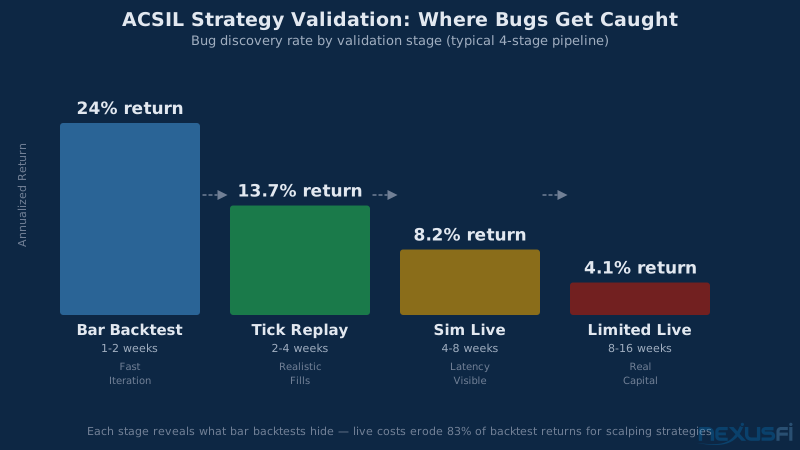
Stage 1 — Bar Backtest: Fast, useful for initial signal validation. Limitations: fills at bar close, zero slippage default. Good for "does this edge exist at all?" Not good for "will this work in live markets?"
Stage 2 — Tick Replay: Sierra Chart's Market Replay uses actual tick data. Your strategy runs against tick-by-tick fills at real bid/ask prices. This is the critical validation step. @djkiwi's analysis on NexusFi showed that for ES during the opening 30 minutes, "the direct costs of slippage and commission is a massive 32%" of gross profit. Your tick replay should confirm slippage costs match your expectation before proceeding. (Source: NexusFi, t=23778)
Stage 3 — Simulated Live: Connect to live market data but trade in simulation mode. Run for a minimum of two weeks. You're testing data feed reliability, session transitions, and behavior during economic releases — things replay can't fully replicate.
Stage 4 — Limited Live: Start with minimum position size. Verify live fills match expected prices within your slippage model, state tracking is accurate, and circuit breakers work. Run this for a month before scaling.
Logging & Debugging #
The difference between a live strategy you can fix quickly when something goes wrong and one you can't is the quality of your logging. Log decisions, not just actions.
What to log: Log why an order was placed (signal values, conditions), every order status transition (submitted, working, filled, canceled, rejected), every position change with entry/exit prices, daily P&L snapshots, and any circuit breaker activations. The format should be: "Signal fired because [conditions]. Submitting [action]."
What not to log on every call: Logging unconditionally inside the main function body runs thousands of times per day. Gate all logging to state changes only. ES averaging 3,000 ticks per day means a log statement that fires every call writes 3,000 lines per session. That's performance overhead during fast markets — exactly when you need zero latency.
Cross-reference against Sierra Chart's order activity log: SC's built-in log shows every order event — submission, working, modification, fill, cancellation. Compare this against your strategy log to verify your code's state matches actual order history. If your log says "entry filled" but the order activity log shows the order was rejected, you've found a state synchronization bug.
Common Pitfalls Checklist #

These are the failure modes experienced traders hit in their first six months of ACSIL automation. Each one is findable in production within hours if you know what symptoms to watch for.
| Pitfall | Symptom | Fix |
|---|---|---|
| State desynchronization | Multiple entries, exits not firing | Check actual OrderStatusCode every call via GetOrderByOrderID() |
| Historical phantom trades | Entries submitted on chart load | Gate all entry logic with sc.IsFullRecalculation check |
| Duplicate order submission | 10 working orders for one signal | Two-part gate: persistent ID check AND actual order status check |
| Missing exit orders | Flat with no stop after entry | Verify exit submission separately; log every step |
| OCO conflict | Both stop and target active after one fills | Use SC's native OCO linking via OCOGroup parameter |
| Session boundary trades | Trades at 3:15 AM | Check session eligibility using sc.IsDateTimeInSC() |
| Kill switch not connected | Can't flatten during emergency | Test kill switch during sim stage, not in live |
| Tick value error | Risk sizing 4× expected | Use sc.TickSize dynamically -- never hardcode contract values |
| Log performance hit | Order delays during fast markets | Gate all logging to state changes only |
ACSIL rewards traders with a working edge. The C++ setup, state machine design, and testing pipeline represent weeks of investment — build that on top of a demonstrated discretionary edge, not in hope of creating one. The platform amplifies whatever you bring to it.
Build Environment and Getting Started #
ACSIL DLLs compile using Visual Studio (Community edition is free). The build target is a 64-bit Windows DLL that Sierra Chart loads from your Data directory. Set the Output Directory to your Sierra Chart Data folder (e.g., C:\SierraChart\Data\), and SC detects the updated file and reloads the study automatically between builds. The build-and-test loop is fast enough to make incremental changes and test them in market replay without significant overhead.
@Trembling Hand's "ACSIL for Beginners" series on NexusFi walks through the complete Visual Studio setup step by step, including project settings that prevent the most common compiler errors. That thread — with over 60 replies and 13+ thanks from community members — is the starting point for environment setup. (Source: NexusFi, t=55327)
The fastest path to a working ACSIL strategy is modifying a known-good skeleton rather than starting from scratch. Sierra Chart's own examples directory (ACSIL Example Trading Systems) provides reference implementations with proper SetDefaults blocks, order management, and state tracking. Start there, add your signal logic, test in replay before going live.
What ACSIL Requires of You #
ACSIL is a framework, not a strategy. The automation infrastructure described here — state management, order lifecycle tracking, circuit breakers, testing workflow — is table stakes for a strategy that runs without supervision. The trading edge itself is a separate problem: what market condition you're exploiting, when it's present versus absent, and how you size for the variance in that edge.
The key insight from traders who've been running ACSIL strategies for years: the infrastructure work is 70% of the effort. Getting the trading system architecture right, building the logging that lets you diagnose live issues, calibrating slippage models against tick replay data — this is the work that determines whether a strategy survives first contact with live markets. The entry/exit logic is the remaining 30%, and it's where most beginners spend 100% of their time.
Build the infrastructure first. Then add the edge. The backtesting framework and risk controls that underpin a serious ACSIL strategy aren't shortcuts — they're what make the strategy worth running in the first place.
Knowledge Map
Prerequisites
Understand these firstCitations
- — Sierra Chart ACSIL for Beginners (2020) 👍 13“Step-by-step Visual Studio setup with the output directory set to C:\\SierraChart\\Data\\ and ACS_Source added to the include directories -- the essential build environment for ACSIL DLL development.”
- — Questions and discussion for Sierra Chart ACSIL for Beginners (2021) 👍 2“Example of iterating the order list using sc.GetOrderByIndex to find open, non-attached orders -- the canonical pattern for order status checking in ACSIL.”
- — Backtesting the right way (2026) 👍 4“In my own trading, I find the backtest to be a good match to real time. I compare them after the fact to ensure that is the case, after accounting for slippage and commissions.”
- — Autotrading Slippage compared to Replay (2012) 👍 23“The direct costs of slippage and commission is a massive 32% of gross profit during the opening 30 minutes -- equivalent of playing roulette with 11 zeros on the roulette wheel.”
- — Daily Loss Limit supervised by Broker/Software (2020) 👍 6“Sierra Chart lets you put in a daily loss limit and it closes any open positions if you hit it.”
- — Big Discrepancies in Execution between Strategy Analyzer and Market Replay (2019) 👍 5“For testing a strategy you should only ever use market replay or live SIM. Strategy analyzer will only be in the ball park if you use really large profit targets and stop losses.”
- — Advanced Custom Study Interface and Language (ACSIL) -- Sierra Chart
- — Example ACSIL Trading Systems -- Sierra Chart