



Automated Risk Controls for Futures Trading
Overview #
Every automated futures trader has the same nightmare: a strategy goes haywire at 2 AM, the order loop fires off 50 contracts in 3 seconds, and by the time anyone notices, the account is down five figures. It happens. It happens to smart people running tested code on stable infrastructure. The difference between traders who survive it and traders who blow up isn't the quality of their alpha — it's the quality of their safety systems.
Automated risk controls are the circuit breakers, kill switches, and guardrails that sit between your trading logic and catastrophe. They don't generate returns. They don't improve your Sharpe ratio. What they do is keep you in the game when everything else fails — and in futures, where leverage amplifies every mistake, "everything else fails" isn't a hypothetical. It's a Tuesday.
System-driven failures are quieter and often more destructive: a runaway order loop submitting hundreds of orders per second, a stale signal generating trades on yesterday's data, a connectivity dropout that leaves orphaned orders sitting on the exchange, or a rollover mismatch that has your algo trading the wrong contract month entirely.
This article covers the complete safety infrastructure stack: from pre-trade order checks to portfolio-level drawdown breakers to the independent kill switch that assumes your trading logic has already failed. If you're running any automated system on futures — from a simple NinjaTrader ATM strategy to a multi-strategy production engine — these controls aren't optional. They're the cost of staying solvent. And it's not just about survival — the NFA's Interpretive Notice 9046 explicitly requires member firms to adopt written supervisory procedures covering the security, capacity, and risk-management controls of any automated order-routing system. [12]
What Can Go Wrong: The Futures Failure Taxonomy #
Before building defenses, name the threats. Futures failures break into two categories, and your risk controls need to handle both.
Market-driven failures are the ones everyone thinks about first: flash crashes, liquidity vacuums during off-hours, limit-up/limit-down moves, and the 3 AM headline that sends crude oil through the floor. These are external. Your system is functioning correctly — the market is just doing something your model didn't anticipate.
System-driven failures are quieter and often more destructive: a runaway order loop submitting hundreds of orders per second, a stale signal generating trades on yesterday's data, a connectivity dropout that leaves orphaned orders sitting on the exchange, or a rollover mismatch that has your algo trading the wrong contract month entirely. These are internal. Your system is broken, and it doesn't know it.
Here's the critical insight: most catastrophic automated trading losses come from system-driven failures, not market-driven ones. A flash crash costs you a bad day. A runaway order loop can cost you an account. As one NexusFi member discovered during FOMC, even well-tested kill switches can fail when the exchange rejects market orders during volatile conditions — the built-in Rithmic exitPositions() function sent a market sell for 14 contracts, but CME rejected it with "Order type not permitted while the market is reserved." The algo assumed the exit worked and shut down, leaving the position wide open. As @Breukelen recounted, it was "78 microseconds away from losing 2k" — saved only because a stop order happened to fill by coincidence. [1]
That story illustrates exactly why automated risk controls need to be layered, independent, and paranoid about confirmation.
The Three Lines of Defense #
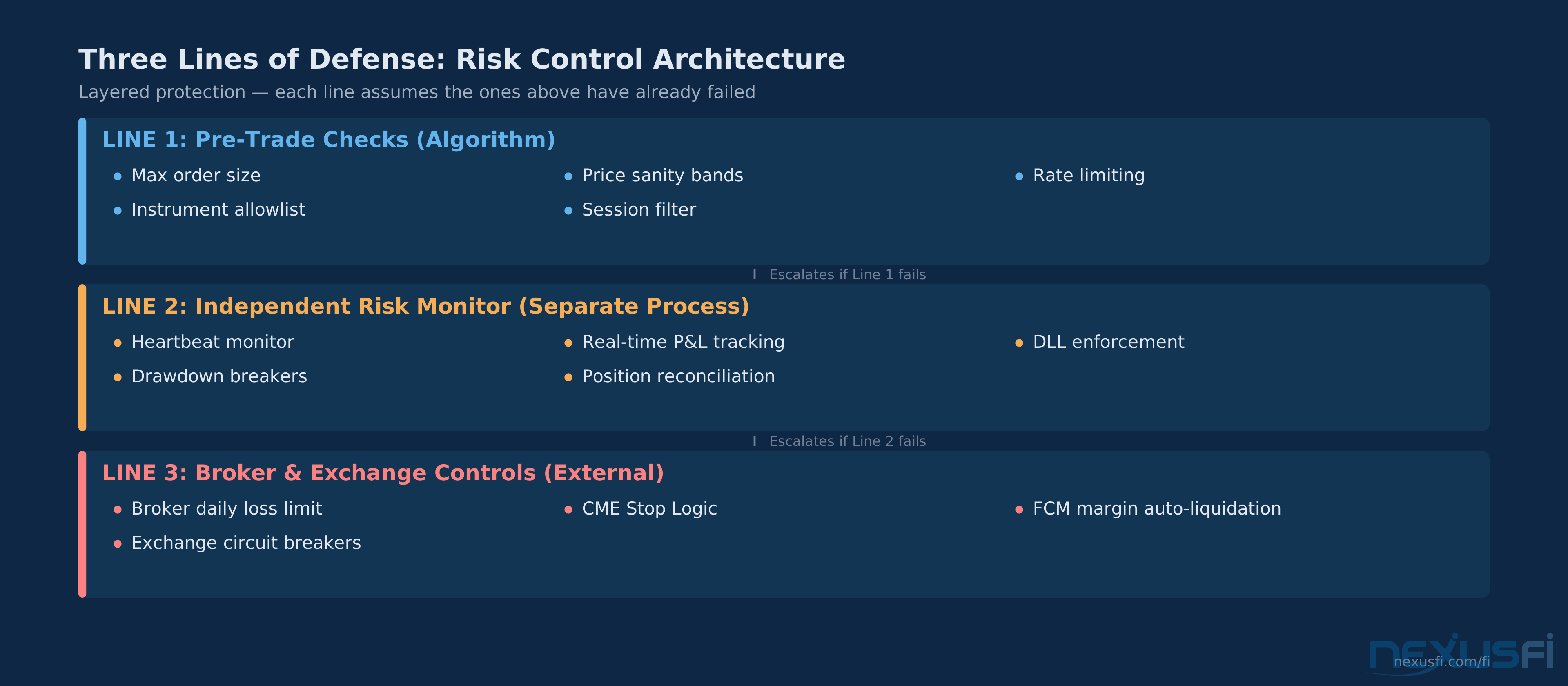
Production-grade risk management follows a layered architecture. No single layer is trusted to catch everything. Each layer assumes the ones above it have already failed.
Line 1: Pre-trade checks embedded in the algorithm. These are the fastest and most specific — your strategy code validates every order before submission. Max order size, price sanity bands, instrument allowlists, rate limits. These catch most routine errors: fat-finger quantities, orders at stale prices, attempts to trade expired contracts.
Line 2: Independent real-time risk monitor. This runs as a separate process — ideally on a separate machine — watching your aggregate exposure, P&L, and margin in real time. It doesn't know or care about your strategy logic. It watches numbers. When numbers breach thresholds, it acts. This is your drawdown breaker, your daily loss limit enforcer, your exposure cap.
Line 3: Broker and exchange-level controls. These are your last resort. Broker-level daily loss limits that flatten you regardless of what your software thinks. Exchange-level protections like CME's Stop Logic that prevent erroneous executions. These catch what your own systems miss.
The key principle: Line 2 must be out-of-band. If your risk monitor runs inside the same process as your trading engine, a bug that crashes the engine also kills the monitor. The watchdog can't watch if it's dead. Run your risk monitor as a separate service that polls your broker API for positions and P&L independently of your trading code. If it can't reach your trading engine's heartbeat for 30 seconds, it assumes the worst and flattens everything.
The Risk State Machine #
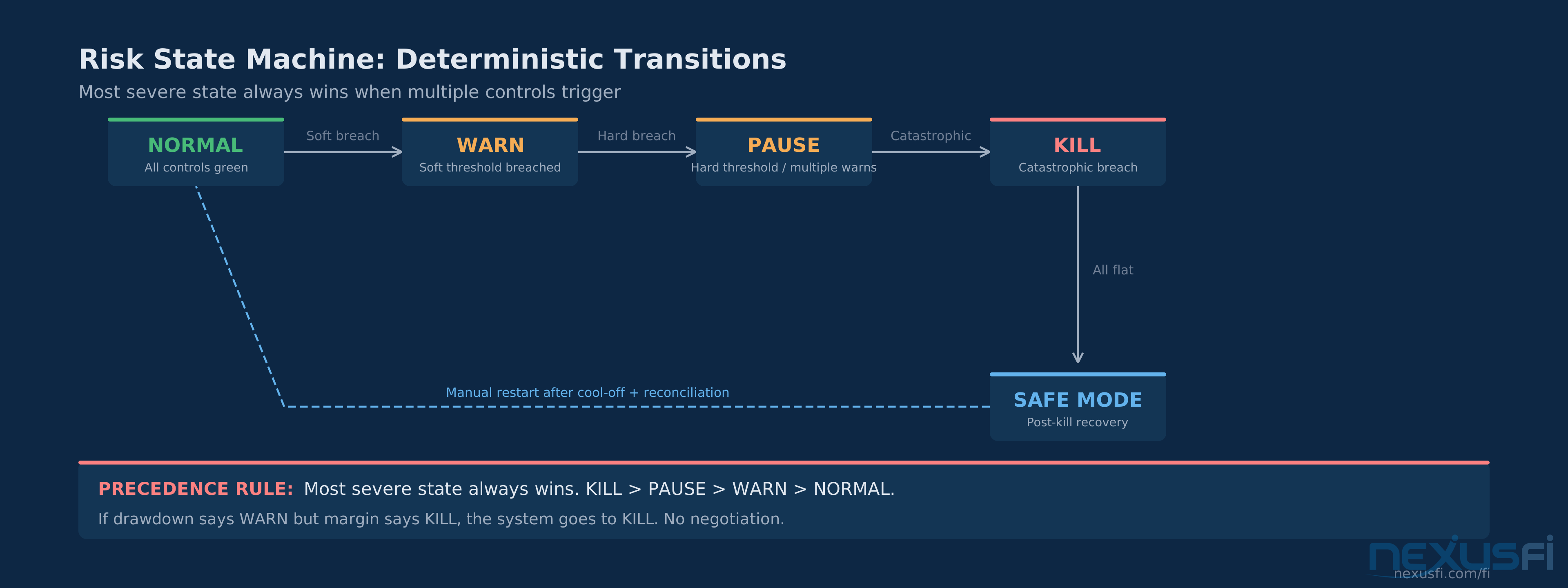
Every automated system exists in one of five states at any given moment. Transitions between states are deterministic — no ambiguity about what happens next.
NORMAL → System trading within all parameters. All controls green.
WARN → One or more soft thresholds breached (P&L down >40% of DLL, margin utilization >60%, or strategy performance below historical baseline). Action: alert trader, log event, optionally reduce position size by 50%. System continues trading.
PAUSE → Hard threshold breached or multiple soft breaches compound. Action: cancel all open orders, prevent new order submission, keep existing positions with protective stops. No new trades until conditions improve or manual override.
KILL → Catastrophic breach. Action: flatten all positions immediately, cancel all orders, disable all automated trading. Zero discretion, zero delay.
SAFE MODE → Post-kill recovery state. Positions are flat. System can accept manual restart only after: (a) mandatory cool-off period elapsed, (b) position reconciliation verified, (c) root cause identified or acknowledged.
Precedence rule when multiple controls trigger simultaneously: the most severe state wins. Always. If the drawdown breaker says WARN but the margin monitor says KILL, the system goes to KILL. If the rate limiter says PAUSE but the daily loss limit says KILL, the system goes to KILL. There is no negotiation between layers — severity always escalates upward, never down.
Kill Switch Design #
A kill switch isn't a button. It's a tiered system with multiple triggers, multiple actions, and multiple fallbacks.
Trigger Thresholds #
Configure triggers with concrete formulas tied to your account and strategy parameters:
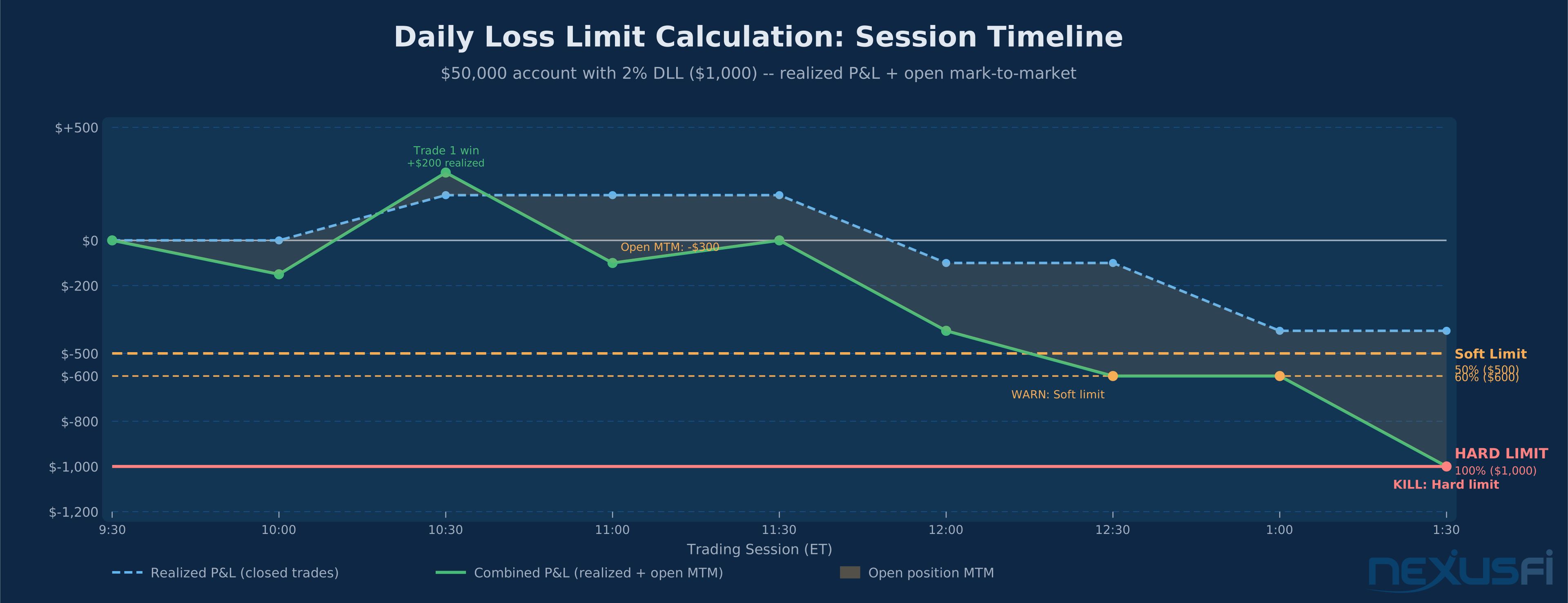
Daily loss limit trigger: if (realized_pnl + mark_to_market_pnl) < -(account_equity × risk_pct) → KILL. For a $50,000 account at 2% daily risk: kill at -$1,000.
Margin utilization trigger: if (used_margin / account_equity) > 0.85 → KILL. Conservative traders use 0.70 for WARN and 0.85 for KILL.
Rate anomaly trigger: if (orders_submitted_last_60s > 3 × historical_avg_per_minute) → PAUSE. If rate exceeds 10× average → KILL.
Heartbeat loss trigger: if (seconds_since_last_heartbeat > 30) → KILL (flatten via independent watchdog process).
Position mismatch trigger: if (internal_position != broker_reported_position) → PAUSE (investigate before resuming).
Flatten Logic: Harder Than It Sounds #
"Flatten everything" sounds simple. In futures, it's not.
Session transitions. If your kill switch fires during ETH when liquidity is thin, a market order to flatten 10 ES contracts could cost you 2-4 ticks of slippage versus 0.25 ticks during RTH. Your flatten logic should know what session it's in — limit orders with escalating aggression during thin periods, market orders during liquid ones.
Exchange rejection. As the Breukelen story shows, exchanges can reject market orders during volatile periods. Your flatten logic needs a fallback: if the market order fails, try an aggressive limit (mid-market minus 5 ticks). If that fails, widen by another 5 ticks. Log every attempt. Never assume the first try succeeded.
Partial fills. You send a market order to sell 10 contracts. 7 fill immediately, 3 are still working. Your system needs to track this and keep trying until the position is actually zero — not just "I sent the order."
Implementation Layers #
Build your kill switch at every level of the stack:
Exchange-native tools: CME's Stop Logic functionality (formally called Velocity Logic) prevents catastrophic fills by pausing matching when prices move too far too fast — during a Velocity Logic event, the instrument transitions to a reserved state, market orders are eliminated, and traders get a brief window to adjust their resting orders before trading resumes. [11] ICE has similar risk controls. These protect against market-driven extremes.
Broker-level controls: Most FCMs offer configurable daily loss limits. As @Big Mike noted, brokers like Velocity Futures allow users to set personal daily loss limits that close positions and prevent new ones from being opened — and this works across any supported platform. [2] This is your Line 3 backstop.
Application-level watchdog: A separate process that monitors your trading engine via heartbeat. If the heartbeat stops, the watchdog connects to your broker API directly and flattens everything.
Pre-Trade Order Controls #
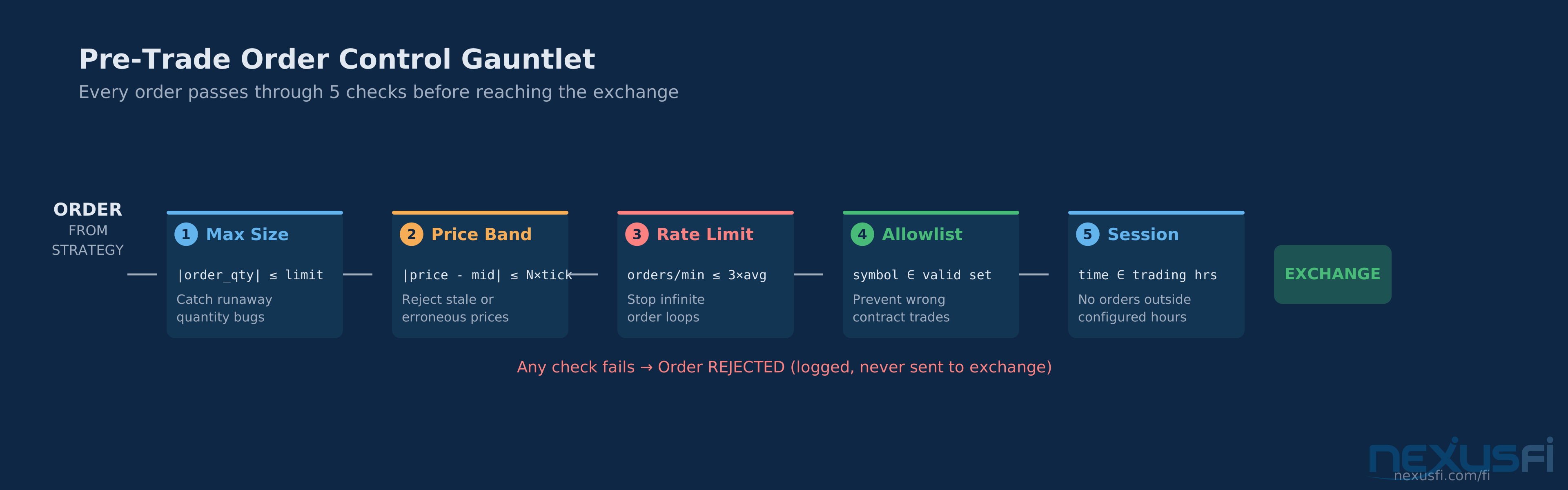
Before any order reaches the exchange, it passes through a gauntlet of sanity checks.
Maximum order size. Hard-coded contract limit per order. If your strategy normally trades 1-4 contracts, a cap of 10 catches bugs that accidentally multiply position size. Formula: max_order_size = min(strategy_max, floor(account_equity × max_risk_pct / (max_stop_ticks × tick_value))).
Price sanity bands. Reject any order with a price more than N ticks from the current mid-market: if |order_price - mid_price| > max(K × ATR(14), N × tick_size) → reject. Use 20 ticks for ES during normal conditions, widen to 50 during scheduled news events. Critical: if mid_price is stale (>500ms old), use last known price plus a conservative buffer — never trade on stale data.
Rate limiting. Cap orders per second per symbol per strategy instance. A strategy that normally submits 5 orders per minute shouldn't suddenly be submitting 50. On breach: queue orders (don't reject outright) and escalate to WARN or PAUSE depending on severity.
Instrument allowlists. Hard-code exactly which contract symbols your strategy is permitted to trade. A rollover bug that points your ES strategy at an expired contract gets caught before a single order is sent.
Daily Loss Limits and Drawdown Breakers #
This is where most traders start — and where most traders learn the hard way that willpower alone doesn't work. As @mcjackson reflected after multiple blown loss limits, "I connected pretty much every major issue I've had to not having a daily loss limit. Or, being really bad about sticking to it." The solution? Automate it completely. [3]
Daily Loss Limit (DLL) Implementation #
What counts as "loss"? Two approaches:
- Realized P&L only: Simple and auditable, but ignores open drawdown. You could be down $5,000 on an open position and your DLL shows $0 loss.
- Realized + mark-to-market: More conservative. Includes unrealized P&L on open positions. Most production systems use this approach because it reflects actual risk.
When does the "day" reset? For CME futures: 5:00 PM ET (daily settlement time). Define this explicitly in code and match your broker's accounting.
How much? Common framework: 1-2% of account equity per day. For a $50,000 account: $500-$1,000 DLL. Prop firms use similar thresholds — TopStep's 50K Combine uses a $1,000 daily loss limit with a $2,000 trailing max drawdown. [4]
Hard vs. soft limits. Soft limit at 50-60% of your hard limit triggers an alert and restricts new positions. Hard limit flattens everything and locks you out. Some traders enforce this mechanically — @SBtrader82 described setting a Rithmic DLL and then blocking platform access entirely using software, keeping only an ancient laptop as emergency fallback. [5]
mcjackson eventually solved the DLL enforcement problem by automating it through the platform itself: "On my personal account, that just meant emailing NinjaTrader and asking them to set it for me. On Topstep, that was a little trickier — you've got to dive into R|Trader's settings and manually set up your Auto Liquidation level." [6]
Drawdown Breakers: Progressive Response #
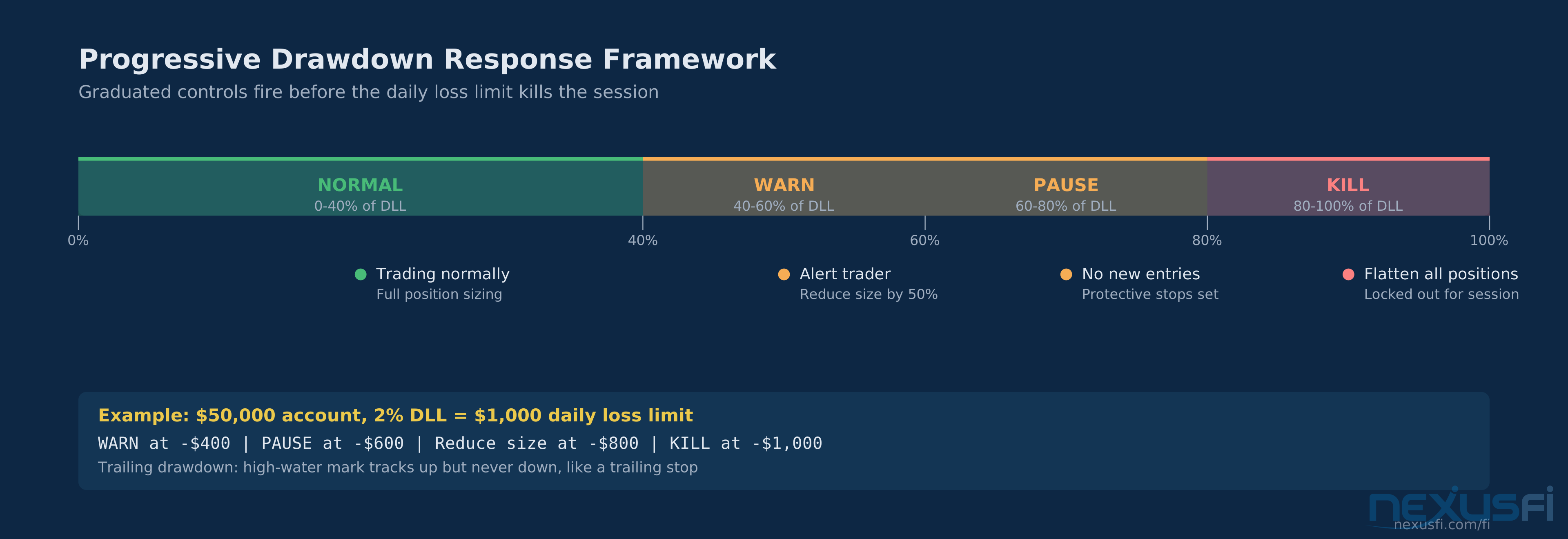
A daily loss limit is binary — you're within it or done for the day. Drawdown breakers add graduated responses that kick in before the DLL fires.
| Drawdown Level | % of DLL Hit | State | Action |
|---|---|---|---|
| Warning | 40% | WARN | Alert trader, log event |
| Caution | 60% | WARN | Reduce max position size by 50% |
| Restrict | 80% | PAUSE | Stop new entries, protective stops on open positions |
| Kill | 100% | KILL | Flatten all positions, lock out for session |
Trailing drawdown vs. fixed. A fixed DLL resets daily. A trailing drawdown follows your equity high-water mark. As @bobwest explained, the trailing mechanism "moves up, like a trailing stop, but never moves down." The danger: a series of winning days raises the floor, leaving less room for a losing day. [7]
Failure-Mode Matrix #
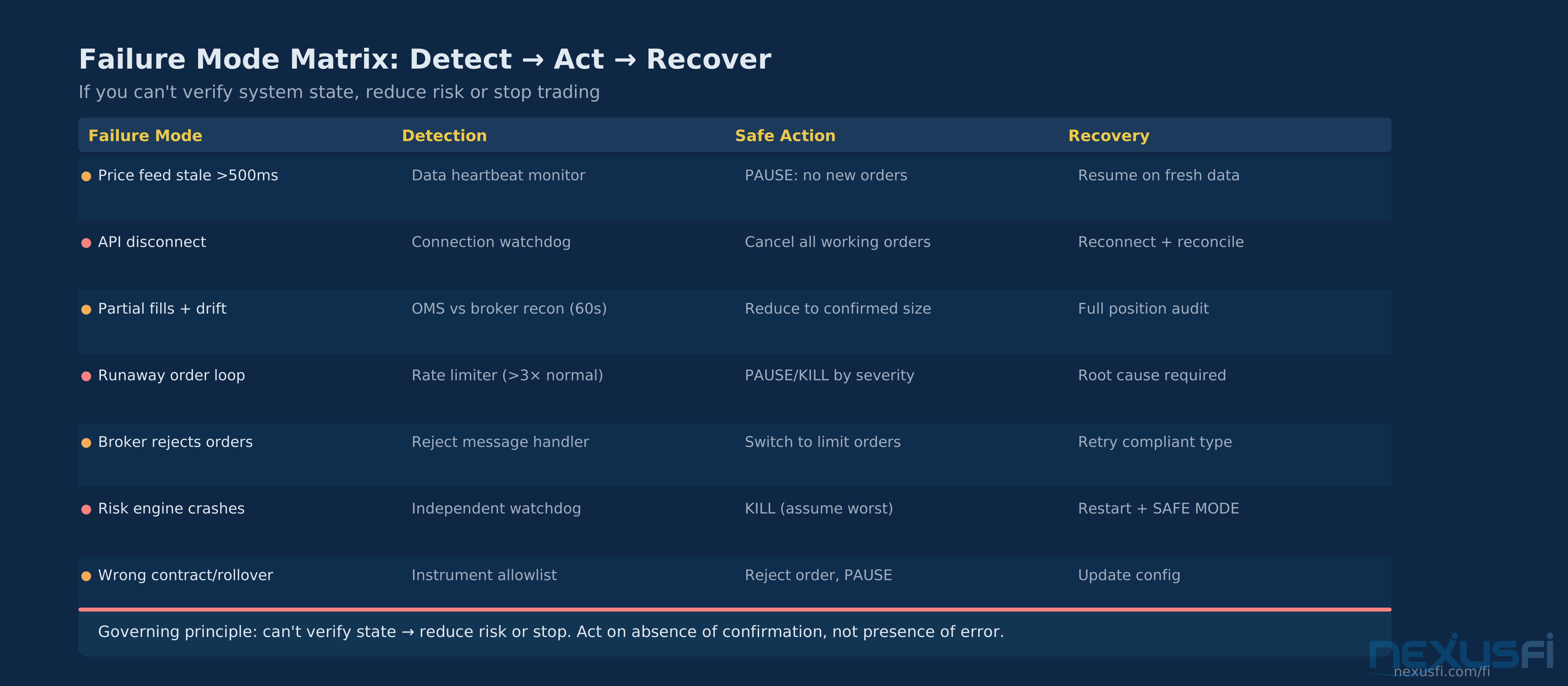
The FOMC kill-switch story is one failure mode. Here's the systematic coverage every automated trader needs to plan for:
| Failure Mode | Detection | Safe Action | Recovery |
|---|---|---|---|
| Price feed stale (>500ms) | Heartbeat monitor on data feed | PAUSE: no new orders, widen stops on open positions | Resume on fresh data + position reconciliation |
| API disconnect | Connection watchdog, failed heartbeats | Cancel all working orders, alert trader | Reconnect, reconcile positions, enter SAFE MODE |
| Partial fills + stale positions | Fill reconciliation (OMS vs broker, every 60s) | Reduce to confirmed-good position size | Query broker position report, reconcile before resuming |
| Runaway order loop | Rate limiter triggers (>3× normal rate) | PAUSE at mild rate; KILL at severe rate | Root cause investigation required before restart |
| Broker rejects (market order ban) | Reject message handler per order | Switch to aggressive limit orders, escalate if those also rejected | Retry with compliant order type |
| Risk engine itself crashes | Independent watchdog process | Immediate KILL (fail-safe default: assume worst) | Restart engine, full reconciliation, enter SAFE MODE |
| Wrong contract/rollover mismatch | Instrument allowlist check pre-trade | Reject order, alert, PAUSE strategy | Verify contract month, update configuration |
The governing principle: if you can't verify the state of the system, reduce risk or stop trading. Don't wait for confirmation that something is wrong — act on the absence of confirmation that everything is right.
Position Sizing Automation #
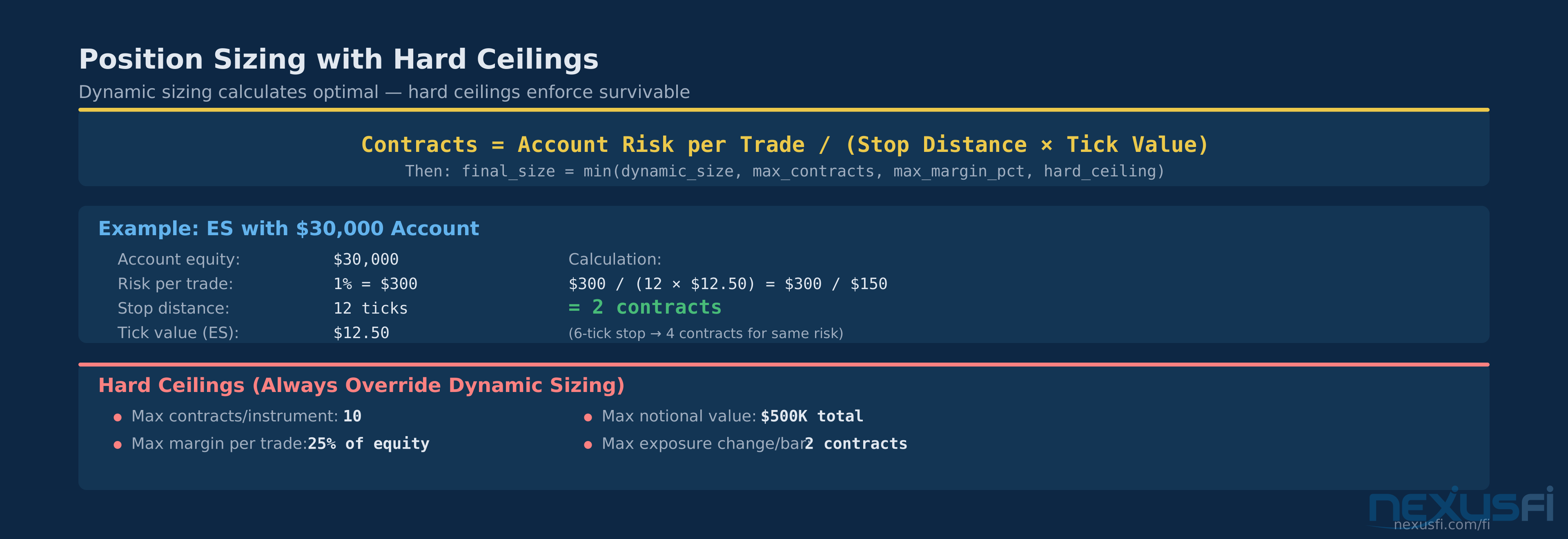
Automated position sizing calculates contracts per trade from predefined risk parameters. The core formula: Contracts = (Account Risk per Trade) / (Stop Distance × Tick Value).
As @Fat Tails laid out, position sizing for futures reduces to three inputs: maximum risk per trade, stop loss size in ticks, and tick value. For a $30,000 account risking 1% ($300) with a 12-tick ES stop (12 × $12.50 = $150 per contract), the math gives 2 contracts. If the stop tightens to 6 ticks, you can trade 4 contracts for the same dollar risk. [8]
Volatility-Adaptive Sizing #
Static sizing ignores changing market conditions. Fat Tails described a weekly calibration using ATR(36) on a 5-minute chart: measure low and high ATR values from the past week's RTH sessions, calculate the stop as mean ATR plus spread, then derive contract count from risk allowance and stop value. Result: "For the next week I am allowed to trade 6 contracts of TF with a stop loss of 14 ticks, or alternatively 4 contracts of CL with a stop loss of 20 ticks." [9]
Hard Ceilings Override Dynamic Sizing #
Dynamic sizing calculates a number. Hard ceilings cap that number. The ceiling always wins:
- Max contracts per instrument: Even if the formula says 20 MES, your hard cap might be 10
- Max notional value: Total position value across all instruments
- Max margin consumption per trade: No single entry should use more than X% of available margin
- Max exposure change per update: Cap how much exposure can change in any single bar
Formula with all constraints: final_size = min(dynamic_size, max_contracts, floor(max_margin_pct × equity / margin_per_contract), hard_ceiling).
Scenario Walkthrough: Kill Switch During Exchange Reject #
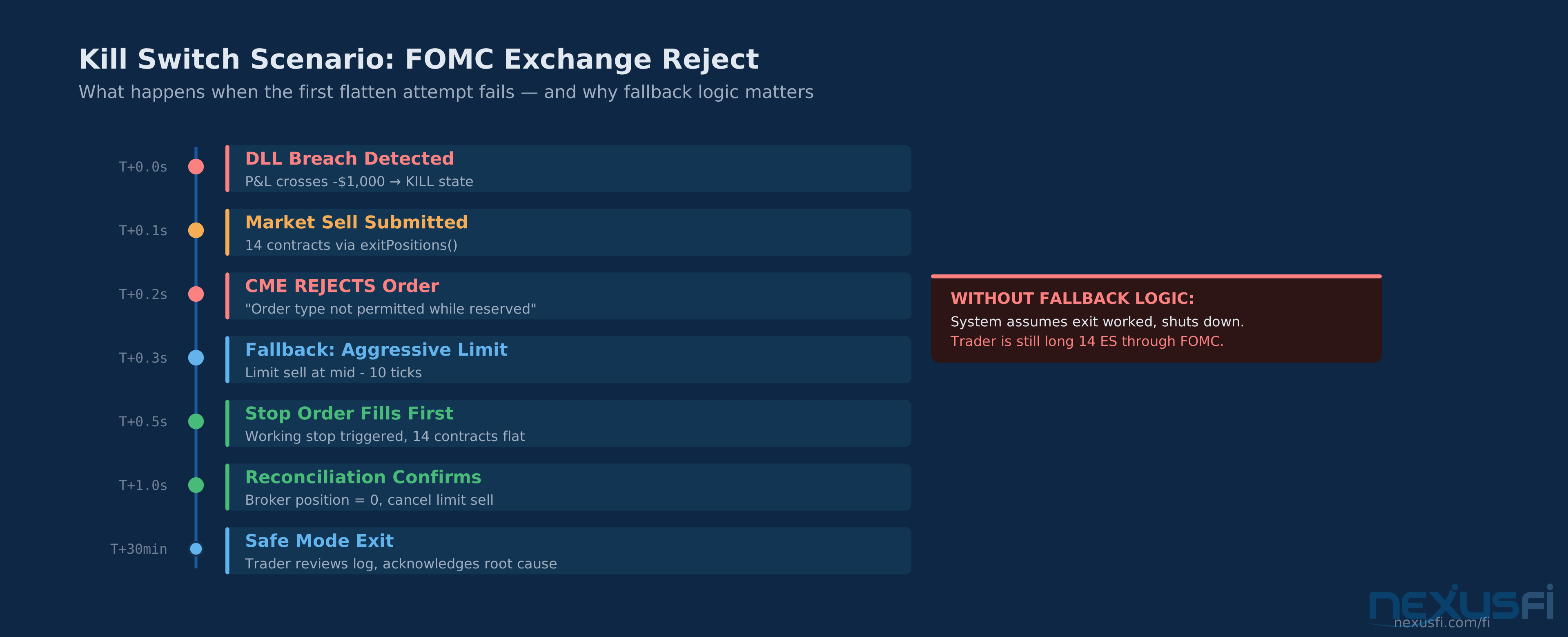
Here's what the full control stack looks like in action during a real failure scenario, modeled on the FOMC kill-switch failure.
Initial state: Strategy is long 14 ES contracts via Rithmic. Daily P&L is -$900 against a $1,000 DLL. Market is volatile (FOMC announcement).
T+0s: DLL breach. Realized + MTM P&L crosses -$1,000. Risk engine transitions from WARN → KILL.
T+0.1s: Kill sequence initiated. Risk engine sends market sell for 14 contracts via Rithmic's exitPositions(). Simultaneously sends cancel-all for 2 open working orders (MIT and stop).
T+0.2s: Exchange rejects market order. CME returns "Order type not permitted while the market is reserved." Market orders are blocked during the volatility pause.
T+0.3s: Fallback triggered. Risk engine detects the rejection (this is the step the Breukelen system missed). Immediately submits an aggressive limit sell at mid minus 10 ticks (well below current bid to prioritize fill).
T+0.5s: Limit order working. Exchange accepts the limit order. Meanwhile, the cancel-all succeeded on one working order but the stop order was triggered and filled before the cancel arrived — 14 contracts are now flat via the stop fill.
T+1.0s: Reconciliation confirms flat. Risk engine queries broker position API: position = 0. Cancels the pending limit sell. Transitions to SAFE MODE. Logs full incident with timestamps.
T+30min: Cool-off complete. Trader reviews incident log, confirms root cause (market order rejected during CME volatility pause), and acknowledges. System eligible for manual restart.
Without the fallback: The system sends one market order, assumes success, shuts down — and the trader is still long 14 contracts through FOMC with no protection. This is exactly what happened to Breukelen, who was saved by coincidental stop execution.
The lesson: Every exit attempt must be verified by polling position status, not by assuming the order worked. Build retry logic with order type escalation (market → aggressive limit → wider limit → manual alert).
Measuring Your Risk Controls #
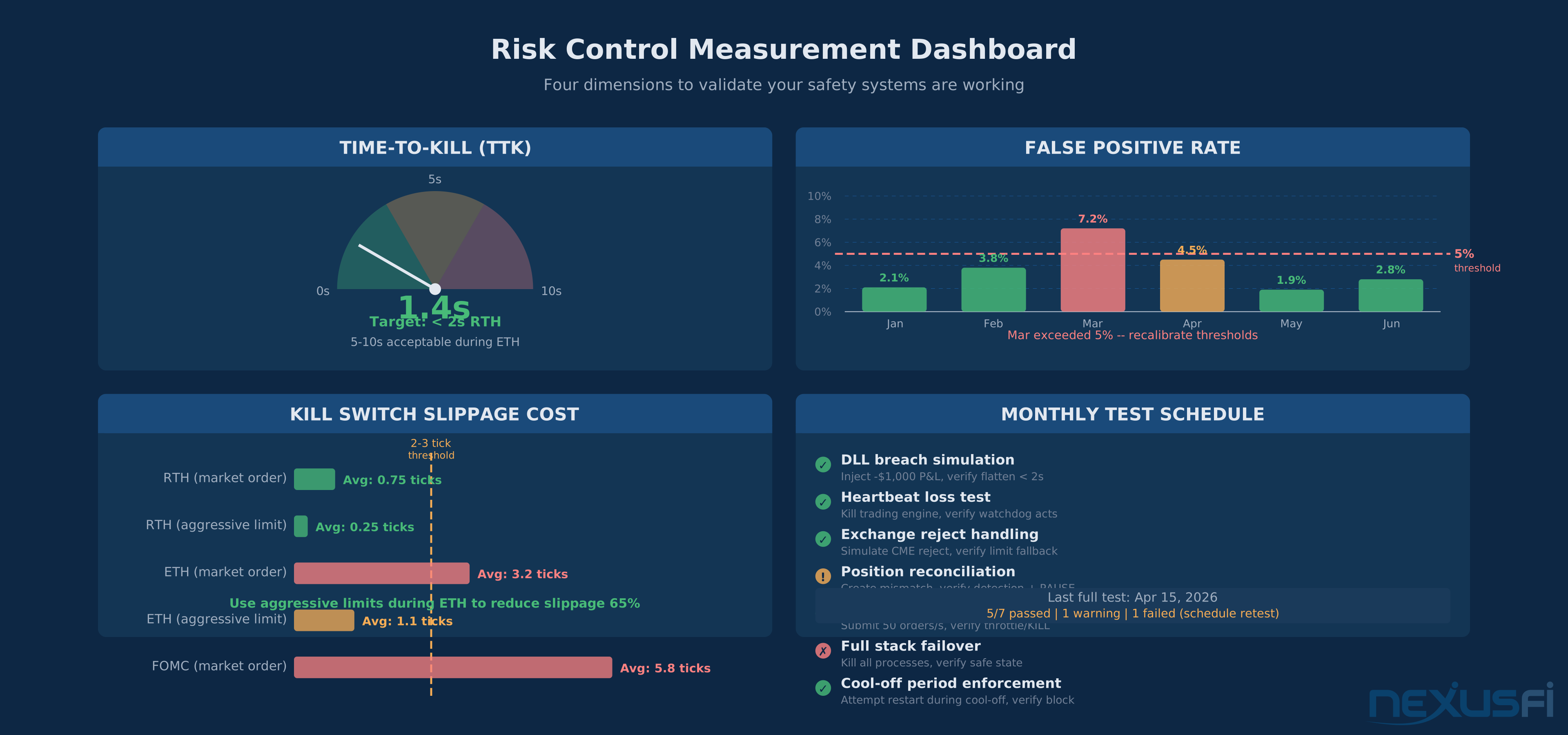
Risk controls without validation are wishful thinking. Here's how to measure whether yours actually work.
Time-to-kill (TTK): How fast does the system transition from breach detection to positions-flat? Measure this in simulation by injecting a DLL breach and timing the full flatten sequence. Target: under 2 seconds for account-level kills during RTH. During ETH or illiquid conditions, TTK will be longer due to fill latency — 5-10 seconds is realistic.
False positive rate: How often do controls fire when they shouldn't? Track every WARN/PAUSE/KILL event and categorize: was the trigger a genuine risk scenario or a false alarm (brief data delay, transient margin spike, etc.)? A false positive rate above 5% of trading sessions means your thresholds need recalibration.
Slippage cost: When the kill switch fires and flattens via market orders, how much slippage do you incur versus the theoretical price at breach time? Track this per event. If average kill slippage exceeds 2-3 ticks on ES, consider using aggressive limits instead of market orders for the flatten.
Monthly kill switch test: Trigger each control level deliberately on a simulation account monthly. Verify the full sequence: detection → state transition → order submission → fill confirmation → reconciliation → safe mode. The worst time to discover a broken safety net is during a real emergency.
Building Your Risk Control Stack: Checklist #
Pre-trade (Line 1):
- [ ] Max order size per instrument
- [ ] Price sanity bands (
|order_price - mid| > threshold→ reject) - [ ] Order rate limiter (max N per minute per symbol)
- [ ] Instrument allowlist (valid, current contract months only)
- [ ] Session filter (no orders outside configured trading hours)
Real-time monitoring (Line 2):
- [ ] Independent risk monitor process (separate from trading engine)
- [ ] Heartbeat monitoring (flatten if heartbeat lost >30s)
- [ ] Real-time P&L tracking (realized + MTM)
- [ ] Daily loss limit with automated KILL
- [ ] Tiered drawdown breakers (WARN → PAUSE → KILL)
- [ ] Margin utilization tracking (WARN at 60%, KILL at 85%)
- [ ] Net and gross exposure limits per instrument and sector
- [ ] Position reconciliation vs broker (every 60 seconds)
- [ ] Data feed staleness detection (PAUSE if stale >500ms)
Broker/exchange (Line 3):
- [ ] Broker-level daily loss limit (set with your FCM)
- [ ] Exchange risk tools enabled (CME Stop Logic)
- [ ] Emergency contact for broker's risk desk
Recovery:
- [ ] Mandatory cool-off period after KILL activation
- [ ] Safe mode with reduced sizing on restart
- [ ] Post-incident report template
- [ ] Monthly kill switch test schedule
That last point matters more than most traders realize: test your kill switch regularly. A kill switch you've never tested is a kill switch you don't actually have.
When Controls Fire on False Alarms #
Automated risk controls will occasionally kill profitable trades. A brief data feed hiccup triggers a staleness PAUSE. A margin spike from an intraday requirement change pushes utilization past your threshold. A position reconciliation delay shows a mismatch that resolves in seconds.
The solution isn't to remove the controls. It's to build them with appropriate sensitivity and track their behavior. Review false positive events weekly. If your kill switch fires on a false alarm once per month, that's acceptable. If it fires daily, recalibrate thresholds.
The math is simple: the cost of a false positive (one missed trading opportunity) is finite and recoverable. The cost of a true positive that wasn't caught (runaway loss on leveraged futures) can be terminal.
Automated risk controls exist to make the recoverable kind of error instead of the catastrophic kind. Set them up. Test them. Trust them.
Knowledge Map
Prerequisites
Understand these firstGo Deeper
Build on this knowledgeReferences This Article
Articles that build on this topicCitations
- — NexusFi Discussion
- — NexusFi Discussion
- — NexusFi Discussion
- — TopStep Trading Combine Parameters
- — NexusFi Discussion
- — NexusFi Discussion
- — NexusFi Discussion
- — NexusFi Discussion
- — NexusFi Discussion
- — NexusFi Discussion
- — Understanding Velocity Logic - CME Group
- — NFA Interpretive Notice 9046: Supervision of Automated Order-Routing Systems