



Sierra Chart: The Professional Futures Trader's Order-Flow Workstation
Overview #
Sierra Chart has been around since 2003. The UI looks like it hasn't changed much since then. The documentation reads like it was written by someone who assumes you're already an expert. The learning curve is real.
And yet, some of the best futures traders in the world use nothing else.
That's not a coincidence. Sierra Chart is not trying to be user-friendly. It's trying to be the most capable order-flow platform available for serious futures traders — and for that specific use case, it succeeds better than anything else on the market. If you're done with the ecosystem of polished-but-limited platforms, this is what the other side looks like.
Key Concepts #
Before getting into specifics, a few terms that show up everywhere in Sierra Chart conversations:
ACSIL (Advanced Custom Study Interface and Language) — Sierra's scripting system, built in C/C++. This is how you write custom indicators, automated strategies, and order-flow tools. Steep learning curve, maximum performance.
Denali — Sierra Chart's proprietary data feed (also called "SC Data" or "Sierra Chart Data"). Provides market data directly from Sierra's servers. The cheapest and most integrated option for most traders.
MBO Data (Market-By-Order) — Full order book data that shows individual orders, not just aggregated size. Rithmic provides MBO for CME futures. Denali provides MBO for ES and NQ. Most platforms don't expose this at all.
Numbers Bars — Sierra's version of footprint charts. Shows bid and ask volume traded at each price level within a bar. One of the most accurate footprint implementations available.
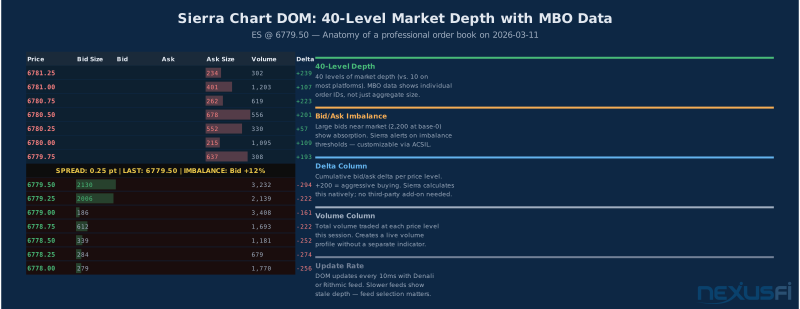
Trade DOM — Sierra's trading ladder with one-click order entry. Configurable to show 40+ levels of market depth with MBO data when your feed supports it.
ACSIL Strategy — A fully automated trading program written in ACSIL. Takes positions, manages stops, applies risk rules — all without manual intervention.
Session Template — A configuration file that defines trading hours, data source, chart types, and studies for a specific trading context. Sierra's way of saving and reusing complex workspace setups.
Order Flow and DOM #
This is where Sierra Chart separates from the field. Not marginally — decisively.
The Trade DOM in Sierra supports up to 40 levels of market depth. Most platforms top out at 10. With a Rithmic or Denali feed, you can enable MBO data that shows individual order IDs in the book — not just the aggregated size at each level. When a 2,000-lot bid at 6,606.00 suddenly collapses to 400 contracts in 200 milliseconds, you see that in real time. That's the difference between detecting absorption and just guessing at it.
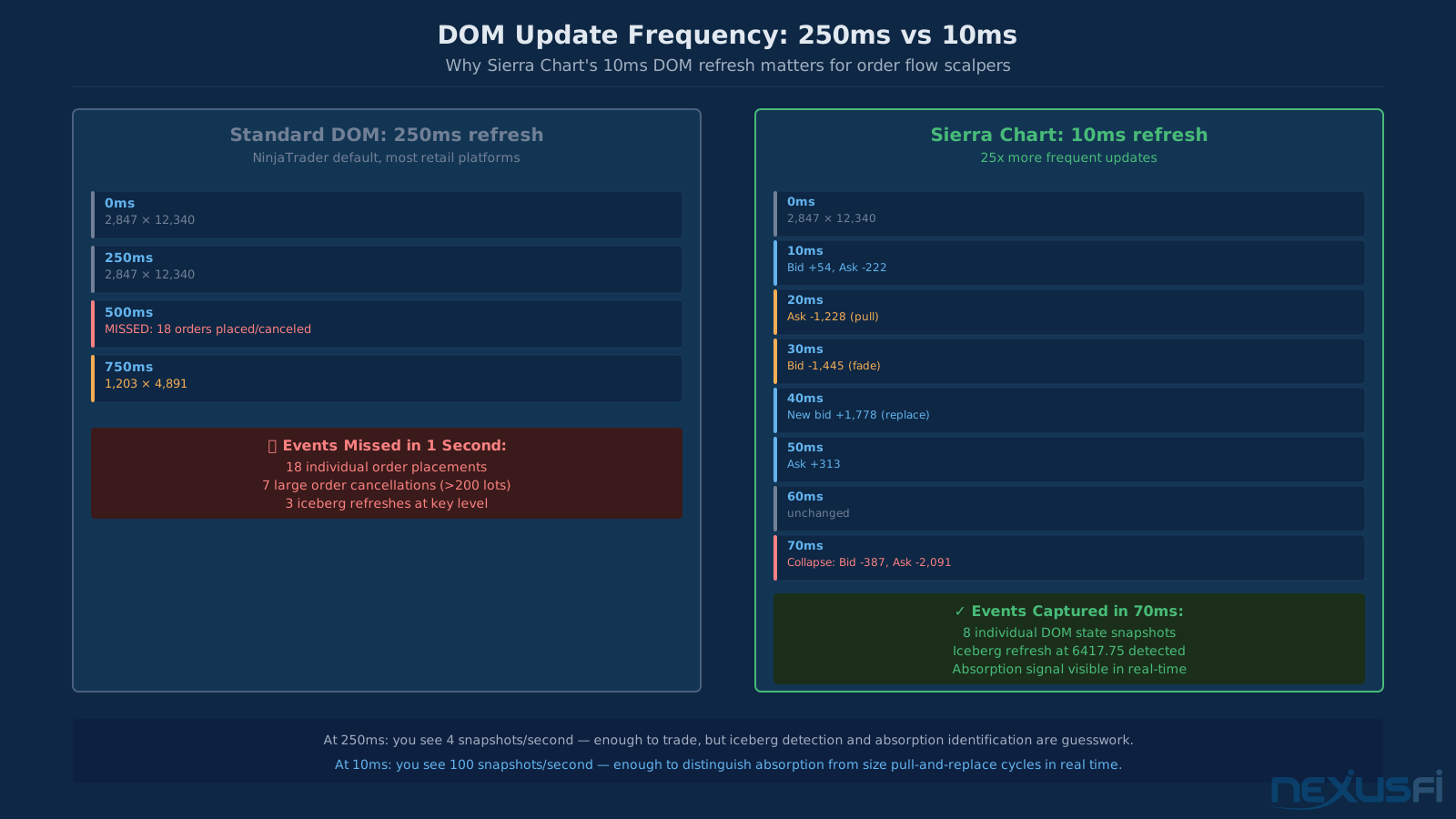
The default DOM update interval is 250ms on most platforms. Sierra can run at 10ms. That's not a small difference when you're watching a 5-lot iceberg order refresh repeatedly at a key level.
Numbers Bars (Footprint Charts)
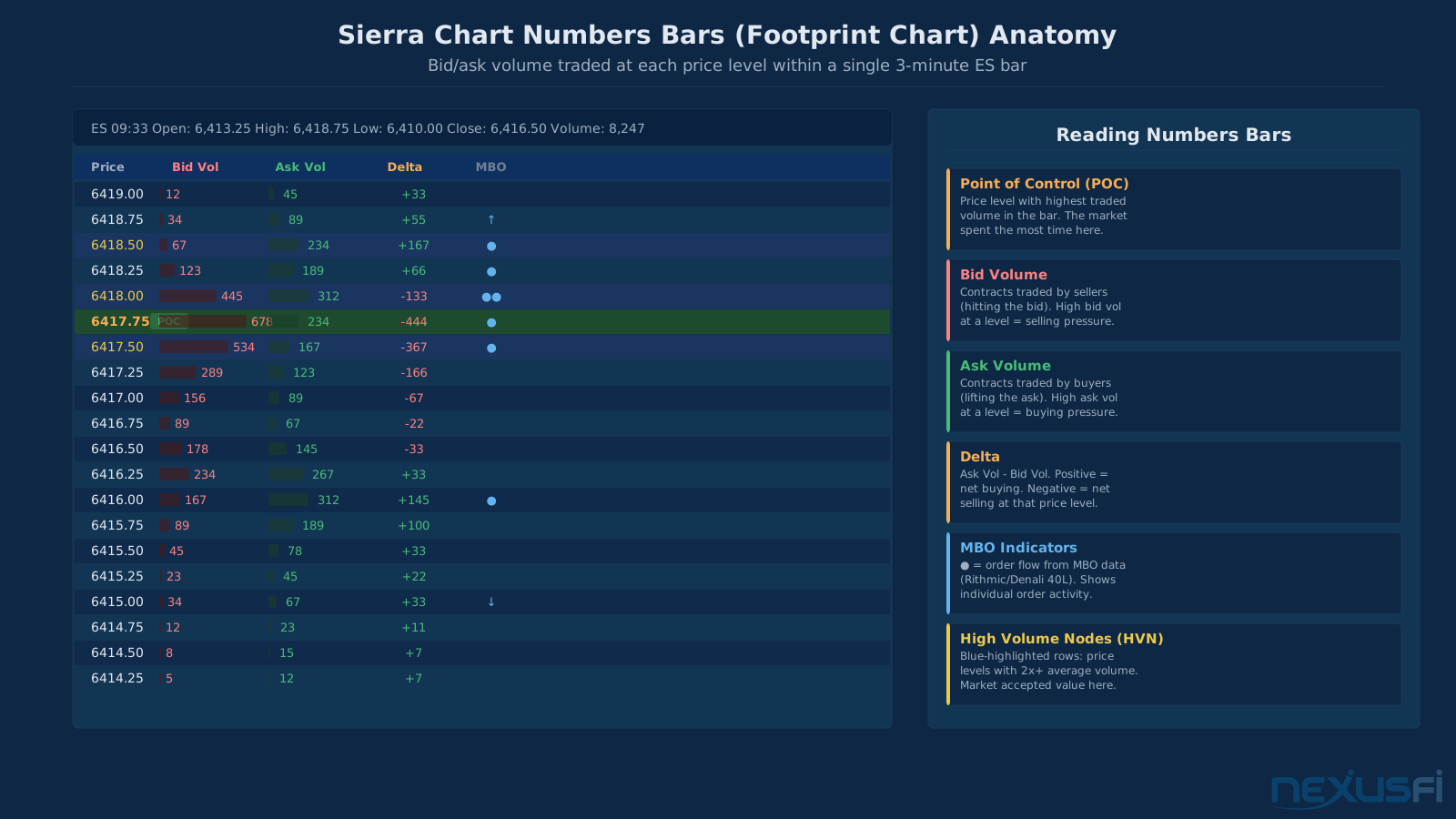
Sierra's Numbers Bars show bid and ask volume traded at each price within a bar. You configure the tick size and the bar type — by time, volume, ticks, or range. The implementation is native, not a third-party add-on, and pulls directly from the live feed rather than reconstructing from bar data. That matters because reconstructed footprints lose information at every step in the aggregation process.
Common configurations for ES day trading:
- 3-minute bars with 0.25-point bins (shows full tick resolution)
- Volume bars (5,000-10,000 contracts per bar) for volatility-normalized viewing
- Range bars (4-8 point range) for structure traders who hate time-distortion
Sierra's Numbers Bars pull directly from the live feed rather than reconstructing from bar data. Reconstructed footprints lose bid/ask classification at every aggregation step. For accurate footprint charts, native vs. reconstructed is not a small distinction.
Volume Profile and Market Profile
Both are built in. No add-on required. Volume Profile shows historical volume-at-price for any time range you specify — session, multi-day, or custom. Market Profile (TPO charts) shows the letter-by-letter price acceptance map that's been the professional framework for 40 years.
The Volume Profile in Sierra is worth discussing specifically. It calculates in real time from the live feed, updates tick by tick, and can display Value Area lines, POC, and distribution shape on the chart alongside your footprint and DOM. You're not paying $40-80/month for a separate add-on to see this. It's core functionality.
Time & Sales with Filtering
Sierra's Time & Sales window is configurable with filtering options that most platforms don't expose: minimum size threshold (show only prints above X contracts), speed filter (ignore prints arriving faster than Y milliseconds, which helps filter sub-second wash trades), and side classification by exchange-reported aggressor flag when available.
This matters because raw Time & Sales on ES produces 2,000-3,000 prints per minute during active sessions. You can't read that. What you can read is "show me every trade above 100 contracts, classified by aggressor." Now you're watching the smart money footprint rather than the noise.
Data Feeds #
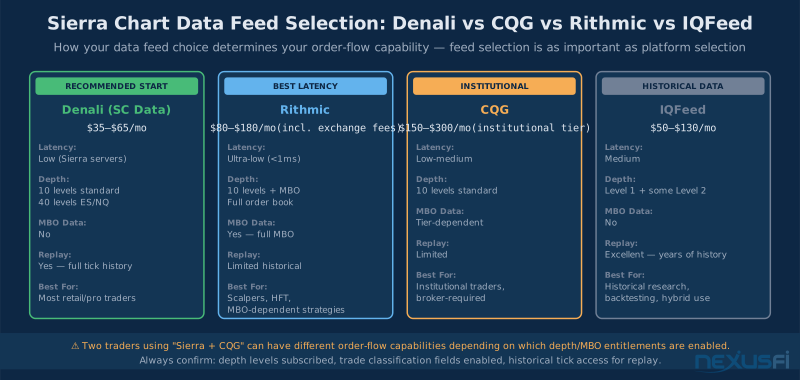
Here's the thing most traders don't understand about Sierra Chart: the platform is only as good as your feed.
Two Sierra Chart users both running ES footprint charts could have completely different order-flow capabilities depending on which feed they're subscribed to and which entitlements they've enabled. The platform exposes what the feed provides — it doesn't fabricate microstructure data.
Denali (Sierra Chart Data Feed)
This is Sierra's own data service. It's the default choice for most traders and works extremely well for what it covers.
Pricing runs $35-65/month depending on what you enable. Base Denali gives you real-time quotes, 10 levels of depth, and Time & Sales for the major CME futures (ES, NQ, CL, GC, SI, ZN, ZB). For an additional fee, you can enable 40-level depth for ES and NQ specifically, plus MBO data for those instruments.
For most retail and semi-professional futures traders, Denali is the right call. It's integrated directly into Sierra's infrastructure, which means data management issues (gaps, reconnects, historical inconsistencies) are Sierra's problem to solve rather than yours.
That's the honest trade-off. Denali's support is handled by Sierra. Third-party feeds add complexity.
For traders new to Sierra Chart, Denali reduces complexity dramatically. You have one support relationship instead of two. Feed gaps, reconnects, and data quality issues are Sierra's problem to diagnose. The transition to Rithmic or CQG is straightforward later — but starting with Denali is almost always the right call.
Rithmic
The choice for scalpers who need microsecond-level latency and full MBO data.
Rithmic connects directly to CME's co-located matching engine infrastructure. Latency is sub-millisecond. You get full depth updates with order IDs (MBO), trade-by-trade timestamps, and the most accurate bid/ask classification available for CME futures.
Cost runs $80-180/month when you add up exchange data fees for depth access. That's meaningfully more than Denali, but for a scalper making 20+ trades per day, the edge from better DOM data and lower latency is worth it.
The one catch: Rithmic's historical data replay capabilities are limited compared to Denali. If you need to replay specific sessions for research, Denali or IQFeed is more capable.
CQG
Professional institutional-grade feed. Widely available through broker relationships — if you're trading through a firm that routes through CQG, you're often already paying for it.
CQG is reliable, has excellent CME coverage, and integrates cleanly with Sierra's chart trader for direct execution. The cost is $150-300/month at retail, but many traders have it bundled through their clearing firm at no additional cost.
Don't assume identical data from CQG and Rithmic just because both are "professional." Depth updates, latency, and MBO availability differ. Test with your actual strategy before committing.
IQFeed (DTN)
IQFeed excels at one thing: historical data depth. Years of clean tick data, reliable data quality controls, and excellent integration with Sierra's backtesting and replay systems.
For order flow trading in real time, IQFeed is not the first choice — the DOM update frequency and MBO availability aren't competitive with Rithmic or Denali. But for researchers who need to replay 18 months of ES data at tick resolution, or run distributional analysis on historical footprint data, IQFeed is hard to beat.
Cost runs $50-130/month with standard exchange fees. Works especially well as a secondary feed — Denali or Rithmic for live trading, IQFeed for deep historical research.
More on DTN IQFeed's setup and configuration: DTN IQFeed setup and configuration guide
Tick Replay and Simulation #
Tick replay is Sierra Chart's most underappreciated feature. And it's the thing that most separates "I tested this" from "I know this works."
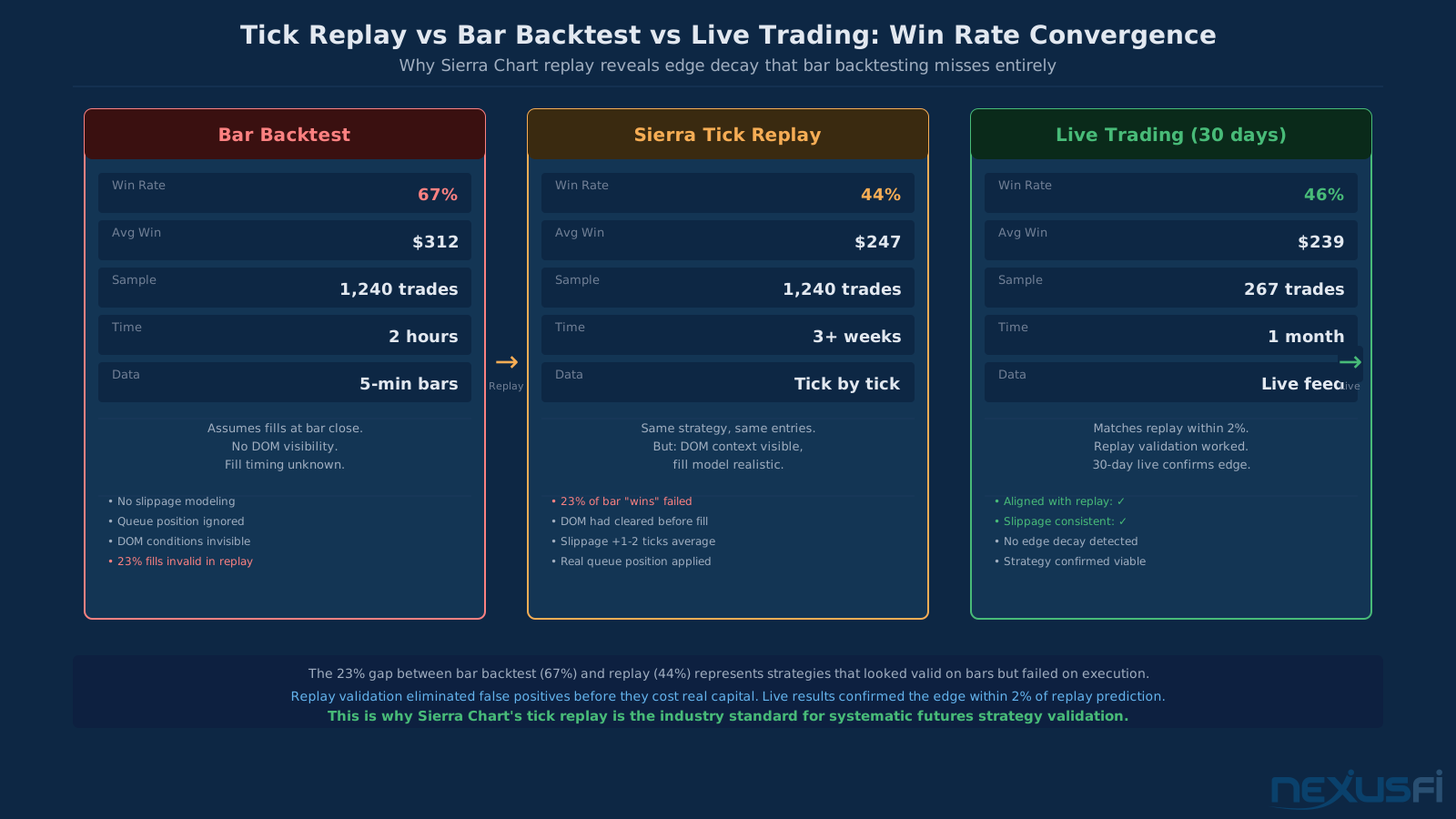
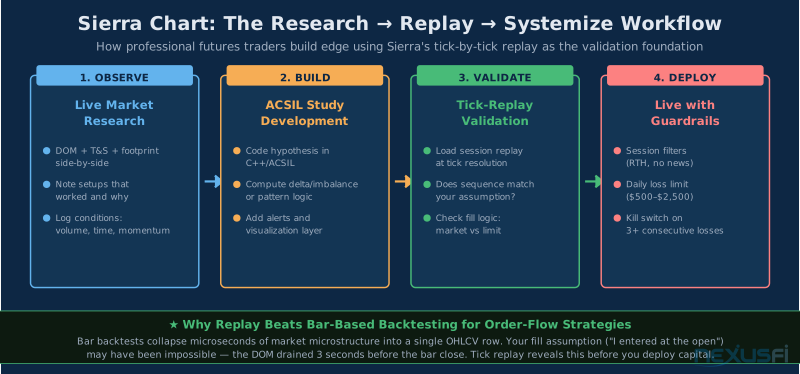
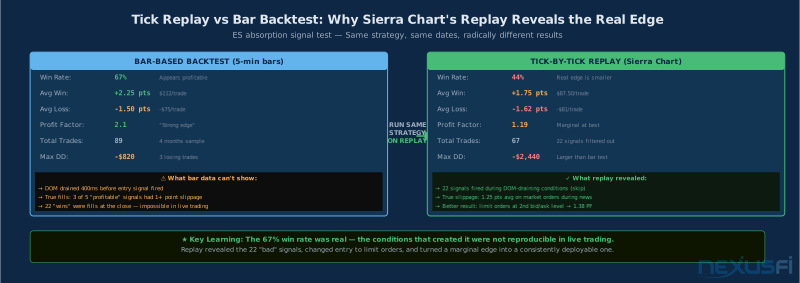
Here's the problem with bar-based backtesting for order-flow strategies: a 3-minute bar collapses everything that happened in 180 seconds into four numbers — open, high, low, close. Your footprint signal that fired "at the bar close" might have fired 40 seconds before the close when the DOM was full. Or it might have fired when the DOM had already drained. The bar can't tell you which. Your backtest assumes you got the fill. The replay shows you whether you actually could have.
Sierra's replay mode plays back historical tick data in real time (or at variable speeds — you can run 2x, 5x, 10x, or step through one tick at a time). The DOM updates as it did live. The footprint builds tick by tick. Your ACSIL studies compute in real time against the replayed data, including any signals or order logic you've programmed.
This is qualitatively different from a bar backtest. You're running your strategy against a reconstruction of the actual market — event ordering preserved, sequence intact, fill model constrained by what was actually available at each price. The strategy that showed 67% wins on bars might drop to 44% on replay because 22 of those "wins" fired when the DOM had already cleared out, which meant your market order hit the next available price at 1-2 ticks worse than the bar close would suggest.
Setting Up Replay Correctly
There are three places traders get burned with replay:
- Data entitlements. Your replay is only as good as your historical data. Denali has good historical tick coverage for CME futures going back several years. Make sure your subscription includes historical data access, not just live feed.
- Fill model. Configure Sierra's order fill simulation to match your actual execution approach. If you're using market orders, set a realistic slippage assumption (typically 1-2 ticks for liquid ES during RTH). If you're using limit orders, decide whether you want aggressive or conservative fill assumptions for queue position.
- Session boundaries. Make sure your session template correctly defines RTH vs Globex hours, and that your replay respects those boundaries. Testing a strategy that's designed for RTH against overnight data will produce misleading results.
Common replay use cases from the NexusFi community:
- Reviewing specific sessions where a strategy underperformed to understand why
- Testing filter conditions (e.g., "don't trade first 15 minutes") without live market risk
- Practicing discretionary order flow reading against known historical sessions
- Validating automated ACSIL strategies against their expected behavior at key market moments
The replay workflow becomes the validation layer between "this looks good on bars" and "I'm willing to put capital on this."
Before going live with any Sierra Chart setup, log at least 20 hours of replay time — actually executing orders in replay mode, not just watching. Practice DOM conditions, footprint signals, and Time & Sales flow against real historical sessions before risking real capital.
ACSIL Scripting #
ACSIL is Sierra's scripting system. It uses C/C++ syntax, compiles to a DLL, and runs as a native extension to the platform. If you have a C++ background, the learning curve is manageable. If you don't, it's steep.
But here's what ACSIL can do that NinjaScript cannot:
- Access raw bid and ask volume at the tick level without third-party feed wrappers
- Compute order-flow statistics at sub-millisecond precision
- Build stateful, session-aware logic that persists data across chart bars with full type control
- Interface directly with depth-of-market updates on every DOM change event, not just bar closes
This matters for strategies that are at the core about microstructure. A simple absorption signal — "bid volume at price X exceeded a threshold relative to traded volume" — can be implemented in NinjaScript. But it runs at bar resolution with C# overhead. In ACSIL, it runs at tick resolution with native C++ performance. For scalpers running 20+ trades per day on ES, that performance gap translates to execution quality that compounds over thousands of trades.
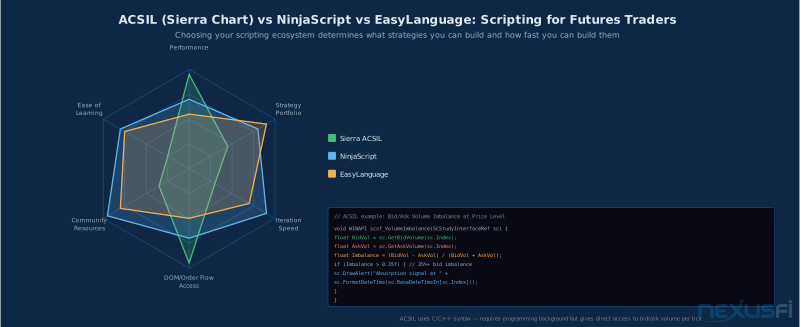
A basic ACSIL study for bid/ask volume imbalance at a price level looks like this:
void WINAPI scsf_VolumeImbalance(SCStudyInterfaceRef sc) {
    float BidVol = sc.GetBidVolume(sc.Index);
    float AskVol = sc.GetAskVolume(sc.Index);
    float Imbalance = (BidVol - AskVol) / (BidVol + AskVol);
    if (Imbalance > 0.35f) {
        sc.DrawAlert("Absorption signal at " +
            sc.FormatDateTime(sc.BaseDateTimeIn[sc.Index]));
    }
}
At 35% bid imbalance, you're flagging bars where aggressive buyers have taken out 35% more supply than was hitting the bid. That's the raw material for an absorption signal.
ACSIL is C/C++ with a real learning curve. Don't buy Package 12 expecting to write custom studies immediately without a programming background. Start with Package 6, learn the platform, and use the community library of existing ACSIL studies first. Most order-flow tools you'll need already exist as free community studies on the NexusFi Sierra Chart forum.
For traders without C++ experience, there's a meaningful and growing library of community-contributed ACSIL studies shared on the NexusFi forum and Sierra's own support forums. Many of the foundational order-flow tools — delta indicators, absorption detectors, imbalance ratios — are available as ready-made studies that you can import and configure without writing code.
ACSIL vs NinjaScript vs EasyLanguage
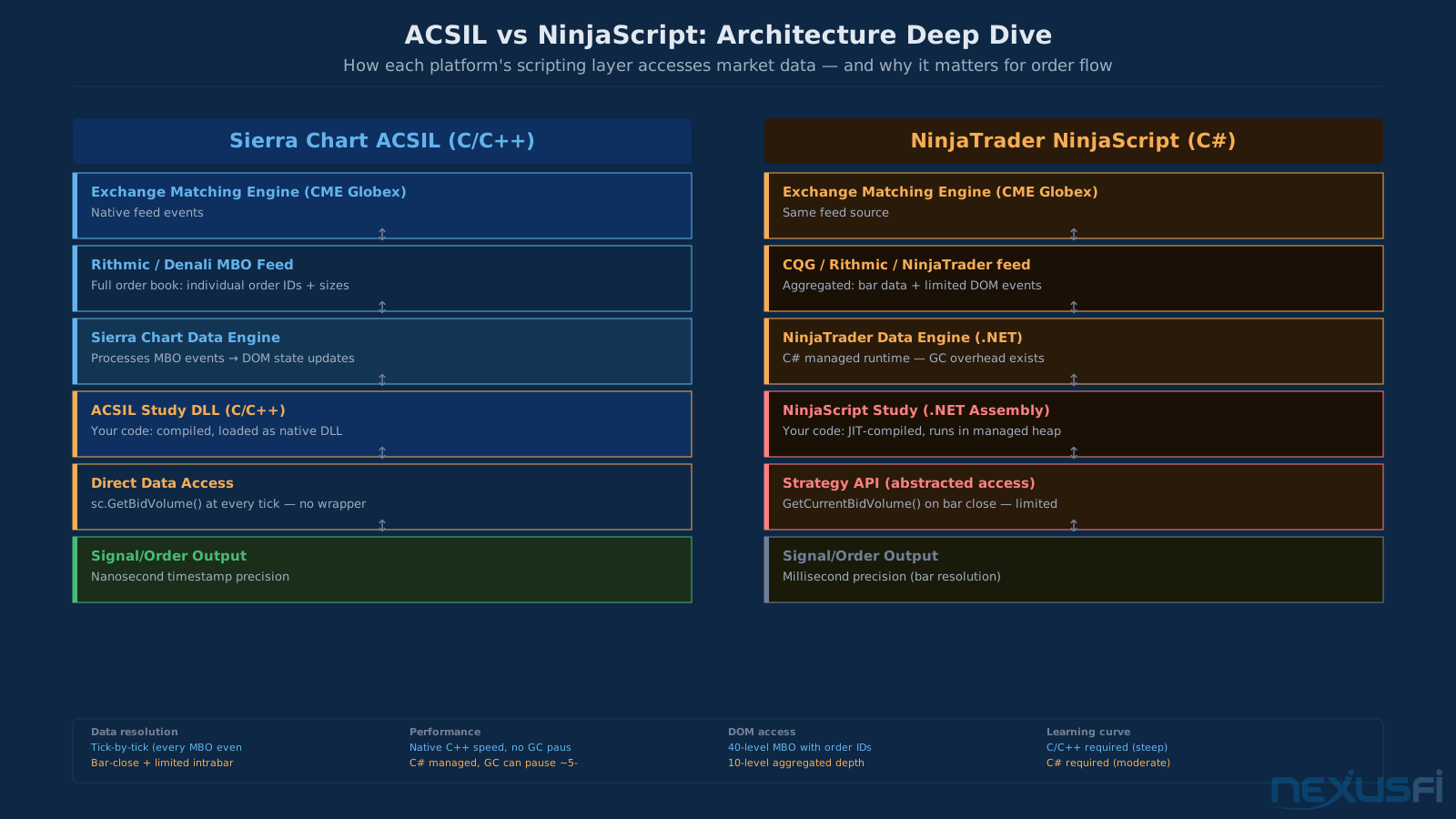
The honest comparison:
NinjaScript (C# based) is faster to write, has a vastly larger community, and is accessible to traders who can code but don't know C++. It's the right call for most systematic traders building indicator-based strategies. The NinjaTrader ecosystem has thousands of tested strategies and indicators.
ACSIL wins when performance at tick resolution matters and when you need direct access to microstructure data that NinjaScript doesn't expose cleanly. The trade-off is 5-10x longer development time for equivalent basic functionality.
EasyLanguage (PowerLanguage in MultiCharts) is excellent for portfolio-level backtesting and systematic strategy development. It's not competitive with Sierra for order-flow microstructure work.
The decision tree is simple: if you're building bar-based systematic strategies, NinjaScript gives you a faster path with more community support. If you're building microstructure tools that need tick-level precision and full DOM access, ACSIL is worth the investment.
More on custom indicators and strategy scripting: custom indicators and strategy scripting
Common Trader Workflows #
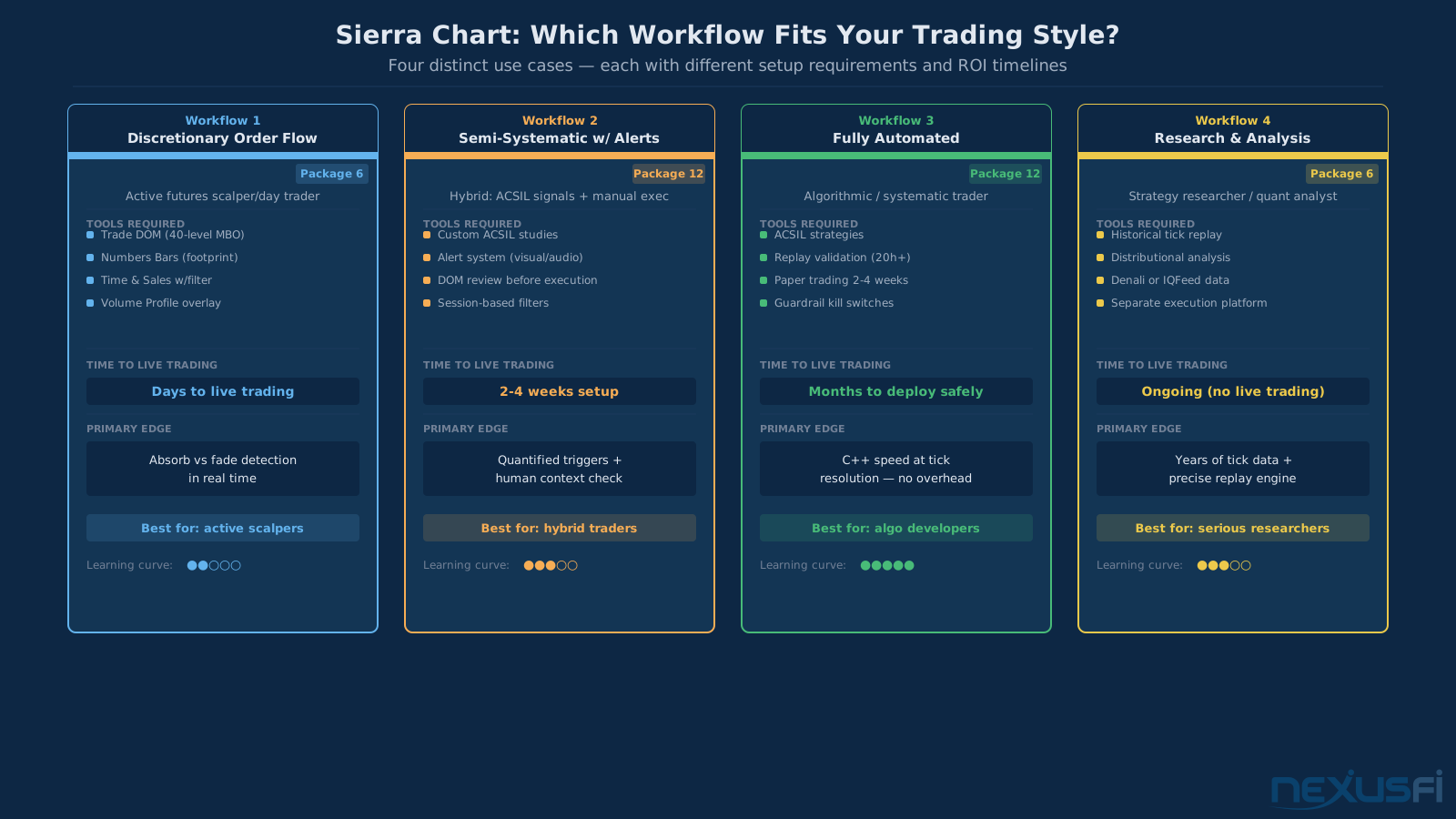
Sierra Chart users don't have one workflow — they have four, and knowing which one fits you determines whether the learning curve is worth it.
Workflow 1: Discretionary Order Flow
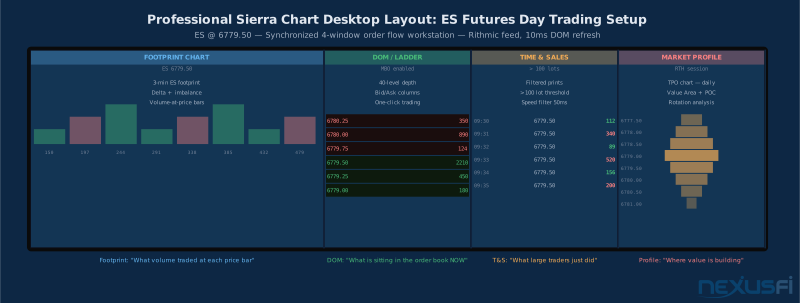
The most common approach. You're using Sierra as a visual trading terminal with DOM, footprint, and Time & Sales synchronized to make execution decisions.
Setup: Footprint chart (3-min or volume bars) plus DOM side by side. Time & Sales with size filter on a third monitor. Market Profile on the fourth for session context.
Your read: footprint shows cumulative delta and absorption signals. DOM shows current order depth and MBO distribution. Time & Sales shows what large traders just executed. Market Profile shows where you are in the daily value area structure.
That "native" point matters. When your order-flow tools are core platform functionality rather than add-ons, they're updated with the platform, tested against the platform's data handling, and don't break when the platform updates.
Workflow 2: Semi-Systematic with Alerts
You've built ACSIL studies that generate signals based on quantitative conditions, but you execute manually after reviewing the context.
Setup: Custom ACSIL studies running in the background. Alert conditions fire on visual and audio outputs when your conditions are met. You review the DOM and footprint context and decide whether to act.
This is a middle path that lets you leverage ACSIL's performance for signal computation while keeping human judgment in the execution loop. The alert fires — you check whether the DOM context confirms — you decide.
Workflow 3: Fully Automated
ACSIL strategies manage entry, stops, and exits without intervention.
The pattern that works: prove the logic first in replay, then paper trade for 2-4 weeks, then deploy with conservative risk controls. The guardrails non-negotiable for any automated strategy:
- Session filter: RTH only (9:30-4:00 ET), no Globex trading unless explicitly tested
- News filter: no new positions 5 minutes before and after major releases (CPI, FOMC, NFP)
- Daily loss limit: hard stop at 2x average winning day (e.g., $500 loss limit if typical winning day is $250)
- Consecutive loss rule: suspend trading after 3 consecutive losses, review logs before resuming
- Kill switch: a watchdog study that monitors for aberrant behavior (orders at wrong prices, position sizes outside expected range) and kills the strategy
Workflow 4: Research and Analysis
Using Sierra primarily as a research platform — not necessarily trading from it live.
Download historical tick data via Denali or IQFeed. Run distributional analysis on footprint data across hundreds of sessions. Identify when your absorption signal has historically resolved favorably versus when it hasn't. Build a filter that improves the base rate from 52% to 62%.
This workflow often pairs Sierra with a separate execution platform. The research happens in Sierra, the trading happens wherever the trader has an existing setup. The replay capability is the asset here — the ability to replay any historical session at tick resolution against your evolving study logic.
Service Packages and Pricing #
Sierra Chart's pricing model is unusual and worth understanding before you compare it to alternatives.
The platform license is a one-time purchase, not a monthly subscription. You pay once, you own it. Data feeds are separate and ongoing, but the platform itself doesn't have ongoing fees.
Service Packages
Sierra sells "packages" that correspond to feature sets:
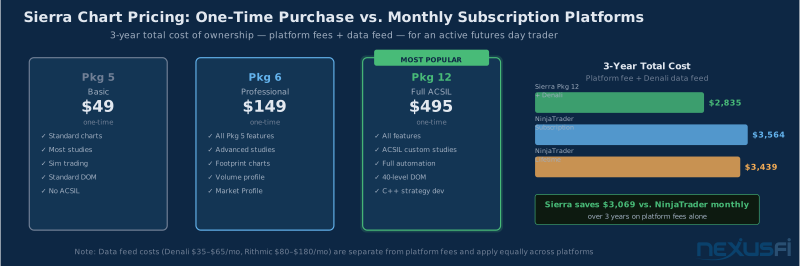
- Package 4 (roughly $49): Basic charting, standard studies, simulated trading. Enough to get started. No footprint charts, no automated trading.
- Package 6 (roughly $149): Professional feature set including footprint charts, Volume Profile, Market Profile, full DOM. Where most serious day traders start.
- Package 12 (roughly $495): Everything, including ACSIL for custom study development and full automation. The right choice if you plan to use ACSIL.
The numbers have moved around over the years — check Sierra's current pricing page for exact figures, since they update periodically.
Three-Year Cost Comparison
Over three years, assuming Denali data at $65/month:
Sierra Chart Package 12 + Denali: $495 (one-time) + $65 x 36 = $2,835 NinjaTrader monthly subscription + equivalent data: $99/month x 36 = $3,564 (platform only) NinjaTrader lifetime license + data: $1,099 (one-time) + similar data costs
The Sierra cost advantage is real but not overwhelming — roughly $729 versus NinjaTrader monthly over three years, before data costs, which are roughly comparable between platforms.
Where Sierra actually saves money is the long run. Year 5 with Sierra costs the same as year 1: just the data feed. Year 5 with a monthly subscription platform keeps costing $99-120/month indefinitely.
For a trader who stays with Sierra for 7+ years (and many do), the cost difference compounds much. But if you're not sure you'll stick with Sierra for the long term, paying the one-time $495 for features you might not use is a real risk.
Sierra Chart's cost compounds over time. Year 1 difference vs NinjaTrader monthly isn't dramatic. By year 5, the one-time license is a clear win — and serious traders tend to stay.
Data Feed Costs Are the Real Variable
The $65/month Denali figure is for standard configuration. If you add MBO data, 40-level depth for ES/NQ, and Globex hours, Denali runs $100-120/month. If you switch to Rithmic with full depth and MBO, add another $80-100/month in exchange fees on top of Rithmic's base fee.
The platform license is the easy decision. What your data feed costs over time is where you need to think carefully about what you actually need. A trader running basic ES day trading on Denali standard is paying under $100/month all-in. A scalper wanting full 40-level MBO data with Rithmic's latency is paying $200-300/month before brokerage costs. Know which trader you are before you commit.
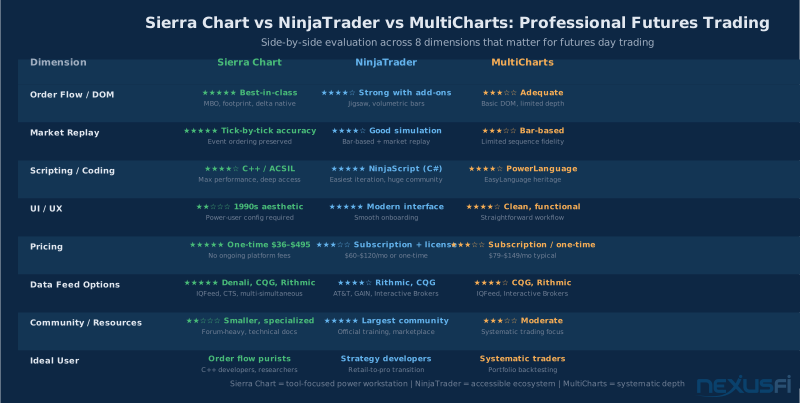
Sierra Chart vs NinjaTrader vs MultiCharts #
This is the question every trader eventually asks, usually after spending real money to find out the hard way. Let's be direct.
Sierra Chart wins when:
- You're primarily a discretionary order flow trader using DOM and footprint charts as your primary decision tools
- You're building custom microstructure studies and need C++ performance at tick resolution
- You've already mastered the basics of futures trading and have a clear methodology — Sierra rewards clarity, not exploration
- Long-term cost efficiency matters — you're planning to trade seriously for 5+ years
- Platform stability matters most — Sierra's uptime record is excellent, crashes are rare
NinjaTrader wins when:
- You're developing systematic strategies and want the fastest path from idea to tested code
- You want access to the largest community of indicators, strategies, and third-party tools
- You're newer to trading platforms and value a modern interface with accessible documentation
- Your broker relationship runs through NinjaTrader's brokerage (significant when relevant)
- You want a wider marketplace for third-party indicators and strategies
MultiCharts wins when:
- You're coming from a TradeStation / EasyLanguage background and want compatibility
- Your focus is portfolio-level systematic trading across multiple instruments
- You need strong walk-forward optimization and portfolio backtesting more than real-time order flow
The brutal truth about the comparison:
NinjaTrader's polish and ecosystem make it easier to start. Sierra's depth makes it better when you know what you're doing. Neither is objectively better — they're optimized for different kinds of traders.
If you're a beginners to intermediate trader building out your edge, start with NinjaTrader. The learning curve is lower, the community is bigger, and the path to productive trading is shorter.
If you're an experienced trader whose primary edge is order flow reading, if you want to build custom microstructure tools, if you think about latency and feed fidelity — Sierra Chart is likely what you'll end up with anyway after trying the alternatives.
That's the accurate summary.
Platform latency considerations
For the vast majority of futures traders, platform latency is not a differentiating factor. ES fills at the CME are governed by the exchange matching engine, and a 5ms difference in order submission latency doesn't change your fill in normal market conditions.
Where latency matters: scalpers running 50+ trades per day who need exact-time order submission for strategies that compete on queue position, or automated strategies where microseconds affect whether a condition is true at entry time. For everyone else, focus on which platform you can actually execute on correctly rather than optimizing milliseconds.
More on this: platform latency and execution speed
Getting Started with Sierra Chart #
The first session with Sierra is genuinely overwhelming. That's not a flaw in the platform — it's the cost of exposing every configuration option directly. Here's a path through the complexity:
Step 1: Install and choose a service package
Download Sierra from sierrachart.com. Start with Package 6 if you want footprint charts and full DOM. Upgrade to Package 12 only when you're committed to ACSIL development.
Step 2: Configure a data feed
For most new Sierra users, Denali (Sierra Chart Data Feed) is the right starting point. It's already integrated — no third-party account setup required. Sign up for a Denali subscription, enter your credentials in Sierra's data feed settings, and you're connected.
If you need Rithmic for lower latency or full MBO, you'll need an account through a Rithmic-connected broker. Ask your broker before trying to set this up independently.
Step 3: Build your first chart window
Start simple: one candlestick chart of ES (@ES), 5-minute bars, standard time display. Get comfortable with Sierra's interface — how to add studies, change chart settings, switch time frames — before loading up with complex footprint configurations.
Step 4: Add your order-flow tools progressively
Once you're comfortable with basic charts, add one new element at a time:
- Switch to Numbers Bars (Sierra's footprint chart) using Trade Volume at Price visualization
- Enable the DOM/Trade DOM window alongside your chart
- Add Volume Profile as an overlaid study on your chart
- Configure Time & Sales with a size filter (start with 50 contracts minimum for ES)
Don't try to absorb the full configuration space at once. Learn what each tool tells you before moving to the next. The traders who get stuck with Sierra are the ones who try to configure everything at once and end up with a complex setup they don't understand.
Step 5: Learn replay before going live
Before trading real capital with Sierra, spend at least 20 hours replaying historical sessions. Use the replay to practice reading your setup — DOM conditions, footprint signals, Time & Sales flow — against known historical outcomes.
This isn't just practice. It's calibration. You're learning what your specific tools tell you and how you should respond to them, against real data, without risking money. Twenty hours of replay before live trading is the best ROI available in trading education.
Common configuration mistakes to avoid:
- Starting with too many studies on a single chart (overwhelms the visual signal)
- Using Globex hours data for strategies designed for RTH (different market conditions)
- Not configuring proper session templates (causes chart alignment errors at session boundaries)
- Assuming default DOM settings are optimal (they're not — customize update frequency and depth levels for your feed)
The NexusFi Sierra Chart forum is the best resource for platform-specific configuration questions. A quick search through 1,000+ threads will answer most questions you'll encounter in the first month.
More on DOM trading and platform selection: DOM trading platforms
For broader platform comparison: futures trading platforms comparison
For NinjaTrader specifically: NinjaTrader
---
Sierra Chart is not for everyone. The interface is a barrier. The documentation assumes expertise. The ACSIL learning curve is real.
But if you're serious about order flow trading and you want a platform that doesn't limit what you can see or build — that gives you 40 levels of DOM, native footprint charts, tick-by-tick replay, and a scripting language that can run at native C++ speed — there's nothing else that comes close.
The traders who use Sierra Chart seriously tend to use it for years. That's not loyalty to a familiar tool. It's the result of arriving at the platform that actually fits the work.
Knowledge Map
Prerequisites
Understand these firstGo Deeper
Build on this knowledgeReferences This Article
Articles that build on this topicCitations
- — Sierra vs. Ninja: why I chose (2012) 👍 20“Sierra and many modern charting platforms now have delta capabilities. Sure, there are addons for NT, but they cost extra, and none of them are the same as having it native.”
- — Sierra vs. Ninja: why I chose (2014) 👍 15“I have a lifetime license to NinjaTrader and do like it -- BUT I am switching to Sierra Charts. Volume Profile, Footprint Charts, the Chart DOM, automatic rollover, best online user manual I've ever seen. Stable, never ever crashes.”
- — Why do you use Sierra Chart? (2014) 👍 13“Sierra Chart allows me to read order flow, market participation, trapped traders, the short-term trend, panic, exhaustion, etc, to a degree that vastly exceeds any other trading platform I've used -- maybe 6 or 7 others.”
- — Sierra vs. Ninja: why I chose (2018) 👍 9“I started on NinjaTrader. I switched to Sierra Chart a few years in. The learning curve is real but it was worth it for me -- primarily for the DOM speed and order flow tools.”
- — Sierra Chart Questions (2018) 👍 6“As a long-time NinjaTrader user, I have migrated to SierraChart and am happy to have done so. Pros: Substantially cheaper, works with many more brokers, stable and fast.”
- — Best alternative to NinjaTrader? (2018) 👍 7“Sierra Chart is the strongest alternative platform for futures traders who prioritize order flow and DOM quality over ease of use.”
- — Why do you use Sierra Chart? (2019) 👍 21“SC is actually used by some professional traders, in some actual prop firms. Traders are generally concerned first with the performance of their platform, and that it lets them do what they need to do.”
- — Sierra Chart Price Increase (2022) 👍 20“Sierra is very highly regarded as one of the most capable, fast (C++ through and through), reliable, feature rich, and extensible platforms out there. Their customer support is FANTASTIC.”
- — Recommended DOM trading platform with MBO support (2022) 👍 2“This is my DOM on Sierra Chart. MBO data is the column with gray numbers. DOM set to update every 10ms. SC seems to be as good as it will get as far as price and quality.”
- — CQG vs Rithmic data feed (2018) 👍 4“I use Sierra Chart's own data-feed. It works great. My logic, as a non-technical person, is as simple as saying it appears to be one less thing that can go wrong.”
- — Rithmic independent of broker possible? (2021) 👍 3“I have experience with Rithmic and CQG and Denali. Rithmic Pros: Have MBO and can see all order book (subscribe market depth). Cons: Have monthly connect fee about 25, limited historical tick data.”
- — Which broker for Sierra + Sierra datafeed? (2018) 👍 4“We use CTS, CQG, and Rithmic. From a latency standpoint, each feed many functions differently because of your connections.”
- — Sierra vs. Ninja: why I chose (2023) 👍 5“SC is more customizable and generally more powerful, in terms of things you can do with it, especially if you can program.”