



NinjaScript Strategy Development: Building Automated Futures Strategies in NinjaTrader 8
Overview #
Most traders who write their first NinjaTrader strategy make the same mistake. They put everything in OnBarUpdate. Signal logic, order placement, risk checks, state tracking — all jammed into a single method that fires hundreds of times a session. It works until it doesn't. A partial fill arrives. An execution event fires out of sync with a bar. Two entries get placed on the same signal. The strategy goes haywire at 9:32 AM on a volatile open and the account takes a hit that three good trading days won't fix.
NinjaScript is a powerful automation framework. NT8 runs on C#, integrates tightly with NinjaTrader's execution engine, and can manage the full lifecycle of a futures trade — from signal detection through exit and logging. But power without structure is a liability. The strategies that survive live markets are the ones built with explicit separation of concerns: a dedicated signal layer, a state machine that tracks order lifecycle, a centralized risk manager that gatekeeps every order, and clean separation between initialization and execution logic.
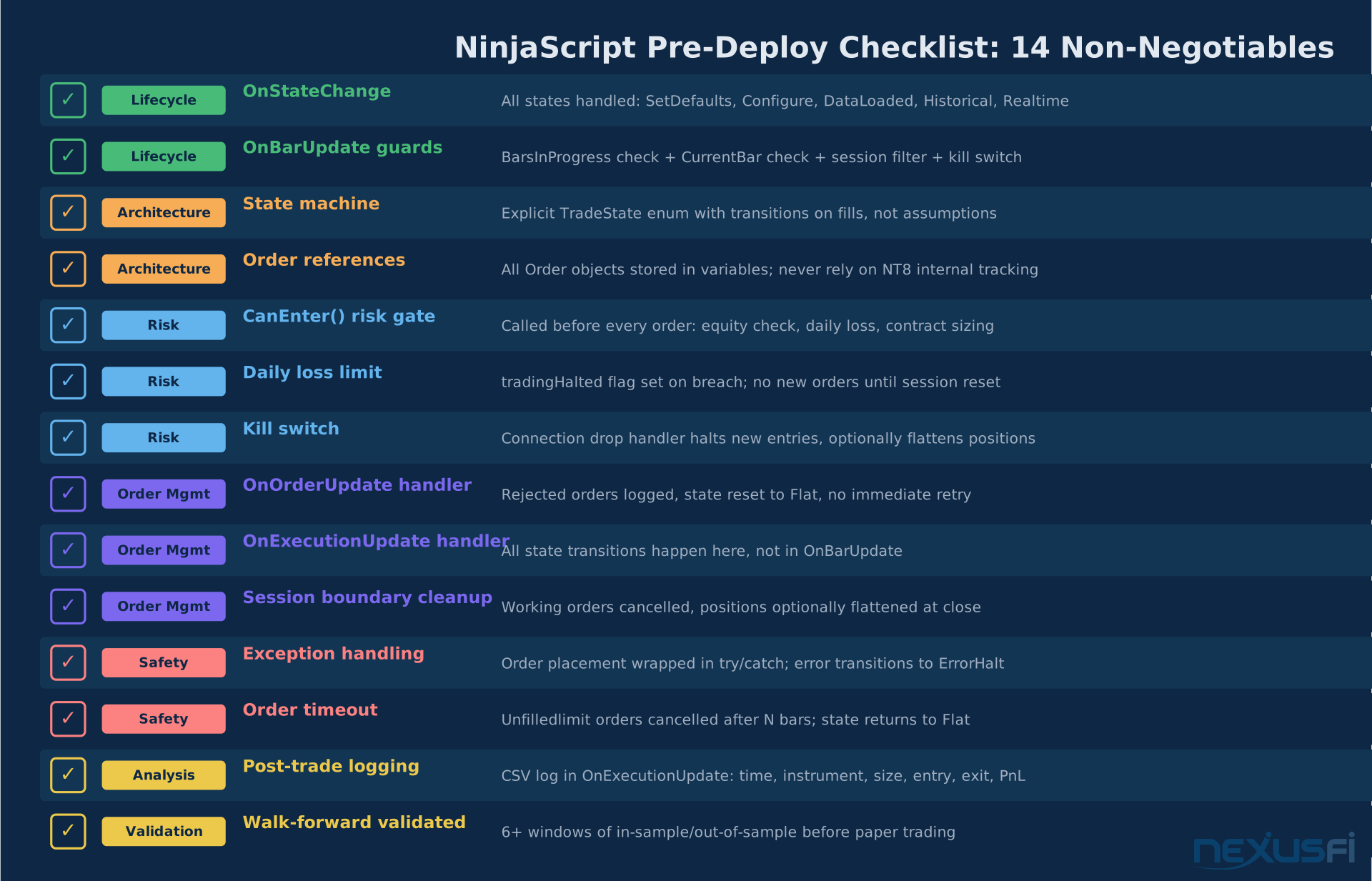
This article covers how to build those strategies correctly — the OnStateChange lifecycle, state machine architecture, the ATM vs. programmatic exit decision, instrument-specific considerations for ES, NQ, and CL, and the production checklist that keeps automated futures trading accounts alive.
Strategy Architecture and Separation of Concerns #
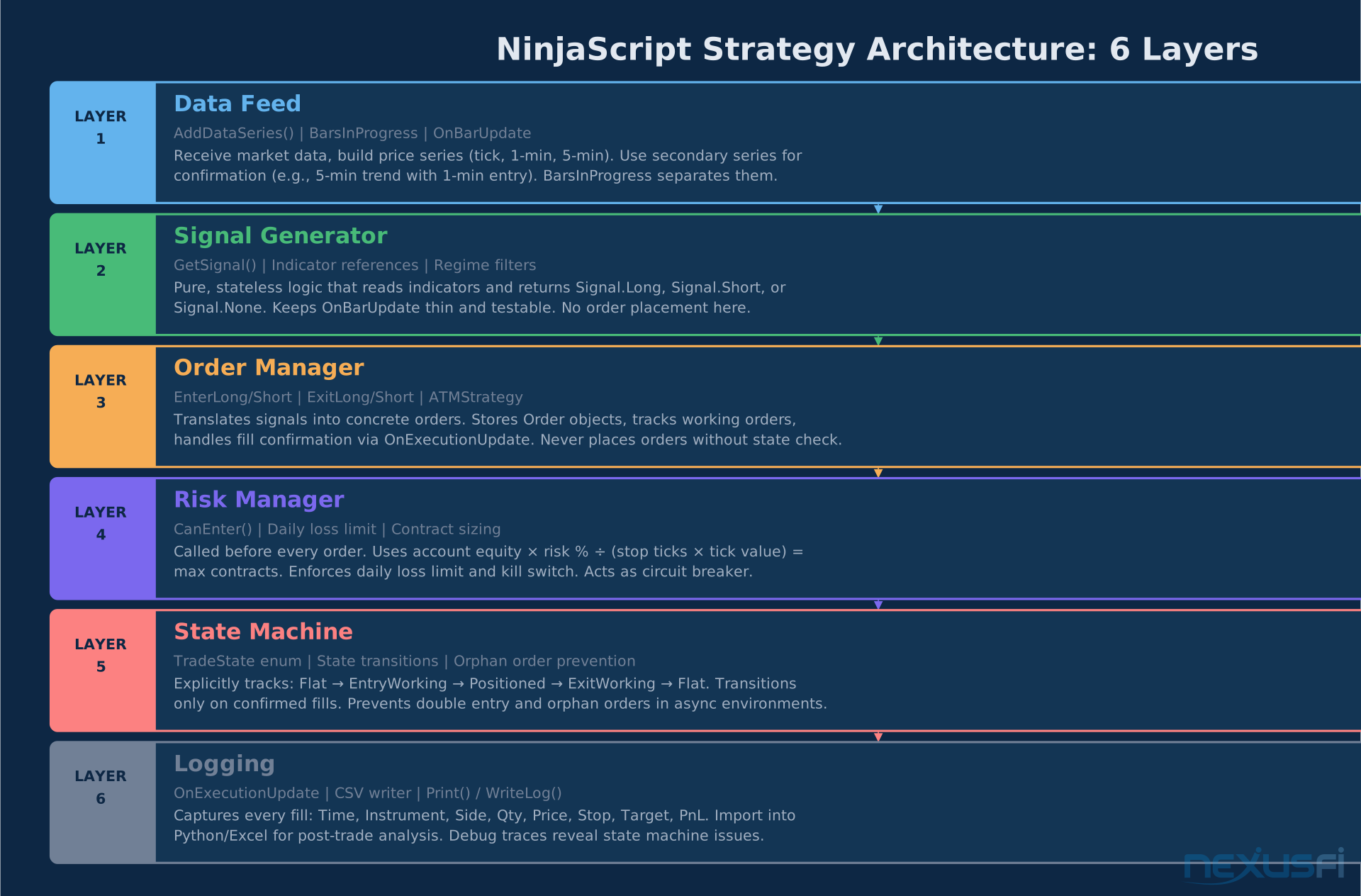
Professional NT8 strategies don't put everything in one place. They separate six distinct responsibilities, each in its own layer:
Layer 1 — Data Feed: Market data ingestion via AddDataSeries(). Multiple timeframes or instruments use BarsInProgress to distinguish primary from secondary series.
Layer 2 — Signal Generator: Pure logic that reads indicators and returns a signal enum (Signal.Long, Signal.Short, Signal.None). No orders, no state checks. Just signal detection. Extracting this into a GetSignal() method makes the logic testable in isolation.
Layer 3 — Order Manager: Translates signals into concrete orders. Stores Order objects in variables. Never assumes a fill — confirms through OnExecutionUpdate. Tracks working orders to prevent duplicates.
Layer 4 — Risk Manager: Called before every order placement. Calculates maximum position size from account equity × risk percentage ÷ contract risk (stop ticks × tick value). Enforces daily loss limits. Acts as the circuit breaker.
Layer 5 — State Machine: Explicitly models the trade lifecycle: Flat → EntryWorking → Positioned → ExitWorking → Flat. State transitions happen on confirmed fills, not assumptions. Prevents double-entry and orphan orders.
Layer 6 — Logging: Every fill recorded via OnExecutionUpdate: time, instrument, side, quantity, price, stop, target, PnL. Import into Python or Excel for post-trade analysis.
:::callout Why architecture matters: A 2011 discussion on NexusFi's Elite Algorithmic NinjaTrader Trading forum showed traders building "Local Order Managers" as separate modules precisely because the order management problem is distinct from the signal problem. The traders who separated concerns had strategies that survived for years. The traders who mixed them were constantly debugging. ::: Mixing these layers creates debugging nightmares. When a fill arrives late and the strategy tries to place a second entry, you want to trace the issue to a single place — the state machine — not untangle spaghetti code inside OnBarUpdate.
The OnStateChange Lifecycle #
NT8 strategy initialization is lifecycle-driven. Everything you'd otherwise do at the top of OnBarUpdate belongs in OnStateChange. Getting this right prevents the most common category of NT8 strategy bugs.
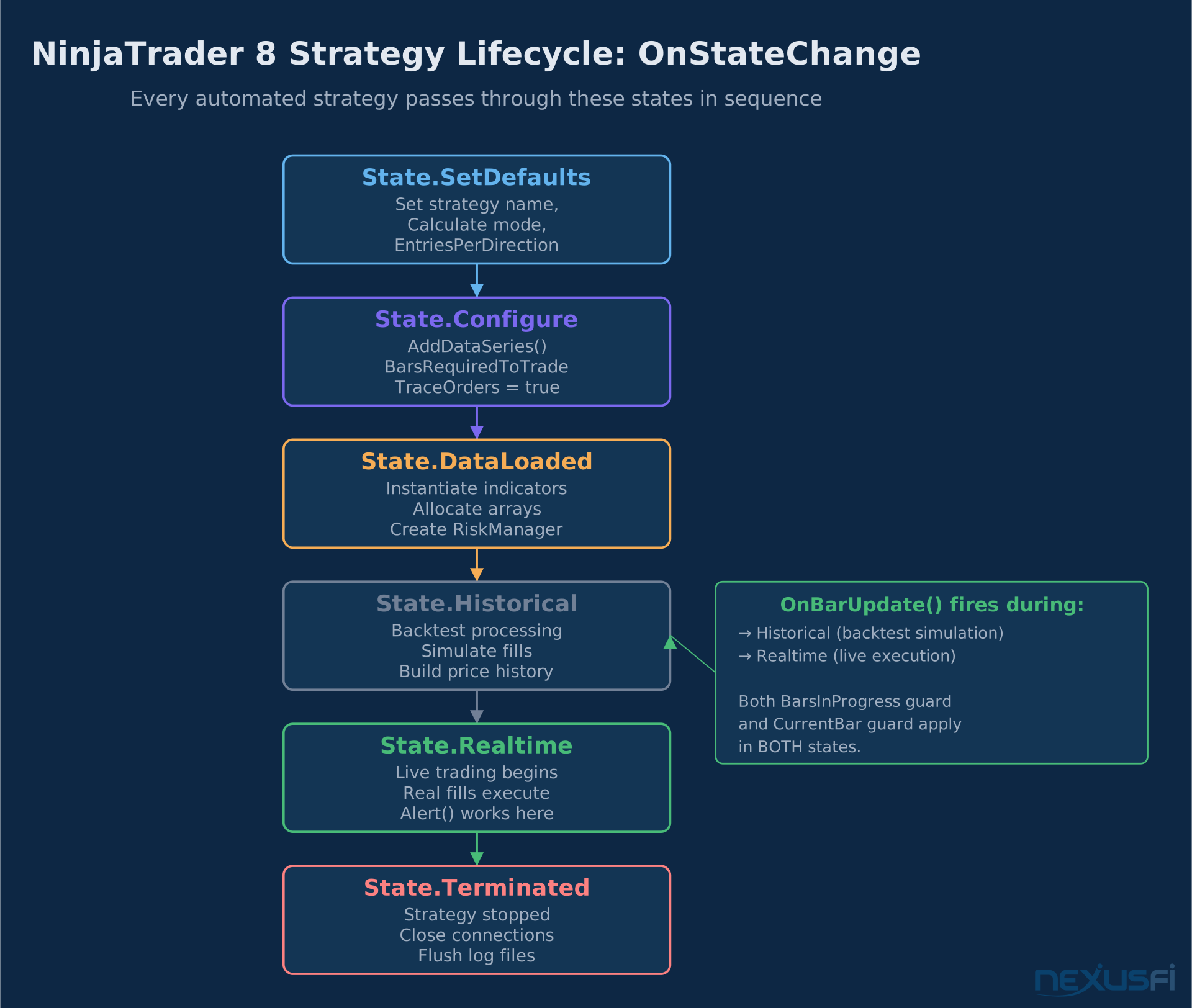
The lifecycle progresses through these states:
State.SetDefaults — Engine startup. Define strategy properties: name, Calculate mode (OnBarClose or OnEachTick), EntriesPerDirection, IsExitOnSessionCloseStrategy. These are the defaults users see in the strategy parameters dialog.
State.Configure — After defaults, before any bars load. This is where you add secondary data series (AddDataSeries()), set BarsRequiredToTrade, and enable TraceOrders = true for order tracking.
State.DataLoaded — After all data series are loaded. Instantiate indicator objects (EMA(), ATR(), Bollinger()), allocate arrays, and initialize any RiskManager or TradeContext objects.
State.Historical — The backtest phase. OnBarUpdate fires here for every historical bar. NT8 simulates fills based on your OrderFillResolution setting. Do not place live-only code here.
State.Realtime — When the first real-time bar arrives. Enable live-only constructs: Alert(), external API calls, console output. Initialize session-specific counters that should start fresh each live session.
State.Terminated — Strategy stopped. Close file handles, flush log buffers, cancel any working orders.
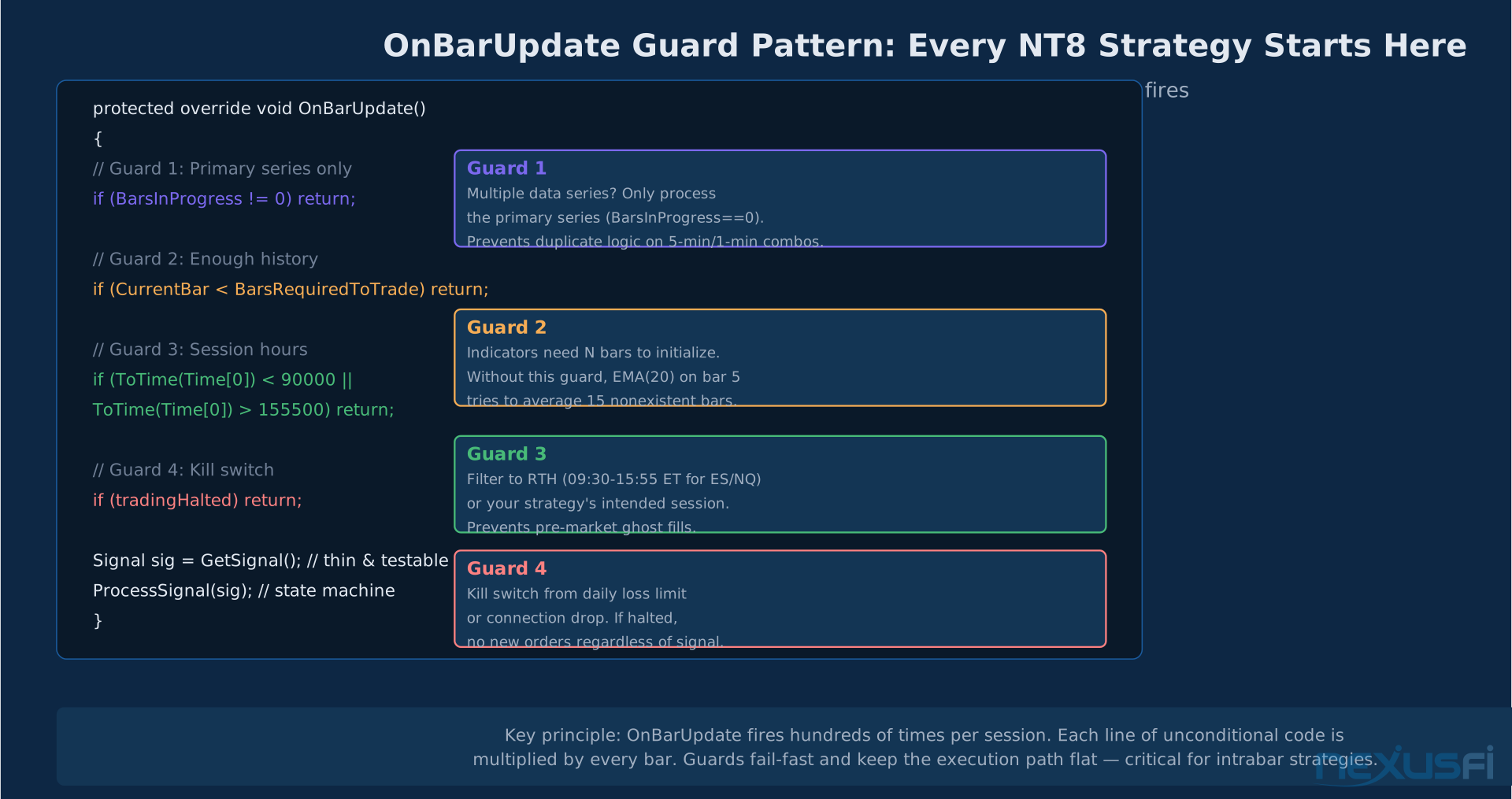
:::callout The most common initialization bug: Setting daily PnL counters or session variables inside OnBarUpdate based on bar index. This resets them in backtests in unintended ways. Session-specific variables should initialize in the State.Realtime transition, not in OnBarUpdate. ::: The OnBarUpdate guard pattern every professional strategy uses:
protected override void OnBarUpdate()
{
    // Guard 1: Only run on primary series
    if (BarsInProgress != 0) return;

    // Guard 2: Enough history to compute indicators
    if (CurrentBar < BarsRequiredToTrade) return;

    // Guard 3: Session hours filter (e.g., avoid pre-market noise)
    if (ToTime(Time[0]) < 90000 || ToTime(Time[0]) > 155500) return;

    // Guard 4: Kill switch
    if (tradingHalted) return;

    // Delegate to thin, testable functions
    Signal sig = GetSignal();
    ProcessSignal(sig);
}
Keeping OnBarUpdate thin isn't about code style. It's about performance. NT8 fires this method on every bar across every data series. Expensive calculations running unconditionally in a 1-minute strategy processing 30 days of historical data is thousands of unnecessary invocations.
The State Machine Approach #
The biggest mistake in automated futures trading isn't a bad signal. It's bad order management. A state machine solves this.
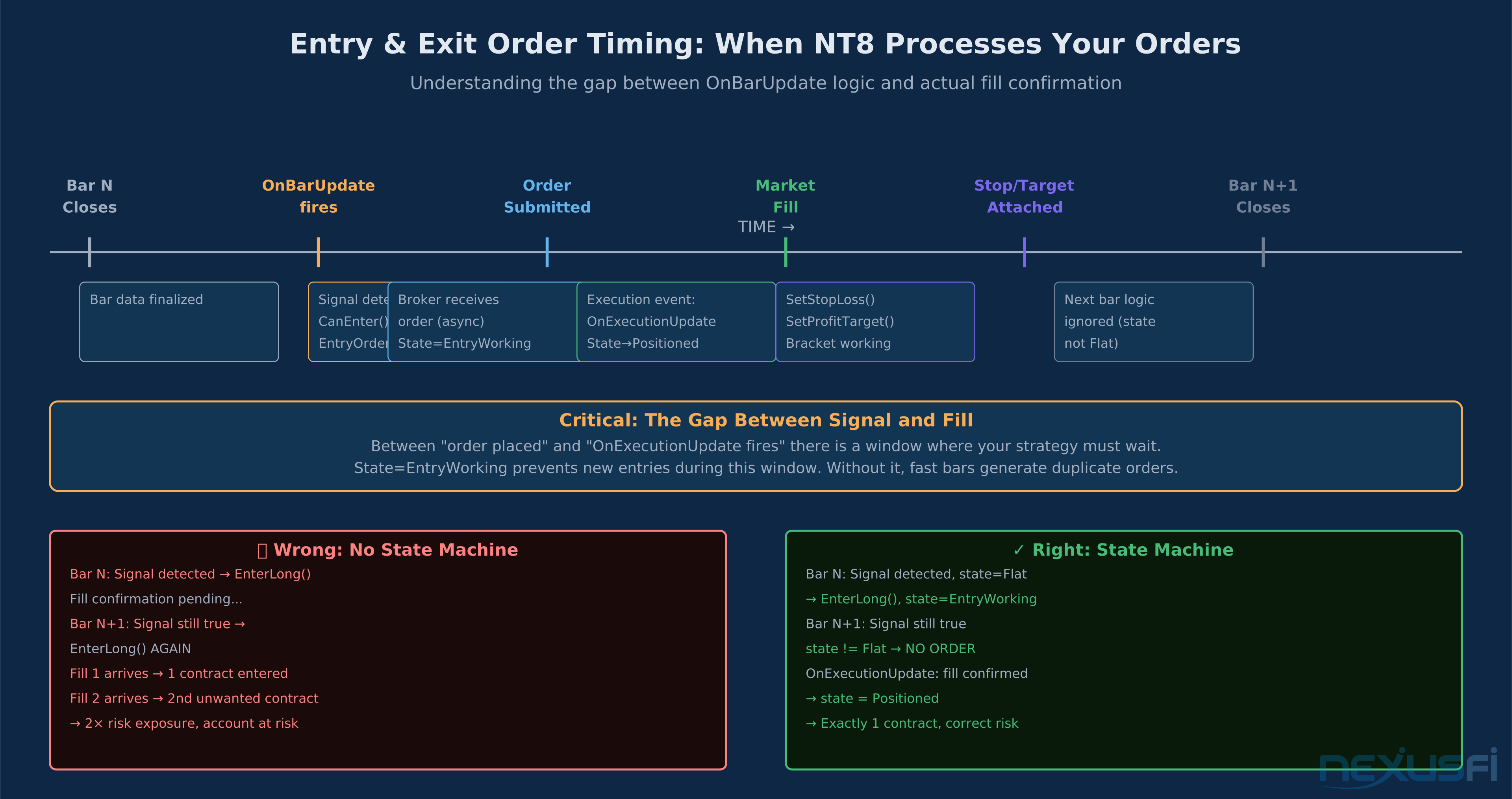
The problem is asynchronous execution. When you place an order in OnBarUpdate, the fill confirmation doesn't arrive until OnExecutionUpdate fires — which happens asynchronously, outside the bar update cycle. If your strategy places an order, then the next bar fires before the fill confirmation arrives, and your logic checks Position.MarketPosition == Flat, it will try to place another order. Now you have two entries on what was meant to be one signal.
A state machine prevents this by tracking what the strategy believes is happening — not what it hopes happened.
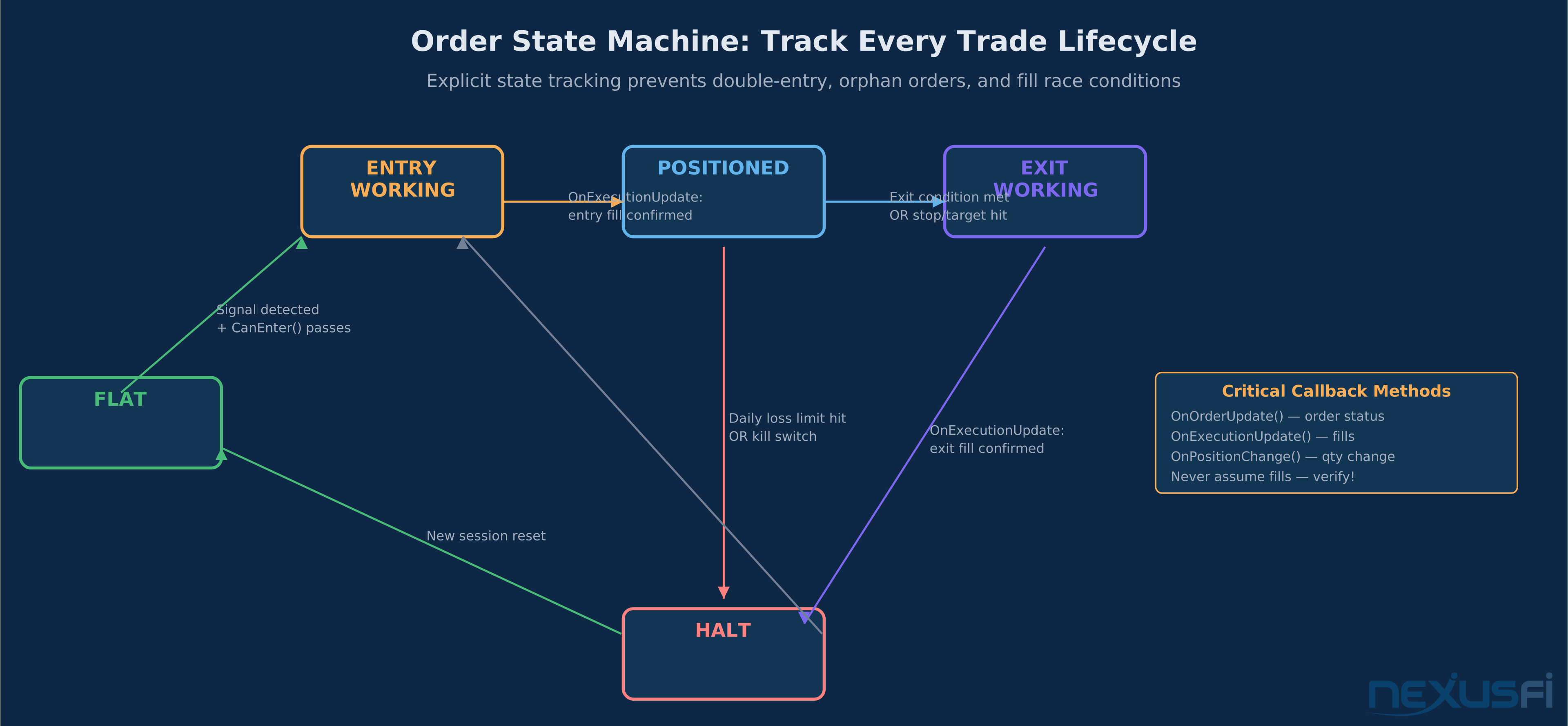
enum TradeState { Flat, EntryWorking, Positioned, ExitWorking, ErrorHalt }
private TradeState tradeState = TradeState.Flat;
State transitions:
| Transition | Trigger | Action |
|---|---|---|
| Flat → EntryWorking | Signal detected + CanEnter() passes | Place entry order |
| EntryWorking → Positioned | OnExecutionUpdate: entry fill | Attach stop/target |
| Positioned → ExitWorking | Exit condition met OR stop/target triggered | Manage exit orders |
| ExitWorking → Flat | OnExecutionUpdate: exit fill | Reset state, update PnL log |
| Any → ErrorHalt | Daily loss limit OR kill switch | Cancel all orders, stop trading |
The ProcessSignal function only places orders when tradeState == TradeState.Flat. The OnExecutionUpdate handler transitions state based on actual fills, not assumptions.
:::callout Order references are non-optional: Store every Order object in a variable. Order entryOrder = EnterLong(...) gives you a reference you can cancel, modify, or check. The alternative — relying on NT8's internal order tracking to figure out what's working — is how orphan orders happen at session boundaries. ::: A community thread from NexusFi's Elite Algorithmic NinjaTrader forum, "NJAMC Local Order Manager (LOM) Collaboration," shows traders building external order managers precisely because NT8's built-in order tracking isn't always transparent enough for complex multi-leg strategies. The state machine pattern solves this in code without external tooling.
ATM Strategies vs Programmatic Exits #
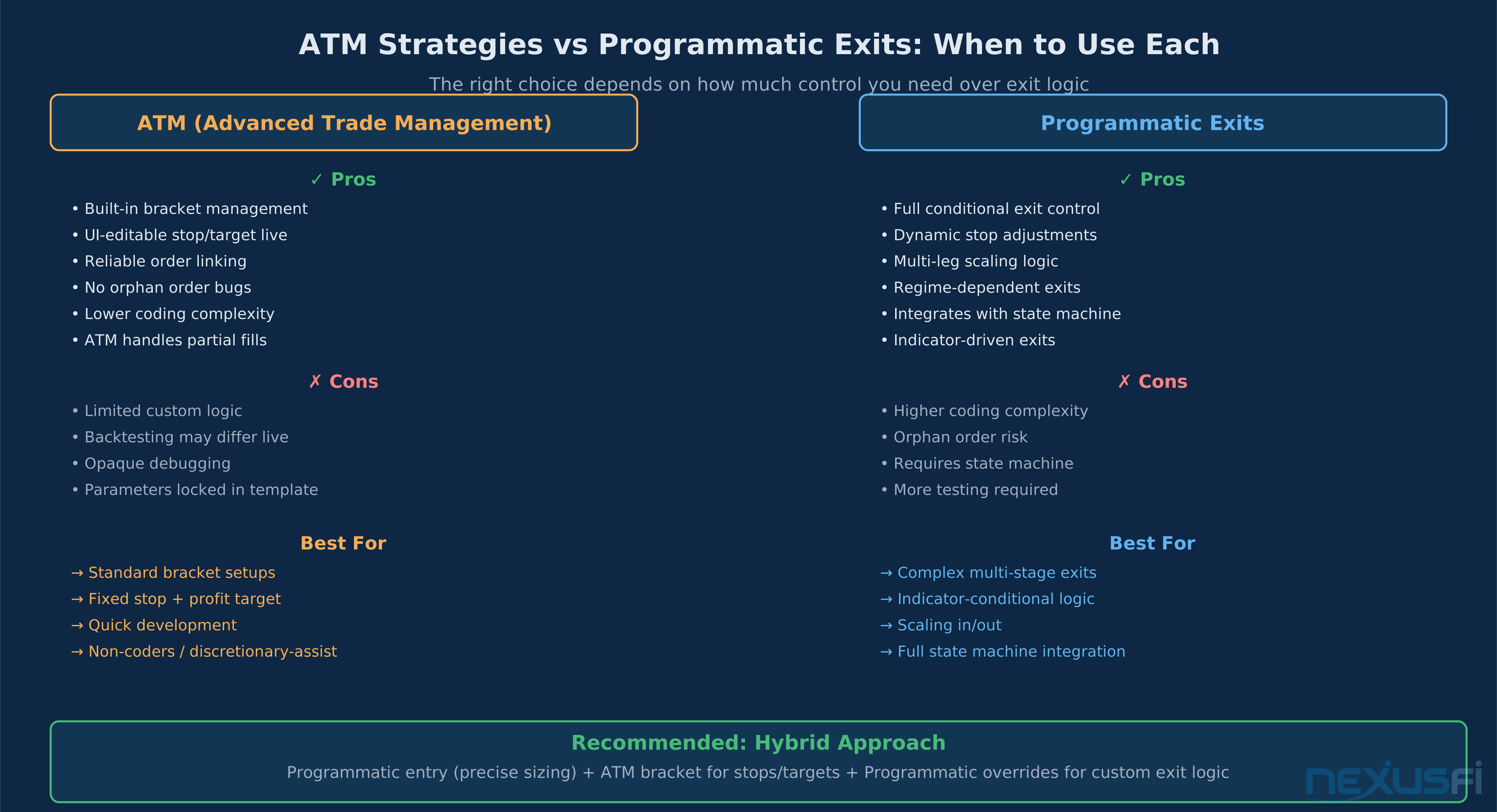
NT8 gives you two exit mechanisms. ATM (Advanced Trade Management) is the built-in bracket system — you define a stop distance, profit target, and optional trailing logic in a template, then attach it to an entry. Programmatic exits use NT8's SetStopLoss(), SetProfitTarget(), and custom logic inside OnBarUpdate.
Both work. The question is which fits your strategy.
ATM is right when:
- Exits are fixed: stop at X ticks, target at Y ticks, optional trailing after Z ticks
- You want to edit stop/target live during the session without code changes
- Reducing coding risk is more important than fine-grained control
- The ATM template handles partial fills and order linking transparently
Programmatic is right when:
- Exit conditions are indicator-driven (e.g., exit when RSI crosses 70, not at a fixed tick count)
- Scaling out: first 2 contracts at 4 ticks, last contract with trailing stop
- Regime-dependent stops: wider stops in high-volatility sessions, tighter in low-vol
- You need dynamic stop adjustments based on price action after entry
The hybrid approach most production strategies use:
- Programmatic entry (
EnterLong(contractQty, "Signal")) for precise sizing - Immediate ATM attachment for the standard bracket logic
- Optional programmatic override for the portion of the position needing custom management
// Hybrid: programmatic entry, ATM bracket
if (sig == Signal.Long && tradeState == TradeState.Flat && CanEnter(stopTicks))
{
    tradeState = TradeState.EntryWorking;
    entryOrder = EnterLong(contractSize, "LongEntry");
    SetStopLoss("LongEntry", CalculationMode.Ticks, stopTicks, false);
    SetProfitTarget("LongEntry", CalculationMode.Ticks, stopTicks * 2);
}
One caveat on ATM in backtesting: the ATM engine behavior can differ between historical simulation and live execution, particularly around trailing logic and order attachment timing. Always validate ATM-based strategies with Market Replay on actual live data, not just on historical bars.
A community post from NexusFi's NinjaTrader forum, in the thread "Want your NinjaTrader STRATEGY created for free?" (by @traderpards, 8 thanks), captures this well: "Exits are a pain. But they're a necessary evil." The traders who systematize exits — whether via ATM or programmatic — outperform the ones improvising them in real time.
Risk Management and Position Sizing #
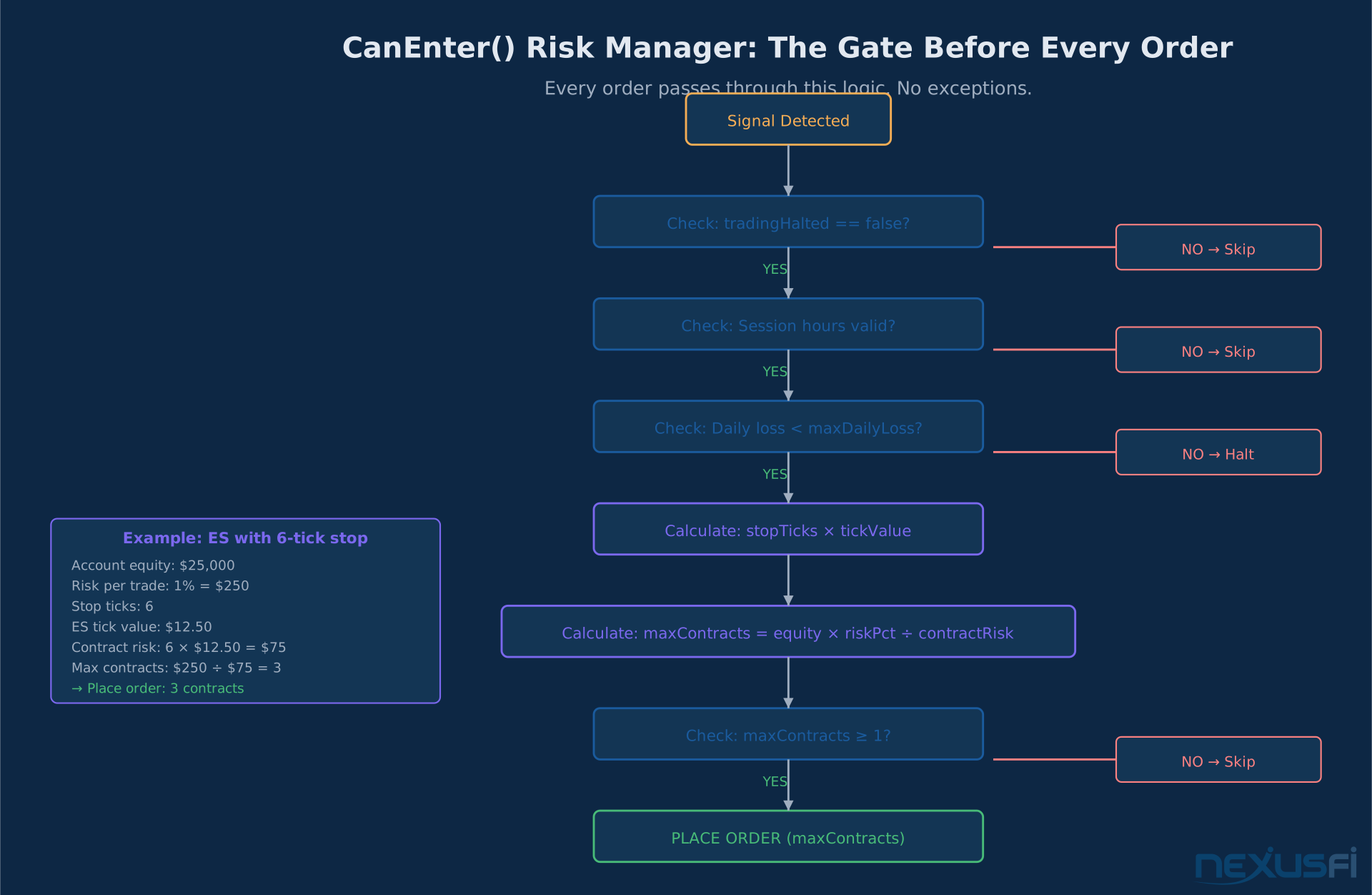
Every automated strategy needs a gate that controls how much it risks on each trade. The CanEnter() function is that gate.
private bool CanEnter(double stopTicks)
{
    // Kill switch: trading halted for session
    if (tradingHalted) return false;

    // Daily loss limit
    double sessionPnL = Account.GetAccountValue(AccountItem.RealizedProfitLoss);
    if (sessionPnL <= -maxDailyLoss)
    {
        tradingHalted = true;
        Print($"Daily loss limit reached: {sessionPnL:C}. Trading halted.");
        return false;
    }

    // Position sizing: risk % of equity per trade
    double accountEquity = Account.GetAccountValue(AccountItem.CashValue);
    double riskAmount = accountEquity * riskPercentage;
    double tickValue = Instrument.MasterInstrument.TickSize *
                       Instrument.MasterInstrument.PointValue;
    double contractRisk = stopTicks * tickValue;

    contractSize = (int)Math.Floor(riskAmount / contractRisk);
    return contractSize >= 1;
}
For ES: a $25,000 account risking 1% with a 6-tick stop → risk $250 ÷ $75 per contract → 3 contracts maximum. That math happens before every single order, not once at session start.
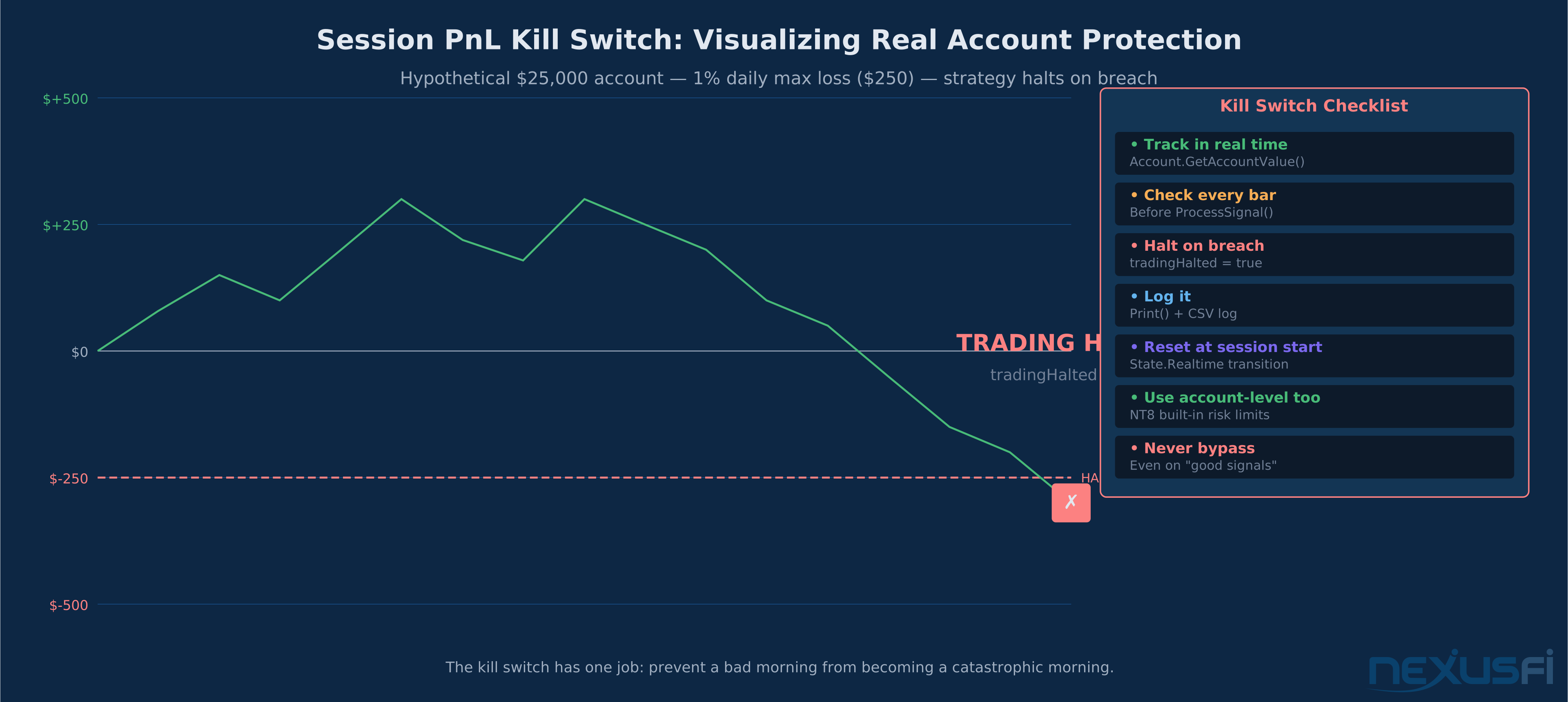
The daily loss limit is non-negotiable for automated strategies. A 2010 thread from NexusFi's EasyLanguage Programming forum ("EasyLanguage Daily Profit and Daily Loss limit in strategy" by @Big Mike, 20 thanks) laid out the pattern that's still relevant in NT8: track session PnL in real time, halt on breach. A related 2011 NinjaTrader thread by @redratsal ("Daily Loss Limit") showed concrete NT7 code for the pattern — the NT8 version uses Account.GetAccountValue() instead, but the logic is identical.
The 2023 thread "New Risk Management Settings built-in to NinjaTrader" (@Liberty88, 6 thanks) notes NT8 now has built-in daily loss limits at the account level, independent of strategy code. Use both — the account-level limit is a safety net, the strategy-level limit is the primary control.
:::callout Global risk tracker for multi-instrument: If you're running strategies on ES, NQ, and CL simultaneously, daily loss tracking should aggregate across all instruments. A static double sessionTotalRisk shared across strategy instances prevents a bad day on NQ from causing ES to continue trading past your overall loss tolerance. :::
Entry and Exit Order Patterns #
Direct Programmatic Orders #
The cleanest approach for strategies that need full control:
// Entry with attached bracket
if (sig == Signal.Long && tradeState == TradeState.Flat)
{
    tradeState = TradeState.EntryWorking;
    entryOrder = EnterLong(contractSize, "LongEntry");
    SetStopLoss("LongEntry", CalculationMode.Ticks, stopTicks, false);
    SetProfitTarget("LongEntry", CalculationMode.Ticks, stopTicks * 2);
}
For indicator-driven exits, place the exit logic in OnBarUpdate when the condition triggers:
// Indicator-driven exit: close if RSI overbought
if (tradeState == TradeState.Positioned &&
    Position.MarketPosition == MarketPosition.Long &&
    RSI(14, 3)[0] > 70)
{
    tradeState = TradeState.ExitWorking;
    ExitLong("SignalExit", "LongEntry");
}
Confirming Fills #
Never transition state in OnBarUpdate. Do it in OnExecutionUpdate:
protected override void OnExecutionUpdate(Execution execution, string execId,
    double price, int quantity, MarketPosition mktPos, string orderId, DateTime time)
{
    if (execution.Order == null) return;

    // Entry confirmed
    if (execution.Order.Name == "LongEntry" &&
        execution.Order.OrderState == OrderState.Filled)
    {
        tradeState = TradeState.Positioned;
        entryPrice = price;
        Print($"Entry filled: {quantity} @ {price:F2}");
    }

    // Exit confirmed
    if (execution.Order.Name == "SignalExit" &&
        execution.Order.OrderState == OrderState.Filled)
    {
        tradeState = TradeState.Flat;
        LogTrade(entryPrice, price, quantity);
    }
}
Session Boundary Cleanup #
Leaving working orders at session close is how you get unexpected fills the next morning. Always clean up:
protected override void OnBarUpdate()
{
    // Force flat before session close
    if (IsExitOnSessionCloseStrategy)
    {
        if (ToTime(Time[0]) >= 155500 && Position.MarketPosition != MarketPosition.Flat)
        {
            ExitLong("EOD", "");
            ExitShort("EOD", "");
        }
    }
}
Instrument-Specific Strategy Considerations #
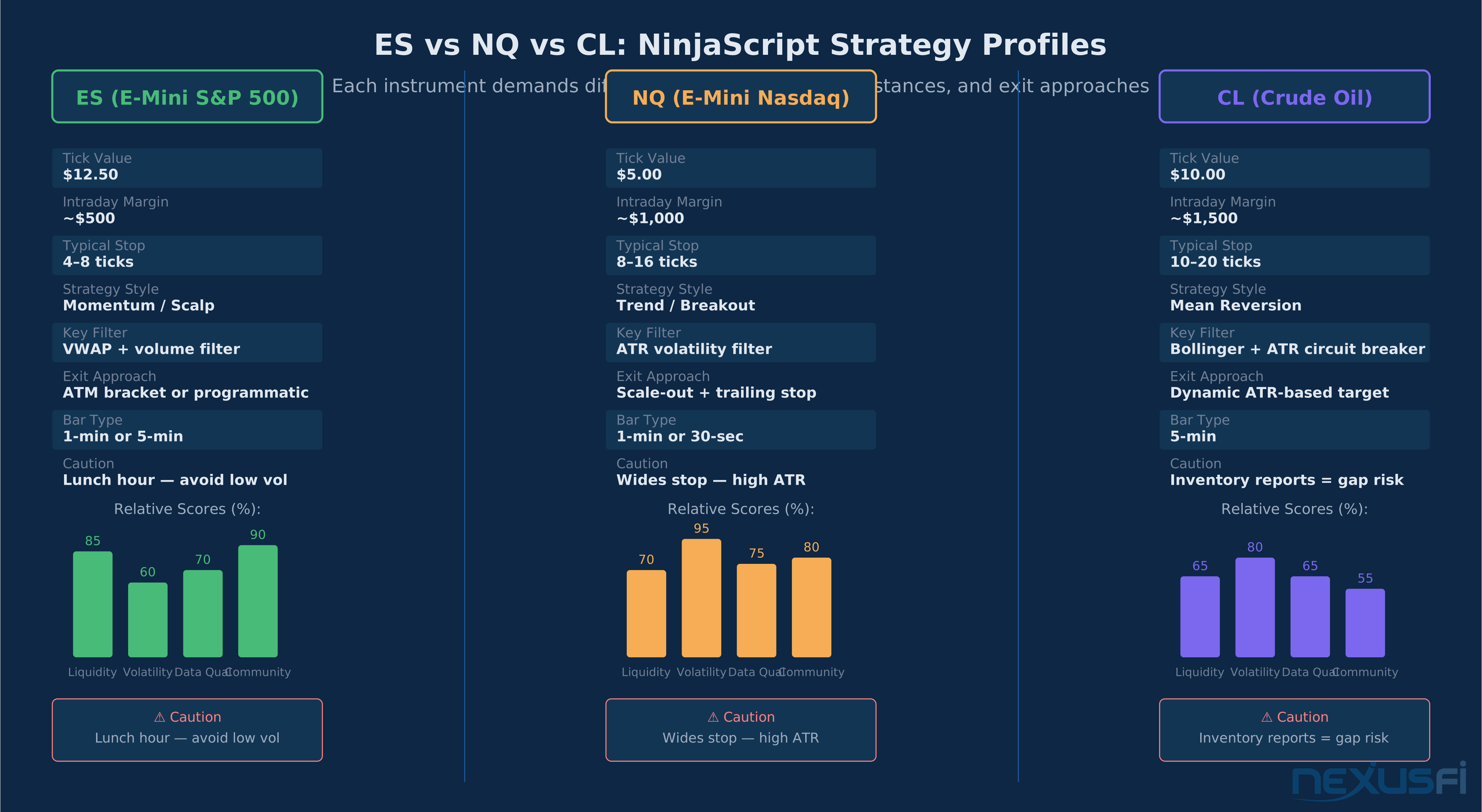
NinjaScript is instrument-agnostic, but your strategy shouldn't be. ES, NQ, and CL have different volatility profiles, tick values, and intraday behavior that require different logic defaults.
ES (E-Mini S&P 500)
ES is the most liquid futures market. Tight spreads, reliable fills, and predictable session structure. Strategies that work on ES tend to be momentum-based or scalping-oriented — VWAP as a trend filter, ATR-scaled stops to avoid the 9:30-10:00 AM chop, and fixed bracket exits that match the 4-8 tick typical stop distances.
ES tick value is $12.50. A 6-tick stop is $75 per contract. A $25,000 account risking 1% can trade 3 contracts. That's a manageable position that won't destroy the account on a false breakout.
The lunch hour (11:30 AM - 1:00 PM ET) is ES's dead zone — volume drops, ranges compress, and mean-reversion patterns dominate even trend-following setups. An IsInSession check or a time filter that avoids this window improves performance on most momentum strategies.
NQ (E-Mini Nasdaq)
NQ is faster and more volatile than ES. ATR on NQ regularly runs 50-100% wider than ES in point terms. Strategies need wider stops (8-16 ticks minimum on most setups), and the delta/order-flow patterns on NQ are more pronounced — sharp buying or selling impulses that can travel 20-30 ticks in seconds.
NQ tick value is $5.00. Smaller per-tick dollar risk means larger position sizes are needed to deploy the same risk amount. A 12-tick stop is $60 per contract on NQ vs. $75 on ES for a 6-tick stop. The lower tick value makes position sizing less punishing but can mask how far prices can move against you.
Scale-out logic is common on NQ — exit half at 10 ticks, trail the rest. This captures the fast initial move while keeping exposure for a larger trend run.
CL (Crude Oil)
CL is mean-reverting on intraday timeframes in normal conditions, but has a sharp regime shift around inventory data (Wednesday 10:30 AM ET). Bollinger Band strategies that work well in consolidation periods break badly on inventory days.
CL tick value is $10.00. Stop distances need to be wider (10-20 ticks minimum) to survive intraday volatility. ATR-scaled stops are especially important — fixed-tick stops on CL frequently get hit by normal volatility before the strategy's intended direction plays out.
Build a volatility circuit breaker into any CL strategy: if ATR exceeds a threshold (e.g., 2× the 20-day average ATR), halt new entries for that session. This prevents inventory-day blowups.
Common Coding Patterns for Production Strategies #
Signal-Only Functions #
Keep signal logic in a separate method that returns an enum. This makes it testable, readable, and easy to modify without touching order management code.
private Signal GetSignal()
{
    double fast = EMA(Close, 9)[0];
    double slow = EMA(Close, 20)[0];
    double prevFast = EMA(Close, 9)[1];
    double prevSlow = EMA(Close, 20)[1];

    // Volatility filter: only trade above-average volatility
    double atr = ATR(14)[0];
    double atrAvg = SMA(ATR(14), 20)[0];
    if (atr < atrAvg * 0.8) return Signal.None;

    if (fast > slow && prevFast <= prevSlow) return Signal.Long;
    if (fast < slow && prevFast >= prevSlow) return Signal.Short;
    return Signal.None;
}
Cancel-on-Invalidation #
When a limit or stop-limit entry order is working and the signal invalidates before fill, cancel the order. Leaving stale entry orders running is how you get filled into positions at the wrong time.
// In OnBarUpdate, when signal flips while entry is working
if (tradeState == TradeState.EntryWorking)
{
    Signal currentSig = GetSignal();
    if (currentSig != pendingSignal)
    {
        CancelOrder(entryOrder);
        tradeState = TradeState.Flat;
        Print("Entry order cancelled -- signal invalidated");
    }
}
Order Timeout #
For limit orders that don't fill within a reasonable window, cancel and reset:
// Order timeout: cancel if not filled within 5 bars
if (tradeState == TradeState.EntryWorking &&
    CurrentBar - entryBarIndex > 5)
{
    CancelOrder(entryOrder);
    tradeState = TradeState.Flat;
}
Post-Trade Logging #
Capture every trade for analysis. Log in OnExecutionUpdate where you have the actual fill data:
private void LogTrade(double entryPx, double exitPx, int qty)
{
    double pnl = (exitPx - entryPx) * qty *
                 Instrument.MasterInstrument.PointValue;
    string line = $"{DateTime.Now},{Instrument.FullName},{qty}," +
                  $"{entryPx},{exitPx},{pnl:F2}\n";
    System.IO.File.AppendAllText(logPath, line);
    sessionPnL += pnl;
}
Import this CSV into Python or Excel after each session. One month of clean trade logs will show you things backtesting never will — the specific times your strategy bleeds, the instruments where slippage is killing edge, the setups that are profitable in backtests but unprofitable live.
Backtesting, Walk-Forward, and Live Validation #
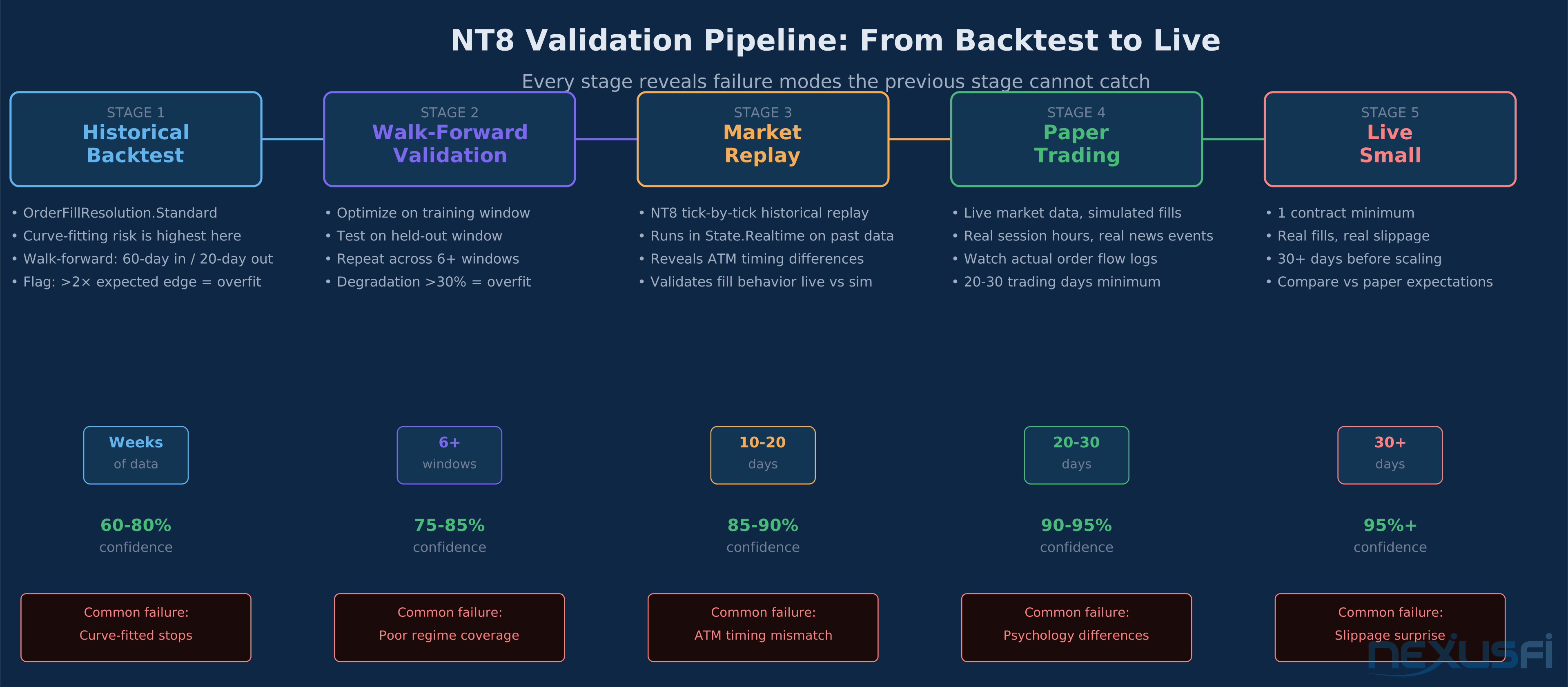
A NinjaScript strategy that looks good in backtesting can fail live for several reasons: curve-fitting to historical data, unrealistic fill assumptions in the backtesting engine, slippage differences, and behavior differences between State.Historical and State.Realtime.
The validation sequence that works:
Step 1 — Historical backtest with OrderFillResolution.Standard. Get a baseline performance profile. Flag any setup that generates more than 2× expected edge — over-optimization is likely.
Step 2 — Walk-forward validation. Optimize parameters on a training window (e.g., 60 trading days), then test on the next 20 days without re-optimizing. Repeat across multiple windows. If walk-forward performance degrades significantly from in-sample, the parameters are overfit.
Step 3 — Market Replay. NT8's Market Replay plays back a specific historical day tick-by-tick in real-time mode. This puts the strategy into State.Realtime on historical data, which reveals any behavioral differences from backtest mode — timing of fills, ATM behavior, session boundary handling.
Step 4 — Paper trading. Run the strategy in sim mode on live market data for 20-30 trading days. Watch the actual order flow, log every entry and exit, and compare with backtest expectations.
Step 5 — Small live. Start with the minimum contract size (1 contract). Let it run for 30+ days before scaling. The first month of live trading almost always reveals issues that didn't show up in paper trading.
:::callout The walk-forward community: NexusFi's "Walk Forward Testing & Optimization Experiences and Best Practices" thread (@kbellare, 6 thanks) is required reading. The key insight from that discussion: the 3:1 in-sample to out-of-sample ratio is a starting point, not a rule. The absolute length matters — a walk-forward on 2009-2013 data with 10-day out-of-sample windows is too short to catch regime shifts. :::
Error Handling and Production Safety #
Automated strategies running unattended need error handling that keeps them safe when things go wrong.
Connection drop handling: NT8 notifies strategies of connection state changes. Build logic that halts new entries if the connection is degraded, and places stop-market orders on open positions:
protected override void OnConnectionStatusUpdate(ConnectionStatusEventArgs args)
{
    if (args.Status == ConnectionStatus.Disconnected)
    {
        tradingHalted = true;
        Print("Connection lost -- trading halted");
        // Optionally flatten open positions via market order
    }
}
Order rejection handling: Not all orders get filled as expected. OrderState.Rejected is a state that needs explicit handling — log the rejection reason, transition state back to Flat, and avoid retrying immediately:
protected override void OnOrderUpdate(Order order, double limitPrice, double stopPrice,
    int quantity, int filled, double averageFillPrice,
    OrderState orderState, DateTime time, ErrorCode error, string comment)
{
    if (orderState == OrderState.Rejected)
    {
        Print($"Order rejected: {order.Name} -- {error}");
        tradeState = TradeState.Flat;
        entryOrder = null;
    }
}
Exception wrapping: Order placement code should be wrapped in try/catch:
try
{
    entryOrder = EnterLong(contractSize, "LongEntry");
}
catch (Exception ex)
{
    Print($"Order placement error: {ex.Message}");
    tradeState = TradeState.ErrorHalt;
    tradingHalted = true;
}
Prerequisites and Further Reading #
Building NinjaScript strategies requires a foundation in both trading and C# programming. On the trading side, you need a clear understanding of how futures trading APIs work and what automated order execution looks like in practice. If you're just starting automated trading, algo trading live deployment covers the practical steps from a working backtest to a live account.
On the risk side, the principles in automated risk controls apply directly to NT8 strategy design — the CanEnter() pattern is the same whether you're in NinjaScript, Python, or EasyLanguage. Strategy evaluation metrics covers how to interpret the Sharpe ratio, Sortino, maximum drawdown, and other statistics NT8's Strategy Analyzer produces.
For broader context on backtesting trading strategies and walk-forward analysis, those articles cover the methodology that validates whether a NinjaScript strategy has a real edge or just looked good on the training data.
If you're working across multiple instruments, strategy portfolio management covers how to aggregate risk and manage correlation between simultaneously running strategies. For the infrastructure considerations — server-side execution, latency, co-location — latency and infrastructure for automated futures trading covers the physical layer.
NinjaTrader's official documentation and NexusFi's Elite Algorithmic NinjaTrader Trading forum are the two best resources for NinjaScript-specific questions. The forum has thousands of threads covering specific coding problems, indicator implementations, and strategy architecture questions that no documentation can fully anticipate.
NinjaScript strategy development is a systems engineering problem, not just a coding problem. The strategies that survive live futures trading are the ones built around three non-negotiables: explicit state tracking that survives asynchronous fills, a centralized risk manager that gates every order, and a validation pipeline that distinguishes real edge from backtesting luck. Get the structure right first. The signal can always be improved later.
Knowledge Map
Prerequisites
Understand these firstGo Deeper
Build on this knowledgeReferences This Article
Articles that build on this topicCitations
- — Want your NinjaTrader STRATEGY created for free? (2015) 👍 8“Exits are a pain. But they're a necessary evil.”
- — NJAMC Local Order Manager (LOM) Collaboration (2011) 👍 1“The big problem of all relative order concepts is managing state correctly.”
- — Daily Loss Limit (2011) 👍 4“Max profit before halt strategy. Max loss before halt strategy.”
- — EasyLanguage Daily Profit and Daily Loss limit in strategy (2010) 👍 20“daily loss and daily profit targets, whereby if one or the other is hit then the strategy will stop for the day.”
- — New Risk Management Settings built-in to NinjaTrader (2023) 👍 6“I use the daily loss limit and trailing max drawdown features built into NT8 now.”
- — Walk Forward Testing & Optimization Experiences and Best Practices (2013) 👍 6“The 3:1 in-sample to out-of-sample ratio is well-established, but there are no guidelines on the absolute period length.”
- — Absolute beginner here, strategy not working (2016) 👍 1“ExitShort based on MarketPosition and Bollinger band crossings.”
- — Want your NinjaTrader indicator created, free? (2022) 👍 3“In the strategy builder you can create the conditions to look at the realized PNL.”
- — The Hurley Method (automated) (2010) 👍 1“daily profit/loss does not work for backtests, only real time.”