TradeStation's EasyLanguage has been the entry point for systematic futures trading for over three decades. If you're coming from discretionary trading and want to automate, or you've already coded strategies in Excel and want something that actually connects to the market — EasyLanguage is worth understanding.
The pitch is simple: EasyLanguage lets you express trading logic in code that TradeStation executes bar-by-bar, backtests against historical data, and runs live on real futures accounts. It's not Python with a broker API bolted on. It's a domain-specific language purpose-built around trading concepts — bars, signals, orders, positions — which makes the code read closer to how traders actually think.
This article covers the full pipeline: execution model, futures data handling, indicator writing, strategy development, backtesting integrity, and optimization discipline. It also draws the honest boundary between what EasyLanguage can do and where you need something else.
---
Academy content is Copyright NexusFi® and may ONLY be used with a discrete citation specifically linking to the original article at https://nexusfi.com/a/automation/tradestation-easylanguage-futures-trading
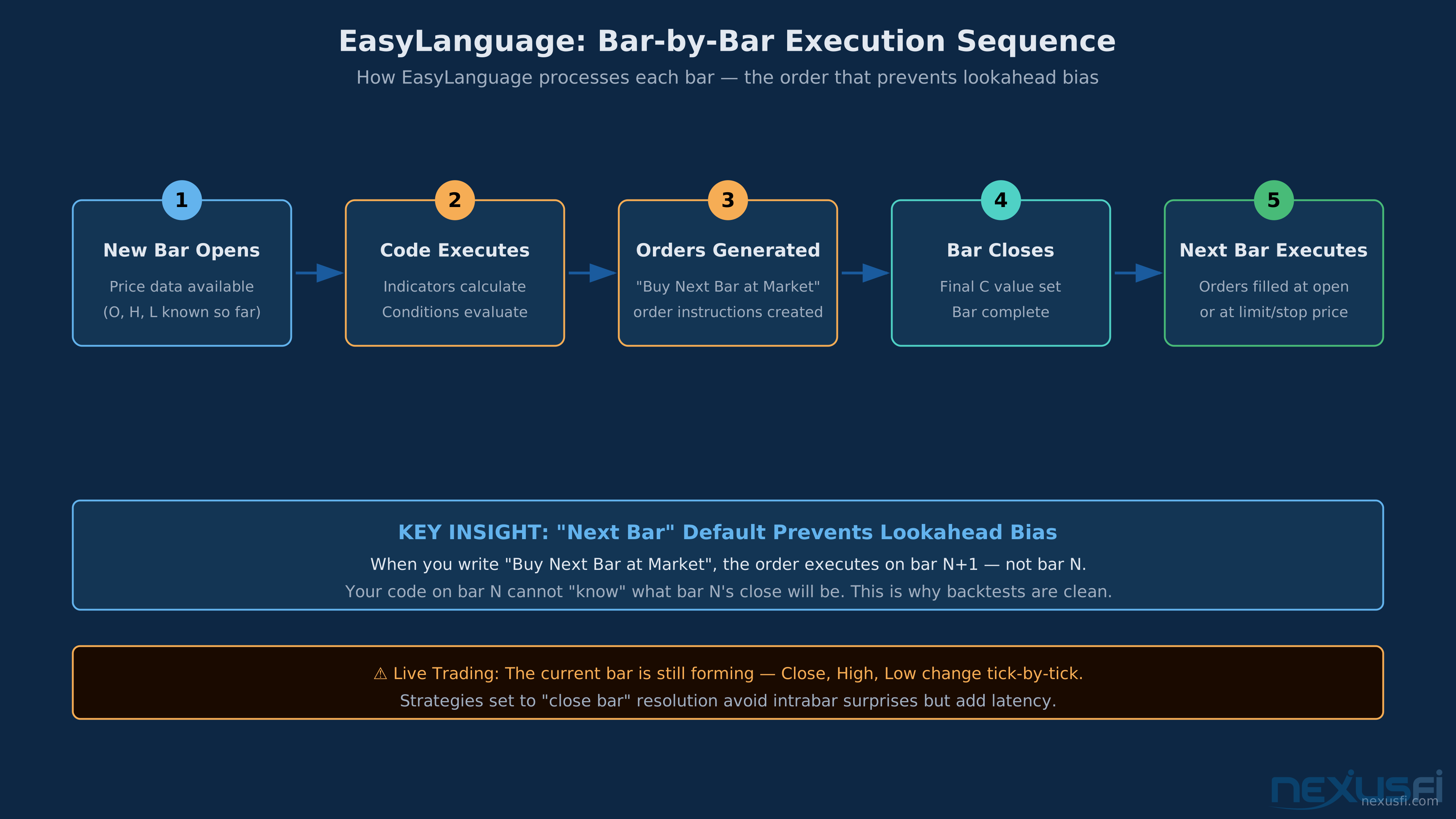
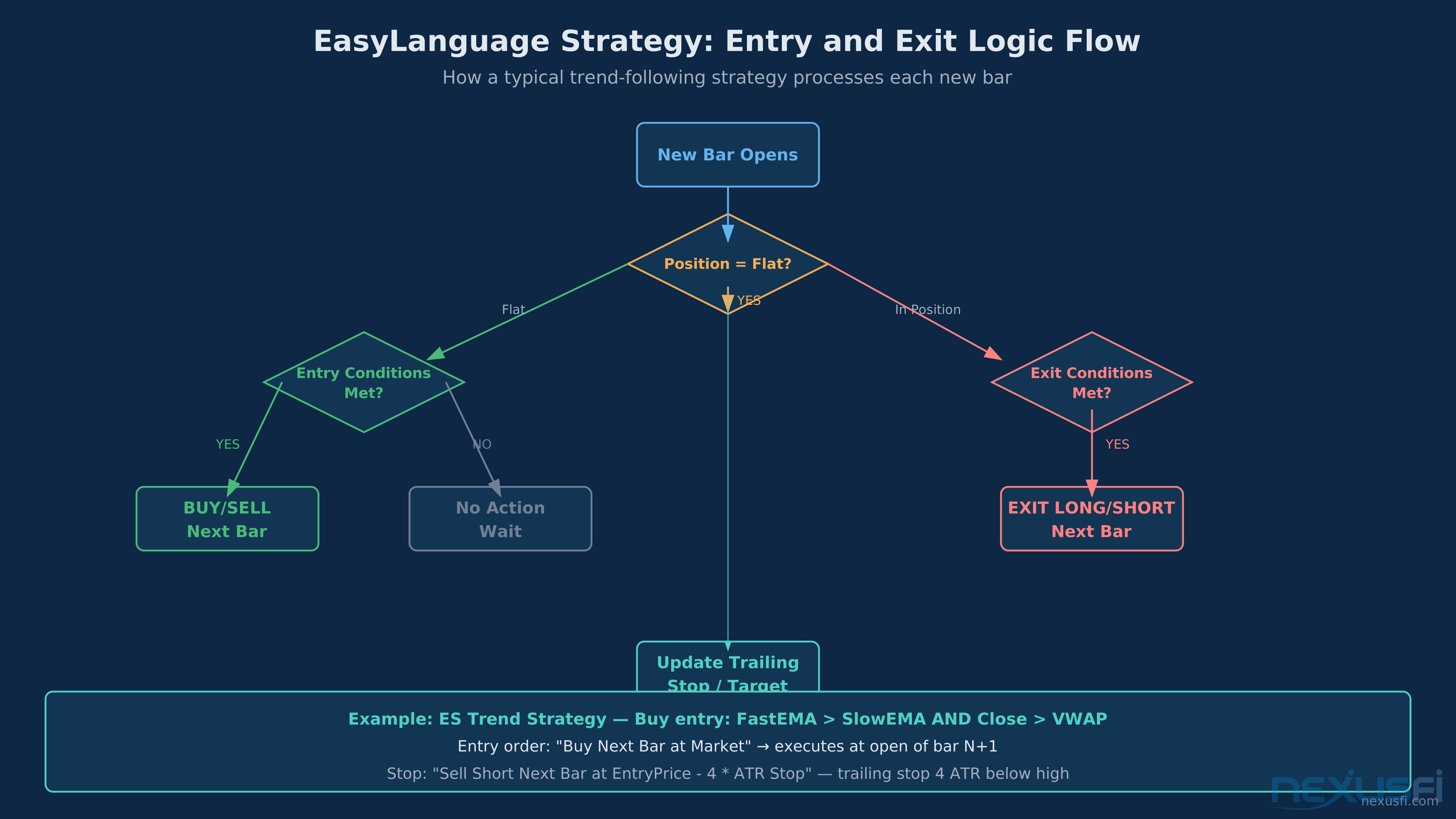
EasyLanguage processes your code once per bar in sequence. New bar opens → code runs → orders generated → bar closes → orders execute on next bar. This "next bar" default is what makes backtesting reliable.
Before writing a single line of code, you need to understand how EasyLanguage actually runs. Getting this wrong leads to strategies that look good in backtesting and fall apart live — one of the most common failures in systematic futures trading.
Bar-by-bar evaluation is the fundamental model. EasyLanguage processes your code once per bar, in sequence from left to right on the chart. At each bar, your code calculates values, evaluates conditions, and generates order instructions. The engine then processes those orders based on the bar's data.
This creates a specific execution sequence:
1. New bar opens
2. Your code runs with access to the current bar's data
3. Conditions are evaluated
4. Orders are generated for next bar (by default)
5. Next bar executes those orders at open, at a limit, or on a stop
The "next bar" default is critical. When you write Buy Next Bar at Market, the order doesn't execute on the current bar — it executes when the next bar opens. This is what prevents lookahead bias: your code can't "know" what the close will be before the bar closes.
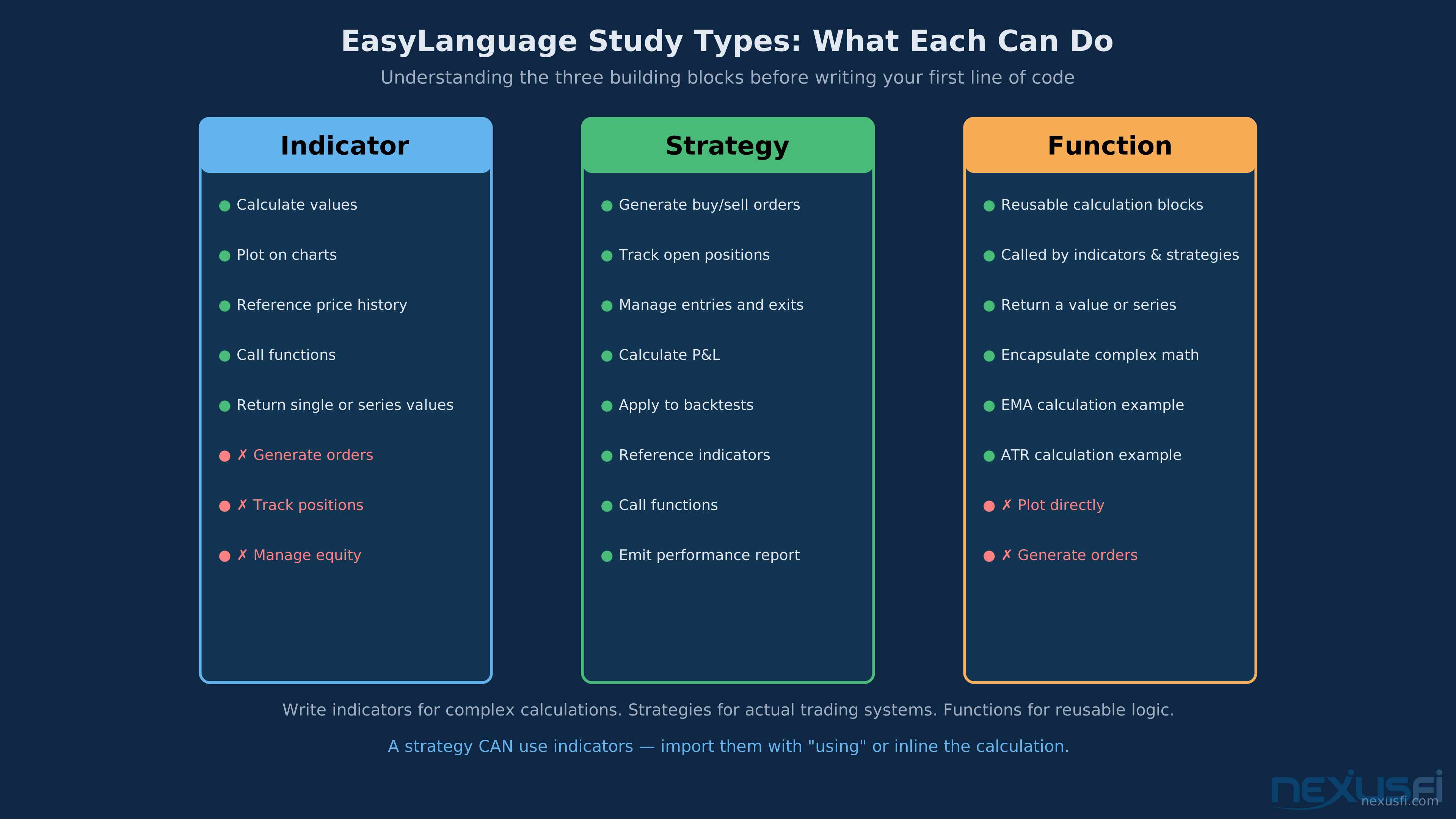
Study types determine what your code can do:
- Indicators: Calculate and plot values. No order generation. Examples: your custom ATR calculation, a session VWAP, a regime filter.
- Strategies: Generate orders, track positions, manage exits. This is where your trading system lives.
- Functions: Reusable calculation blocks that indicators and strategies call. Write once, use everywhere.
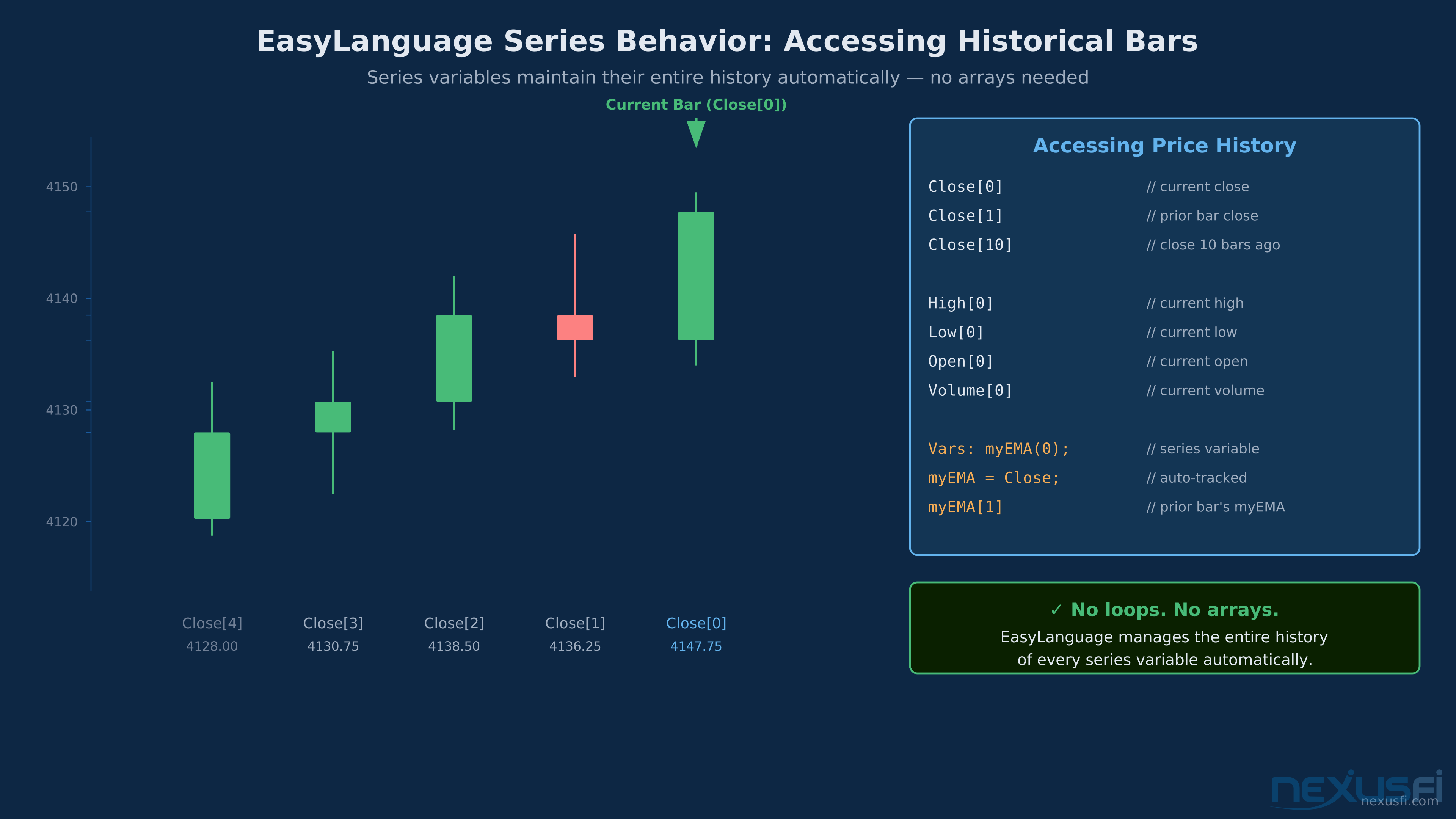
Every EasyLanguage variable declared as a series maintains its full history automatically. Close[0] is current bar, Close[1] is previous bar, Close[10] is 10 bars ago -- no loops or arrays needed.
Series behavior is what makes EasyLanguage feel natural for traders. Every variable declared as a series maintains its entire history automatically. You access prior bars with bracket notation:
``
Close[0] { current close }
Close[1] { prior bar's close }
Close[10] { close 10 bars ago }
`
No manual arrays. No looping through history. The platform handles it. This is what the council consensus called EasyLanguage's core advantage — it maps directly to how traders think about price history.

State persistence works differently from most programming languages. Variables declared with
Vars: maintain their value from bar to bar unless you explicitly update them. A trailing stop tracking variable doesn't reset at each bar — it holds its value until your code changes it. This enables complex trade management without tangled logic.
Real-time vs. historical behavior is where most beginners get burned. In backtesting, each bar has its final OHLCV values. In live trading, the current bar is still forming — close, high, low are all changing tick by tick. A condition that evaluates on the closing price of a bar needs to wait until that bar closes. Strategies set to "close bar" resolution avoid most intrabar surprises, but come with latency.
---
Academy content is Copyright NexusFi® and may ONLY be used with a discrete citation specifically linking to the original article at https://nexusfi.com/a/automation/tradestation-easylanguage-futures-trading
Futures Data Handling: Sessions, Contracts, and Multi-Data #
Futures are session-driven instruments. Getting data handling right separates strategies that work from strategies that have invisible bugs.
Session boundaries are where futures diverge from equities most sharply. A TradeStation 5-minute bar chart of ES can span multiple sessions — RTH (09:30-16:00 ET), Globex (the overnight 18:00-09:30), and settlement. Your strategy needs to know which session it's in.
The TimeSessionStart and TimeSessionEnd functions return the current session's boundary times. For ES trading, a typical session filter:
`
if Time >= 0930 and Time < 1600 then begin
  { RTH-only logic here }
end;
`
Don't hard-code these times for production code. Use inputs so you can adjust without recompiling. For non-US instruments (DAX, CL), session times differ and your strategy needs explicit parameterization.

Session resets are essential for any intraday state. Daily P&L tracking, trade count limits, opening range calculations — these all need to reset when a new session starts. The reliable approach uses a date-change detection:
`
vars: PriorDate(0), DailyPL(0), TradeCount(0);

if Date <> PriorDate then begin
  PriorDate = Date;
  DailyPL = 0;
  TradeCount = 0;
end;
`
Contract continuity is the quiet killer of futures backtests. When you backtest ES over five years, you're actually looking at quarterly contract rollovers. How TradeStation handles those rollovers matters enormously. The default continuous contract adjusts prices backward to eliminate roll gaps, but the adjustment method (ratio vs. point-based) changes your price history and can make moving average calculations meaningless.

Check your data settings carefully. For strategies using price levels or percentage-based calculations, understand whether your data is adjusted and how. For strategies using price differences (momentum, rate-of-change), the adjustment method matters less.

Tick size and point value must be wired into every calculation. On ES, one tick is 0.25 points and worth $12.50. On NQ, one tick is 0.25 points but worth $5.00. On CL, one tick is $0.01 per barrel — a $10 move per contract. Hardcoding these is a maintenance nightmare. Use:
`
TickSize = MinMove / PriceScale;
TickValue = BigPointValue * TickSize;
`
These built-in functions pull the correct values from the contract specification, so your strategy doesn't break when you apply it to a different instrument.

Multi-data and multi-timeframe analysis is one of EasyLanguage's legitimately powerful features. You can load a secondary data series into the same chart and reference it in your code. A common pattern for futures traders: use a higher-timeframe trend filter on Data2 while executing entries on Data1.
`
inputs: HTFLength(20);
vars: HTFTrend(0);

{ Data2 is the higher timeframe chart loaded via chart settings }
{ Reference it with [Data2] bracket }
HTFTrend = Close of Data2 - Close[HTFLength] of Data2;

if HTFTrend > 0 then
  { Only look for longs }
`
The alignment issue to watch: Data2 bars don't synchronize perfectly with Data1 bars unless you handle the timing carefully. In backtesting, Data2 "knows" more than it should at any given Data1 bar. Building strong HTF filters requires testing to confirm there's no lookahead from Data2 bar timing.

---
Academy content is Copyright NexusFi® and may ONLY be used with a discrete citation specifically linking to the original article at https://nexusfi.com/a/automation/tradestation-easylanguage-futures-trading
Three distinct building blocks. Indicators calculate values and plot them -- no orders. Strategies generate orders and track positions. Functions are reusable calculation blocks called by both.
An indicator in EasyLanguage calculates values and plots them on the chart. No orders. No position tracking. Just math on bars.
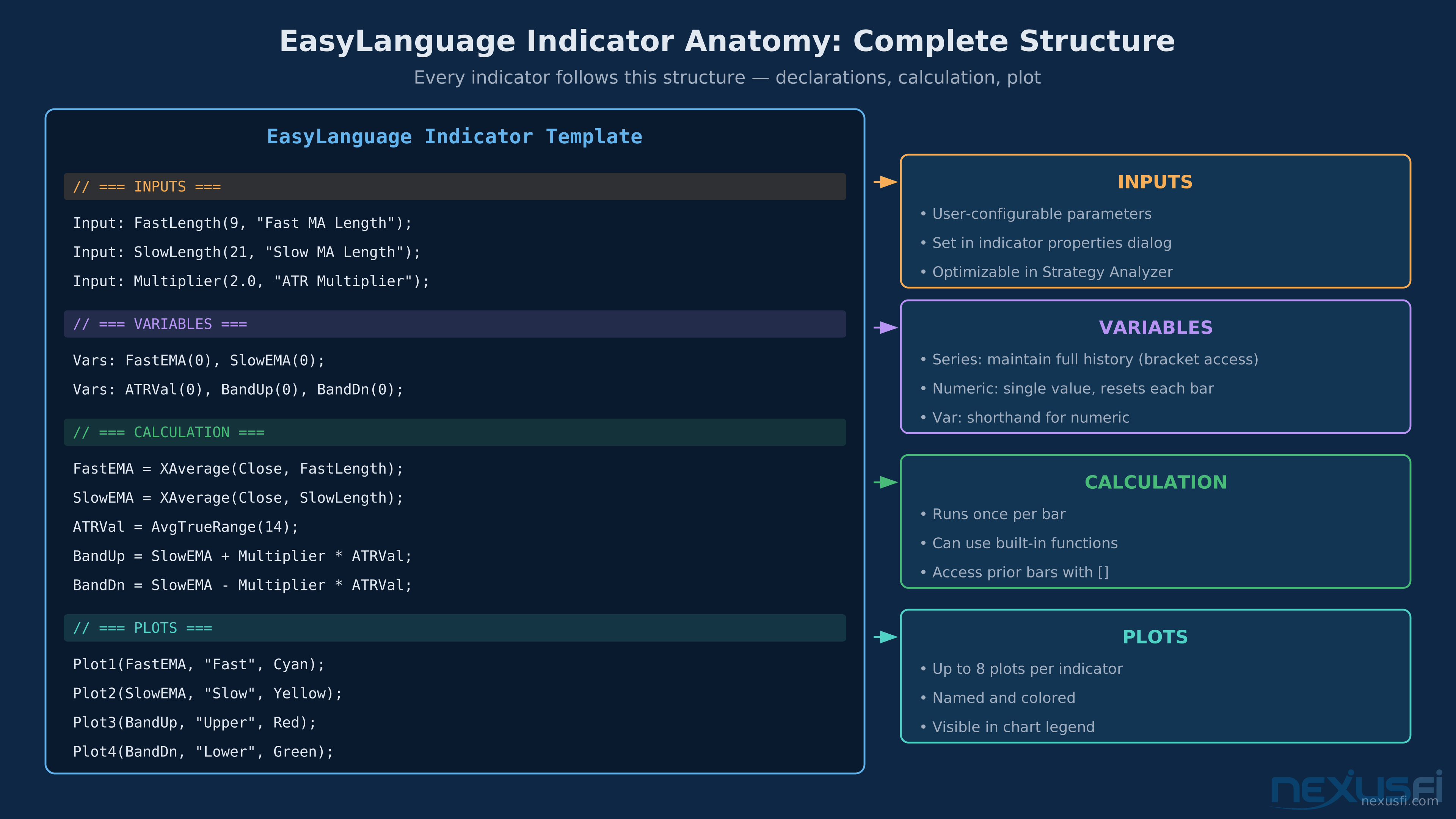
The structure is minimal:
`
{ ATR-based volatility indicator }
inputs: ATRLength(14), Multiplier(2.0);
vars: ATRValue(0), UpperBand(0), LowerBand(0);

ATRValue = Average(TrueRange, ATRLength);
UpperBand = High + (ATRValue * Multiplier);
LowerBand = Low - (ATRValue * Multiplier);

Plot1(ATRValue, "ATR");
Plot2(UpperBand, "Upper");
Plot3(LowerBand, "Lower");
`Every indicator has four sections. Inputs are user-configurable parameters. Variables store calculation state. Calculation computes your values per bar. Plots render results on the chart.
For futures, the most useful indicators to build as custom components:
Session range indicators track the opening range, prior session high/low, and value area boundaries. These are reference levels your strategy needs access to throughout the session.
Volatility-normalized indicators use ATR or a similar measure to adapt to changing market conditions. An ES strategy that works in low-volatility periods often fails in high-volatility ones if stops and targets are fixed in ticks rather than scaled to current ATR.
Regime classifiers classify market regimes — trending, ranging, or volatility expansion. A simple ADX-based regime filter:
`
inputs: ADXLength(14), TrendThreshold(25);
vars: ADXValue(0);

ADXValue = ADX(ADXLength);
Plot1(ADXValue, "ADX");
Plot2(TrendThreshold, "Threshold");
`
Your strategy then uses this indicator's output to decide which mode to operate in.

Lookahead prevention is the critical discipline in indicator writing. EasyLanguage's bar-by-bar model makes it easy to accidentally reference data that wouldn't have been available at the time. The most common violation: using the current bar's closing price as input to a trigger condition. A close-based crossover can't actually execute at close — the next bar at market is the earliest you can act on it.

Test your indicators by looking at the rightmost bar while a chart is live. The values should not change as the bar forms — if they do, you have a repainting issue.

---
Academy content is Copyright NexusFi® and may ONLY be used with a discrete citation specifically linking to the original article at https://nexusfi.com/a/automation/tradestation-easylanguage-futures-trading
Writing Strategies: Entries, Exits, and Trade Management #
A strategy evaluates position state first, then branches to entry or exit logic. Orders generated on bar N execute on bar N+1. This flow repeats for every bar in the backtest and live trading.
Strategies are where EasyLanguage earns its reputation. The order placement syntax is clean and direct.
Order primitives:
`
Buy N Contracts Next Bar at Market;         { Long market entry }
SellShort N Contracts Next Bar at Market;   { Short market entry }
Sell N Contracts Next Bar at Market;        { Long exit }
BuyToCover N Contracts Next Bar at Market;  { Short exit }

Buy N Contracts Next Bar at Price Limit;    { Limit entry }
Buy N Contracts Next Bar at Price Stop;     { Stop entry }
`
The "Next Bar" qualifier is the default and should almost always be used. It prevents lookahead execution by ensuring the order can only fill on a bar that opens after the signal is generated.

Position state tracking uses built-in variables:
`
MarketPosition    { 1=long, -1=short, 0=flat }
EntryPrice        { average entry price of current position }
CurrentContracts  { number of contracts in current position }
BarsSinceEntry    { bars elapsed since entry }
PositionProfit    { current open trade P&L in points }
`
A complete trade management block for an ES strategy:
`
inputs:
StopTicks(12), { Initial stop in ticks }
Target1Ticks(16), { First target }
Target2Ticks(32), { Second target }
BreakevenTrigger(8), { Move stop to entry after this many ticks profit }
Sell All Contracts Next Bar at (EntryPrice - StopSize) Stop;
{ First target }
Sell 1 Contract Next Bar at (EntryPrice + T1Size) Limit;
{ Second target }
if CurrentContracts < 2 then
Sell 1 Contract Next Bar at (EntryPrice + T2Size) Limit;
{ Breakeven adjustment after partial fill }
if PositionProfit >= (BreakevenTrigger * TickSize) and CurrentContracts = 1 then
Sell All Contracts Next Bar at EntryPrice Stop;
end;
`
This code shows the critical patterns: tick-normalized stops and targets, daily loss limits, partial exit management, and breakeven protection.

Intra-bar order generation (IOG) is a feature that allows strategies to react to price movement within a bar rather than waiting for bar close. For futures traders, this matters for stop and limit order simulation accuracy. With IOG enabled, if ES moves from 5,900.00 to 5,887.75 intrabar, your 5,892.50 stop actually fires during that bar rather than waiting for the next bar's open.

IOG has a significant cost in backtesting speed and introduces additional assumptions about fill order. @kevinkdog has noted that using
SetPercentTrailing without tick data and IOG "totally invalidates the results" — the trailing stop calculates against bar close data and ignores the intrabar path the stop would have followed in reality.
Tip
The IOG tradeoff: Enable IOG for any strategy using intrabar stops, trailing stops, or limit orders that need accurate fill modeling. The performance hit (2-5x slower backtesting) is worth it. Without IOG, your stop management results are fiction.
Multiple strategies on one instrument is something EasyLanguage handles differently than many traders expect.
“With futures like NQ, in Tradestation you CAN automate strategy A in Chart 1, and strategy B in chart 2. This works really well in Tradestation 10.0.”
The key is that TradeStation treats each chart window's strategy independently for futures, so the equity curves add and the combined drawdowns are reduced when strategies are uncorrelated.
The Global Variables approach he describes allows strategies to communicate — one chart can signal another, enabling portfolio-level logic without being limited to single-strategy automation.
---
Academy content is Copyright NexusFi® and may ONLY be used with a discrete citation specifically linking to the original article at https://nexusfi.com/a/automation/tradestation-easylanguage-futures-trading
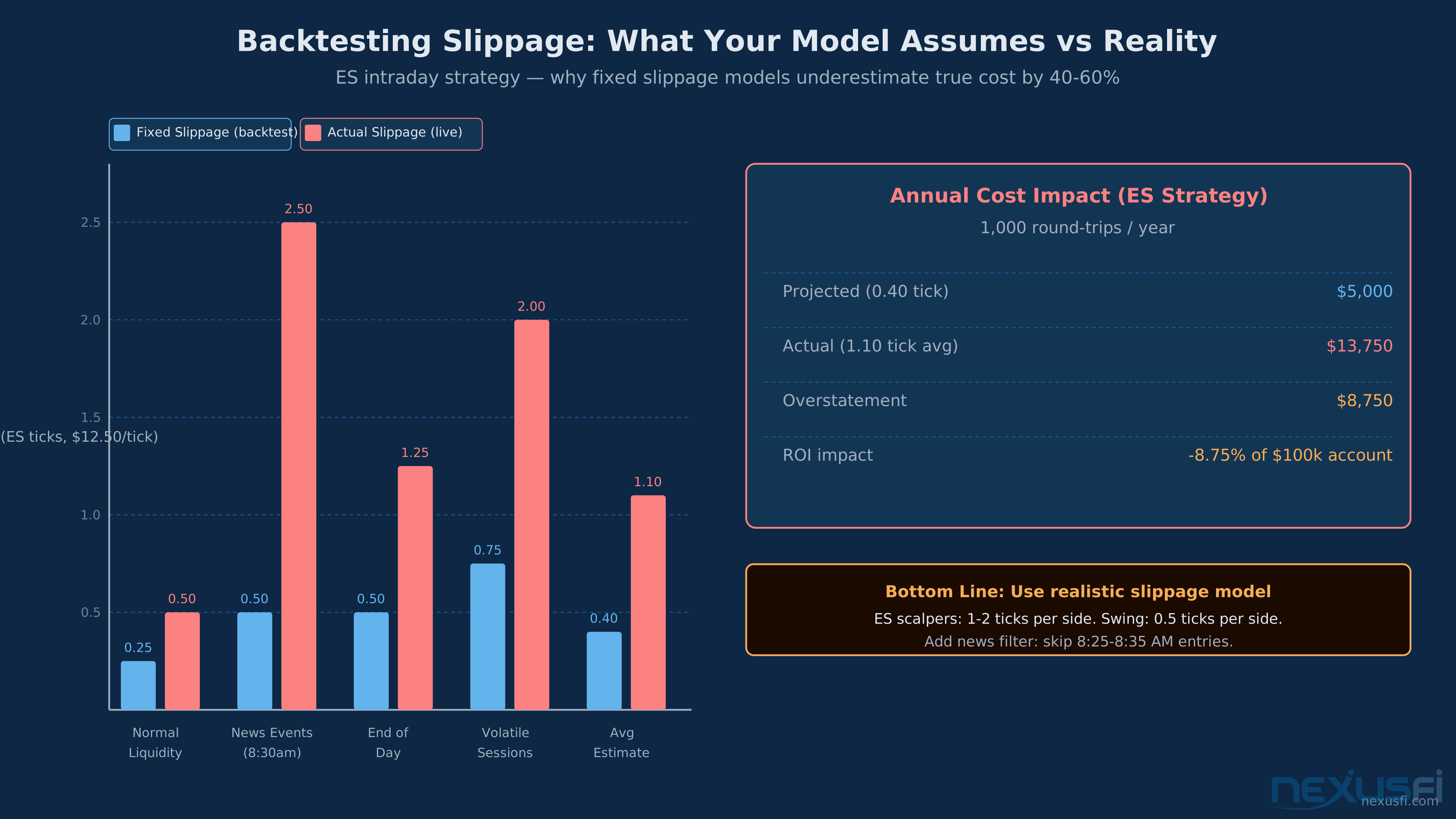
Fixed slippage models assume 0.40 ticks per side. Actual ES slippage averages 1.10 ticks -- 175% higher. News events hit 2.50 ticks. A 0k strategy loses ,750/year to this modeling gap.
This is the section that separates strategies that survive deployment from strategies that look great in the report and die in the first week live. Futures backtesting has specific failure modes that equity backtesting doesn't, and getting them wrong produces results that aren't worth the paper they're printed on.
Commission and slippage are the first gatekeepers. In the Strategy Performance Report settings, you set commission per trade and slippage in ticks. For ES:
- Commission: $3.50-$5.00 per contract round-turn is realistic for retail. Adjust for your broker.
- Slippage: For market orders, 1-2 ticks per side (2-4 ticks round-turn) is a reasonable baseline on liquid contracts. More in fast markets.
@kevinkdog reviewing a Euro futures strategy noted: "5 euro per side for slippage is also way too low. Real life slippage will gobble up a lot of your 32 euro avg profit per trade." If the average profit per trade is less than 3-4x the round-turn slippage estimate, the strategy likely doesn't survive realistic execution costs.
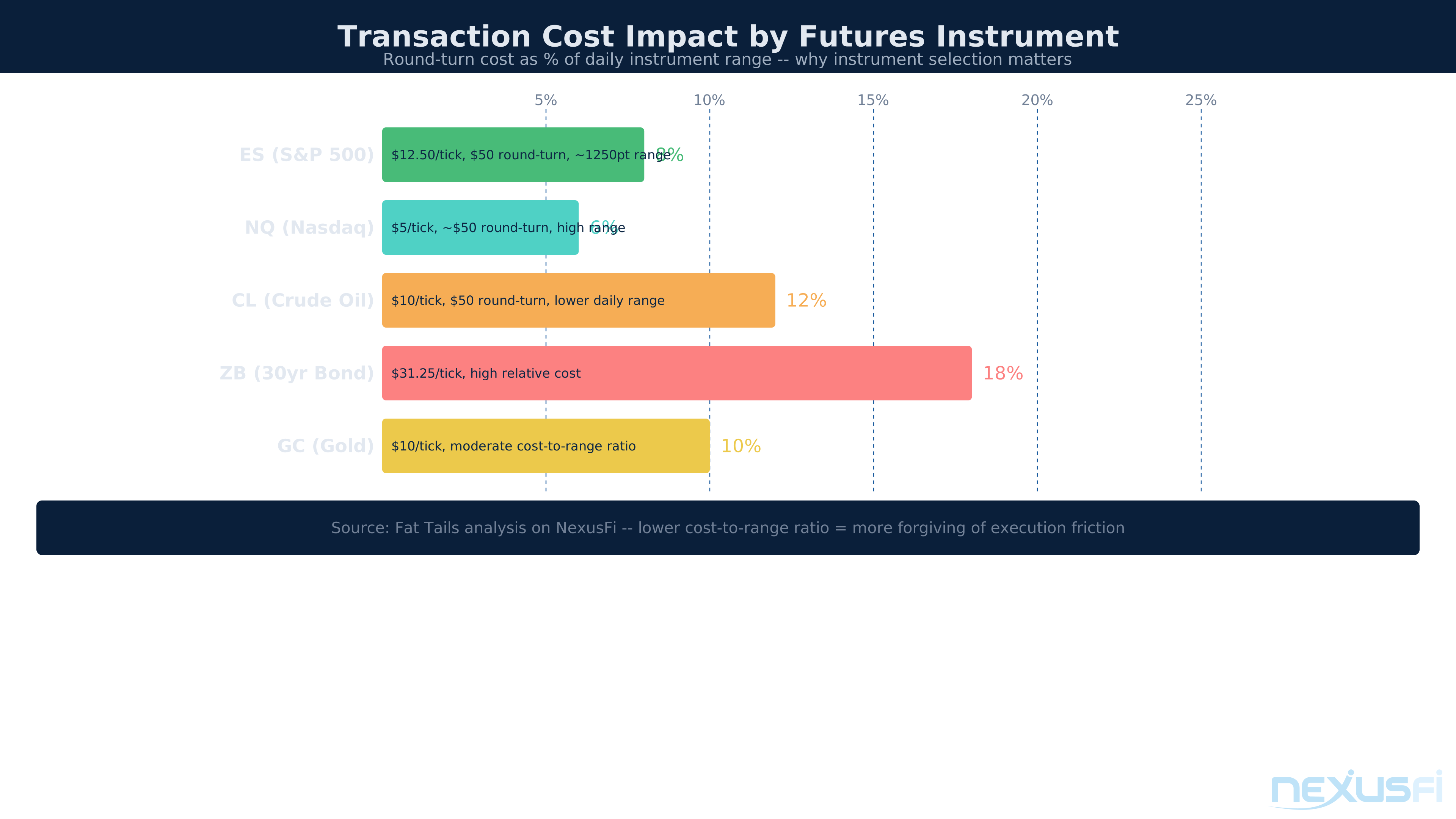
@Fat Tails ran a systematic analysis of transaction cost impact across multiple futures contracts, finding: "It is very difficult to produce consistent profit, if you trade shorter time horizons than 15 minutes. Even if you keep your position typically between 15 minutes and some hours, not all of the instruments are suited." His analysis showed CL has the lowest transaction cost burden relative to its range, while instruments like ZB require disciplined limit-order entry to stay profitable.
Average trade size is the most important single number in your performance report. Take the net profit and divide by number of trades. Now subtract your round-turn commission and slippage estimate. If the result is negative or close to zero, the strategy doesn't trade — it just moves money from your account to the broker and exchange.
For an intraday ES strategy with 1-tick slippage per side ($12.50) and $4.00 commission, round-turn cost is about $29.00 per trade. Any strategy averaging less than $75-$100 per trade net profit is living dangerously close to the line.
The Bar Magnifier is TradeStation's mechanism for simulating intrabar order execution on bar-data strategies. When enabled, it uses tick data to determine when intrabar orders (stops, limits) would have been filled during the bar. This dramatically improves backtest accuracy for strategies with intrabar exit logic.
The practical implication: a strategy tested without Bar Magnifier and tick data will show different results than one tested with it. The difference is usually unfavorable — Bar Magnifier catches cases where your stop was hit before your target, whereas bar-data-only testing assumes a best-case fill sequence.
Lookahead bias prevention checklist:
- Never reference Close in a condition that triggers an entry on the current bar. Use Close[1] for confirmed signals.
- Be careful with indicator inputs. If your indicator uses Close as input and you're checking it against a condition if Indicator > X then Buy This Bar at Close, you've created perfect future knowledge.
- Overnight gaps distort any strategy that tries to enter or exit at a specific price when the market opens far away from that price.
- Volume-based conditions in live trading will differ from backtesting if volume data accumulates across sessions differently than your historical data format.
Key performance metrics for futures (not equities):
| Metric | Target | Why It Matters |
|--------|--------|----------------|
| Average Trade Net Profit | > 3x round-turn cost | Survival threshold |
| Profit Factor | > 1.5 | Edge confirmation |
| Maximum Drawdown | < 20% of account | Psychological survivability |
| Win Rate + Payoff Ratio | Positive expectancy required | Either high win rate or high R:R |
| Max Consecutive Losses | Know the distribution | Position sizing calibration |
| Percent Time in Market | Lower = better (for intraday) | Less overnight/weekend exposure |
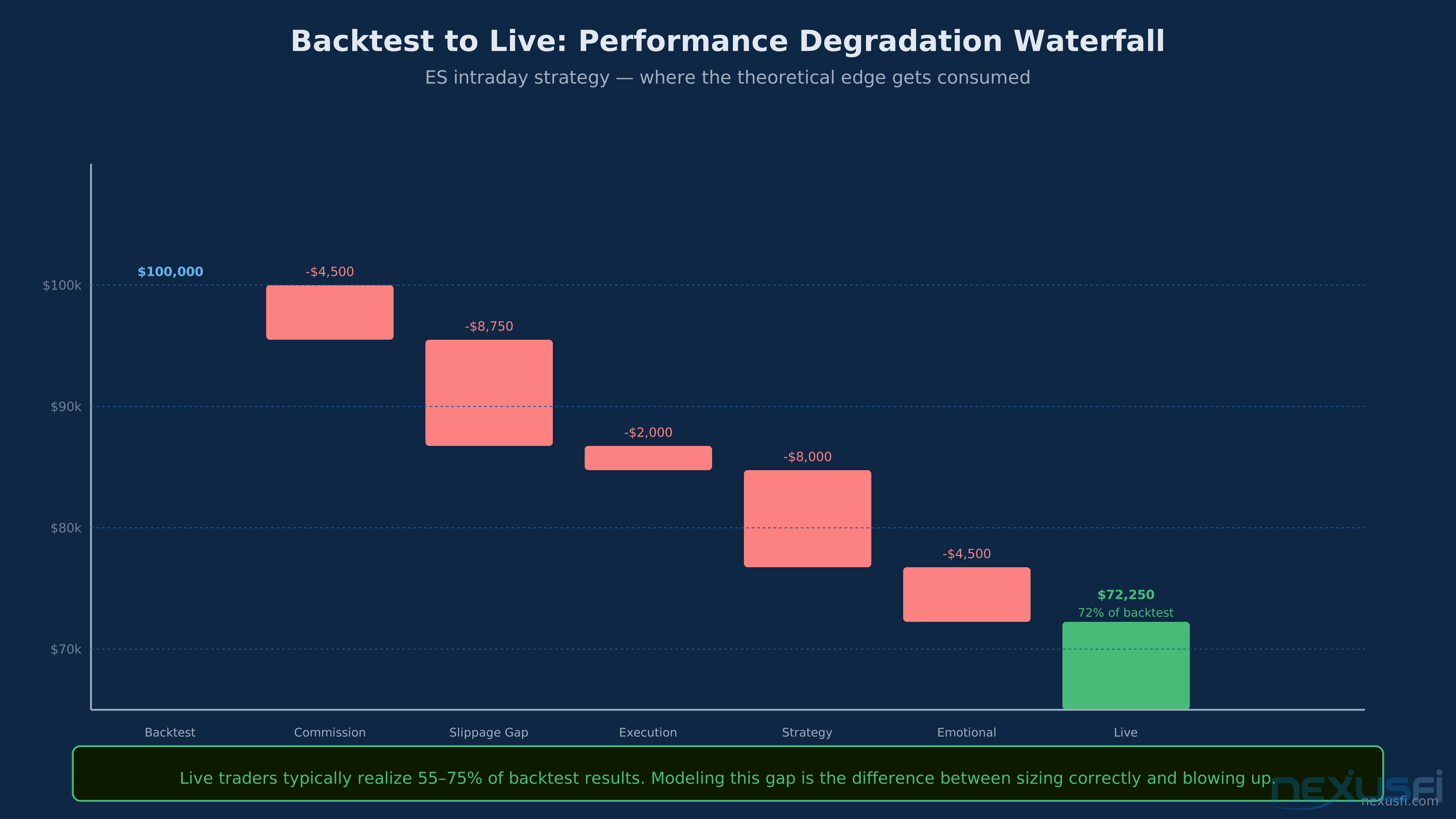
Expect 55-75% of backtest performance in live trading. Commission, slippage gaps, latency, strategy decay, and execution errors each take a piece. Sizing your live strategy against the degraded number, not the backtest, prevents blowup.
Key Insight
The 10:1 backtest-to-live ratio: Every edge that looks 10 units large in backtesting should be assumed to be 1 unit large in live trading. The combination of overfitting, regime change, execution friction, and data artifacts typically consumes 80-90% of a backtested edge. Build strategies where even 1/10th of the backtest edge is worth trading.
---
Academy content is Copyright NexusFi® and may ONLY be used with a discrete citation specifically linking to the original article at https://nexusfi.com/a/automation/tradestation-easylanguage-futures-trading
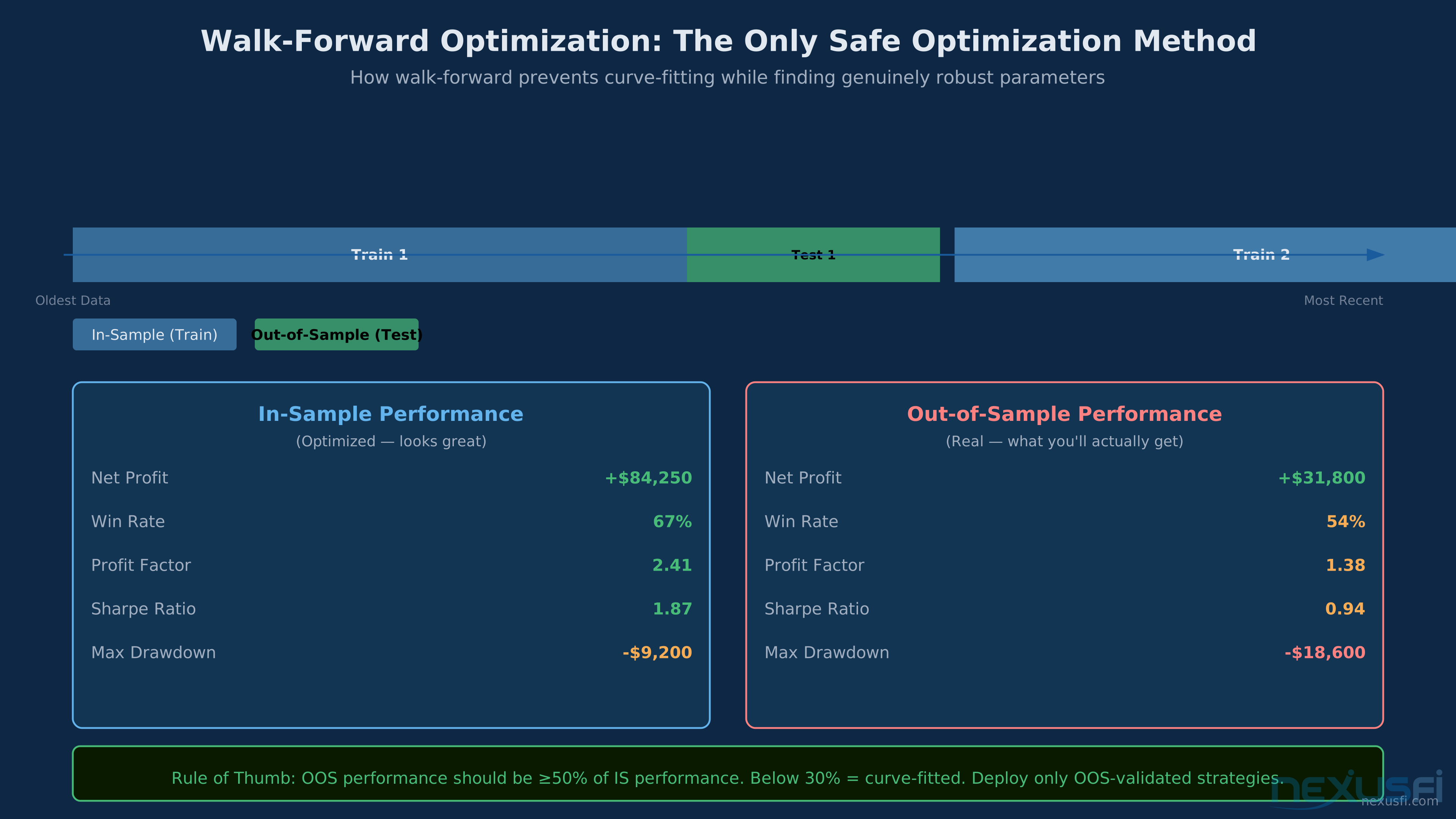
Walk-forward divides history into rolling train/test windows. Parameters are optimized on in-sample data, then validated on out-of-sample data -- revealing whether the edge is real or curve-fitted.
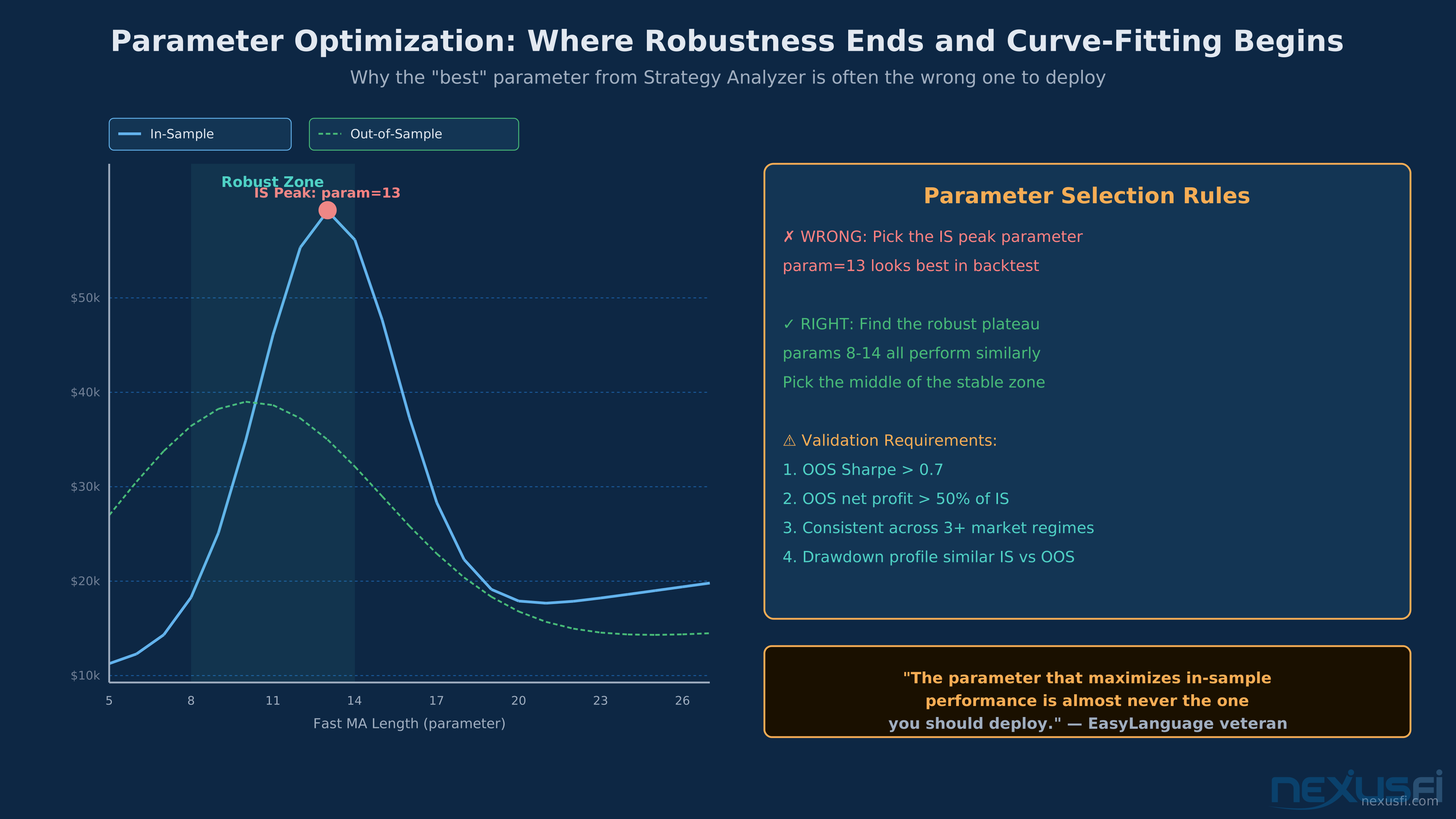
Parameter optimization is where most EasyLanguage traders do the most damage to their results. Done wrong, it produces strategies that are perfectly fitted to the test period and useless going forward — textbook overfitting. Done right, it finds parameter regions that are strong across regimes.
Walk-forward optimization (WFO) is the standard validation framework. The concept: divide your historical data into multiple in-sample/out-of-sample periods, improve on each in-sample segment, test the resulting parameters on the corresponding out-of-sample segment. If the strategy performs consistently across all out-of-sample segments, you have evidence of robustness.
TradeStation's WFO tool implements this directly. @vmodus describes the setup: "Improve some of the input parameters to a strategy, selecting Walk-Forward as the 'Type'; there must be at least 10,000 combinations (tests) for the WFO to work. Run the optimization and wait for it to finish. If the results look good, open the WFO tool, load the optimization file, run the cluster analysis."
The 10,000-combination minimum matters because WFO with too few combinations produces statistically meaningless results. With a large enough optimization space, the cluster analysis can identify parameter regions that performed consistently versus parameter values that happened to work by chance.
Cluster analysis is the output of WFO that traders actually use. Instead of selecting the single best parameter set, cluster analysis identifies groups of parameter values that performed consistently well. If many nearby parameter combinations work, the strategy has genuine robustness in that region. If only one narrow spike worked, it's data-mining noise.
@kevinkdog's perspective on WFO validity: "Not really out of sample anymore — it is some conglomeration of out of sample and curve fitted results" when you start selecting the best combination from multiple in/out period configurations. The trap is using WFO itself as another optimization step rather than treating each out-of-sample period as genuinely unseen data.
Parameter space design matters as much as the optimization method. Rules for setting up optimization inputs:
- Set ranges that span realistic market behavior, not just what looks good on this dataset
- Use step sizes that match instrument tick size for price-based parameters (stops/targets in tick multiples)
- Separate signal parameters from risk parameters. A 20-period vs 22-period EMA is a signal question. A 12-tick vs 14-tick stop is a risk question. Never co-improve them — they answer different questions.
- Test parameters in pairs when they interact (e.g., a fast/slow MA crossover — scan the ratio, not just individual values)
Monte Carlo simulation is the final filter before live deployment. By randomizing the order of historical trades and running thousands of simulations, you get a distribution of possible equity curves. The 5th percentile of that distribution — the worst realistic outcome — is your actual downside scenario, not the single historical path.
For futures strategies, target a Monte Carlo 5th percentile that still shows positive expectancy with full transaction costs. If the worst-case simulation produces a drawdown that would blow out a realistic account before recovering, the position sizing or the strategy itself needs adjustment.
The in-sample peak at parameter 13 is a trap -- curve-fitted to historical noise. The out-of-sample line reveals the robust plateau between 8-14. Choosing the plateau midpoint beats chasing the IS peak every time.
Out-of-sample discipline is the most important and most violated rule. Hold back at least 20-30% of your historical data before starting any optimization. Treat this reserved data as genuinely unseen. Run your final parameters against it exactly once. If it fails, the strategy is not forward-ready regardless of in-sample results.
---
Academy content is Copyright NexusFi® and may ONLY be used with a discrete citation specifically linking to the original article at https://nexusfi.com/a/automation/tradestation-easylanguage-futures-trading
EasyLanguage vs. NinjaScript: The Honest Comparison #
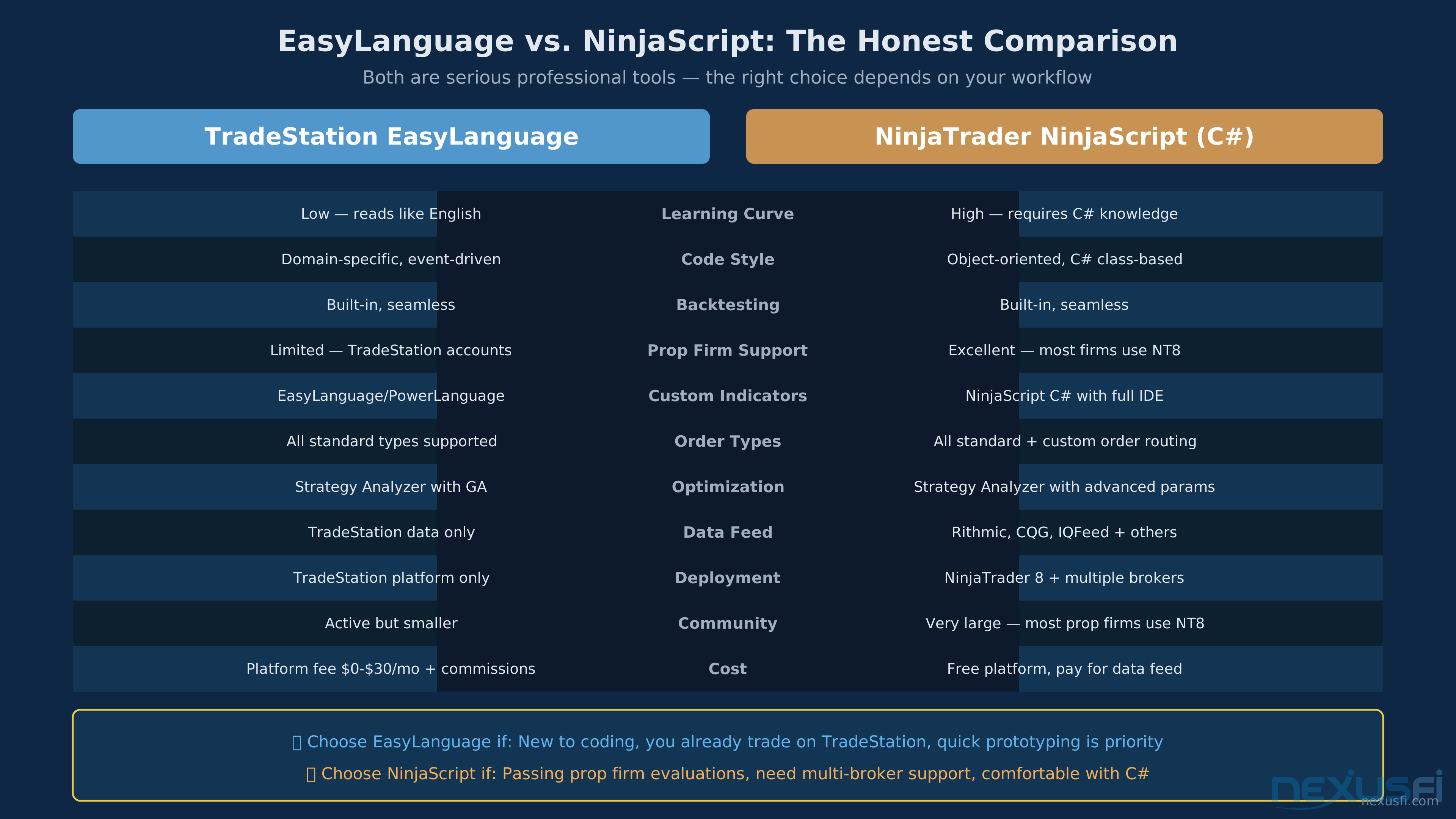
Both platforms have decades of real-world deployment in futures automation. The right choice depends on what you're building, not which platform has more features.
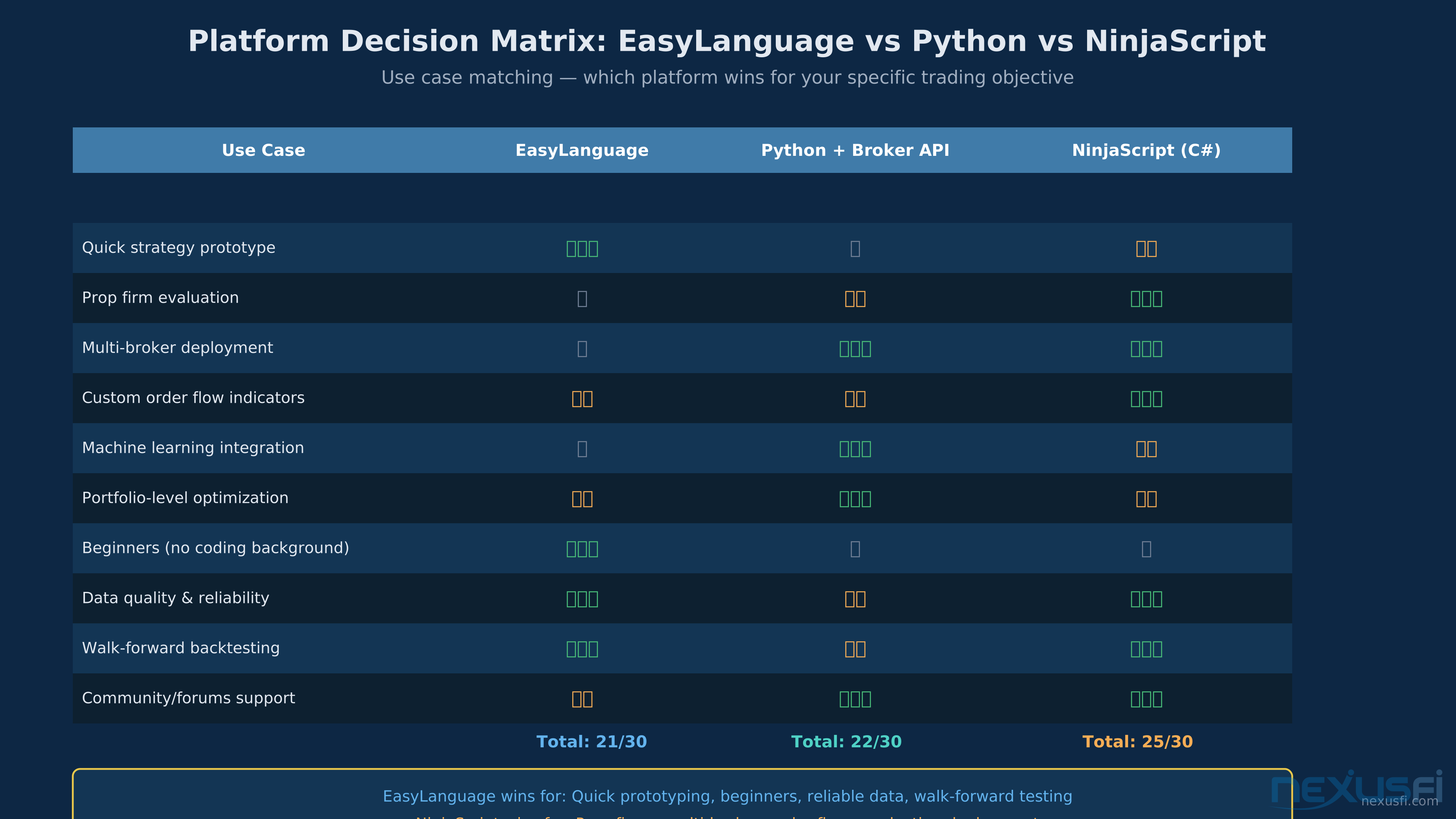
EasyLanguage wins on ease of learning, quick prototyping, and data reliability. NinjaScript wins on prop firm support, multi-broker deployment, and production-grade order flow tools.
EasyLanguage strengths:
- Faster idea-to-test cycle. The time-series-centric model maps directly to trading logic. Less boilerplate, fewer intermediate abstractions.
- Built-in workflow integration. Charting, scripting, backtesting, and optimization in the same environment. You don't manage data pipelines between tools.
- Legacy code base. Thirty years of community strategies and indicators. If you're implementing a published systematic methodology, someone has probably already written it in EasyLanguage.
- Bar-based prototyping is genuinely natural. Most futures discretionary strategies translate to EasyLanguage more directly than to C#.
NinjaScript strengths:
- Full C# power. Complex object-oriented architectures, external library integration, custom order routing, machine learning pipeline connections.
- Event-driven model. OnBarUpdate, OnOrderUpdate, OnMarketDepth` — each event type has its own handler. More complex to write, but more precise about when code runs.
- No ceiling on engineering complexity. When EasyLanguage becomes a constraint, NinjaScript can grow with you.
The practical boundary: If your strategy logic fits in 500 lines of EasyLanguage and the research workflow is the bottleneck — use EasyLanguage. If your strategy requires order book data, custom execution logic, multi-account management, or integration with external systems — NinjaScript or a full-stack broker API is the better foundation.
@Big Mike's community example shows EasyLanguage scaling to sophisticated multi-contract management with breakeven stops, multiple targets, and position tracking — all within standard EasyLanguage constructs. Most intraday futures strategies never need to go beyond what this framework enables.
---
Academy content is Copyright NexusFi® and may ONLY be used with a discrete citation specifically linking to the original article at https://nexusfi.com/a/automation/tradestation-easylanguage-futures-trading
Slippage Reality Check: What Backtests Don't Show You #
The gap between backtested performance and live performance is real, persistent, and predictable. Understanding it before deployment protects capital.
Transaction cost analysis showing instrument selection matters for algo traders. ES and NQ offer lower cost-to-range ratios than CL or ZB, giving strategies more breathing room. Source: Fat Tails analysis on NexusFi.
Market orders during volatility are where the headline slippage assumptions break down. In a normal ES market, a market order fills within 0.25-1.25 points of the stated price. In fast-moving conditions — CPI prints, FOMC decisions, flash crashes — market order slippage can be 5-20 points on ES and proportionally more on less liquid contracts.
For strategies with stops at fixed tick values (e.g., 12-tick stop on ES = $150), a single 20-point slippage event on a stop hit costs more than a month of normal trading. This isn't theoretical. It happens in live markets.
Limit order non-fills are the opposite problem. A backtest assumes your limit order at 5,892.50 fills if price trades there. In reality, queue position matters. If your order is 1,000 contracts back in a queue at 5,892.50, and only 800 contracts trade through that price, you don't get filled. The backtest doesn't know this.
The practical solution: test strategies with both market-order and limit-order fill assumptions. If the strategy's edge disappears when you assume limit orders don't fill at the boundary price, you have fill-quality dependency that won't survive live trading.
Bid-ask spread impact compounds with trade frequency. On ES, the bid-ask is typically 0.25 points (1 tick). For a strategy trading 10 round-trips per day on one contract: 10 trades × $12.50 spread cost per side × 2 = $250/day purely from crossing the spread. Annual: $62,500 per contract against a typical ES backtest that shows $100,000/year before any friction. Half your edge, gone.
---
Academy content is Copyright NexusFi® and may ONLY be used with a discrete citation specifically linking to the original article at https://nexusfi.com/a/automation/tradestation-easylanguage-futures-trading
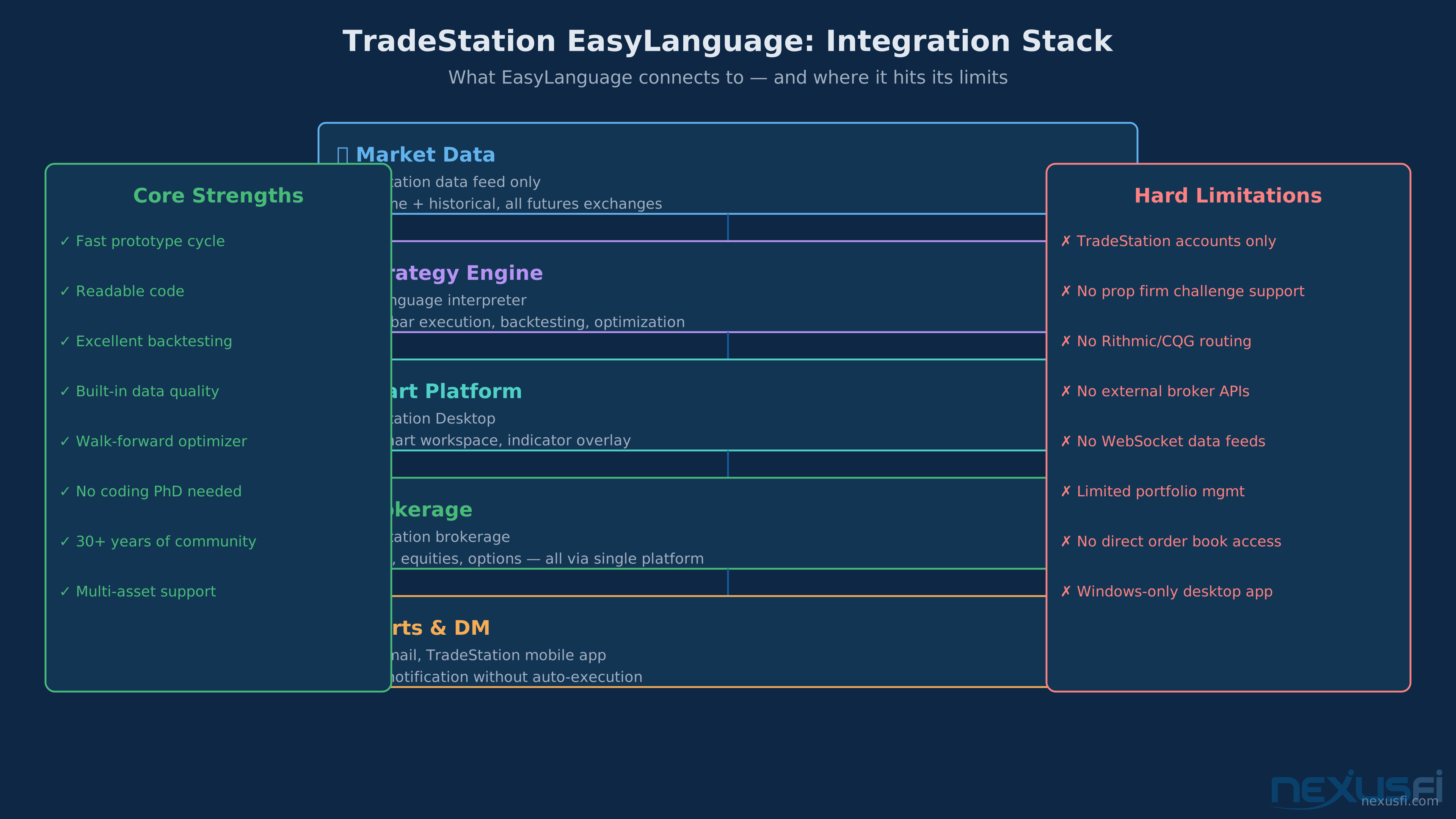
Understanding the limits prevents expensive mistakes.
EasyLanguage connects TradeStation data → strategy engine → chart platform → brokerage in a tight loop. No third-party brokers, no prop firm routing, no external data feeds. The tradeoff: zero integration complexity, zero flexibility.
EasyLanguage is not a real-time execution system in the sense of sub-second latency. Bar-close strategies have latency equal to your bar interval. Even tick-based strategies run through TradeStation's processing pipeline. If your strategy requires sub-millisecond execution or co-location advantages, EasyLanguage is not the tool.
EasyLanguage is not a portfolio management system. Each strategy runs independently on its chart. There's no native cross-strategy position netting, correlation-aware sizing, or account-level P&L monitoring. The Global Variables workaround (@kevinkdog's approach) adds cross-chart communication but requires careful engineering to remain reliable.
EasyLanguage is not a machine learning framework. You can call external DLLs (including Python-generated models), but the language itself has no native ML capabilities. Strategies that depend on dynamic feature selection, deep learning signal generation, or reinforcement learning approaches require external tooling connected via the DLL interface.
EasyLanguage is not a substitute for trading methodology. This is the most important limit. EasyLanguage implements your rules precisely. It can't tell you whether those rules have edge. A perfectly coded strategy on a poor edge will produce a perfectly coded losing strategy. The research discipline — what conditions justify a trade, why those conditions have edge — lives outside the code.
EasyLanguage scores best for quick prototyping, beginners, and backtesting reliability. NinjaScript dominates for prop firm evaluations and multi-broker deployment. Python wins on machine learning integration and portfolio optimization.
---
Academy content is Copyright NexusFi® and may ONLY be used with a discrete citation specifically linking to the original article at https://nexusfi.com/a/automation/tradestation-easylanguage-futures-trading
NexusFi Elite Members can help keep Academy articles accurate and comprehensive.
Your feedback goes directly to Fi for review and action.
Become an Elite Member to suggest improvements and help shape the trading knowledge base.
Unlock the Full NexusFi Academy
833 in-depth articles across 17 categories — written by traders, backed by community research. Includes knowledge maps, citations with community excerpts, and the ability to help improve articles.
Strategies (91)
Order Flow Analysis
Volume Profile Trading
plus 89 more
Market Structure (44)
Initial Balance: The First Hour That Defines Your Entire Trading Day
Volume Profile: Reading the Market's Structural Blueprint at Every Price Level
plus 42 more
Exchanges (44)
Futures Contract Rollover and Expiration: When, How, and What Can Go Wrong
plus 42 more
Concepts (44)
Renko Charts and Range Bars for Futures Trading: The Complete Guide
Point of Control (POC): The Complete Guide to Volume's Gravitational Center
plus 42 more
Indicators (56)
Delta Analysis & Cumulative Volume Delta (CVD)
Market Internals: Reading the Broad Market to Trade Index Futures