



5G and LTE Backup Internet for Futures Traders: Router Hardware, SIM Plans, and Failover Setup
Why Cellular Backup Is Non-Negotiable #
Your ISP will go down. Not maybe — will. Cable companies average 53 minutes of unplanned downtime per year. Fiber is better, but "better" isn't zero. When your connection dies at 9:31 AM with an open NQ position, the question isn't whether you had a backup. It's whether your backup actually worked.
Cellular internet — 4G LTE and now 5G — has become the standard failover solution for home-based futures traders. It's cheap, widely available, and fast enough for market data and order routing. But "available" and "actually works during a live-trade emergency" are different problems. Most traders set up cellular backup once and never test it. The router either fails over too slowly, the trading platform doesn't reconnect cleanly, or the cellular signal is weaker than expected under load.
This guide covers the complete setup: which routers handle failover correctly, which carrier plans perform during real market hours, what latency to actually expect from cellular, and how to validate everything before you need it.
How Cellular Failover Actually Works #
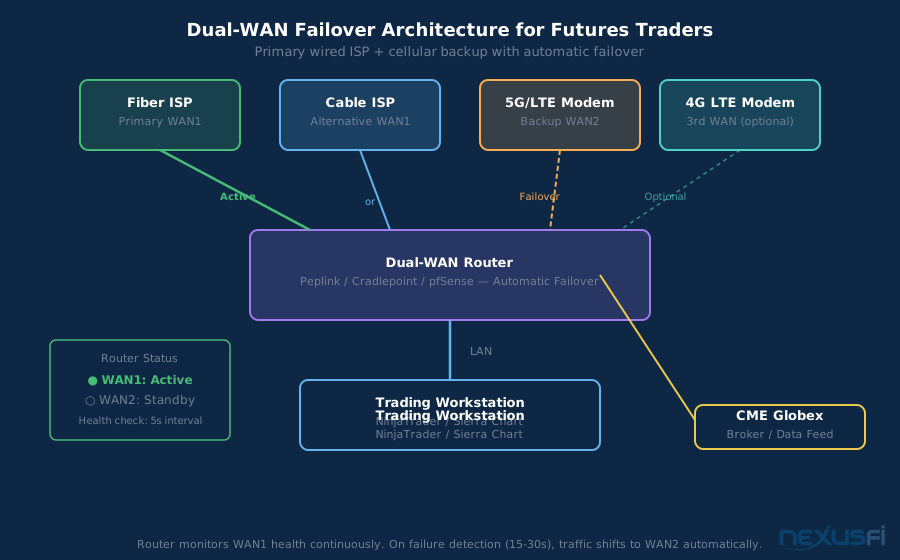
A dual-WAN router connects to two internet sources simultaneously: your primary wired ISP and a cellular modem or hotspot. It monitors both paths continuously by sending small health-check packets to designated IP addresses. When WAN1 stops responding, the router shifts all traffic to WAN2 automatically.
The mechanics sound simple. The execution is where traders get burned.
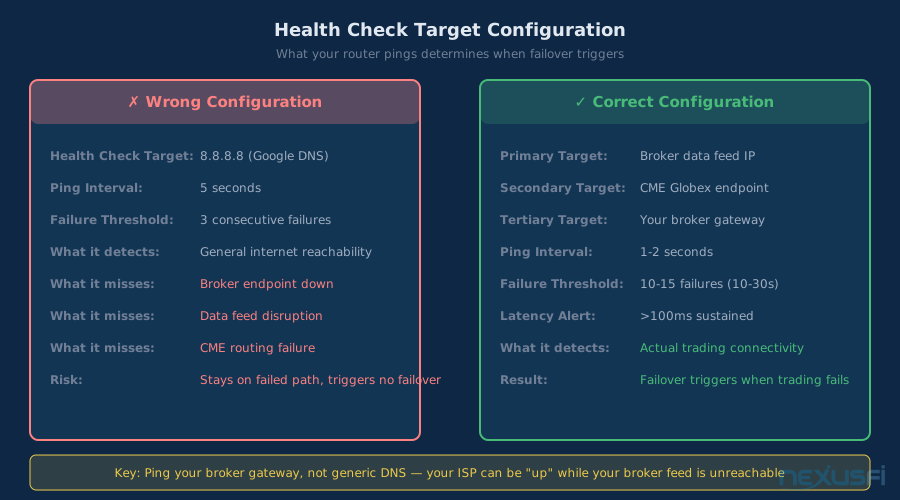
Health check targets matter. If your router pings Google's 8.8.8.8 to verify connectivity, it detects your WAN is "up" as long as Google is reachable. But if your broker's data center is having routing issues between you and them, your router doesn't know — and won't fail over. Configure health checks against IPs close to your actual trading endpoints: your broker's primary data feed IP, or the CME Globex connection address.
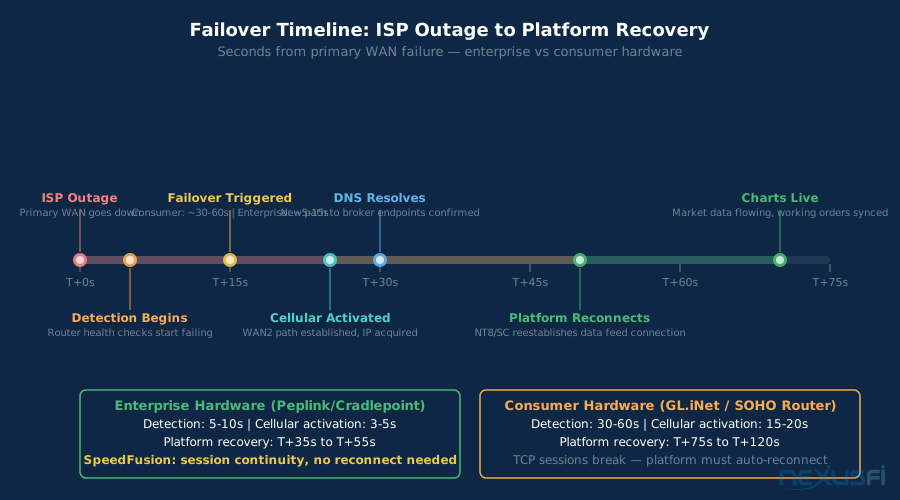
Failover detection time: Consumer routers typically require 3-5 missed health checks before triggering failover, with each check spaced 5-10 seconds apart. That's 15-50 seconds just to detect the problem — before the cellular path activates. Enterprise hardware (Peplink, Cradlepoint) can be configured to detect failures in under 5 seconds.
Session behavior during transition: When WAN switches, your public IP address changes. This breaks TCP connections. Your trading platform's market data feed will drop and need to re-establish. Platforms differ much in how they handle this: NinjaTrader will typically auto-reconnect within 10-20 seconds if the network is up; Sierra Chart varies by data feed configuration. Either way, you're looking at a gap between the WAN switch completing and your charts being live again.
The total recovery window from primary ISP failure to "charts are live again" runs 30-90 seconds with consumer hardware. That's the budget you're working with.
The phone number you need: @Fat Tails recommends having your broker's trade desk phone number on speed dial — both landline and cell. "If both internet connections fail, I have prepared a list of different phone numbers to join my broker to close all positions immediately." (risk trading internet outage liability LLC) This is the last resort that works even when everything else fails.
Router Hardware: Peplink, Cradlepoint, GL.iNet, pfSense #
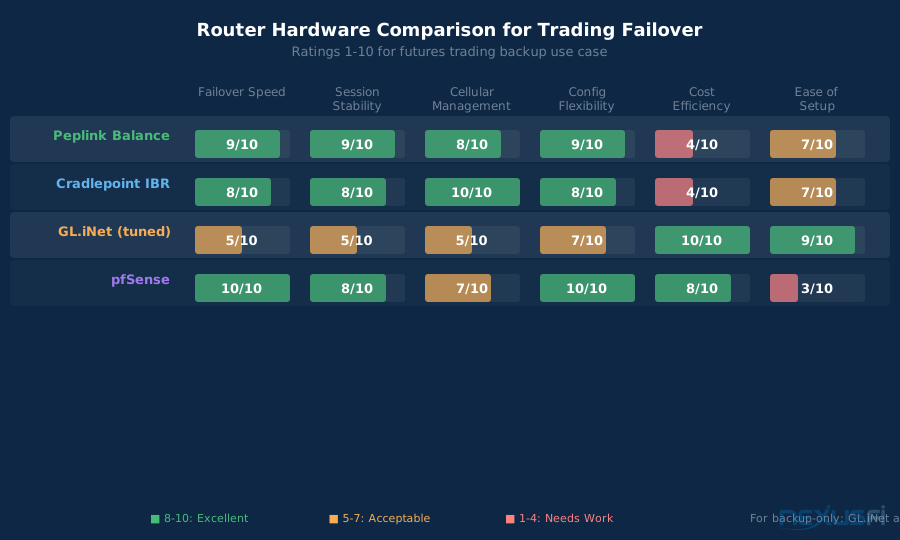
Not all dual-WAN routers handle failover equally. For trading purposes, the key metrics are: detection speed, session stability during the transition, and the router's ability to detect degradation (not just complete failure) on your primary WAN.
Peplink Balance Series (Best for Mission-Critical)
Peplink is the gold standard for trading-grade failover. The Balance series supports configurable health checks down to 1-second intervals, WAN bonding (combining cellular and wired simultaneously), and smart routing policies that can be configured to route latency-sensitive traffic — order submission — differently from bulk traffic like chart history downloads.
Key advantage for traders: SpeedFusion bonding can maintain session continuity across WAN changes by tunneling traffic through both paths simultaneously. When WAN1 fails, sessions already established through SpeedFusion don't break — they continue on WAN2. This is as close to transparent failover as you can get without full carrier-grade infrastructure.
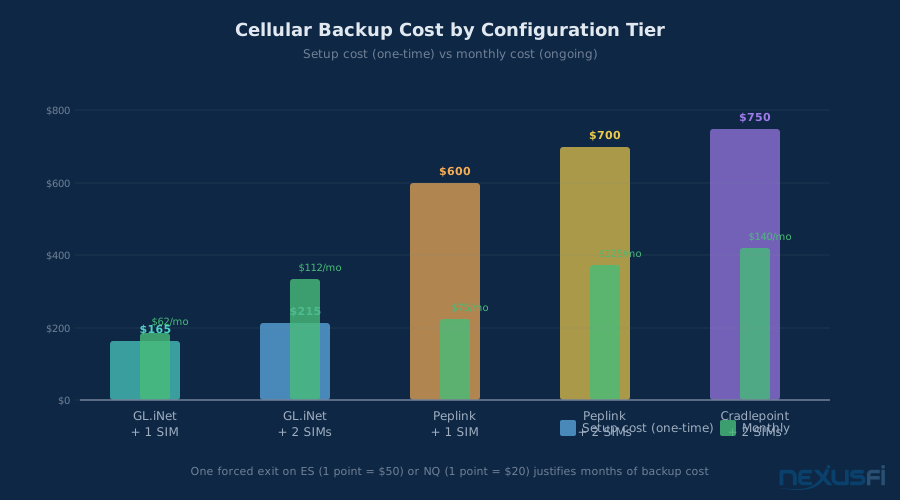
The balance series (Balance 20X or higher) supports embedded LTE modems or external USB/Ethernet cellular adapters. Price: $400-$800 for hardware adequate for a trader's home setup.
Verdict: Worth the premium if you run automated strategies that cannot tolerate any reconnection delay. Overkill for discretionary traders who can handle a 30-second reconnection window.
Cradlepoint (Cellular Infrastructure Specialist)
Cradlepoint is what network engineers deploy in field vehicles, retail locations, and remote sites where cellular is the primary connection. The IBR650C series and higher support enterprise-grade failover with deep carrier management, signal monitoring, and granular policy routing.
Cradlepoint's strength is cellular management. The admin console shows detailed carrier signal metrics (RSRP, RSRQ, SINR), not just bars. You can configure carrier aggregation bands, set preferred frequencies, and monitor signal trends over time. For traders in areas with marginal 5G coverage, this visibility is valuable.
Price: $500-$900 for home-office capable models. Requires a separate data SIM (not included as a plan).
Verdict: Best choice when cellular performance (not just failover) is critical — traders in rural areas or those whose primary ISP is unreliable frequently enough that cellular does real work.
GL.iNet Beryl AX / Flint 2 (Budget-Capable with Testing)
GL.iNet routers are favored in the networking enthusiast community for their OpenWrt foundation, easy setup, and competitive pricing ($80-$150). Many traders have used them successfully for cellular backup.
The practical limitation is failover granularity. Default configurations check for connectivity on a schedule — often 30-60 second intervals — which means you could be without connectivity for over a minute before the router even starts the switchover process. You can improve this through OpenWrt's mwan3 package with aggressive health check tuning, but it requires more manual configuration than the enterprise options.
Verdict: Reasonable budget option for backup-only cellular, but you must validate failover timing manually during a test session. Don't assume the defaults are fast enough.
pfSense / OPNsense (Expert-Level Maximum Control)
pfSense on commodity hardware gives you the most flexible failover configuration possible. The Multi-WAN gateway system supports weighted failover, gateway groups, per-rule routing, and fully customizable health check intervals.
The catch is complexity. pfSense requires understanding of networking concepts — gateway groups, floating rules, DNS resolver behavior — that go beyond typical consumer router knowledge. A misconfigured pfSense box can fail to failover at all, or worse, silently route traffic through a degraded path without notification.
Verdict: Excellent for traders with networking knowledge who want to build a proper infrastructure stack. Not for plug-and-play scenarios.
Router Selection Summary
| Router | Failover Speed | Session Stability | Cellular Management | Cost | Complexity |
|---|---|---|---|---|---|
| Peplink Balance | 2-8 seconds | Excellent (SpeedFusion) | Good | $400-800 | Medium |
| Cradlepoint IBR | 5-15 seconds | Good | Excellent | $500-900 | Medium |
| GL.iNet (tuned) | 30-90 seconds | Poor (TCP resets) | Basic | $80-150 | Low-Medium |
| pfSense (configured) | 2-30 seconds | Configurable | Configurable | $100-300 | High |
SIM Plan Selection: T-Mobile, Verizon, AT&T FirstNet #
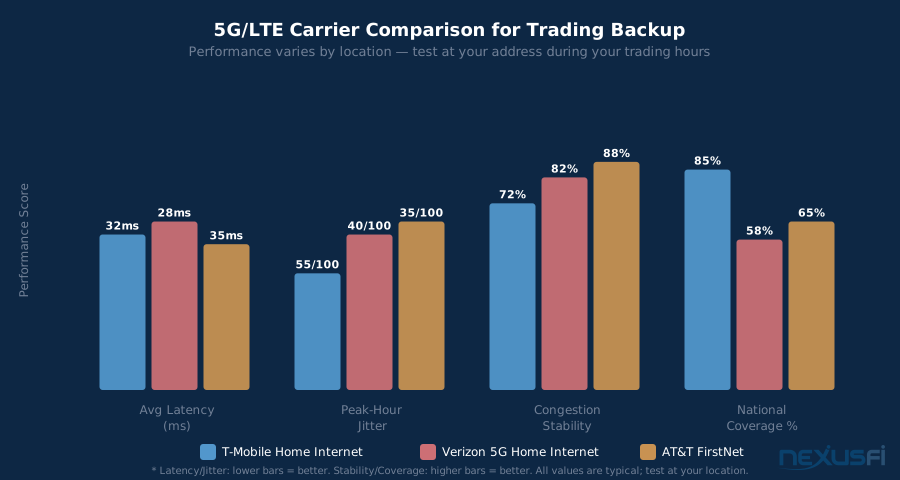
Speed test numbers are irrelevant for trading backup. What you care about: jitter, packet loss, and congestion behavior during market hours. A carrier delivering 300 Mbps average but spiking to 150ms latency at 9:30 AM is worse than one delivering 40 Mbps consistently at 28ms throughout the session.
T-Mobile Home Internet (TMHI)
T-Mobile's fixed wireless internet product uses their 5G and 4G LTE network to deliver home internet service at $50/month with no data caps. For many users, especially in suburban and rural areas underserved by cable or fiber, TMHI delivers surprisingly competitive latency.
The trading-relevant catch is congestion. TMHI shares tower capacity with T-Mobile's mobile network. At 9:30 AM when traders are connecting and every commuter's phone is pulling email, tower congestion can push latency from 25ms to 80-120ms. This is unlikely to cause platform disconnections (that requires actual packet loss), but it degrades data feed timeliness.
TMHI also uses CGNAT (carrier-grade NAT), which means you don't get a public IP address. For most trading use cases this doesn't matter — you're connecting out to broker servers, not receiving inbound connections. But some broker APIs or monitoring tools that require inbound connectivity won't work through CGNAT. Verify with your broker before depending on TMHI.
Verizon 5G Home Internet and Business Plans
Verizon's fixed wireless products (5G Home Internet and LTE Home Internet) cover different geographic areas and deliver different performance profiles. Where 5G Ultra Wideband (mmWave) is available — mostly dense urban areas near towers — latency can hit 10-20ms with excellent jitter. The more broadly available 5G Nationwide (sub-6 GHz) behaves more like LTE: 30-55ms median with periodic congestion spikes.
Verizon's network tends to perform more consistently under load than T-Mobile's in many markets. The tradeoff is availability: Verizon's fixed wireless footprint is smaller. Verizon Business plans offer static IP options, which eliminates the CGNAT problem and simplifies certain firewall and monitoring configurations.
AT&T FirstNet
FirstNet is AT&T's public safety network with priority data access. Originally built for first responders, FirstNet's priority scheduling means your data traffic receives precedence over standard AT&T commercial customers when towers are congested.
For trading, this matters during events that spike cellular demand in your area: natural disasters, major public events, widespread cable outages (when everyone simultaneously switches to cellular). If your ISP goes down during a major storm and your neighbors all pull out their phones, FirstNet maintains performance while standard plans degrade.
Practical SIM Strategy
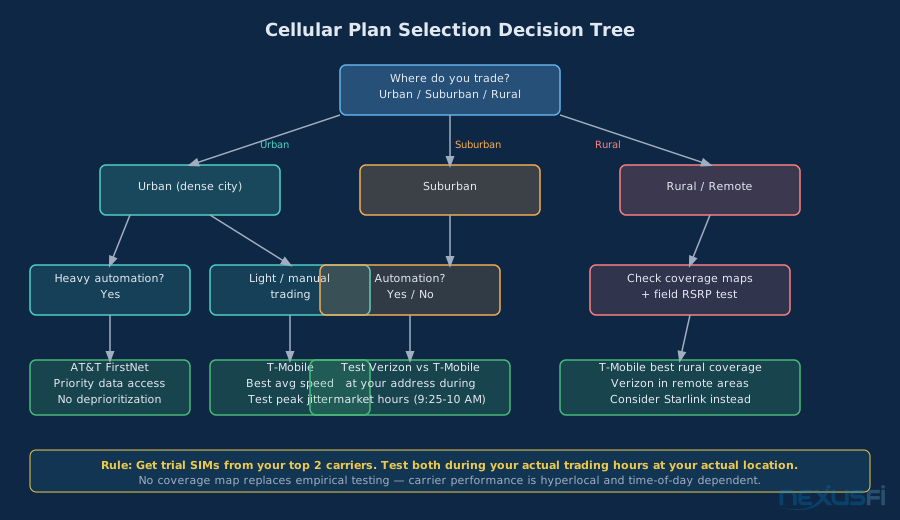
The right answer is hyperlocal. Get 30-day trial SIMs from two carriers, connect them to your cellular router, and run ping tests to your broker's data feed endpoints during actual trading hours (not off-peak). Measure: average latency, P95 latency, jitter (standard deviation), and packet loss percentage over a 30-minute window.
Don't pick a SIM plan based on speed tests. Generic speed tests (Speedtest.net, Fast.com) measure throughput from nearby CDN servers — not latency to CME Globex or your broker's execution endpoints. A plan delivering 300 Mbps on Speedtest with 140ms latency to your broker during market hours is worse than one delivering 40 Mbps with 30ms stable latency.
Latency Reality: Cellular vs Fiber vs Cable #
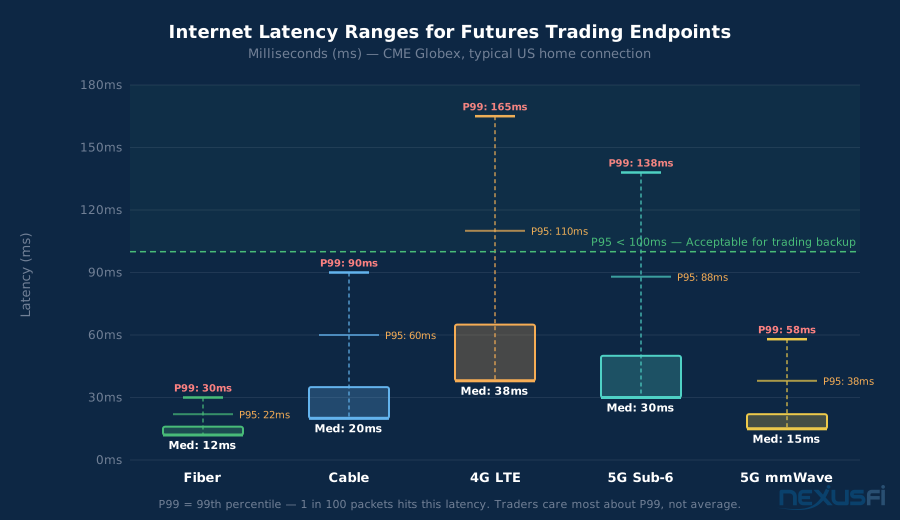
Here's what to actually expect, benchmarked against CME Globex endpoints from the Chicago area:
| Connection Type | Median Latency | P95 Latency | P99 Latency | Jitter (Std Dev) |
|---|---|---|---|---|
| Fiber (Symmetric Gigabit) | 8-15ms | 18ms | 25ms | 2-4ms |
| Cable (DOCSIS 3.1) | 15-25ms | 45ms | 80ms | 8-15ms |
| 4G LTE (good signal) | 25-45ms | 90ms | 150ms | 15-25ms |
| 5G Sub-6 GHz | 20-40ms | 75ms | 130ms | 10-20ms |
| 5G mmWave (urban) | 10-20ms | 35ms | 55ms | 5-10ms |
A few things these numbers reveal:
P99 tail latency is the trading metric that matters. Your platform disconnects during a 150ms spike, not during an 8ms average. When evaluating cellular for trading, ask: how often do P99 events occur, and how long do they last?
5G mmWave approaches fiber stability, but it's only available in small coverage zones near towers — typically within 500 feet. If you're not near a tower with mmWave, you're on Sub-6 GHz, which behaves closer to LTE.
Peak hour congestion raises all of these numbers. LTE P99 during market open on a congested tower can reach 200-300ms. This is usually not long enough to cause a platform disconnect — which typically requires sustained packet loss — but it will produce lag in your charts and order confirmations.
Failover Configuration for NinjaTrader and Sierra Chart #
Network-level failover is step one. Platform-level behavior during and after failover is step two — and most traders stop at step one.
Router Configuration (All Hardware)
Configure your health check targets to IPs that reflect real reachability to your broker, not just "internet is working." Options:
- Primary target: Your broker's primary data feed server IP address. (Check your platform's connection diagnostics or ask your broker's support for this.)
- Secondary target: Your data provider's IP (Rithmic, CQG, IQFeed endpoints as applicable).
- Fallback: A financial services IP close to major exchange infrastructure.
Avoid using general internet health checks (8.8.8.8, 1.1.1.1). Your ISP can be up and functional while your broker's connection is broken — a scenario these checks won't catch.
Set health check interval: 5 seconds maximum. Failure threshold: 3 consecutive failures. This detects an outage in 15 seconds. Avoid setting it too aggressive (1-second checks with 1-failure threshold) as this can cause flapping on momentary packet loss that's not actually a meaningful outage.
NinjaTrader Failover Behavior
NinjaTrader monitors its data feed connection continuously. When the connection drops (your WAN switches and the TCP session breaks), NT8 will typically display a "No connection" status and attempt auto-reconnect at configurable intervals. Default reconnect attempts: every 5 seconds.
After WAN failover completes (15-90 seconds depending on hardware), NinjaTrader should reconnect on its own within a few reconnect cycles. Expected total platform recovery: 45-120 seconds from primary ISP failure to charts live again.
Working orders during failover: Orders already submitted to the exchange remain active at the exchange even if your platform disconnects. When NinjaTrader reconnects, it will synchronize the current position state with your broker. This sync usually completes correctly, but verify with your broker that their platform-disconnect handling works as expected for your account type.
Sierra Chart Failover Behavior
Sierra Chart's behavior depends on which data feed you're using. With Rithmic, Sierra Chart maintains a TCP connection to the Rithmic RAPI service. On WAN drop, this connection breaks and Sierra Chart enters "waiting for reconnect" mode.
For Sierra Chart with DTN IQFeed (a NexusFi sponsor at nexusfi.com/d/data-providers/dtn-iqfeed): IQFeed's Windows client manages the connection separately from Sierra Chart itself. The IQFeed client will attempt to reconnect; once it does, Sierra Chart's data feed resumes. This can sometimes require restarting the IQFeed client after a prolonged disconnect.
Position Sync After Reconnect
For algorithmic traders specifically, position synchronization after reconnect is not automatic. The pattern @dom993 describes — tracking positions in external files and reconciling on reconnect — is the production-grade approach to surviving disconnects without corrupting strategy state.
DNS Configuration
DNS resolution can cause problems during WAN failover that traders never diagnose correctly. When WAN switches, your DNS resolver may briefly return stale results or fail to resolve. Fix: configure your trading PC to use fixed DNS servers (8.8.8.8 and 1.1.1.1) rather than relying on your ISP's DNS via DHCP.
Signal Quality and Antenna Optimization #
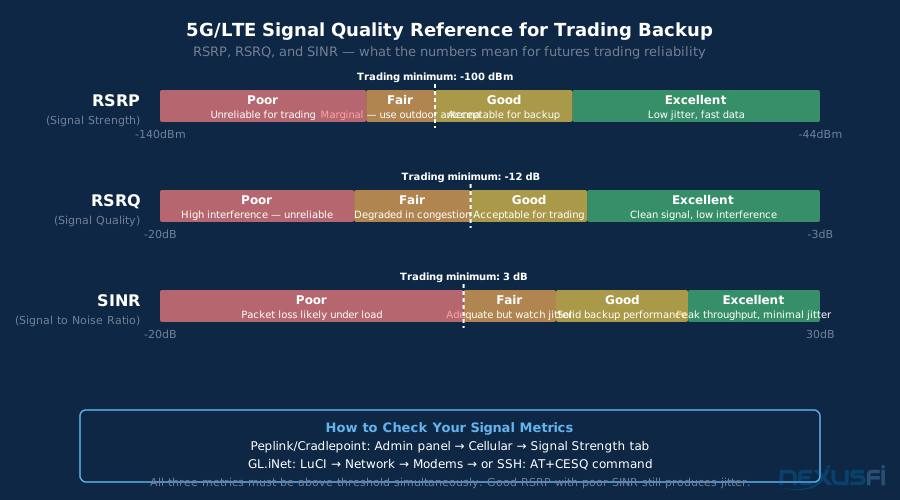
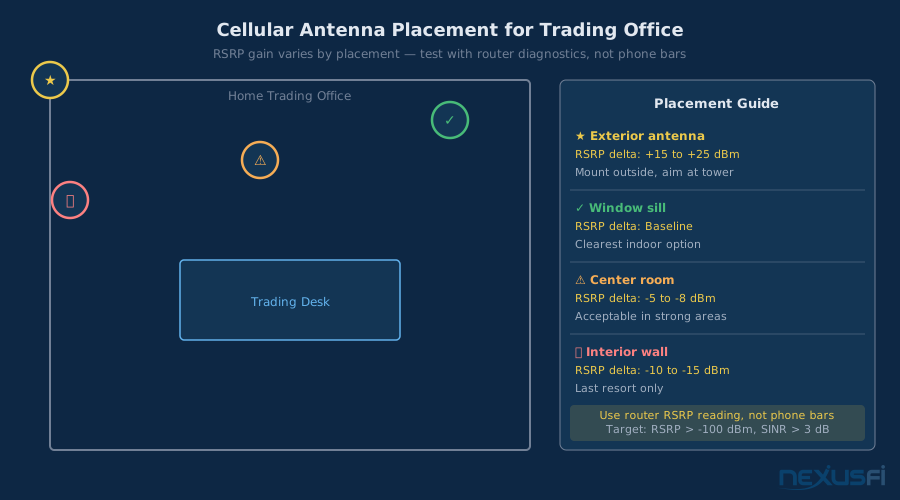
Signal bars are a simplified indicator. For trading-grade cellular backup, you need the actual radio metrics: RSRP, RSRQ, and SINR.
RSRP (Reference Signal Received Power): Measures signal strength. Scale: -44 dBm (excellent) to -140 dBm (no signal). For trading backup, minimum threshold is -100 dBm. Below -100 dBm, you'll see increased jitter and packet loss under load. Above -80 dBm is excellent.
RSRQ (Reference Signal Received Quality): Measures signal quality relative to interference. Scale: -3 dB (excellent) to -20 dB (poor). For trading, minimum threshold is -12 dB. Poor RSRQ even with good RSRP means tower interference is degrading your signal.
SINR (Signal to Interference and Noise Ratio): Measures how much signal you're getting above the noise floor. Scale: 30 dB (excellent) to -20 dB (no usable signal). For trading, minimum threshold is 3 dB. SINR below 0 dB means your device is fighting significant interference.
Access these metrics in your router's admin panel (Cradlepoint and Peplink display them prominently; GL.iNet requires the OpenWrt LuCI interface or SSH access to modem diagnostic commands).
Antenna placement matters more than you'd expect. Moving a cellular modem six inches toward a window versus against an interior wall can change RSRP by 10-15 dBm. Modems with external antenna ports (TS-9 or SMA connectors) can be connected to outdoor directional antennas for much better performance in marginal signal areas.
Testing Your Failover Before Going Live #
The only way to know your failover works is to test it. "Probably works" is not a risk management strategy for open positions.
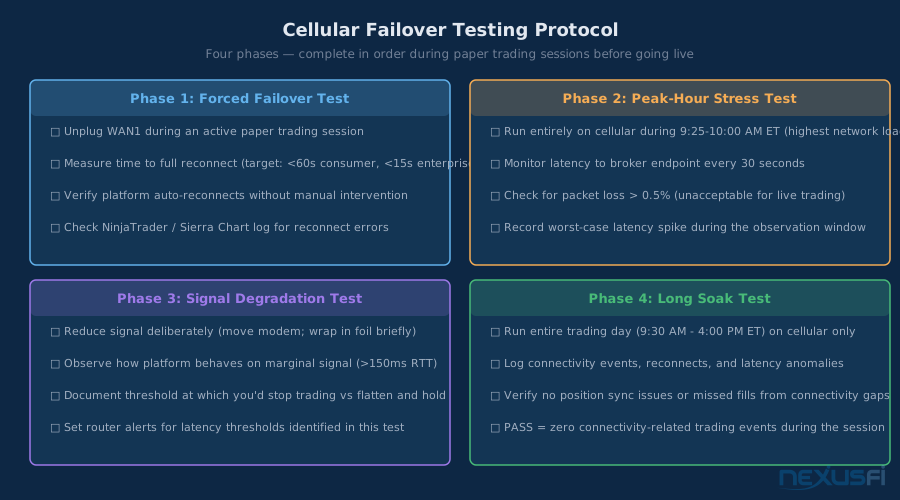
The Forced Failover Test
Run this during a paper trading or live simulation session:
- Open your platform with a live (or sim) data connection. Have charts running and an order ticket open.
- Physically disconnect your primary WAN (unplug the cable from your modem or turn off the modem).
- Note the time.
- Watch your router's admin panel for WAN switch detection and cellular activation.
- Watch your trading platform for reconnect.
- Note the time when charts show live data again.
Record: total time from disconnect to live data. Whether you needed to manually restart anything. Whether working orders were correctly synced after reconnect.
Peak Hour Stress Test
Run your cellular connection as the only path (disconnect primary WAN) for 30-60 minutes during the US market open (9:25 AM - 10:00 AM ET). Monitor continuously with PingPlotter or similar against your broker endpoint. If everything works during market open on cellular — charts live, orders round-tripping normally — it works.
The Degradation Test
Most router health checks only detect total WAN failure, not degradation. Test whether your router fails over on a degraded connection by simulating packet loss on WAN1 using a QoS tool or traffic shaping on a secondary device. Some routers can be configured to fail over when packet loss exceeds a threshold (e.g., more than 10% loss for 30 seconds).
The Operational Runbook: What to Do When Failover Triggers #
Document this before you need it. Under stress during a live trade, you don't want to be making decisions about what to do next.
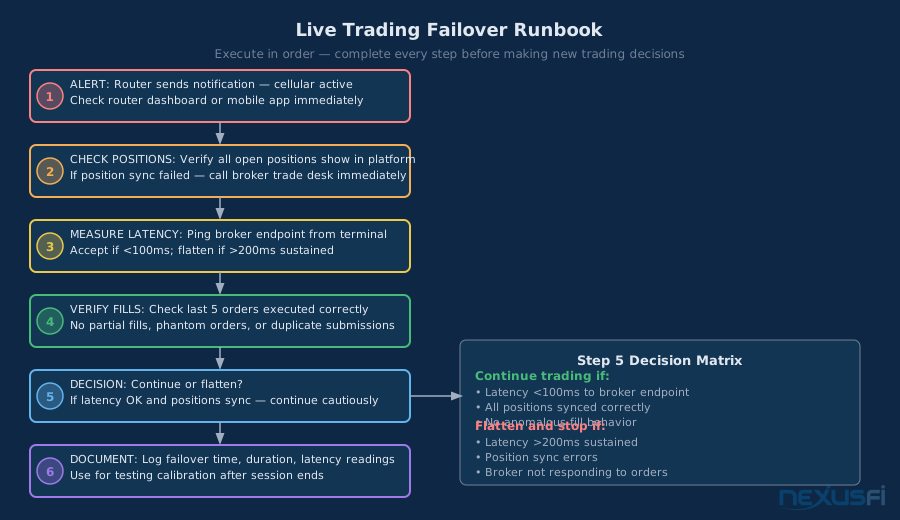
Step 1: Recognize the failover. Your router should alert you (email, SMS, or a visual indicator on a connected display). Set this up before you trade on cellular backup. You need to know immediately when you're on cellular.
Step 2: Assess platform state. Is your platform showing live data? Check the data feed status indicator in NT8 or SC. If it's still connecting, give it 30-60 seconds before manual intervention.
Step 3: Verify working orders. Check your active orders display. Orders submitted before the disconnect should be visible (they're at the exchange, not your local platform). If the order display shows nothing when you know you have positions, call your broker immediately.
Step 4: Decide trading mode. While on cellular backup, decide in advance:
- Are you going to continue trading normally?
- Are you going to reduce size or avoid new entries until primary connectivity returns?
- If cellular is degraded, are you going to flatten and wait?
Make this decision in advance, written down. "I will continue trading on cellular if latency stays below X ms and no packet loss" is a rule. Figure-it-out-later is not.
Common Failure Modes and How to Prevent Them #
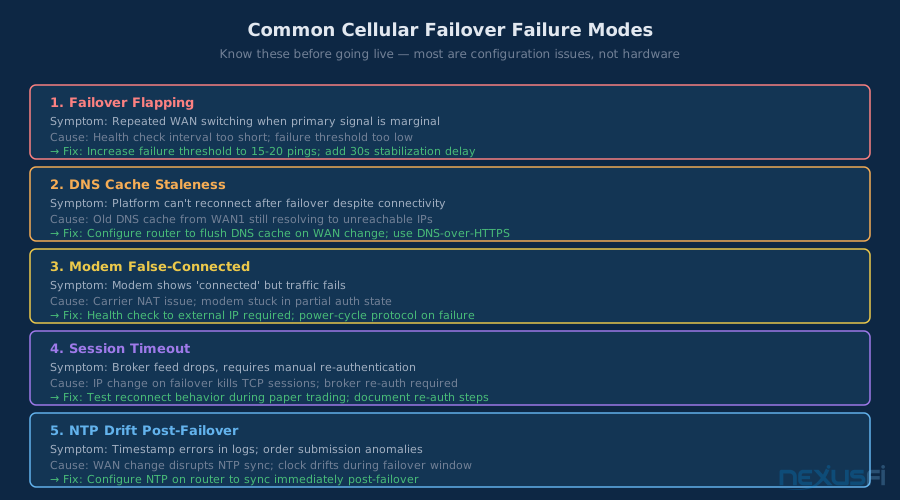
Failure Mode 1: Failover flapping. Your router oscillates between WAN1 and WAN2 because WAN1 is intermittently degraded, not fully down. This produces repeated disconnects and reconnects — worse than staying on one path. Prevention: Set a "stability threshold" before failing back to WAN1. Most enterprise routers support a configurable minimum time on WAN1 before allowing failover triggers again.
Failure Mode 2: DNS propagation delays. After failover, DNS queries that cached on your ISP's resolver may fail briefly. Your trading platform tries to connect to a hostname it resolved 20 seconds ago, the session fails, and the platform can't reconnect until DNS refreshes. Prevention: Use fixed DNS servers (8.8.8.8/1.1.1.1) on both your router and trading PC.
Failure Mode 3: Cellular modem not actually connected. Your cellular modem shows "connected" in your router's admin panel but has no data throughput (carrier deauthenticated the device, SIM expired, data cap hit). Your router doesn't detect this because the modem reports "connected" at the L2 layer. Prevention: Configure health checks that verify actual data flow, not just link state.
Failure Mode 4: NTP time sync failure during failover. Some routers or cellular modems can cause NTP time sync issues briefly during WAN transitions. Trading platforms that depend on accurate timestamps may behave unexpectedly if your system clock drifts much. Prevention: Use multiple NTP servers in your Windows time service configuration.
Failure Mode 5: Broker position sync timeout. After reconnection, your platform queries your broker for current position state. If this sync times out, some platforms display stale position data. Prevention: Know your broker's sync behavior. After any reconnect following an outage longer than 60 seconds, manually verify your position display matches the broker's web platform before making any trades.
Advanced Configurations: Dual-Carrier and pfSense #
Dual-Carrier Setup
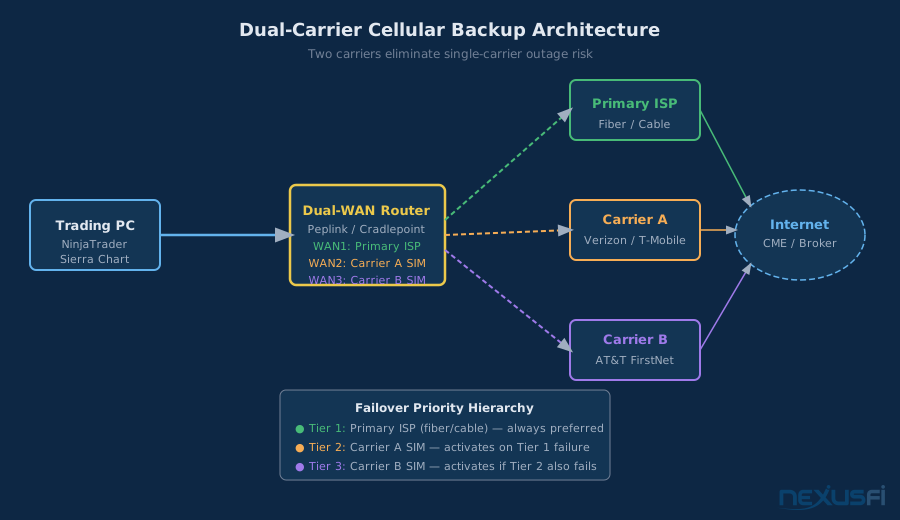
The failure scenario that defeats single-carrier cellular backup: tower outage, carrier infrastructure failure, or carrier-specific congestion that takes down your backup at exactly the moment you need it most. Two cellular providers on different towers eliminate this single point of failure.
Implementation options:
- Peplink MAX series: Supports multiple cellular modems natively. WAN1 = primary ISP, WAN2 = Carrier A cellular, WAN3 = Carrier B cellular. Three-way failover hierarchy.
- Two separate routers: A secondary cellular-only router (GL.iNet) provides emergency backup if your primary router/cellular combination fails.
- Business-class modem with dual-SIM: Some modems (Netgear LM1200, certain Sierra Wireless models) support two SIM cards with automatic switching.
pfSense Multi-WAN Configuration
For traders comfortable with network configuration, pfSense's Multi-WAN setup provides maximum flexibility. Key settings for trading use:
Gateway configuration: Create a gateway group with WAN1 (fiber/cable) as Tier 1 and WAN2 (cellular) as Tier 2. Traffic routed through this gateway group automatically uses Tier 2 when Tier 1 is down.
Health check optimization: Set gateway monitoring interval to 500ms with failure threshold at 10 consecutive failures (5 seconds to detect failure). Set latency thresholds: alert if RTT exceeds 100ms, down if RTT exceeds 500ms. This catches severe degradation before it becomes a total outage.
Firewall rules: Create a floating rule that routes traffic from your trading PC's IP address through the gateway group first. Route everything else normally. This ensures your trading platform always uses the best available path while other household traffic continues normally.
Bottom Line: Build Your Cellular Backup Right #
Cellular backup internet for futures trading is a solved problem. The hardware exists. The carrier plans exist. The configuration is documented. The critical step — almost universally skipped — is testing.
Five things to implement today:
- Router choice: GL.iNet if budget is the constraint; Peplink Balance or Cradlepoint if you're running automated strategies or need faster failover. pfSense if you have networking experience.
- Carrier selection: Get trial SIMs from two carriers. Test latency to your broker endpoints during market hours (9:25-10:00 AM ET is the stress test). Pick the more consistent one, not the faster one.
- Health checks: Configure your router to monitor your broker endpoint, not just generic internet IPs. Set failure detection to 15-30 seconds.
- Test it: Force a failover during a sim session. Document the recovery time. Verify your platform reconnects without manual intervention.
- Write a runbook: One page. What you check, what you do, what thresholds trigger you to flatten versus continue trading while on cellular.
Big Mike's point is valid: for traders running overnight positions or automated strategies, a VPS or dedicated server eliminates the ISP dependency entirely. Your platform lives in a data center, your home connection is just for monitoring. But for discretionary intraday traders working from their workstation, cellular backup is the practical solution — and when built correctly, it holds.
Prerequisites
Before implementing cellular backup, ensure you have a stable primary connection (see Internet Connection for Day Traders) and understand basic network concepts including WAN/LAN topology and DNS. The Home Network Setup for Futures Traders guide covers the foundational setup this article builds on.
Further Exploration
- Internet Redundancy and Backup Connectivity -- the broader redundancy picture including power backup and ISP diversity
- Starlink for Futures Traders -- satellite internet as an alternative or additional backup path
- Trading Redundancy and Backup Systems -- full coverage of all failure points beyond internet connectivity
- Windows VPS for Futures Trading -- the VPS alternative that eliminates ISP dependency entirely
Knowledge Map
Go Deeper
Build on this knowledgeCitations
- — Trading futures over 5G network (2022) 👍 2“I have both of the major 5G providers in the US and Verizon had 40MBPS and TMoble 300MBPS at the same location so all 5G networks are not the same nor are they always consistent.”
- — Monitor Internet Connection for Overnight Hold (2021) 👍 1“I have multiple Gigabit fiber optic uplinks via different ISP's that use different backbones. On top of that, I have 4G LTE backup in the event both fiber's are down. Everything is handled by my own pfsense router.”
- — internet connection issue (2015) 👍 4“It's not seamless in the retail space of routers, in other words you will experience a disconnection of around 30-60 seconds depending on your hardware. For absolute flawless failover you need high-end equipment.”
- — Router failover redundancy cellular backup (2014) 👍 3“For those looking for a hardware solution to provide automatic failover/failback for internet connection, the Cradlepoint devices are a good solution. You can do one or more ethernet based uplinks as well as one or more cellular based uplinks.”
- — risk trading internet outage liability LLC (2010) 👍 5“Redundancy required. I have a second PC (laptop), which is always charged. I have a mobile backup internet connection, in case my fixed line does not work. I have a fixed and a mobile telephone line.”
- — Outage with a live position on Ninja (yikes) what to do? (2012) 👍 3“In case that I lose connectivity, I have a backup internet connection (mobile) to replace my fixed line. In case of a PC failure, I have a notebook to connect to my broker. The notebook also works during a power failure.”
- — Outage with a live position on Ninja (yikes) what to do? (2012) 👍 5“My standard procedure in case of a disconnect with possible open orders will continue to be: 1. Keep Broker trade desk phone number on speed dial, land line and cell. 2. Call immediately.”
- — Best way to sync positions on re-connecting (2013) 👍 3“I have a strat which is always in the market, 24/7 ... keep track at all time of your open positions and open orders in private files. Cancel all open orders in OnTermination().”
- — Ask Me Anything (AMA) with NinjaTrader Client Services (2020) 👍 3“Worth a look perhaps, and added benefit is not demanding a higher end router that does failover.”
- — Trading futures over 5G network (2022)“I want to buy a camper van and do some travelling and take my trading with me. The obvious thing to do would be to have a backup device on a different network, and a direct phone number to my broker.”
- — internet connection issue (2015) 👍 3“I use a TP-Link dual Wan router. You can configure it in failover, or you can use it 50/50 or any %. Ninjatrader prefers to be on one line and switch when necessary -- it's low cost, +/- 200.”