



Internet Redundancy and Backup Connectivity for Active Futures Traders: ISPs, Cellular Failover, and the Hardware That Keeps You Trading
Overview #
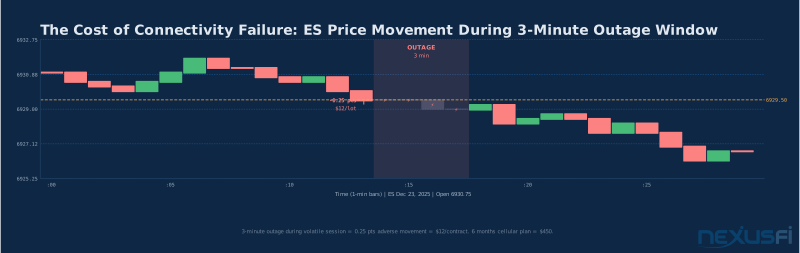
Your internet connection is not infrastructure. It's your order entry line. When it goes down with an open position, you don't get a technical timeout — you get a P&L event. The market doesn't pause while you reboot your router.
Every futures trader has a story. Cable modem resets during NFP. Fiber cut by a backhoe. ISP maintenance at 9:31 AM ET. The question isn't whether it will happen to you. It's whether you'll have a live position when it does.
This guide covers the full stack: primary connection selection, automatic ISP failover, cellular backup limitations, router hardware that actually works, and how to test everything before you need it in a live session.
For context on how this fits into your broader trading infrastructure, see /a/infrastructure/trading-redundancy-backup-systems for a complete disaster recovery overview, and /a/infrastructure/home-network-setup-futures-traders for LAN configuration.
That's the mental model for everything that follows.
Understanding What "Redundancy" Actually Means for Futures Trading #
Most traders think of redundancy as "having a backup internet connection." That's necessary but not sufficient. Real trading redundancy means maintaining uninterrupted ability to:
- Monitor open positions — Know where your positions are at all times
- Receive market data — See the market you're trading
- Submit and modify orders — Enter, adjust, and exit
- Receive order confirmations — Know your orders executed
Each of these requires a different type of connectivity. Market data typically runs over UDP or TCP and can tolerate brief gaps with reconnection. Order entry runs over persistent TCP/TLS sessions that break when your IP changes or your path to the broker changes. This distinction matters when designing your failover: the goal isn't to preserve your internet connection generically — it's to preserve the specific sessions your broker's platform relies on.
The three-tier failure model every trader should think through:
Tier 1: ISP outage. Your primary internet provider goes down. This is the most common failure. Solution: secondary ISP on different physical infrastructure.
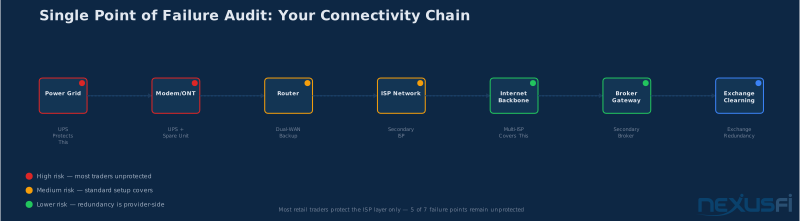
Tier 2: Local hardware failure. Your router or modem dies, taking out both ISPs even if the internet itself is up. Solution: UPS, spare hardware, or ability to bypass failed components.
Tier 3: Platform or broker failure. Your connection is fine but your trading platform or broker's systems are having issues. Solution: secondary platform, secondary broker account, broker trade desk phone number.
Most traders build for Tier 1 but not Tier 2 or 3. As @Pa Dax noted: "The exchanges and brokers nowadays are very stable, but we've seen DDoS attacks on banks this week disabling access to their banking apps, why would that not happen someday at my broker when I'm in a big position? I have standby accounts fully funded to either hedge a position when a broker fails or quickly resume trading." Tier 3 is rare, but worth a plan.
Recovery time objectives (RTOs) by trading style:
- Scalpers: <30 seconds to fully operational
- Day traders: <2 minutes acceptable
- Swing traders: <10 minutes acceptable
Recovery time objective (RTO) is not about how quickly you can restore your connection — it's about how quickly you can close your position if connectivity cannot be restored. Build for position closure, not for optimistic reconnection.
If your current setup can't hit your trading style's RTO, you don't have real redundancy.
Primary Connection Selection: What counts #
Futures traders get obsessed with latency but it's the wrong metric to improve for retail setups. The round-trip from your home to CME data centers in Aurora, Illinois ranges from 5 to 50ms depending on your location and provider. The difference between 8ms and 15ms has no practical impact on order execution for manual traders. What does impact you is connection stability, packet loss, and jitter — and these vary enormously between providers and technologies.
Fiber to the Home (FTTH): the clear first choice
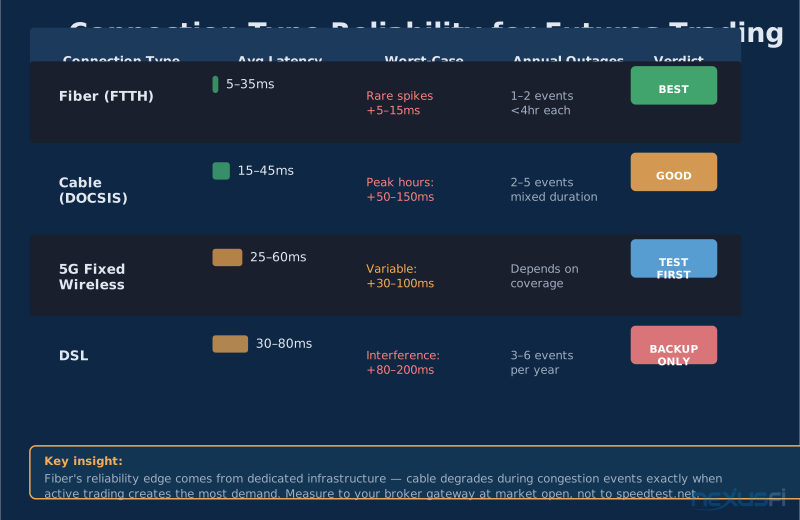
Fiber is the best primary connection for futures trading because it's the most consistent technology available to retail customers. Dedicated fiber infrastructure doesn't share bandwidth with your neighbors. When your cable-dependent neighborhood has a hundred people streaming video at 7 PM, your FTTH connection is unaffected.
Practical specs for futures trading:
- Latency to CME endpoints: 5--35ms from major metros
- Jitter: typically sub-millisecond to a few milliseconds
- Packet loss: typically negligible under normal load
- Reliability: 99.5--99.9% uptime with reputable providers
The catch: the provider matters more than the technology. AT&T Fiber, Google Fiber, Verizon FIOS, and local fiber co-ops all offer "fiber" but their reliability and support vary much. Measure to your broker's endpoints before committing.
Cable (DOCSIS): acceptable with caveats
Cable is the most common primary connection among retail futures traders and works well — until it doesn't. The primary failure mode is congestion. Cable infrastructure is shared among neighbors, and during peak usage hours (evenings, weekends), that congestion shows up as latency spikes and increased jitter.
For trading purposes, what matters isn't your connection's capacity (100 Mbps vs 1 Gbps doesn't affect order entry) — it's the latency distribution. A 15ms connection that occasionally spikes to 200ms during a volatile ES session is worse than a 25ms connection that stays flat.
If cable is your primary connection: test it during market hours, not during off-hours. Measure latency to your broker's gateway, not to speedtest.net. If you see consistent latency spikes between 9:30 and 11 AM ET, you need to account for that in your stop placement and your redundancy planning.
Fixed Wireless (5G Home Internet): viable with conditions
T-Mobile Home Internet and Verizon 5G Home Internet have become genuinely viable for some traders as either primary or secondary connections. The community is split on this. Some traders report excellent results; others have found the jitter unacceptable during high-activity sessions.
The honest answer: test for 30 days during market hours before trusting fixed wireless as your primary. Measure latency to your broker's endpoints, not to the generic speedtest. Pay particular attention to behavior during volatile market sessions when cellular towers face higher load.
Fixed wireless is an excellent backup connection because it uses different physical infrastructure than cable or fiber, making simultaneous outages unlikely.
DSL: backup only
DSL has variable latency (30--80ms), line noise in rain, and lower reliability — it's a poor primary for active traders. As @rleplae found: "The poor speed compared to the cable connection is because I am at a too long distance from the telephone hub. They don't tell you that when you order the connection! So you can better check it beforehand." Adequate as a secondary — not a primary.
The Dual-ISP Framework: How to Build Automatic Failover #
A second ISP does you no good if switching to it takes you three minutes of manual reconfiguration. The goal is automatic failover that triggers within seconds and requires zero action on your part during a live session.
Failover vs. load balancing: this distinction will protect you
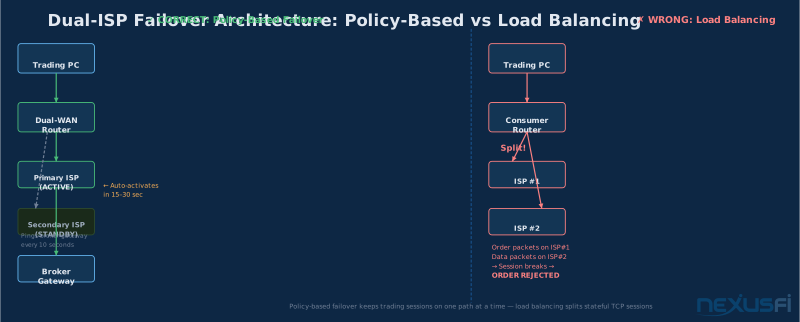
Consumer-grade load-balancing routers split your traffic across multiple connections. This sounds good on paper but is actively dangerous for trading. Your order entry sessions are stateful TCP/TLS connections. If the router starts splitting these packets across two different WAN paths — or switches paths mid-session — you'll get connection resets, platform disconnections, and potentially order submission failures.
The correct architecture is policy-based failover:
- All trading device traffic routes through the primary WAN
- The secondary WAN carries non-trading traffic (streaming, downloads) or sits completely idle
- When the primary WAN fails health checks, all traffic fails over to secondary
- When primary recovers, traffic fails back after a hold-down period
Load balancing splits TCP sessions across two WANs. Order entry sessions are stateful — splitting them causes connection resets and platform disconnections. NEVER use load balancing for your trading machine. Policy-based failover (one path at a time, automatic switching) is the only correct architecture.
This is at the core different from load balancing. The trading machine gets one path at a time — deterministic, predictable behavior.
Health check configuration matters more than the hardware
The router's failover decision depends on its health checks. Most consumer routers only fail over when the physical link drops (link-down detection). That's inadequate. Your ISP's connection can be "up" while your path to your broker is broken due to upstream routing issues. For trading, you need app-layer health checks:
- Ping your broker's order-entry gateway, not just 8.8.8.8
- Configure the router to trigger failover after N consecutive failures (e.g., 3 failed pings, 10 seconds apart)
- Include a hold-down period before failing back to primary (prevents flapping)
Without broker-endpoint health checks, you can have your ISP technically "up" while being unable to trade — and your router won't failover because it doesn't know your specific connectivity need has failed.
The two-ISP architecture in practice:
Use two ISPs from different providers using different physical infrastructure. Fiber from one provider and cable from another eliminates the scenario where a backhoe cuts the same physical conduit serving both. If your neighborhood has both providers running separate infrastructure, choose them deliberately.
As @Big Mike described his home office setup: "I have multiple Gigabit fiber optic uplinks via different ISPs that use different backbones. On top of that, I have 4G LTE backup in the event both fibers are down. Everything is handled by my own pfSense router, which handles the automatic load-balancing and failover/failback." That's the full stack — primary fiber, secondary fiber from a different backbone, and cellular tertiary.
Most traders don't need that level of build. Two ISPs on different technology (fiber + cable, or cable + 5G fixed wireless) gets you 99%+ coverage.
Failover timing expectations:
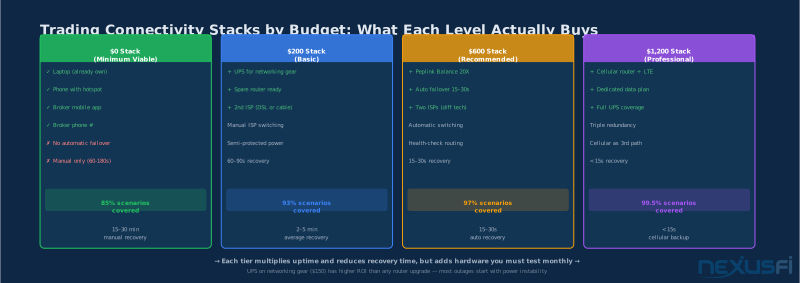
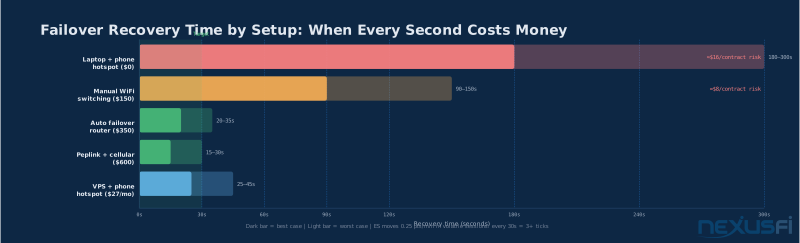
Automatic router failover: 15--30 seconds from link failure to primary traffic on secondary connection. This includes health check detection time, route change propagation, and your trading platform's reconnection to the broker.
During that 15--30 second window, your platform may show disconnected. Your pending orders may remain at the broker (if your broker holds them server-side) or may need to be re-submitted (if your platform holds them locally). Know which your broker and platform uses before you need to find out during a live session.
Dual-ISP failover is automatic if your router is properly configured. The three requirements: (1) different physical ISP infrastructure, (2) app-layer health checks targeting your broker's endpoints — not just 8.8.8.8, and (3) a hold-down timer to prevent flapping.
Router Hardware: The Device Between You and the Market #
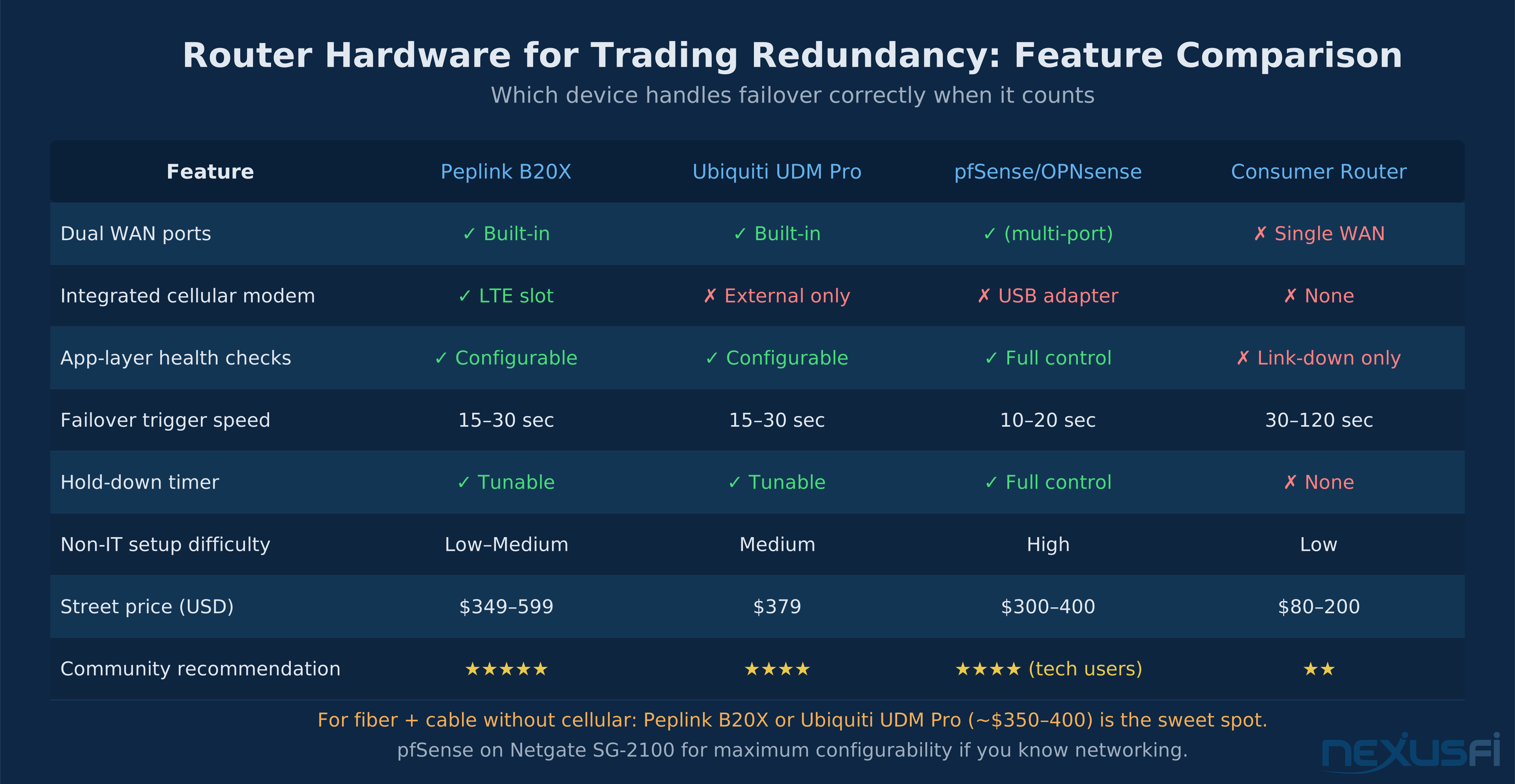
Consumer routers — regardless of brand — are generally inadequate for trading redundancy. The failover implementations on Netgear Nighthawk, ASUS gaming routers, and TP-Link consumer products suffer from slow health checks, limited health check targets, and failover that triggers only on physical link-down rather than connectivity failure. You'll get failover eventually, but "eventually" in a trading context means the position has moved against you.
Peplink Balance series: the consistent community recommendation
The Peplink Balance 20X ($349 street price) is the device that comes up repeatedly in trader infrastructure discussions. It provides:
- Dual WAN ports with integrated cellular modem slot (LTE built-in)
- Configurable health checks to specific IP endpoints
- Automatic failover with tunable hysteresis timers
- SpeedFusion bonding (combines multiple connections for a single stream)
- A web interface designed for non-IT professionals
In 2014, @Big Mike pointed to Cradlepoint for similar reasons: "for those looking for a hardware solution to provide automatic failover/failback for internet connection, the Cradlepoint devices are a good solution. You can do one or more ethernet based uplinks (ie: DSL or Cable or FiOS) as well as one or more cellular based uplinks (ie: 3G/4G modems)." The Peplink Balance 20X is the modern equivalent at similar price points.
The Peplink Balance 30 LTE ($599) adds a third WAN port for connecting primary fiber, secondary cable, and tertiary cellular to one device. As @rahulgopi noted: "I use peplink dual WAN / 4G LTE. I have comcast + Tmobile 4G Lte for backup — if you are a Tmobile mobile customer, the data line is practically free." Real-world confirmation that the Peplink + T-Mobile combination works at retail costs.
Ubiquiti UniFi Dream Machine Pro ($379): Excellent hardware with a strong monitoring dashboard and clean network management. Failover is reliable but requires more networking knowledge to configure correctly. Works well for fiber + cable setups where cellular isn't needed at the router level.
pfSense/OPNsense on a Protectli or Netgate appliance ($250--400): Maximum flexibility for technically inclined traders. Open-source software with full control over every routing policy, health check, and failover rule. The learning curve is steep. If you don't know what a DHCP lease is, this isn't your path.
Equipment recommendation by situation: For a fiber + cable setup without cellular needs, the Peplink Balance 20X or Ubiquiti UDM Pro handles automatic failover reliably in the $350--400 range. If you need integrated cellular backup at the router level, the Peplink Balance 20X with built-in LTE modem runs $500--600. For maximum configurability with technical knowledge, pfSense on a Netgate SG-2100 costs $300--400.
DNS configuration: Configure your router's DNS to use 1.1.1.1 (Cloudflare) and 8.8.8.8 (Google) rather than your ISP's default resolvers. ISP DNS servers often fail before the connection itself fails, making your trading platform appear unable to connect when the internet is technically up. DNS cache staleness during failover can delay reconnection by 30--60 seconds on routers that don't flush the cache on WAN changes.
Configure router DNS to 1.1.1.1 and 8.8.8.8 — never rely on ISP-provided DNS resolvers. ISP DNS servers frequently fail before the connection itself fails, producing a confusing state where your internet is "up" but your platform can't connect. Custom DNS resolvers eliminate this failure mode entirely.
Cellular Backup: When It Works and When It Doesn't #
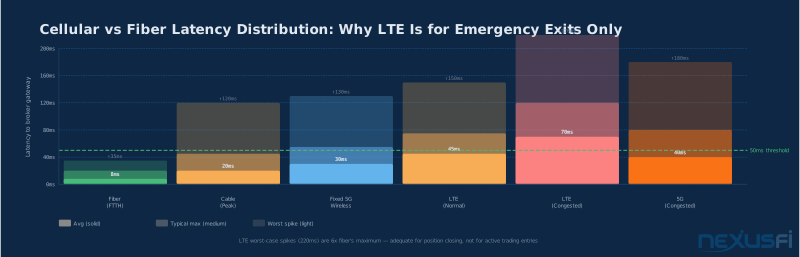
Cellular backup occupies a specific and limited role in trading infrastructure: it's for closing positions, not opening them. The latency and jitter characteristics of LTE and 5G make it unreliable for new trade entries.
Realistic latency expectations:
- LTE (healthy conditions): 40--80ms to metro endpoints
- LTE (congested): spikes to 150--200ms+ are common
- 5G (optimal): 25--50ms — still variable
- 5G (congested tower): can degrade to LTE performance
More importantly, cellular suffers from jitter — inconsistent latency between packets. A connection that averages 50ms but spikes to 180ms unpredictably will cause platform reconnections and order timing issues. For scalping, this is unusable. For closing a swing trade, it's entirely adequate.
The cellular backup workflow:
When you failover to cellular, your trading plan changes immediately:
- Close any scalping positions — the latency is too variable for precision exits
- Widen stops on active day trades to account for latency
- No new entries until your primary connection is restored
- Use limit orders only — no market orders on cellular
Hardware configuration matters more than the carrier:
@CenFlo's approach captures the practical spectrum: "I have unlimited data with Verizon (Grandfathered plan)... I also have a backup phone (Google Fi service) which is cheap and I can also use it if plan A and B fail. Both of my phones are rooted and I can use them to tether any devices that need Inet access."
That's the emergency-only approach — phone hotspot. It works, but it requires you to notice the connection failed, enable the hotspot, switch your trading PC to the new WiFi network, and wait for your platform to reconnect. Under pressure with an open position moving against you, this process takes longer than you think.
The better approach is a cellular router that handles failover automatically:
Integrated cellular router (best): Peplink Balance 20X with integrated LTE modem. Both your primary ISP and the cellular connection terminate at the same device. Failover to cellular is automatic, takes 15--30 seconds, and requires zero manual action.
Dedicated USB modem + dual-WAN router (acceptable): Netgear LM1200 or similar USB modem connected to a router with cellular WAN support. Less reliable than an integrated solution — driver issues and USB connectivity problems are common.
Smartphone hotspot (emergency only): Built into every phone, costs $0 extra if you have a compatible data plan. Activation time: 30--60 seconds. Effective for "close my position and go flat" operations.
Critical rule: Use a different carrier for your cellular backup than for your mobile phone. Having your phone and your cellular backup on the same carrier eliminates the redundancy.
VPN Considerations: When It Helps and When It Hurts #
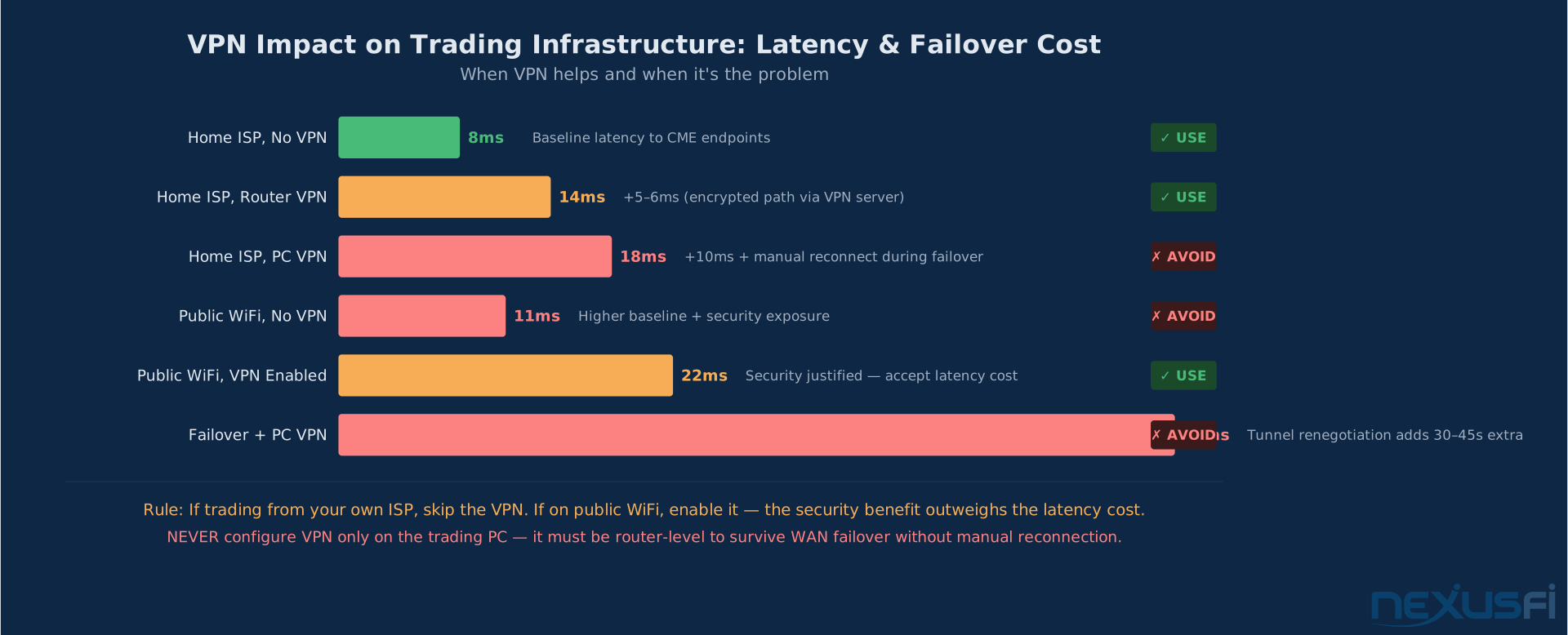
The default answer for home traders on their primary connection: no VPN. The security benefit of encrypting your brokerage traffic over your own private ISP connection doesn't justify the latency cost and the complexity it introduces during failover.
What VPN actually costs you:
A VPN adds 5--30ms latency depending on the provider and server location. More problematic for redundancy setups: when your connection fails over to a backup WAN, the VPN tunnel must be re-established. This tunnel renegotiation adds 10--30 seconds to your recovery time on top of the router's failover time. During a live position, you don't have those seconds.
When VPN is appropriate:
- Trading from a public WiFi network (coffee shop, hotel, airport): security absolutely justifies the latency cost. Enable VPN before connecting to any public network.
- Your broker specifically requires a VPN connection (some FCMs and professional platforms require this for order routing)
- Trading from a foreign country where your broker's platform is geo-blocked
Configuration if VPN is required:
Configure the VPN at the router level, not on your trading PC. This ensures that when your WAN fails over, the router re-establishes the VPN tunnel automatically rather than requiring you to manually reconnect. Peplink and pfSense both support this. A VPN configured only on your trading computer will lose its tunnel during WAN changes and require manual reconnection.
For a deep dive on VPN selection and configuration for futures trading, see /a/infrastructure/trading-vpn-futures-traders.
VPN at home on your own ISP: skip it. VPN on public WiFi: mandatory. If VPN is required for your broker, configure it at the router level — not on your trading PC — so it automatically reconnects during WAN failover without manual intervention.
Power Redundancy: The Overlooked Single Point of Failure #
The most common trader connectivity failure isn't the ISP — it's power. A brief power interruption resets your modem, router, and trading PC simultaneously, wiping out any ISP redundancy you've built.
@Saroj was direct about this in the community: "Have your cable modem and router both plugged into your UPS. ALWAYS HAVE DEFENSIVE STOPS IN PLACE WHEN THE TRADE IS PUT ON. This risk isn't just where there is a major blackout... There are many scenarios in which your trading computer could lose either a data or power connection."
Minimum UPS configuration for a trading setup:
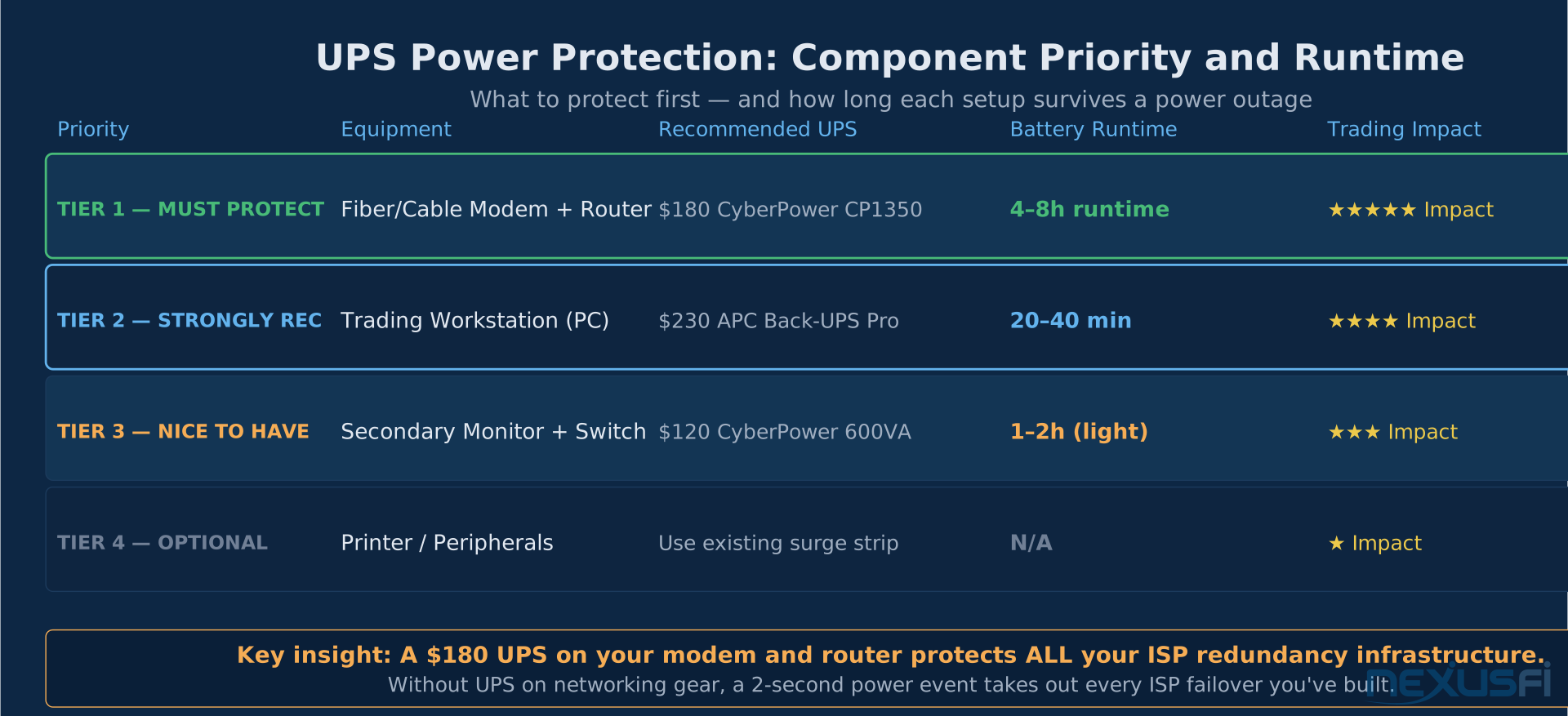
- Cable/fiber modem: must be on UPS
- Router: must be on UPS
- Network switch (if used): must be on UPS
- Trading PC: strongly recommended on UPS
A proper UPS protects against brownouts, surges, and brief outages. For most power events — the 2-minute outage from a car hitting a utility pole — a mid-range UPS (CyberPower CP1500PFCLCD, ~$180) provides 30--60 minutes of runtime for networking gear and a workstation.
For a detailed guide to UPS sizing and configuration, see /a/infrastructure/ups-power-protection-futures-traders.
For longer outages (storms, regional grid issues), a UPS buys you time to switch to cellular + laptop and continue trading. As @richw described after moving to VPS-based trading: "I have set up a VM in AWS where I will now run NinjaTrader. This will help to insulate me from issues at my home — power outages, Internet outages, PC failures, etc. If I lose my primary Internet connection, I can switch quickly to a WiFi hotspot from my phone and a laptop."
The VPS/cloud approach at the core changes the power equation: your trading platform runs on infrastructure with enterprise-grade power redundancy, and you only need enough local power to run a laptop and cellular connection.
Power protection priority:
- Modem and router (essential — without these, all ISP redundancy fails)
- Trading PC (important — 30-minute runtime covers most outages)
- Secondary display and peripherals (nice to have)
Size your UPS based on the wattage of connected devices with at least 20% headroom.
Failover Testing: The Monthly Drill You're Not Running #
This is the section most traders read and then don't act on. That's a mistake.
@bobwest made this point clearly in the community: treating trading infrastructure as a business means testing your disaster recovery plan, not just building one. Every piece of redundancy you've installed is useless if you've never verified it works — under the time pressure of a live position.
The core insight: An untested backup is not a backup. It's a hope.
Monthly testing protocol:
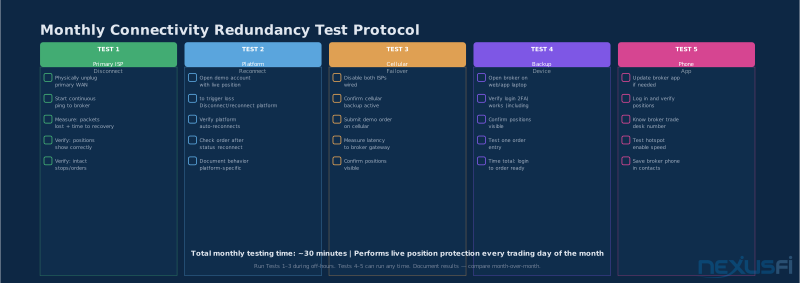
Test 1: Primary ISP disconnect (off-hours)
- Open a demo/sim account with a live market position
- Unplug your primary ISP's ethernet or coax cable (physically disconnect it, don't just disable it in software)
- Start a continuous ping to your broker's gateway
- Observe: How many pings fail? How long until reconnection? Does your trading platform automatically reconnect?
- Once reconnected, verify: Are positions showing correctly? Are stops and pending orders intact?
- Document the results with actual numbers
If you're using a Peplink or similar router, the failover should take 15--30 seconds. If it takes 3 minutes, your health check interval is misconfigured and needs tuning.
Test 2: Platform-specific reconnection behavior
Different platforms handle WAN changes differently:
- NinjaTrader: Typically reconnects automatically after a brief disconnection. Locally-managed orders may cancel. Verify with your specific broker.
- TradingView: Browser-based. The page often needs a refresh.
- Interactive Brokers TWS: Excellent automatic reconnection. Verify order status immediately after reconnection.
- Sierra Chart: Generally reconnects well; market replay data may need re-downloading.
Know your platform's behavior before you discover it in a live situation. For mobile trading backup procedures, see /a/infrastructure/mobile-futures-trading-network-risk-platform.
Test 3: Cellular and backup device test
Disconnect both primary and secondary ISPs. Verify cellular backup activates automatically (router dashboard). Open the trading platform and confirm market data flows. Submit a demo order. Separately, log into your broker's web platform on a phone or laptop — confirm you can see positions and that 2FA works. Save your broker's trade desk number in your phone now, before you need it.
That three-tier structure — primary ISP, cellular/mobile, broker phone — covers 99.9% of failure scenarios.
Real-World Failure Scenarios: What Actually Happens #
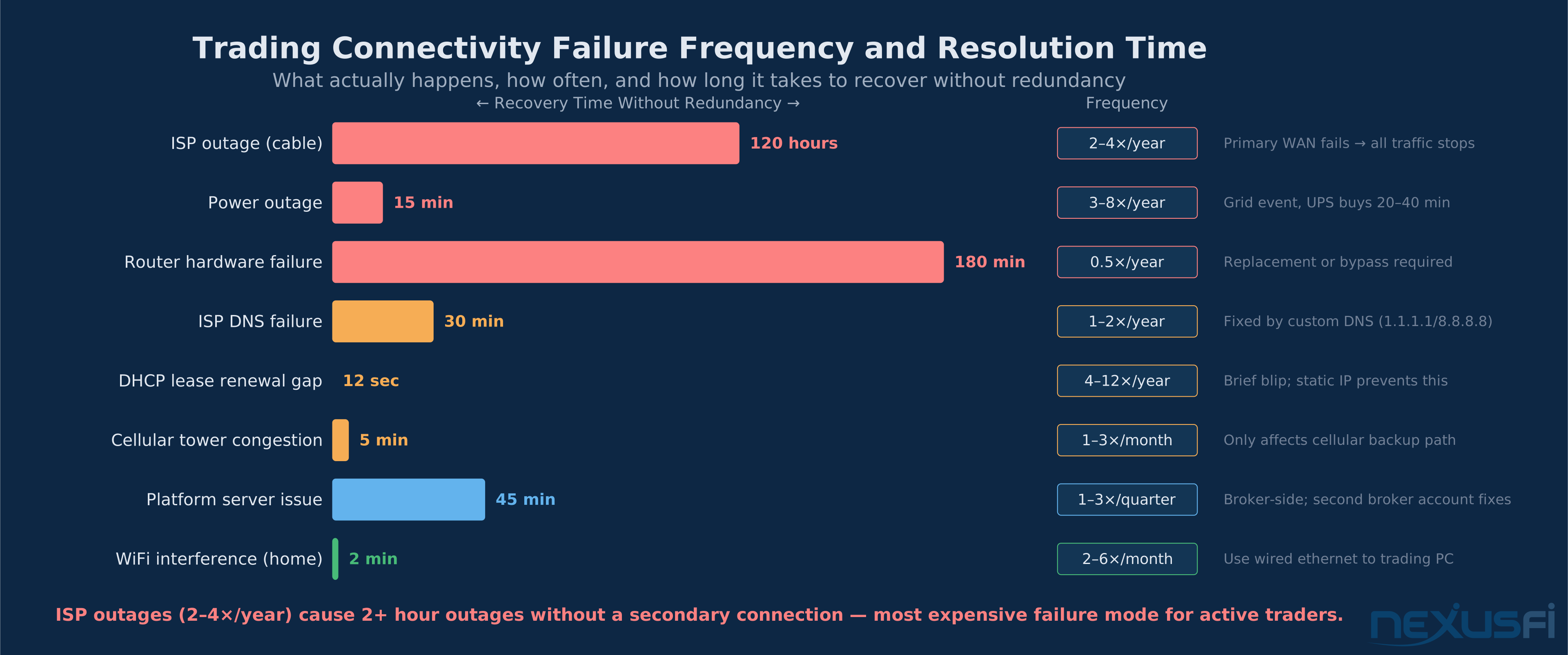
ISP outage (most common, 2--4x/year for cable)
The backhoe cuts a line during a construction project. Your neighborhood node fails. Your provider schedules maintenance. As @SMCJB described the experience: "[Comcast] runs through periods where 2-3 times a day it appears to drop the signal for about 10 seconds — this causes everything with a heartbeat to think it's disconnected." In all these cases: if you have no secondary ISP, you have no access to your open positions.
Prevention: secondary ISP on different physical infrastructure. The difference between "my cable is from Comcast" and "my secondary is fiber from AT&T" is the physical path they take to your house. Different conduits mean a single construction event can't take out both.
Router failure (1 every 2--3 years)
The router that handles both your primary and secondary ISPs fails due to a power surge, overheating, or hardware defect. Now both ISPs are useless until you replace or bypass the router.
Prevention: Keep a preconfigured spare router ready. Know how to connect your trading PC directly to your modem (bypassing the router entirely) as an emergency bypass.
Platform-specific failures
Some platforms have outages even when your internet is working fine. Have a secondary platform configured and know how to access your broker's web-based order management.
DNS failure and DHCP issues
ISP DNS servers can fail before the connection itself fails. Prevention: set router DNS to 1.1.1.1 and 8.8.8.8. For DHCP lease renewal gaps during market hours, request a static IP from your ISP if available.
The "everything fails" cascade
Power outage takes out your modem, router, and PC simultaneously. The backup cellular router has no power either. The UPS wasn't installed.
Prevention: UPS on networking gear is non-negotiable. Size it for 30 minutes minimum. Know where your laptop is and ensure it's charged. Know your broker's trade desk number.
The VPS Alternative: When Home Infrastructure Isn't the Answer #
Some traders bypass home connectivity redundancy entirely by running their platform on a cloud VM. As @richw described: "This will help to insulate me from issues at my home — power outages, Internet outages, PC failures, etc. If I lose my primary Internet connection, I can switch quickly to a WiFi hotspot from my phone and a laptop... The cost at 50% usage will only be around $27 per month. That is cheap insurance."
@Scalpingtrader reached the same conclusion: "Stability / access to the market and your orders is really the only thing you should care about as retail trader... I rather not invest in all that stuff at home but rather get a similar level of stability from the remote solution."
The VPS approach trades home infrastructure complexity for ~$27--50/month, shifting most failure scenarios to datacenter-grade reliability. For a full comparison, see /a/infrastructure/ninjatrader-vps-mobile-companion.
The minimum stack: Charged laptop + broker app on phone + trade desk number saved (85% coverage, free). Then: UPS ($80--200), secondary ISP ($30--60/month), dual-WAN router ($350--600). Order matters — UPS first, because most failures start with power.
Emergency Protocol #
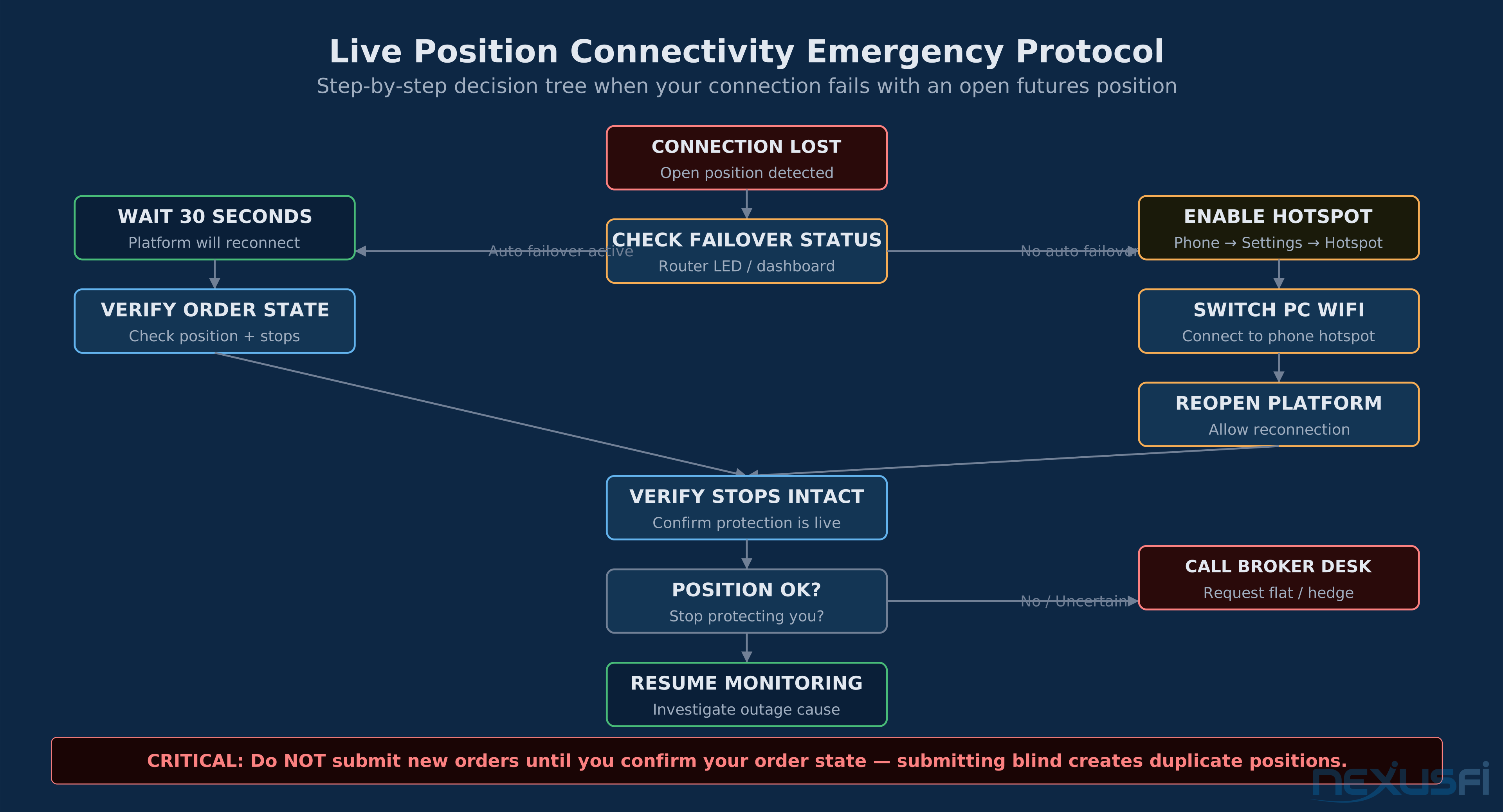
When connectivity fails with an open position, this is the sequence — no improvising:
- Do NOT submit new orders immediately — your previous orders may still be pending at the broker. Duplicate positions are the #1 connectivity emergency mistake.
- Check auto-failover — if your router switched to the secondary ISP, the platform will reconnect within 30 seconds. Wait.
- If no auto-failover: phone hotspot — Settings → Personal Hotspot → On. Connect trading PC to hotspot. Reopen the platform.
- Verify order state — use broker's web platform to confirm position size, direction, and that protective stops are live.
- If in doubt: call the trade desk — every futures broker can flatten your position by phone. That number should be saved in your phone now.
@Fat Tails described this structure precisely: "My broker natively supports OCO orders, and I so do not have orders which are locally held. In case that I lose connectivity, I have a backup internet connection (mobile) to replace my fixed line. In case of a PC failure, I have a notebook to connect to my broker. The notebook also works during a power failure. If nothing works, I have the phone number of the trade desk of the broker ready to flatten everything if need."
The most expensive mistake in a connectivity emergency is submitting new orders before confirming your existing order state. Duplicate positions from blind order submission are a genuine risk. Always check the broker's web platform for order state before taking any action.
Knowledge Map
Go Deeper
Build on this knowledgeReferences This Article
Articles that build on this topicCitations
- — Router failover redundancy cellular backup (2013)“for those looking for a hardware solution to provide automatic failover/failback for internet connection, the Cradlepoint devices are a good solution. You can do one or more ethernet based uplinks (ie: DSL or Cable or FiOS) as well as one or more cellular based uplinks (ie: 3G/4G modems).”
- — PA Dax CL, ES and Bund Price Action Trading Log (2018)“The exchanges and brokers nowadays are very stable, but we've seen DDoS attacks on banks this week disabling access to their banking apps, why would that not happen someday at my broker and the services becomes inaccessible when you're in a big position? So I want to be able to switch to another broker when mine fails. I have standby accounts fully funded to either hedge a position when a broker fails or quickly resume trading.”
- — Doomsday senerio (2018)“First, look at your situation and determine where you have a 'single point of failure' -- something where if just one thing fails, like the outside power, you are screwed. Then find a way to have a redundant way to provide that.”
- — Ron's trading journal (2013)“I took a second ISP (internet service provider), who uses a different technology (VDSL2) on copper wire. The bandwidth is a bit less but still very comfortable at 10 Mbps download and 0.5 Mbps upload. The poor speed compared to the cable connection is because I am at a too long distance from the telephone hub. They don't tell you that when you order the connection! So you can better check it beforehand.”
- — Outage with a live position on Ninja (yikes) what to do? (2013)“In case that I lose connectivity, I have a backup internet connection (mobile) to replace my fixed line. In case of a PC failure, I have a notebook to connect to my broker. The notebook also works during a power failure. If nothing works, I have the phone number of the trade desk of the broker ready to flatten everything if need.”
- — Monitor Internet Connection for Overnight Hold (2023)“I have multiple Gigabit fiber optic uplinks via different ISPs that use different backbones. On top of that, I have 4G LTE backup in the event both fibers are down. Everything is handled by my own pfSense router, which handles the automatic load-balancing and failover/failback.”
- — Spoo-nalysis ES e-mini futures S&P 500 (2018)“I have unlimited data with Verizon (Grandfathered plan) and I won't let it go. I also have a backup phone (Google Fi service) which is cheap and I can also use it if plan A and B fail. Both of my phones are rooted and I can use them to tether any devices that need Inet access.”
- — Learning to Trade with the Big Money (2023)“I have finally taken a step I have been thinking about for quite some time. I have set up a VM in AWS where I will now run NinjaTrader. This will help to insulate me from issues at my home -- power outages, Internet outages, PC failures, etc. If I lose my primary Internet connection, I can switch quickly to a WiFi hotspot from my phone and a laptop.”
- — Tell me about internet speed (2018)“Stability / access to the market and your orders is really the only thing you should care about as retail trader. Many traders have backup-internet connections, backup-electricity to keep their computer and internet running and all those things to maintain a stable connection.”
- — Doomsday senerio (2018)“Have your cable modem and tower both plugged into your UPS. ALWAYS HAVE DEFENSIVE STOPS IN PLACE WHEN THE TRADE IS PUT ON. This risk isn't just where there is a major blackout... There are many scenarios in which your trading computer could lose either a data or power connection.”
- — Home Automation (2017) 👍 3“I use peplink dual WAN / 4G LTE. I have comcast + Tmobile 4G Lte for backup. if you are a Tmobile mobile customer, the data line is practically free.”
- — Home Automation (2017) 👍 2“Comcast is pretty good most of the time, but I run through periods where 2-3 times a day it appears to drop the signal for about 10 seconds. Unfortunately this causes everything with a heartbeat to think its disconnected.”