



Starlink Satellite Internet for Futures Traders: Latency, Jitter, and Real-World Performance
Overview #
There's a question that comes up constantly on NexusFi: can you trade futures from a remote location using Starlink satellite internet? It's not a theoretical question. Traders are moving to rural properties, living in RVs, working from off-grid setups, and asking whether Starlink can replace the fiber connection they left behind.
The short answer is: it depends on how you trade, how you configure the setup, and what backup connectivity you have in place.
Starlink is a at the core different category of satellite internet than the legacy systems it replaced. SpaceX's low-earth orbit (LEO) constellation delivers latency in the 25-60ms range under good conditions — compared to 500-700ms for older geostationary satellite services. That difference moves Starlink from "completely unusable for trading" to "viable for many trading styles." But viable doesn't mean equivalent to fiber, and the margin between acceptable and problematic narrows fast as your trading style demands faster execution.
This article covers what Starlink actually delivers for futures traders, where it breaks down, and how to configure it defensively if it's your only realistic option.
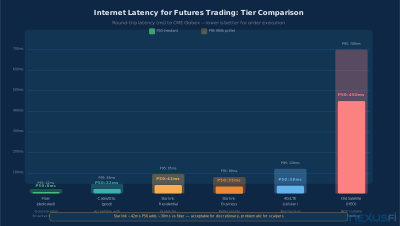
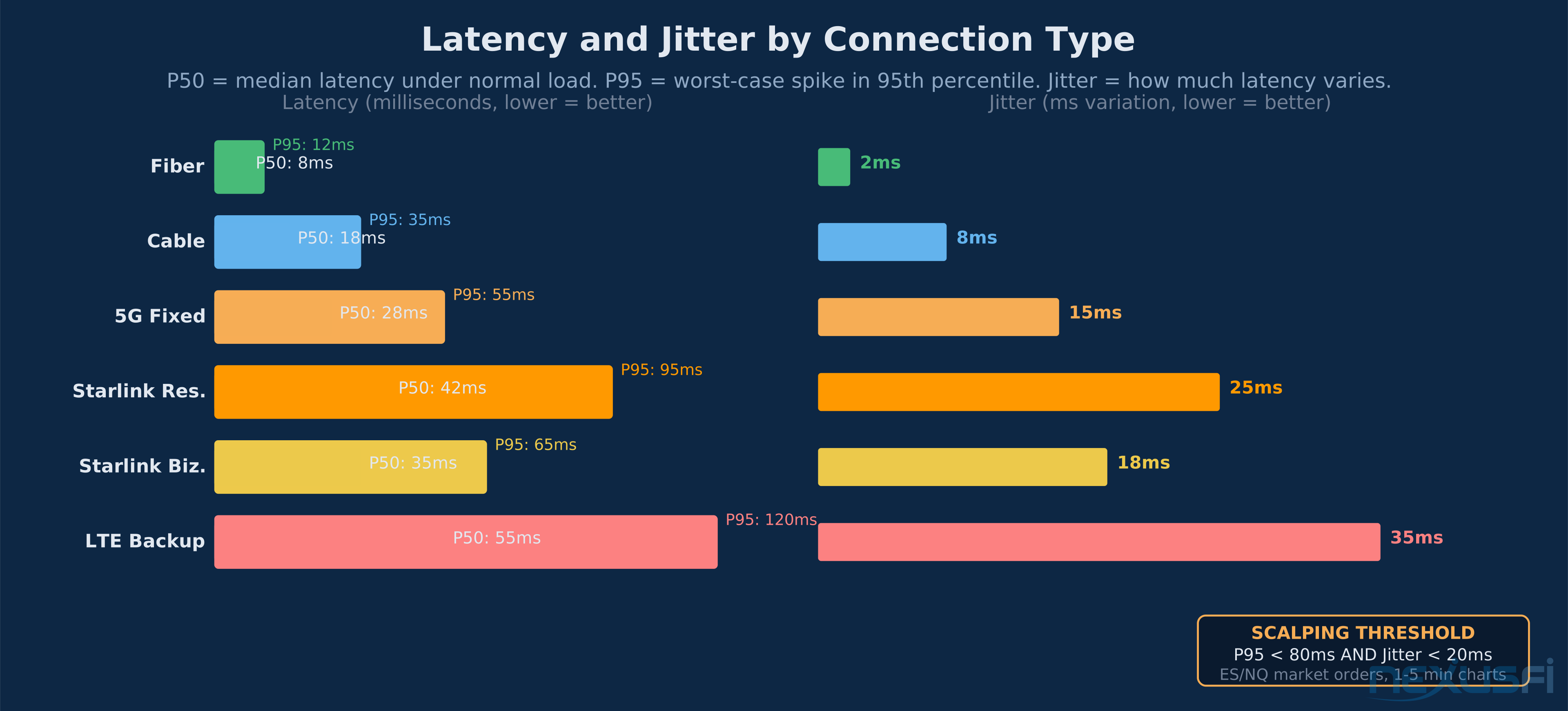
:::image b3816f4a-491b-4973-b1f5-f21027c978ed Fiber delivers 8ms P50 to CME Globex. Starlink sits at 42ms P50 under good conditions. The gap matters less for discretionary traders, much more for scalpers running tight stops.
Latency vs. Bandwidth: What counts for Trading #
The biggest misconception about internet connections for trading is conflating bandwidth with performance. When traders say they "have fast internet," they usually mean high download speeds — 500Mbps, 1Gbps. For futures trading, that number is nearly irrelevant.
@Big Mike addressed this directly in the trading infrastructure discussion thread:
"For trading, priorities are as follows: 1) Reliability/uptime 2) Minimum bandwidth of about 1 Mbps 3) Minimal latency. When people buy faster internet connections for their home office in order to have a better trading experience, it isn't really the additional bandwidth that helps them — it's the fact that higher tier connections often have lower latency as well."
A trading platform sending order messages to a CME broker gateway uses almost no bandwidth. A Level 2 DOM feed for ES is kilobytes per second. A tick data feed for multiple instruments is still well under 1Mbps. The trading-relevant question is how quickly that tiny amount of data travels from your broker to your machine and back.
Latency is the round-trip time (RTT) for that data. A 20ms connection means your order acknowledgment arrives 20ms after you send it. A 100ms connection means it takes 100ms. For most discretionary traders, the difference between 20ms and 60ms is imperceptible and irrelevant to edge. The difference between a 30ms stable connection and a 200ms spike — that's where executions miss, DOM updates freeze, and stop orders fail to trigger at intended prices.
@Big Mike was equally blunt in a follow-up discussion:
"Bandwidth has about zero to do with trading. Latency can affect fills. There is virtually nothing you can do to improve latency, unless you're willing to pay for a dedicated server or collocation."
The critical implication: Starlink's 42ms P50 average latency is acceptable for most trading styles. Starlink's jitter — the variance in that latency — is what creates real execution problems.
Starlink Technical Specs for Traders #
Starlink uses a constellation of satellites in low earth orbit, typically at 340-1200km altitude. The signal travels from your dish to the nearest satellite, through the constellation, to a ground station, then to your broker's gateway and back. That path is at the core longer than a fiber cable from your house to a data center.
What this produces for futures traders:
Average round-trip latency: 25-60ms to nearby servers under good conditions. In practice, 35-50ms to CME gateway is realistic for most US locations. Compare this to fiber at 8-22ms or cable at 20-45ms.
Jitter: Higher than fiber, variable. In clear conditions with good dish placement, Starlink jitter can be remarkably consistent. During satellite handoffs, congestion, or weather, jitter spikes are common.
Packet loss: Normally low, but with brief bursts during satellite beam transitions. A packet lost mid-session doesn't just represent lost data — it triggers TCP retransmission, which adds 100-500ms of additional latency on that connection until the retry completes.
Throughput: More than sufficient for any trading application. 50-300Mbps down is typical. This is irrelevant except for your VPN tunnel or data download operations.
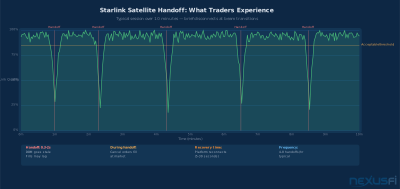
Satellite handoffs: Starlink's dish continuously shifts between satellites as they move overhead. Each transition creates a brief instability event — typically 0.3-2 seconds of degraded or lost signal. These happen 4-8 times per hour under normal conditions. For browsing, you never notice. For an active DOM ladder, a 1-second freeze at the wrong moment matters.
@Ariman86 gave a practical summary in the Scalp Trading with Starlink thread:
"I believe what you should be looking at is not speed but latency. Starlink's latency is averaging at 40-50ms according to reviews, so if your 12.5mb offers lower delay then you will not benefit from Starlink."
He's right about the framing. The question isn't download speed. It's whether your existing connection has higher or lower latency than Starlink, and whether that latency is stable.
Jitter and Packet Loss: The Real Performance Variables #
The most dangerous misconception about Starlink performance is looking at average latency and concluding the connection is acceptable. Average latency is the least useful number for trading purposes.
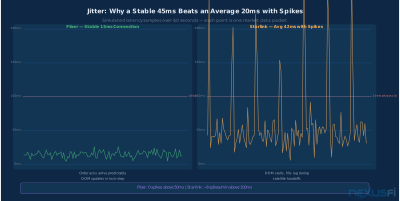
:::image eb7c309d-425d-492d-b194-00d18f9cf8d3 Stable 15ms fiber vs Starlink with handoff spikes — the average might look similar, but the spikes are what cause missed fills and frozen DOMs.
Consider two theoretical connections:
- Connection A: Rock-steady 45ms, never deviates by more than 3ms
- Connection B: Averages 20ms but spikes to 200-400ms several times per minute during satellite transitions
Connection A is objectively better for trading despite having a higher average latency. Your DOM updates arrive predictably. Your order acknowledgments come back in a known timeframe. Your stop orders fire when the market hits your level. Connection B produces constant surprises — brief freezes, stale quotes, orders that take unexpected time to confirm.
Starlink with good dish placement and low congestion behaves more like Connection A. Starlink with partial sky obstruction, weather interference, or network congestion under load resembles Connection B during its bad moments.
@SMCJB explained the distinction clearly in the Starlink day trading discussion:
"Think of internet connectivity like water in a pipe. Bandwidth/capacity is how much water is moving through the pipe while latency is how fast that water is moving. For trading having a small very fast pipe (ie low latency connection) is more important than having a massive but slower pipe. If your connection is 500Mbps but latency is 100ms or more, your fills are going to be slower than someone with a 10Mbps connection at 20ms latency."
-- @SMCJB, Day Trading (Scalping) with Starlink satellite internet?
For Starlink users, the practical implication: measure jitter, not just ping. A tool like PingPlotter or WinMTR gives you a continuous picture of your connection's behavior over time. Run it for several hours during market hours — including at the cash open, during a news event, and during peak local internet usage — before drawing any conclusions about whether your Starlink setup is tradeable.
Starlink vs. Fiber, Cable, and Cellular #
The honest comparison across internet types for trading:
Fiber remains the clear best choice. Consistent 5-20ms latency, minimal jitter, highest reliability, no atmospheric interference. If fiber is available and affordable, get fiber. No other technology competes for active trading.
Cable (coaxial) is acceptable for most trading styles. Latency runs 15-45ms typically, with congestion-related spikes at peak hours. A good cable connection in a quiet neighborhood performs well. Cable degrades under heavy neighborhood usage — the "last mile" is shared infrastructure, so gaming and streaming by neighbors can affect your jitter during evening hours.
Starlink occupies a middle position — better than cellular, better than old satellite, worse than fiber, roughly competitive with cable in many conditions. Its specific weaknesses (handoffs, obstruction sensitivity, weather) require mitigation strategies that fiber doesn't require.
Cellular (4G/LTE/5G) varies wildly by carrier, tower load, and RF conditions. In strong 5G coverage areas with low congestion, cellular can be competitive with Starlink for trading. As a backup connection, cellular is excellent. As a primary for active futures trading, it's unreliable because tower congestion is unpredictable.
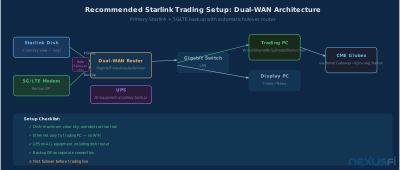
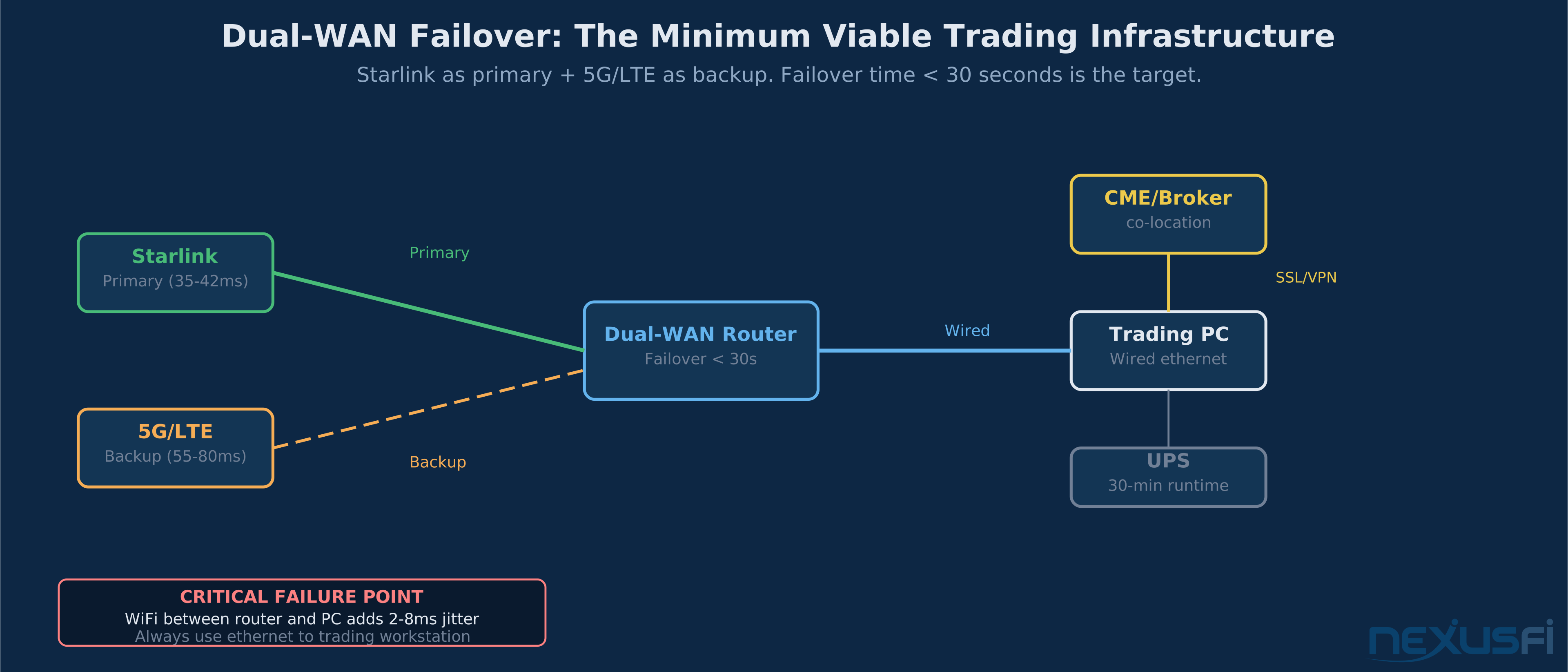
:::image 33ae1a58-252c-4ede-8729-60260a7b94aa The recommended configuration: Starlink as primary with dedicated 5G/LTE backup, both feeding a dual-WAN router with automatic failover. UPS covers all equipment.
@redbarntrades ran a direct before/after comparison when switching from DSL to Starlink in a rural location:
"I thought I would post the results of the change over from DSL connection to Starlink. I received the Ethernet adapter today, so I just finished connecting it to my trading PC. Before Starlink: Ping: 456 Down: [much lower]. The results are better with Starlink — much lower latency and more consistent connection for my needs."
That's the context where Starlink genuinely shines: replacing bad DSL, legacy satellite, or areas with no wired broadband. For traders coming from fiber, the comparison is unfavorable. For traders coming from 450ms ping times, Starlink is significant.
When Starlink Works for Futures Trading #
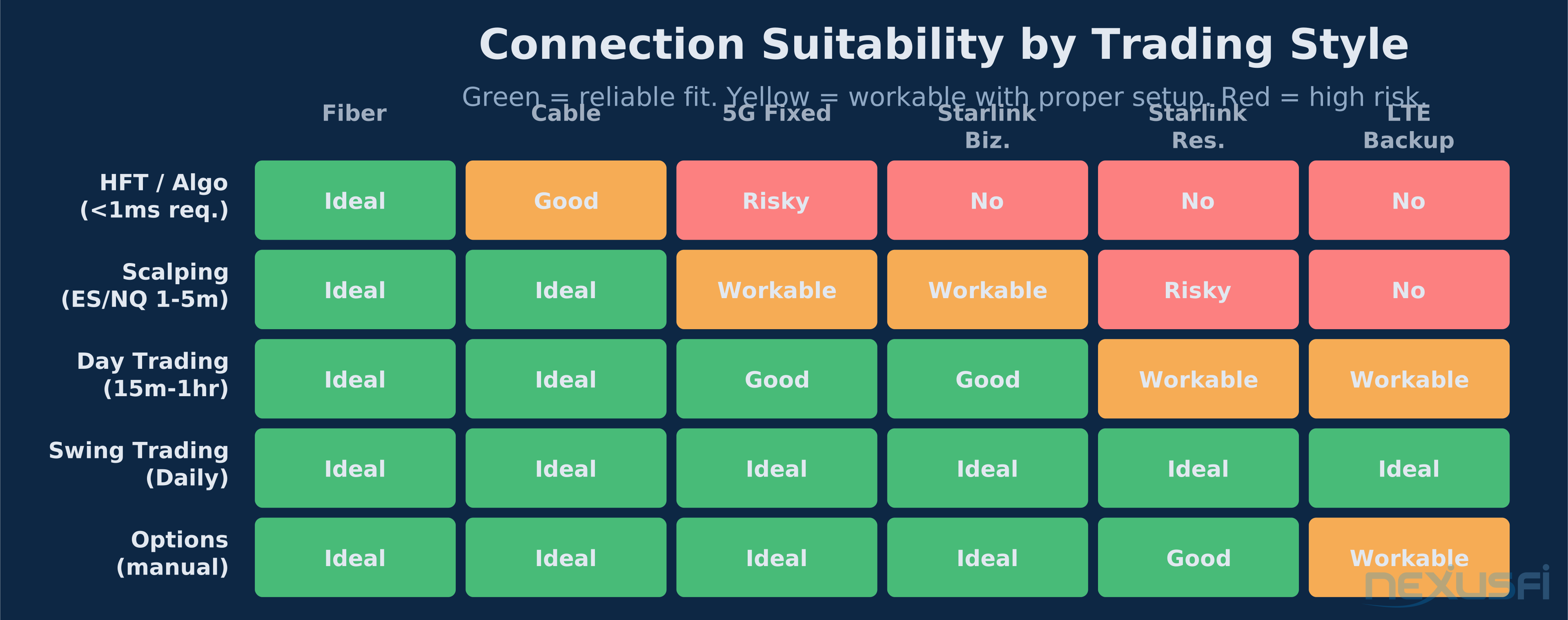
Starlink can support a real futures trading practice for these trading styles and conditions:
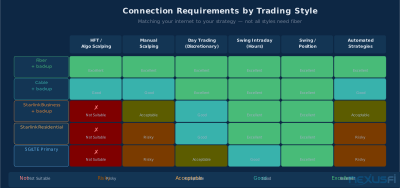
Discretionary day trading on index futures (ES, NQ, RTY) where entries are based on chart patterns and market structure, not sub-second execution advantage. A 42ms connection doesn't cost you edge when your edge is reading order flow, not front-running price.
Swing intraday positions held for hours with defined entries and exits. Latency becomes nearly irrelevant when your holding period is measured in hours and your risk management is server-side stops.
Position traders and swing traders using futures for directional exposure. Entry and exit precision matters at the seconds level, not milliseconds. Starlink handles this without issue.
Rural locations with no fiber alternative. If your choice is 450ms satellite latency vs. 42ms Starlink vs. spotty 4G, Starlink is clearly the right call. The question isn't Starlink vs. fiber; it's Starlink vs. what's actually available.
@dredmond19800 shared his actual experience trading NQ from Ireland on Starlink:
"I use Starlink in Ireland and it's fine for my needs. I trade NQ and don't have any 'lag' problems."
That's a meaningful data point. NQ on a 40-50ms connection from Ireland, discretionary trading style, no lag problems. The traders who report negative Starlink experiences are typically running automated strategies with tight timing requirements, or scalping with very short holding periods where execution speed affects P&L directly.
:::image 40c24912-9d82-464a-91fb-099ce5d02817 Not all styles need fiber. Discretionary day trading and swing intraday are both viable on Starlink. Scalping and automated high-frequency strategies are where Starlink creates real risk.
When Starlink Fails: High-Risk Scenarios #
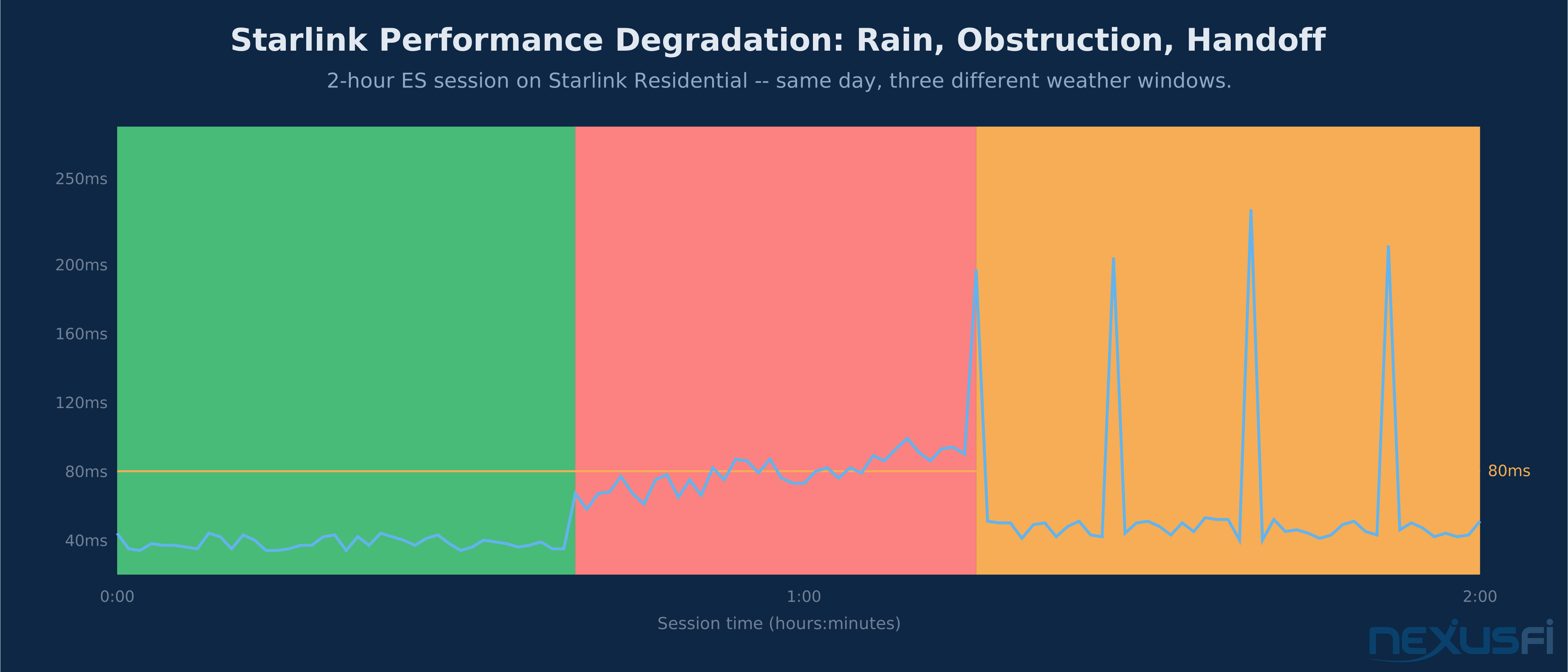
Starlink becomes genuinely problematic in several specific conditions:
Scalping with tight stops. If your edge requires getting in and out of positions within seconds and your stop is 2 ticks, a 200ms DOM freeze during a satellite handoff can be the difference between stopping out at your level and getting filled 4 ticks worse. The frequency of handoffs is low enough that this doesn't happen every trade — but it happens often enough to affect your statistics over time.
Automated strategies with tight session management. Algorithms that depend on continuous data feed integrity and rapid order management are exposed to every Starlink interruption. A 2-second DOM stall that a discretionary trader barely notices can cause an algo to enter incorrect state, double-fill, or fail to cancel a working order.
High-volatility news events. FOMC announcements, NFP releases, CPI prints — these are exactly when you most need your connection to behave. They're also when satellite network congestion spikes as user activity increases. The same event that makes your trading situation most time-sensitive is the event most likely to cause network degradation.
Weather interference. Heavy rain, snow accumulation on the dish, severe thunderstorms overhead — all degrade Starlink performance. The degradation isn't always total loss; it can manifest as increased packet loss and jitter, which is worse than a clean outage because your platform doesn't detect it the same way.
Partial sky obstruction. Trees, rooflines, utility poles, or anything that intermittently crosses the dish's field of view create periodic signal interruptions. The Starlink app's obstruction detection tool exists specifically because this is the single most common cause of poor performance.
:::image 4f77f1f6-30d0-4daa-ada0-a04393f437d8 Satellite handoffs happen 4-8 times per hour under normal conditions. Brief signal drops create DOM freezes and stale data. Most discretionary traders adapt; scalpers and automated systems cannot.
@kiwi put the core issue precisely:
"For a visual stimulus like trading, human reaction times are about 1/4 of a second. That's 250 milliseconds, so Starlink's 50ms doesn't add much to that. But if you've automated your scalping and your computer reacts very fast it might matter more. Idle latency is just the round trip delay if you're doing nothing — which trading will normally be as it's a tiny fraction of your broadband bandwidth."
That's the right framework. Human reaction time is the binding constraint for manual traders, not network latency. Automation changes the equation because the computer reacts faster than the network delivers.
Starlink Business vs. Residential #
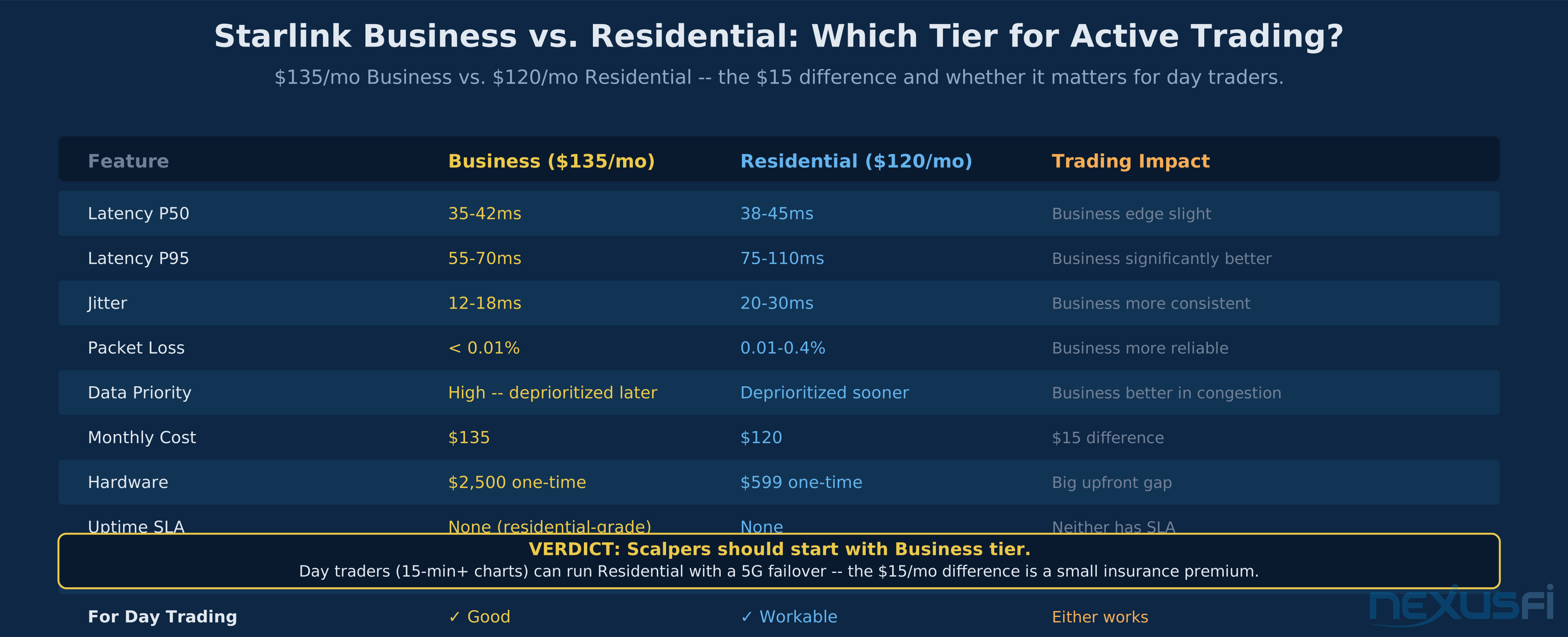
SpaceX offers multiple Starlink tiers. For trading purposes, the relevant distinction is between priority service tiers (Business, Priority) and the standard residential plan.
What Business/Priority plans provide:
- Higher queue priority during network congestion
- More consistent throughput under load
- Better service-level expectations for uptime
- Priority ground station routing in some configurations
What they don't provide:
- Lower physics-limited latency. The signal still travels to LEO and back.
- Immunity to satellite handoffs. The beam transition behavior is the same.
- Protection from weather interference. The dish physics don't change.
- Any guarantee of trading-specific performance.
If Starlink is your primary trading connection and you cannot tolerate occasional congestion-related degradation, the Business tier is the defensible choice. The upgrade buys consistency under load — during peak usage hours when residential service degrades, Business plans hold up better. Whether that consistency is worth the price premium depends on your trading style and how often you experience congestion issues with residential service.
For traders using Starlink as a backup connection (with fiber primary), the residential plan is adequate. You don't need Business tier for a failover link that activates occasionally.
The Optimal Starlink Trading Configuration #
If you're trading on Starlink — or considering it — configuration quality matters more than any other variable except dish placement.
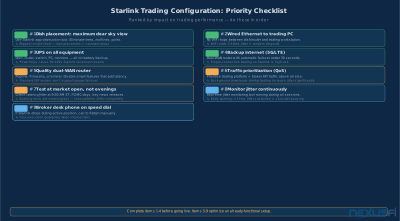
1. Dish placement is everything. This is the single highest-impact variable in your entire setup. A dish with perfect clear sky view performs dramatically better than one with even modest obstruction. Use the Starlink app's sky view and obstruction detection features. Mount as high as possible. Eliminate any object that crosses the dish's field of view during your trading hours. Reassess seasonally — trees grow, and summer canopy can create problems that didn't exist in winter.
2. Wired Ethernet to your trading PC. This is non-negotiable. WiFi adds its own jitter layer on top of Starlink's variability. Every wireless hop between the dish router and your trading workstation is another failure point and another latency contributor. Run a cable.
3. Quality router between dish and LAN. The Starlink dish comes with its own router, but using a dedicated dual-WAN capable router (Peplink Balance, Firewalla Pro, pfSense box) gives you proper failover capability and QoS control. Disable features on the router that add latency without benefit — some "smart" traffic management features actually degrade trading connections.
4. QoS prioritization. Configure your router to prioritize trading platform traffic and broker API connections above all other traffic on your network. Streaming, backups, and downloads happening in the background during trading sessions can spike your connection's jitter much.
5. UPS on all equipment. Every piece of network equipment between the dish and your trading PC — the Starlink dish itself, its power supply, the router, any switches — needs to be on a battery backup. A 2-second power fluctuation that cycles the Starlink hardware creates a multi-minute reconnection event. Most UPS units cost $80-150 and protect against the most common cause of unexpected disconnects.
:::image 22f9e0dc-9ca2-4c1c-b1fe-5dc6c218c782 The nine-step configuration checklist. Items 1-4 are mandatory before going live. Items 5-9 improve a working setup.
Dual-WAN Failover: The Critical Safety Net #
Trading on a single internet connection — any connection, including fiber — is operationally risky. Trading on Starlink without a backup is considerably riskier, because Starlink has known interruption patterns that fiber doesn't.
The standard solution is dual-WAN: two independent internet paths feeding a router that monitors both connections and fails over automatically when the primary drops.
Your secondary connection for Starlink backup should be:
- 5G/LTE cellular — works everywhere Starlink works, different failure modes. AT&T, T-Mobile, and Verizon all offer home internet plans using cellular hardware that's suitable for a backup WAN connection.
- Cable or DSL if available — in rural areas where Starlink is being used, wired broadband may be available but poor enough that Starlink is preferred as primary. Keep it as backup.
- Separate carrier 5G — if you already have T-Mobile home internet, use Verizon cellular as backup, or vice versa.
The failover router monitors both connections with continuous health checks. When Starlink's primary link drops, the router switches to the backup path in typically 5-30 seconds (depending on configuration). Your trading platform experiences a brief reconnect but doesn't lose state if the reconnect logic is strong.
Test the failover before you ever trade live on this setup. Pull the Starlink ethernet cable while running your platform in a simulator. Watch what happens. Does the platform reconnect automatically? Does your order state survive? If your platform crashes on reconnect rather than resuming gracefully, you have a problem that needs solving before you rely on this configuration with real positions.
@kevinkdog's trading system checklist from his public trading journal included this infrastructure layer explicitly:
"Storage (Offsite and Onsite) - Backup Internet Provider - Backup Power Supply - Backup Phone Line - Backup Broker - Backup Trading Desk. There is more, I know, but having backups (and possibly even backups for the backups) makes for a more professional operation."
That framework applied to Starlink: your primary connection is Starlink, your backup is cellular, your backup to the backup is your broker's phone desk.
Testing Your Connection Before Trading Live #
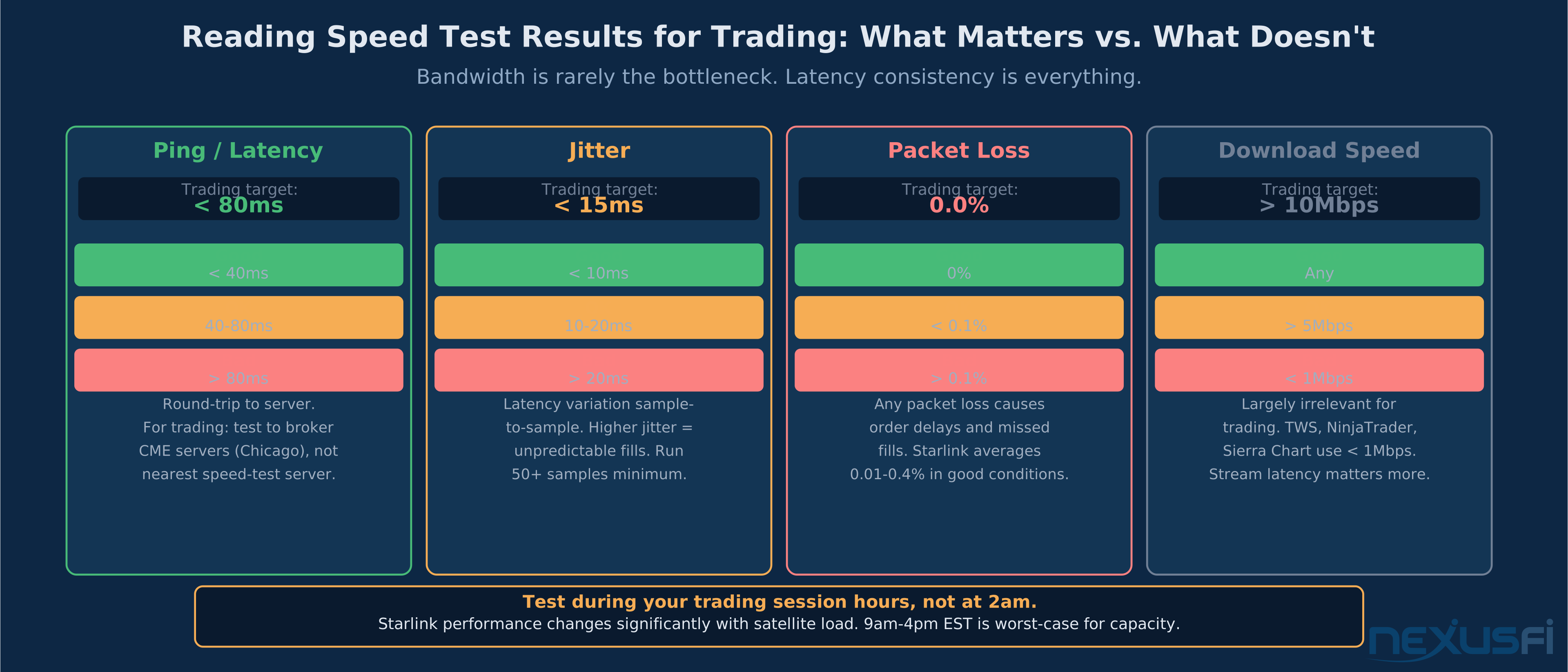
The most common mistake traders make with Starlink is testing it at the wrong time. Running a speed test at 9 PM on a Sunday tells you almost nothing about how the connection performs during ES market hours.
Test protocol before committing to live trading:
Test at the cash open (9:30 AM ET). This is when order flow spikes, data feeds saturate, and your platform works hardest. It's also when satellite network usage is relatively high. Measure ping and jitter to your broker's primary gateway (or to a nearby server) continuously during the first 30 minutes.
Test during scheduled news events. CPI, PPI, FOMC — these events are public. Run your connection test before, during, and after. Watch for jitter spikes that coincide with the release. High-volatility news moments also tend to be higher network-load moments.
Test at local peak internet hours. In most residential areas, 6-9 PM brings the highest satellite network congestion. If your trading session extends into evening hours, test then.
Monitor jitter continuously. Average ping is misleading. You want to see the distribution of latency — specifically, how often it spikes above 100ms and by how much. PingPlotter, WinMTR, or similar tools that give you a running jitter chart are what you need. Run them for several hours, not just during a brief speed test.
Test your platform reconnect behavior. Deliberately disconnect and reconnect your internet connection (at home, not during live trading) and watch how your trading platform handles it. Does it reconnect automatically? Does it preserve working orders? Does it require manual restart? Know the answers before you're in a live trade when connectivity drops.
Emergency Protocols When Starlink Drops #
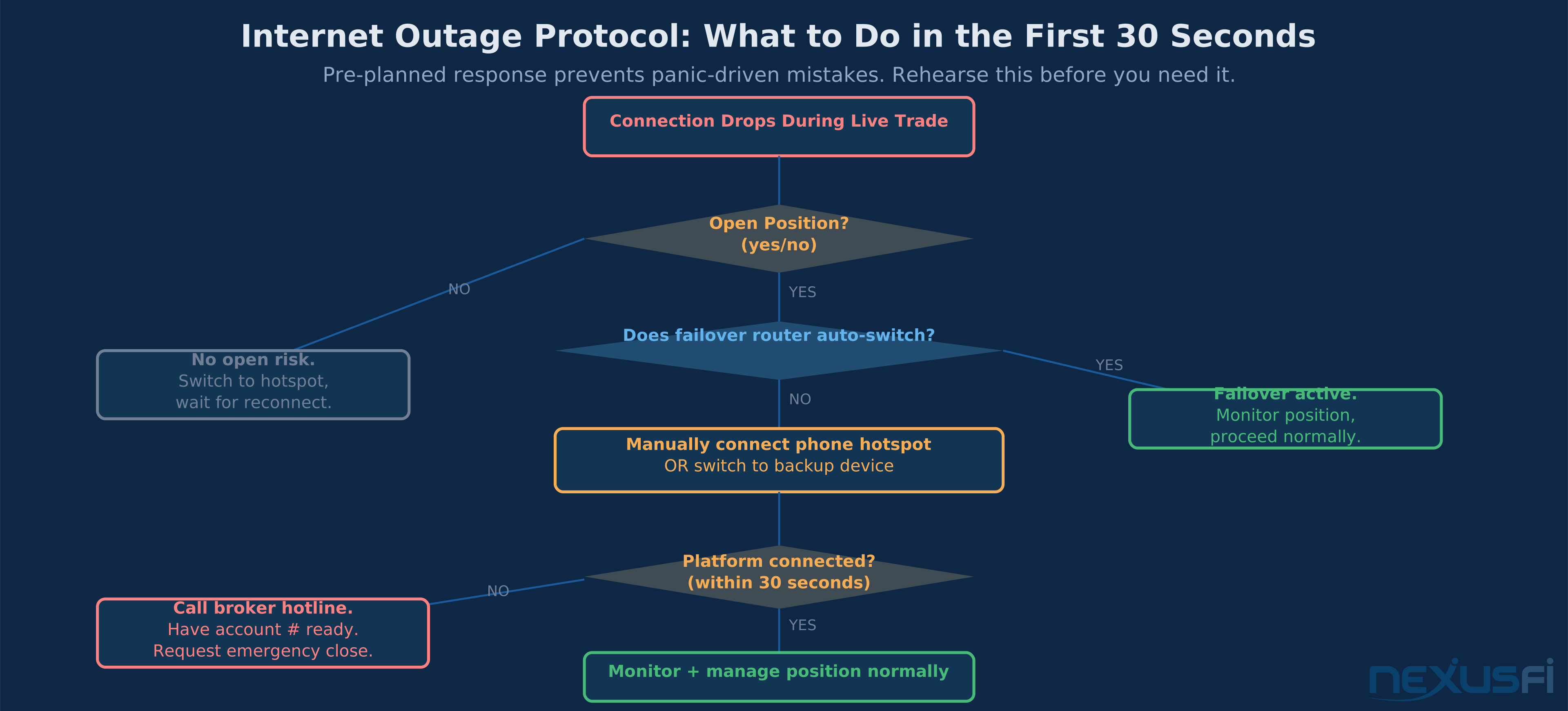
Even a well-configured Starlink setup with backup connectivity will occasionally experience issues. You need a protocol for the moment when everything fails simultaneously.
Broker desk phone number, stored as a contact. Not searched for in a panic while watching an open position move against you — already in your phone, labeled clearly. Every futures broker has a trading desk that can execute orders by voice. Know the number. Have it ready.
@Fat Tails addressed this directly in the internet outage risk discussion:
"I do not understand your post. If your internet connection fails, why don't you just phone your broker and close the position? I am not engaging in (unsupervised) automated trading."
That's the foundational protocol. Your broker can manually flatten your position if you can't do it electronically. The phone number is your ultimate backstop.
Pre-set bracket orders and stops. Never hold a naked futures position that relies entirely on your ability to manually exit. If your connection drops while you're in a trade with a server-side stop order, the stop fires without any dependency on your internet connection. If your connection drops while you're holding an unprotected position, you're exposed to unlimited adverse movement until you can reconnect or call in.
Position size appropriate to your connectivity risk. If you're trading on Starlink — which has higher intrinsic connectivity risk than fiber — your position size should reflect that. Smaller positions mean smaller adverse outcomes during brief disconnects.
Systematic reconnection drill. Practice reconnecting your trading platform after a simulated outage. Time it. Know how long it takes to restore full functionality. That knowledge changes how you think about risk during a live session.
NexusFi Community Experience #
The NexusFi community has accumulated real-world Starlink trading data over several years of the technology's commercial availability. The consensus tracks closely with what the technical analysis predicts.
@NW Trader described the risk profile of any internet dependency directly:
"My internet connection is normally very stable, but this morning it went down for a couple of minutes and then came back up. Strange... Given how short the day was I just logged off for the day. I've been thinking a lot about the impact of internet reliability on trading and whether I need to get a 4G/LTE backup connection."
That's the experience that drives traders to backup connectivity — not catastrophic failures, but brief interruptions that disrupt trading rhythm or force early session endings.
The Starlink-specific experience on NexusFi is predominantly positive for discretionary traders in rural locations where it replaced worse alternatives. Negative experiences cluster around automated trading, scalping, and traders who expected Starlink to match fiber performance without proper configuration.
@sam028 posted from the Starlink scalping discussion:
"Compared to a fiber link, Starlink has a much higher network latency, which can be a problem in scalping. Still, if there's no automation involved it should be fine for many trading styles."
-- @sam028, Day Trading (Scalping) with Starlink satellite internet?
That's the honest community verdict: higher latency than fiber, acceptable for manual discretionary trading, risky for automated or scalping strategies.
Bottom Line #
Starlink has made satellite internet viable for futures trading in a way that simply wasn't possible before its LEO constellation. For traders who have no access to fiber or reliable cable broadband, Starlink enables a trading practice that would otherwise require compromising to a at the core worse connection.
For traders with fiber access, Starlink doesn't offer a compelling reason to switch. The physics of satellite-to-LEO-to-ground-station communication impose latency floors that fiber doesn't have, and the handoff interruptions add a failure mode that fiber lacks entirely.
The practical decision tree:
- Fiber available? Use fiber. Add a cellular backup if you're trading actively.
- Cable available, fiber not? Use cable with a Starlink or cellular backup.
- No wired broadband? Starlink Business tier with cellular failover, full configuration checklist, tested before going live.
- Trading style: discretionary, moderate order frequency? Starlink works.
- Trading style: scalping, automated, high cancel/replace frequency? Starlink is a meaningful execution risk. Pursue fiber or accept the tradeoff consciously.
The worst outcome is using Starlink as a primary trading connection without backup, without testing, and discovering its limitations during a live position at a news event. Don't be that trader. Configure defensively, test thoroughly, and keep the broker's phone number on your speed dial.
For additional reading on trading infrastructure, see /a/infrastructure/internet-connection-day-trading, /a/infrastructure/internet-redundancy-backup-connectivity, and /a/infrastructure/exchange-colocation-futures-traders for the full spectrum from home setup to professional co-location.
Knowledge Map
Go Deeper
Build on this knowledgeReferences This Article
Articles that build on this topicCitations
- — What is your internet speed? (2014) 👍 9“For trading, priorities are as follows: 1) Reliability/uptime 2) Minimum bandwidth...”
- — Internet Speed (2013) 👍 3“For trading, latency matters far more than raw bandwidth.”
- — Anyone using Starlink for Scalp Trading? (2023) 👍 1“Looking forward to some replies as I am getting closer to ordering up a dish for Starlink.”
- — Day Trading (Scalping) with Starlink satellite internet? (2024) 👍 4“What you care about is latency and not bandwidth/capacity. Using the analogy of water in a pipe, bandwidth is how much water can flow at once.”
- — Anyone using Starlink for Scalp Trading? (2023) 👍 3“Since you had some good input regarding Starlink, I thought I would post the results of the change over from DSL connection to Starlink.”
- — Anyone using Starlink for Scalp Trading? (2023) 👍 3“I use Starlink in Ireland and it's fine for my needs. I trade NQ and don't have any lag problems. Currently connected to AMP using Quantower and the ping/round-trip time is 30/20ms.”
- — Anyone using Starlink for Scalp Trading? (2023) 👍 2“Idle latency is just the round trip delay if you're doing nothing -- which trading will normally be a bit higher than that.”
- — Taking a Trading System Live (2013) 👍 8“Backup Plans: In an ideal world, computers never crash, internet connections never go down, your broker never has issues.”
- — risk trading internet outage liability LLC (2010) 👍 5“Operational risk cannot be excluded, but it can be reduced. If you have a long position and the exchange is hit by a terrorist attack...”
- — NW Trader's Journal (2019) 👍 5“My internet connection is normally very stable, but this morning it went down for a couple of minutes and then came back up.”
- — Day Trading (Scalping) with Starlink satellite internet? (2024) 👍 2“What you care about for latency is that it's consistent. You actually lose more money from variable latency than you do from slightly higher but consistent latency.”