



Windows VPS for Futures Trading: Complete Setup Guide for NinjaTrader, Sierra Chart, and Automated Strategies
Overview #
At some point, every serious futures trader faces the same moment. You're running NinjaTrader or Sierra Chart, you've got automation firing during the overnight session, and then — Windows Update reboots your machine at 2:47 AM during an open position. Or your ISP goes down during NFP. Or your laptop goes to sleep mid-session. These aren't edge cases. They're the inevitable cost of running trading infrastructure on consumer hardware.
A Windows VPS solves this by replacing your local machine with a dedicated server that stays on 24 hours a day, 7 days a week. But not all VPS setups are equal — the wrong configuration can introduce new failure modes harder to diagnose than a simple reboot. This guide covers complete setup: how to size a VPS for NinjaTrader, Sierra Chart, and automated strategies; how exchange proximity actually works (and the common misconception about it); how to harden Windows for a trading environment; how to build monitoring that catches crashes; and how to architect your automation lifecycle so a reboot or disconnect doesn't leave you with open positions and no strategy running.
Why Futures Traders Need a Windows VPS #
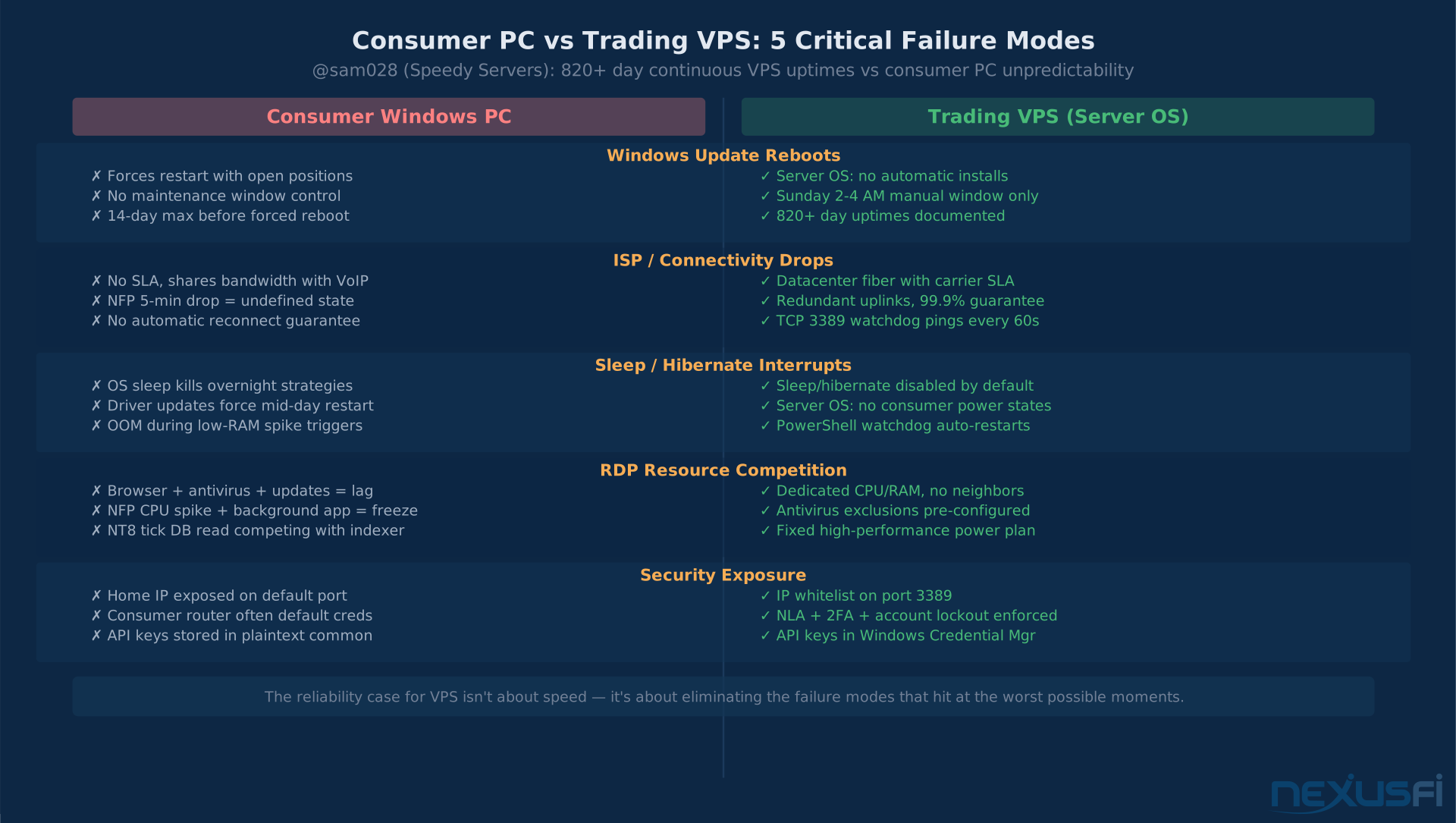
The core value isn't speed. It's reliability. The specific failure modes a VPS eliminates are the ones that cost money — not in theory, but in practice, on random Tuesday mornings when you're not watching.
Futures markets trade nearly continuously — CME ES and NQ sessions run from Sunday 5 PM through Friday 4 PM Central, with only a 1-hour maintenance break each day. If your automated strategy needs to run during overnight sessions, ETH pivots, or pre-market structure building, you need infrastructure that mirrors that schedule. A home PC with consumer Windows doesn't do this reliably. Pair a trading VPS with solid internet redundancy on your home connection and you've eliminated both failure modes. Windows Update, sleep states, driver updates, resource contention from browsers and background apps — all of these create brief interruptions that turn into real problems in automated trading contexts.
The second failure mode is connectivity. Home internet services don't have SLAs. A 5-minute ISP outage during an NFP print doesn't just disconnect you from your broker — it leaves your strategies in an undefined state where position reconciliation depends entirely on how your platform handles a forced reconnect. A dedicated VPS in a commercial datacenter gets enterprise-grade uptime guarantees and redundant fiber feeds that a residential ISP doesn't offer.
NinjaTrader member @sam028 (Speedy Trading Servers) described this directly: "We use server's version of Windows: there is no automatic updates install and no unexpected reboots. Some of our users never install updates and never reboot" — with server uptimes of over 820 days being common in their fleet. That kind of continuous operation simply isn't achievable on a consumer Windows setup.
VPS Sizing: RAM, CPU, and Storage #
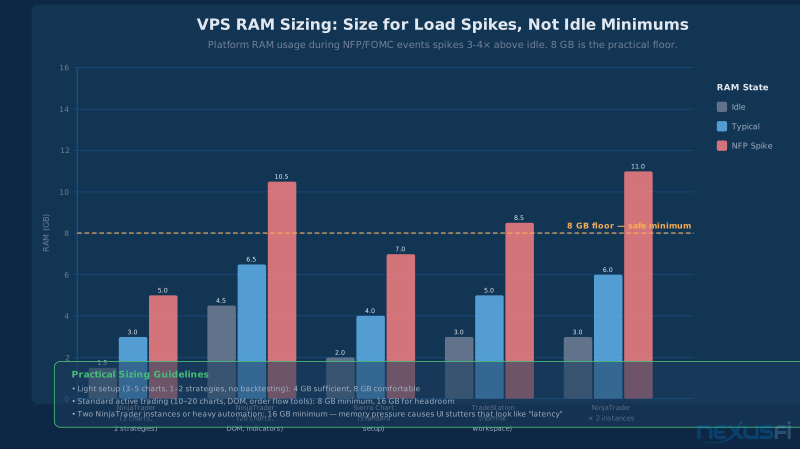
The most common VPS sizing mistake is sizing for idle, not for spikes. Your platform might idle at 1.5 GB during a slow afternoon session. That same platform during NFP, with 20 charts updating simultaneously and three strategies processing the same feed, can use 4--6× more. Size for the spike, not the baseline.
RAM Requirements by Platform and Workload
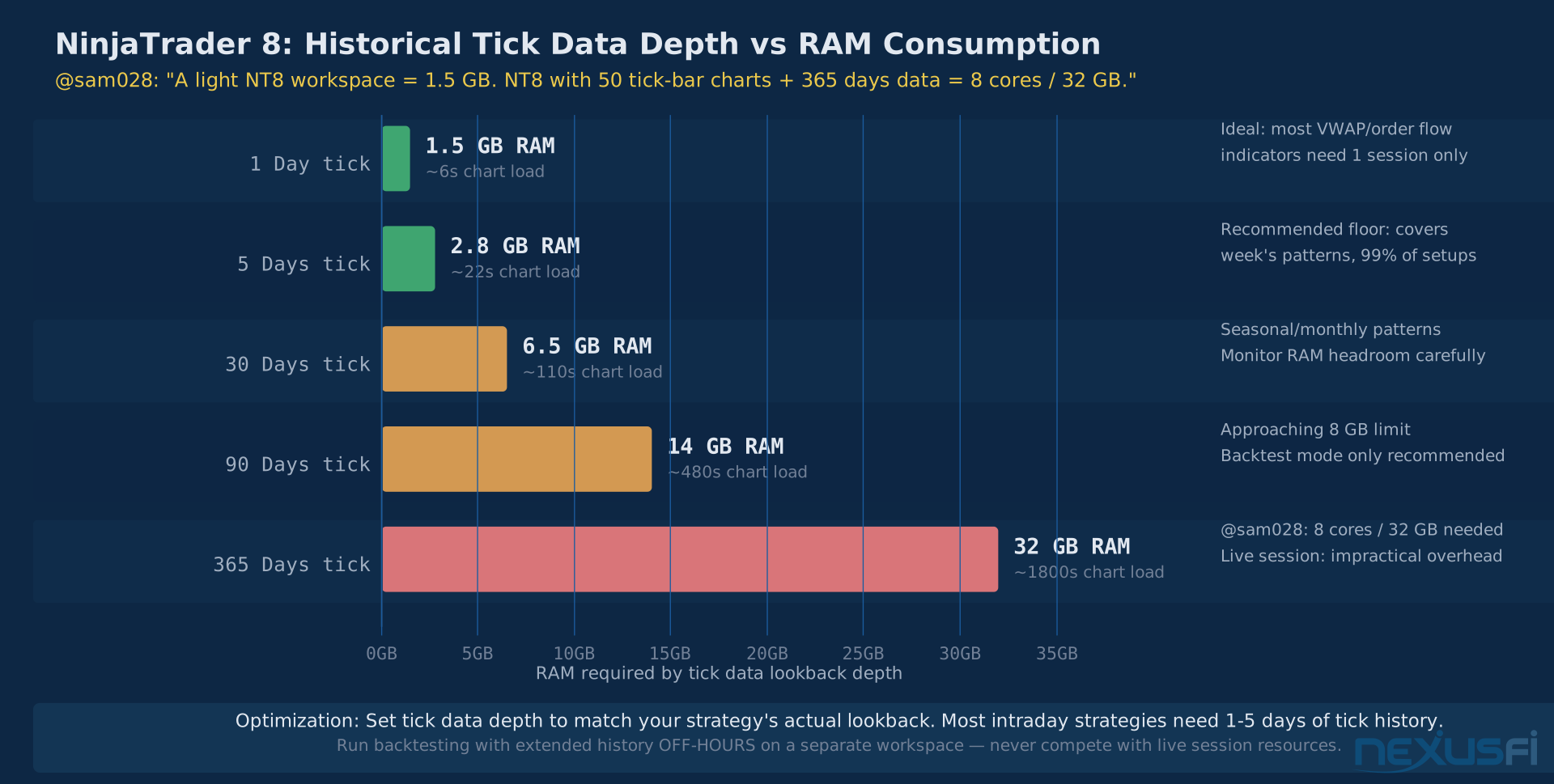
@sam028's benchmark from years of managing trading VPS infrastructure provides the most reliable numbers available: "A light NinjaTrader 8 workspace will run fine with 1 core/1.5 GB, while an NT8 with 50 charts full of indicators based on ticks, with 365 days of historical data loaded, can be very busy with 8 cores/32 GB." The key variables are number of charts, historical data depth per chart, bar type (tick bars are more demanding than time bars), and indicator complexity.
| Platform / Configuration | Idle / Light | Active Trading | Recommended VPS |
|---|---|---|---|
| NinjaTrader 8 (3--5 charts, 2 strategies, time bars) | 1.5--2 GB | 3--4 GB | 8 GB minimum |
| NinjaTrader 8 (15--20 charts, DOM, tick bars, order flow) | 4--5 GB | 7--9 GB | 16 GB recommended |
| Sierra Chart (standard multi-market setup) | 2--3 GB | 4--6 GB | 8 GB minimum |
| TradeStation (standard workspace) | 3--4 GB | 5--7 GB | 8 GB minimum |
| Two NinjaTrader instances simultaneously | 3--4 GB total | 6--11 GB total | 16 GB minimum |
@futurenow measured their NT8 workload (24 open charts, 2 strategies enabled, Market Analyzer) at "around 2.2 GB of RAM" in a local VM — but that's baseline, not peak-session load. Member @KillerJukeBox running NT8 on a 1 vCPU / 4.5 GB Windows Server 2019 VPS noted "you could get away with 3 GB RAM easily if you don't want to do any backtesting/intensive stuff" — but the headroom was valuable for stability.
The practical rule: 8 GB is the safe minimum for serious active trading. 16 GB if you're running multiple instances, heavy tick-based strategies, or backtesting during extended hours. The extra cost is typically $5--15/month — less than a single trading error caused by an out-of-memory crash.
CPU Architecture and Clock Speed
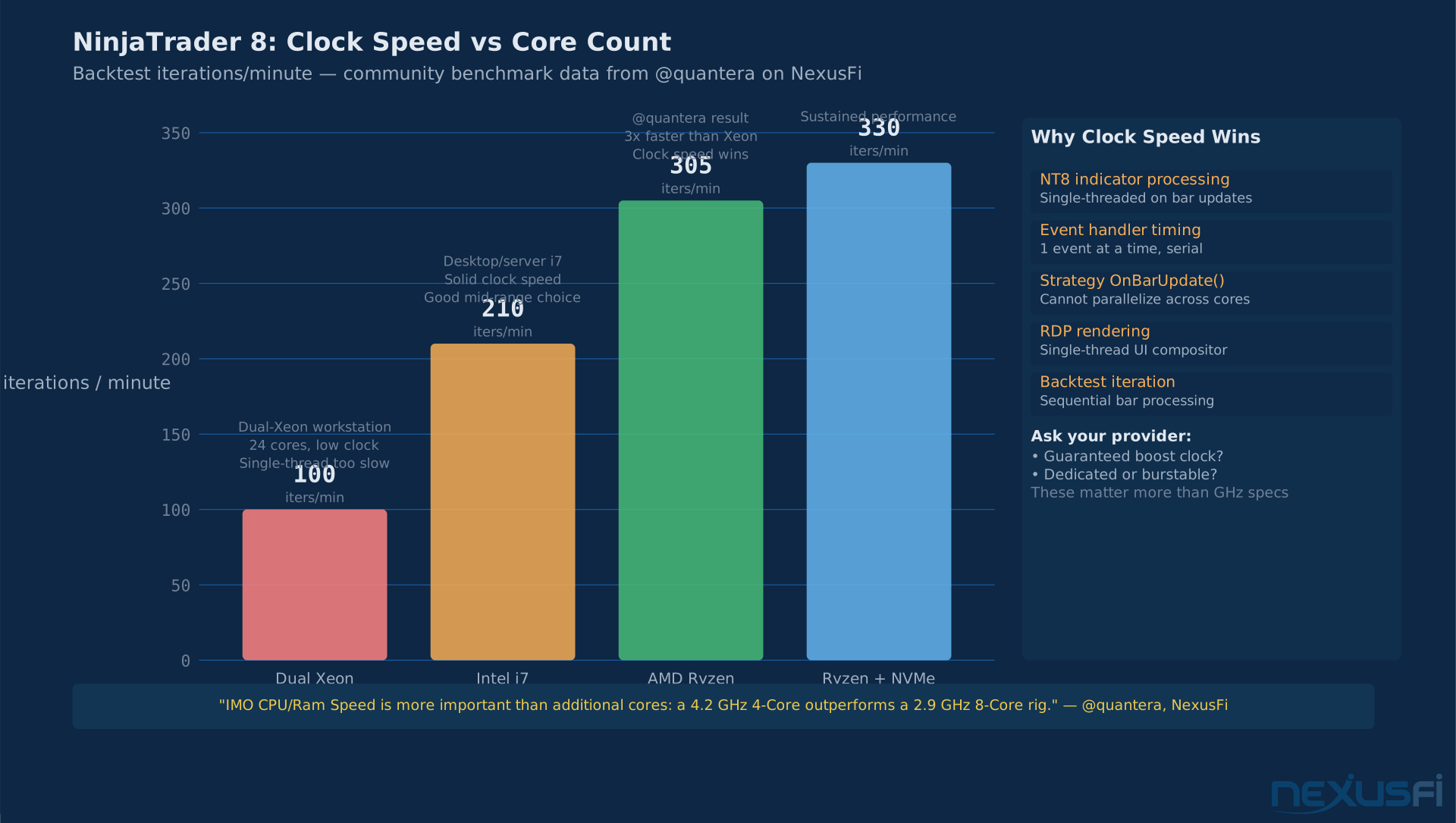
For trading platform performance, single-thread clock speed matters more than core count. NinjaTrader's indicator processing and event handling are largely single-threaded during real-time bar updates. A 4.2 GHz 4-core machine will outperform a 2.9 GHz 8-core machine for charting responsiveness.
@quantera published one of the community's most detailed NT8 performance comparisons: "IMO CPU/Ram Speed is more important than additional cores: a 4.2 GHz 4-Core outperforms a 2.9 GHz 8-Core rig." Their data showed backtest iterations of ~300/min on a high-clock i7 versus ~100/min on a dual-Xeon 24-thread system — despite the Xeon having 6× more cores. Single-thread performance matters even more on VPS because hypervisor scheduling means burst clock consistency translates directly to event-processing responsiveness.
On the AMD vs. Intel question: @planetkill observed after testing multiple providers including Speedy, Azure, AWS, and RouterHosting: "The performance is unbeatable because it's running on AMD CPUs instead of Intel Xeons, making remote desktop feel very smooth and not laggy." The mechanism is that AMD EPYC chips at modern boost clocks often outperform server-grade Xeons in consumer workloads like RDP rendering, where single-thread response time matters. Ask your provider: Are cores dedicated or burstable? What is the guaranteed boost clock? These questions matter more than brand.
Storage: NVMe Is Not Optional
NVMe SSD is the correct choice for trading VPS storage. NinjaTrader's tick database and Sierra Chart's study data are read and written continuously during live sessions. When an IO stall hits — during Windows indexing, Defender scans, or chart loading — it appears as chart "lag" often misattributed to network latency. @quantera found "moving from SSD to M.2 NVMe was huge" for strategy performance. Minimum 120 GB NVMe; 250 GB if you maintain significant historical tick data.
VPS Location and Exchange Proximity #
The most persistent misconception in the futures VPS discussion is that ping to the CME datacenter in Aurora, Illinois is the primary performance metric. It's not. Your order routing path is more complex, and getting this wrong means paying for a Chicago datacenter that provides zero latency benefit.
@SMCJB gave what is probably the clearest community explanation:
Ask your broker this before selecting a VPS datacenter: "Where is your order gateway?" Not where CME is, not where the exchange is — where your broker's credit check server sits. That answer determines whether Chicago, New Jersey, or Dallas is the right choice for your connection.
The correct model: Your execution latency is determined by three legs — VPS-to-broker-gateway, broker-gateway-to-exchange, and exchange processing. You can only control the first leg. The question to ask your broker before selecting a VPS region is: "Where is your order gateway?" The answer determines whether Chicago, New Jersey, or another datacenter is the right choice.
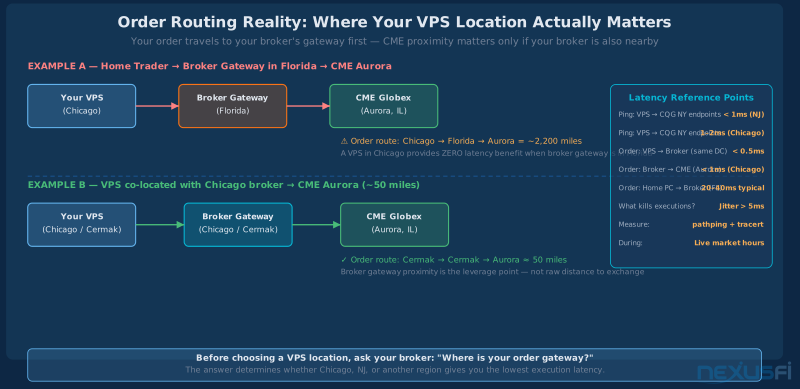
For CQG-routed connections, @sam028 provided specific measurements: from their New Jersey datacenter, ping to CQG's primary IP (64.208.51.207) runs below 1ms. Chicago connections achieve 1--2ms. @planetkill confirmed "1--2 ms ping to CQG" from Ninja Mobile Trader's platform — but only meaningful when the broker gateway is also in the region.
For CME Globex futures (ES, NQ, CL, GC, ZB), the matching engine is in Aurora, IL. @SMCJB clarified an important geographic subtlety: "ICE's Brent and Gasoil matching engines are in Chicago, not London" — and CL (NYMEX) routes through CME Globex in Aurora, not the old New York pit. The Cermak datacenter in downtown Chicago provides low-latency connectivity to both ICE and CME networks and is typically less expensive than direct Aurora colocation.
Trading-Specific VPS vs. Generic Cloud
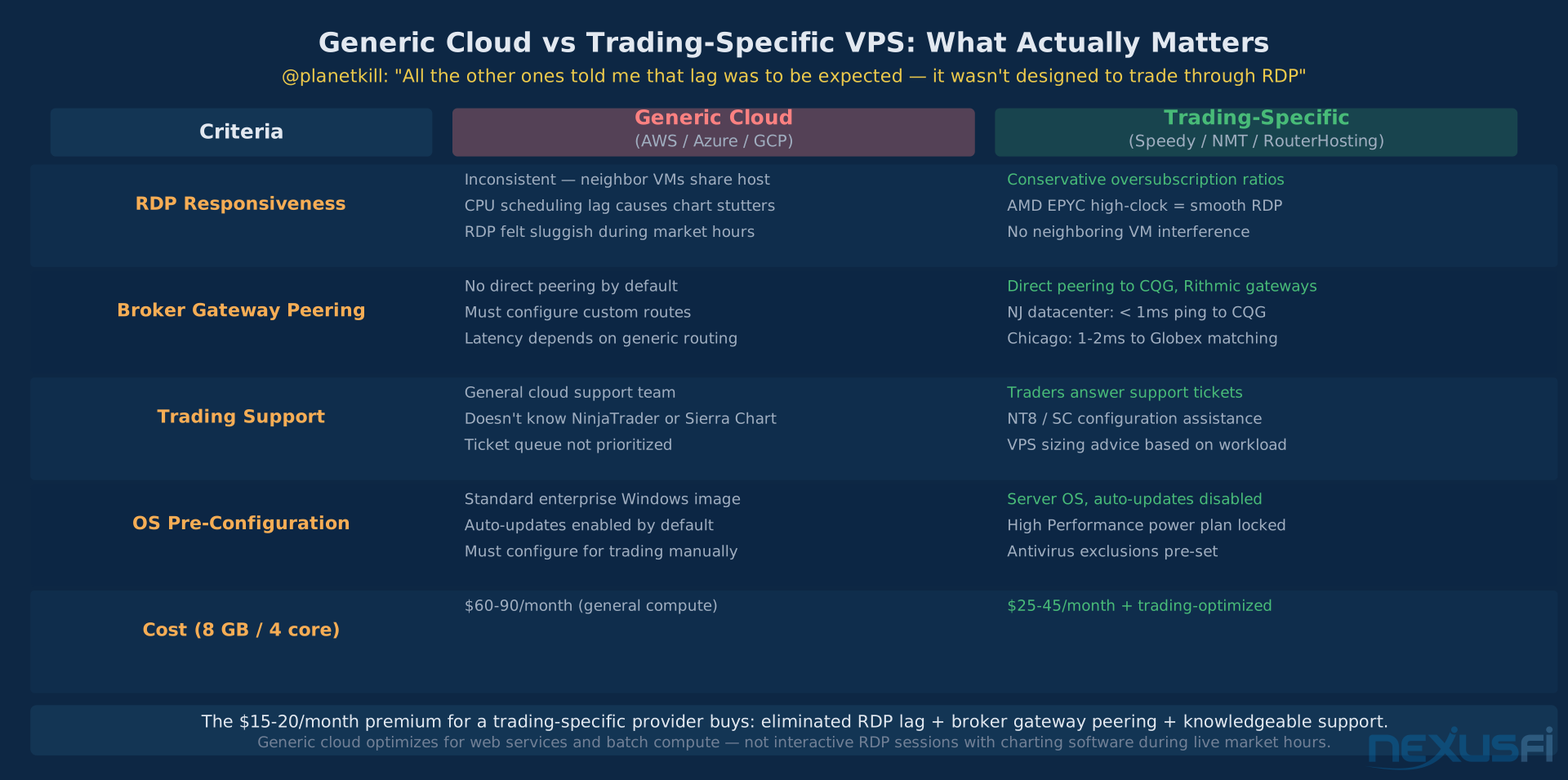
AWS, Azure, and Google Cloud are capable platforms optimized for web services and batch computing — not for interactive RDP sessions running charting software during live trading. The specific failure mode in generic cloud is RDP responsiveness under load: when a VM is placed on a host with heavy neighboring workloads, CPU scheduling consistency degrades. Charts that should update in 20ms start taking 80--200ms. The platform appears connected; data is flowing; but the UI feels sluggish in exactly the ways that matter for monitoring and order entry.
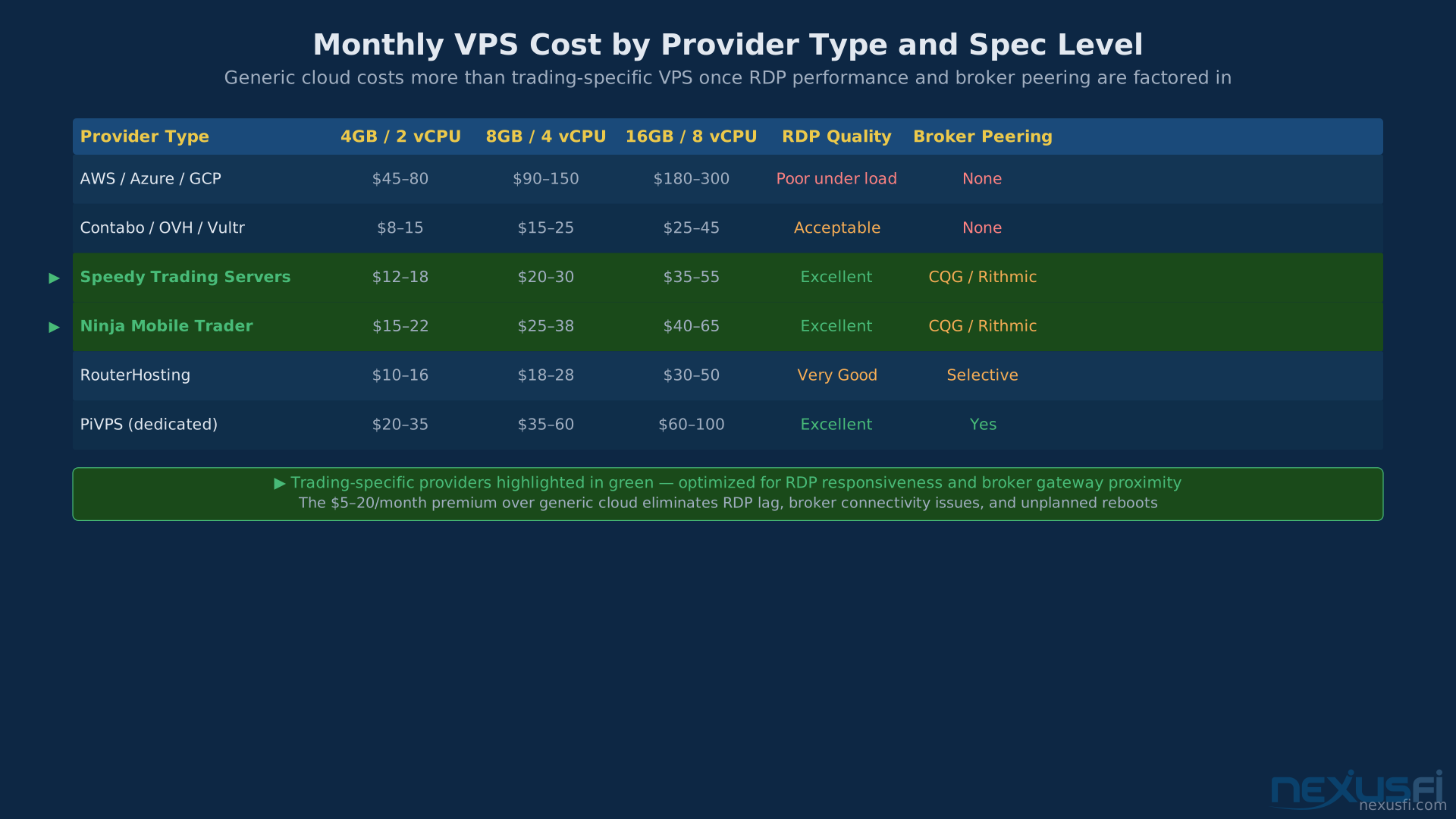
Dedicated trading VPS providers (Speedy Trading Servers, Ninja Mobile Trader, RouterHosting, PiVPS) manage oversubscription ratios conservatively and maintain direct network peering to major broker connectivity points. @planetkill noted after testing multiple generic cloud providers: "All the other ones told me that lag was to be expected because it wasn't designed to trade through remote desktop." The cost differential is typically $5--20/month for comparable specs — justified for reliable RDP performance.
Initial Windows Configuration for Trading #
The default Windows installation on a fresh VPS is not a trading environment. It's a general-purpose OS configured for typical enterprise use. The following changes convert it into a stable trading appliance.
OS Selection: Windows Server 2022/2025 vs. Windows 11 Pro
Windows Server 2019 or 2022 is the recommended OS for trading VPS deployments. Server editions handle unattended operation more cleanly — no consumer update aggression, more predictable service behavior. @sam028's datacenter runs all trading VPS instances on server editions for this reason. @KillerJukeBox ran NT8 on Windows Server 2019 Datacenter: "normally leave the instance on 24/7." Windows 10/11 Pro is viable if your provider doesn't offer Server editions, but requires aggressive debloating and update policy locking to achieve comparable stability.
Critical Settings -- Apply Before Installing Platform
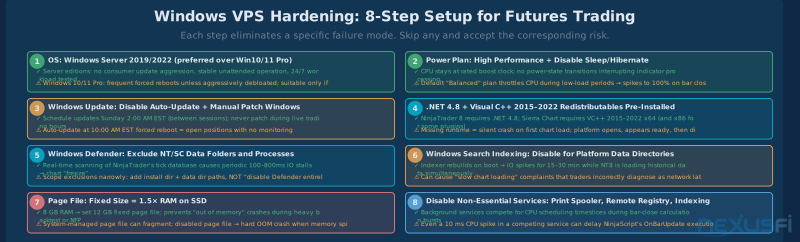
Disable automatic Windows Update reboot: In Group Policy or Registry, configure Windows Update to "Download and notify for install." Schedule manual update windows for Sunday 2--4 AM Central, between the Friday 4 PM close and Sunday 5 PM re-open. A forced reboot at 10 AM during a live ES position is a preventable disaster.
Power plan — High Performance: Control Panel → Power Options → High Performance. This prevents CPU throttling during low-load periods, which can cause brief 100% utilization spikes when the next bar-close event fires. Also set processor power management minimum state to 100%.
Disable sleep and hibernation: In Power Options, all sleep/hibernate settings to Never. On a VPS these should already be disabled by the provider — verify.
Install required runtimes before trading platform: NinjaTrader 8 requires .NET Framework 4.8. Sierra Chart requires Visual C++ 2015--2022 Redistributables (both x64 and x86). Missing either causes silent runtime failures where the platform appears to start but crashes on first data connection.
Windows Defender exclusions for trading directories: Real-time antivirus scanning of NinjaTrader's tick database causes periodic IO stalls of 100--800ms, appearing as chart stutters. Add folder exclusions for: NinjaTrader install directory (C:\Program Files (x86)\NinjaTrader 8\), NinjaTrader data directory (C:\Users\[user]\Documents\NinjaTrader 8\), and Sierra Chart directory. Scope as directory-level exclusions, not system-wide disable.
Disable Windows Search indexing for platform data directories: The Windows indexer rebuilds on boot and runs periodic scans. When this overlaps with NinjaTrader loading its tick database, the competing IO causes slow chart loading that resolves only after the indexer completes. Right-click platform data folders → Properties → General → Advanced → uncheck "Allow files in this folder to be indexed."
Page File Configuration
Set a fixed page file: with 8 GB RAM, configure 12 GB fixed. With 16 GB RAM, use 16--24 GB fixed. Place on NVMe — same volume as OS is fine if single-drive. Do not disable the page file; an OOM crash during NFP is worse than the minimal performance cost of a page file that rarely gets used.
@quantera documented the performance impact: "I was constantly maxing out 32 GB of RAM during backtests — the CPU and backtest would idle for 8--10 seconds every 40 seconds while cached data was moved to virtual memory." Moving the page file to a dedicated SSD eliminated the issue. On a VPS, fixed-size configuration much reduces fragmentation-related stall spikes.
NinjaTrader-Specific VPS Configuration #
Beyond base Windows configuration, NinjaTrader requires platform-specific settings for reliable VPS operation:
Run as Administrator: Required for certain license operations and data folder writes. Create a shortcut to NinjaTrader.exe → Properties → Compatibility → "Run this program as an administrator," or configure via Task Scheduler with elevated privileges.
Disable Search Indexing for NT data folders: Work through to NT Control Center → Help → About → "Open Log Folder" to find the exact data directory path. Add this path explicitly to the indexing exclusion list. First-boot indexing of NT's historical tick data can cause 10--20 minute slow chart loading that resolves only after indexer completion.
Historical data depth: In NinjaTrader → Tools → Options → Performance, verify that historical data lookbacks are not unnecessarily deep for your indicators. Each additional day of tick data per chart increases memory consumption and bar-load time. For live intraday trading, 5--10 days of tick history is typically sufficient for most intraday indicators.
Strategy optimization — separate from live trading: Run backtesting and optimization outside of trading hours. Running heavy backtests during live sessions creates exactly the resource competition a dedicated VPS was meant to eliminate.
Monitoring and Crash Detection #
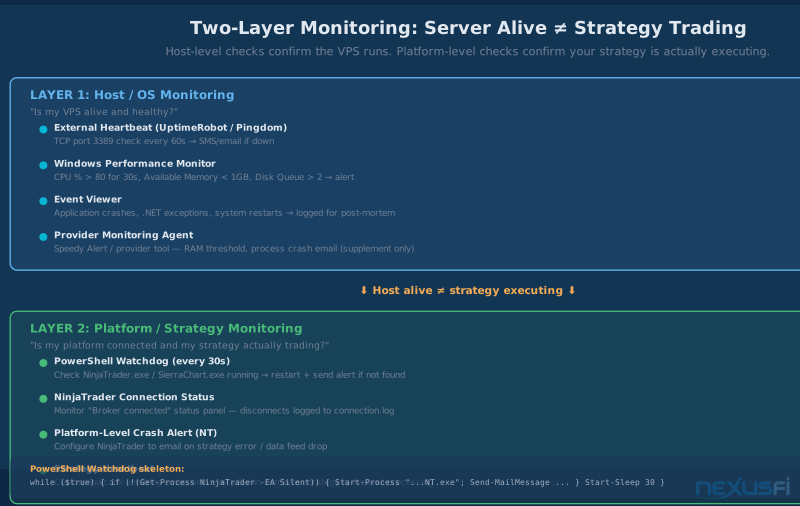
Don't rely on port 3389 (RDP) monitoring to confirm your strategies are running. A frozen NinjaTrader process, a dropped data connection, or a strategy that errored silently — none of these affect RDP connectivity. Two separate monitoring layers are required: one for the host, one for platform execution.
The most important monitoring insight: your VPS being reachable via RDP tells you nothing about whether your strategy is actually executing. A frozen NinjaTrader process, a dropped data feed, or a strategy that errored and stopped — none of these affect RDP connectivity. You need two separate monitoring layers.
Layer 1: Host-Level Monitoring
External heartbeat: Configure UptimeRobot or Pingdom (free tiers available) to check TCP port 3389 on your VPS IP every 60 seconds with SMS alerts. If this fails, the VPS itself is unreachable — provider infrastructure failure, network outage, or Windows crash.
Windows Performance Monitor: Configure performance counter alerts for CPU utilization above 80% for 30+ seconds (potential runaway strategy), Available Memory below 1 GB (approaching OOM), and Disk Queue Length above 2 (IO stall). These fire in the Windows Event Log and can trigger PowerShell email alerts.
Provider monitoring agents: @sam028 described their monitoring approach: "For users who want to be informed if their machine is unreachable, we install a monitoring agent polled by our monitoring servers (which are not in the same datacenter). If for any reason the monitoring servers can't reach the VPS, the user will receive an alert email." Provider-level monitoring is valuable supplementary coverage — not a substitute for your own application-level checks.
Layer 2: Platform and Strategy Monitoring
PowerShell watchdog script: A script checking for the NinjaTrader or Sierra Chart process every 30 seconds, restarting the platform and sending an alert if not found:
while ($true) {
    if (!(Get-Process NinjaTrader -ErrorAction SilentlyContinue)) {
        Start-Process "C:\Program Files (x86)\NinjaTrader 8\bin64\NinjaTrader.exe"
        Send-MailMessage -To "[email protected]" -Subject "NT8 Restarted" -Body "Restarted at $(Get-Date)"
    }
    Start-Sleep -Seconds 30
}
Run via Task Scheduler with "Run whether user is logged on or not" and "Run with highest privileges." This catches platform crashes that don't affect RDP connectivity at all.
Strategy heartbeat indicator: Build a simple indicator that fires an email alert on a scheduled interval — every 5 minutes during session hours. @vmodus described this pattern: "Write an indicator with an Alert that triggers every n-minutes. If you don't receive emails, then one of the following has happened: The indicator isn't enabled / Your Alert condition isn't working / TS crashed / VPS is offline/crashed." The same pattern applies to NinjaTrader — a OnBarUpdate email trigger on a 1-minute chart confirms the strategy is alive and processing bars.
Port monitoring caveat: @vmodus tried monitoring platform-specific ports and found they "randomly can show as being down and send out a warning even though TS is working fine." The strategy heartbeat approach is more reliable than port checks for confirming actual trading system functionality.
Security for Your Trading VPS #
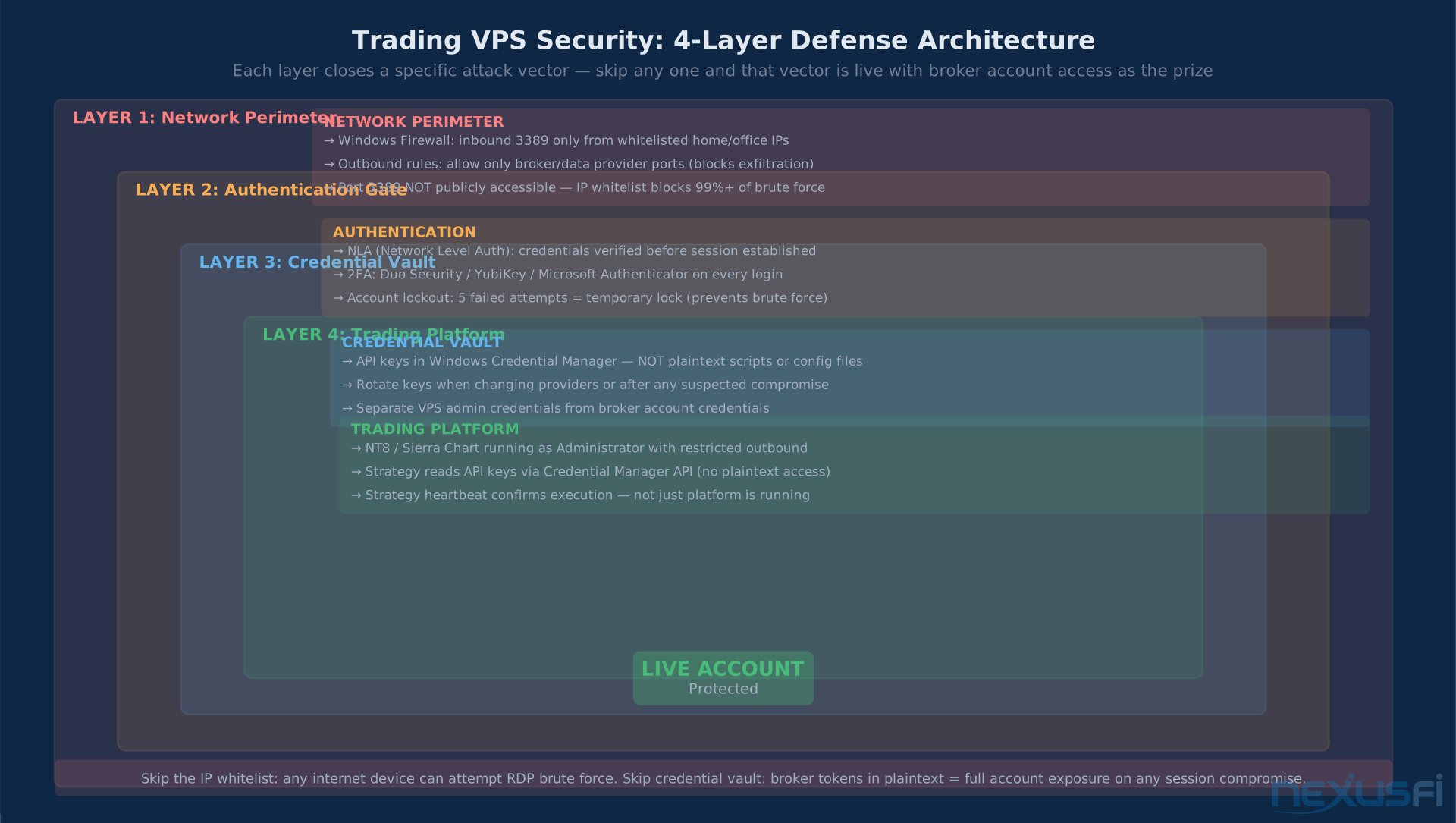
Your trading VPS credentials give access to a machine connected to your live accounts. Three practical controls cover the primary risk surface:
RDP access hardening: Enable Network Level Authentication (NLA) for RDP via System → Remote Desktop settings. Configure Windows Firewall to allow inbound RDP (port 3389) only from your home and office IP addresses. Enable two-factor authentication via Duo Security (free tier covers personal use), Yubico YubiKey, or Microsoft Authenticator via Azure AD.
Credential hygiene for automation: If your automated strategies use API keys (Rithmic, CQG, broker tokens), store these in Windows Credential Manager, not plaintext script files. Access from PowerShell via Get-StoredCredential; from NinjaScript via the Credential Manager API. Rotate API keys when changing VPS providers or after any suspected security incident.
Firewall rules: Beyond RDP, outbound rules should allow only the ports your specific broker and data provider require. Rithmic uses port 8005 and 443; CQG uses various ports in the 10000--10100 range. Block unused outbound paths. A compromised VPS that can exfiltrate data over arbitrary outbound ports is a worse outcome than a VPS that can't connect to suspicious destinations.
Automation Lifecycle: Startup, Disconnect, Recovery #
The automation lifecycle question — what happens when the VPS reboots, when connectivity drops, when a strategy errors — is the part of VPS setup most traders underprepare for. When failures happen during live trading, your emergency protocols determine the outcome. Getting this wrong can result in strategies in undefined states: working orders neither confirmed nor cancelled, positions held without monitoring.
Auto-Launch on Login
Add a NinjaTrader shortcut to the Windows Startup folder: C:\ProgramData\Microsoft\Windows\Start Menu\Programs\Startup\. For more reliable recovery (including when not logged into an RDP session), use Task Scheduler with a "System startup" trigger and "Run whether user is logged on or not." This handles the case where the VPS reboots while you're asleep and you haven't manually reconnected via RDP.
Disconnect Handling Policy
Your strategy code must explicitly define what happens when the data feed or broker connection drops. The decision depends on strategy type:
Pure signal strategies (typically flat): Pause on disconnect, resume on reconnection. Verify data feed reconnection before re-enabling entry logic — the risk of false signals during reconnect (stale data, missed bars) is higher than the risk of missing an entry.
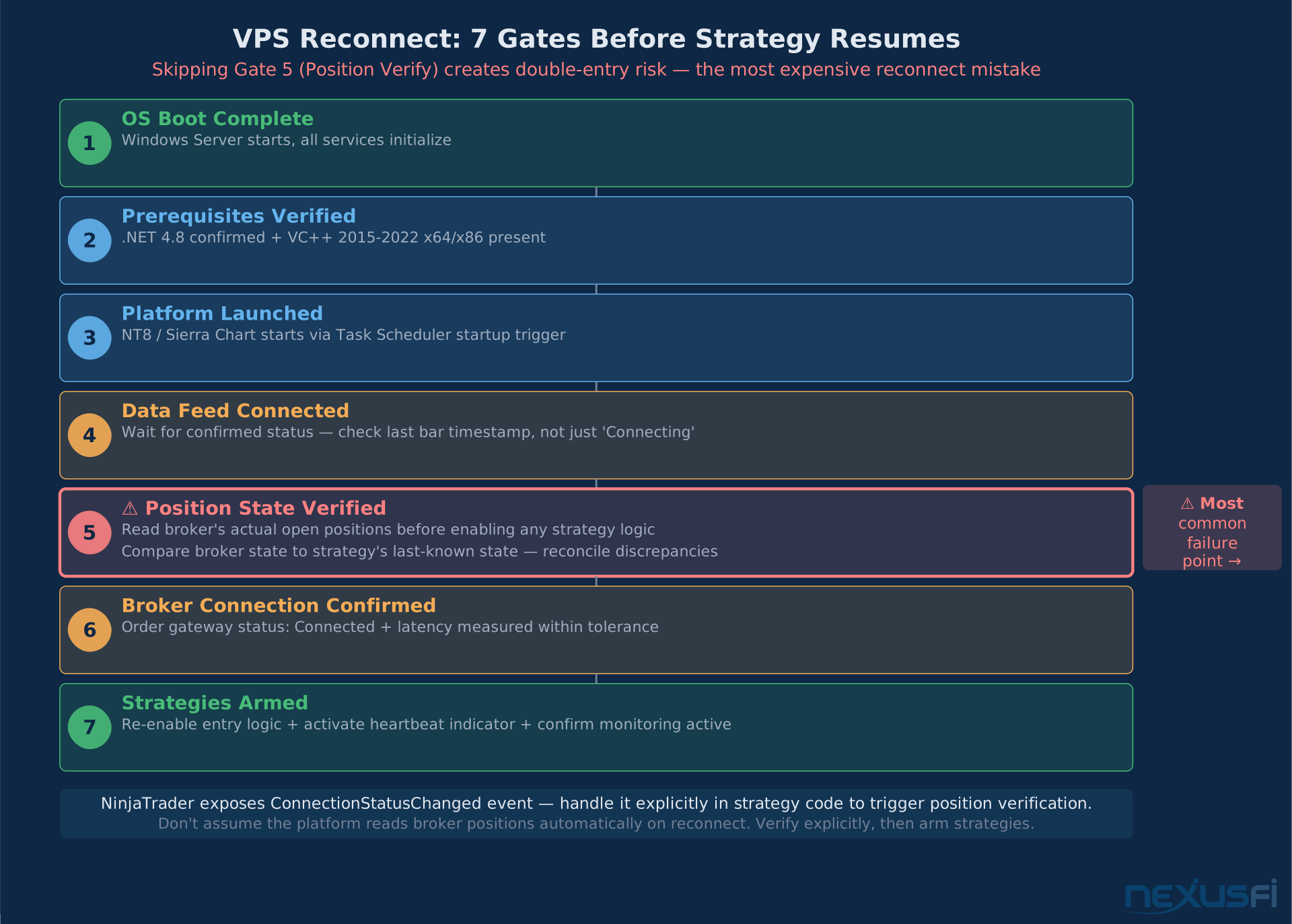
Position management strategies (managing open trades): On broker disconnect, execute a fail-safe action — typically either holding current state for liquid instruments with tight spreads, or flattening via market order. NinjaTrader exposes a ConnectionStatusChanged event that fires when broker or data feed connectivity changes. Handle this event explicitly in strategy code rather than assuming continuous connectivity.
Reconnection Verification Sequence
After a reboot or reconnect, the correct sequence is: OS boot → prerequisites verified → platform launched → data feed connection confirmed → broker connection confirmed → account position state verified against broker's actual open positions → strategies armed. Skipping the position verification step can result in double-entry if the strategy assumes flat when the broker still shows a position from before the disconnect.
Go-Live Checklist #
Before moving live strategies to your VPS, verify each item:
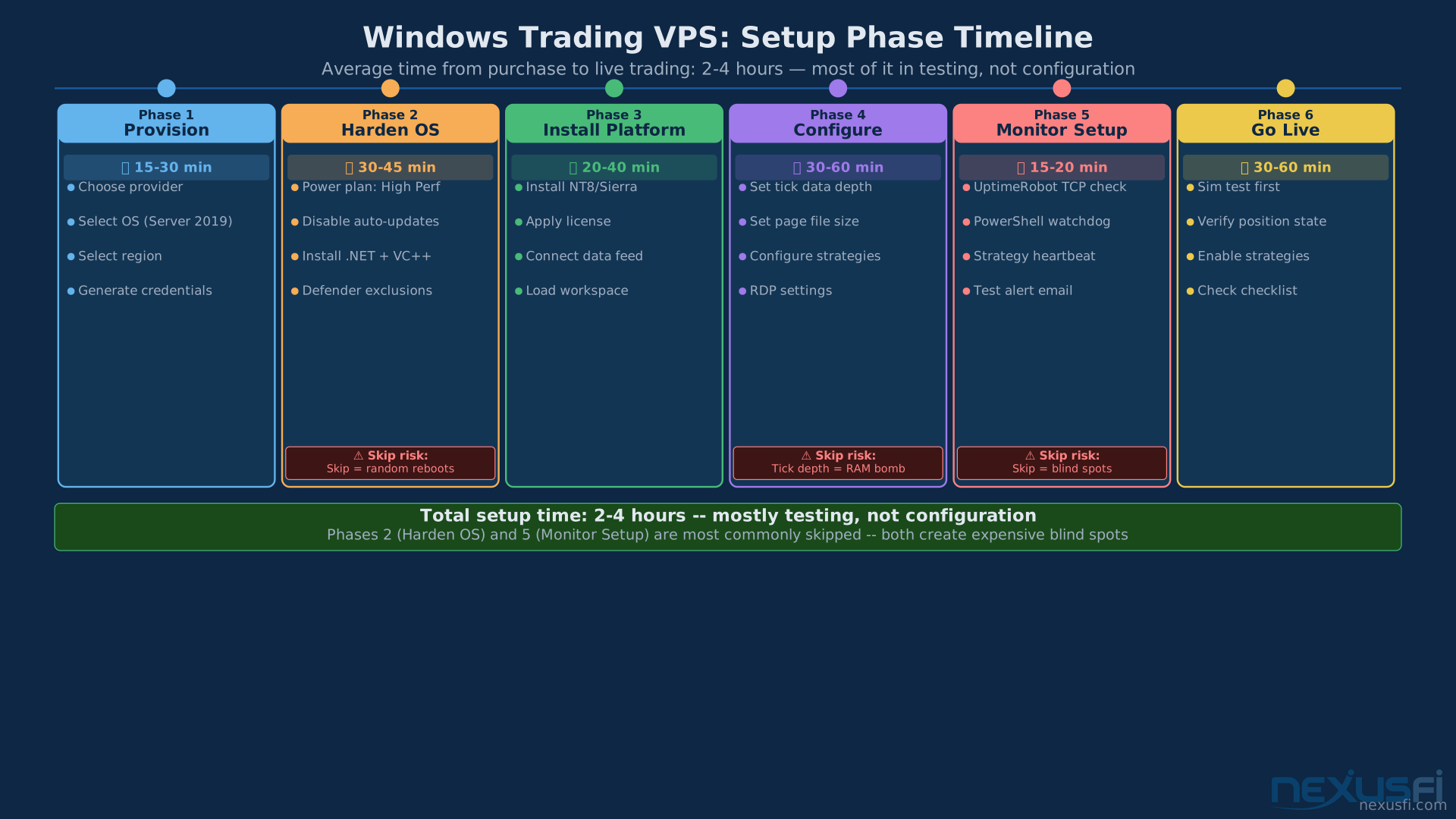
- OS: Windows Server 2019/2022, High Performance power plan, sleep/hibernate disabled
- Updates: Automatic updates disabled, manual maintenance window scheduled Sunday 2--4 AM
- Dependencies: .NET 4.8 installed and confirmed, VC++ 2015--2022 x64+x86 installed
- Antivirus: Defender exclusions added for platform install and data directories
- Indexing: Windows Search indexing disabled for platform data directories
- Page file: Fixed size configured (1.5× RAM minimum, on NVMe)
- Platform: NT8 or Sierra Chart installed, running as Administrator, license applied
- Connectivity: Broker data feed connected, latency measured (ping + pathping to broker gateway during live session), jitter verified < 2ms consistently
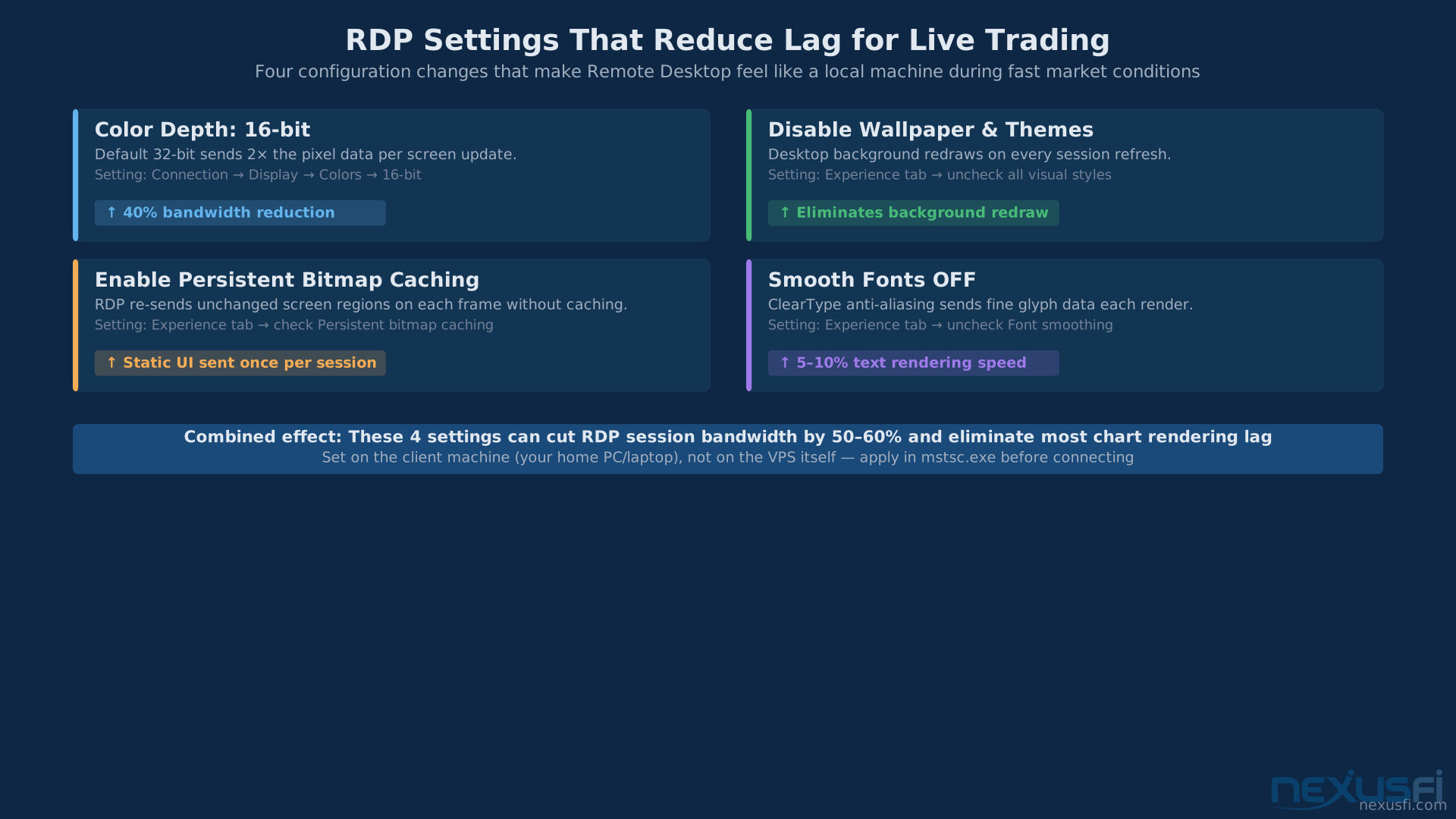
- RDP: Color depth set to 16-bit, visual effects minimized, persistent bitmap caching enabled
- Monitoring Layer 1: UptimeRobot or Pingdom configured, SMS alerts for TCP 3389
- Monitoring Layer 2: PowerShell watchdog script running via Task Scheduler
- Monitoring Layer 3: Strategy heartbeat indicator active during session hours
- Security: RDP NLA enabled, 2FA configured, inbound 3389 whitelisted to known IPs only, API keys in Credential Manager
- Automation: Auto-launch on startup configured, disconnect handling implemented in strategy code
- Position verification: Tested that reconnect sequence reads broker position state before resuming strategies
- Backup: Strategy DLLs, workspace files, and connection configurations backed up off-VPS weekly
Knowledge Map
Go Deeper
Build on this knowledgeReferences This Article
Articles that build on this topicCitations
- — Recommended Windows VPS for NinjaTrader 8. For $7-$12 /month. PiVPS? CheapWindowsVPS? (2021) 👍 4“I can 100% vouch for the VPS from ninjamobiletrader.com...For latency, I get 1-2ms ping to CQG 64.208.51.207...performance is unbeatable because it's running on AMD CPUs instead of Intel Xeons, making remote desktop feel very smooth and not laggy.”
- — speedytradingservers.com review (2022) 👍 3“A light NinjaTrader 8 workspace will run fine with 1 core/1.5 GB, while an NT8 with 50 charts full of indicators based on ticks, with 365 days of historical data loaded, can be very busy with 8 cores/32 GB.”
- — speedytradingservers.com review (2019) 👍 7“We use server's version of Windows: there is no automatic updates install and no unexpected reboots. Some of our users never install updates and never reboot -- uptimes of 820+ days are common.”
- — Which the best faster VPS to retail (2022) 👍 8“Your order goes across the internet to your broker's order gateway in Florida where your broker performs a credit check, before sending it to CME back in Chicago. Having a faster VPS in Chicago isn't going to help you if the order has to go to Florida.”
- — Why get dedicated servers near CME if they trade CL, yet CL's exchange is NYMEX? (2016) 👍 4“The Globex matching engine is in Chicago but if your broker's order servers/credit check is in New Jersey, New York or Connecticut, being collocated in Chicago doesn't help you.”
- — NinjaTrader 8 (NT8) Performance Improvements and Tweaks (2018) 👍 26“IMO CPU/Ram Speed is more important than additional cores: a 4.2 GHz 4-Core outperforms a 2.9 GHz 8-Core rig. Moving from SSD to M.2 NVMe was huge.”
- — My Gauntlet journal (2019) 👍 3“1vCPU, 4.5GB RAM and 50GB storage. Windows server 2019 datacenter. NinjaTrader 8 x64 bit running on it with my strategy. You could get away with 3GB RAM easily if you don't want to do any backtesting/intensive stuff.”
- — What ports to monitor on VPS (2020) 👍 1“Write an indicator with an Alert that triggers every n-minutes. If you don't receive emails: The indicator isn't enabled / Your Alert condition isn't working / TS crashed / VPS is offline/crashed.”
- — Recommended Windows VPS for NinjaTrader 8. For $7-$12 /month. PiVPS? CheapWindowsVPS? (2021) 👍 1“I've been running strategies in NT8 on Contabo's VPS M for the last several months with zero issues/faults/crashes/shutdowns so far.”
- — Your experience with VPS Ninjamobiletrader? (2023) 👍 5“I've been thru a bunch of VPS providers but am really happy with Mobile NinjaTrader. Run some pretty heavy Algos and charts for two different systems and it performs very well. No platform connection drops or server outages.”
- Speedy Trading Servers — How to Setup a Trading VPS for NinjaTrader (2024)
- NinjaTrader — NinjaTrader 8 Help Guide -- Performance and Configuration (2024)