



Trading Redundancy & Backup Systems: Internet Failover, Power Backup, and Disaster Recovery for Day Traders
Overview #
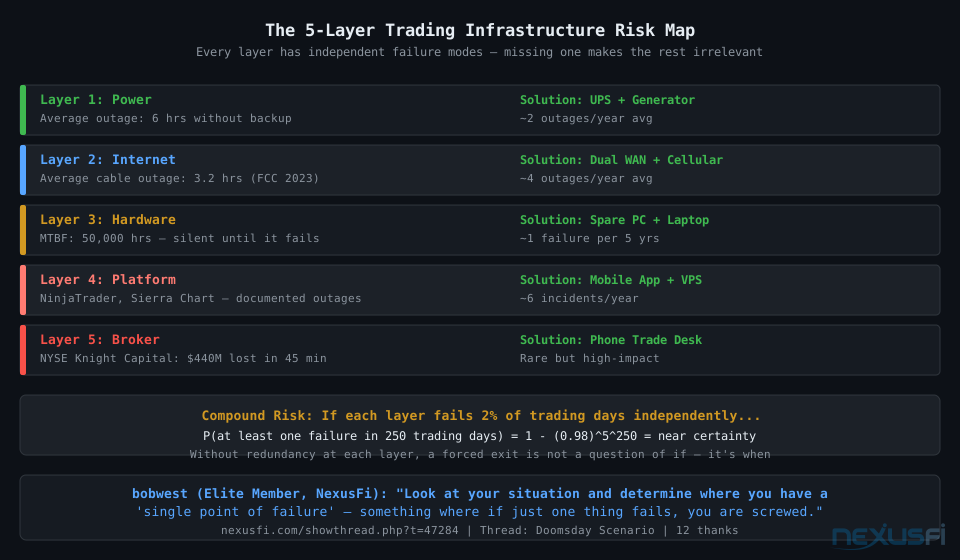
Your trading setup has five ways to fail — and only one needs to go wrong. Power drops, internet goes down, your PC crashes, the platform freezes, or your broker has an outage. Any single failure with an open position and no backup plan puts you in the exact situation traders dread: a live trade you cannot manage, going wherever the market wants to take it.
This article covers the complete infrastructure redundancy stack for day traders — from dual-WAN internet failover to UPS sizing to disaster recovery procedures you can execute in 60 seconds. Every recommendation here comes from traders who learned these lessons the hard way on NexusFi's forum, often with real money on the line.
The math is simple but brutal: if each of your five infrastructure layers fails 2% of trading days independently, you'll face a complete multi-layer failure within your first year. Add redundancy at every layer, and the probability of a catastrophic failure in any given session drops to near zero.
Before anything else: stop-loss orders are your most important redundancy. They sit at the exchange level, not on your PC. Even if your entire local setup goes dark, a properly placed stop fires automatically. This doesn't replace the infrastructure work below — it complements it.
The Single Point of Failure Framework #
A single point of failure (SPOF) is any component whose failure brings down the entire system. The goal is eliminating SPOFs layer by layer, so no single event can force you out of a position involuntarily.
@bobwest put it clearly in the NexusFi Doomsday Scenario thread: "Look at your situation and determine where you have a 'single point of failure' — something where if just one thing fails, you are screwed. Then find a way to have a redundant way to provide that, so if one of the ways fails, you are not screwed." That post received 12 thanks — it's the clearest framework for thinking about this problem.
Here are the five failure layers, in order of how frequently they fail in residential trading environments:
- Layer 1 -- Internet: The most common failure. Residential ISPs average 4+ outages per year. A brief fiber cut, a misconfigured CMTS, or a neighborhood power outage that kills your ISP's node -- all produce the same result for you.
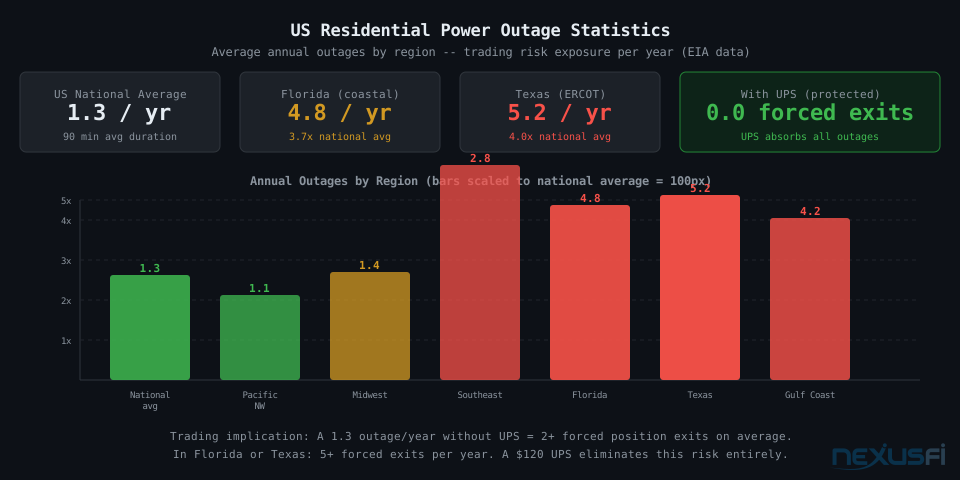
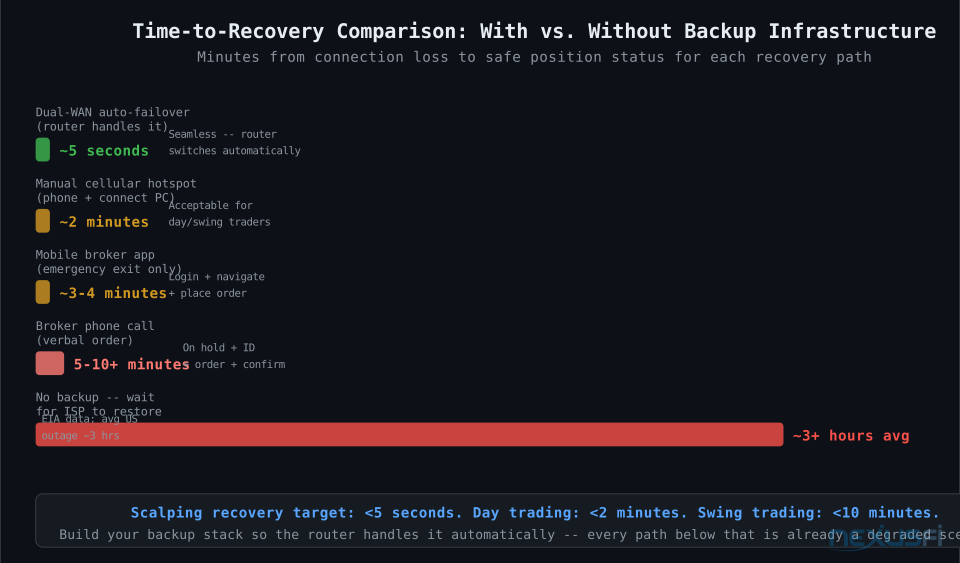
- Layer 2 -- Power: US residential power averages about 1.3 outages per year with a mean duration of 90 minutes. Florida, Texas, and coastal areas experience much more. Brief voltage sags and spikes also reset routers and modems.
- Layer 3 -- Hardware: Your PC, modem, or router. Quality hardware has 50,000+ hour MTBF ratings, but early failures happen in the first 12 months. Drives fail. Capacitors age. RAM goes bad at the worst possible time.
- Layer 4 -- Platform: NinjaTrader, Sierra Chart, TradeStation, and others have documented outages. Platform freezes are more common during high-volatility sessions that spike CPU usage.
- Layer 5 -- Broker: Rarest but potentially highest impact. When a broker has an outage during a fast market, consequences can be significant. The Knight Capital incident ($440M lost in 45 minutes due to a technical failure) is the extreme case of what happens without contingency plans.
@"Look at your situation and determine where you have a single point of failure — something where if just one thing fails, you are screwed. Then find a way to have a redundant way to provide that, so if one of the ways fails, you are not screwed." — @bobwest, Doomsday Scenario thread (12 thanks)
Building redundancy at layers 1 and 2 eliminates 80%+ of your forced-exit risk. Layers 3-5 matter for completeness, but internet and power outages are where most traders get burned.
Internet Backup: Dual-WAN, Cellular, and Starlink #
Internet redundancy is where most traders should spend their first dollar. The solution — a dual-WAN router — has been standard practice in small businesses for a decade. For traders, it's still underutilized despite being straightforward and affordable.
Dual-WAN Router: The Foundation
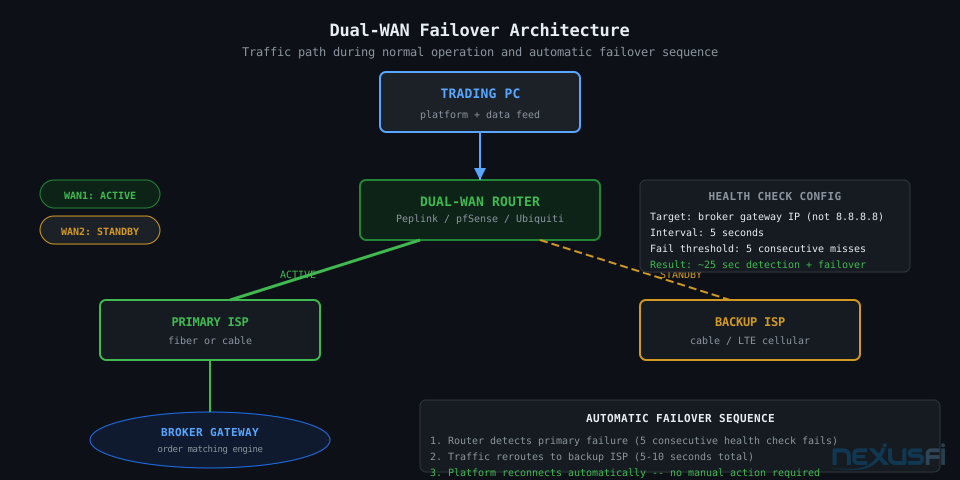
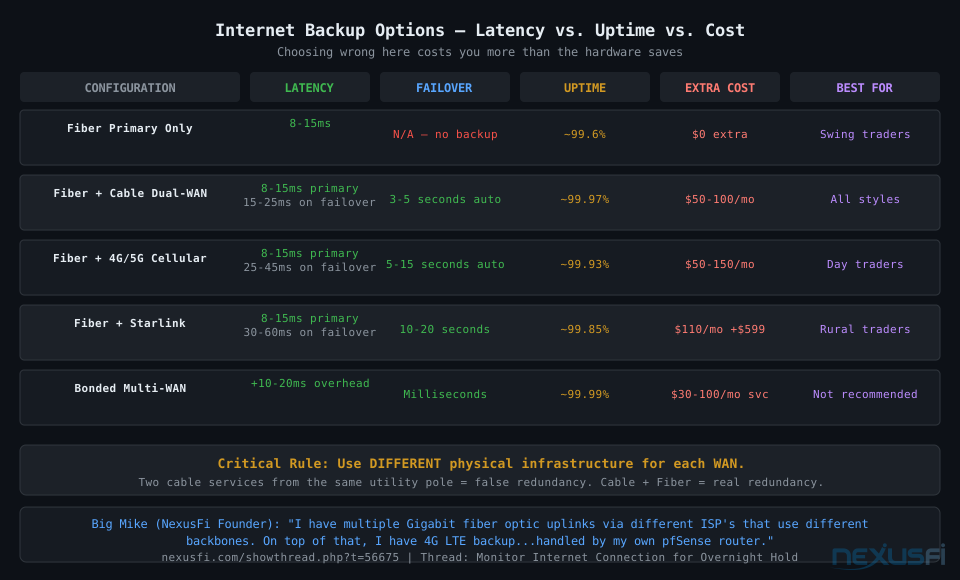
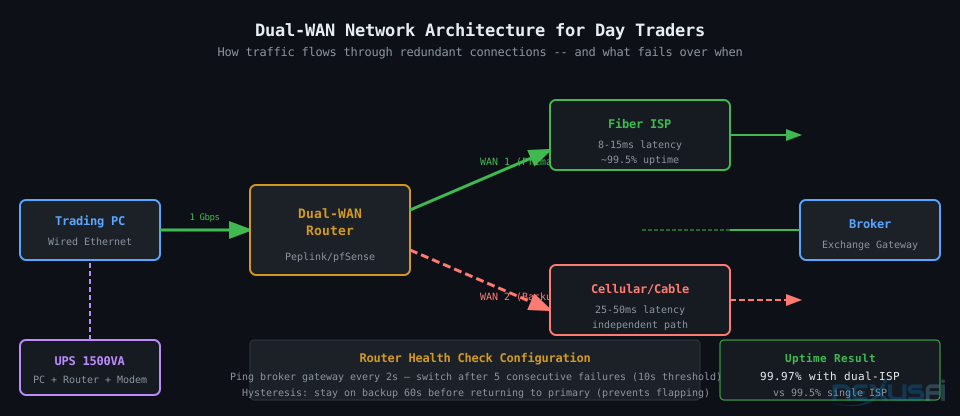
A dual-WAN router connects to two separate internet sources and automatically switches when one fails. Quality units from Peplink, Ubiquiti, or pfSense run $200-800 and include features critical for trading: health-check configuration targeting specific endpoints, failover hysteresis preventing rapid switching on brief glitches, and QoS rules prioritizing trading traffic.
The critical rule: your two WAN connections must use physically different infrastructure. Two cable services from the same utility pole is false redundancy — one fiber cut takes both out simultaneously. The right combination is cable + fiber, or fiber + DSL on separate conduit, or any mix using different physical last-mile paths.
@Big Mike documented his professional build: "I have a redundant internet connection (DSL+Cable with a load balancing/auto-failover router) simply because my internet provider here sucks, so it is a requirement for me to operate successfully." That's the foundational principle — before it's a convenience, it's a requirement.
Cellular Backup: Latency Reality
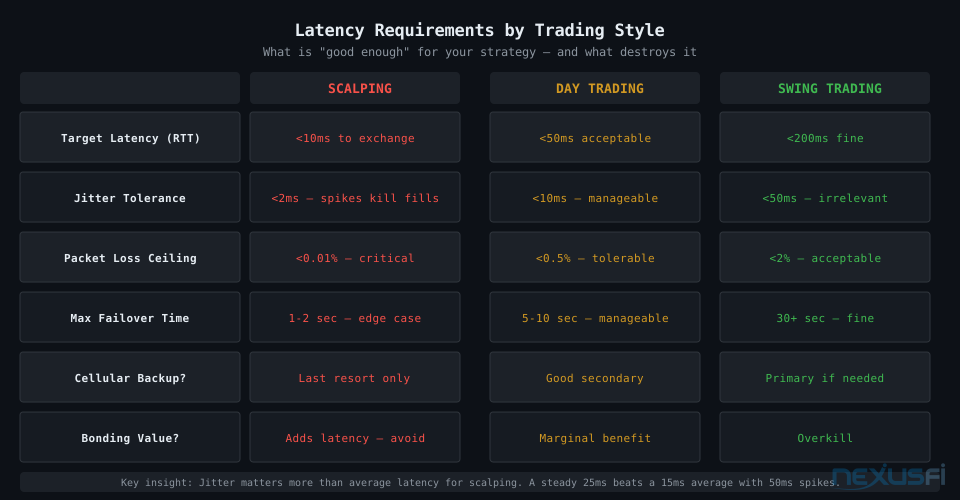
4G/5G cellular is the most common backup choice — and it works, with important limitations. Modern 5G can hit 20-30ms to a nearby broker gateway under good conditions. 4G LTE typically runs 35-60ms. This is acceptable for day traders with minute-to-hour horizons. For scalpers targeting sub-30ms fills, it's a last resort, not a working backup.
@dstrader uses a Verizon LTE MiFi hotspot as backup: "I also have a wireless internet connection for back up just in case... I rarely have a disconnection, maybe a couple of times a year if much." That's the real-world usage pattern — it sits ready and rarely triggers, but when it does, it works.
@CenFlo keeps Verizon unlimited data specifically for trading backup: "I have unlimited data with Verizon (Grandfathered plan) and I won't let it go. I pay a decent amount for it, but last night was one of those times when it more than paid for the monthly cost, hell the yearly cost."
Starlink as Tertiary Backup
Starlink is improving — as of late 2025, latency in most US regions runs 25-50ms under normal conditions, with peak-hour variability. Where Starlink earns its cost: rural areas where fiber isn't available and cellular coverage is weak. Urban traders with fiber + cable available get more consistent failover at lower cost.
Power Backup: UPS Selection and Sizing #
The UPS is the most underrated part of trading infrastructure. Power outages are the silent failure mode — no warning, instant loss of everything. A proper UPS absorbs not just outages but voltage sags, spikes, and brownouts that silently corrupt data or reset equipment.
What You Must Protect
The critical path: PC → network → modem → ISP signal. Every device on this path needs UPS protection.
- Trading PC: Obvious. Also the highest draw.
- Router: Protect this even before the PC. Your router rebooting while your PC stays on defeats the purpose of backup internet.
- Cable modem/ONT: Most traders miss this one. Your modem draws only 8-15W -- put it on UPS. If the modem reboots, you lose internet even if the ISP's signal is fine.
- Monitors: Optional for brief outages. If UPS runtime is tight, drop monitors first. You can close positions without seeing charts if stops are in the market.
@bobwest on UPS: "Have UPS protection (battery backup) on all components of your local setup, including your cable modem or whatever device connects you to the internet. I have had power go out locally here but the cable company was still providing access. Act quickly in that case, because their power may not last either."
Sizing Your UPS
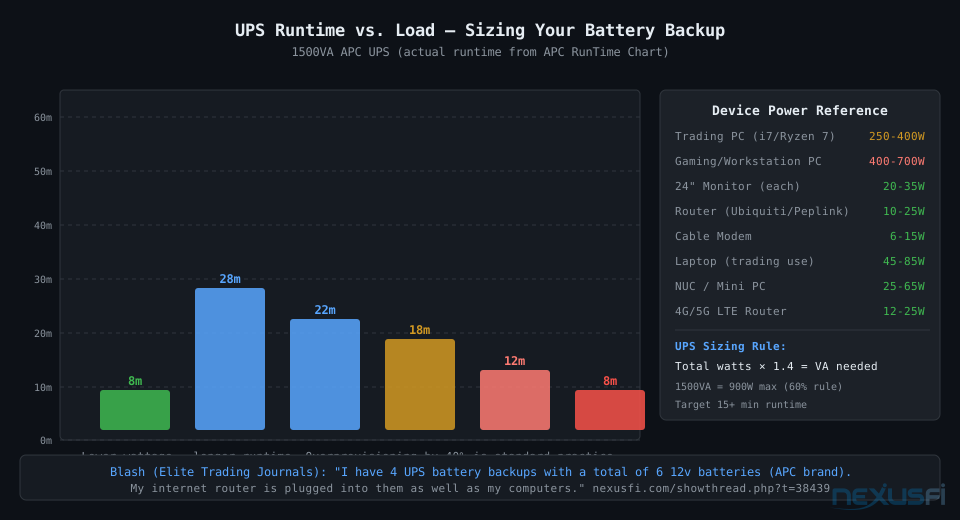
The formula: total watts × 1.4 = VA rating you need. Most UPS specifications mislead buyers by listing VA, not watts. A 1500VA UPS delivers approximately 900W.
Real trading workstation power consumption:
- Mid-range trading PC (i7/Ryzen 7): 250-300W under load
- Monitor 24" (per screen): 20-35W
- Router: 10-25W
- Cable modem: 6-15W
A dual-monitor setup: 280W (PC) + 60W (2 monitors) + 20W (router) + 10W (modem) = 370W total. A 1500VA APC unit runs about 12-14 minutes at 370W draw. That's enough to exit positions and close cleanly during most residential outages.
If 12 minutes feels tight, drop the monitors from the UPS circuit. Running PC + router + modem only at ~310W extends runtime to 30-40 minutes on the same unit. You can close positions without charts if you know the position size.
UPS Tiers: Entry-level ($80-120): APC Back-UPS 1000-1100VA. Mid-range ($150-250): APC Back-UPS Pro 1500VA, pure sine wave output. Professional ($300-600): APC SMT1500 or Eaton 5P with hot-swappable batteries and remote monitoring.
Critical note: APC and Tripp Lite batteries need replacement every 3-4 years. UPS units continue to show "charged" status even as capacity degrades — annual load testing is the only reliable check.
Hardware Redundancy: Backup Computers and Emergency Access #
Hardware failure is the lowest-probability scenario, but when it happens, there's no software fix. Drive dies, power supply fries, DIMM goes bad — you need a plan that doesn't involve waiting for a repair shop while an open position drifts.
Backup Computer Options
Laptop with full trading stack installed: Keep NinjaTrader, Sierra Chart, your data feed client, and your broker's platform installed and tested. Monthly — actually monthly — log in, verify the platform connects, verify your data feed works. If you discover a licensing issue, discover it on a Sunday afternoon, not during a system failure.
Browser-based fallback: Many brokers offer web-based platforms (Interactive Brokers TWS, Tradovate's web app). @CenFlo also runs three separate futures accounts with different brokers: "There was a point last night when I was both long and short in separate accounts. It can be a touch difficult to manage, but it allows me much more flexibility."
Know if your broker has a web platform, and know the URL. Broker emergency: @ThatManFromTexas keeps the trade desk on speed dial: "1. Keep Broker trade desk phone number on speed dial, land line and cell. 2. Call immediately." Direct. Works.
Broker and Platform Emergency Procedures #
The difference between prepared and unprepared traders: the prepared trader knows their broker's emergency phone number and has tested it during non-market hours. The unprepared trader finds the number by searching the website during a system failure while a position moves against them.
Your Broker's Trade Desk
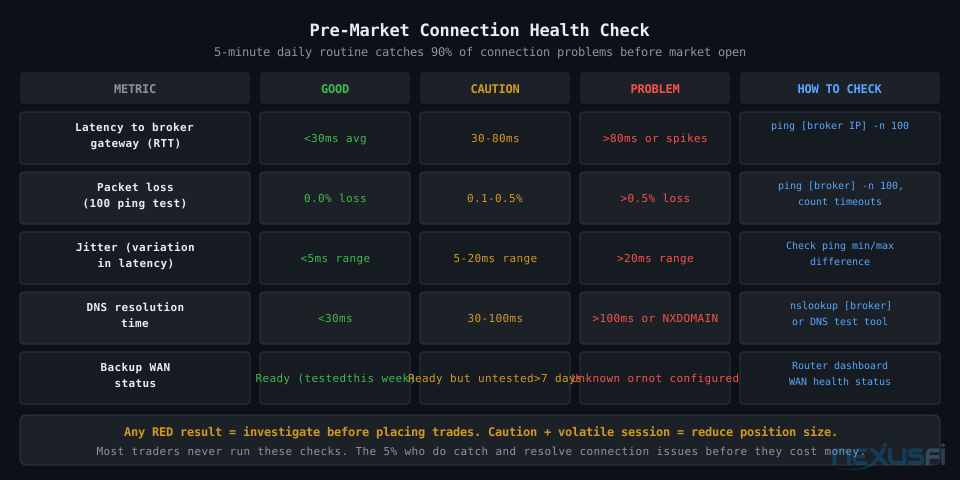
Every FCM (futures commission merchant) has a trade desk that can execute orders verbally. Latency is terrible compared to electronic execution — 2-5 minutes to describe your position and receive a ticket number. For emergency exits, this isn't about optimal execution. It's about getting out.
What to prepare before you need it:
- Trade desk phone number (write it on paper, post it at your trading desk)
- Account number (memorized or immediately accessible)
- A landline or different phone -- if your phone runs on VoIP, a power outage kills both your internet and your ability to call
@bobwest: "Have a landline you can use to call your broker's trade desk. Not just your cell phone. An old-fashioned, wired-in land line. These get power from the phone line itself and will be up if your line power is not."
Order Persistence: Server-Side vs. Client-Side
One question worth checking with your broker directly: if your connection drops, are your working limit orders and stops maintained at the broker's side or your PC's side? Server-side orders survive a disconnection. Client-side orders vanish with it.
@Pa Dax runs standby accounts fully funded: "I have standby accounts fully funded to either hedge a position when a broker fails or quickly resume trading. Also, I've got a business subscription internet connection at home that doesn't leave me surprised when there's any maintenance or whatever." That's a professional-grade approach: funded alternatives, not just phone numbers.
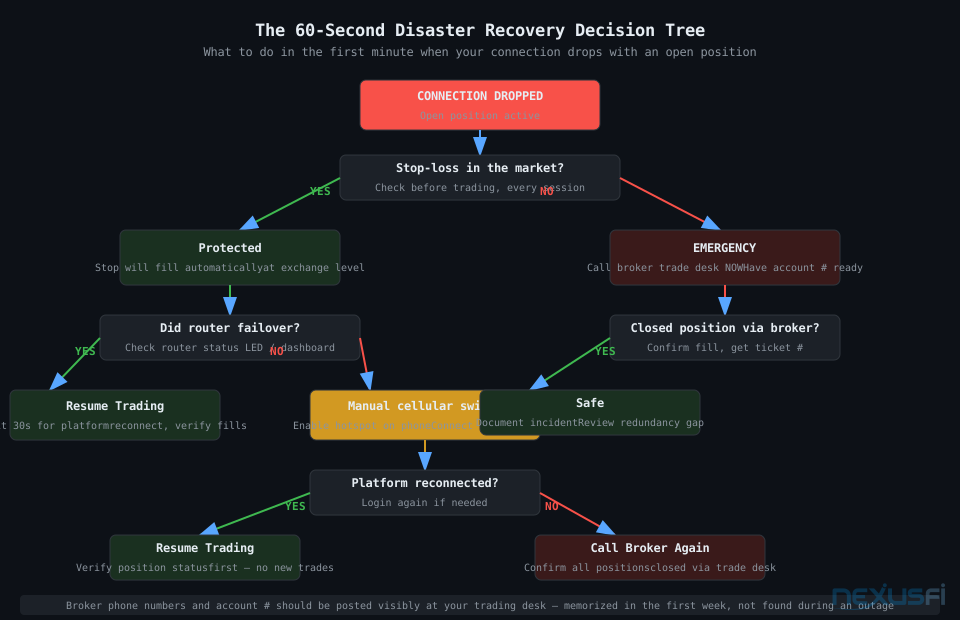
The 60-Second Disaster Recovery Procedure #
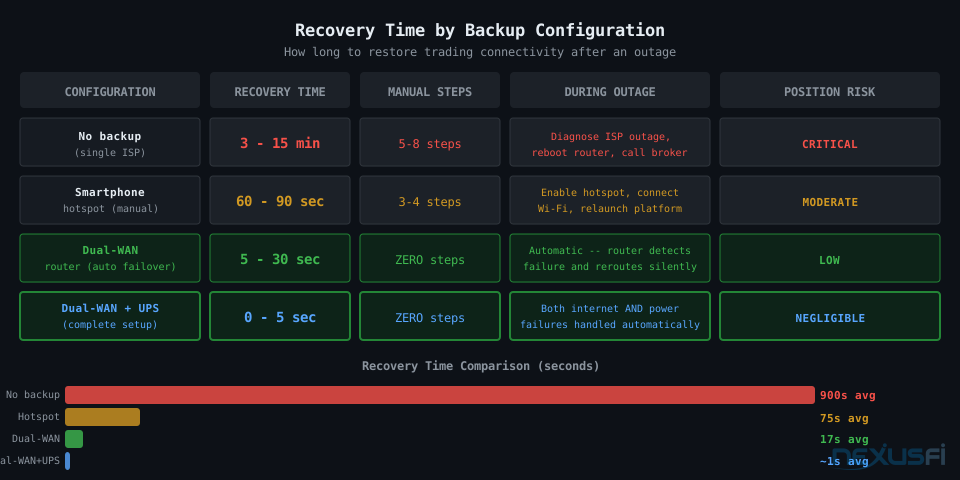
Planning is only useful if it produces action under pressure. Execute this when you've lost connectivity with an open position — before troubleshooting anything.
- 0-5 seconds: Do you have stops in the market? If yes -- you're protected at the exchange level. Now troubleshoot. If no -- immediately go to step 2.
- 5-15 seconds: Is this a failover or full outage? Check your router status lights. A working dual-WAN router should have already switched to backup. If it has, your platform will reconnect automatically within 30 seconds. Wait.
- 15-30 seconds: Platform reconnecting? If no connection within 30 seconds, switch to your phone's cellular hotspot manually. Connect your PC or laptop to the hotspot and wait for platform reconnect.
- 30-60 seconds: Still no connection? Open your broker's mobile app. Verify your position. If you have no stop and are in an adverse position -- close via mobile app now.
- After 60 seconds: Call the trade desk if the mobile app also fails. This is the absolute last resort.
Building Your Backup Stack by Trading Style #
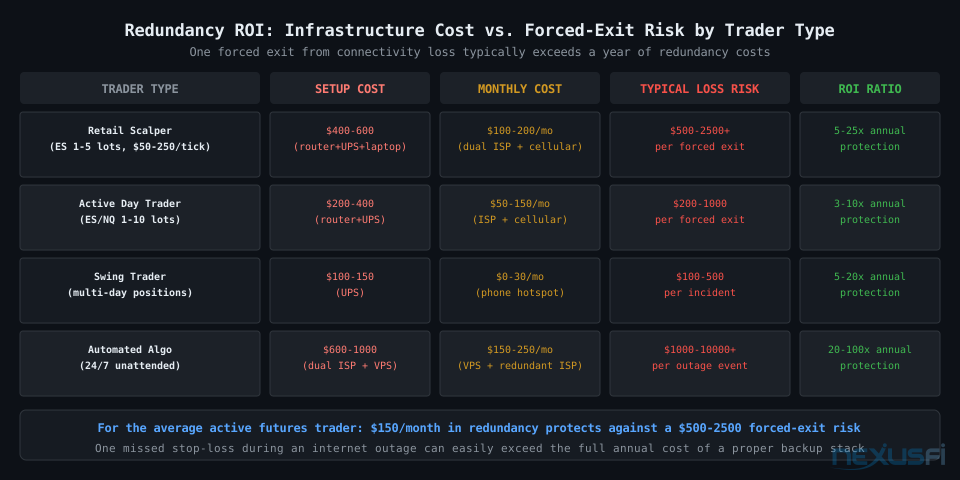
Scalpers: Maximum Redundancy Required
At tick-by-tick execution speeds, you're most vulnerable to any latency spike or disconnection. Accept that any failover event likely means closing positions — the goal is to close quickly and cleanly, not to continue trading through a degraded connection.
Required stack: Primary ISP (lowest-latency fiber available), secondary ISP cable from a different provider with dual-WAN router under 5-second failover, UPS 1500VA minimum on critical path, backup PC tested monthly, mobile app tested quarterly, stop losses on every position.
Day Traders: Standard Professional Setup
Minute-to-hour horizons give you more tolerance for brief disruptions. A 10-second failover is acceptable. Focus on preventing total connection loss rather than optimizing ultra-low latency on the backup path.
Recommended stack: Best available primary ISP (fiber preferred), backup via dual-WAN router with cellular modem integrated (Peplink or similar, 5G preferred), UPS 1000-1500VA covering PC + router + modem, mobile app installed and tested.
Swing Traders: Minimal Viable Backup
Your biggest risk is missing an important news event, not latency spikes. A smartphone cellular hotspot and your broker's mobile app covers the realistic emergency scenarios with appropriate risk management.
Testing Your Redundancy: The Monthly Drill #
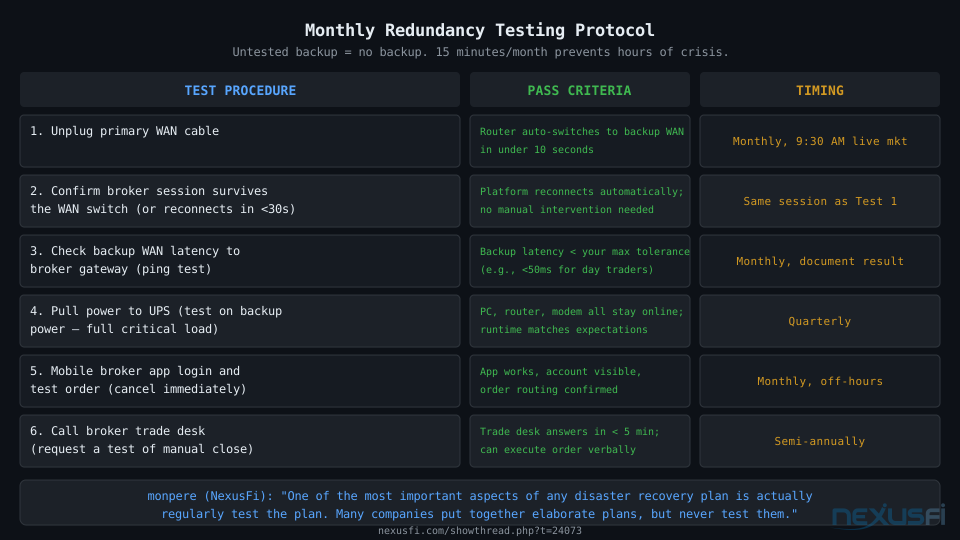
Most traders buy the hardware, configure it once, and never test it. The result: when the actual outage happens, the failover doesn't trigger correctly, the cellular plan is throttled, or the battery in the UPS is dead. Three years of monthly premium payments for a backup system that doesn't work when it matters.
Test 1: WAN Failover (Monthly)
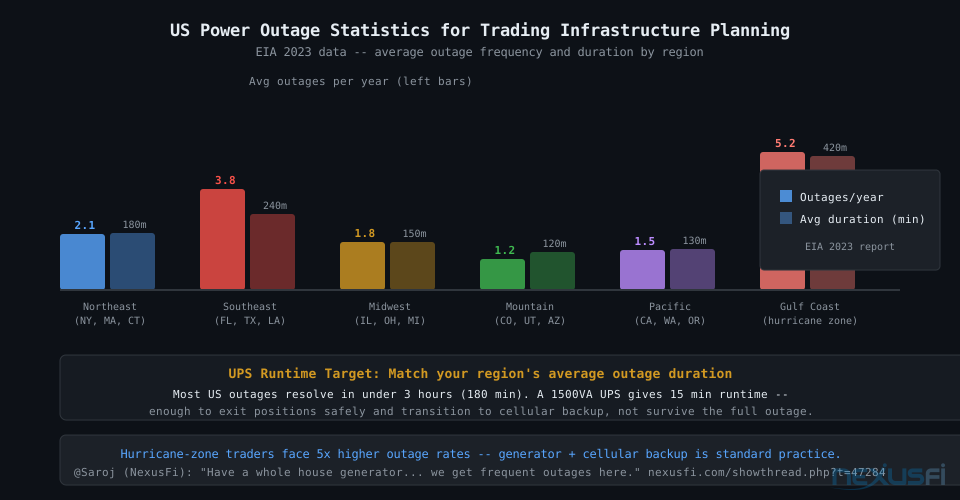
Physically disconnect your primary WAN cable from the router. Watch the WAN status indicator. Within 5-10 seconds, you should see traffic rerouting to backup. Open your broker's platform — if it auto-reconnects within 30 seconds, your failover works. Check the latency: ping your broker's gateway and document the backup latency. Know what "normal backup latency" looks like so you can identify degradation over time.
Test 3: Mobile App Login (Monthly)
Open your broker's mobile app. Log in. Verify the positions screen loads. Place and immediately cancel a small test order if your account minimum allows. This takes five minutes and catches auth issues, app updates required, and credential problems before they matter.
Router Recommendations #
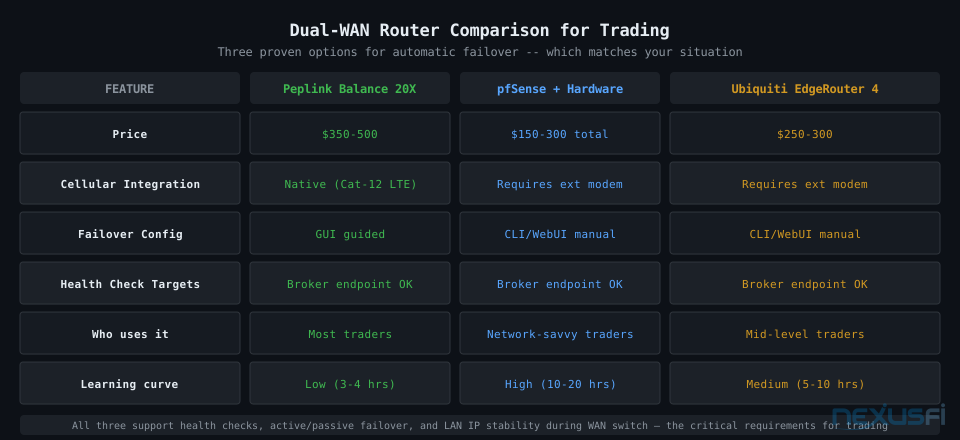
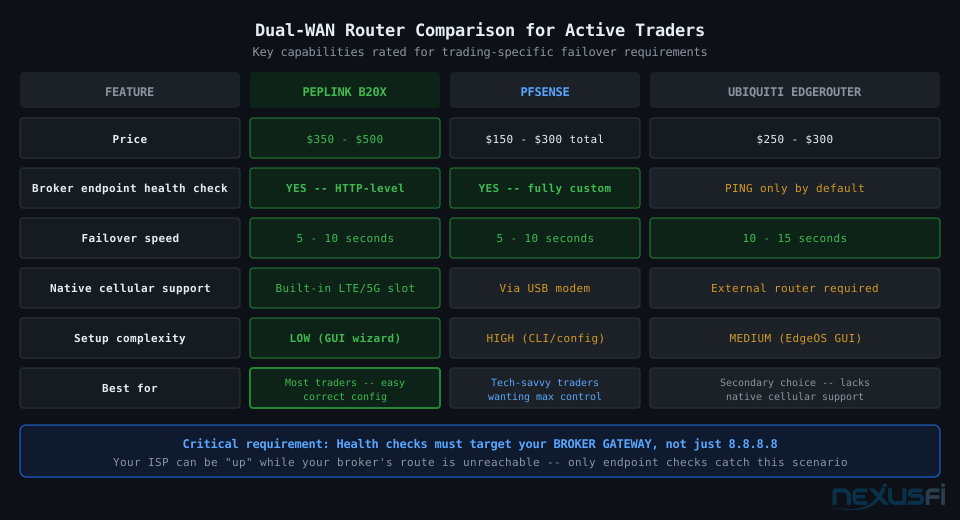
The router is the most important hardware decision in your backup stack. Key features for trading: WAN health checks targeting specific endpoints (HTTP-level, not just ICMP ping), failover hysteresis (3-5 consecutive failures before triggering), no network restart on WAN switching, and LAN IP stability during failover.
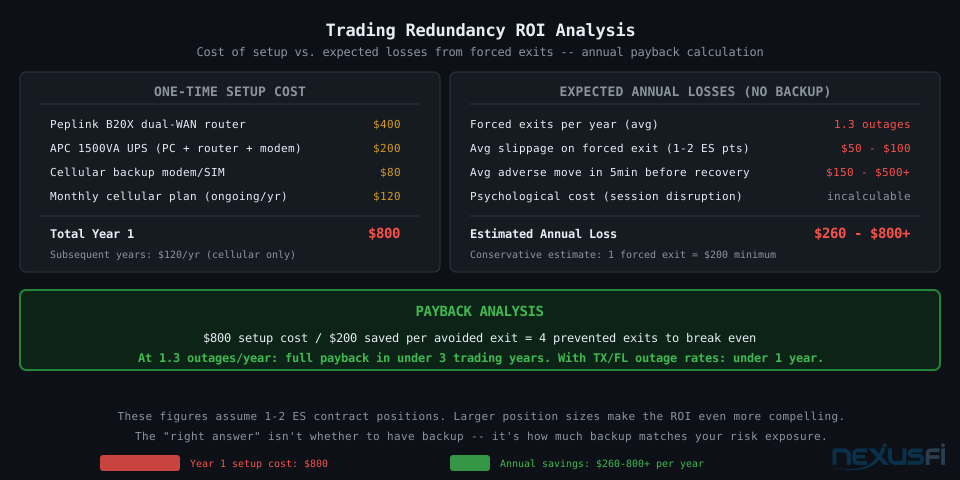
Peplink Balance 20X ($350-500): The gold standard for small trading setups. Native LTE integration, dual WAN ethernet ports, excellent failover implementation. Easiest to configure correctly.
pfSense on bare metal ($150-300 total): Open-source router OS on a small PC (Protectli Vault). Infinitely configurable, detailed logging. Requires more setup time. @Big Mike's choice.
Ubiquiti EdgeRouter 4 ($250-300): Enterprise-grade hardware, excellent value. Less user-friendly than Peplink. No native cellular support — requires a separate cellular router as WAN input.
Key Takeaways #
- Stop-losses are your most important backup. They protect you at the exchange level regardless of what happens to your local setup.
- Dual-WAN with different physical infrastructure is the internet redundancy standard for active traders. Two cable connections from the same utility pole is not redundancy.
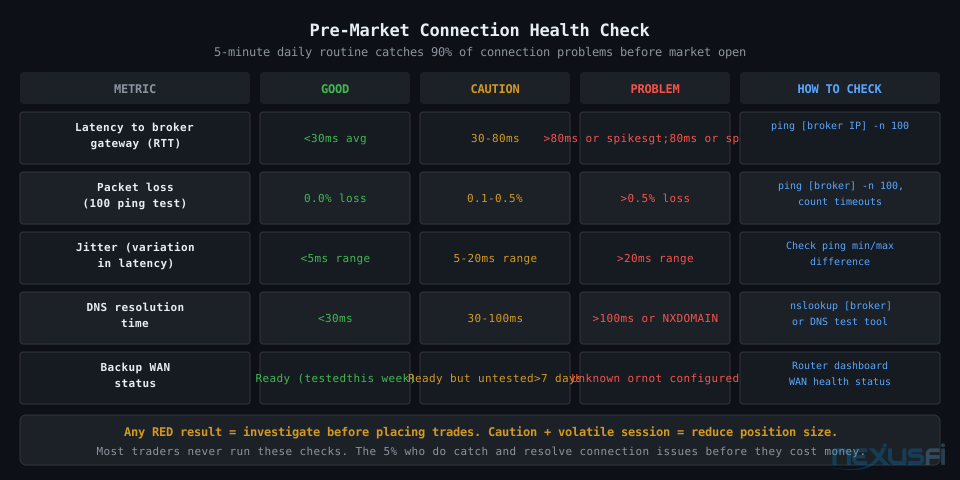
- Cellular backup latency varies by location and time of day. Test at 9:30 AM before trusting it for live trading.
- UPS your entire critical path: PC, router, modem. The modem especially -- most traders miss this. A 1500VA unit at typical trading loads gives 12-15 minutes, enough to exit cleanly.
- Know your broker's trade desk phone number. Write it down. Post it. It's the final backup when everything else has failed.
- Test your redundancy monthly. Untested redundancy is not redundancy. A 15-minute drill catches problems before they happen during live trading.
- Match the stack to your exposure. Scalpers need dual-ISP setups. Swing traders need a UPS and a tested mobile app. Don't over-engineer for your actual risk profile.
Citations #
- @bobwest -- Doomsday Scenario thread, 2019 (12 thanks): Single point of failure framework, UPS protection requirements, landline for broker calls.
- @Big Mike -- Multiple Accounts as Hedge, 2011 (3 thanks): DSL+Cable dual-WAN setup, pfSense router for automatic failover.
- @CenFlo -- Spoo-nalysis thread, 2016 (6 thanks): Verizon unlimited data for trading backup, multiple broker accounts.
- @Pa Dax -- PA Dax CL ES trading log, 2018 (6 thanks): Fully funded standby broker accounts, business ISP subscription, complete backup documentation.
- @dstrader -- How do you handle connection loss?, 2015 (4 thanks): Verizon LTE MiFi hotspot as cellular backup.
- @ThatManFromTexas -- Outage with a live position, 2012 (5 thanks): Trade desk speed dial as primary emergency protocol.
Upgrade to Elite Membership to access the full NexusFi community discussions, submit corrections, vote on section quality, and ask Fi follow-up questions directly.
Version 1 · Published May 30, 2026 · NexusFi Academy
Knowledge Map
Go Deeper
Build on this knowledgeReferences This Article
Articles that build on this topicCitations
- — Doomsday senerio (2019) 👍 12“Look at your situation and determine where you have a single point of failure -- something where if just one thing fails, you are screwed. Then find a way to have a redundant way to provide that, so if one of the ways fails, you are not screwed.”
- — Monitor Internet Connection for Overnight Hold (2021) 👍 1“I have multiple Gigabit fiber optic uplinks via different ISP's that use different backbones. On top of that, I have 4G LTE backup in the event both fiber's are down.”
- — Router failover redundancy cellular backup (2014) 👍 3“For those looking for a hardware solution to provide automatic failover/failback for internet connection, the Cradlepoint devices are a good solution.”
- — The Scalper's Journey (2016) 👍 8“I have an APC battery backup, bought 5 or 6 years ago for maybe a hundred bucks. I test it occasionally, and the occasional power outage due to Florida weather tests it too.”
- — Disaster planning & redundancy (2010) 👍 1“I have a UPS that powers the trading computer, router and 2 trading screens for about 10 minutes in the event of a power failure -- enough time to close out of trades.”
- — Amazing Market shutdown for 2 days with today's technonlogy (2012) 👍 2“One of the most important aspects of any disaster recovery plan is actually regularly test the plan.”
- — The Scalper's Journey (2017) 👍 2“We also have electricity cuts here at times and hence I bought 2 UPS units for around $40 each and they work like a charm.”
- — Doomsday senerio (2019) 👍 4“Have your cable modem and tower both plugged into your UPS.”
- — PA Dax CL, ES and Bund Price Action Trading Log (2018) 👍 6“I have standby accounts fully funded to either hedge a position when a broker fails or quickly resume trading.”
- — How do you handle connection loss? (2015) 👍 4“I also have a wireless internet connection for back up just in case... I rarely have a disconnection, maybe a couple of times a year if much.”
- — Spoo-nalysis ES e-mini futures S&P 500 (2016) 👍 6“I have unlimited data with Verizon (Grandfathered plan) and I won't let it go.”
- — Outage with a live position on Ninja (yikes) what to do? (2012) 👍 5“1. Keep Broker trade desk phone number on speed dial, land line and cell. 2. Call immediately.”