



Order Flow Heatmaps and Liquidity Visualization: Reading the Invisible Order Book
Overview #
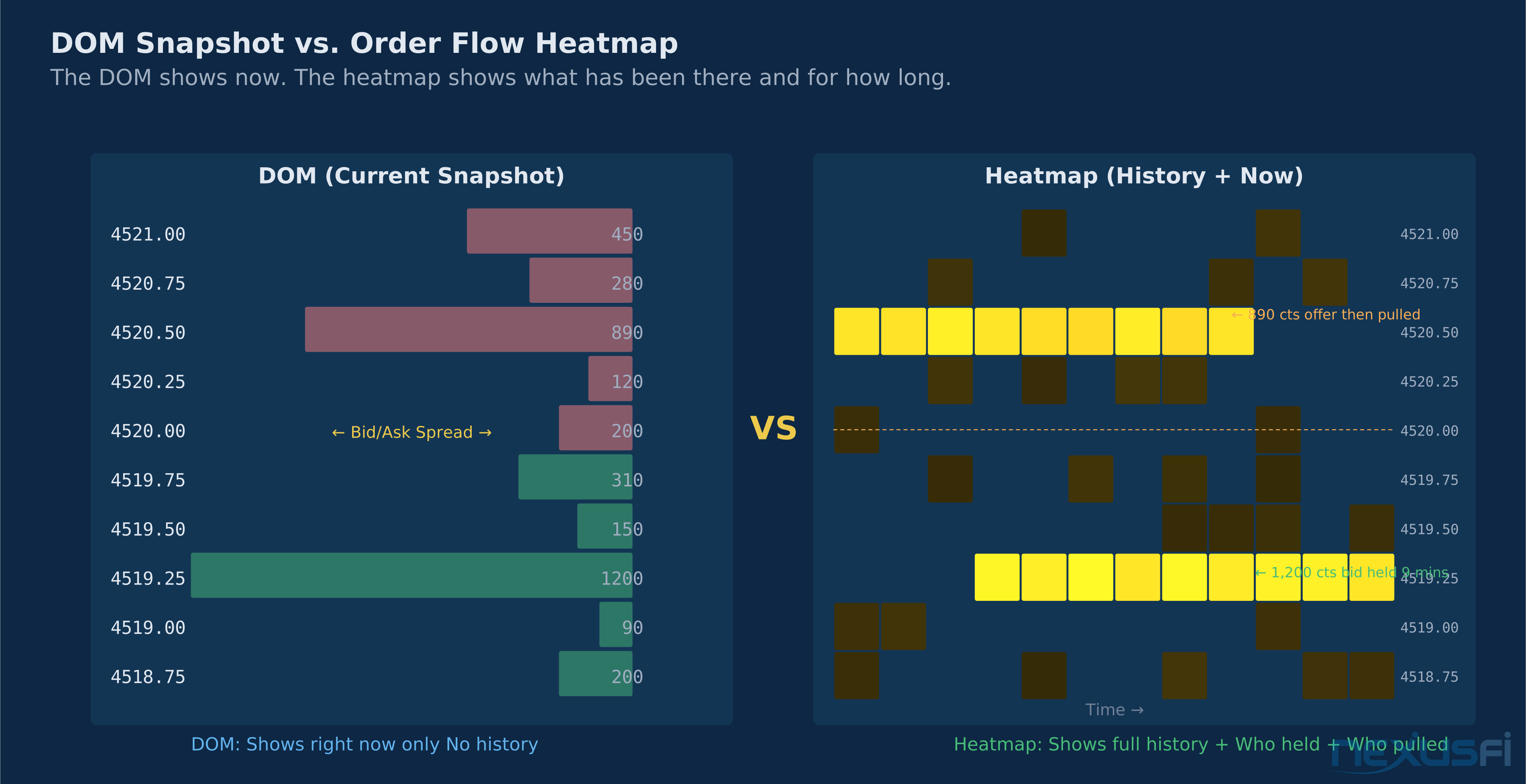
The DOM gives you a snapshot. The footprint chart shows you what executed. The order flow heatmap shows you what's been waiting.
That's the core distinction. Every major trading platform surfaces the current bid and ask levels — the live DOM you watch tick by tick. But the resting limit orders at those levels appear, move, and disappear faster than any human can track. A 2,000-contract limit order sitting at 4510.00 in ES might have been there for 30 seconds or 30 minutes. Your DOM only tells you it's there now. The order flow heatmap tells you how long it's been there, how it grew or shrank, whether it's been absorbing aggressive flow, and whether it disappeared the moment price approached.
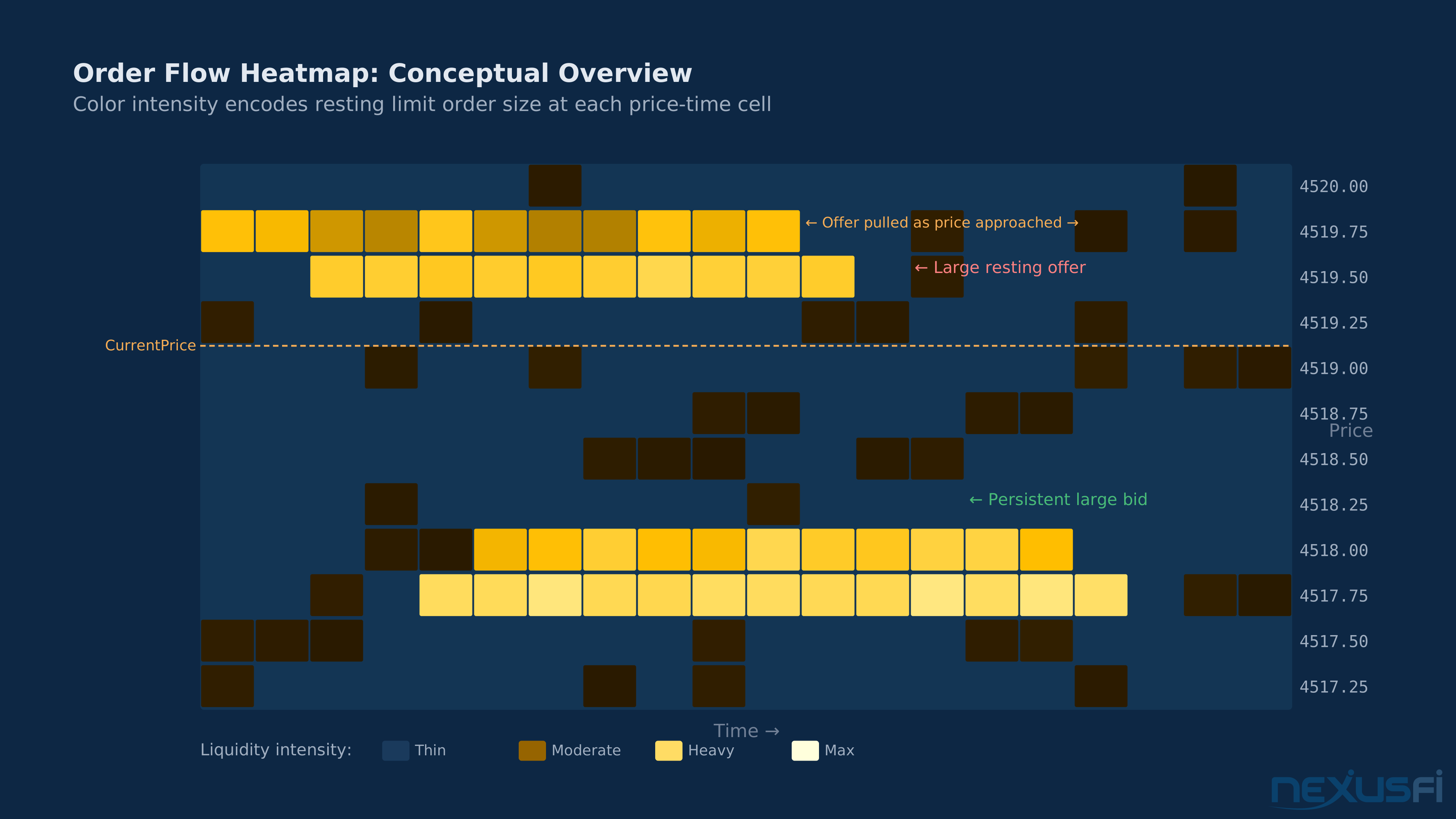
Order flow heatmaps — also called liquidity maps, market depth heatmaps, or bid/ask heatmaps — are a visualization technique that layers the full history of limit order book changes onto a time-price chart. Price moves along the y-axis. Time progresses along the x-axis. Color intensity at each cell encodes the size of resting orders at that price level at that moment in time. The result is a living record of where liquidity pools form, hold, and dissolve.
[1] That synthesis — historical volume context layered with live liquidity positioning — is what makes heatmap analysis genuinely different from other order flow tools.
The canonical platform for this visualization is Bookmap. Sierra Chart implements a similar study called Market Depth Historical Graph. ATAS provides its own heatmap variant. What all of these share is the same underlying data: the full order book at each moment in time, not just the top of book that most traders see.
How Order Flow Heatmaps Work #
The Data Layer: Full Depth vs. Top of Book #
Most traders work with Level 1 data — the best bid and best ask, plus last trade price and volume. Level 2 data extends this to the top 5, 10, or 20 price levels in the book. Order flow heatmaps require the full depth of market — all visible limit orders at every price level, updated tick by tick.
CME Group's futures markets publish this through two data products:
MDP 3.0 (Market Data Platform): Standard Level 2 data showing the top 10 bid/ask levels with aggregated size. This is what most retail platforms use.
MBO (Market-By-Order) data: CME's premium feed that reveals individual orders rather than aggregated size. At 4510.00 with 1,200 contracts showing, MDP tells you "1,200 contracts." MBO tells you it's actually four separate orders: one 800-lot, one 250-lot, and two 75-lots — a at the core different picture for identifying institutional orders versus retail stacking.
Order flow heatmaps primarily consume MDP 3.0 data because it's available through standard data feeds. Platforms with MBO support (Bookmap offers this as a premium add-on) can distinguish between a single large order and many small orders piled at the same level — a distinction with serious trading implications.
The Visualization Mechanics #
The heatmap renders a 2D grid with these dimensions:
X-axis (horizontal): Time, progressing left to right. Each column represents a time increment — typically seconds, though the resolution is configurable.
Y-axis (vertical): Price, with the current market price centered and levels extending up and down. The visible range adjusts as price moves.
Cell color: This is the key. Each cell's color encodes the quantity of limit orders resting at that price level at that moment in time. Standard convention:
- Dark background (black): Minimal or no resting orders
- Yellow/amber: Moderate liquidity present
- Bright white/hot white: Heavy liquidity concentration
Some platforms use red-white gradients (Bookmap's classic) or blue-yellow gradients. The specific colors differ, but the logic is identical: bright = heavy orders, dark = thin or absent.
Executed trades: Most heatmap platforms overlay the actual trades executed on top of the resting order visualization. Bookmap uses colored dots or circles, sized proportionally to trade size. This lets you see not just where orders are resting, but where they're being hit.
What the Heatmap Reveals #
The order flow heatmap makes several phenomena visible that are invisible to DOM traders watching the current snapshot:
Persistent liquidity levels: When you see a bright horizontal "wall" of color on the heatmap extending across time at a specific price level, that's a persistent limit order — someone has been holding significant size there for minutes. This is qualitatively different from transient liquidity that appears and disappears. Persistent liquidity at a level strongly suggests institutional positioning, not retail stacking.
Liquidity migration: Watch how bright cells move over time. If a large liquidity cluster that was sitting at 4508 gradually shifts upward to 4509, 4510, it suggests the large participant is following price higher — bidding under the market and moving up as price moves up. This is characteristic of a patient buyer accumulating.
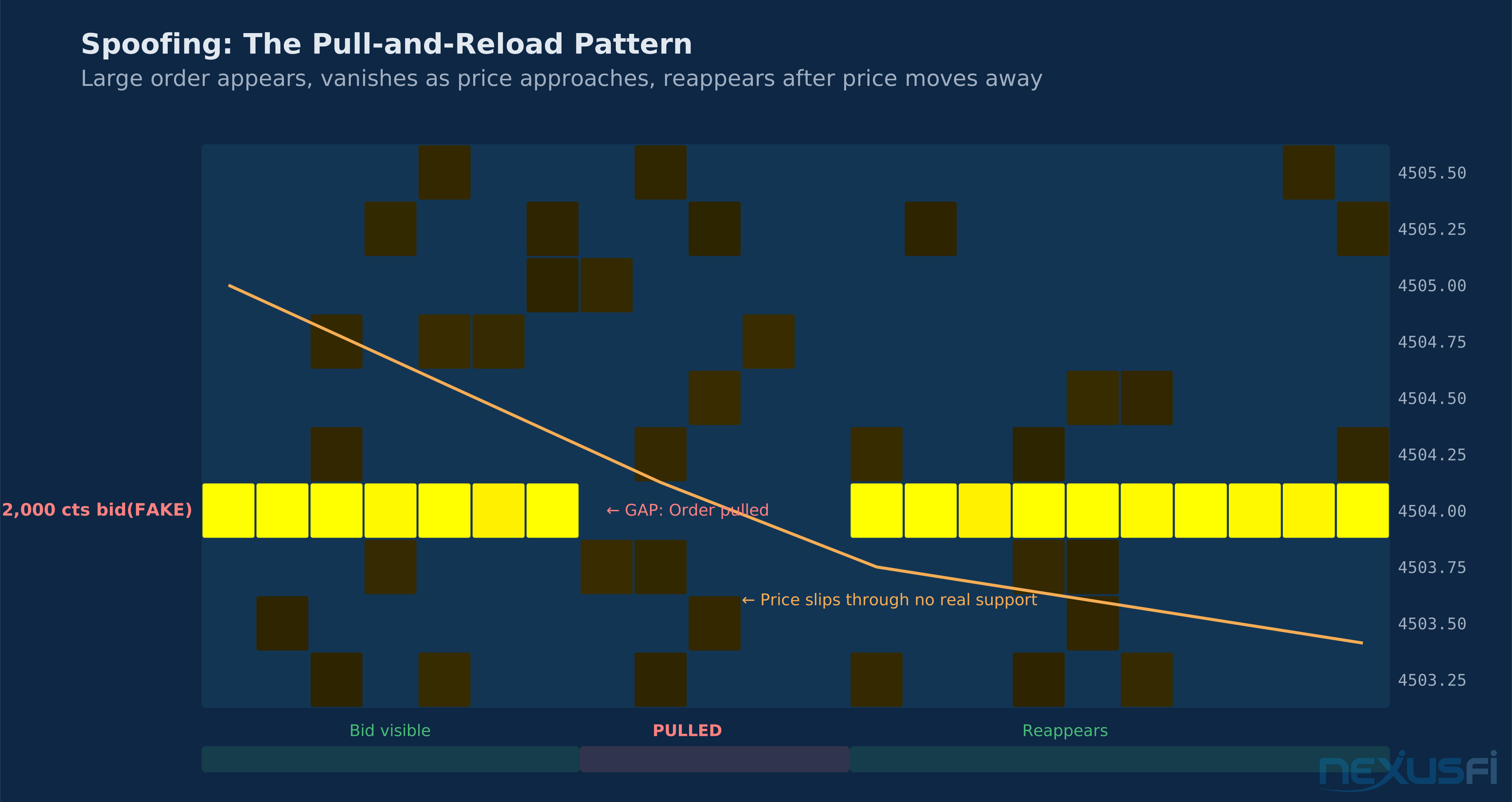
Pull-and-reload patterns: A classic manipulation tell. A large order sits visible at a level (bright cell). As price approaches, the order disappears (cell goes dark). Once price moves away from the level, the order reappears. This is spoofing behavior — the large order was never intended to execute; it was there to influence price direction.
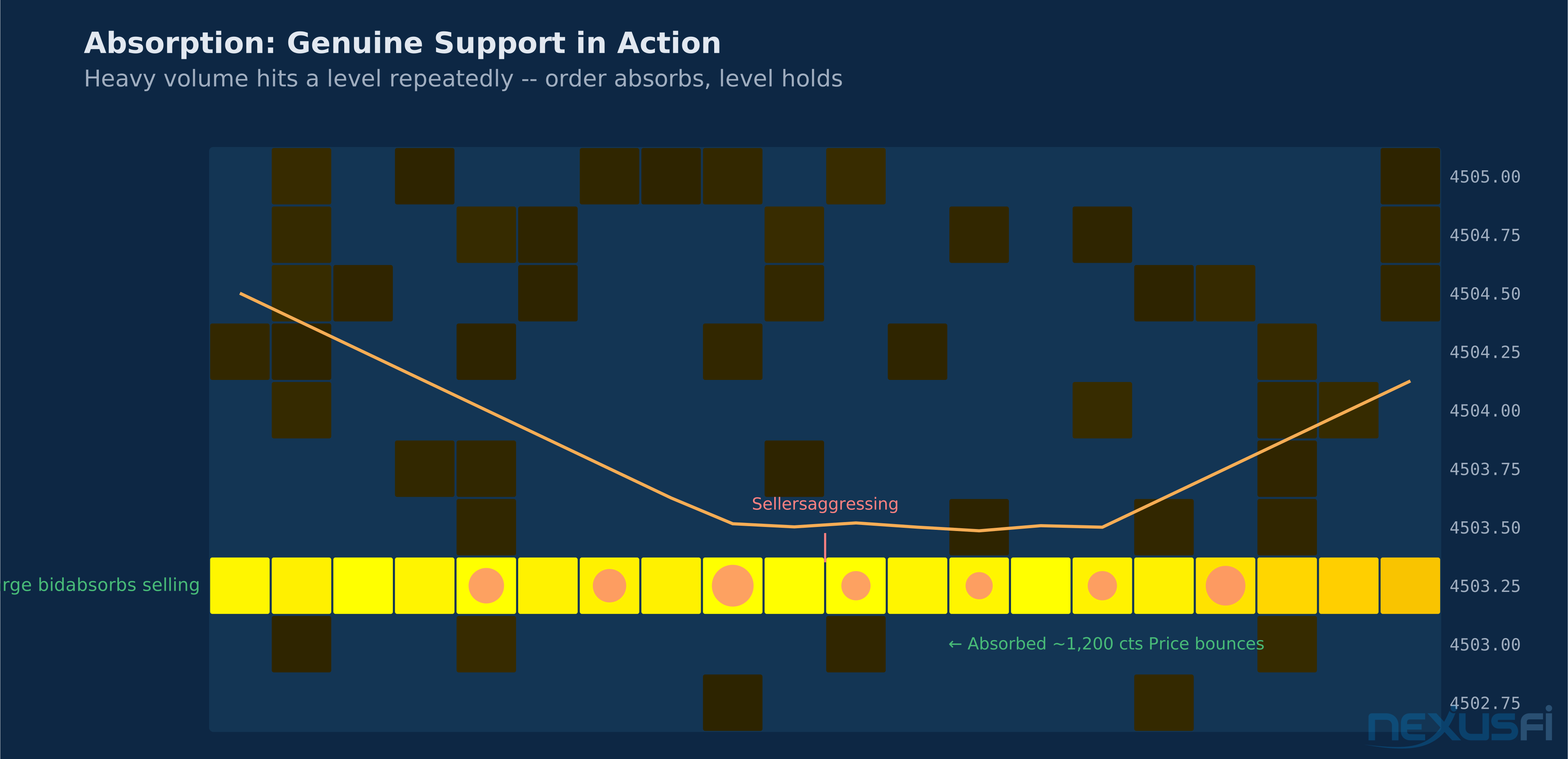
Absorption events: When price arrives at a heavily-lit level on the heatmap and stalls there, with visible trades hitting that level (dots appearing at the bright cell), the large limit order is absorbing the aggressive flow. The order is transacting, not being pulled. The cell gets consumed but may reload. This is genuine support or resistance in action.
Platforms Implementing Heatmap Analysis #
Bookmap #
Bookmap is purpose-built for heatmap visualization. Founded by former high-frequency traders who recognized that the Level 2 order book contained more information than retail traders could see with standard DOM tools, Bookmap's primary interface IS the heatmap.
The core Bookmap visualization overlays:
- Heatmap layer: Color-coded resting order visualization (the depth history)
- Aggressor bubbles: Circles representing executed trades, sized by volume, colored by direction (green for buy aggression, red for sell aggression)
- Trade activity bars: Column histogram on the right showing total volume and delta per price level for the visible time window
- Volume dots and markers: Additional configurable overlays for large trades, iceberg detections, and stop runs
In December 2019, Bookmap shared a heatmap screenshot on NexusFi demonstrating this analysis in ES: "Nice liquidity activity captured by the heatmap today in the ES. Especially note the larger player(s) heavily layering in on the bid around 3150-3153 at 2:00-2:30 pm ET. Strong aggressive buyer ensued and moved price to a new range. Some pretty nice examples of the context and relationship between price structure, liquidity, and aggressor volume throughout the entire day." [3] This example illustrates the core trading use case: identifying where large bids are stacking, then watching for the aggressive buying that follows once those bids provide a platform.
Bookmap's add-on ecosystem extends the core heatmap with:
- MBO indicators: Iceberg On-Chart (tracks individual icebergs from CME MBO data), Stop & Iceberg, large trade indicators
- Quantower integration: Real-time analytics overlaid on the heatmap
- Bookmap API: Allows custom modules — one NexusFi user asked about monitoring "liquidity stacking/pulling on multiple price levels (ie 10 levels up, 10 levels down, how much in sum was added/deleted for all levels in given timeframe)." [4]
Bookmap's response to this question included the "quotes delta" column and the ability to build custom API modules — but also acknowledged that watching only the visual heatmap makes it "virtually impossible" to track aggregate additions/deletions across 10+ levels simultaneously.
Sierra Chart: Market Depth Historical Graph #
Sierra Chart implements heatmap functionality through its Market Depth Historical Graph study, which overlays the bid/ask depth history on a price chart using the same color-intensity principle as Bookmap.
Sierra Chart's advantages in heatmap analysis:
- ACSIL programmability: Every depth bar is accessible via Sierra Chart's C++ API, enabling custom alert creation and backtesting on recorded depth data
- Bid/Ask depth bars study: A complementary tool showing total bid vs. ask depth as a separate sub-chart, configurable with custom alerts when imbalances exceed thresholds
- Combined analysis: Sierra Chart allows running the heatmap study alongside its full order flow toolkit (volume at price, cumulative delta, DOM, time and sales) in an integrated environment
The limitation is Sierra Chart's learning curve and the fact that depth-level backtesting requires recording the data yourself, as historical full-depth data isn't readily available from most providers.
ATAS (Advanced Time and Sales) #
ATAS provides a heatmap visualization as part of its broader order flow suite. The ATAS implementation integrates the heatmap with smart DOM features and its own cluster chart (footprint) visualizations. For traders who want heatmap analysis alongside standard footprint patterns without Sierra Chart's configuration complexity, ATAS provides a more accessible entry point.
MotiveWave #
MotiveWave's depth chart study provides a similar market depth history visualization. For traders already using MotiveWave for Elliott Wave or Fibonacci analysis who want to add depth-of-market context, MotiveWave's built-in implementation avoids the need for a separate platform.
Key Patterns and Signals #
The Horizontal Wall #
The most recognizable heatmap pattern. A bright horizontal band extending across multiple time increments at a specific price level indicates persistent, heavy limit orders at that price. This is the heatmap's version of a "big number" — a level where meaningful institutional interest is parked.
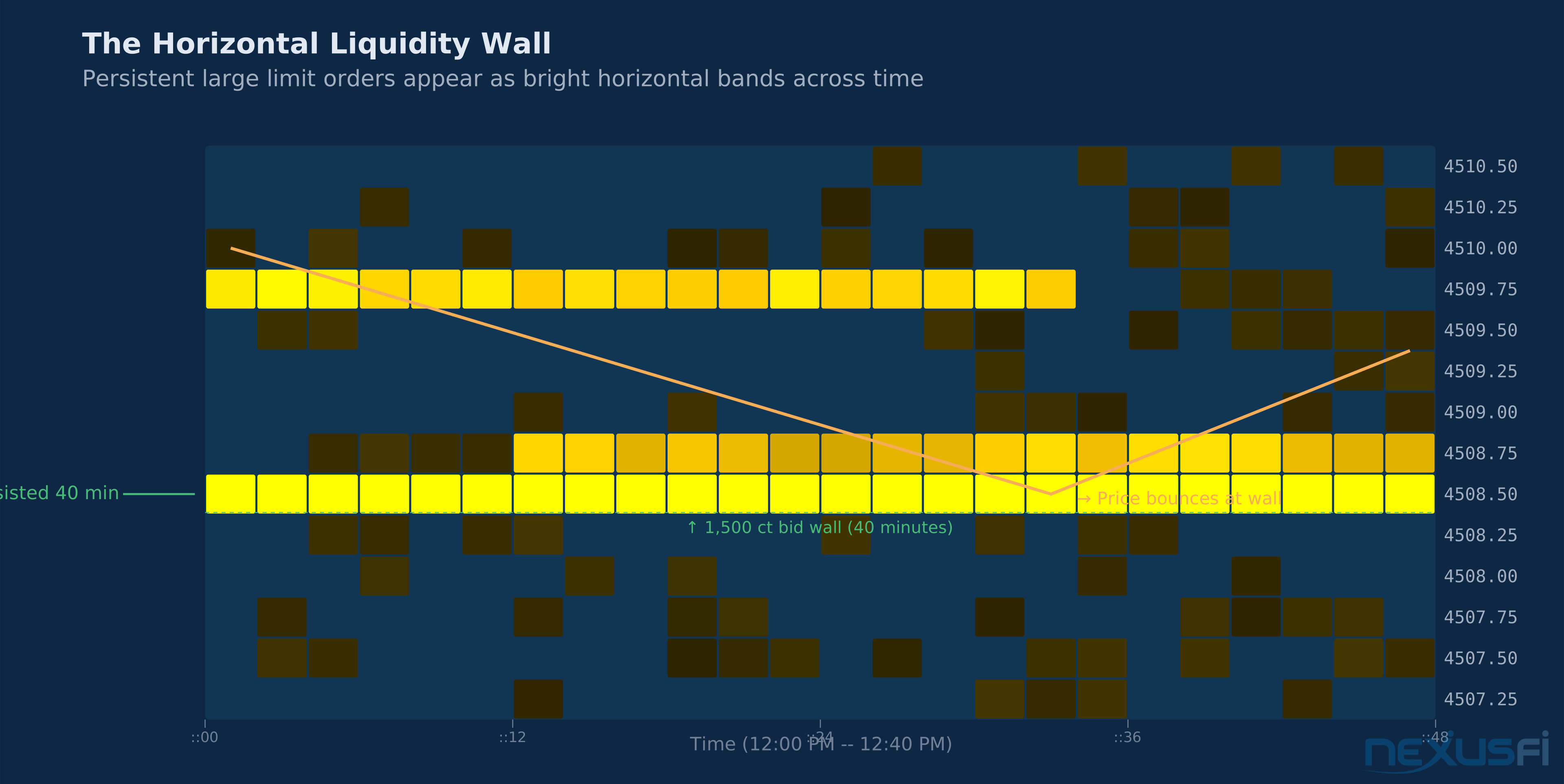
Reading the wall: Not all walls are equal. A wall that appeared 20 minutes ago and has held steady is more significant than one that appeared 30 seconds ago. The duration of persistence is a proxy for conviction.
Wall approach dynamics: As price approaches a wall:
- If the wall holds and aggressive flow absorbs into it (dots/bubbles appearing at the wall level), it's genuine support/resistance with conviction.
- If the wall dissolves before price arrives (cells go dark as price approaches), it was either a spoof or a large player who decided the level was no longer worth defending.
- If the wall grows larger as price approaches (cells get brighter), additional participants are joining the liquidity at that level — potentially a stronger reversal point.
Pull-and-Reload: The Spoofer's Signature #
Spoofing is illegal under the Commodity Exchange Act, but it continues to occur. The heatmap makes spoofers more visible than any other tool.
The pattern:
- Large order appears on one side (say, 2,000 contracts on the bid at 4505)
- Price is above 4505 and begins moving toward it
- As price approaches within 1-3 ticks, the 2,000-lot disappears (pulled)
- Price moves past 4505 without support
- The 2,000-lot reappears at 4505, or slightly lower, ready to repeat
On the heatmap, this appears as a bright horizontal line that terminates as price approaches, leaving a dark gap at the exact moment of contact.
As @matteo83 asked Bookmap's educator on NexusFi: "Huge part of liquidity is fake/spoofing. How can you make constructive decisions using visualisation of something that is mostly fake?" [4] Bookmap's response identified the key distinction: "Liquidity relatively close to the market can't be entirely fake as it has a risk of being executed (e.g. in a stop run). Also, many elements of liquidity are important, not just spoofing. Did the liquidity transact? Did they bid in front of the longer term liquidity, or was it behind it? Did they also pull on the offer at the same moment? What was the reaction by the aggressors?" [6]
The practical translation: orders very close to the current market price (within 3-5 ticks) are much harder to spoof because they risk execution. The large fake orders tend to appear further out. On the heatmap, the zone of "credible liquidity" versus "potentially spoofed liquidity" corresponds to proximity to the current market.
Iceberg Orders: The Hidden Hand #
Iceberg orders are legitimate large orders that only show a small portion of their total size in the visible book. A 5,000-contract bid might show as 200 contracts at each refresh, replenishing as each lot executes. On the DOM, it looks like a 200-contract bid. On the footprint, you see heavy ask volume executing without price moving. On the heatmap, you see moderate apparent depth that doesn't diminish despite heavy aggressor flow.
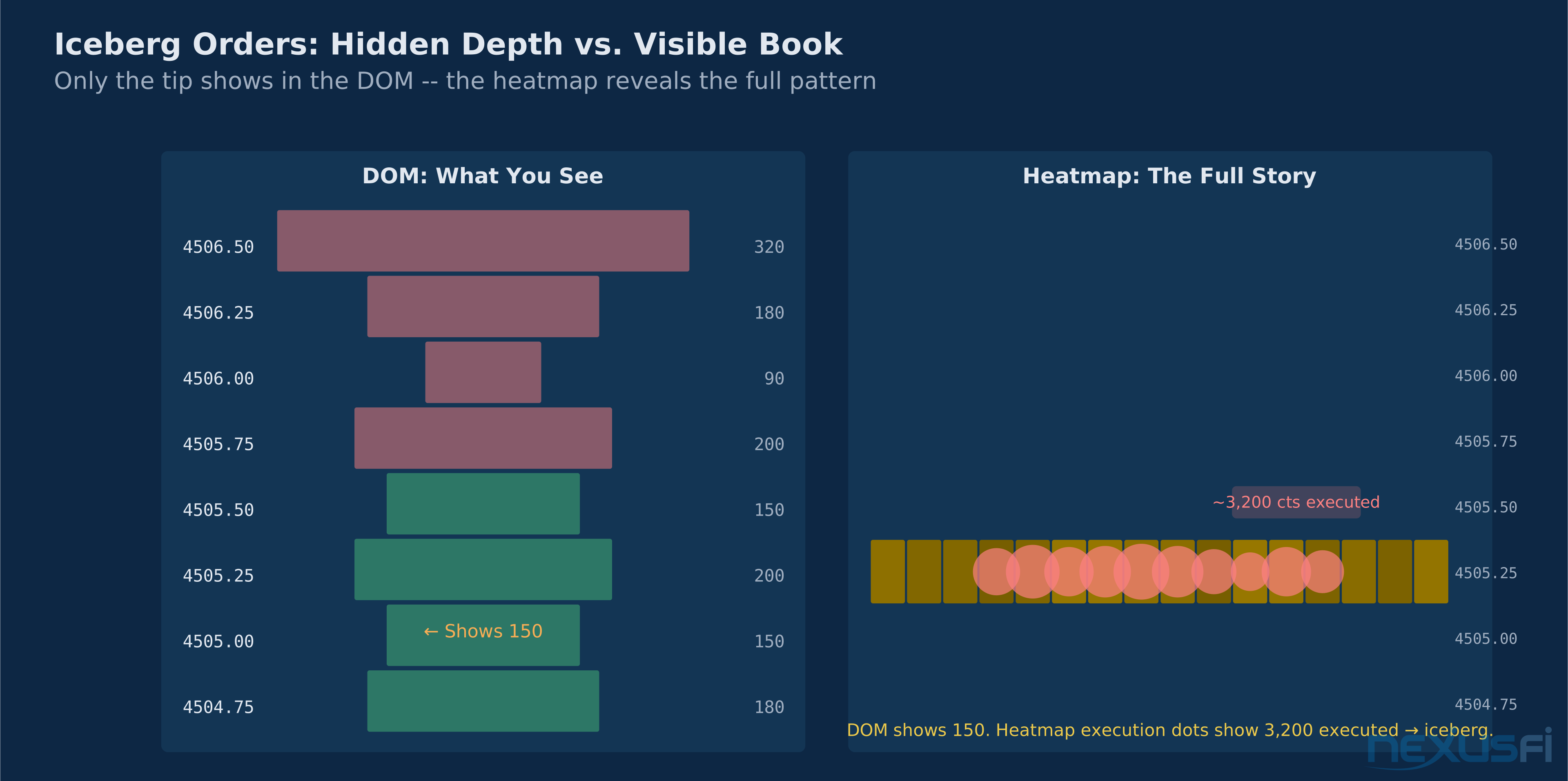
Platforms with MBO data (Bookmap's premium tier) can identify individual icebergs by tracking order-level activity: watching when a specific order ID replenishes after partial fills. Without MBO, you infer icebergs from the pattern of absorption — volume executing into a level that appears shallower than the volume being absorbed.
The heatmap's advantage for iceberg detection is historical context. If you see 3,000 contracts print at a level that's showing only 200 contracts visible, the disproportion is visible in the heatmap's bubble sizes versus cell intensity. Bookmap's Stop & Iceberg add-on explicitly monitors this disproportion.
Diagonal Patterns: Following the Momentum #
When liquidity moves with price in a diagonal pattern on the heatmap — bright cells not staying at fixed price levels but shifting up and down as price moves — it indicates a dynamic participant who is adjusting orders in real time.
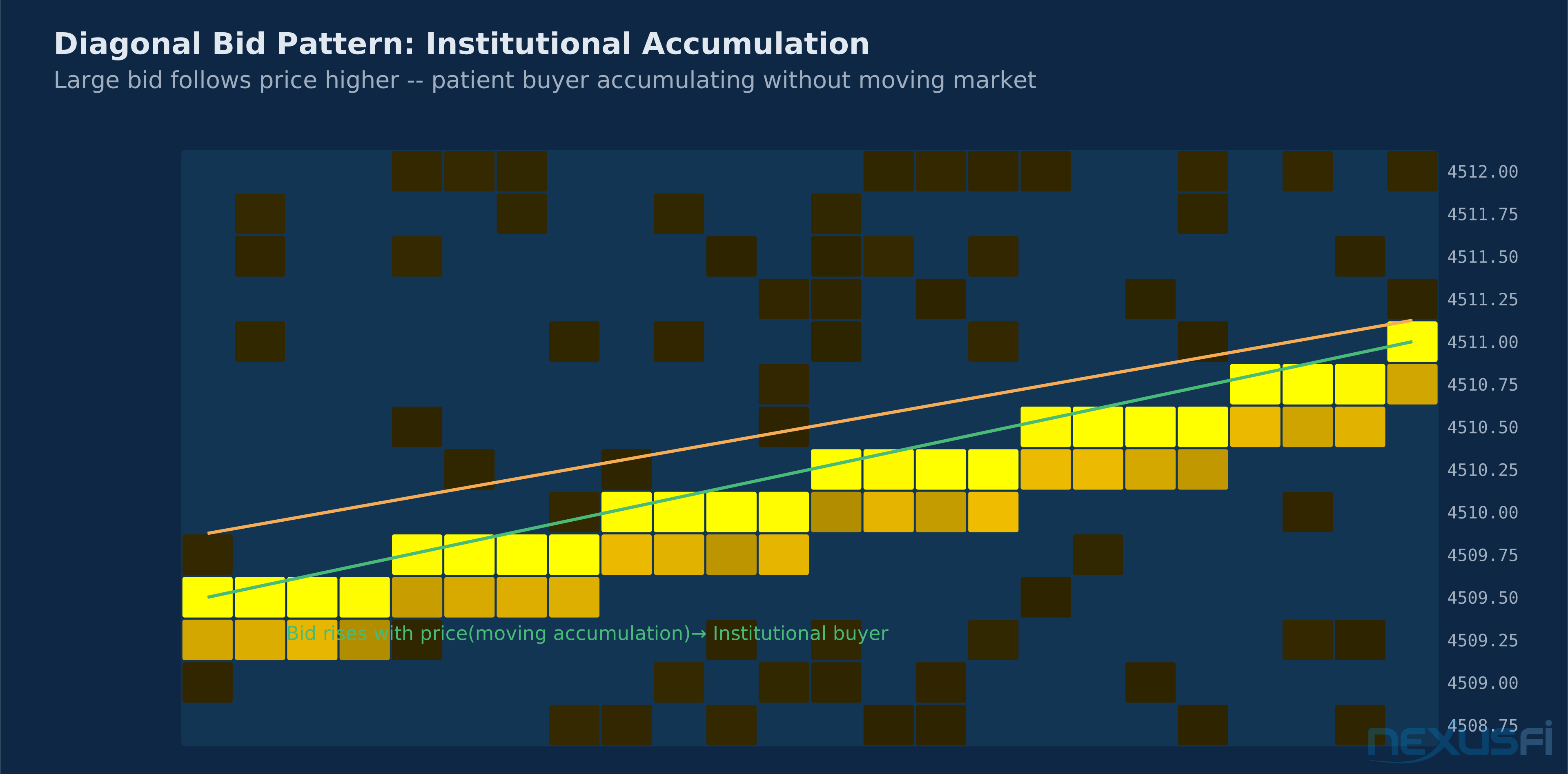
Upward diagonal on the bid: A large bid that moves higher as price moves higher. This is a buyer who wants to stay close to the market, continually bidding under current price. Institutional accumulation pattern — they're following up, not waiting for a pullback.
Downward diagonal on the offer: A large offer that drops as price drops, maintaining position just above market. Could indicate a large short seller riding the move lower, offering into every bounce.
Diagonal patterns are harder to interpret than horizontal walls but can be more significant for understanding the intent of large participants.
Liquidity Void Zones #
Where the heatmap is consistently dark — thin or absent resting orders across an extended price range — those are low-friction zones. Price can move quickly through them because there are no large passive orders to absorb the flow.
After a heavy selling move, you often see a liquidity void in the price range that was just traded through. The orders that were resting there executed. The zone is temporarily empty. If price returns to that void, it may sweep through quickly, as the original liquidity that defined the zone is now consumed.
This is the heatmap's version of single prints in market profile — areas of price that the market visited but didn't build at, creating a zone of potential high-velocity travel on revisit.
The DOM vs. Heatmap Trade-Off #
Every heatmap analysis starts with a DOM reading — the current live book. The heatmap adds historical context to that snapshot. As Bookmap articulated on NexusFi: "Tools like the footprint charts, the DOM, and T&S don't show both current and historical order flow data, so having the heatmap with better visualization & performance (faster updates) gives you advantage." [6]
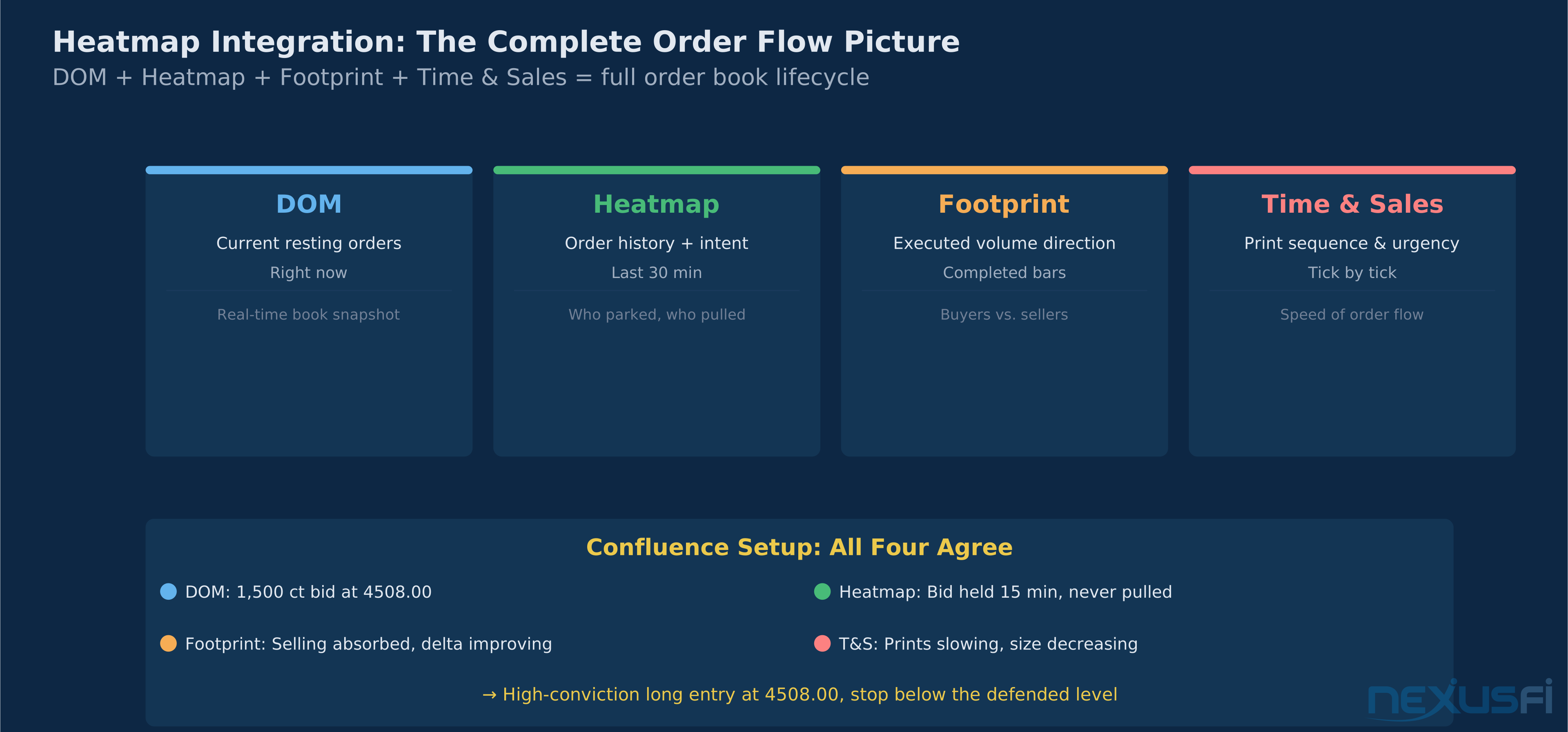
The relationship between DOM and heatmap is additive:
| Tool | What It Shows | Time Frame |
|---|---|---|
| DOM | Current resting orders at each level | Right now |
| Heatmap | History of resting order changes | Last N minutes |
| Footprint | Executed volume at each price level | Completed bars |
| Time & Sales | Individual prints, size, direction | Real-time sequence |
No single tool captures everything. The DOM tells you what's there now. The heatmap tells you what was there and for how long. The footprint tells you what actually executed. Time and sales tells you the sequence and urgency.
Traders who combine all four tools have a complete picture of the order book lifecycle: what was resting, what was pulled, what was hit, and in what sequence.
Bookmap's core value proposition is making this combination visually accessible. Rather than simultaneously watching a DOM, footprint chart, and T&S feed — three separate windows you have to mentally integrate — Bookmap's visualization merges the DOM history (heatmap), trade execution (bubbles), and volume analytics (columns) into a single visual space.
Practical Trading Applications #
Entry Timing with Liquidity Verification #
The classic heatmap application: you have a directional bias from your primary analysis (volume profile, market profile, trend analysis), and you use the heatmap to time entries at levels where you can verify actual liquidity support.
Setup: Identify a key level where you want to enter long — say, a previous POC or value area low that you expect to act as support on a pullback.
Heatmap confirmation: As price pulls back toward that level, watch the heatmap for liquidity building on the bid side at or near that level. If you see a large bid accumulating (bright cells forming) as price approaches, the level is being defended — someone is adding liquidity precisely where your analysis said support should exist.
Entry: Enter as you see the first evidence that the bid is absorbing selling (dots/aggressor bubbles appearing at the bid level, price stalling or reversing).
Stop placement: Below the established bid level. If price goes through a large defended level, the trade is wrong. The stop is behind the liquidity that defined the setup.
This is the approach described by @Bookmap on NexusFi: "there is typically liquidity around key levels such as big figures... Insight to liquidity at these levels will give you an edge over simply relying on the assumption of the presence of liquidity at key levels." [8]
Stop-Run Detection #
Stop-run setups are high-probability trades when you can identify where retail stops are clustered and observe institutional behavior around those levels.
The heatmap pattern for a stop run:
- Retail stops accumulate below a well-known support level (previous lows, round numbers, overnight low)
- As price approaches that level, large offers appear just below it on the heatmap — not supporting price, but positioned to sell into the stop-triggered buying
- Price pierces the level, triggering stops (visible as a burst of aggressor buying on the footprint/T&S)
- The large offers absorb the triggered buying, preventing price from recovering
- OR — the large offers are pulled just before price hits the stops (pulling rather than absorbing), allowing price to spike through and reverse hard
In the second scenario, the large trader wants to trigger the stops for the liquidity (to fill their long at lower prices), not to continue lower. After the spike down, they're done selling and price reverses quickly. The heatmap shows the offer disappearing precisely at the stop level, followed by rapid price reversal.
Identifying Institutional Accumulation #
Slow, patient institutional accumulation leaves a distinct heatmap signature: persistent large bids slightly below market, moving up as price moves up, absorbing occasional selling without large price impact.
The diagnostic pattern:
- A bright bid cluster that's been visible for 15-30+ minutes
- The cluster moves upward incrementally as price advances
- When selling hits the cluster (aggressor bubbles at the bid level), the cluster doesn't diminish — it reloads
- Price doesn't drop much on the selling waves
This is a large participant who wants to accumulate size at current prices without moving the market against themselves. They're bidding below where they want to buy, absorbing any selling that comes their way.
Reading the Opening Range #
The opening minutes of the RTH session often determine the day's structure. The heatmap during the first 5-15 minutes reveals the initial positioning of large participants:
Stacked bids on the open: Large bid clusters appearing in the opening minutes below a key level (previous close, overnight midpoint) suggest institutions positioning for higher. They're providing a floor.
Stacked offers on the open: The mirror image — institutions selling into strength. They don't want higher prices and are building a ceiling.
Thin book on the open: Dark heatmap with minimal depth means no one has committed yet. These opens often feature sharp, fast moves in either direction as smaller participants probe for information before the large players show their hand. Low-liquidity openings are dangerous environments for larger size — slippage risk is elevated.
Pre-Market Preparation: Mapping Liquidity Levels #
Like volume profile, heatmap analysis can inform pre-session preparation. Review the previous session's heatmap to identify:
- Levels where large bids held: These are potential support zones going forward — the large participant may reappear at the same levels
- Levels where large offers held: Potential resistance zones
- Levels where large orders were pulled: Areas of "ghost liquidity" — the structure showed strength there but it wasn't real, worth noting for potential fast moves on retest
- Absorption events: Where one side absorbed significant flow from the other — these levels have genuine two-sided interest
Limitations of Heatmap Analysis #
The Spoofing Problem #
The heatmap makes spoofing more visible, but doesn't eliminate the interpretation challenge. Fake large orders are more easily placed far from the market, where the risk of execution is low. The heatmap shows you they're there, but it doesn't tell you conclusively whether they're real until you see price approach them.
Skilled heatmap traders develop intuition for differentiating persistent credible liquidity (held for minutes, reloads after partial execution, doesn't vanish as price approaches) from spoofed levels (placed far from market, disappears as price moves toward it, reappears after price moves away).
[7] The heatmap gives you temporal context to identify the spoof pattern — but not certainty.
Latency and Data Quality #
Order flow heatmaps require ultra-low-latency data feeds to be useful. A feed with 500ms+ latency defeats the purpose — you're seeing the order book as it was, not as it is. The best heatmap implementations use co-located or near-co-located data connections to minimize delay.
For most retail traders, this is a practical concern: internet-based data feeds from most retail brokers have too much latency for reliable real-time heatmap analysis. Platforms that route heatmap data through their own optimized infrastructure (Bookmap's managed feed, Sierra Chart's direct CME connection) provide substantially better results than standard retail broker feeds.
MBP vs. MBO Resolution #
Most traders see Market-By-Price (MBP) data — aggregated total size at each price level. This means a level showing 1,000 contracts could be:
- One 1,000-lot institutional order
- One hundred 10-lot retail orders
- Any combination thereof
For heatmap analysis, this distinction matters. A single large order is more likely to be a meaningful support/resistance signal than 100 small orders happening to cluster at the same level.
MBO data resolves individual orders, but carries significant additional cost and data processing requirements. Most retail traders work with MBP data and acknowledge the ambiguity.
Crypto and Thin Market Limitations #
Order flow heatmaps work best on the most liquid futures markets: ES, NQ, CL, ZN/ZB, 6E. In thinner markets, individual large orders dominate the entire visible depth, making patterns noisy and less reliable. Crypto futures on CME have grown in liquidity but still don't approach the depth of equity index futures.
On thin markets, single participants can generate heatmap patterns that look significant but reflect one actor's activity rather than a market-level signal. Context awareness is essential.
Cognitive Load #
The heatmap is a high-information-density visualization. The color gradients, bubble overlays, and column analytics generate significant visual data simultaneously. New traders often experience information overload — trying to watch everything at once and processing nothing clearly.
The progression most experienced heatmap traders recommend: start by watching just one thing. Pick one pattern — say, large bid persistence at key levels — and watch only for that for weeks before adding additional heatmap layers. The full picture becomes clear incrementally, not all at once.
Integrating Heatmap With Other Order Flow Tools #
Heatmap + Volume Profile #
Volume profile shows WHERE price accepted value (historical concentration). The heatmap shows WHERE large participants are currently positioning. When these align — a volume profile high volume node coincides with active heatmap bid or offer accumulation — you have two independent reasons to expect price interaction at that level.
Misalignments are equally useful. A volume profile POC with no heatmap activity on approach suggests the level may not be defended this session. Price could slice through without the bounce the historical profile would otherwise suggest.
Heatmap + Footprint Charts #
The footprint shows what executed. The heatmap shows what was positioned. The combination reveals whether executed volume was consistent with the resting order picture:
Convergence: Heavy bid shown on heatmap, heavy ask volume execution in footprint (buyers aggressively lifting the offered side). The execution matches the positioning — buyers are real, the supply/demand interaction is occurring.
Divergence: Heavy bid shown on heatmap, but light execution at the bid level (few buyers). The large bid may be there to provide price support without intending to execute — watching for the pull.
Heatmap + Market Profile #
Market profile's TPO count and value area identify the time distribution of activity. Heatmap layers in the order placement dimension. Single prints in market profile often correspond to dark zones on the heatmap — price moved through those areas quickly because there was no liquidity holding it.
A market profile poor high (auction terminated without meaningful selling) combined with a heatmap showing an emerging offer cluster at the same level on re-approach changes the interpretation: the initial poor high may have been lack of sellers, but now sellers are present. A different trade setup.
Knowledge Map
References This Article
Articles that build on this topicCitations
- — Discussion“Volume Profile shows you where volume traded historically, Bookmap shows you where orders are sitting right now.”
- — Discussion“BookMap is Nothing but a replacement of a standard DOM, BUT it gives you the information of past Volume that you don't get in a DOM.”
- — Discussion“Nice liquidity activity captured by the heatmap today in the ES. Especially note the larger player(s) heavily layering in on the bid around 3150-3153 at 2:00-2:30 pm ET.”
- — Discussion“Huge part of liquidity is fake/spoofing. How can you make constructive decisions using visualisation of something that is mostly fake?”
- — Discussion“I use the heatmap when i'm trading futures. I use the SC market depth study.”
- — Discussion“Tools like the footprint charts, the DOM, and T&S don't show both current and historical order flow data, so having the heatmap with better visualization gives you advantage.”
- — Discussion“a lot of spoofing goes on and generally that involves stacking the order book on one side to fool people into trading in the other direction.”
- — Discussion“The way I look at absorption is when you see either buyers or sellers cutting off the opposing traders.”
- — Discussion“Insight to liquidity at these levels will give you an edge over simply relying on the assumption of the presence of liquidity at key levels.”