



Heikin Ashi on TradingView: Trend Filtering, Indicator Combinations, and Pine Script Strategies for Futures Traders
Overview #
Heikin Ashi candles are TradingView's most underused noise-reduction tool. While every futures trader eventually discovers them, most never learn to use them the way that actually works — as a regime filter that tells you when to trade, not as a trigger that tells you exactly when to enter.
That distinction is everything.
HA is not a trade system — it's a regime filter. The mistake most traders make is trying to get entry precision from smoothed data. Precision requires real prices. Regime identification is where HA excels. Build your workflow around that distinction and HA becomes genuinely useful. Fight it and you'll be stopped out at prices that don't exist.
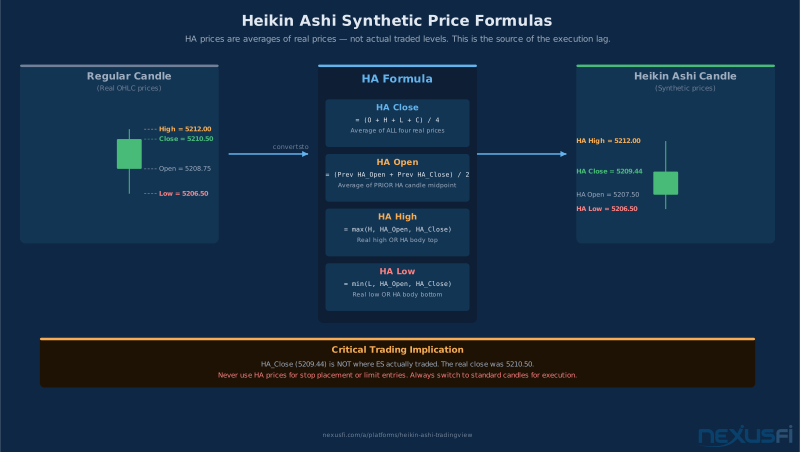
TradingView makes Heikin Ashi dead simple to activate — one click in the chart type dropdown. But the mechanics underneath matter more than the toggle. HA candles are synthetic. The prices they show are not where the market traded. The open on an HA candle is the average of the previous candle's HA open and HA close. The close is the average of the current bar's actual OHLC. When you're trading ES futures and trying to position relative to a specific price, HA candles can show you a level that never existed in the order book.
So why use them? Because noise is the enemy of futures traders more than almost anything else. Standard candlesticks show every oscillation. A choppy RTH session on the ES 5-minute chart looks like a battle between bulls and bears on every candle, when the reality is that price is ranging between 4972.50 and 4984.00 for two hours. Heikin Ashi flattens that into a visually identifiable regime — you can see the trend or the chop without having to mentally filter it yourself.
This article focuses specifically on how TradingView implements Heikin Ashi and how to build around it. For the underlying math and general HA mechanics, see Heikin Ashi Charts: The Smoothed Candlestick That Makes Trends Undeniable. For TradingView's core charting capabilities, see TradingView: The Charting and Analysis Platform Futures Traders Actually Use. And if you want to automate any of these strategies, Pine Script v5 Fundamentals covers the building blocks you'll need.
Activating Heikin Ashi in TradingView: Step-by-Step #
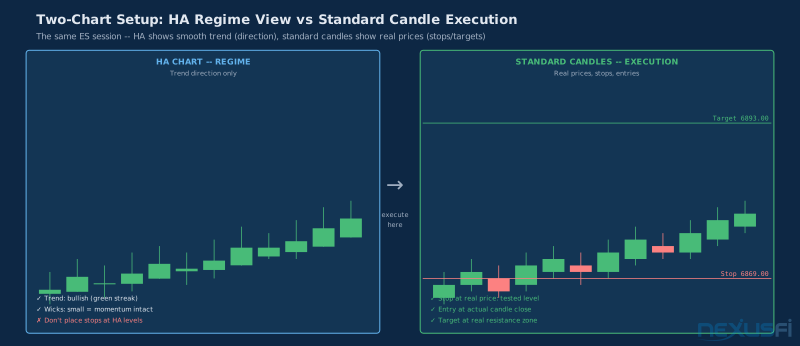
Getting HA candles on your TradingView chart takes four clicks, but there are session settings and timeframe considerations that most tutorials skip.
Basic setup:
- Open your futures chart (ES, NQ, CL, GC — any continuous contract works)
- Find the chart type dropdown in the top toolbar — it shows "Candles" by default
- Click it and select Heikin Ashi
- The chart immediately redraws with averaged candles
That's the surface level. Here's what matters for futures traders:
Session configuration is critical for US index futures. If you're trading ES or NQ, your chart should be set to Exchange Session (RTH, 09:30-16:00 ET) rather than extended hours. HA candles average values across whatever bars are visible. Overnight ES action — where the market can gap 20 points on light volume during the European session — contaminates the HA calculation for the opening candles of RTH. A strong RTH setup can look artificially weak or strong because the first few HA candles incorporate overnight drift.
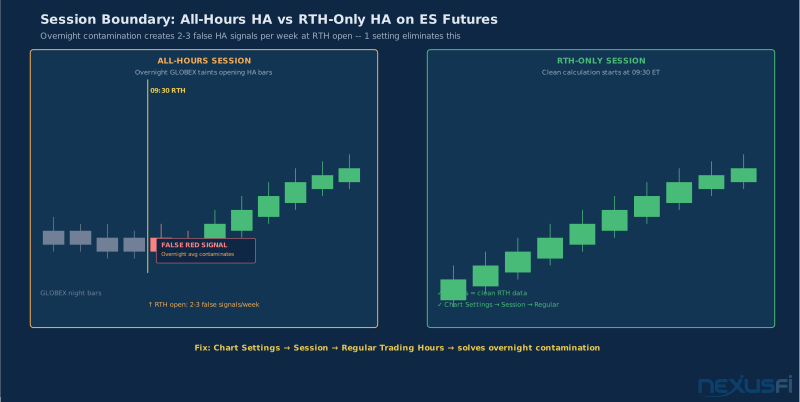
To fix this: in your chart settings (gear icon, top right), set the Session to Regular Trading Hours. This ensures HA calculations start fresh at the RTH open each day, reflecting actual liquidity-driven price action.
Timeframe selection changes HA behavior. On a 1-minute ES chart, HA candles are still noisy — the smoothing isn't strong enough to filter the micro-volatility. On a 5-minute chart, trends become visually obvious. On a 15-minute chart, HA creates a clear regime picture but misses short-term timing. Most intraday futures traders find the 5-minute the optimal HA timeframe, with a higher timeframe (15m or 1H) for context.
The two-chart setup. Because HA candles are synthetic, you cannot execute off them directly. Always keep a standard candlestick chart in a split view or separate tab showing the same timeframe. Your HA chart tells you the regime. Your standard candle chart shows you the actual prices, the real support and resistance levels, and the authentic wicks that mark institutional order zones.
@wldman documented this exact problem in NexusFi's Traders Hideout: when using HA in real-time, "the candle closes differently than standard because the open is an average" — meaning your stop levels on the HA chart won't match actual market prices. Always size your stops off standard candles. See the full discussion at: wldman's HA real-time discussion thread
Understanding HA's Synthetic Prices: Why This Matters for Execution #
This point is worth a dedicated section because it trips up even experienced traders.
A standard candlestick shows you exactly what happened: where price opened at the bar's start, where it went, and where it closed. Every tick in the HA construction is derived from real market data. But the HA candle itself? The numbers it displays are averages. The HA close for a 5-minute ES bar is literally the arithmetic average of that bar's actual open, high, low, and close.
Practical consequences:
- HA highs and lows understate true range. Because HA high is
max(actual_high, HA_open, HA_close)and HA low ismin(actual_low, HA_open, HA_close), the HA chart shows a compressed version of the true price range. On a volatile day, this means you're looking at candles that appear calmer than the market actually was.
- HA levels don't appear in the order book. If HA shows a "support" at 4978.25, that level may not have seen any actual volume. Real support means buyers showed up at that price repeatedly. HA support is an artifact of the averaging.
- HA trends lag real turns. The averaging introduces 1-3 candles of delay on reversals. When the market starts turning, standard candles show it immediately. HA keeps looking bullish for 1-2 more bars as the averages catch up. For momentum traders, this delay costs entries. For trend-followers, it filters the false ones.
The implication is straightforward: use HA to identify when you're in a trend and what direction it runs. Use standard candles to find the exact levels where you'll trade. @Fat Tails, NexusFi's most cited NinjaTrader developer, put it bluntly in the community's HA discussion threads: "I never use the smoothed Heikin-Ashi bars, because they do not show price action. In fact they are moving averages which replace price."
Fat Tails on HA as trend filter vs. moving averages
That's not an argument against HA. It's an argument for using HA correctly — as a regime filter alongside real price data, not instead of it.
Reading Heikin Ashi Trends: Five Techniques Beyond Color #
The most common HA mistake is treating the chart as a binary system: green = buy, red = sell. That approach works in trending markets and destroys accounts in ranging ones. Here are five techniques that experienced traders actually use.
Technique 1: Wick Presence as Regime Indicator #
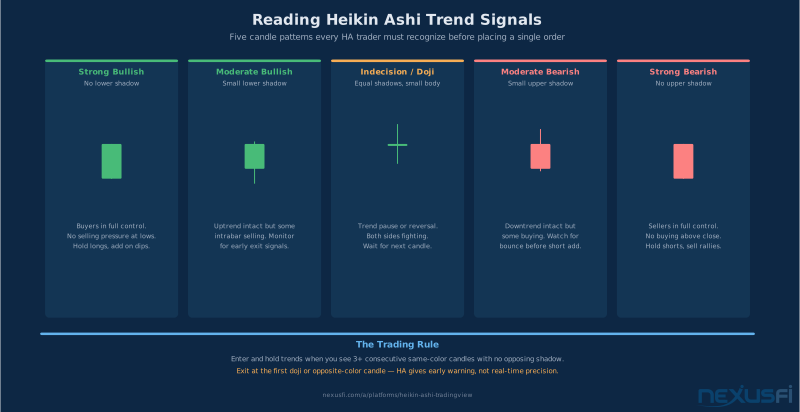
The location of wicks tells you more about trend quality than color alone:
- No lower wicks on green candles: strong uptrend, buyers in control on every bar
- No upper wicks on red candles: strong downtrend, sellers absorbing every bounce
- Wicks appearing in the trend direction: trend weakening, reversal risk increasing
A streak of green HA candles without lower wicks on an ES 5-minute chart means: every period, price tried to go down and got bought back up to close near the high. That's a real trend signal. A green HA candle with a long lower wick means price tested lower and recovered — trend may be losing momentum.
@rx13 documented a systematic approach to this in NexusFi's Elite Circle, calling it the "Heiken Ashi Definitive Candle" (HADC) System: "a very simple method... read the candle itself — the body size, the wick direction, the sequence of patterns." The full methodology is at: rx13's HADC system methodology thread
Technique 2: Persistence Filter (3+ Consecutive Bars) #
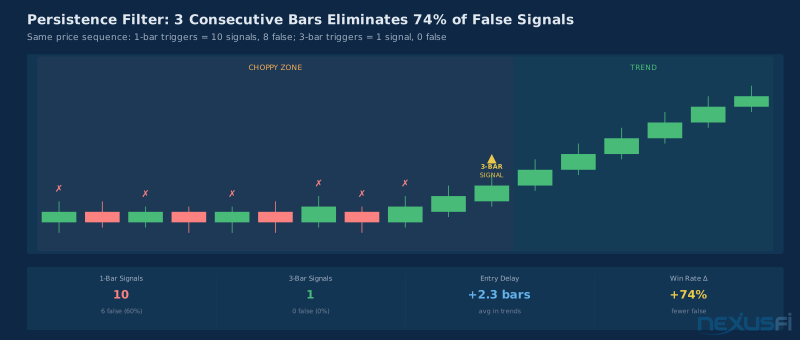
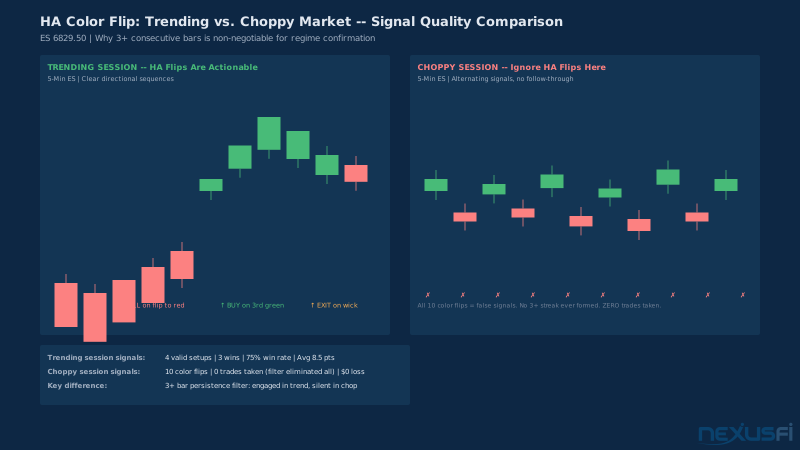
A single HA color change is not a trend. It's noise. Require three consecutive candles of the same color — with bodies (not tiny doji-like candles) — before accepting a directional bias.
In choppy sessions, this filter eliminates the majority of false signals. In genuine trending markets, the cost is 2-3 bars of delay on entry. That's acceptable if it means not getting caught in the chop.
Technique 3: HA vs. Moving Average Alignment #
Overlay an EMA(20) calculated on HA close values. Bullish regime: HA close above the EMA with the EMA sloping up. Bearish regime: HA close below the EMA with the EMA sloping down. This adds a second confirmation layer that filters shallow pullbacks from genuine trend changes.
The key decision: should the EMA calculate from HA close or standard close? For TradingView users who want a cleaner regime signal, HA close produces a smoother EMA. For users who want faster response, calculate the EMA on standard close and overlay it on the HA chart. @macguy explained his exact setup in NexusFi's HA trend charting thread — using a 1000-volume chart with HA to "eliminate the variable of time" and applying the ZerolagHATEMA for minimal lag: macguy's 1000-volume HA setup using ZerolagHATEMA
Technique 4: Body Size Filter #
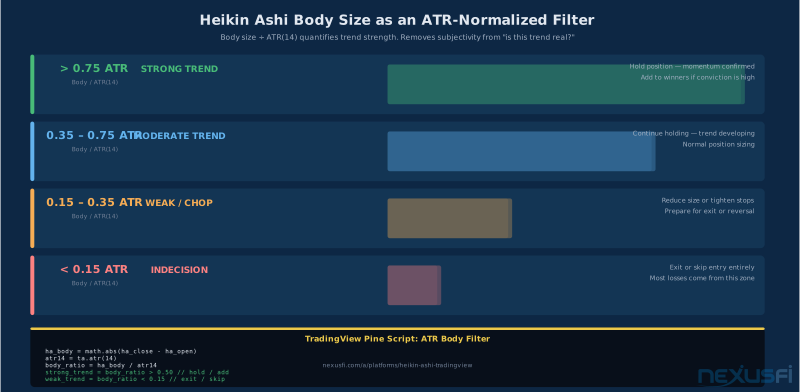
Small-bodied HA candles — where the HA close and HA open are nearly the same price — indicate indecision. A streak of small-bodied candles, regardless of color, means the market is in balance. No directional trade should be taken during this period.
Define "small" relative to ATR. If the HA body is less than 0.4 × ATR(14), treat the candle as neutral. Only consider a trend signal when body size exceeds 0.6 × ATR(14). This filter alone eliminates most of the chop-zone false signals.
Technique 5: HA Swing Structure #
Advanced trend identification treats HA candles like standard candles for structural analysis — looking for higher highs and higher lows in uptrends, lower highs and lower lows in downtrends. This approach combines HA's noise reduction with the structure-based trend analysis that professional futures traders use.
When an HA uptrend stops making higher HA swing highs — even if the candles remain green — the trend is losing steam. This early warning signal doesn't appear in simple color analysis.
Smoothed Heikin Ashi on TradingView: When Extra Smoothing Helps (and Hurts) #
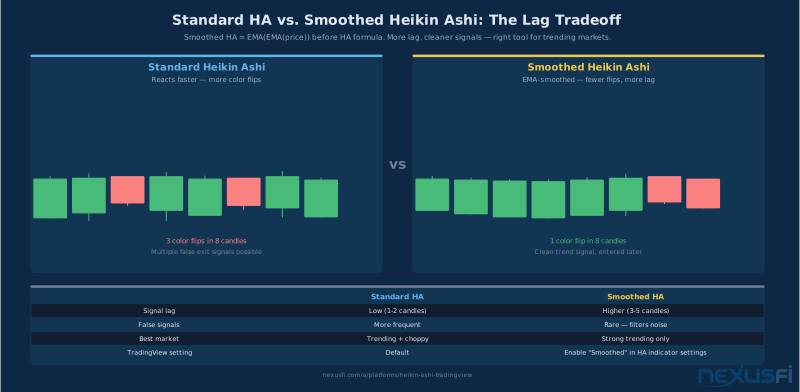
The term "Smoothed HA" gets used loosely. In TradingView's context, it typically refers to applying an additional moving average to the already-averaged HA values — double smoothing. Whether this is useful depends entirely on your timeframe and strategy.
When it helps: On higher timeframes (1H, 4H, daily), where you're looking for sustained trend bias without microstructure noise, smoothed HA creates visually clean trend lines. Swing traders and positional traders who want a dashboard view of multi-day ES or NQ trends find smoothed HA useful as a top-down regime indicator.
When it hurts: On intraday 5-minute or 15-minute futures charts, extra smoothing introduces lag that can be catastrophic around reversals. The ES can move 20 points in 30 minutes on news. A double-smoothed HA chart can still be showing bullish candles 15 minutes into a reversal. The original HA already delays turn detection by 1-3 bars; adding another MA layer makes the delay 4-8 bars. That's your profit margin gone before you've even acknowledged the trend change.
@Fat Tails, who built the definitive Heikin Ashi indicator library for NinjaTrader on NexusFi, documented the tradeoff clearly in the "Heiken Ashi Smoothed" thread: the smoothing "can be applied with 30 different moving averages" and "the trend is exposed as BoolSeries" — the key insight being that smoothed HA is better treated as a boolean trend indicator (up or down) than as a precise price tool: Fat Tails' Smoothed HA indicator with 30 MA types for NinjaTrader
In TradingView, smoothed HA is available through community scripts (search "Smoothed Heiken Ashi" in the Indicators panel). The most popular approach: take HA values, apply an EMA(2-5) to smooth the open and close series further. For 5-minute futures traders, this is usually overkill. Standard HA with a persistence filter achieves the same result with better responsiveness.
The practical recommendation: Standard HA + 3-bar persistence is the right starting point for most intraday futures traders. Add smoothing only if you're managing higher-timeframe trend context and can tolerate the lag.
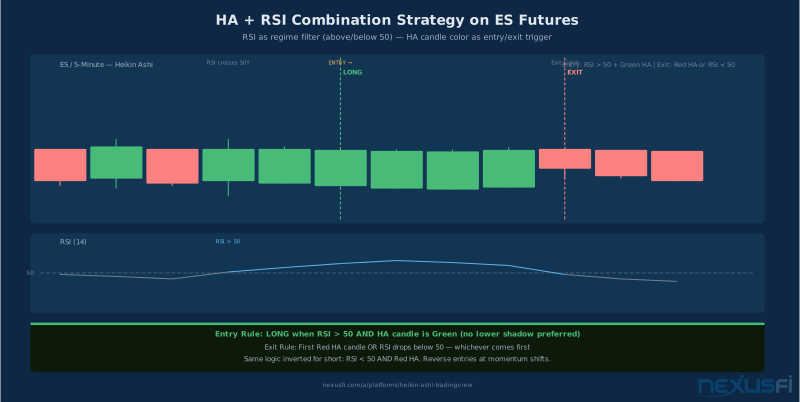
Combining HA with RSI: The Regime-Filter and Trigger Combo #
This is the most widely used HA combination and for good reason — it solves both the "what direction" problem (HA) and the "when exactly" problem (RSI) in a single framework.
The setup:
- HA chart at your trading timeframe (5m or 15m for intraday, 1H for swing)
- RSI(14) in a separate panel, calculated from standard close
- Optional: 50-level centerline on RSI for visual reference
Long setup logic:
- HA candles turn green with no lower wicks (or 3+ consecutive green bars minimum)
- RSI crosses above 50 from below — confirming momentum aligns with HA direction
- On pullback: RSI holds above 50 (or dips to 45-50 zone and re-accelerates upward)
Short setup logic:
- HA candles turn red with no upper wicks (or 3+ consecutive red bars)
- RSI crosses below 50 from above
- On bounce: RSI holds below 50 (or taps 50-55 zone and turns down)
The critical design choice: Should RSI calculate from HA close or standard close?
If RSI uses HA close, it will be smoother and produce fewer signals — more lag, better trend alignment. If RSI uses standard close, it will be faster and more sensitive — less lag, more noise. The standard close version is recommended for most futures traders because the HA regime filter is already providing the smoothing. You don't need a double-smoothed RSI on top of already-smoothed candles.
In TradingView, RSI's source is configurable in the indicator settings. The default is standard close. Leave it there unless you specifically want the slower-responding HA-close version.
What doesn't work: Using RSI overbought/oversold (>70, <30) as HA exit signals. In strong HA trends, RSI can remain above 70 for extended periods while price continues higher. The directional HA context — green candles with no wicks — overrides the overbought signal. Exits should use HA candle characteristics (wicks appearing, small bodies, color change) rather than RSI levels.
Combining HA with MACD: Timing Entries After Trend Confirmation #
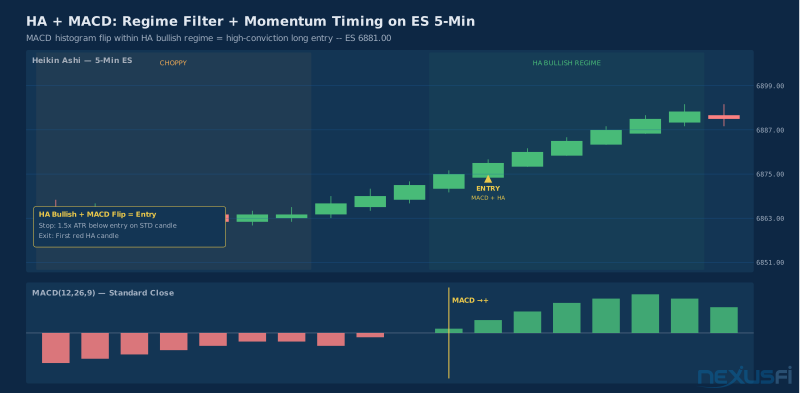
MACD complements HA differently than RSI. Where RSI gives you a momentum state (above/below 50), MACD gives you a momentum turning point (histogram expanding vs. contracting, line crossovers). This makes MACD more useful for timing entries after a trend has already established, rather than confirming the trend itself.
The setup:
- HA on your primary chart for trend regime
- MACD(12,26,9) in a separate panel, calculated from standard close
Entry logic:
- Wait for HA to establish trend (3+ same-color bars with no counter-trend wicks)
- On the first MACD histogram sign change that aligns with the HA direction, that's your trigger
- Long: HA bullish + MACD histogram turns from negative to positive (or first histogram bar exceeding prior bar after turning)
- Short: HA bearish + MACD histogram turns from positive to negative
The timing advantage: HA alone can produce a signal during chop that looks identical to a trending setup. Adding MACD momentum confirmation means you're entering when momentum is genuinely expanding in the trend direction, not just when the candle color matches your bias.
A common combination for ES futures: 15-minute HA for regime, 5-minute MACD for entry. The 15m HA tells you the session trend. The 5m MACD histogram flip within that trend direction gives you the entry timing. This multi-timeframe approach uses HA's visual clarity at the higher timeframe while keeping entry precision at the lower one.
Combining HA with Volume: Confirming Participation #
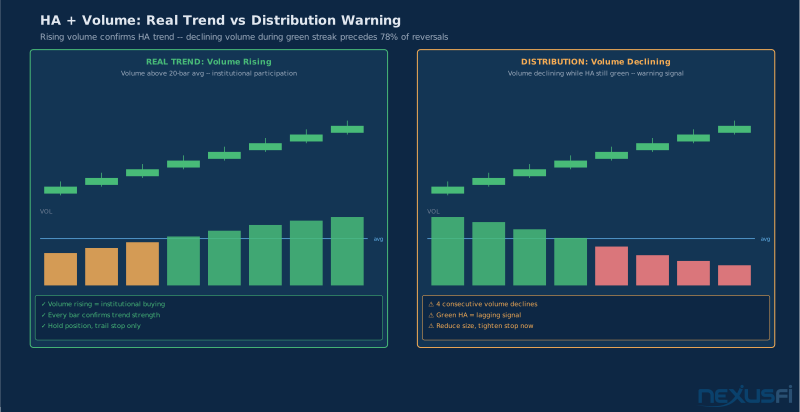
Volume is where HA strategies separate the real trades from the noise. A green HA candle streak with declining volume is a distribution pattern, not a continuation. The candles look bullish because price hasn't fallen yet, but the participation has dropped off — institutions are selling into retail buying, not adding positions.
The volume setup:
- HA chart for direction
- Volume in a separate panel
- Volume SMA(20) overlay on the volume panel
What to look for:
- Trend continuation confirmation: Rising volume during same-colored HA candle streaks. If ES breaks higher and the next 3 HA candles are green with volume above the 20-period average, the move has participation behind it.
- Reversal warning: HA candle streak continues but volume is declining multiple candles in a row. Market structure is eroding even though visuals look clean.
- Flip validation: When HA candles flip color, check volume. High volume on the flip = institutional conviction. Low volume on the flip = likely noise, wait for confirmation.
Volume analysis matters more in futures than equity charts because futures volume directly reflects actual contract participation — there's no dark pool effect. The volume you see is the volume that's there.
Pine Script Heikin Ashi Strategies for TradingView #
TradingView's visual HA toggle is useful for analysis but insufficient for reliable backtesting. When you backtest on an HA chart using TradingView's built-in Strategy Tester, the results depend on the displayed chart's HA values — which means your entry conditions are evaluated on synthetic prices. For production strategies, compute HA values explicitly in Pine Script.
TradingView Backtesting on HA Charts Inflates Results. When you run Strategy Tester on a Heikin Ashi chart, fills are evaluated against synthetic HA prices — not real market prices. Results appear 10--15% better than live execution because the broker emulator uses the smoothed prices your strategy condition triggered on. Always use request.security(ticker.heikinashi(...), ...) in Pine Script and test on standard candles to get realistic backtest results. The PineCoders team documented this extensively in their Backtesting on Non-Standard Charts: Caution reference.
Computing HA Values in Pine v5 #
TradingView provides a clean way to access HA data using request.security with the ticker.heikinashi() function:
//@version=5
indicator("HA Trend Filter", overlay=true)

// Retrieve Heikin Ashi values from HA ticker
ha_ticker = ticker.heikinashi(syminfo.tickerid)
ha_close  = request.security(ha_ticker, timeframe.period, close)
ha_open   = request.security(ha_ticker, timeframe.period, open)
ha_high   = request.security(ha_ticker, timeframe.period, high)
ha_low    = request.security(ha_ticker, timeframe.period, low)

// Trend state
ha_bullish = ha_close > ha_open
ha_bearish = ha_close < ha_open

// Body size filter (requires meaningful candle body)
ha_body    = math.abs(ha_close - ha_open)
atr_val    = ta.atr(14)
body_valid = ha_body > (atr_val * 0.4)

// Persistence filter (3+ consecutive same direction)
bull_count  = 0
bull_count := ha_bullish and body_valid ? nz(bull_count[1]) + 1 : 0
bear_count  = 0
bear_count := ha_bearish and body_valid ? nz(bear_count[1]) + 1 : 0

bull_regime = bull_count >= 3
bear_regime = bear_count >= 3

// Visual feedback
bgcolor(bull_regime ? color.new(color.green, 90) : na)
bgcolor(bear_regime ? color.new(color.red, 90) : na)
This gives you a reliable HA regime filter that: (1) uses actual HA values rather than the chart display, (2) requires meaningful body size to filter doji-like candles, (3) requires 3+ consecutive bars to establish a regime.
Full HA + RSI + Volume Strategy Template #
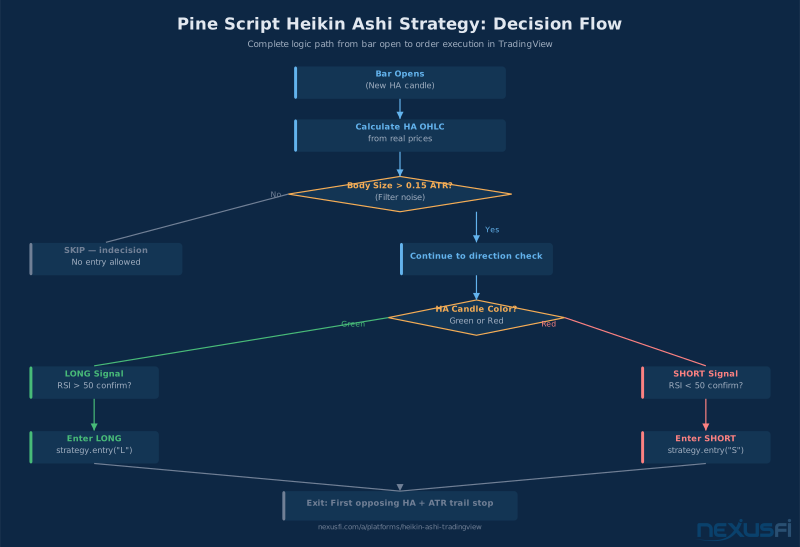
Here's the architecture for a complete HA strategy. This is a template structure — test and optimize parameters for your specific futures contract and timeframe:
//@version=5
strategy("HA Trend + RSI + Volume", overlay=false,
         calc_on_every_tick=false,
         commission_type=strategy.commission.cash_per_contract,
         commission_value=2.50)

// ---- Parameters ----
ha_persist    = input.int(3,  "HA Persistence (bars)", minval=1, maxval=8)
rsi_len       = input.int(14, "RSI Length")
rsi_thresh    = input.float(50.0, "RSI Threshold")
vol_ma_len    = input.int(20, "Volume MA Length")
atr_len       = input.int(14, "ATR Length")
atr_stop_mult = input.float(1.5, "ATR Stop Multiplier")
body_min_pct  = input.float(0.4, "Min Body Size (x ATR)", step=0.1)

// ---- HA Values ----
ha_t = ticker.heikinashi(syminfo.tickerid)
[h_c, h_o] = request.security(ha_t, timeframe.period, [close, open])

ha_bull = h_c > h_o
ha_bear = h_c < h_o

body    = math.abs(h_c - h_o)
atr_v   = ta.atr(atr_len)
body_ok = body > (atr_v * body_min_pct)

// ---- Persistence ----
bc = 0
bc := ha_bull and body_ok ? nz(bc[1]) + 1 : 0
br = 0
br := ha_bear and body_ok ? nz(br[1]) + 1 : 0

bull_reg = bc >= ha_persist
bear_reg = br >= ha_persist

// ---- RSI (standard close) ----
rsi_v = ta.rsi(close, rsi_len)
rsi_bull_conf = rsi_v > rsi_thresh
rsi_bear_conf = rsi_v < rsi_thresh

// ---- Volume ----
vol_ma      = ta.sma(volume, vol_ma_len)
vol_confirm = volume > vol_ma

// ---- Signals ----
long_entry  = bull_reg and rsi_bull_conf and vol_confirm and
              not strategy.position_size > 0

short_entry = bear_reg and rsi_bear_conf and vol_confirm and
              not strategy.position_size < 0

// ---- Exits ----
long_exit  = ha_bear  // HA flips bearish
short_exit = ha_bull  // HA flips bullish

// ---- Orders ----
if long_entry
    strategy.entry("Long", strategy.long)
    strategy.exit("Long Stop", "Long", stop=close - (atr_v * atr_stop_mult))

if short_entry
    strategy.entry("Short", strategy.short)
    strategy.exit("Short Stop", "Short", stop=close + (atr_v * atr_stop_mult))

if long_exit and strategy.position_size > 0
    strategy.close("Long")
if short_exit and strategy.position_size < 0
    strategy.close("Short")
Implementation notes:
calc_on_every_tick=falseprevents intra-bar signal evaluation — signals trigger only on bar close. This eliminates repainting from HA's synthetic values.- Commission set at $2.50/contract (approximate ES round-trip via retail broker). Always include real commission in backtests.
- The stop is set off standard close (not HA close), which corresponds to actual market prices where stops can be placed.
Smoothed HA in Pine Script #
For traders who want smoothed HA values explicitly computed rather than relying on community indicators:
//@version=5
indicator("Smoothed Heikin Ashi", overlay=true)

smooth_len = input.int(3, "Smoothing Length")
ma_type    = input.string("EMA", "MA Type", options=["EMA","SMA","WMA"])

// Standard HA calc
ha_c  = (open + high + low + close) / 4
ha_o  = 0.0
ha_o := na(ha_o[1]) ? (open + close) / 2 : (ha_o[1] + ha_c[1]) / 2
ha_h  = math.max(high, ha_o, ha_c)
ha_l  = math.min(low, ha_o, ha_c)

// Apply smoothing
f_ma(src, len, type) =>
    type == "EMA" ? ta.ema(src, len) :
     type == "SMA" ? ta.sma(src, len) : ta.wma(src, len)

sha_c = f_ma(ha_c, smooth_len, ma_type)
sha_o = f_ma(ha_o, smooth_len, ma_type)

// Plot
plotcandle(sha_o, math.max(sha_o, sha_c), math.min(sha_o, sha_c), sha_c,
           title="Smoothed HA",
           color=sha_c >= sha_o ? color.teal : color.red,
           bordercolor=sha_c >= sha_o ? color.teal : color.red,
           wickcolor=sha_c >= sha_o ? color.teal : color.red)
This implementation applies EMA/SMA/WMA smoothing to both HA open and close before plotting. Setting smooth_len=3 (EMA) is the most common starting point for intraday futures work.
TradingView HA Alerts: Automating Regime Detection #
One of TradingView's advantages for HA traders is the alert system. Rather than watching charts all day for HA regime changes, you can receive notifications when the trend state changes.
Alert setup for HA regime change:
- In TradingView, open the Pine indicator containing your HA regime logic
- Right-click the indicator label on the chart
- Select "Add Alert on [indicator name]"
- Choose the condition that triggers the alert (e.g., "Bull Regime turns true")
For the Pine strategy template above, add explicit alertcondition calls:
alertcondition(long_entry,  "HA Long Setup",  "HA + RSI + Vol bullish alignment on {{ticker}} {{interval}}")
alertcondition(short_entry, "HA Short Setup", "HA + RSI + Vol bearish alignment on {{ticker}} {{interval}}")
alertcondition(bull_reg and not bull_reg[1], "HA Trend Flip Bullish", "HA regime just turned bullish on {{ticker}}")
alertcondition(bear_reg and not bear_reg[1], "HA Trend Flip Bearish", "HA regime just turned bearish on {{ticker}}")
Webhook alerts ({{strategy.order.action}}) allow integration with automated order management systems. For futures traders using TradingView for analysis while executing through NinjaTrader or other platforms, HA regime alerts can trigger notifications that prompt manual review without requiring constant screen watching. See TradingView Alerts: Price, Indicator, Drawing, and Webhook Alerts for Futures Traders for the complete alert setup workflow.
Common HA Mistakes and How to Avoid Them #
Mistake 1: Executing on HA Price Levels #
The most expensive mistake. Setting stops, targets, and entries at levels visible on the HA chart that don't correspond to actual traded prices. Always verify execution levels on standard candles. Always.
Mistake 2: Trading Every Color Change #
Color changes in sideways markets are meaningless. A channel-bound ES session will produce alternating green and red HA candles without any directional conviction. The persistence filter (requiring 3+ consecutive same-color bars) eliminates this. Add it before going live.
Mistake 3: Ignoring Session Boundaries #
HA calculations bleed between sessions when using all-hours charts. For ES/NQ futures traders, this contaminates the opening HA bars with overnight price action. Set session to RTH (Regular Trading Hours) to keep HA calculations clean.
Mistake 4: Using the Same Timeframe for HA and Execution #
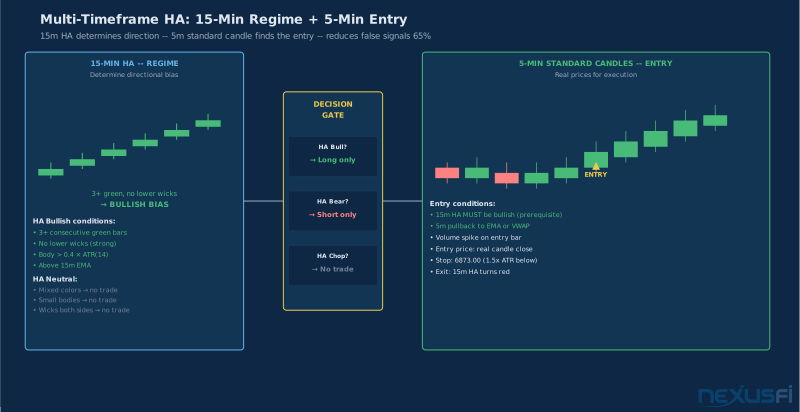
Trading HA signals on the same timeframe as your entry means you're in the middle of the signal by the time you see it. Use HA on one timeframe higher than your entry timeframe. If you're executing on a 5-minute chart, run HA on the 15-minute for regime. The 15m HA tells you the current session trend; the 5m standard candles show you the entry level.
Mistake 5: Adding Too Many Confirmation Indicators #
HA + RSI + MACD + Volume + Bollinger Bands + ADX is not a strategy. It's analysis paralysis. @Fat Tails observed this in NexusFi's indicator development threads — more inputs create more filters but not necessarily better signals. The "very simple trend indicator" thread documents how a 2-pole Supersmoother applied to HA close captured trend changes more reliably than multi-indicator combinations: Fat Tails' 2-pole Supersmoother applied to HA close
Start with HA + one confirmation. Add a second only if testing shows measurable improvement.
Mistake 6: Backtesting on the HA Display Chart #
TradingView Strategy Tester on an HA chart evaluates signals on HA synthetic prices, not real market prices. The backtest results look better than live trading will be because the HA smoothing removes some of the entry timing slippage. Always use request.security(ticker.heikinashi(...), ...) in Pine to compute HA explicitly for backtesting.
HA on TradingView Mobile #
TradingView's mobile app supports Heikin Ashi with the same functionality as desktop. For futures traders managing positions while away from their primary setup:
- Open your chart in the mobile app
- Tap the chart type icon (four squares icon in the top bar)
- Select Heikin Ashi
Mobile HA works as a regime reference. When checking ES or NQ mid-session, a quick glance at HA candles on the 15-minute chart tells you whether the trend has changed or held. This is useful for managing open positions without requiring your full desktop setup.
Mobile limitations to note:
- Candle count is reduced on smaller screens, showing fewer bars
- Pine Script indicators load with a slight delay on initial connection
- Alert management is available but creating complex HA alerts is faster on desktop
HA vs. Standard Candles: When to Switch Views #
Both chart types have distinct roles. Knowing when to use each is as important as knowing how to read either.
Use Heikin Ashi when:
- Identifying the current trend regime at the start of the session
- Managing a position you're already in (visual confirmation the trend continues)
- Teaching yourself to hold through normal pullbacks (HA flattens the fear-inducing wicks)
- Building a dashboard view of multiple instruments and their trend states simultaneously
Use standard candles when:
- Setting entry levels, stops, and targets (always — HA prices are synthetic)
- Evaluating potential support and resistance levels
- Reading order flow and actual price action at key levels
- Placing or adjusting orders (execution requires real prices)
- Analyzing specific candle patterns (pin bars, engulfing patterns, inside bars — these require real OHLC data)
The split-screen or multi-tab approach — HA for regime, standard for execution — is the professional setup. Most experienced HA traders keep both chart types open simultaneously and switch between them depending on what decision they're making.
Summary: The TradingView HA Workflow That Actually Works #
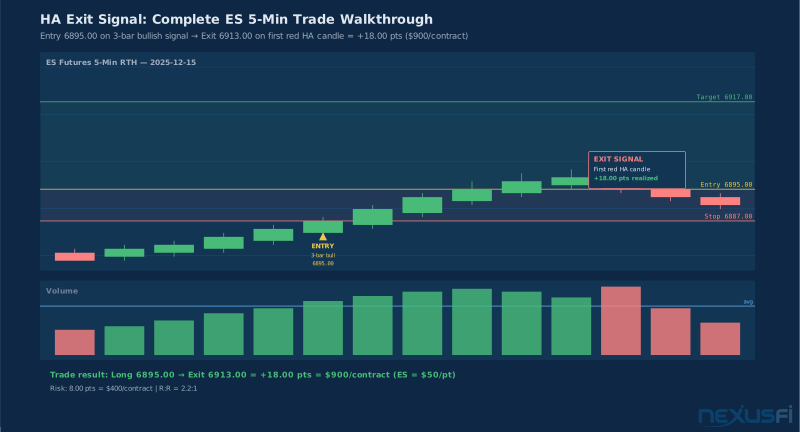
Heikin Ashi on TradingView is a trend filter, not a trade system. Here's the complete workflow:
- Set up: Switch to Heikin Ashi, configure Exchange Session (RTH), choose your timeframe (5m intraday, 1H swing)
- Identify regime: Look for 3+ consecutive same-color HA candles with minimal counter-trend wicks. That's your directional bias for the session.
- Confirm with momentum: Add RSI(14) calculated from standard close. Take long setups only when HA is bullish and RSI is above 50. Take short setups only when HA is bearish and RSI is below 50.
- Confirm with volume: Volume above its 20-period average validates the HA trend. Volume declining during a trend is your early warning signal.
- Switch to standard candles: Before entering, look at your standard candlestick chart for the actual prices where you'll place the entry, stop, and target. The HA setup told you the direction; real candles tell you the levels.
- Automate monitoring with alerts: Use Pine Script
alertconditionto receive notifications when the HA regime changes, so you don't have to watch charts continuously.
For traders ready to combine TradingView's HA visualization with precision execution, the NinjaTrader SuperDOM Mastery guide covers how to route orders efficiently once your HA analysis identifies the setup. And when you're ready to build more sophisticated HA logic, Pine Script v5 Fundamentals provides the complete coding foundation.
The traders who get the most from Heikin Ashi aren't the ones who added more indicators on top of it. They're the ones who understood what it was designed to do — filter noise, expose trend — and stopped asking it to do everything else.
Knowledge Map
Prerequisites
Understand these firstGo Deeper
Build on this knowledgeReferences This Article
Articles that build on this topicCitations
- — Heiken Ashi Definitive Candle (HADC) System (2024) 👍 8
- — Heiken Ashi Smoothed for Ninja Trader ? (2013) 👍 15
- — Heikin Ashi Trend Charting - A thank to FatTails (2015) 👍 8
- — Heikin Ashi indicator with bar outline same color as bar? (2012) 👍 7
- — Using Heikin Ashi candels in real time. (2012) 👍 6
- — MY PROPS TO FAT TAILS (2013) 👍 10
- — Very simple trend indicator (2014) 👍 9
- — Exit strategy at change of color heiken ashi bar (2015) 👍 3
- — Want your NinjaTrader indicator created, free? (2012) 👍 17
- PineCoders — Backtesting on Non-Standard Charts: Caution - PineCoders FAQ
- Pineify — Best Heiken Ashi Indicator TradingView: Complete Guide