



NinjaTrader SuperDOM Mastery: Complete Guide to DOM Trading and Order Flow
NinjaTrader's SuperDOM (Super Depth of Market) is the closest thing to a professional trading desk that retail futures traders can access. While chart-based traders watch price history unfold one bar at a time, DOM traders watch the market's present--every resting bid, every resting offer, and every contract traded in real time. Done right, it's edge. Done wrong, it's sensory overload that produces losing trades faster than any other approach in futures.
This guide covers everything you need to trade the SuperDOM effectively: how the interface works, how to read order flow, the three primary signal modules, three proven scalping playbooks, risk management rules that actually matter, and the common failure modes that kill DOM traders before they find their edge.
One important reality check before we begin: the SuperDOM is a tool, not a holy grail.
The distinction between reading the live ladder and reading historical order flow is one most traders never fully internalize.
Overview #
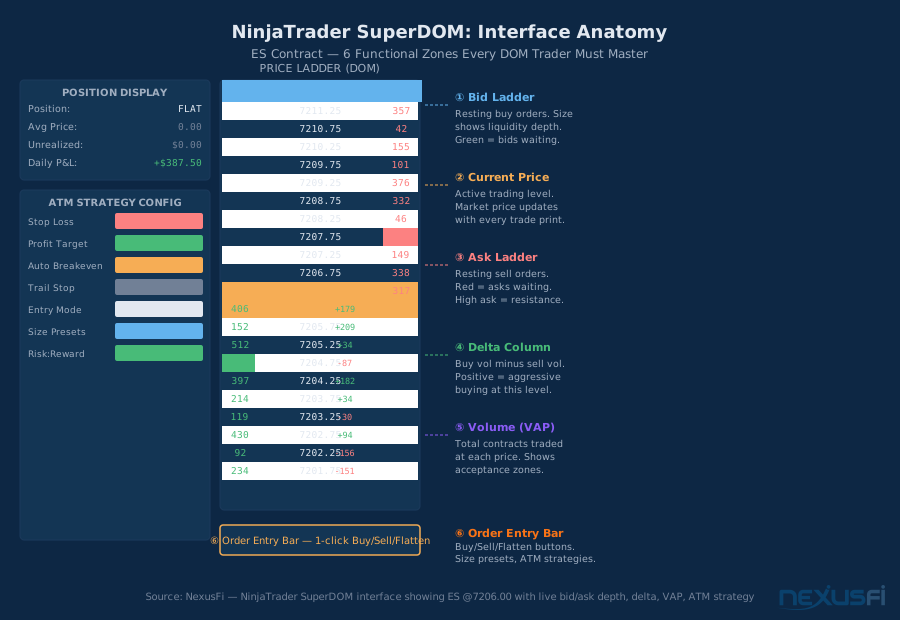
The SuperDOM combines six functional zones into a single workspace: the bid ladder (resting buy orders), the price ladder (current market depth), the ask ladder (resting sell orders), the delta column (net buying vs. selling pressure per level), the volume at price (VAP) column (cumulative transaction volume), and the order entry bar (one-click buy/sell/flatten with bracket order automation). Mastery means knowing exactly which zone to watch--and when.
Who this tool is for: Futures scalpers and short-term intraday traders on liquid contracts (ES, NQ, CL, ZN). DOM trading is not effective on thin markets or wide-spread instruments--you need the electronic order book depth of CME Group products to make this work.
Learning curve: Expect 200-300 hours of live market observation before you develop reliable intuition. @hyperscalper from NexusFi's Traders Hideout, who has documented his NQ micro-scalping extensively, described the process: "I'm happy to discuss various methods of 'digging deeply' into the Market Depth. Of course everything you do will want to be as efficient as possible, since peak update rates for MNQ will be roughly..." The implication is that processing speed--not just pattern recognition--is a key skill developed over time.
Setting Up the SuperDOM for Active Trading #
Getting the configuration right before your first live session is non-negotiable. The default settings are built for general use, not scalping.
Ladder depth: Set your ladder to display 20-30 ticks above and below the current market price. Anything less leaves you blind to approaching liquidity levels. Anything more is too much visual field to process under live market conditions.
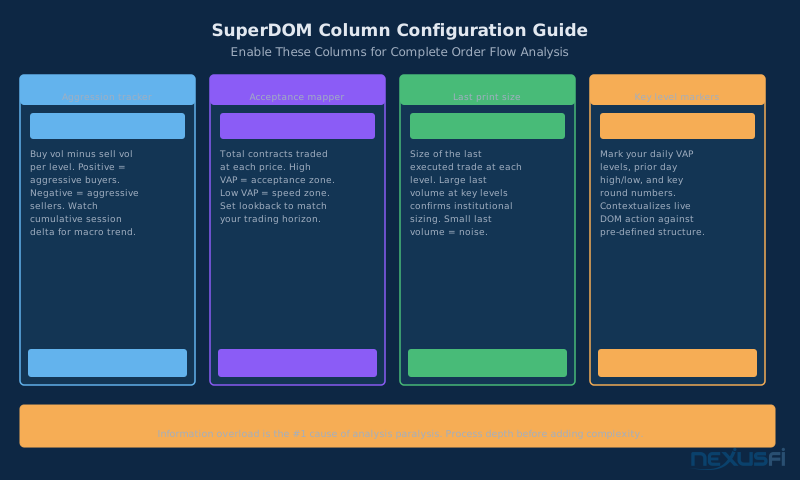
Enable delta and volume columns: These are turned off by default. Delta shows buy volume minus sell volume at each price level throughout the session. Volume at price shows total contracts transacted at each level. Both columns transform the DOM from a static snapshot into a dynamic flow monitor.
Color scheme configuration: Professional DOM readers customize colors so the bid side and ask side are instantly distinguishable at a glance. Standard is green for bids, red for asks--but the key is contrast. Under stress, your brain defaults to color before text, so the scheme must be clean enough to parse in under 200 milliseconds.
Audio alerts for large trades: Configure size filters so you hear an audio alert when a print exceeds your threshold (typically 100+ contracts on ES, 50+ on NQ). Your eyes are already processing the ladder; audio provides a second channel for large prints without requiring you to shift focus.
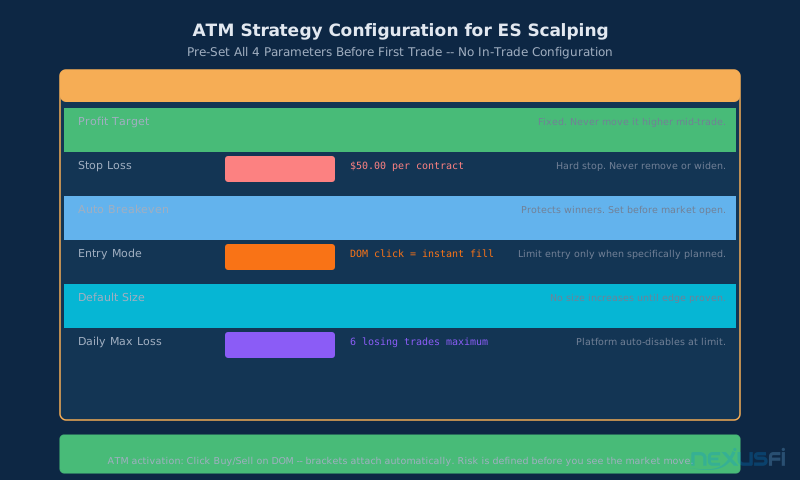
ATM (Automated Trade Management) strategy: Pre-configure your ATM before the market opens. For scalping, typical settings are: profit target 6 ticks ($75/contract on ES), stop loss 4 ticks ($50/contract), auto-breakeven at 3 ticks of profit. These numbers are not arbitrary--they produce a positive expected value when your win rate exceeds 43%, accounting for commission and slippage. The ATM strategy executes instantly on position entry, removing the execution risk of placing stops manually under pressure.
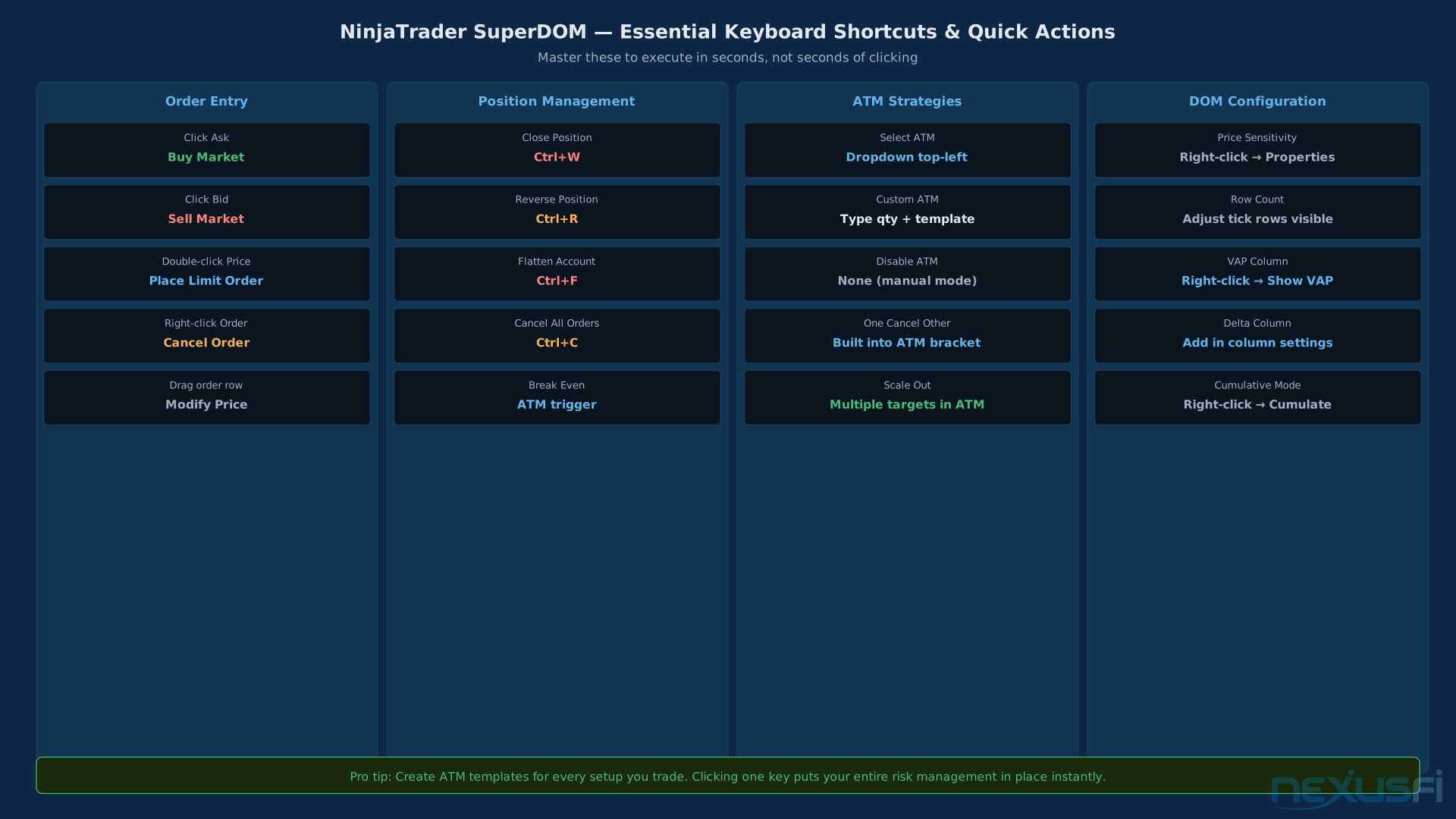
Position-size buttons: Set up hotkeys for your base size (1 contract) and scale sizes (2x, 4x). In DOM trading, sizing decisions happen faster than you can type--you need one-button execution.
The Six-Component Anatomy of SuperDOM #
1. The Bid Ladder #
The left column shows resting limit buy orders at each price level below the current market. Each number represents the total quantity of contracts waiting to buy at that specific price. A bid of 847 at 7204.75 means 847 contracts are queued to buy ES if price reaches 7204.75.
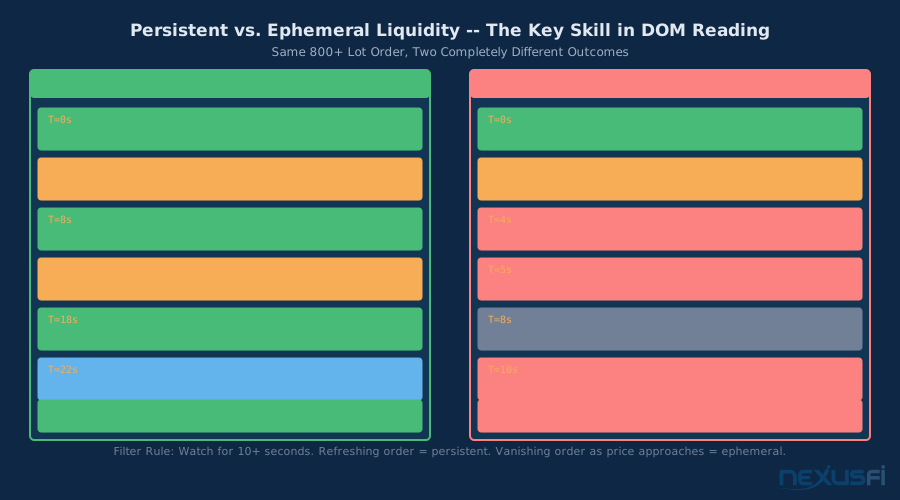
The bid ladder is your first view of support structure. Large persistent bids indicate price levels where buyers are defending their position. The critical qualification is persistent--an 847-lot bid that disappears when price approaches is spoofed or hedged liquidity, not real support. We'll cover persistence filters shortly.
NexusFi member @1LotTrader, writing about custom DOM tools, explained the bidding dynamics at session boundaries: "Usually in my experience it is a thin market with mostly locals/prop traders trading and trying to fake each other out on the outside of the ranges." This is the reality of the DOM: it's a negotiation, not a map.
2. The Price Ladder #
The center column shows current market prices at each tick increment. For ES (tick size $0.25), prices appear as 7206.00, 7206.25, 7206.50, etc. The current traded price highlights in the center of the ladder with the best bid one tick below and the best offer one tick above.
The price ladder auto-centers on the market price and scrolls continuously during fast markets. Some traders lock the ladder at a reference level during key tests to observe whether price can maintain above or below a critical zone without the ladder auto-scrolling away.
3. The Ask Ladder #
The right column mirrors the bid ladder with resting sell orders. An ask of 623 at 7207.75 means 623 contracts are waiting to sell at that price.
Large persistent asks create resistance zones. The same persistence filter applies--you need the large ask to hold for meaningful time (10+ seconds on a fast market like ES) before treating it as actionable resistance. Quick-cancel large offers are commonly used for spoofing or to test market depth.
NexusFi member
The implication is that professional players manipulate the visible order book to extract orders from retail traders.
4. The Delta Column #
Delta is defined as buy volume minus sell volume at each price level. A positive delta (+280) means aggressive buyers hit the offer 280 more times than aggressive sellers hit the bid at that price. A negative delta (-180) means more aggressive selling.
The delta column tells you who is being aggressive. Limit orders (passive orders) just sit on the book. Market orders (aggressive orders) cross the spread and create delta. When you see price rising but delta going negative, it means sellers are aggressively selling into each up-tick--a classic divergence signal.
Cumulative delta tracks the running sum of all session delta from the open. It's the clearest indicator of whether overall buying or selling pressure has dominated the session.
5. Volume at Price (VAP) #
VAP shows total contracts traded at each price level since your session start (or your configured lookback period). It's the historical record of where the market has accepted price--where transactions actually occurred, as opposed to where orders are resting.
Understanding the difference between VAP and resting liquidity is foundational. A price level with high VAP means the market has transacted heavily there in the past--it's an acceptance zone where both buyers and sellers agreed to do business. A price level with large resting bids means someone currently wants to buy there--but they haven't been tested yet.
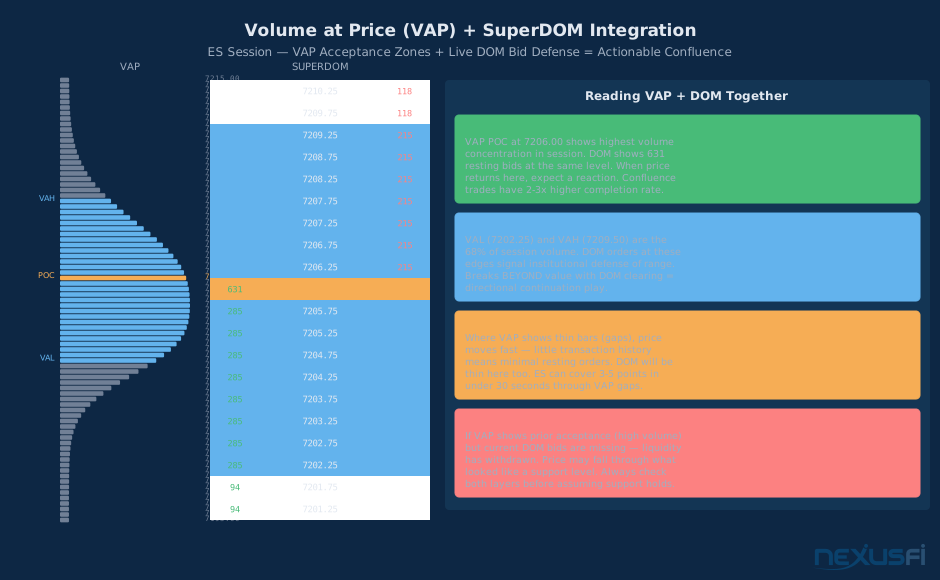
The most actionable setups combine both: a high-VAP acceptance zone (historical activity) defended by current resting bids (present liquidity) creates a two-layer support structure.
6. The Order Entry Bar #
The bottom panel contains your execution interface: buy/sell/flatten buttons, size selectors, ATM strategy selectors, and order management tools. In scalping, execution speed is a real edge--the difference between filling at the bid versus paying the spread can mean the difference between a winning and losing trade on a 4-tick scalp.
Critical habit: set up your ATM strategy and size BEFORE you see a signal. Fumbling with configuration at entry is a leading cause of missed trades and wrong-size entries under pressure.
Reading Order Flow: The Three Signal Modules #
Module A: Imbalance Detection #
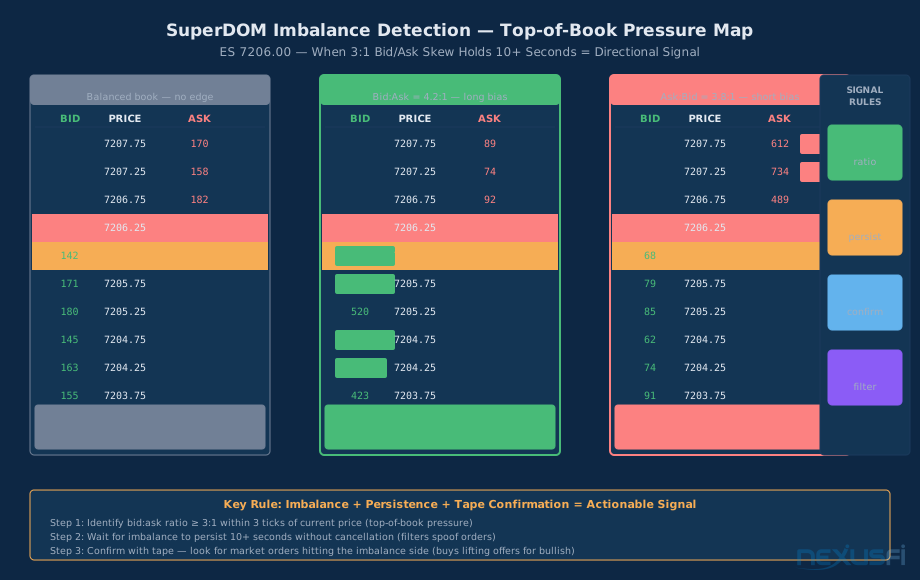
The most commonly discussed DOM signal is bid/ask imbalance--when resting size on one side of the book much exceeds the other side. NexusFi member
The basic definition: Bullish imbalance occurs when resting bids near the current price exceed resting asks by a threshold ratio (typically 3:1 or greater). Bearish imbalance is the reverse.
The refined definition: Measure imbalance within 3 ticks of the current price (top-of-book pressure). Imbalances at levels 10 ticks away from the market are less relevant than imbalances at the touch price.
The persistence filter: An imbalance must persist for a meaningful duration before acting on it. On ES, 10+ seconds of sustained imbalance is a reasonable threshold. Imbalances that appear and disappear in under 5 seconds are primarily HFT activity or layering--not actionable retail DOM signals.
The cancel-to-execution ratio: This is the key difference between experienced DOM traders from beginners. Watch whether large resting orders actually get traded through when tested, or whether they cancel as price approaches. Large orders that cancel when tested are either spoof orders or institutional hedges that will move to the next level. Large orders that get fully executed (transact and stay on the tape) represent real committed liquidity.
Tape confirmation: After identifying persistent imbalance, look at the time & sales for confirmation. Bullish imbalance should be accompanied by market buy orders executing (prints on the ask), not just resting bids. The DOM shows potential--the tape confirms reality.
Module B: Absorption and Tape Reading #
Absorption is one of the most powerful signals in order flow trading and one of the most difficult to learn. It occurs when price tests a level and large volume transacts there without the price moving through the level. The force of the market (selling in a down move) is absorbed by committed buyers, leaving the level intact.
@Silvester17 from NexusFi, who has documented his order flow development extensively in "The Scalper's Path," described the concept precisely: "When you say 'if I see a level where a few hundred contracts trade and price does not move'--then imho a much better [signal]..."
Signs of absorption in the DOM:
- Price makes a test at a support level
- Large prints execute at that level (visible in tape/T&S)
- Bid ladder maintains its size or refreshes quickly after prints
- Price stops making lower lows--each test is at approximately the same level
Signs of absorption failure:
- Bids cancel as price approaches (no real commitment)
- Each test breaks slightly lower than the previous
- Tape shows more sells than the bid size can absorb
- Price eventually trades through with increasing momentum
The key insight
Context filtering is essential. Absorption at a key daily volume profile level has far higher follow-through than absorption at a random intraday price.
Tape reading fundamentals:
- Aggressive trade direction: Market buys (lifting the offer) signal urgency to own. Market sells (hitting the bid) signal urgency to exit or short. The ratio of aggressive buys vs. sells paints a picture of who's in control.
- Trade size analysis: A single 500-lot print at a key level is more meaningful than 50 separate 10-lot prints. Institutional sizing leaves distinct footprints in the tape.
- Exhaustion signals: When aggressive orders slow down at a level that was previously driving price, it signals momentum exhaustion. The aggressive buyers that drove price from 7200 to 7209 are now pausing at 7209--potential reversal point.
Module C: Volume at Price as Context #
VAP doesn't generate real-time signals--it provides the context in which you interpret your real-time signals. @trendisyourfriend from NexusFi's Traders Hideout summarized it well: "Your curiosity about DOM trading and reading market rhythm is spot on--it's a totally different language compared to chart-based analysis."
Value Area: The range containing 68% of session volume. Price inside the value area typically rotates, testing both ends. Price breaking outside the value area with conviction (confirmed by DOM and delta) signals directional continuation.
Point of Control (POC): The price level with the highest volume for the session. When price returns to the POC after a move away, it often stalls--the POC is a gravitational center that continues attracting trades throughout the session.
VAP gap levels: Areas with very little transaction volume on the VAP profile represent speed zones. When price enters a VAP gap, it tends to move quickly--there are few resting orders and limited historical acceptance. Understanding where VAP gaps are located lets you predict where price will hesitate (high VAP nodes) and where it will accelerate (VAP gaps).
Combining VAP with live DOM: The most reliable setup is when a historical VAP acceptance zone (high VAP) is defended by current resting bids (live DOM). NexusFi member
VAP provides the stable background structure that gives context to the noisy real-time DOM.
Three Proven Scalping Playbooks #
Playbook 1: Test-Hold-Go (Absorption Play) #
This is the highest-probability DOM setup and the one most consistently cited by experienced order flow traders. It requires patience to set up but produces the clearest edge.
Conditions:
- Price makes a down move and tests a known support level (VAP acceptance zone, prior session close, round number)
- Selling attempts fail to push through (absorption confirmed by tape)
- Resting bids hold their size or refresh when tested
- Down move loses momentum (decreasing frequency of sell prints)
Execution:
- Identify the support level in advance during pre-market preparation
- Wait for the test--don't anticipate it
- Observe absorption: look for large prints at the level without breakdown
- Enter long when a buy-side imbalance develops after the test and holds (bid imbalance + confirmed tape)
- Place stop below the tested level (1-2 ticks below the low print)
- Target initial VAP node above entry or first resistance level in the DOM
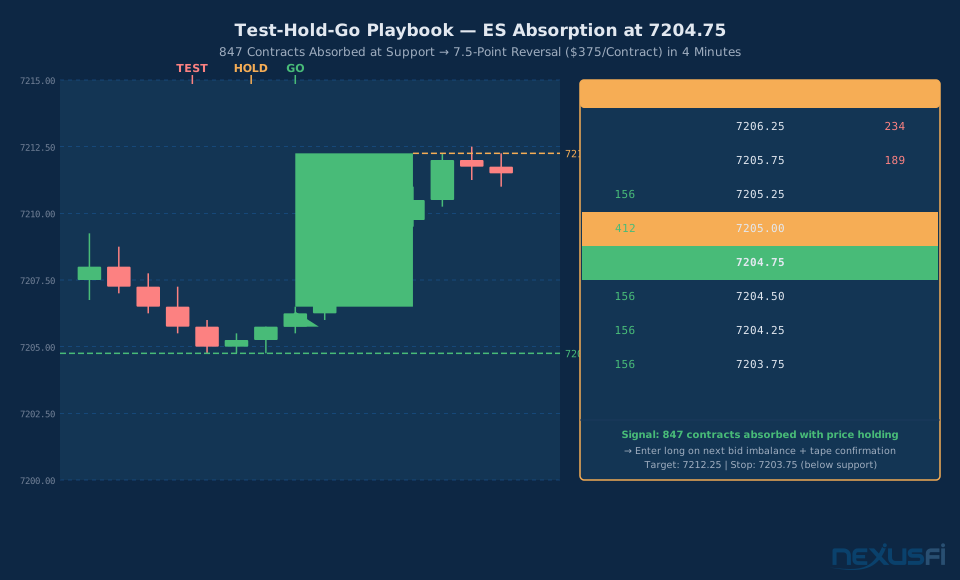
Real example (ES 7204.75): On April 27, 2026, ES found session support at 7204.75. The DOM showed 847 contracts absorbed at that level across a 4-minute window with no breakdown. Each test saw the bids refresh quickly and the tape showed sellers being absorbed--market sells landing but price not declining. Entry was on the next bid imbalance ($7206.25 breakout), with a stop at 7203.75 and target at 7212.25. The move delivered 7.5 points ($375 per contract) in 4 minutes.
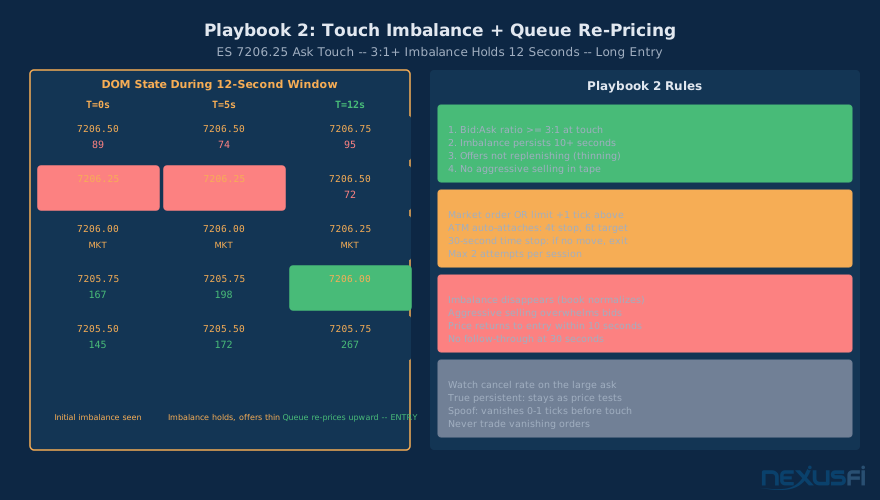
Playbook 2: Touch Imbalance + Queue Re-pricing #
A more aggressive, shorter-duration play suited to experienced DOM readers. It requires rapid decision-making and accepts more noise in exchange for earlier entry.
Conditions:
- The current market-touch price (best bid or ask) shows persistent imbalance (3:1 or better)
- The imbalance side is replenishing as it transacts (orders refresh when hit)
- Opposing side (the side you're trading against) is showing thinning or cancellation
Execution:
- Identify persistent 3:1+ imbalance at the market touch
- Confirm with 5-10 seconds of persistence under pressure
- Enter in the direction of the imbalance as price accepts that level
- Exit quickly if the imbalance dissolves (within 15-20 seconds if no follow-through)
- Tight stop: 2-3 ticks (the imbalance failure point)
- Target: next DOM liquidity level or 3-4 ticks
Touch Imbalance playbook is most vulnerable to spoofing. Large orders appearing at the touch that cancel as price approaches create false imbalances. Apply strict persistence requirements and watch for cancel behavior before acting.
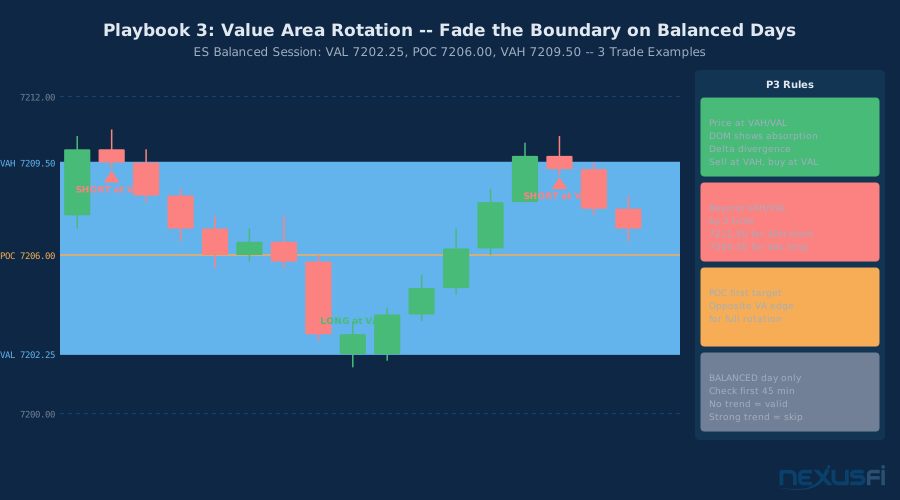
Playbook 3: Value Area Edge Rotation #
A mean-reversion play for balanced, non-trending market sessions. Requires proper regime identification before entry.
Conditions:
- Market is in a balanced session (prior day's VAP shows distribution, no directional trend)
- Price reaches the Value Area High (VAH) or Value Area Low (VAL)
- DOM shows thinning liquidity at the boundary + signs of absorption against the breakout
- Delta divergence at the edge (price at VAH but delta declining = selling absorbed each tick higher)
Execution:
- Pre-identify VAH and VAL from the session VAP profile
- Wait for price to reach the edge with momentum (not a gradual drift)
- Look for the DOM tell: bids appearing at VAH (fading the rally) or asks at VAL (fading the sell)
- Confirm with tape: large prints at the edge without follow-through = absorption
- Enter fade with stop beyond the edge (2 ticks outside VAH/VAL)
- Target: POC or opposite value area edge
Critical warning: This playbook fails catastrophically in trending sessions. When a balanced day transitions to a directional breakout, fading the VAH or VAL will result in chasing a strong trend against you. The regime filter is not optional--determine trend vs. balance status before market open using prior day structure.
Risk Management Rules That Actually Matter #
DOM scalping has a unique risk profile: the edge per trade is small (2-8 ticks), trades happen frequently, and losses can compound quickly if stops aren't rigidly enforced. Most traders who fail at DOM trading don't fail because they can't read the DOM--they fail because they can't manage risk.
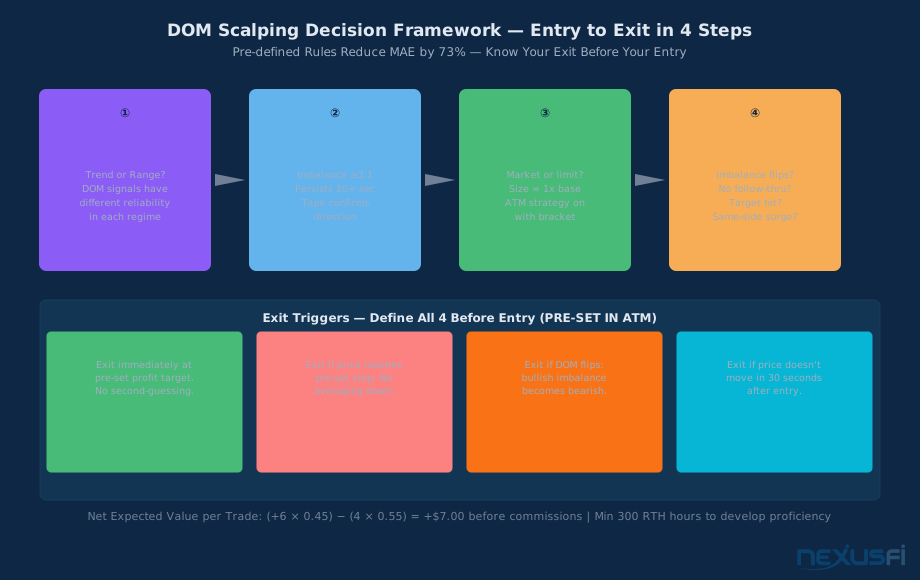
Rule 1: Define all four exit triggers before entry
Before entering any trade, you must know: (1) where your profit target is, (2) where your stop loss is, (3) what DOM condition will cause you to exit regardless of price, and (4) what time condition will cause you to exit if nothing happens. The ATM strategy handles triggers 1 and 2 automatically. Triggers 3 and 4 require discipline to execute manually.
Rule 2: Hard daily loss limit--the most important rule
Set a maximum daily dollar loss before your first trade. When you hit it, close the platform. This is not negotiable. DOM trading involves rapid decision-making under stress, and losing traders almost universally report that their worst months involved chasing losses after hitting early setbacks. A 3-trade maximum loss rule (if you lose your first 3 trades, stop for the day) is a reasonable starting framework.
Rule 3: Position size discipline--base size only until edge is confirmed
Trade single contracts until you have at least 300 tracked live trades in your journal with a measured win rate and average win/loss ratio. Scaling size before this data exists is speculation, not risk management. The expected value calculation for DOM scalping: (6 ticks × win_rate) − (4 ticks × loss_rate) must be positive under your measured statistics before size increases are justified.
Rule 4: Slippage and commission budgeting
ES scalping at 4-tick stops and 6-tick targets assumes roughly $2.50 per contract in commissions (both sides). After 100 trades, that's $250 in commissions--a real drag on a $100-per-winning-trade model. Add expected slippage (realistically 0.5-1 tick per entry and exit in fast markets), and your actual net per trade is lower than the theoretical. Build this into your expected value calculations from day one.
Rule 5: Invalidation must be DOM-based, not just price-based
A stop loss at "4 ticks below entry" is a starting point. But the sharper exit is "exit when the bid imbalance that created my entry reverses to a bearish imbalance." DOM-based invalidation exits trades faster when the setup fails, reducing maximum adverse excursion. This requires experience--you need to be able to read the DOM change in real time and exit without hesitation.
Rule 6: Session selection
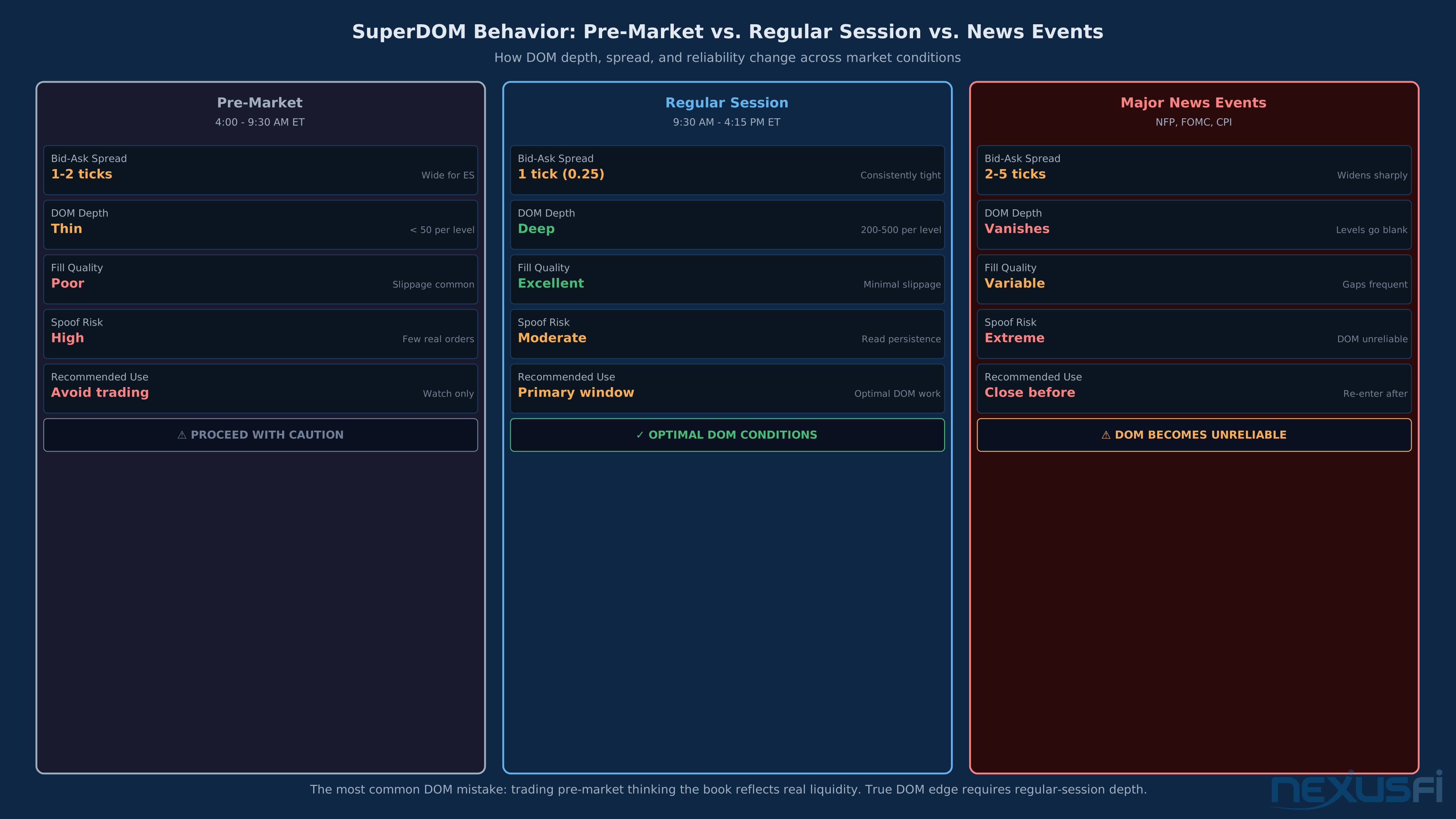
ES DOM signals are most reliable during regular trading hours (9:30 AM - 4:15 PM ET). Pre-market and after-hours sessions have thin liquidity, wider spreads, and DOM patterns that don't translate to normal-hours behavior. New DOM traders should restrict trading to the first 90 minutes and the last 90 minutes of RTH, where volume is highest and DOM signals have the most follow-through.

Common Failure Modes #
Failure Mode 1: Wall Watching Without Cancel Analysis #
The most common beginner mistake. You see a 900-lot bid at a key level and assume it's a strong support. Price approaches, the 900 lots vanish in milliseconds, and you're now long into a falling market.
The fix: watch the level for at least 30 seconds before the price approaches it. Does the size hold? Does it refresh when partially hit? Does it grow or shrink as price approaches? Orders that grow as price approaches are genuine (size is being added to defend). Orders that vanish as price approaches are either spoofed or conditional on price not actually reaching them.
Failure Mode 2: Ignoring Higher Timeframe Context #
DOM signals have dramatically different reliability based on the larger market structure. A bullish absorption signal at a random intraday level has much lower probability than the same signal at the prior day's low, a weekly value area boundary, or a major market-on-close price.
Before starting your trading session, spend 15 minutes identifying the 3-5 most significant levels on daily and weekly charts. These are the levels where your DOM signals will have the most follow-through. NexusFi member
--highlighting how experienced traders layer macro context across multiple instruments.
Failure Mode 3: Treating VAP as a Signal Generator #
Volume at Price is a context tool, not a signal. High-volume nodes don't guarantee reversals--they simply indicate areas of historical activity. A POC that held price for four hours yesterday might be sliced through cleanly on tomorrow's directional day if the market sentiment has shifted.
Use VAP to contextualize your real-time DOM signals. Don't use VAP to generate entry signals without confirming DOM action.
Failure Mode 4: Trading DOM Signals Against the Trend #
The value area rotation playbook (Playbook 3) is a mean-reversion strategy that fails on trend days. Beginners who learn this setup in range-bound markets apply it indiscriminately and get stopped out repeatedly when ES breaks into directional mode.
The fix: classify each session's character within the first 30-45 minutes of trading. A trend day shows sustained directional price movement with little overlap between one-hour bars. A balanced day shows overlapping ranges and repeated VAP node tests. Playbook 3 only works on balanced days.
Failure Mode 5: Information Overload #
The SuperDOM provides more information per second than the human brain can consciously process. Beginners try to track every column, every level, every print. The result is analysis paralysis--no trades, or poor trades from information overwhelm.
The fix: simplify. For your first 50 hours, watch only the price ladder and one column (delta or VAP, not both). Add columns as you develop the processing speed to use them. Most professional DOM scalpers have a narrow visual focus--not a wide one. They've learned which signals matter for their specific edge and filter everything else.
Failure Mode 6: Backtesting DOM Signals #
DOM data is difficult to backtest reliably. Historical reconstructions of order book state don't capture the speed and cancellation behavior of live markets. Strategies that appear profitable in historical DOM data often fail in live trading because the data doesn't capture the spoofing, refresh behavior, and latency that define real-time market microstructure.
Don't backtest SuperDOM strategies. Build your edge through forward testing with small size, detailed journaling, and statistical tracking over hundreds of live trades.
The NinjaTrader Advantage for DOM Trading #
NinjaTrader's SuperDOM is widely regarded as one of the most capable retail DOM tools available. Key advantages over generic DOM implementations:
One-click execution: The platform processes entry + ATM strategy attachment as a single atomic operation. In fast markets, this means your stop and target are placed the instant your entry fills--no delay, no manual placement.
ATM strategy library: Pre-built templates for different market conditions (tight scalps, momentum plays, trend following) allow traders to switch execution modes quickly based on session character.
Column customization: The ability to add columns (delta, VAP, last cumulative volume, custom indicators) transforms the SuperDOM into a configurable analytics workspace. NexusFi member @SpeculatorSeth developed a custom "Last Cumulative Volume Column" specifically for this interface, highlighting the community's investment in SuperDOM as their primary tool.
NinjaTrader ecosystem: Because the platform is widely used in the NexusFi community, there's deep institutional knowledge available. The NinjaTrader forum on NexusFi (one of the most active areas on the site) contains thousands of threads on SuperDOM configuration, custom columns, and trading techniques built specifically for this interface.
Integration with NinjaTrader Brokerage: For traders who want to combine the SuperDOM interface with tight commissions and futures margin flexibility, NinjaTrader Brokerage offers a natural extension of the platform. See the NinjaTrader Brokerage RDL listing for current commission structures and margin requirements.
Building Your SuperDOM Practice Plan #
Mastery of the SuperDOM follows a predictable progression. Most traders who succeed follow a similar path; most who fail skip steps.
Phase 1: Platform Familiarity (Weeks 1-2) Sim trading only. Configure the interface. Practice entering and exiting positions without watching the DOM signals--just learn where all the buttons are and get comfortable with ATM execution. Your goal is zero fumbling with the interface. Interface uncertainty costs you money in live markets.
Phase 2: Pattern Recognition (Weeks 3-8) Sim trading with active observation. Watch the DOM for 2-3 hours per session without trading. Identify imbalances. Predict what price will do next. Check your prediction. Keep a simple log: what you saw, what you predicted, what happened. This builds intuition without risking real capital.
Phase 3: Signal Execution (Weeks 9-16) Live trading with 1-contract size. Execute only Playbook 1 (Test-Hold-Go). This is the highest-probability, lowest-execution-pressure setup. Track every trade in detail: DOM state at entry, tape confirmation, result. Target 100+ trades with statistics tracking.
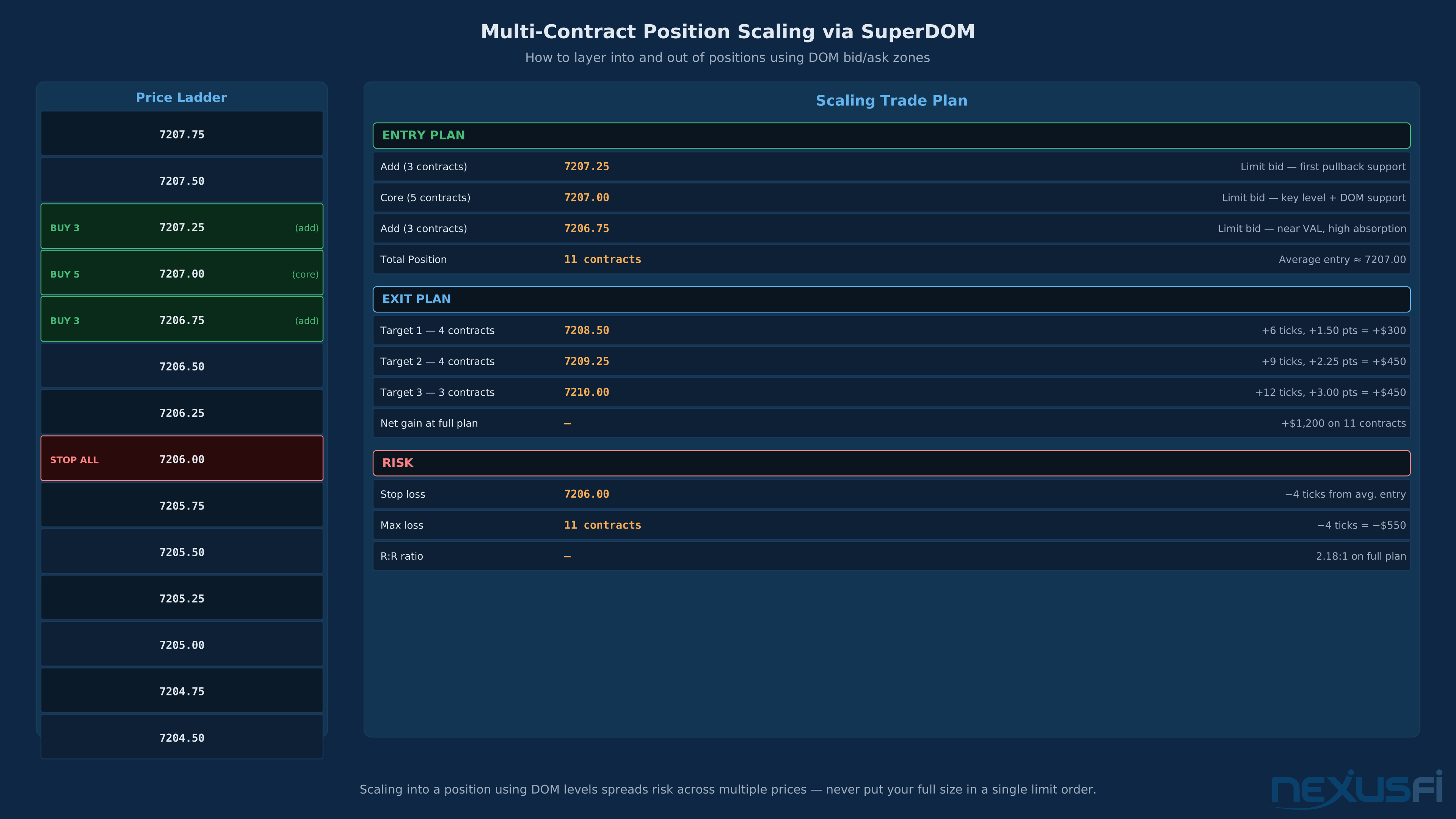
Phase 4: Playbook Expansion (Month 4+) Add Playbook 2 (Touch Imbalance) as a secondary tool when Playbook 1 opportunities are not present. Add Playbook 3 (Value Area Rotation) after you can reliably classify session character. Scale size only after 300+ live tracked trades show positive expected value under measured statistics.
Phase 5: Scale and Specialize Develop your specific edge: which contract, which session time, which setup type produces your best results. Most successful DOM traders have a narrow specialty--they don't trade everything. They've found their edge and they mine it.
Setting Realistic Expectations #
The NexusFi community has produced some of the most sophisticated public discussions of DOM trading available anywhere. Threading through those discussions is a consistent theme: this approach requires much more development time than chart-based trading, but the edge it produces is more sustainable because it's based on real-time market mechanics rather than lagging indicators.
@hyperscalper, who has dedicated years to developing his NQ DOM approach, described the commitment: the goal is analyzing market depth at 10 updates per second, identifying minimum observable sizes, merging updates intelligently. This is professional-grade market microstructure work.
Reasonable expectations for a committed learner:
- First profitable month: 6-12 months of focused practice
- Consistent profitability: 18-24 months
- Scaling to meaningful size: 3+ years
These timelines assume daily practice during regular trading hours with disciplined journaling.
The traders who make it through the learning curve almost universally report the same thing: the DOM isn't difficult to read once you have enough screen time. The difficulty is managing your own psychology--the impulse to act on every signal, the urge to average down on a losing trade when the DOM looks supportive, the confirmation bias that makes your preferred outcome look more likely than it is.
One final insight from the NexusFi community: @hyperscalper observed about DOM-based order flow that "the key is to know exactly how the DOM gives you meaningful market direction signals. Now, my focus is on Nasdaq Micro Scalping; and basically when the Price is about to Rise, then Ask ties..." The specificity matters. Broad DOM awareness is the beginning. Tight, specific, repeatable signal identification is the destination.
The traders who succeed at DOM trading share one trait: they stopped trying to see everything and started seeing one thing clearly. Narrow focus, deep reading, consistent application.
Knowledge Map
Prerequisites
Understand these firstGo Deeper
Build on this knowledgeReferences This Article
Articles that build on this topicCitations
- — How I Day Trade and Micro Scalp the NASDAQ Futures (2023) 👍 2“Peak update rates for MNQ are roughly 30% higher than NQ, with 1000 updates per second not uncommon in bursts.”
- — GOM Ladder vs Order Flow Analytics? (2015) 👍 6“For scalping purposes, I feel both are useless. You need to be reading the actual DOM. A lot of people mistake footprint charts and DOM reading as the same thing, but it is really not.”
- — DOM/ORDERFLOW TRADING (2021) 👍 4“I have been using the Jigsaw order book for a very long time. For my trading the DOM is essential.”
- — Learning to trade Order Flow using DOM (2014) 👍 13“I am a strong believer in order flow. I also believe a good dom is all you really need.”
- — Scalping the Bund with orderflow (DOM reading) (2014) 👍 10“I rely almost solely on the DOM to trade. I watch several DOM at the same time: Bund, FESX, FDAX, ZN, 6E, 6J.”
- — For DOM based traders. (ES/NQ) (2025) 👍 6“Your curiosity about DOM trading and reading market rhythm is spot on -- it is a totally different language compared to chart-based analysis.”
- — Ninja Trader Custom Order Book - 1LDom - Source Code (2012) 👍 8“Usually in my experience it is a thin market with mostly locals/prop traders trading and trying to fake each other out on the outside of the ranges.”
- — DOM bands indicator (2010) 👍 11“These players are almost always receiving our orders, and then moving the DOM side up or down by controlling the various levels of DOM price -- kind of like a dangling worm on a hook.”
- — No BS Day Trading (2013) 👍 17“The DOM can move fast with all the spoofing of orders and general market dynamics so I believe data feed quality is quite important.”
- — Last Cumulative Volume Column for NinjaTrader SuperDOM (2016) 👍 6“The NinjaTrader DOM is missing cumulative volume totals separated by bid/ask -- only showing how much has executed since it started printing at that price.”