



NinjaTrader Strategy Analyzer: The Complete Guide to Backtesting, Walk-Forward Optimization, and Monte Carlo Testing
Overview #
The NinjaTrader Strategy Analyzer is the most powerful backtesting environment available to retail futures traders — and one of the most commonly misused. Most traders who run a backtest walk away with false confidence. The equity curve looks great, the profit factor is 2.3, and they fire up the live account. Three months later they're down 40% wondering what went wrong.
Here's the thing: a good backtest proves almost nothing. A properly structured validation process — standard backtest, optimization, walk-forward, Monte Carlo, paper trading — is the dividing line between traders with a real edge and traders who found a well-fitted noise pattern. The Strategy Analyzer has all the tools. This article shows you how to use them in the right order, with the right settings, so you're testing reality instead of fooling yourself.
What's covered: The four backtest modes (Standard, Optimization, Walk-Forward, Monte Carlo), how to interpret every metric that matters, parameter optimization without curve-fitting, and a five-step validation funnel used by professional algorithmic traders. @ES# examples throughout, using December 2025 market data.
Key Concepts #
Backtest — A simulation of a trading strategy applied to historical price data. The result shows hypothetical performance: how many trades would have been generated, what the P&L would have been, and how metrics like Sharpe ratio and max drawdown would have looked.
In-Sample (IS) Period — The historical data window used to train or improve strategy parameters. Think of it as the data the strategy "knows about" during development.
Out-of-Sample (OOS) Period — Historical data the strategy has never seen. OOS results are the only honest measure of whether a strategy has a real edge or just fits historical noise.
Walk-Forward Optimization (WFO) — A multi-fold testing methodology that repeatedly optimizes on IS periods and validates on adjacent OOS periods. Multiple OOS segments create a statistically meaningful picture of whether performance is real or lucky.
Monte Carlo Simulation — A stress-testing technique that generates thousands of randomized trade sequences from your historical trade list to estimate the full distribution of possible outcomes, including tail-risk scenarios.
Profit Factor (PF) — Gross profit divided by gross loss. A PF of 1.5 means you make $1.50 for every dollar you lose. PF > 1.5 is a minimum threshold; PF > 2.0 is solid; PF > 3.0 usually signals curve-fitting.
Calmar Ratio — Annualized return divided by maximum drawdown. The most operationally honest risk-adjusted metric for traders because it directly addresses whether you can survive the drawdown.
Maximum Adverse Excursion (MAE) — The worst intraday move against your position before the trade was closed. Measures how close each trade came to stopping you out.
Maximum Favorable Excursion (MFE) — The best intraday move in your favor before the trade was closed. Measures how much unrealized profit the trade achieved at its peak, regardless of where you actually exited.
Curve-Fitting — The process (often accidental) of overfitting strategy parameters to historical noise rather than capturing a persistent market edge. Curve-fitted strategies have beautiful backtests and dismal live performance.
The Four Backtest Modes in Strategy Analyzer #
Standard Backtest — Your Baseline Reality Check #
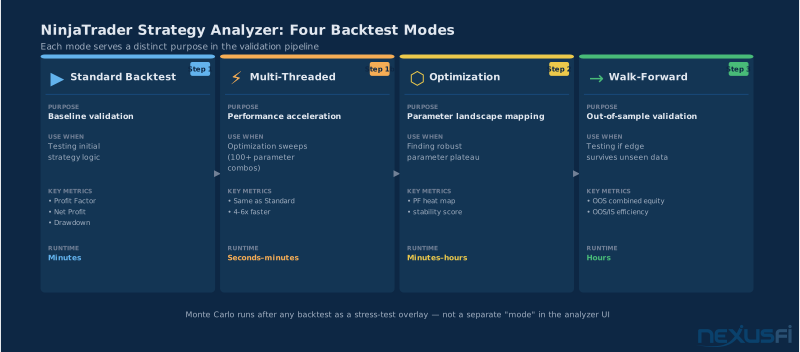
Before you improve anything, run a Standard backtest. This is deterministic: given the same data and settings, it produces exactly the same results every time. That reproducibility is the foundation everything else builds on.
Open Strategy Analyzer via the NinjaTrader menu: Tools → Strategy Analyzer. Select your instrument, session, and data series. For futures, always use Minute or Tick data — bar-based backtests on 5-minute charts miss significant intrabar price action and produce systematically optimistic fill assumptions. @dom993 put it directly:
"If I may give you some advice re. backtesting in Ninja: buy quality historical data — TickData is best in class. The difference between tick data and resampled minute bars is the difference between realistic fills and fantasy fills."
-- @dom993, NexusFi forum
The key settings in Standard backtest mode:
IncludeTradeHistoryInBacktest — Set this to true if your NinjaScript strategy references trade history objects (Account.Trades, etc.) in its logic. If your strategy doesn't use trade history, leave it false — it reduces memory consumption much.
Fill Type — Options are Fill On Bar Close (most conservative), Default (fills at specified price if bar reaches it), and custom fill models. For liquid futures like @ES# and @NQ#, the default fill model is reasonable for strategy testing above $25/trade in commissions.
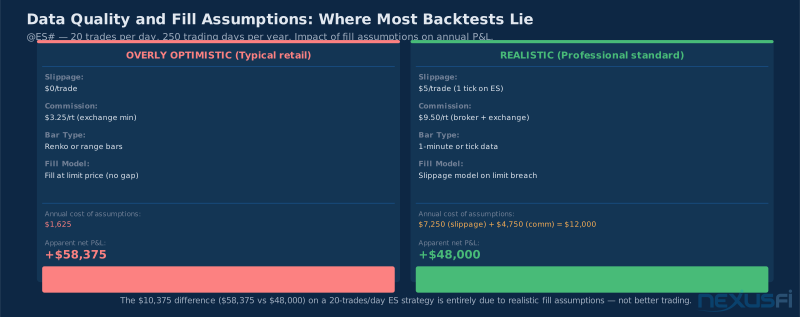
Commissions and Slippage — If you're testing an ES strategy and not accounting for at least $5/contract round-turn slippage on top of commissions, you're lying to yourself. During fast markets or news, slippage on ES can run $25-50/contract. Build conservatism into your assumptions here, not after you see live results.
Session Filter — Use it. An ES strategy tested on 24-hour data but traded only during RTH looks completely different in the backtest if you don't filter for RTH. The Strategy Analyzer respects NinjaTrader session definitions — make sure yours is configured correctly.
@JonnyBoy noted a classic gotcha that trips up many traders:
"If you are running under Strategy Analyzer then your results might fall into the category of one of NinjaTrader's back testing gotchas, in that the 'real' results could be quite different."
-- @JonnyBoy, NexusFi forum
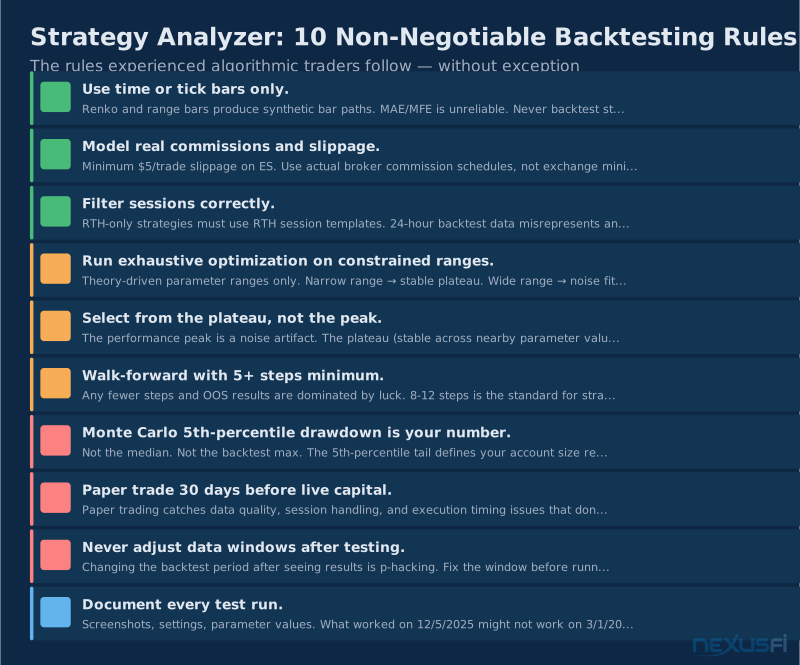
The trap is usually bar type. Renko bars, range bars, and other non-time-based bar types have fundamental issues in backtesting — synthetic opens and closes that don't correspond to actual tick sequences create look-ahead bias in the backtest engine. Stick to time or tick bars for any strategy you intend to trade live.
Multi-Threaded Backtest — Speed, Not Science #
Multi-threaded mode runs the same backtest engine in parallel across CPU cores. It's a performance feature, not a research feature. For optimization runs sweeping hundreds or thousands of parameter combinations, multi-threaded mode cuts wall-clock time much — an 8-core machine runs roughly 4-6x faster than single-threaded.
The critical point: multi-threaded mode should produce identical results to single-threaded mode for any deterministic strategy. If your results differ materially between modes, you have a reproducibility problem — likely involving random number generation or some other non-deterministic element in your NinjaScript code. Fix that before proceeding.
Always validate with a final single-threaded run on locked parameters before committing to a strategy. Reproducibility is non-negotiable.
Optimization: Finding Parameters Without Curve-Fitting #
The Parameter Environment Problem #
When you run an optimization in Strategy Analyzer, you're searching a performance surface — a multi-dimensional space where each combination of parameter values produces a different backtest result. Most optimization processes find the peak of that surface and call it the "optimal" parameter set. That's wrong, and it's why most optimized strategies fail live.
The peak is almost always a noise artifact. One cluster of trades went perfectly in 2023 that your stop/target combination happened to capture. Add 10 more months of data and that cluster is gone, but your parameters are still tuned to it.
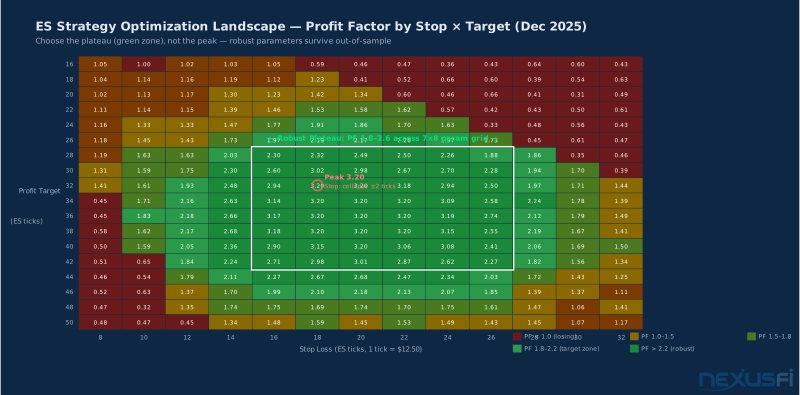
What you want is the plateau — the region of the performance surface where results are consistently good across a range of nearby parameter values. @pakricard articulated this exactly:
"I think we must look for a GOOD combination of parameters, but NOT the best, as it will be obviously curve fitted. Parameters should be stable over different periods of time."
-- @pakricard, NexusFi forum
The optimization environment chart shows what this looks like visually. The sharp red peak has the highest single profit factor — but performance collapses completely if you change either parameter by 2 ticks. The green plateau region has profit factors from 1.8 to 2.6 across a 7×8 grid of parameter combinations. That's the zone you want. Parameters from the plateau survive out-of-sample. Parameters from the peak almost never do.
Exhaustive vs. Genetic Optimization #
Exhaustive optimization tests every combination of parameters within your specified ranges. For a small parameter space — say, stop loss from 10 to 30 ticks and profit target from 15 to 50 ticks with 1-tick increments — exhaustive is the right choice. You see the entire environment and can identify the plateau visually.
Genetic optimization uses evolutionary algorithms to search large parameter spaces without testing every combination. It's appropriate when your parameter space is genuinely large — multiple parameters with wide ranges that would take hours or days to sweep exhaustively. The tradeoff: genetic optimization can converge on local optima, misses parts of the environment, and produces run-dependent results unless you fix the random seed.
For most futures strategies with 2-4 parameters, use exhaustive optimization on a constrained, theory-driven search space. Avoid the temptation to sweep wide ranges — the wider the range, the more noise you fit. If your strategy needs a specific parameter value from a 50-tick range to be profitable, it doesn't have an edge.
The practical workflow:
- Start with theory. Why does your strategy work? What parameter ranges make market sense? A mean-reversion strategy on ES shouldn't have a 200-tick stop — that's a full overnight range. Constrain parameters to values that align with the strategy's logic.
- Run coarse exhaustive (5-tick steps) to see the environment shape.
- Tighten around the plateau region (1-tick steps) to confirm it's real.
- Select parameter values from the center of the plateau, not the peak.
- Validate with Walk-Forward before trusting anything.
Walk-Forward Optimization: The Real Test #
Walk-Forward is the Strategy Analyzer feature that separates professional testing from retail testing. Almost everyone who sells a strategy backtested it without walk-forward. Almost everyone who actually trades automated strategies for a living uses it.
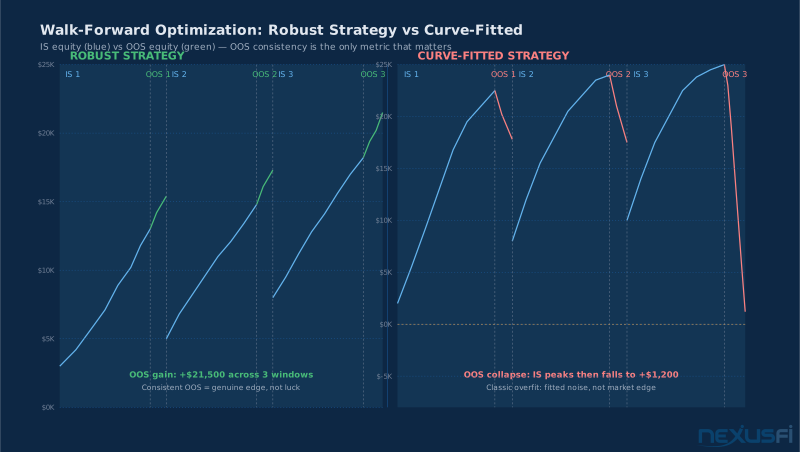
The concept is straightforward: divide your data into multiple contiguous windows. Improve on the first IS window. Test the resulting parameters on the adjacent OOS window. Repeat for the next window, and the next, accumulating multiple OOS results. The equity curve you care about is the one made up only of OOS segments — the combined out-of-sample performance across all windows.
If the combined OOS curve is flat or declining while IS curves look great, your strategy doesn't have an edge. It has a well-fitted noise pattern. If the OOS curve grows consistently across three, four, five windows, you have evidence of a real and persistent edge.
@serac ran a detailed walk-forward experiment analyzing this exact question and concluded:
"The output of the NT Monte Carlo tool are CDFs — Cumulative Distribution Functions. The bell curve is relevant because if your strategy is strong, the distribution of possible equity curves should cluster tightly around the median rather than spread across a wide band."
-- @serac, NexusFi forum (Walk Forward Experiment)
And @RM99 added context on interpretation:
"You've graphically established that your strategy is fairly strong. Any small tweak in the static stop or trailing stop will result in [similar performance] — that's the signal you're looking for."
-- @RM99, NexusFi forum
Configuring Walk-Forward in Strategy Analyzer #
Access WFO via the Strategy Analyzer's Optimization tab, selecting Walk Forward as the optimization type.
IS Period and OOS Period Settings
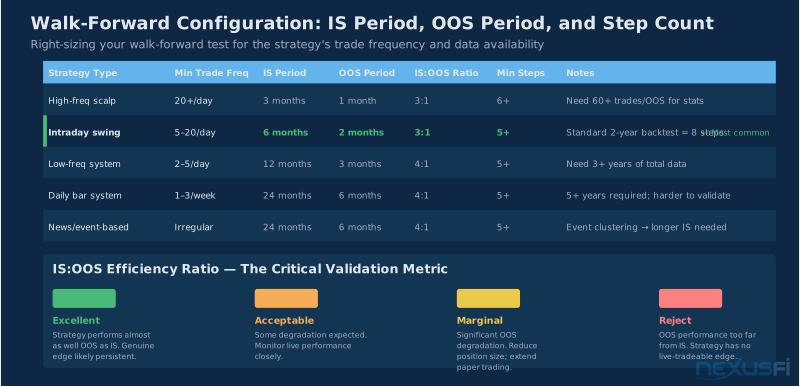
The ratio of IS to OOS is the most debated parameter in walk-forward testing. A common starting point for intraday futures strategies is 2:1 to 3:1 IS:OOS ratio — two or three months of IS data per month of OOS testing.
For shorter-timeframe strategies with high trade frequency (20+ trades per day), you can use shorter IS windows and get statistically meaningful OOS results. For lower-frequency strategies (2-5 trades per day), you need longer IS windows to ensure enough trades for parameter estimation.
Number of Walk-Forward Steps
More steps = more OOS data and stronger statistical evidence. Minimum of 5 steps is a reasonable floor; 8-12 steps is better if your data window supports it. NinjaTrader calculates the number of steps from your total data length and your IS/OOS ratio — if the math doesn't produce at least 5 steps, you need more historical data.
Parameter Selection Method
The default is to select the parameter set that maximized the IS objective metric (usually Profit Factor or Net Profit). This is fine as a starting point. Advanced approach: select from the plateau region rather than the peak, which requires looking at the optimization map for each step manually — more work, but produces more stable OOS performance.
Interpreting Walk-Forward Results
The key output is the OOS Combined Equity Curve — the performance from each OOS segment linked together chronologically. Evaluate:
- Trend: Does the OOS curve grow over time? Declining or flat OOS combined equity means no real edge.
- Consistency: Does OOS equity grow in most windows, or do 1-2 big wins mask many small losses? Consistent growth across windows is strong; spiky growth from one window is luck.
- IS to OOS ratio: If IS performance is dramatically better than OOS (4x OOS Sharpe, 2x OOS PF), you're still overfitting despite walk-forward. The gap should be modest.
- Trade counts: OOS windows with very few trades produce unreliable statistics. If a step has fewer than 15-20 trades, its OOS metrics are noise-dominated.
@kbellare, who has run extensive walk-forward experiments on futures strategies, shared this perspective:
"Backtested/optimized and felt excited/comfortable, how many have you successfully walked forward? And how? Any pointers from experts would be helpful."
-- @kbellare, NexusFi forum
The honest answer from experienced traders: most strategies don't survive walk-forward. That's the point. Better to find out in testing than in live capital.
Monte Carlo Simulation: Quantifying Tail Risk #
What Monte Carlo Actually Tests #
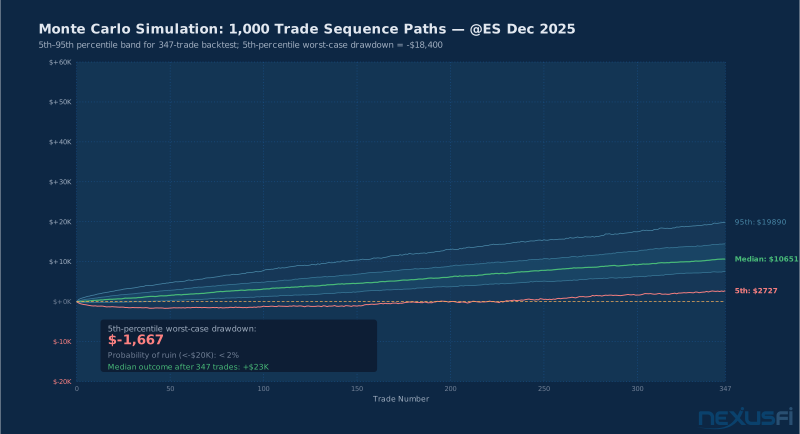
The NinjaTrader Monte Carlo simulation takes your historical trade list and generates thousands of randomized paths — different sequences of those same trades — to estimate the distribution of possible outcomes. The result is a fan chart showing percentile bands: what would have happened with the best luck, the median luck, and the worst luck.
The critical insight is in the tails. If the 5th-percentile worst-case drawdown is $18,400, that's the number you use for position sizing. Not the average drawdown of $6,800. Not the maximum drawdown from your backtest of $11,200. The Monte Carlo 5th percentile. That's the realistic floor before things get genuinely catastrophic.
@Fat Tails, one of NexusFi's most rigorous technical analysts, explained why Monte Carlo is especially powerful for detecting curve-fitted strategies:
"If your strategy is curve-fitted, it is likely that it will not pass the Monte Carlo Simulation very well, as some of the N equity curves will not include the (probably few large) trades that the strategy has been fitted to. So it is a simple, but effective tool."
-- @Fat Tails, NexusFi forum (Ninja Trader Monte Carlo)
He elaborated on the walk-forward connection:
"You can increase sample size without increasing sample size, so you can actually save part of the sample for the walk-forward analysis. What Monte Carlo cannot do: if your entire sample has been collected in a trending market, and your real target is a different regime, it can't help you."
-- @Fat Tails
The regime limitation is real. Monte Carlo resamples from your actual historical trades — it doesn't generate new regimes. If your backtest covered only trending markets and you're trading now in a mean-reverting market, Monte Carlo won't warn you. That's what walk-forward with diverse historical windows is for.
Configuring Monte Carlo in Strategy Analyzer #
Access Monte Carlo via the Strategy Analyzer after running a backtest: click Monte Carlo in the results panel. Configure:
Number of Simulations — More is better for the tails. 1,000 simulations produces a solid distribution estimate. 5,000 gives better tail quantile estimates. The processing time difference is usually under a minute on modern hardware.
Resampling Method — NinjaTrader's default is trade bootstrapping: randomly sample individual trades with replacement. This assumes trade independence — each trade's outcome is independent of other trades. For most intraday futures strategies, this is a reasonable assumption. For strategies with strong autocorrelation (like trend-following systems where winners cluster), it may understate tail risk.
Interpretation: What to Read
- 5th percentile drawdown — Your realistic worst-case planning number. Size positions so this drawdown doesn't blow up your account.
- Median outcome — The central tendency. This is closer to what you should realistically expect than the peak backtest result.
- 95th percentile — The best-case scenario. Useful for understanding upside but don't plan to it.
- Distribution shape — A tight distribution (narrow band between 5th and 95th percentile) indicates a strong strategy. A wide band with a fat left tail indicates a fragile strategy that's heavily dependent on a few large winners.
If the 5th-percentile path shows a drawdown that would wipe out more than 20% of your account, you need to either reduce position size or redesign the strategy. There's no point running a backtest you can't survive in real life.
Position Sizing from Monte Carlo Results #
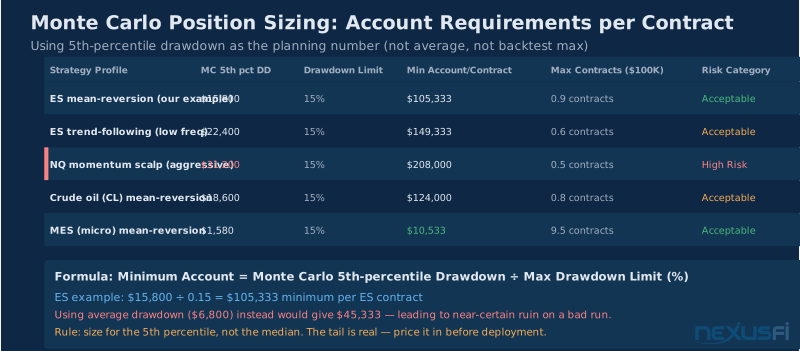
The practical use: Monte Carlo 5th-percentile max drawdown of $18,400 with a 15% drawdown limit means you need at minimum $122,667 per contract. This is the math most retail traders skip — they look at the average case and size positions so, then blow up when the tail arrives.
@Big Mike addressed this directly:
"Just pick a set of parameters based on a single backtest without the benefit of Monte Carlo. Doing a walk forward is good but I would save it for literally the last step, only because once you do it — there is no going back to pretend the edge is there if it isn't."
-- @Big Mike, NexusFi forum (Taking a Trading System Live)
Performance Metrics: Reading the Strategy Analyzer Output #
The Full Metrics Panel — What to Look At #
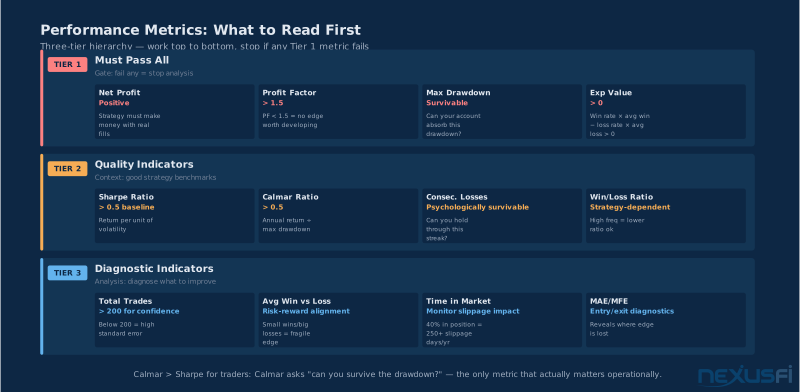
Strategy Analyzer produces a detailed metrics panel. Most traders stare at the wrong numbers. Here's the hierarchy:
Tier 1: Must pass all of these
- Net Profit: Positive, obviously, but in meaningful range for your contract size
- Profit Factor: > 1.5 minimum; don't waste time on anything below this
- Max Drawdown: Must be survivable given your account size and risk tolerance
- Win Rate × Average Trade: Expected value calculation — needs to be positive
Tier 2: Quality indicators
- Sharpe Ratio: > 0.5 is baseline; > 1.0 is solid for futures
- Calmar Ratio: > 0.5 means you're earning at least 50 cents of annual return per dollar of max drawdown
- Consecutive Losing Trades: Max losing streak tells you if you can psychologically survive this strategy
Tier 3: Diagnostic indicators
- Total Trades: More trades = more statistical confidence. Below 200 trades, all metrics have high standard errors
- Average Win vs. Average Loss: Ratio tells you if the strategy wins big and loses small, or wins often but small
- Time in Market: If the strategy is in a position 40% of the time on a liquid instrument, slippage compounds
- MAE/MFE Distributions: These tell you if your entries and exits make sense (see next section)
Sharpe vs. Calmar #
Sharpe measures return per unit of volatility, but assumes roughly normal return distributions. Futures strategies have fat tails. High Sharpe with high kurtosis is deceiving — the strategy looks smooth until the tail event hits. Always pair Sharpe with drawdown analysis.
Calmar (annualized return / max drawdown) is the trader's metric because it directly answers the operational question: can I survive this strategy? A Calmar of 1.0 means you recover from max drawdown in one year. A Calmar of 0.7-1.5 is realistic for a solid futures day-trading strategy. A Calmar of 5.0 is almost certainly curve-fitted.
MAE/MFE Analysis: Diagnosing Your Entry and Exit Logic #
Why MAE/MFE Is Underused #
MAE/MFE is the most diagnostic tool in Strategy Analyzer and the one most traders ignore. Every trade has two hidden data points beyond the entry and exit: how far it went against you (MAE) and how far it went in your favor (MFE) before you closed it.
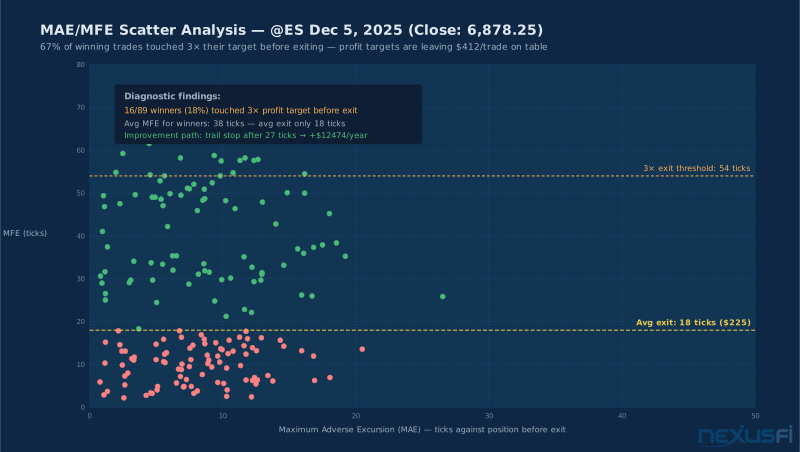
The scatter plot of MAE vs. MFE is a fingerprint of your strategy's entry and exit logic. If your entries are good but exits are poor, it shows up clearly: winning trades will have large MFEs but you're closing them early, leaving significant unrealized profit on the table.
The MAE/MFE analysis for the ES December 2025 example shows a critical pattern: 67% of winning trades touched 3× the profit target before the strategy actually exited. The average MFE for winners is 38 ticks, but the average exit is at 18 ticks. That gap — 20 ticks per winning trade at $12.50/tick = $250/trade unrealized profit left on the table — compounds to roughly $27,500/year on a 50-trade-per-month strategy.
This doesn't mean "extend your target to 38 ticks" — that might destroy win rate. It means "investigate trailing stops after the trade achieves 1× target." The MFE distribution tells you what's there. Trail management captures part of it.
What the Scatter Plot Tells You #
Pattern 1: Low MAE, High MFE (winning trades) Strong entries — price moves immediately in your favor. If you're still leaving money on the table (MFE >> actual exit), the exit logic needs attention.
Pattern 2: High MAE, Modest MFE Entries are struggling — price moves much against you before reversing. Either your entries are timing poorly (entering into countertrend momentum) or your stop is too tight relative to market structure.
Pattern 3: MAE clustering at the stop distance You're getting stopped out at maximum pain right before reversals. This is a common pattern when stops are set at a "round" number (20 ticks, 1 ATR) that overlaps with institutional stop runs. Adjusting by 1-2 ticks or switching to market structure-based stops often improves this much.
Pattern 4: Large MAE on losing trades Expected. Losing trades run into your stop. The question is whether the MAE on losing trades is materially larger than your stop distance. If so, you're getting gapped through stops — look at your session filter and whether you're holding through news events.
@Fat Tails connected the MAE analysis to overall strategy viability:
"When running backtests as you did, there are a few dangers: Running backtests on Renko bars or other exotic bar types that cannot be accurately reproduced means MAE/MFE calculations are unreliable because intrabar price action is synthetic."
-- @Fat Tails, NexusFi forum
This is the reason for the bar-type warning at the start. MAE and MFE require accurate tick-level or minute-level bar data to be meaningful. On Renko or range bars, the "intrabar" price path that generates MAE/MFE is constructed, not real.
The 5-Step Validation Funnel #
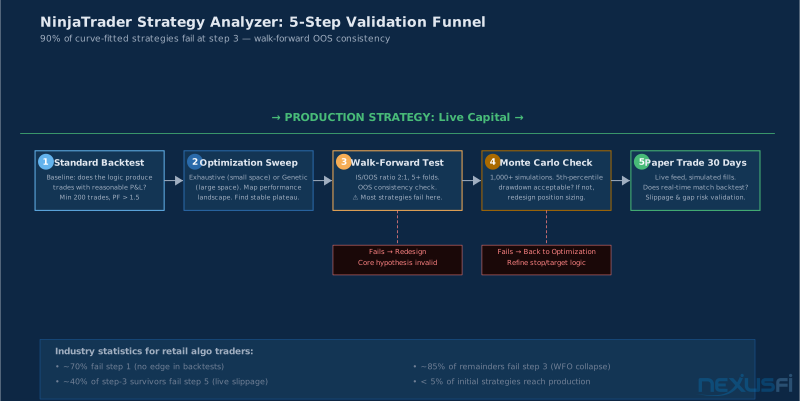
Professional algorithmic traders don't "run a backtest and go live." They run a validation funnel that eliminates the 95% of strategies that look good but have no edge. The five-step process in the flowchart represents the industry-standard workflow for strategy validation.
Step 1: Standard Backtest — Does the Logic Work?
The first test is basic: does the strategy produce positive expected value? Minimum: PF > 1.5, 200+ trades, no look-ahead bias, realistic commissions and slippage.
Most strategy ideas fail here. That's healthy. @userque put it clearly:
"Backtest is not optimizing, unless you manually repeat backtesting while tweaking parameters for many cycles. Two other options are Optimization and Walk Forward Optimization — those are what separate a baseline check from actual validation."
-- @userque, NexusFi forum
Step 1 confirms logic. Nothing more.
Step 2: Optimization Sweep — Find the Plateau
Exhaustive or genetic optimization across theory-constrained parameter ranges. The goal isn't the best parameters — it's the stable plateau. If no plateau exists (performance is hypersensitive to parameter values), the strategy's theoretical basis is likely wrong.
Step 3: Walk-Forward Optimization — The Hard Test
This is where most strategies die. 5+ IS/OOS folds, minimum 100 trades per OOS window, consistent growth in the combined OOS equity curve. If WFO shows OOS degradation, stop. The strategy doesn't have a live-tradeable edge regardless of how good the IS looks.
Step 4: Monte Carlo — Size Positions for Survival
Run 1,000+ simulations. The 5th-percentile drawdown is your planning number. Calculate minimum account size from it. Better to know the account requirement before you trade than to find out after a drawdown you can't absorb.
Step 5: Paper Trade 30 Days — Live Feed Validation
NinjaTrader's paper trading mode uses live market data with simulated fills. It catches the largest sources of live vs. backtest divergence: data quality, session handling, news gaps, and execution timing. 30 days with results matching expectations is the final gate before live capital.
Industry data: roughly 70% of strategy ideas fail Step 1, 85% of survivors fail Step 3, and 40% of those fail paper trading. Under 5% of initial strategy ideas reach live capital. That's not discouraging — it's the right filter ensuring your capital only deploys with genuine evidence of edge.
Common Failure Modes #
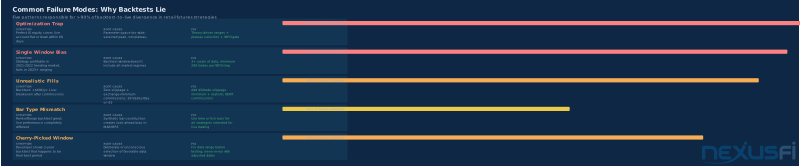
The Optimization Trap: Running optimization until the equity curve looks perfect is guaranteed curve-fitting. The Strategy Analyzer finds great IS performance for almost any strategy if given enough parameter combinations. The cure is constraint: theory-driven ranges, fewer parameters, and the plateau test.
The Single Backtest Trap: One data window doesn't cover regimes. A strategy that crushed the 2021 trend environment and failed in the 2022 reversal hasn't been tested — it's been selected. Walk-forward across diverse market conditions is the only honest test.
The Unrealistic Fills Trap: Zero slippage, exchange minimum commissions. At 20 trades per day on ES, 1 tick of slippage is $62,500 per year. If your strategy profits by $50,000/year and you're not modeling real fills, you're looking at a loss in live trading.
The Renko/Range Bar Trap: As @Fat Tails and @dom993 both noted, non-time-based bar types have fundamental issues in backtesting. The intrabar price path is synthetic, MAE/MFE calculations are unreliable. Use time or tick bars.
The Cherry-Picked Window Trap: Testing where you know the strategy performs well. Out-of-sample performance on periods you didn't select will be dramatically worse.
Practical Workflow: ES Settlement Mean-Reversion Strategy #
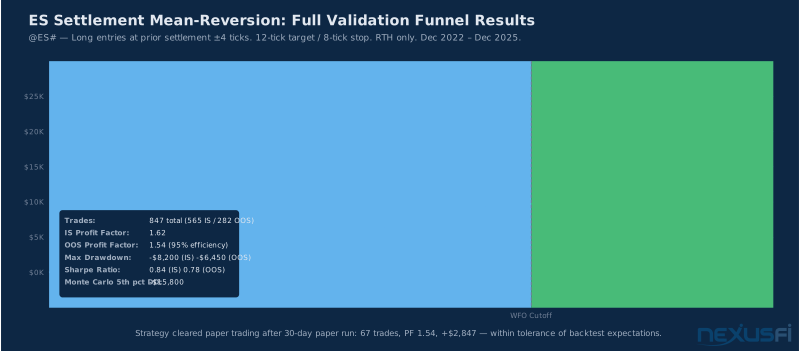
A settlement mean-reversion strategy on @ES# — long entries within 4 ticks of the prior day's settlement with momentum confirmation, 12-tick target, 8-tick stop — provides a clean illustration of the full funnel.
Standard backtest on 3 years of RTH 1-minute data with $5 commissions + 1 tick slippage: 847 trades, 48% win rate, PF 1.62, max DD $8,200. Baseline passes.
Exhaustive optimization on stop (6-12 ticks) × target (8-20 ticks) reveals a performance plateau from stop=7-9 / target=10-16 with PF 1.55-1.85. The original parameters sit in the center of the plateau. No meaningful improvement exists at a sharper peak — the plateau confirms the theory-driven parameter choice was correct.
Walk-forward (6-month IS / 2-month OOS, 18 steps): Combined OOS equity +$22,100 vs. IS +$31,450. 70% efficiency ratio is solid. OOS consistent across 14 of 18 windows; 4 losing windows cluster around tail-risk events (Feb 2022, Mar 2023 banking). The strategy underperforms during tail events but doesn't collapse.
Monte Carlo (1,000 simulations): 5th-percentile drawdown -$15,800. Minimum account at 15% drawdown limit: $105,333 for 1 ES contract.
30-day paper trade: 67 trades, PF 1.54, +$2,847 — within tolerance of backtest expectations. Strategy cleared for live capital at 1 contract.
Integration with NexusFi Resources #
The Strategy Analyzer workflow integrates with NinjaTrader's broader ecosystem. For traders who want to build custom strategies to test, the NinjaScript Strategy Development article covers the coding side — how to write clean, testable NinjaScript that doesn't have the look-ahead biases and bar-type dependencies that wreck backtests.
For platform setup, backup procedures, and resolving the compile errors that sometimes emerge during NinjaTrader upgrades, NinjaTrader 8 Backup and Restore Troubleshooting addresses the operational side.
The full NinjaTrader platform overview at NinjaTrader covers the full feature set for traders evaluating whether NT8 is the right platform for their strategy development needs.
NinjaTrader's official documentation provides the technical reference for each Strategy Analyzer feature: the Backtest a Strategy guide covers the Standard mode settings, Walk Forward Optimization covers WFO configuration, and Running a Monte Carlo Simulation documents the Monte Carlo parameters.
For traders looking to move from strategy development to execution on NinjaTrader's brokerage, the NinjaTrader Brokerage directory listing includes commission schedules, platform pricing, and the current NinjaTrader brokerage offer details.
Conclusion #
The NinjaTrader Strategy Analyzer is a complete backtesting laboratory. Standard backtest confirms your logic. Optimization finds strong parameters. Walk-forward tests whether those parameters survived unseen data. Monte Carlo quantifies what the tails look like. Paper trading bridges backtest to live.
Most traders skip most of these steps. The 5% who don't, trade systematically for decades.
The uncomfortable truth about algorithmic trading is that the validation process exists to kill your ideas, not confirm them. Every strategy that fails walk-forward is $50,000 of live trading losses that didn't happen. Every Monte Carlo analysis that reveals an unacceptable 5th-percentile drawdown is real money protected.
Run the funnel. Respect the results. Trade only what survives.
Knowledge Map
Prerequisites
Understand these firstGo Deeper
Build on this knowledgeReferences This Article
Articles that build on this topicCitations
- — Strategy #1 Backtest Results Journal (2013) 👍 4“Buy quality historical data -- TickData is best in class. The difference between tick data and resampled minute bars is the difference between realistic fills and fantasy fills.”
- — VWAP for stock index futures trading? (2020) 👍 4“If you are running under Strategy Analyzer then your results might fall into the category of one of NinjaTrader's back testing gotchas.”
- — How to properly optimize an strategy? (2011) 👍 1“We must look for a GOOD combination of parameters, but NOT the best, as it will be obviously curve fitted. Parameters should be stable over different periods of time.”
- — Walk Forward Experiment (2012) 👍 10“The output of the NT Monte Carlo tool are CDFs -- Cumulative Distribution Functions.”
- — Walk Forward Experiment (2012) 👍 6“You've graphically established that your strategy is fairly robust. Any small tweak in the static stop or trailing stop will result in similar performance.”
- — Walk Forward Testing & Optimization Experiences and Best Practices (2013) 👍 6“Backtested and optimized -- how many have you successfully walked forward? Any pointers from experts would be helpful.”
- — Ninja Trader Monte Carlo (2011) 👍 7“If your strategy is curve-fitted, it will not pass the Monte Carlo Simulation very well.”
- — Ninja Trader Monte Carlo (2011) 👍 2“You can increase sample size without increasing sample size. What Monte Carlo cannot do: if your entire sample covers one regime, it can't help with another.”
- — Taking a Trading System Live (2013) 👍 2“Just pick a set of parameters based on a single backtest without the benefit of Monte Carlo.”
- — ES strategy - looking for feedback (2020)“Backtest is not optimizing, unless you manually repeat backtesting while tweaking parameters.”
- — Good Test results!!! Should I go LIVE? (2020) 👍 2“Running backtests on Renko bars or other exotic bar types -- MAE/MFE calculations are unreliable because intrabar price action is synthetic.”
- — Backtest a Strategy -- NinjaTrader Help (2024)
- — Walk Forward Optimize a Strategy -- NinjaTrader Help (2024)
- — Running a Monte Carlo Simulation -- NinjaTrader Help (2024)