



TradingView: The Charting and Analysis Platform Futures Traders Actually Use
Overview #
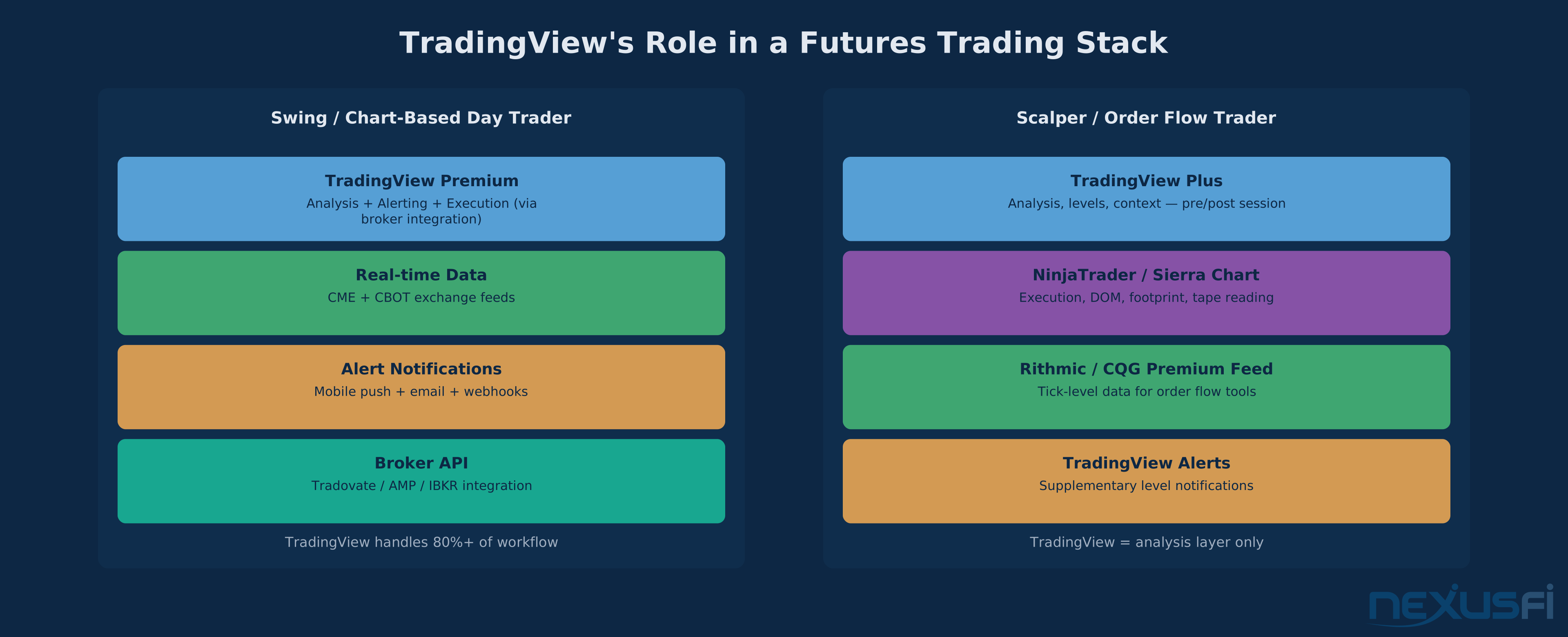
TradingView is the world's most widely used retail charting platform — 90+ million registered users across equities, forex, crypto, and futures. For futures traders specifically, TradingView serves as a powerful analysis and alerting layer: cloud-synced charting with volume profile, Pine Script indicator development, a webhook-based alert engine, and broker integrations for chart-based order entry. It is not, however, a complete execution infrastructure — no DOM, no order flow visualization, and broker-dependent order routing mean that active day traders and scalpers typically pair TradingView with a dedicated execution platform.
This article evaluates TradingView from a futures trader's perspective: what the platform does well, where its limitations matter, how Pine Script fits into strategy development, and which subscription tier matches different trading workflows. Every assessment is grounded in practitioner experience from the NexusFi community.
TradingView is an excellent fit for position traders and swing traders who make decisions from charts. It's adequate for chart-based day traders with caveats around execution. It's a poor fit for scalpers and order flow traders who need DOM and tape reading tools. Match the tool to your trading style before building your workflow around it.
What TradingView Actually Delivers #
TradingView's popularity creates a confusion problem. Traders new to futures often assume it's a one-stop shop: chart here, execute here, automate here. Veterans know better. TradingView is an analysis and alerting layer, not a complete trading infrastructure. Understanding exactly where it excels and where it falls short is the difference between using it productively and fighting its limitations every session.
As @SirianSTO put it on NexusFi: "As a charting platform, TradingView (desktop) is really, really good. Doesn't freeze even at the time of FOMC announcements. Clean interface, very user-friendly." And as @HowardMilano noted: "I use TradingView, main reasons are ease of use (in browser) and script extensibility. I love it that I can go from one computer to another and access the same TradingView in seconds." The cloud-sync workflow is a genuine differentiator that no desktop-only platform matches.
TradingView's strength is charting, analysis, alerting, and Pine Script. Its limitation is execution -- no DOM, no order flow visualization, and broker-dependent order routing. Match the tool to your trading style before committing to a setup built around it.
The TradingView Workspace: Layouts, Watchlists, and Multi-Chart Setup #
The TradingView interface is built around layouts — saved configurations of charts, timeframes, indicators, and drawing tools that persist across sessions and sync across devices. A layout stores everything: instruments, indicators with settings, drawings, and pane divisions. Switch layouts and your entire analysis workspace changes instantly — a trend-following layout for position trades and a scalp layout for intraday moves are one click apart.
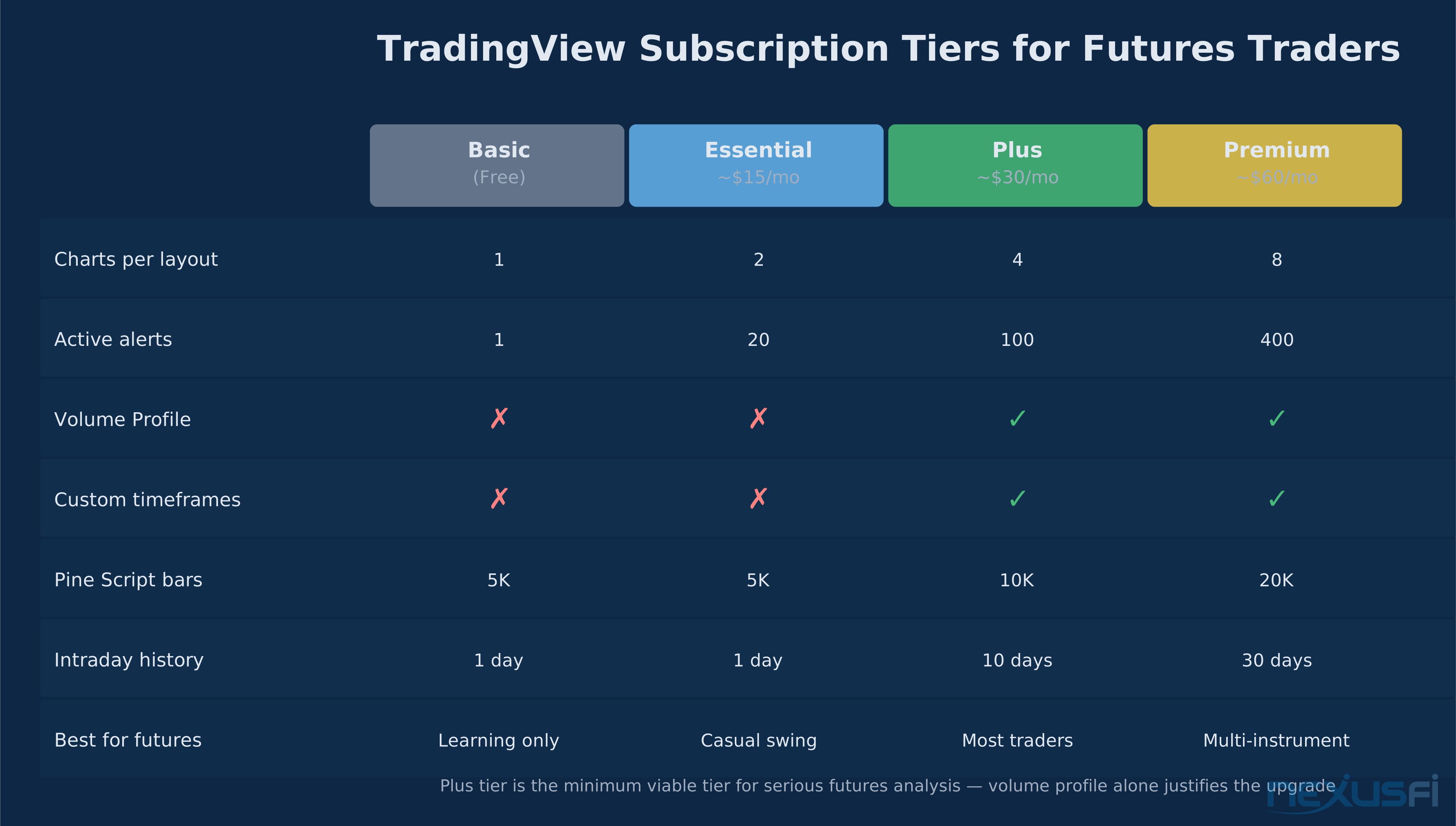
Chart configurations by plan tier:
- Basic (free): One chart per layout. Workable for learning; too limited for active trading.
- Essential (~$15/mo): 2 charts per layout. Tight for any multi-timeframe setup.
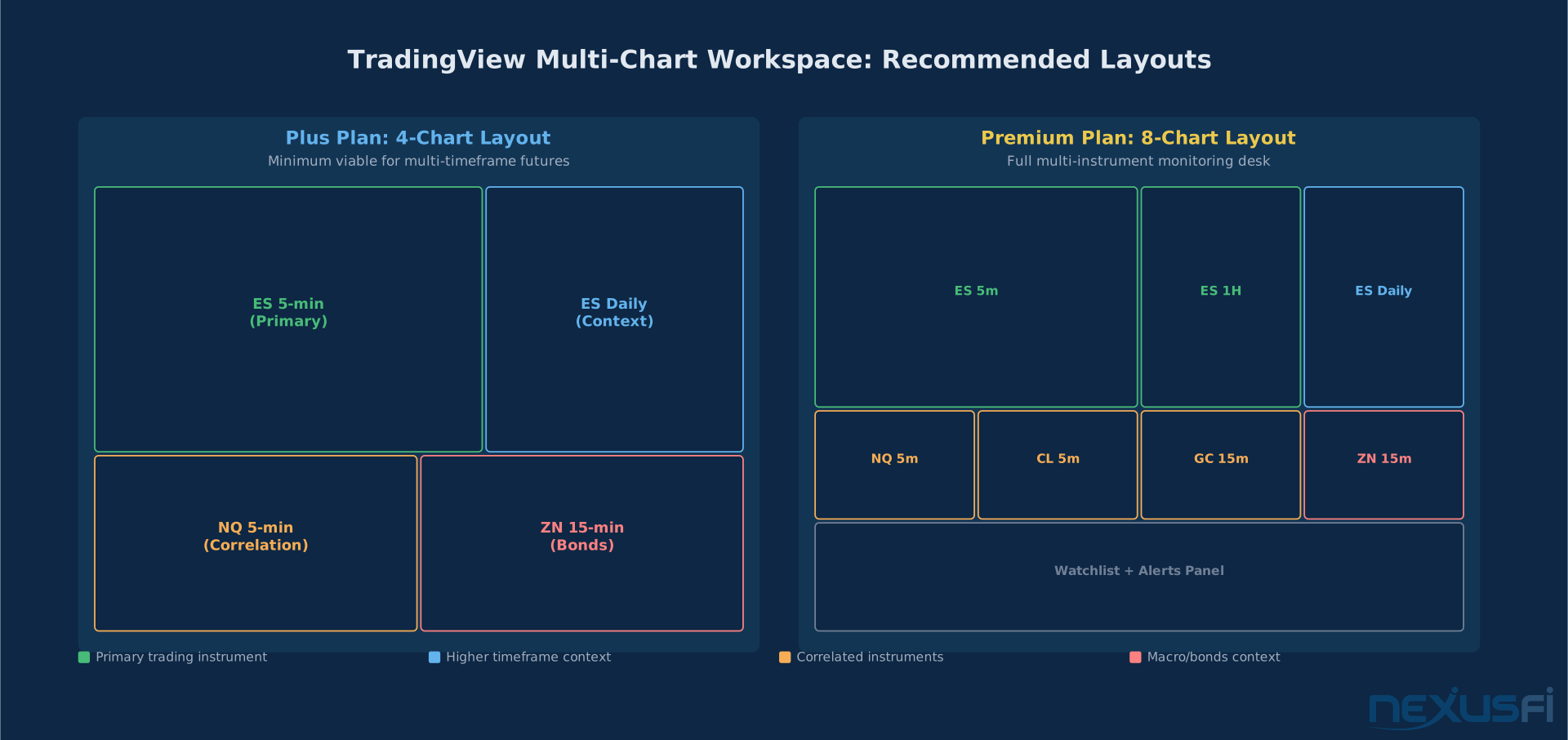
- Plus (~$30/mo): 4 charts. The minimum viable tier for serious futures analysis.
- Premium (~$60/mo): 8 charts. Full multi-instrument, multi-timeframe setups.
For futures traders, the typical Plus layout runs a higher timeframe (daily or 4-hour) alongside your trading timeframe (5-minute or 15-minute), with a separate chart for a correlated instrument (ZN if you're trading ES, for example). Watchlists complement layouts — they're instrument lists with custom columns showing indicator values, price change, or Pine Script expressions. For futures traders tracking ES, NQ, CL, GC, ZB, and currencies, a well-organized watchlist replaces a separate screener subscription.
Charting Capabilities: What Futures Traders Actually Use #
TradingView's charting engine handles everything that chart-based futures analysis requires:
Volume Profile (Plus and above): Session, visible range, and fixed range volume profile are available with CQG data. The accuracy is Level 1 — not tick-level — but sufficient for identifying VAH, VAL, and POC. As @kovacs noted on NexusFi: "Volume data is not tick by tick but still quite precise overall. They have volume profile, vwap and tons of other tools. If you don't need Level 2 you should be fine." And @metalhe4der confirmed: "IMO it's worth the extra dough for me to get access to features I need on a powerful enough cloud platform that I can use from my work computer."
VWAP: Session VWAP with standard deviation bands is built in. Anchored VWAP (from a specific bar, high, or low) is available via Pine Script. Multiple VWAP anchors on the same chart are commonly used for longer-timeframe level identification.
Multi-timeframe drawing sync: Lines drawn on a daily chart appear on your 5-minute chart at the correct levels. This eliminates the manual level-transfer workflow that plagues traders on platforms without cross-timeframe sync.
Continuous contracts: Front-month data transitions without gaps affecting indicator calculations. Switch between continuous contract view and specific expiration months as needed.
Replay mode: Step through historical data bar by bar on any timeframe. Legitimate pattern recognition practice — available on all paid plans.
What TradingView lacks for futures is depth-of-market visualization. Footprint charts, bid-ask volume at each price level, delta analysis, and cumulative delta require external platforms. TradingView is chart-based analysis, not order flow analysis — different toolsets for different trading edges.
Pine Script v5: The Language That Changed Retail Strategy Development #
Pine Script is TradingView's proprietary scripting language — purpose-built for trading, thinking in bars, series, and signals rather than general-purpose abstractions. A trader who has never written code can become productive in Pine Script within days.
As @AllSeeker observed on NexusFi: "Pine is very easy to learn and manipulate, it is very verbose. And if you had any kind of previous programming experience, you can probably do it in couple of days. Its easiest and free way to back test strategies and papertrade."
For context on where Pine Script sits in the scripting ecosystem, @bobwest offered a detailed comparison on NexusFi: "Pinescript is tailored for one environment, the TradingView platform. It's simpler, and can only be used there. NinjaScript is not just C# — it uses the C# language to control the use of NinjaTrader functionality." Pine Script optimizes for speed-to-prototype within TradingView's ecosystem, while NinjaScript offers deeper customization at a steeper learning curve.
Pine Script v5 (the current version) introduced user-defined types for complex data structures, improved loop performance, enhanced request.security() for multi-timeframe data, and more precise strategy.exit() for stop and target placement.
Where Pine Script shines: Custom indicators. If you have a concept — a moving average variant, a volatility band, a pattern recognition rule — you can code it and overlay it on any chart within hours. The feedback loop is immediate: write code, see the result, refine, repeat. The public library contains over 100,000 published scripts — quality varies enormously, but most common concepts already have working implementations you can study or adapt.
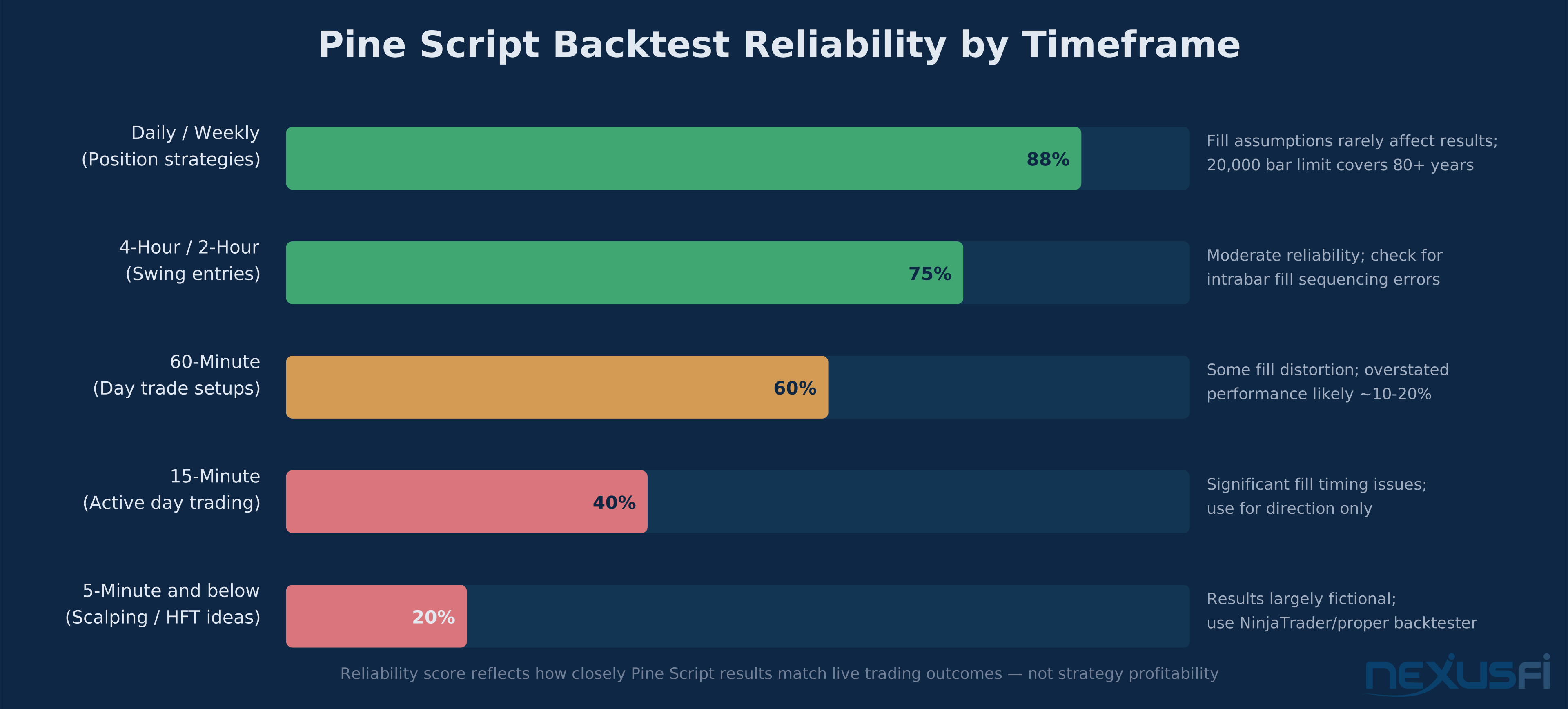
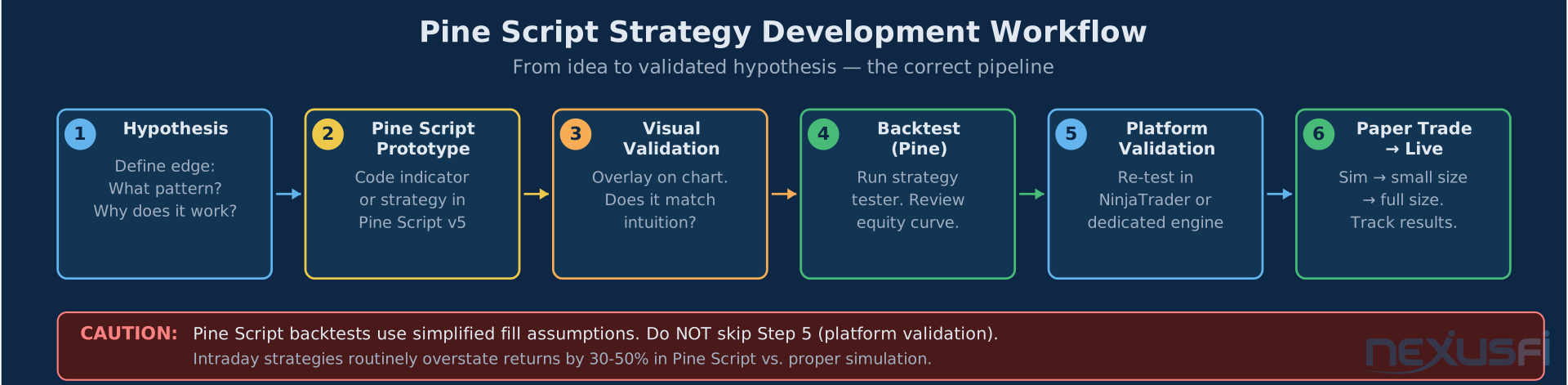
Pine Script's strategy backtester uses simplified fill assumptions that can produce much inflated results for futures day trading strategies. Orders fill at the next bar's open or at the limit price without queue modeling. For 1-minute ES strategies, this creates systematic overstatement of returns. Use Pine Script backtests for directional hypothesis testing, not performance forecasting.
Specific limitations for futures strategy validation:
- Contract roll gaps: Continuous contract data doesn't model roll costs. Strategies holding through quarterly rolls show P&L that doesn't match actual trading economics.
- Bar limit: Plus allows 10,000 bars; Premium allows 20,000. At 1-minute bars for ES, that's ~83 sessions on Premium -- insufficient for strong day trading validation. For daily bars, 20,000 covers decades.
- Intrabar fill sequencing: If a 5-minute bar has both stop and target within its range, Pine Script can't determine which hit first. This creates phantom trades that wouldn't occur live.
- No exchange fee model: CME, NFA, and clearing costs aren't modeled unless manually input. Backtests overstate net performance by $8-15 per round turn at current fee levels.
The correct workflow: use Pine Script for hypothesis generation, indicator development, and initial screening. When a concept survives Pine Script testing, move to NinjaTrader's Strategy Analyzer or a purpose-built backtesting engine before trading it live.
The Alert Engine: Real-Time Notifications and Webhook Automation #
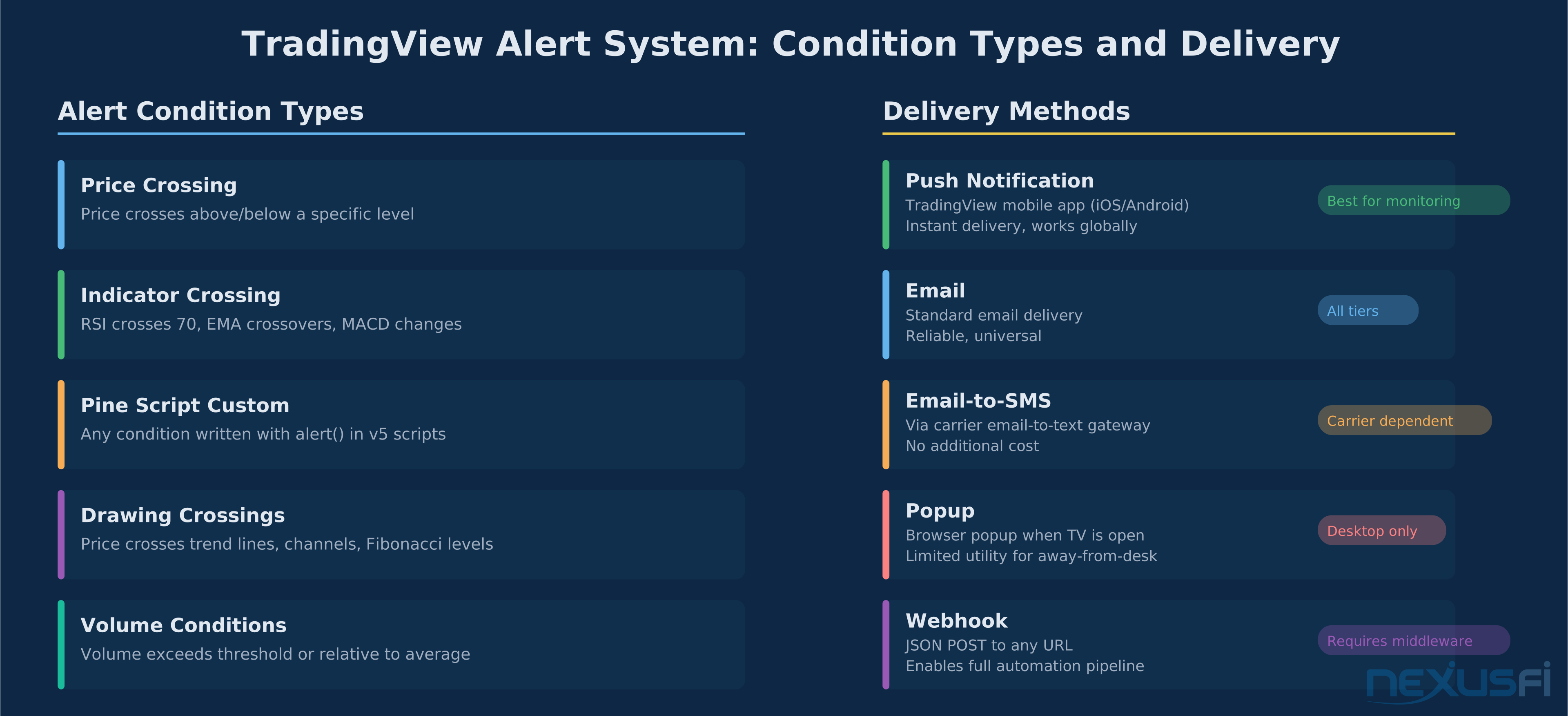
TradingView's alert system is one of its most underutilized capabilities. Most traders set basic price alerts. The alert engine is actually a full event processing system that can trigger on any condition you can express in Pine Script — and send those triggers anywhere via webhook.
Alert condition types: price crossing, indicator crossing (RSI, EMA, MACD), custom Pine Script conditions via alert(), and drawing conditions (trend line crossings).
Delivery options: Push notification, email, email-to-SMS, popup, and webhook. As @bwolf shared on NexusFi: "I was looking for a way to have my phone call me with an alert for when a level is crossed during Globex, when I am asleep. Not a popup on my phone, but an actual phone call instead." Webhook integrations with third-party services extend alerts to phone calls, Slack, Discord, and direct broker API execution.
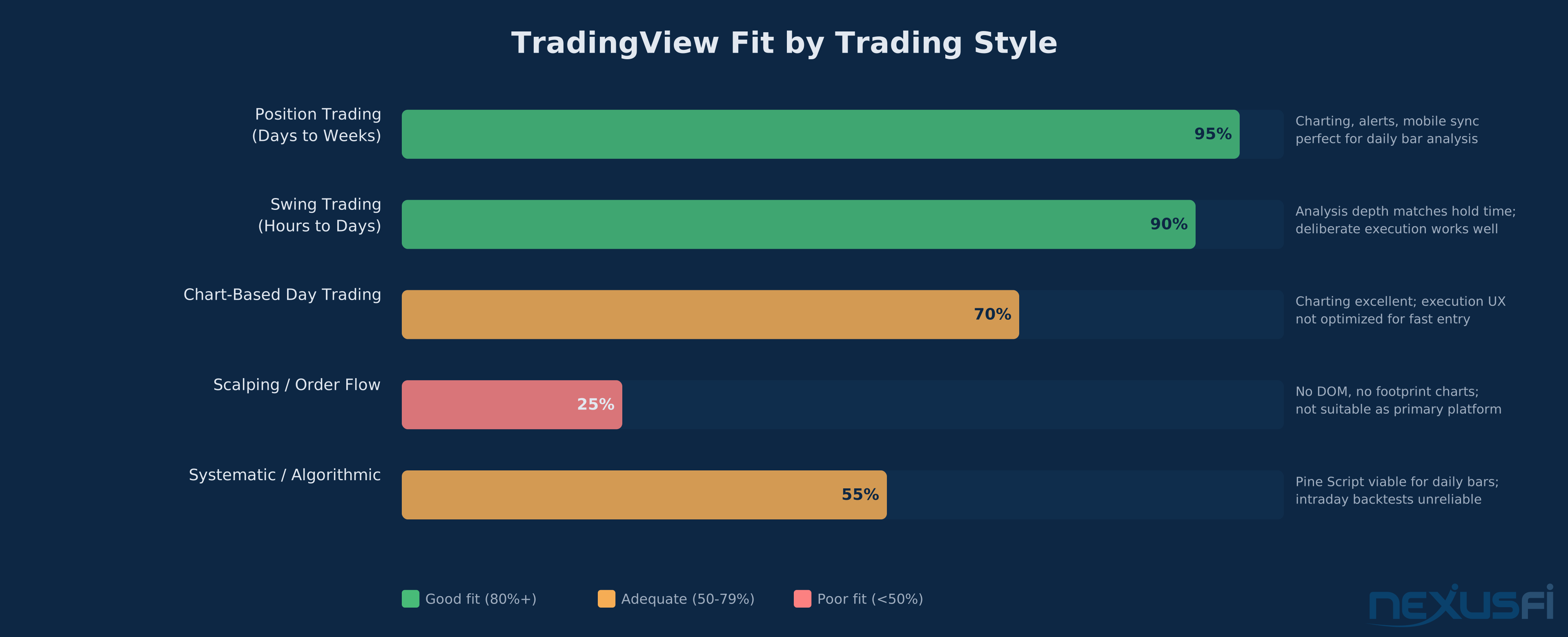
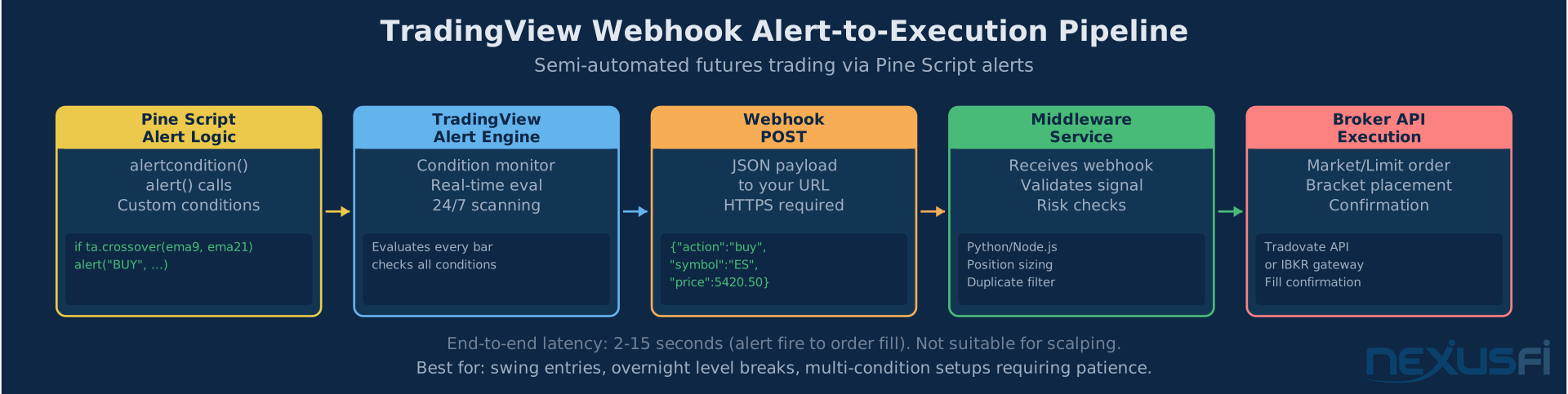
The webhook option is where serious automation becomes possible. When a Pine Script alert fires, TradingView sends a JSON payload to any URL you specify:
{"symbol": "{{ticker}}", "action": "{{strategy.order.action}}", "price": {{close}}, "contracts": 1}This payload is received by middleware that translates it into broker API calls. Popular options include custom Python/Node.js services and broker-specific solutions like Tradovate's webhook API.
End-to-end latency from alert to order fill typically runs 2-15 seconds. Viable for swing entries and overnight level breaks -- not for scalping where sub-second execution matters.
Alert limits: Basic: 1 | Essential: 20 | Plus: 100 | Premium: 400. Plus covers most manual trading workflows. Premium's 400 limit starts to constrain automated multi-instrument systems.
Real-Time Data: Exchange Subscriptions and Data Quality #
TradingView's real-time futures data comes through CQG's Level 1 feed — best bid, best offer, last trade, and aggregated volume. Everything needed for chart-based analysis, level identification, and indicator calculation.
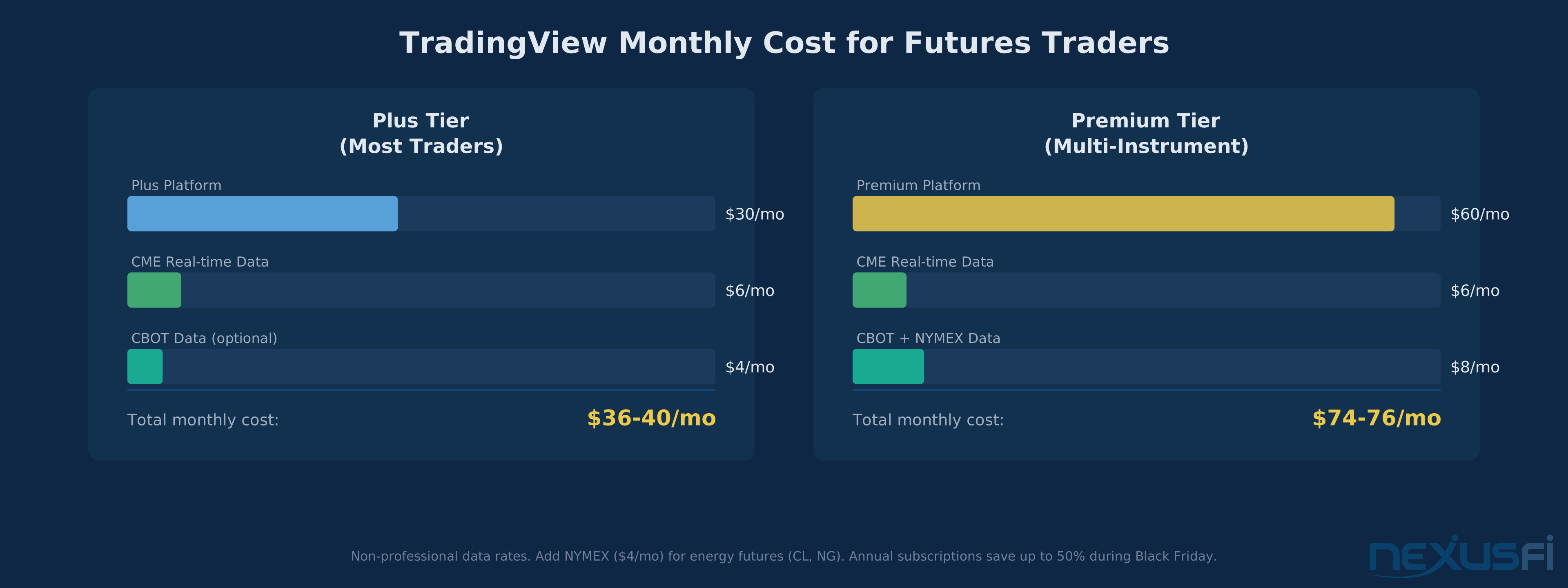
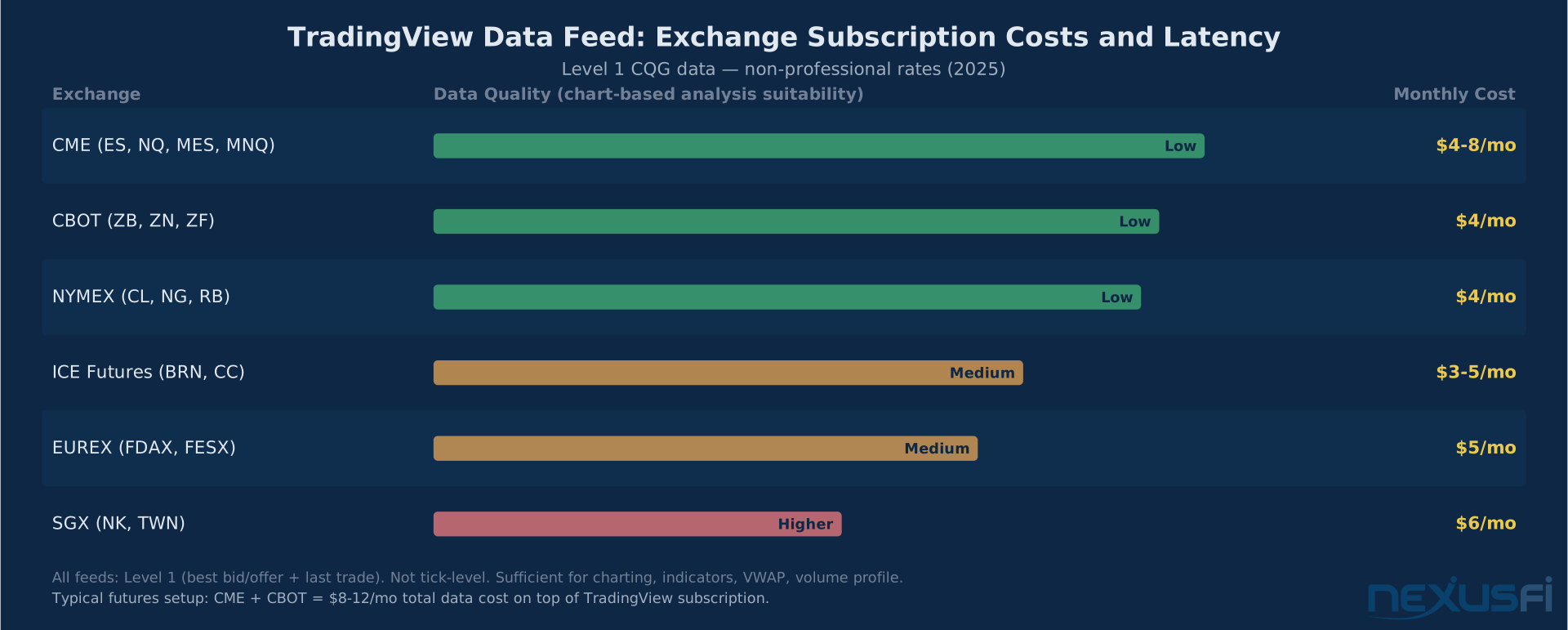
Exchange data subscriptions are separate from your TradingView plan. Current rates (2025, non-professional):
- CME Group (ES, NQ, MES, MNQ, CL, GC): ~$4-8/mo
- CBOT (ZB, ZN, ZF, ZC, ZW): ~$4/mo
- NYMEX (CL, NG, RB): ~$4/mo
- ICE Futures (BRN, CC, KC): ~$3-5/mo
Most futures traders need CME + CBOT for equity index and Treasury futures. Total data cost: typically $8-16/month. As @Grantx advised on NexusFi: "TradingView is a great platform. Just check your data entitlement. For futures you need to be signed up with CQG and an FCM like Dorman."
Non-professional rates are per-user, not per-connection — you can open TradingView on multiple devices simultaneously without duplicate data fees. The data feed is not suitable for tick-by-tick order flow analysis or footprint charts — for those, you need Rithmic or CQG premium data on a dedicated platform.
Community Scripts: Finding Quality in a High-Volume Ecosystem #
The TradingView script library contains 100,000+ published scripts, ranging from professional-grade implementations to indicators with look-ahead bias baked in. Effective evaluation criteria: sustained boost count over time (not quick spikes), Editor's Picks designation, verified author status with multiple quality scripts, and active comment threads discussing real-world usage. Always read source code before using any script for trading — verify calculations only use data available at the bar being plotted.
A significant portion of highly-rated community scripts contain subtle look-ahead bias -- they use future bar data in calculations, producing impressive historical performance that can't be replicated live. Before using any community script for decision-making, verify its calculations only use data available at the close of the bar it's plotting on.
Broker Integration: How Futures Execution Actually Works #
TradingView connects to futures brokers through API integrations that route orders from the chart interface to your broker's servers. The broker connection sends order instructions only — your margin, balance, and positions remain within the broker's platform.
Futures broker integrations (2025): Tradovate, TradeStation, AMP Global, Optimus Futures, Interactive Brokers, and others. Integration depth varies — Tradovate supports brackets, limits, stops, and position monitoring; some support only basic market and limit orders. As @forestcall described on NexusFi: "I can not put it into words why having both Tradovate and TradingView at the same time helps me with my win ratio. But between the 2 tools, I can visualize volume better."
The major limitation, as @SirianSTO identified on NexusFi: "The broker interface is useless because you cannot store order presets. The size is always 1, for example. Anything else, and you have to change it manually before placing the order every time." Dedicated futures platforms (NinjaTrader, Sierra Chart) allow hotkey-triggered orders at predefined sizes, bracket configurations, and OCO setups. TradingView's order entry suits swing traders placing deliberate orders, not day traders needing fast execution.
The workflow serious futures traders converge on: TradingView for analysis and alerting, a dedicated platform (NinjaTrader, Sierra Chart, Jigsaw) for execution. Analysis layer and execution layer as separate applications.
Mobile Access: Monitoring, Not Trading #
TradingView's mobile app (iOS and Android) is genuinely one of the best retail trading apps available. The charting engine runs at full quality — indicators, drawings, multi-timeframe switching, and layout sync all work identically to desktop. Alert management is clean. Position P&L monitoring through broker integrations is reliable.
Where mobile falls short: execution speed and order management. Placing orders from a touchscreen is slower and less precise than keyboard and mouse, compounded by the same preset limitations as desktop. The productive mobile use case: monitoring. Set alerts on desktop, monitor on mobile. Make trading decisions at the screen; manage stops from your phone.
TradingView by Trading Style: An Honest Fit Assessment #
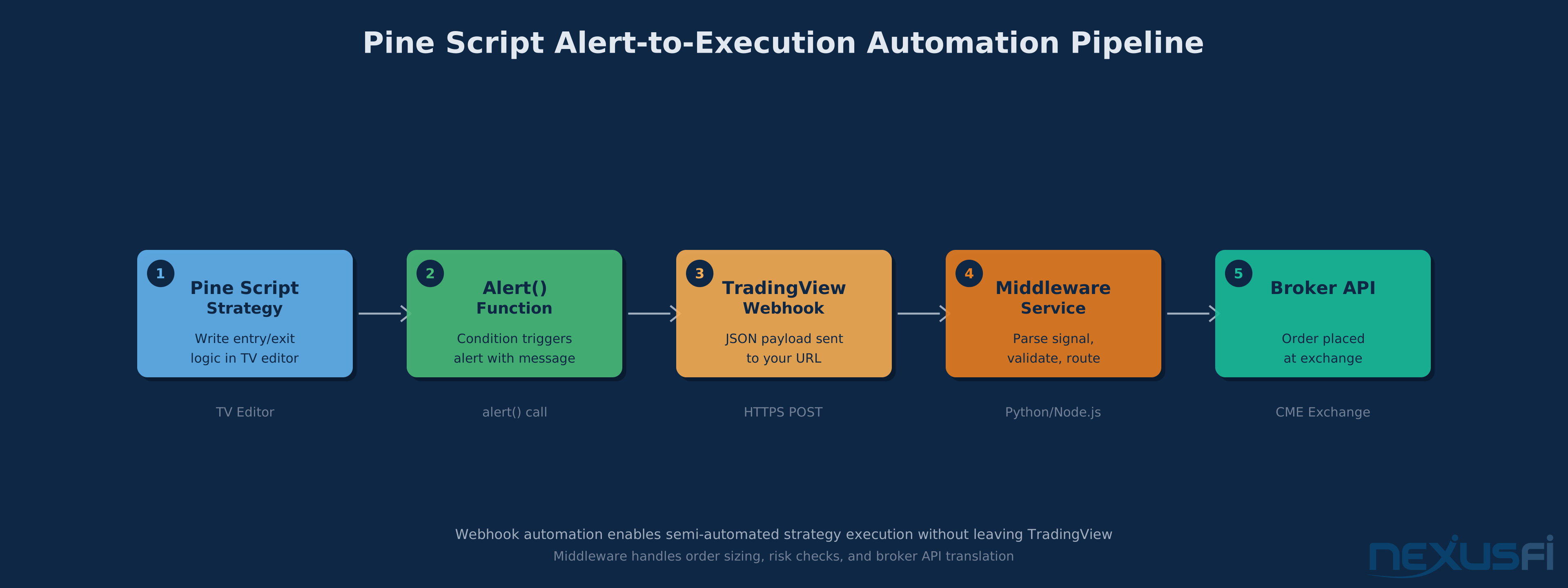
Position traders (days to weeks): Near-perfect fit. All chart analysis tools available, Pine Script backtesting reliable at daily bar resolution, alerts handle overnight monitoring, mobile enables position management anywhere.
Swing traders (hours to days): Strong fit. Multi-timeframe analysis and alerts serve the workflow well. Execution occurs at deliberate entry points where broker integration limitations don't create friction.
Chart-based day traders: Adequate with caveats. Charting and alerts work for intraday analysis, but execution requires accepting broker integration limitations or running a dedicated platform alongside TradingView.
Scalpers and order flow traders: Poor fit. No DOM, no footprint charts, no delta analysis, no tape reading. Use TradingView as a reference layer and trade from a dedicated order flow platform.
Systematic/algorithmic traders: Partial fit. Pine Script webhook automation enables semi-automated signal delivery, but full automation requires middleware. For intraday strategy validation, use a dedicated backtesting platform before live deployment.
Subscription Tiers: Which Plan Fits Your Actual Workflow #
For futures traders, the decision comes down to two questions: do you need volume profile, and how many simultaneous charts do you run?
Plus (~$30/month): Volume profile, 4 charts, 100 alerts, custom timeframes, 10,000 Pine Script bars. The right tier for most active futures traders — volume profile alone justifies the upgrade if you use POC, VAH, and VAL.
Premium (~$60/month): 8 charts, 400 alerts, 20,000 bars. Worth it only if you trade 4+ instruments simultaneously or run complex Pine Script strategies approaching the bar limit.
As @kovacs advised on NexusFi: "If you decide to subscribe, don't purchase a yearly subscription immediately. Buy it during the 2 weeks of Black Friday as there are huge discounts (50-60%)." Annual subscriptions at promotional pricing typically run half the regular price.
Add exchange data ($8-16/month for CME + CBOT). Total: Plus runs $38-46/month; Premium runs $68-76/month.
TradingView in the Futures Platform Ecosystem #
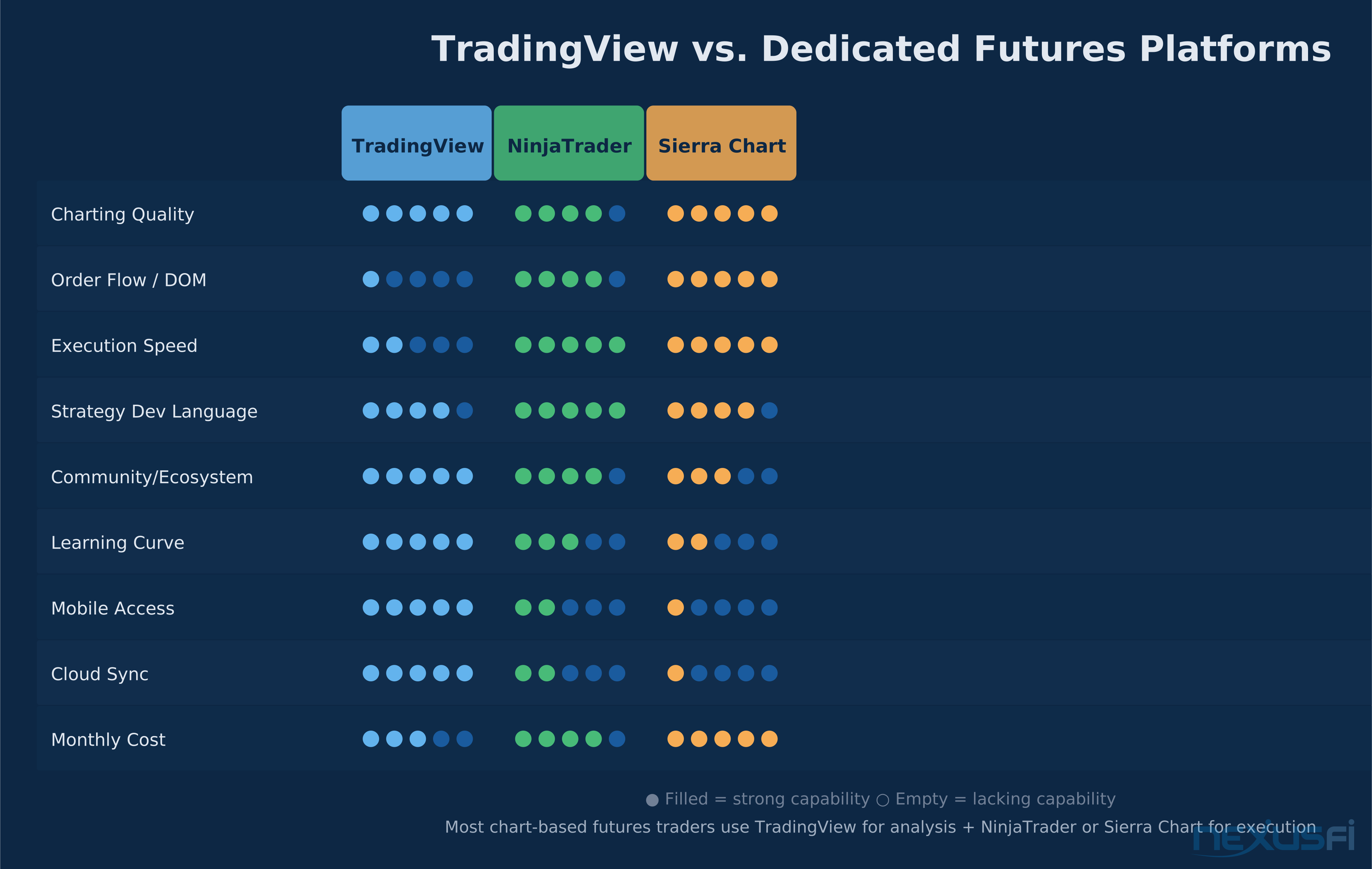
TradingView vs. NinjaTrader: NinjaTrader's execution environment — ATM strategies, bracket orders, hotkey management, C# scripting — outclasses TradingView for active day trading. TradingView wins on cloud sync, mobile quality, community size, and Pine Script accessibility. The convergence pattern: TradingView for analysis, NinjaTrader for execution.
TradingView vs. Sierra Chart: Sierra offers unmatched performance for high-frequency data and customization through ACSIL (C++) that Pine Script can't approach. Sierra's DOM and order flow tools are best-in-class. The tradeoff: configurability vs. accessibility — Sierra can do more, TradingView takes less time to set up productively.
TradingView vs. Tradovate: Tradovate excels at low-latency execution with good bracket management; TradingView's charting and Pine Script ecosystem is much more capable. Many traders use Tradovate for execution connected to TradingView's integration, with TradingView providing superior charting for pre- and post-session analysis.
The consistent theme: TradingView occupies the analysis layer of futures trading infrastructure. Dedicated execution platforms occupy the trading layer. They're complementary tools, not competing alternatives.
Getting Set Up: The Practical Workflow for Futures Traders #
The setup sequence that minimizes friction:
Step 1: Start with a free account for 2-4 weeks. Explore charting, build a futures watchlist (ES, NQ, CL, GC, ZB minimum), test the indicator library.
Step 2: Subscribe to Plus during a Black Friday promotion. Volume profile and 4 charts are the inflection point for productive futures use.
Step 3: Add CME real-time data ($4-8/month). Add CBOT for Treasuries, NYMEX for energy.
Step 4: Build 2-3 named layouts — a higher-timeframe contextual layout and an intraday layout.
Step 5: Connect your execution platform on a second monitor. Use TradingView for level identification, trade from NinjaTrader/Sierra Chart/broker native platform.
Step 6: Set alerts at 3-5 key levels per instrument. Let alerts come to you instead of watching every tick.
TradingView runs 50-60% discounts during Black Friday and Cyber Monday. An annual Plus subscription at Black Friday pricing costs less than 6 months at regular monthly rates. Sign up free first, use any trial offered, and wait for a promotion before committing.
The Bottom Line #
TradingView excels as an analysis and alerting layer for futures traders. Pair it with a dedicated execution platform for DOM and order flow — that combination covers 90% of what retail futures traders need.
TradingView is the right charting platform for most futures traders who make decisions from charts, indicators, and price structure rather than from order flow and real-time order book dynamics. Its charting quality is genuine, Pine Script has a real ecosystem, the alert system is more capable than most traders use, and the cloud-sync mobile workflow is unmatched.
The honest limitation remains consistent: it's not a complete execution infrastructure. Order management, fast bracket placement, and DOM-based execution require a dedicated futures platform. The traders who get most value from TradingView treat it as their analysis environment and connect a specialized execution tool for trading.
As the NexusFi community has consistently documented: TradingView for the analysis. A dedicated platform for the trade. Both running simultaneously on a multi-monitor setup is the configuration that serious chart-based futures traders actually use.
Knowledge Map
Prerequisites
Understand these firstGo Deeper
Build on this knowledgeReferences This Article
Articles that build on this topicCitations
- — Tradingview (2023)“As a charting platform, TradingView (desktop) is really, really good. Doesn't freeze even at the time of FOMC announcements. Clean interface, very user-friendly.”
- — Tradingview (2023) 👍 1“The platform is great, especially if you trade long term. The learning curve is low compared to Sierra.”
- — WHAT ARE THE MOST POPULAR PLATFORMS? (2019) 👍 1“Pine is very easy to learn and manipulate, it is very verbose. And if you had any kind of previous programming experience, you can probably do it in couple of days.”
- — Tradingview (2023)“The broker interface is useless because you cannot store order presets. The size is always 1, for example.”
- — Rrrracer's complete noob starting from scratch journal (2017) 👍 2“No question, it's fast, reliable, powerful and can do just about anything.”
- — Pinescript VS NinjaScript (2023) 👍 3“Pinescript is tailored for one environment, the TradingView platform. It's simpler, and can only be used there. NinjaScript is not just C# -- it uses the C# language to control the use of NinjaTrader functionality.”
- — Tradingview Phone Call Alert (2023) 👍 5“I was looking for a way to have my phone call me with an alert for when a level is crossed during Globex, when I am asleep. Not a popup on my phone, but an actual phone call instead.”
- — Tradovate - Im trading Micro E-Mini Futures - Do I need "Market Internals" data feed? (2020) 👍 9“I can not put it into words why having both Tradovate and TradingView at the same time helps me with my win ratio. But between the 2 tools, I can visualize volume better.”
- — Most important features in a trading platform? (2021) 👍 1“I use Tradingview, main reasons are ease of use (in browser) and script extensibility. I love it that I can go from one computer to another and access the same Tradingview in seconds.”
- — Rrrracer's complete noob starting from scratch journal (2017) 👍 2“TradingView is a great platform. Just check your data entitlement. For futures you need to be signed up with CQG and an FCM like Dorman.”
- — TradingView cloud based software (2016) 👍 2“IMO it's worth the extra dough for me to get access to features I need on a powerful enough cloud platform that I can use from my work computer.”