



Jigsaw Daytradr: The Order Flow Workspace That Shows You What the DOM and Tape Are Actually Saying
Overview #
Jigsaw Daytradr is an order flow trading platform built specifically for futures scalpers and day traders who make decisions based on what's happening in the order book — not on chart patterns, indicators, or price action alone.
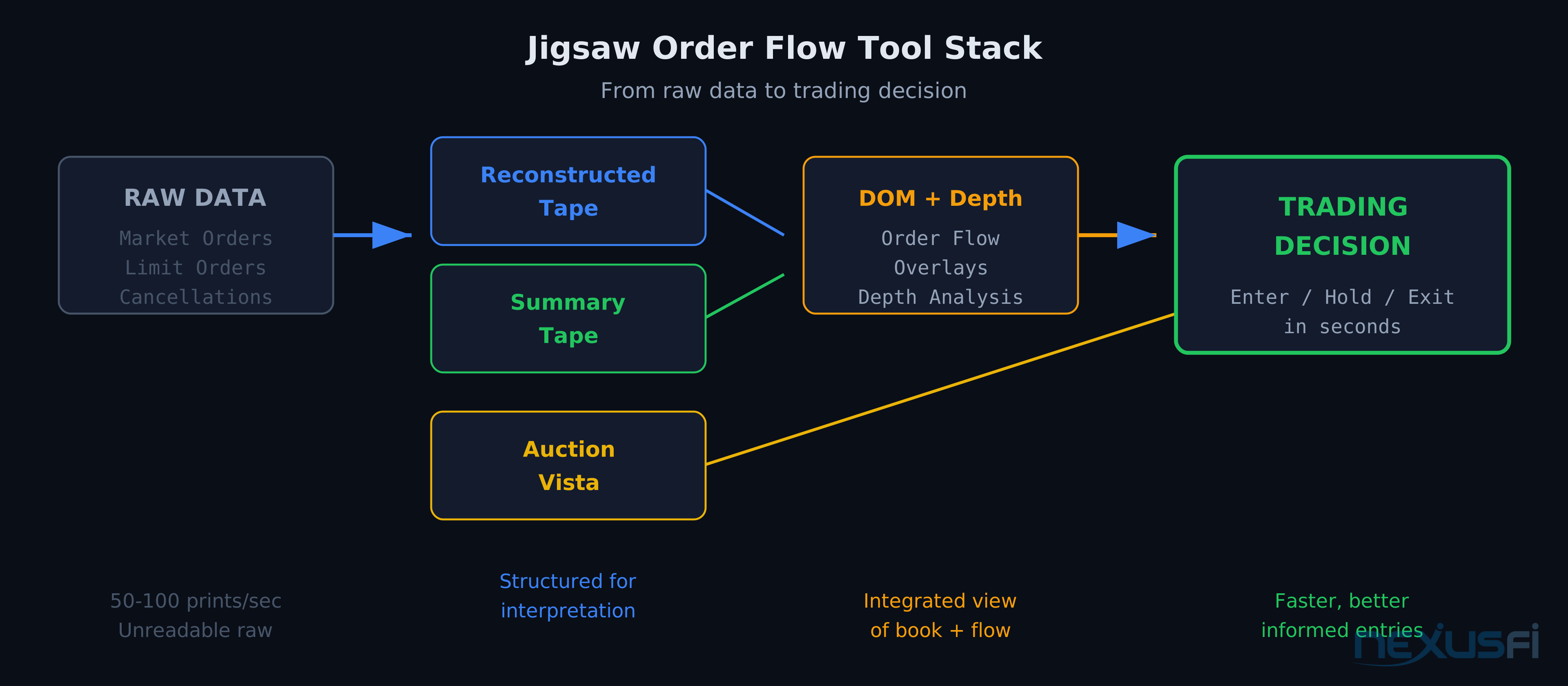
The core proposition: built-in DOMs in NinjaTrader, Sierra Chart, and most other platforms show the order book and time & sales as raw data streams. Jigsaw restructures that data into interpretation layers — tools that compress, filter, and contextualize the raw feed into information you can act on in real time. The difference between raw data and interpreted data is the difference between watching a firehose and reading a story.
The platform connects to data feeds like CQG, Rithmic, and IQFeed, and integrates with execution platforms including NinjaTrader, MultiCharts, and others. It's not a replacement for your charting platform — it's a replacement for your DOM and tape reading tools, running alongside your charts and feeding into your execution workflow.
Key Concepts #
Understanding Jigsaw requires understanding the underlying order flow concepts it's built to reveal.
DOM (Depth of Market) The DOM shows the limit orders resting in the order book at each price level. Left column = bid-side orders (buyers waiting); right column = offer-side orders (sellers waiting). A basic DOM shows the current state of these limit orders. Jigsaw's DOM goes further: it tracks how orders change in real time — added, pulled, refreshed — while showing the aggression of market orders hitting those limits. See Depth of Market (DOM): Reading the Order Book for the full conceptual breakdown.
Order Flow Order flow is the net directionality of orders entering the market. The most useful information comes from understanding who is initiating and who is responding. Aggressive market orders (initiators) move price. Passive limit orders (responders) absorb that aggression. The balance between initiation and absorption tells you where the conviction is.
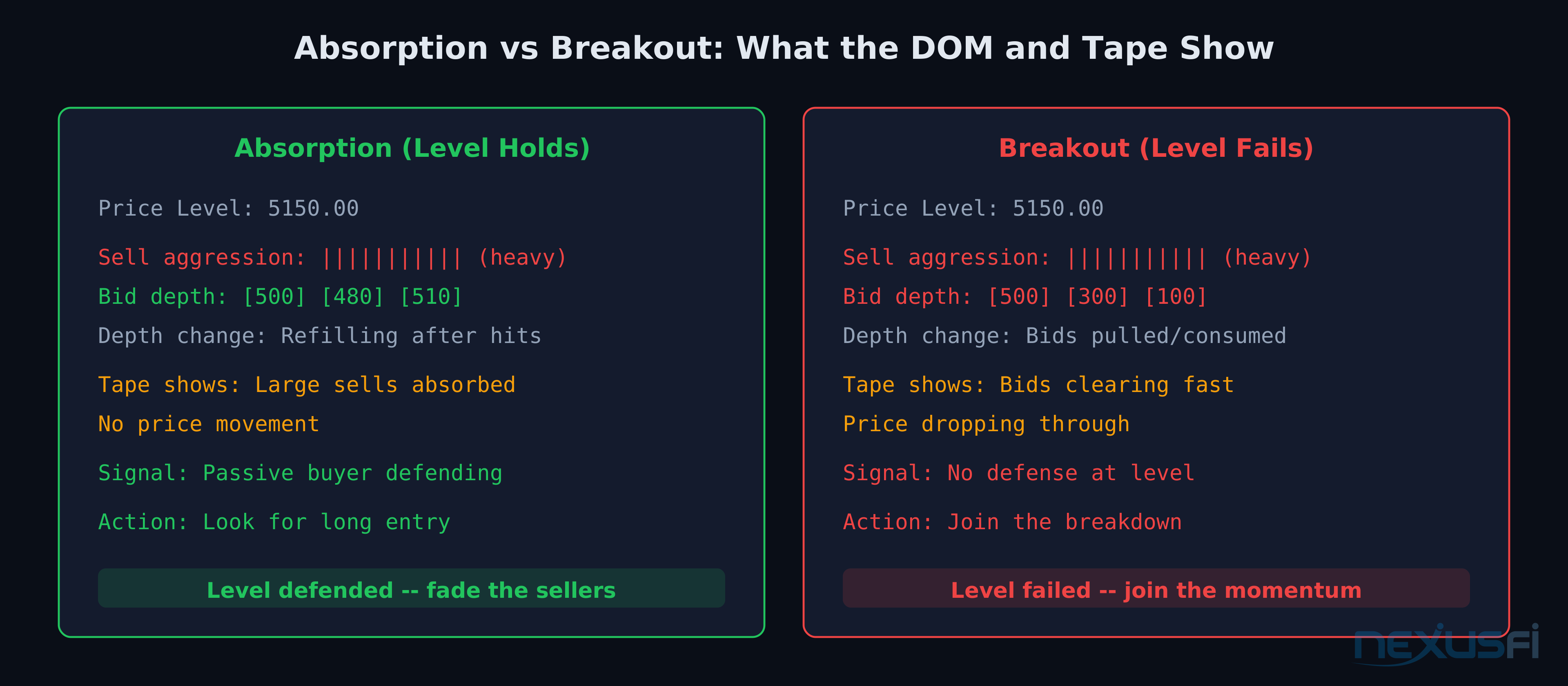
Absorption Absorption occurs when one side of the market is unable to move price despite significant aggressive activity. Large sell aggression that fails to push price lower indicates buyers are absorbing the selling — large limit orders at the bid are eating the supply without the market tipping. This is one of the highest-probability signals in DOM trading: if sellers are trying hard and can't drive price down, there are large buyers defending that level.
Reconstructed Tape Raw time & sales runs too fast to read in an active futures market. The reconstructed tape rebuilds individual prints into sequences, showing clusters of activity at each price level rather than individual transactions. When a large buyer sweeps through a level in ten separate 100-lot prints, the reconstructed tape shows you one 1,000-lot event — making the actual story of what's happening visible.
Auction Vista Jigsaw's heat map visualization layer. Displays a time-based view of limit order activity across prices, showing where liquidity is being placed, pulled, and consumed over time. Makes large order placement and withdrawal patterns — including iceberg orders — visible in a way that a numeric DOM cannot.
How Jigsaw Works #
The DOM Interface #
Jigsaw's DOM is built around a single principle: every piece of information on the screen should help you make a trading decision in the next few seconds. The interface tracks how many contracts have traded at each price, how many were buy-initiated vs. sell-initiated, and how the order book is changing as price approaches key levels.
Standard DOMs show the current state of the order book as a static snapshot — what's there right now, but not whether those orders are genuine, whether they've been building or shrinking, or what happened on the last three ticks. Jigsaw's DOM adds that temporal dimension: showing change, not just state — which is the critical difference for a scalper making decisions in seconds.
Reconstructed Tape #
Jigsaw's reconstructed tape takes a different approach than filtering. Instead of showing every print individually, it rebuilds the tape into meaningful events. When a buyer sweeps through 800 contracts in 12 separate lots, the reconstructed tape shows "800 contracts bought, buy aggressor." For scalpers, this is the difference between staring at a waterfall of numbers and reading a story with characters (large passive defenders, aggressive initiators, iceberg orders), a plot, and turning points you can act on.
Summary Tape and Auction Vista #
The summary tape compresses execution data further. Instead of showing individual reconstructed sequences, it aggregates by price and time, presenting volume imbalances and intensity metrics you can scan in a glance. When you see deep imbalances building at a level — 5,000 buy contracts vs. 800 sell contracts — that's absorption quantified.
Auction Vista provides a heat-map visualization of how liquidity is being consumed across price and time. It shows where large orders are sitting, how the bid/ask environment is shifting, and where the "fight" is happening. When price approaches a significant level, Auction Vista shows whether there's heavy order density at that level (suggesting it will hold) or whether orders are being pulled as price approaches (suggesting failure).
Auction Vista is especially useful for identifying iceberg orders — large orders that periodically refresh to maintain a constant visible size while quietly accumulating or distributing. These orders leave distinctive patterns in the heat map that are nearly impossible to identify from tape reading alone.
Platform Integration #
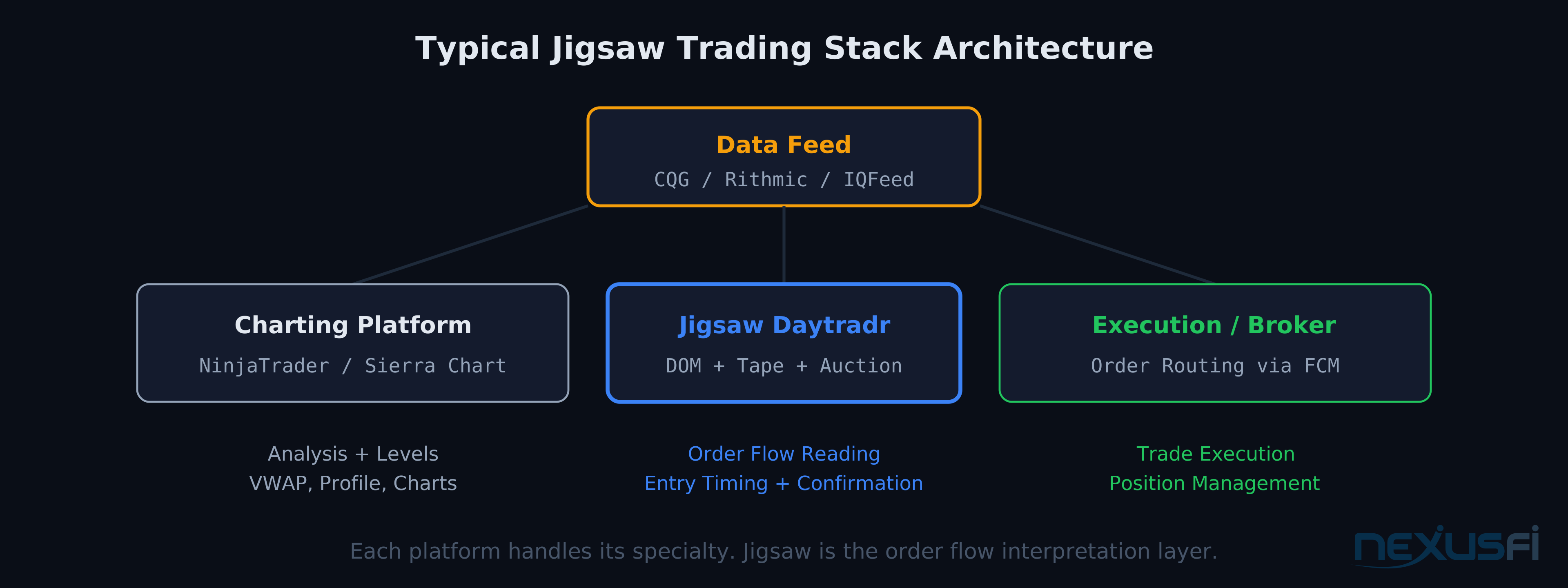
Jigsaw doesn't replace your charting platform. It replaces your DOM and tape reading tools. The typical setup:
- Charting and analysis: NinjaTrader, Sierra Chart, or TradingView
- Order flow reading: Jigsaw Daytradr
- Execution: Through Jigsaw's DOM or your execution platform
- Data feed: CQG, Rithmic, or IQFeed connected to Jigsaw
The workflow: use charts to identify what to trade (the thesis — a key level, a value area, a market structure inflection point), then switch to Jigsaw to determine when to trade it (the execution — when the DOM and tape confirm the thesis is valid right now).
Sierra Chart Integration #
Sierra Chart already has strong built-in order flow tools — footprint charts, cumulative delta, numbers bars, and a capable native DOM. Some Sierra Chart users find its built-in capabilities cover their needs without adding Jigsaw. Others use Jigsaw specifically for the reconstructed tape and Auction Vista while keeping Sierra Chart for charts.
Data Feed Considerations #
Jigsaw supports CQG, Rithmic, and IQFeed as data sources. The choice of data feed affects order flow quality much:
- CQG: Generally considered most accurate for order flow work, with reliable bid/ask attribution
- Rithmic: Fast and widely used, good for most order flow applications
- IQFeed: Primarily used for charting/historical data; less common as a primary order flow feed
The bid/ask attribution issue is critical for order flow analysis. If your data feed miscategorizes market orders (because of latency in reporting), your tape analysis will be distorted. CQG's direct exchange connections minimize this. If you're seeing persistent unexplained divergences between tape direction and price movement, your data feed's bid/ask attribution is worth investigating.
Jigsaw vs. Built-In DOM Tools #
What Built-In DOMs Do Well #
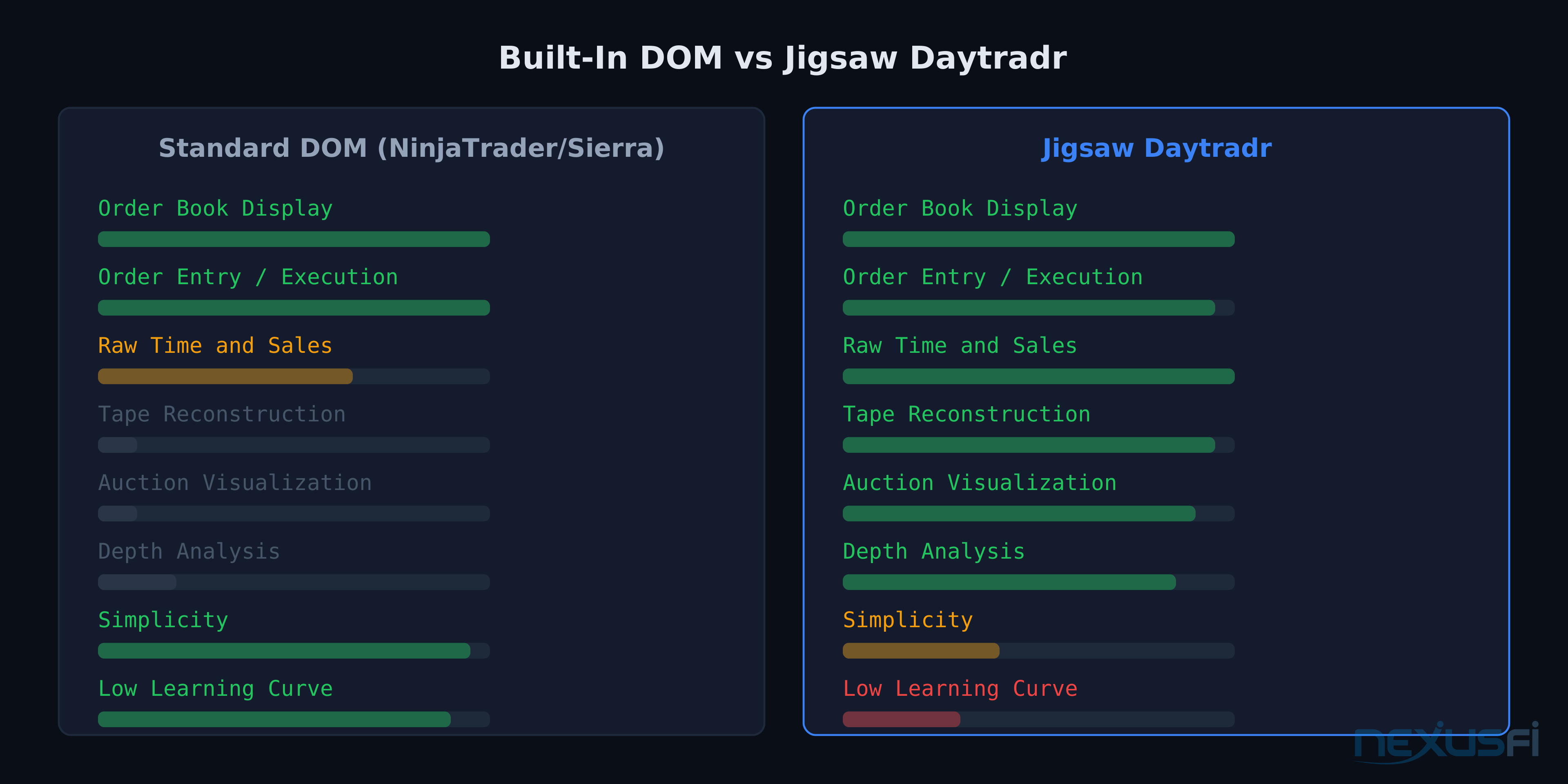
NinjaTrader's SuperDOM and Sierra Chart's Trading DOM are competent execution surfaces. They show the order book, let you place and manage orders efficiently, and display basic time & sales. For traders who use charts for analysis and the DOM primarily for order entry, built-in tools are usually sufficient.
Sierra Chart goes further with built-in footprint charts, numbers bars, and cumulative delta — for chart-focused order flow traders, these tools provide enough context without adding Jigsaw. If your method involves analyzing completed bars (footprint charts, TPO profiles) rather than live DOM and tape, you may not need Jigsaw's real-time tools.
Where Jigsaw Adds Value #
Jigsaw's edge is in the interpretation layers:
- Tape reconstruction takes an unreadable stream and turns it into events you can act on in real time. Unavailable in any built-in DOM
- Summary tape gives you a running score of who's winning the current auction, updated in real time
- Auction Vista is a full-featured heat map visualization
- Depth analysis shows how the order book is changing, not just what it looks like at a single moment
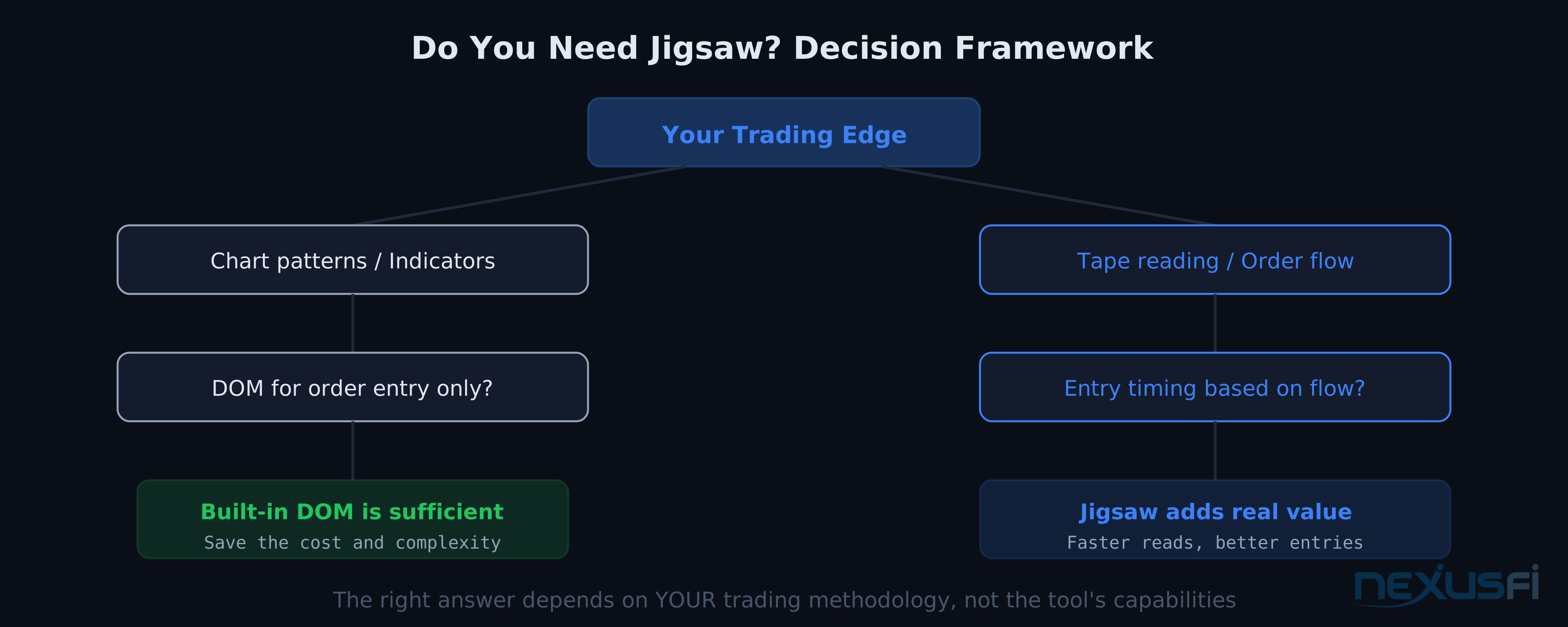
Use built-in DOM tools if:
- Your edge comes from chart patterns, indicators, or footprint analysis
- You use the DOM primarily for order entry, not for reading flow
- Your trading timeframe is minutes to hours, not seconds to minutes
Consider Jigsaw if:
- Your edge depends on reading the tape and DOM in real time
- You make entries based on absorption, aggression, and liquidity shifts
- You trade very short timeframes where seconds matter
- You trade liquid futures markets (ES, NQ, CL, GC, ZN) where order book data is meaningful
Practical Trading with Jigsaw #
What Jigsaw Excels At #
Absorption detection is perhaps Jigsaw's strongest use case. When price approaches a key level and you need to know whether buyers or sellers are defending it with conviction, the DOM and summary tape give you a near-real-time read on whether large passive orders are absorbing aggression.
Breakout confirmation is equally valuable. Before committing to a breakout trade, Jigsaw lets you check whether the tape shows genuine aggressive momentum (large market orders stepping through multiple levels) or a thin-book move that could reverse quickly. Breakouts on thin order books are traps. Breakouts with heavy initiation and no defensive absorption at the breakout level are real.
Fade setups at extremes require knowing whether the extreme is defended. When price pushes to a range high and the DOM shows a large offer building and holding, while the tape shows aggressive selling stepping in, you have confirmation for a fade.
The Learning Curve #
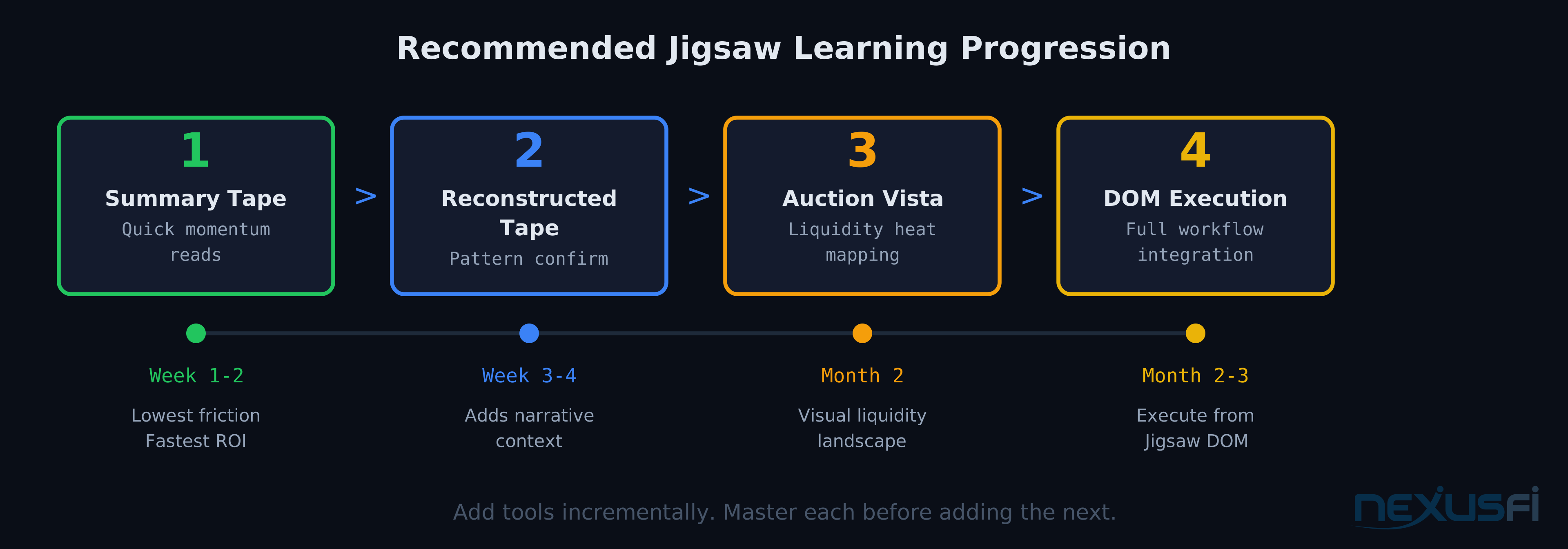
Order flow trading has a genuine learning curve, and Jigsaw's tools add another layer on top. The traders who succeed almost universally start with one tool, get comfortable over weeks, then layer in the next.
Recommended progression:
- Learn order flow concepts first (absorption, aggression, imbalance) — Jigsaw's own educational materials are significant
- Start with the summary tape on markets you know well, watching it alongside your existing analysis
- Add reconstructed tape for confirmation and pattern recognition once the summary tape reads naturally
- Incorporate Auction Vista once tape reading is comfortable — it adds a visual layer to patterns you already understand numerically
- Integrate execution through Jigsaw's DOM last — changing execution workflow while simultaneously learning new analysis tools creates cognitive overload
Pricing and Cost Considerations #
Jigsaw uses a subscription model with tiers: simulation/educational access for learning without live execution, and professional/live access for full DOM execution. Verify current rates at jigsawtrading.com — pricing changes over time.
Key cost factors to evaluate:
- Software subscription (monthly fee for Jigsaw itself)
- Data feed costs (CQG or Rithmic carry their own monthly charges)
- Exchange data fees (CME, ICE, and others apply separately)
- Live DOM fee (additional charge for executing trades from Jigsaw's DOM vs. analysis-only use)
Compare against your current stack. If you're already paying for a NinjaTrader lease plus CQG data, adding Jigsaw is incremental. The ROI question is personal — for high-frequency scalpers, even a 0.25-point improvement in average entry quality on ES pays for the software quickly.
Journalytix: The Trade Review Tool #
Jigsaw includes Journalytix, a trade journal and analytics platform that connects directly to your execution data. Rather than manually logging trades, Journalytix captures them automatically and analyzes performance patterns — win rate and profit factor by time, instrument, and direction; overtrading patterns; and execution quality metrics. For traders working on discipline alongside order flow skill, the combination of real-time tools and systematic post-session review creates a feedback loop that accelerates skill development.
Who Should Use Jigsaw #
Ideal users:
- Futures scalpers who take 5+ trades per day and need sub-second market reads
- DOM/tape traders who understand order flow concepts and want professional-grade tools
- Treasury and interest rate traders (ZN, ZB) where DOM dynamics are especially rich
- ES, NQ, CL, GC traders in active sessions where order flow data is abundant
- Traders transitioning from chart-only to order flow who want structured, interpreted tools
Poor fit:
- Swing traders holding for hours or days — DOM dynamics are noise at that timeframe
- Indicator/chart pattern traders who don't incorporate order flow
- Beginners who haven't learned basic trading concepts yet — the learning curve compounds
- Low-volume markets where order flow signals are sparse and unreliable
Knowledge Map
Prerequisites
Understand these firstGo Deeper
Build on this knowledgeReferences This Article
Articles that build on this topicCitations
- — Jigsaw Trading, Daytradr and Journalytix (2013) 👍 16“Without the Jigsaw depth and sales DOM you will have an extremely hard time detecting these things as they occur”
- — DOM/ORDERFLOW TRADING (2021) 👍 4“The DOM of Jigsaw gives you all the information at micro level. You see aggressive sellers and aggressive buyers based on the market orders.”
- — Jigsaw Trading's Peter Davies AMA (2022) 👍 3“When volume comes in you're getting an update for every limit order that was filled rather than an update for each market order -- hence the purpose behind Jigsaw's reconstructed tape.”
- — Jigsaw Trading, Daytradr and Journalytix (2012) 👍 6“I found that the change in the limits in the book -- which his tool shows in real time -- was very valuable information for me.”
- — Bookmap vs Jigsaw Daytradr (2020) 👍 19“I use both. I find Jigsaw is way too easy to place trades and Bookmap is great with seeing a visual of your DOM.”
- — Jigsaw Trading, Daytradr and Journalytix (2016) 👍 2“With Auction Vista I have a heatmap free of charge, so to speak.”
- — Sierra vs jigsaw (2023) 👍 7“Sierra Chart is the Swiss army knife of trading platforms; Jigsaw has a deep focus on the DOM and tape that sets the standard for order flow centered trading.”
- — No BS Day Trading (2013) 👍 17“The first issue is your data feed. Some feeds have trouble distinguishing between if a market order was processed at bid or at offer -- this can really affect your chance of success.”
- — Bookmap vs Jigsaw Daytradr (2020) 👍 6“Jigsaw Tools provided multiple ways to look at order flow, and Auction Vista seems so easy to read.”
- — Jigsaw Trading, Daytradr and Journalytix (2013) 👍 10“For me it was the missing piece to profitable trading. PERIOD. It takes some time to learn and to train your eyes and mind but the effort is well worth it.”
- — Jigsaw Trading, Daytradr and Journalytix (2016) 👍 7“Within the space of a couple of days, I was able to see what was going on in the order book.”