



DOM Trading Platforms: Choosing the Right Price Ladder for Futures Execution
Overview #
Every futures trader eventually lands on the same question: which platform gives me the best DOM? The price ladder is where execution happens — limit orders, stop placement, bracket management, the whole nine yards. And the gap between a good DOM and a bad one isn't cosmetic. It's the difference between confident execution and fighting your own tools during fast markets.
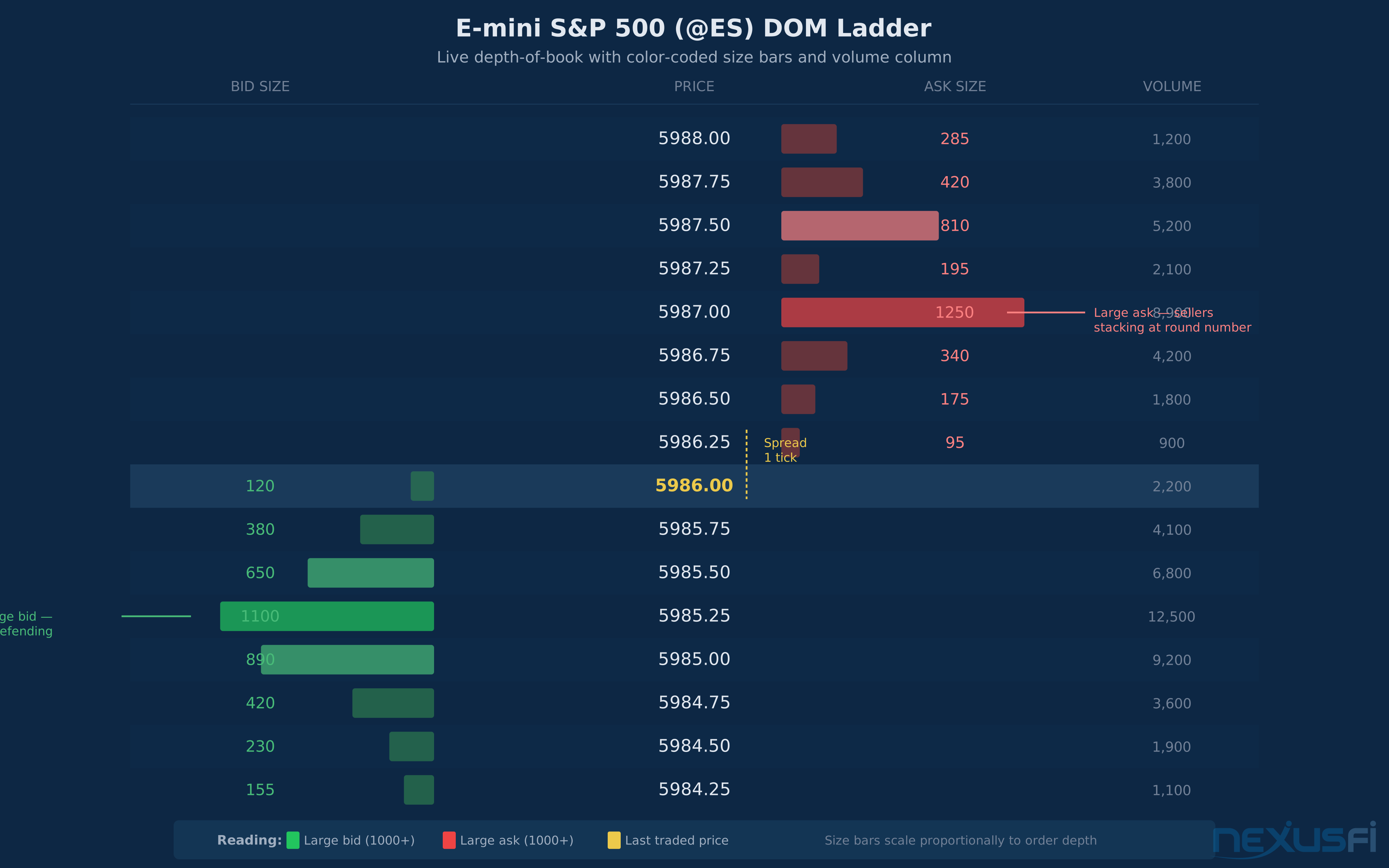
The DOM looks simple on the surface. Bids on the left, asks on the right, a price column in the middle. But even this basic orientation trips people up — as @Ecclesiastes clarifies, the buy side of the DOM is actually the offer (ask) side, and the sell side is the bid, which feels backwards until you think about who is doing the buying and selling at each level. [8] And the details diverge wildly between platforms. Sierra Chart offers a Chart DOM that overlays the order book directly on your candlestick chart — nobody else does this. NinjaTrader's SuperDOM has deep ATM strategy integration for automated bracket management. Jigsaw's Daytradr was purpose-built for DOM scalpers. And Trading Technologies (TT) set the original standard that everyone else is still chasing.
For a full breakdown of what the DOM actually shows you and how to read it, see Depth of Market (DOM): Reading the Order Book in Futures Trading. This article is about the platforms — what features matter, how they compare, and how to pick the right one for how you trade.
Key Factors #
Not all DOM features matter equally. What really moves the needle, ranked by impact on your trading execution.
1. Update Speed and Data Throughput #
This is the factor that separates platforms at a fundamental level. When ES is ripping through levels during a news release, you need the DOM to keep up. If your price ladder stutters, lags, or freezes, you're trading blind in exactly the moments where execution matters most.
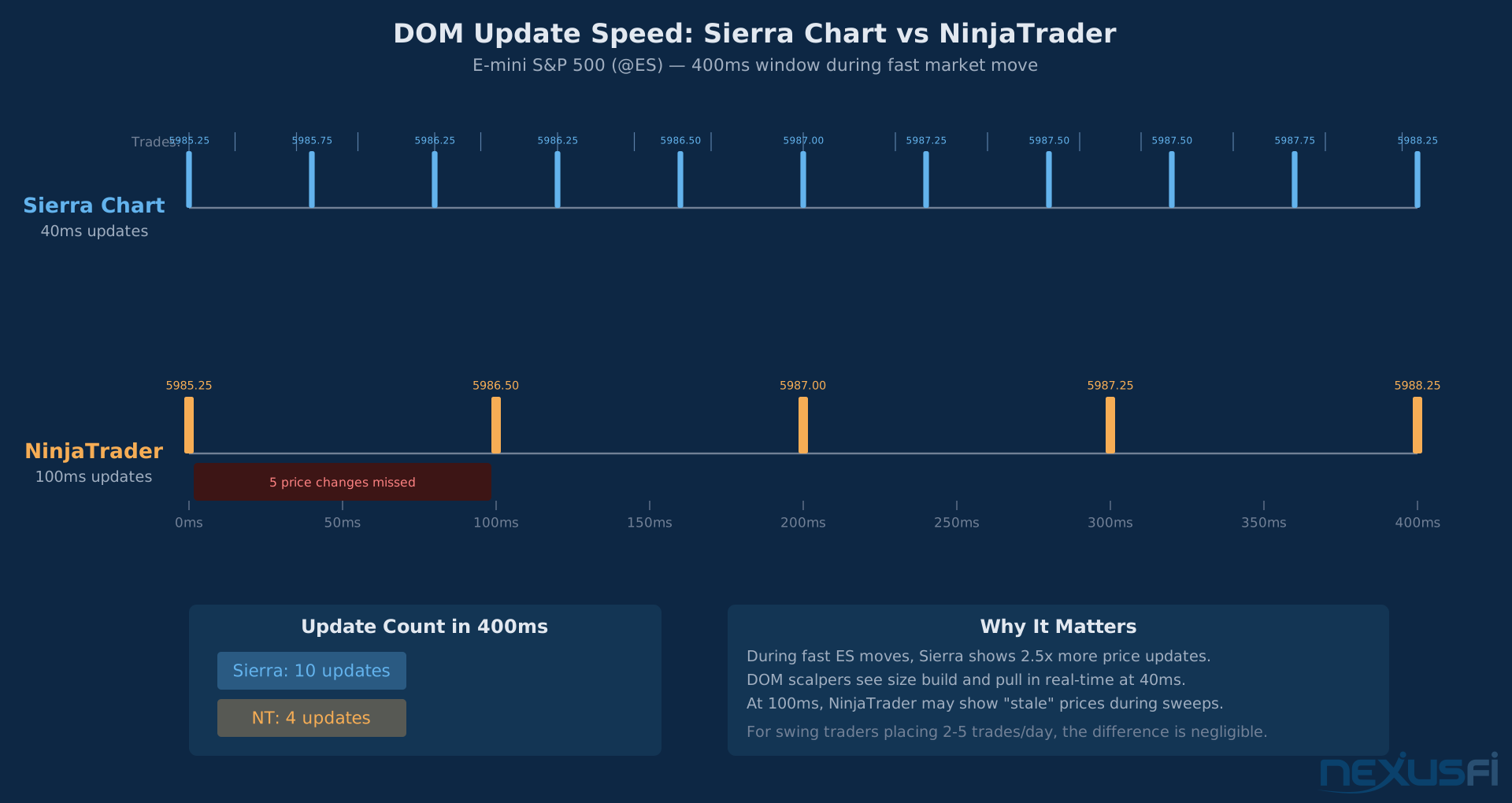
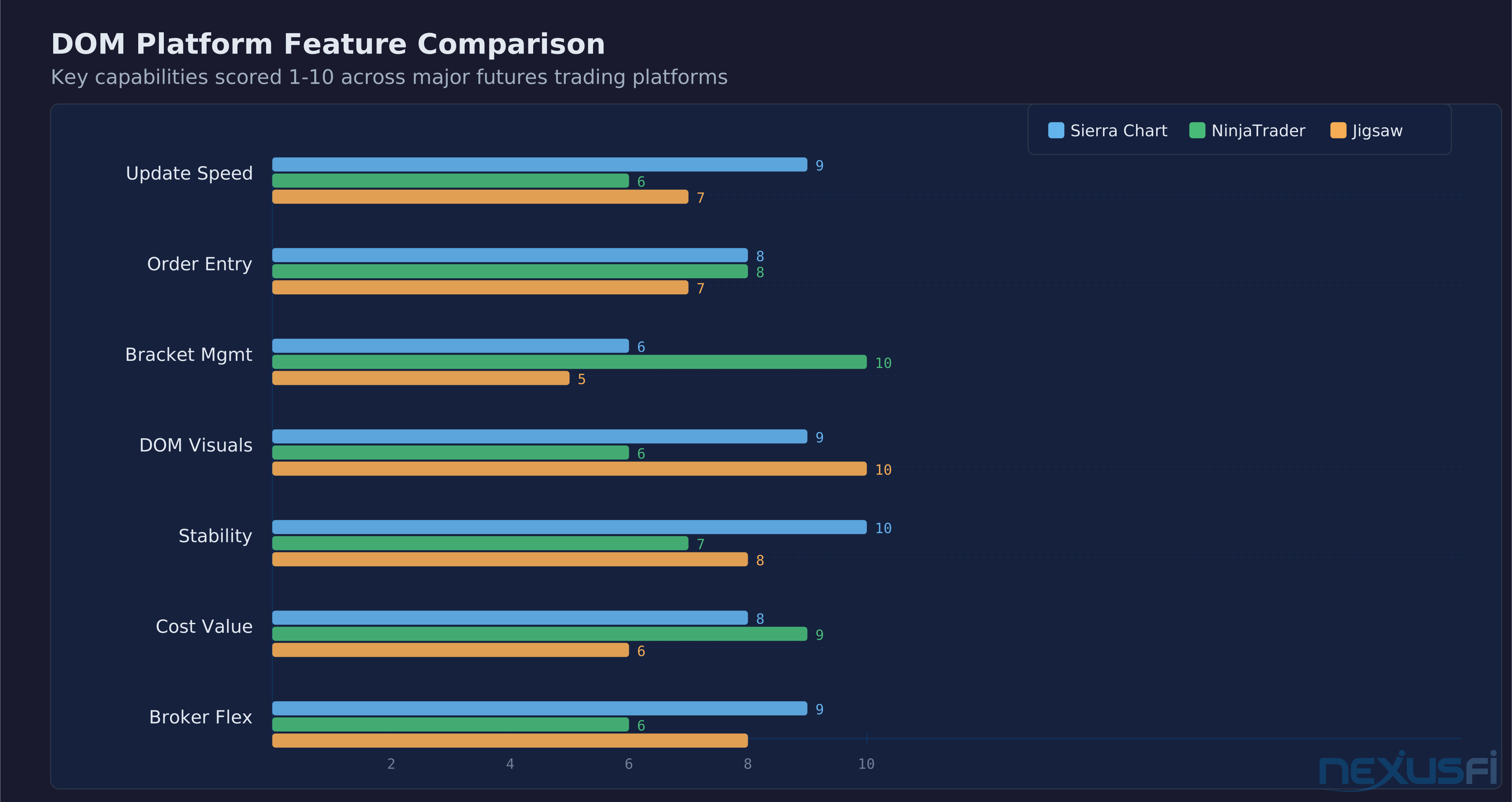
Sierra Chart's Chart Update Interval is configurable down to 10ms, with DOM-specific settings commonly running at 30-40ms — Sierra Chart's own documentation recommends faster intervals specifically for Trading DOMs than for core charts. [10] That's more than twice as fast as NinjaTrader's 100ms minimum.
[1] For DOM scalpers who need to see every print hit the ladder in real-time, this difference is significant. For swing traders placing a limit order and walking away, it's irrelevant.
The data feed matters just as much as the platform. Rithmic feeds tend to be faster than CQG for raw market data. IQFeed is solid for historical data but isn't typically the first choice for DOM-focused scalping. Your platform is only as fast as the data coming into it.
2. Order Entry Mechanics #
How you get orders onto the ladder determines how quickly you can react. The basics — click to place a limit, drag to move it, right-click to cancel — should be instant and intuitive. Beyond that, platforms diverge.
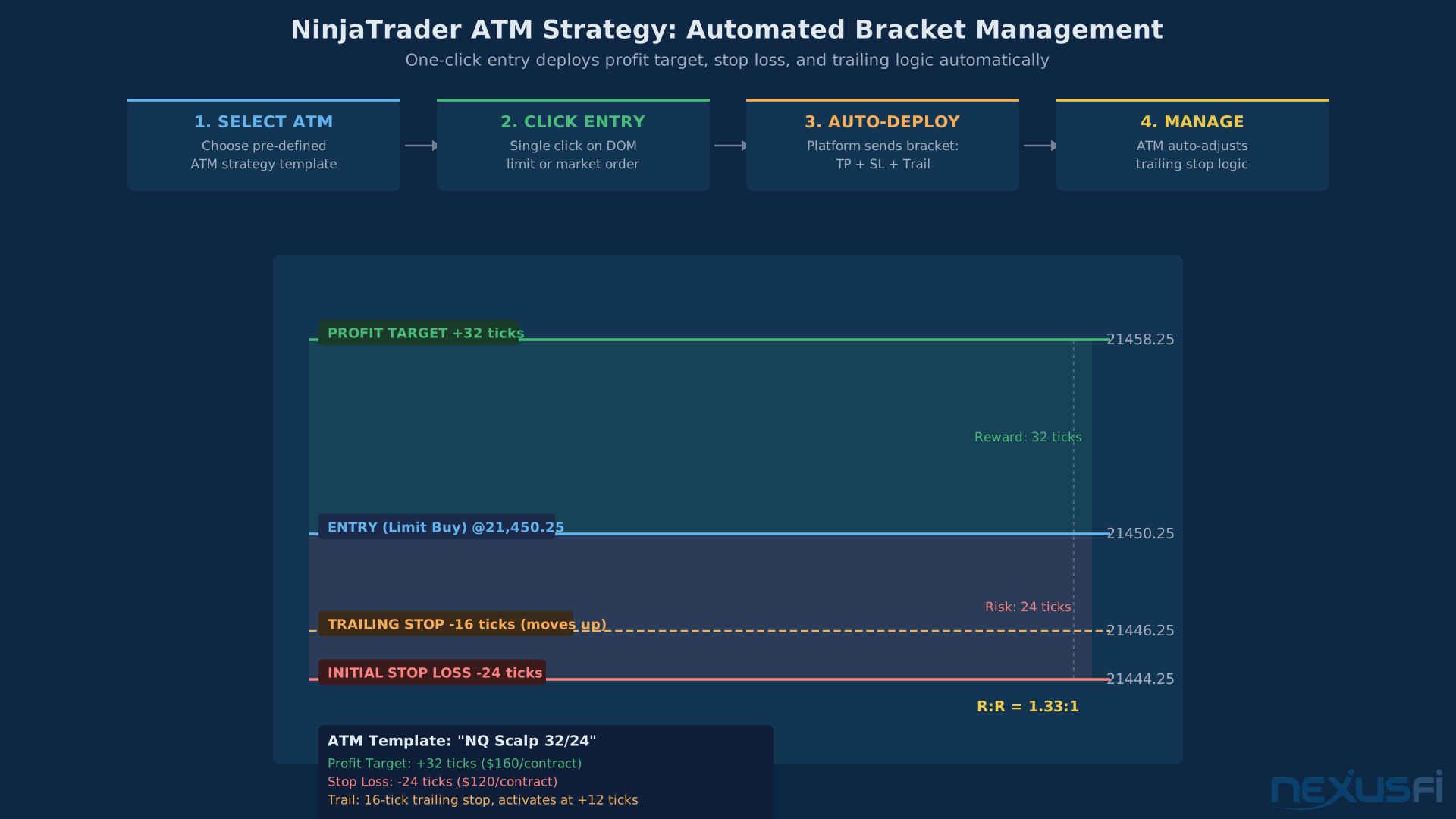
Bracket order management is where NinjaTrader excels. The SuperDOM's ATM (Advanced Trade Management) strategies let you pre-define profit targets, stop losses, and trailing logic. Click once to enter, and your entire bracket deploys automatically. This is NinjaTrader's killer feature for the DOM, and it's why many traders who prefer Sierra's charts still use NT's SuperDOM for execution.
Hotkey order entry is essential for speed. Sierra Chart offers fully configurable keyboard shortcuts for every order type. NinjaTrader supports hotkeys as well. The best DOM setups have traders placing and modifying orders without touching the mouse.
One-click order modification — dragging stops and targets on the ladder — should feel instant. Any lag between your click-drag and the order actually moving at the exchange introduces execution risk. Test this in simulation before committing real capital.
3. Static vs. Scrolling Price Ladder #
This is a religious debate among DOM traders. A static DOM keeps the price ladder fixed — prices don't move on the screen, the market moves through them. A scrolling DOM keeps the last traded price centered, shifting the entire ladder up or down as the market moves.
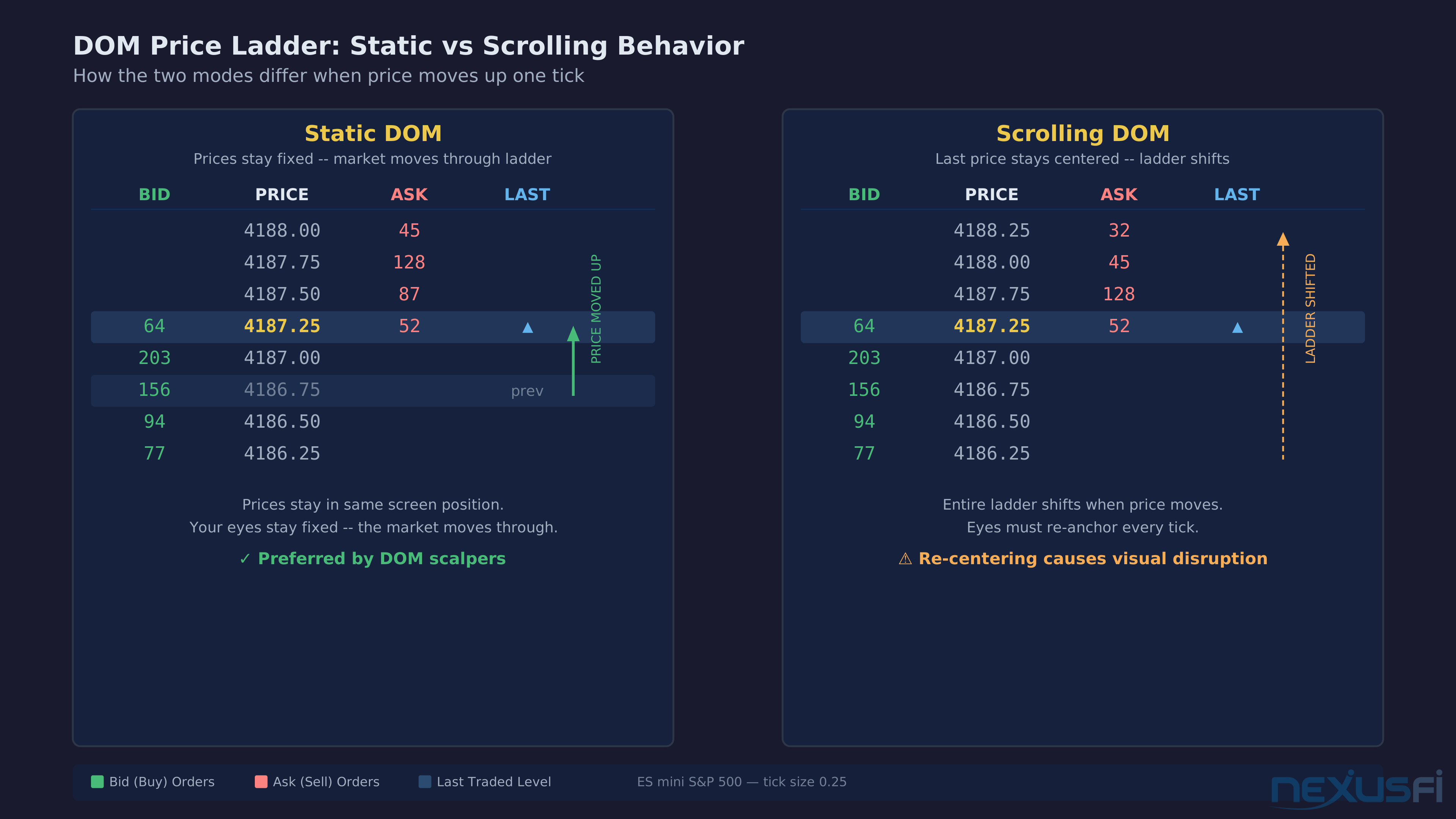
Static DOMs are generally preferred by professional DOM scalpers. When you're watching size build and pull at specific levels, you need those levels to stay in the same place on your screen. If the ladder scrolls every time the market ticks, your eyes have to re-anchor constantly. Sierra Chart and Jigsaw both offer excellent static DOM implementations. As @Babool highlights, Sierra's "Static DOM" was a key reason for switching from NinjaTrader. [2]
NinjaTrader's SuperDOM defaults to scrolling but can be configured for static behavior. TT's DOM is traditionally static and is still considered the gold standard for professional price ladder execution.
4. Chart DOM Integration #
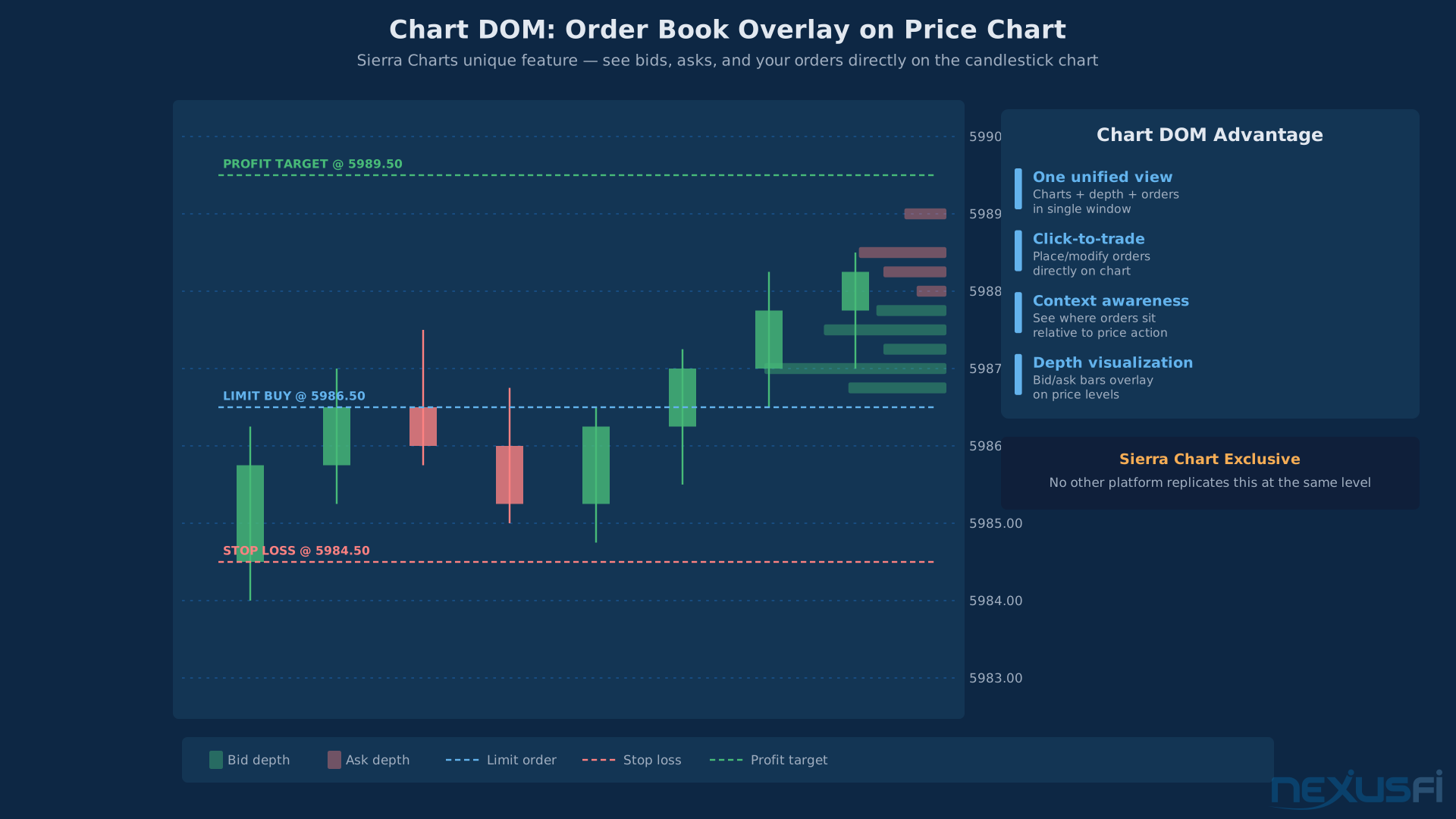
Sierra Chart pioneered the Chart DOM — an order book overlay directly on a candlestick chart. You see resting bids and offers as colored bars extending from the price axis right on your chart.
[2] You can place and manage orders directly on the chart without switching to a separate DOM window.
This matters for traders who combine technical analysis with DOM execution. Instead of watching a chart on one monitor and a DOM on another, you see everything in one view. The downside: it can get visually crowded on complex charts.
NinjaTrader has chart trading capability but doesn't integrate the full order book depth onto the chart the way Sierra does.
5. Depth Levels and Order Book Visualization #
Different platforms display different amounts of order book depth. Most show 10 levels by default, but some allow expanding to 20 or more. However, as
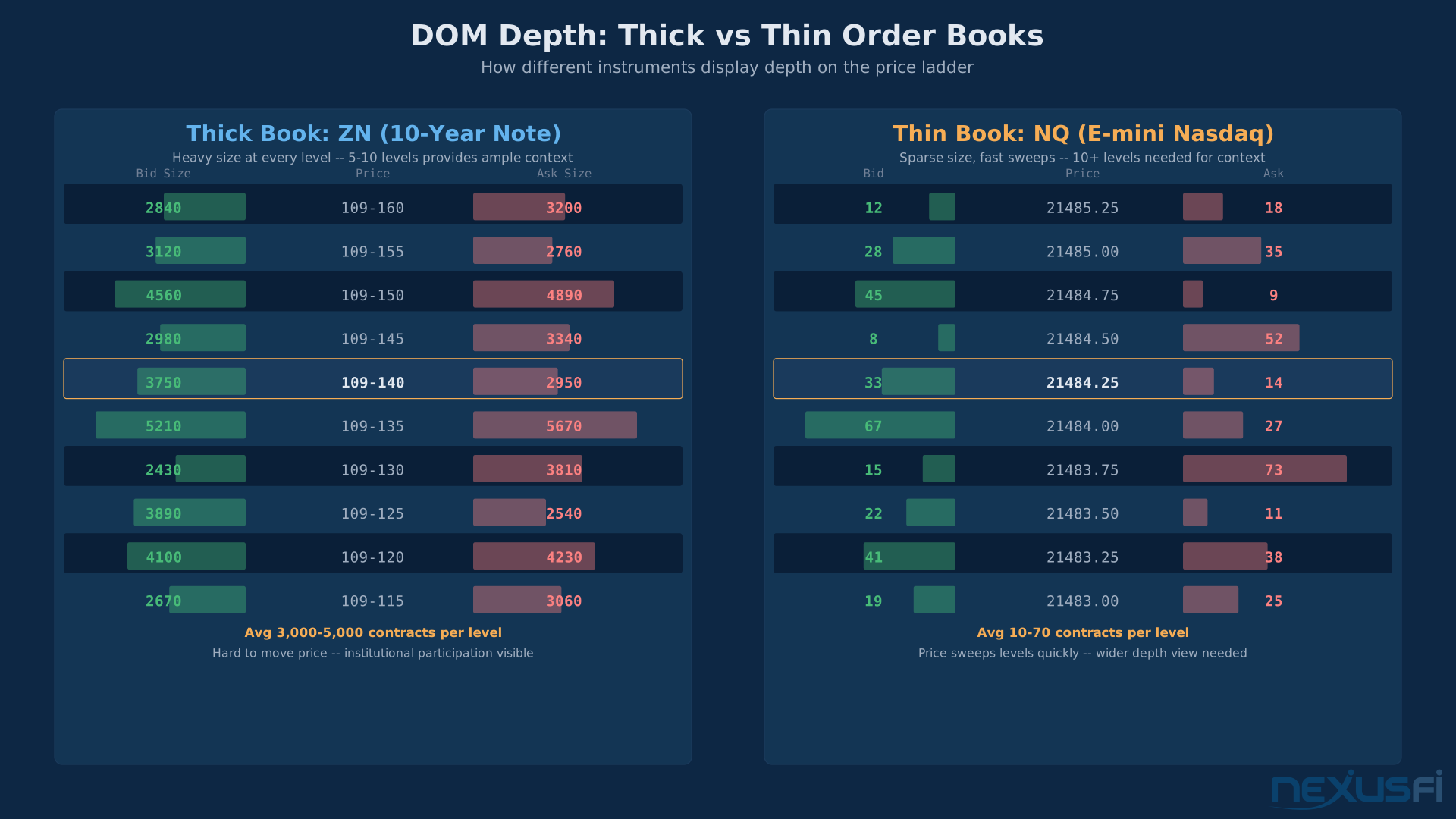
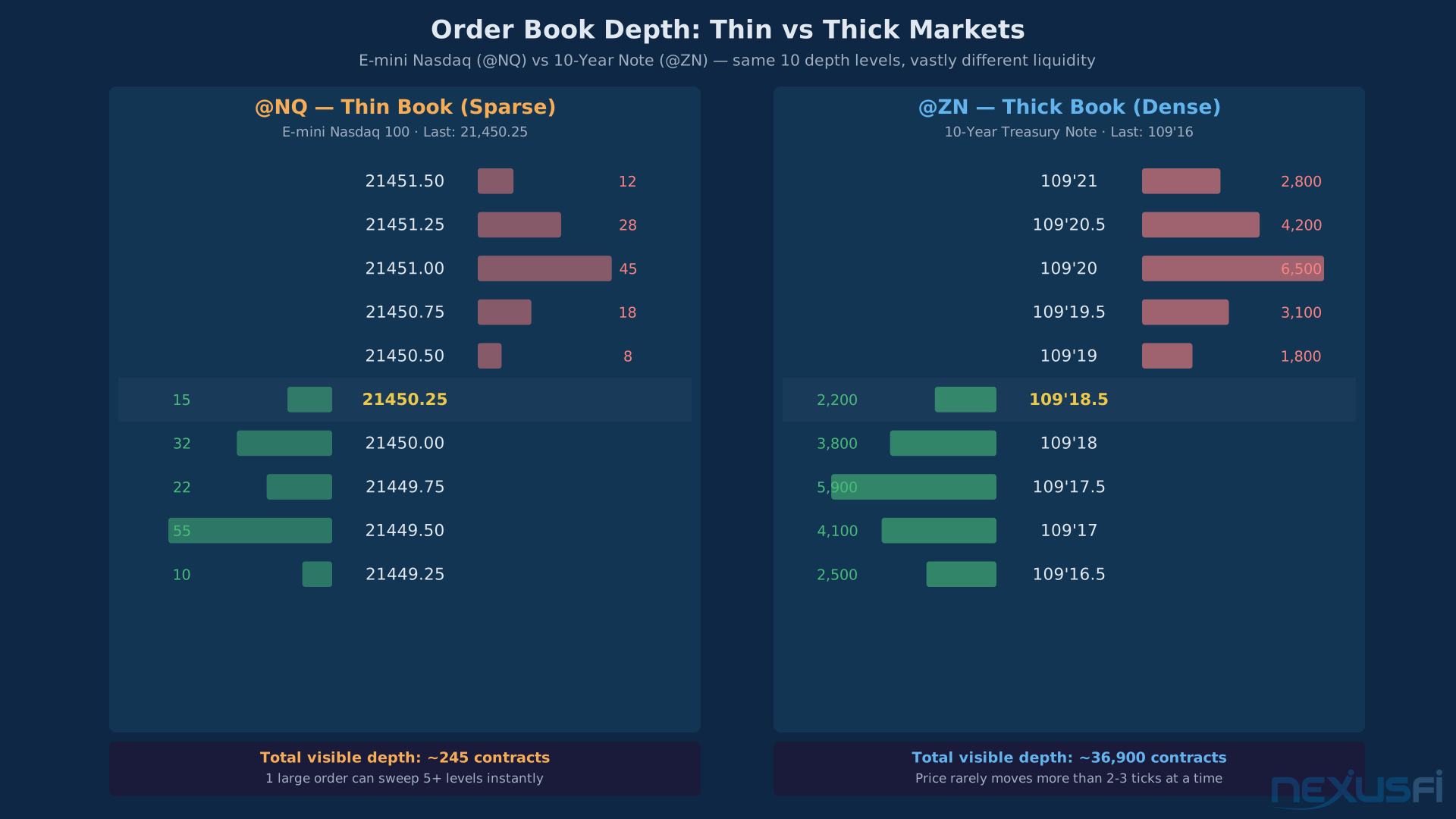
The number of levels you need depends entirely on the instrument. On the 2-Year Note (ZT), 5 levels is plenty — the book is so thick that meaningful information concentrates near the inside. On NQ, even 10 levels can seem sparse because price sweeps through them quickly. On crude oil (CL), 10-20 levels gives you useful context about where size is stacking. As @matthew28 illustrates with Jigsaw DOM screenshots, thick instruments like ZN show heavy size at every level while thin instruments like NQ have sparse books that move fast. [4]
Some platforms go beyond raw bid/ask size and add volume-at-price columns showing executed volume alongside resting orders. Jigsaw was an early pioneer here, and Sierra Chart has since built equivalent functionality into its DOM columns.
6. Stability and Resource Usage #
A DOM that crashes during a news event is worse than no DOM at all. Platform stability under high-throughput conditions is non-negotiable.
Sierra Chart runs lean — minimal system resources, rarely crashes, loads charts and DOMs almost instantly. Multiple NexusFi community members cite Sierra's stability as a primary reason for switching. NinjaTrader 8 improved much over earlier versions but still consumes more memory and can occasionally freeze during extreme tick bursts.
TT's move to a web-based platform raised concerns.
Jigsaw runs as a standalone application or NinjaTrader add-on and maintains good performance. Quantower is newer but has been gaining ground as a lightweight multi-broker option.
7. Broker Connectivity and Cost #
Your DOM platform needs to connect to your broker, and not every combination is possible or cost-effective.
NinjaTrader is both a platform and a brokerage (NinjaTrader Brokerage). Using NT as your platform with NT Brokerage gives you the tightest integration and lowest friction. But you're locked into their execution ecosystem.
Sierra Chart connects through multiple data feeds — Denali Exchange (their own), Rithmic, CQG, TT, and others. This flexibility means you can pick your broker and data feed independently.
TT charges premium fees — either monthly credits or per-side transaction fees that are typically 2-3x what CQG charges. You're paying for the brand name and the infrastructure.
Jigsaw works as an add-on to NinjaTrader or Sierra Chart, or standalone with Rithmic, CQG, or Interactive Brokers connectivity.
Head-to-Head Comparison #
| Feature | Sierra Chart | NinjaTrader | Jigsaw Daytradr | TT (Trading Technologies) |
|---|---|---|---|---|
| Update Speed | 40ms | 100ms | Varies by host | Low-latency infrastructure |
| Static DOM | Yes | Configurable | Yes | Yes (traditional standard) |
| Chart DOM | Yes (unique) | Basic chart trading | No | No |
| Bracket Management | Manual/semi-auto | ATM strategies (excellent) | Manual | Manual |
| Hotkeys | Fully configurable | Yes | Yes | Yes |
| Volume-at-Price Columns | Yes | Basic | Yes (pioneered this) | Basic |
| Historical Bid/Ask Storage | Yes | No | No | No |
| Broker Independence | High (many feeds) | Medium (NT Brokerage + others) | High (add-on model) | Low (TT ecosystem) |
| Monthly Cost | ~$36/mo (annual) | Free (with NT Brokerage) | ~$579/yr standalone | Credits or per-trade |
| Learning Curve | Steep | Moderate | Moderate | Low-moderate |
| Stability | Excellent | Good | Good | Good (web concerns) |
Decision Framework #
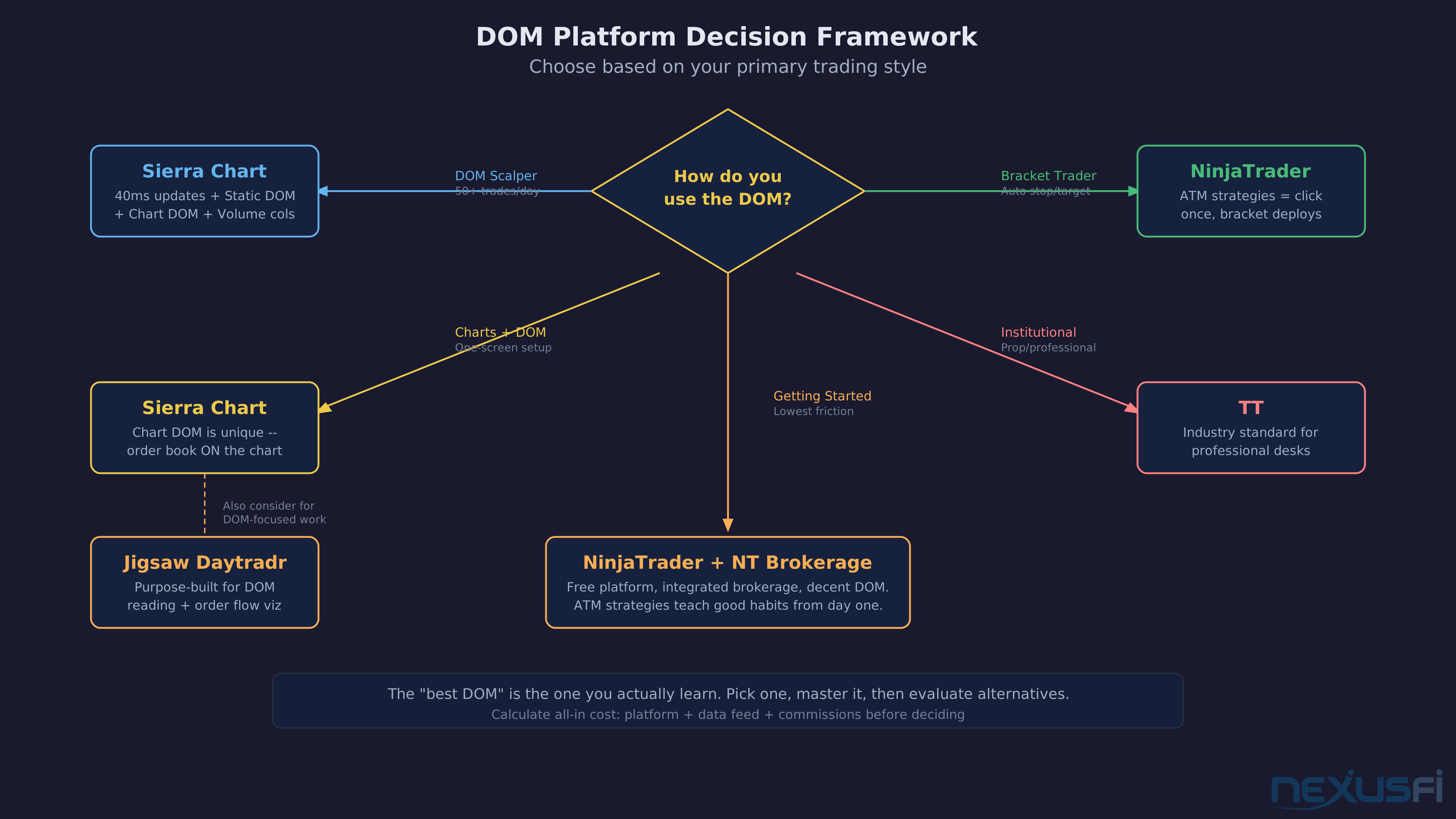
There is no universal best DOM platform. The right DOM is the one that matches your execution style — a scalper's ideal setup would slow down a bracket trader, and vice versa.
If you're a DOM scalper who lives on the ladder, executing dozens of trades per day, watching size build and pull: Sierra Chart or Jigsaw. You need the fastest updates, a rock-solid static ladder, and volume-at-price columns. Sierra gives you the complete ecosystem — charts, DOM, footprint, all in one. Jigsaw is purpose-built for DOM reading with outstanding visualization of order flow on the ladder.
If you're a bracket trader who sets entries with pre-defined stops and targets and lets the automation manage the trade: NinjaTrader's SuperDOM. ATM strategies are unmatched for this workflow. Click once to enter, and your profit target, stop loss, and trailing logic deploy automatically. Nobody else does this as cleanly.
If you need charts and DOM in one view and want to trade directly from your chart with full order book depth visible: Sierra Chart's Chart DOM. This is a unique feature that no other platform has replicated at the same level.
If you're at a prop firm or institution and need exchange-grade infrastructure with proven reliability: TT. It's the most expensive option, but it's what professional trading desks have used for decades. The web migration is a concern for some, but the infrastructure behind it remains institutional-grade.
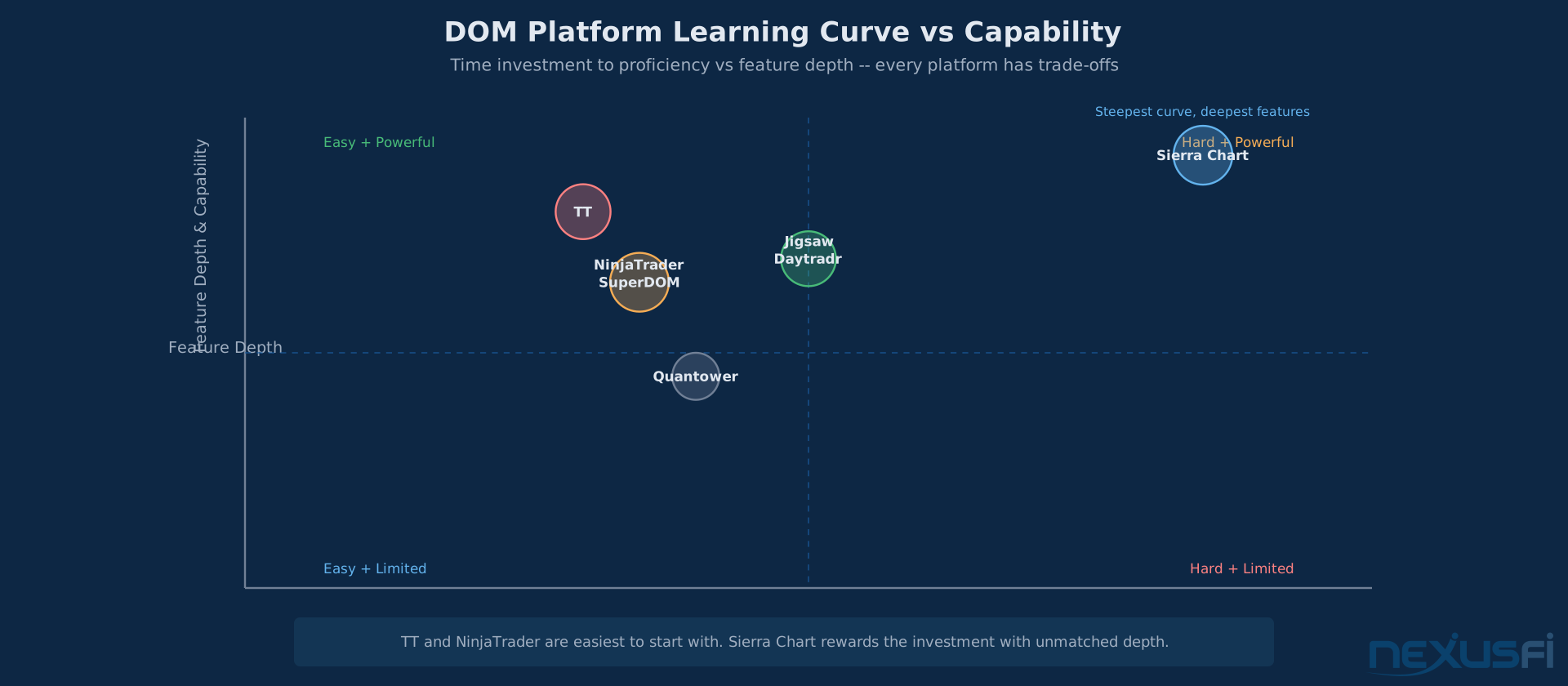
If you're starting out and want the lowest friction to get a DOM on screen: NinjaTrader with NinjaTrader Brokerage. Free platform, integrated brokerage, decent DOM out of the box. The SuperDOM isn't the fastest or most feature-rich, but it works, and the ATM strategies teach good trade management habits from day one.
DOM Selection Takeaway The best DOM is the one you actually learn. Switching platforms every six months because someone on a forum said theirs is better is a guaranteed way to never develop DOM reading skill. Pick one, learn it deeply, master it — then evaluate alternatives from a position of competence, not curiosity.
Getting Started #
- Define your trading style first. DOM scalpers need different tools than swing traders who happen to use a DOM for entry. Don't buy the "best" platform — buy the right one.
Run your chosen platform in simulation during live market hours for at least two weeks before going live. Pay special attention to how the DOM behaves during fast markets — that's when tool quality matters most and when switching costs are highest.
- Use simulation extensively. Every platform on this list offers demo/sim modes. Run your chosen platform in simulation for at least two weeks during live market hours. Pay attention to how the DOM feels when the market is fast — that's when tool quality matters.
- Test with your actual data feed. DOM performance depends on the combination of platform + data feed + broker. A fast platform on a slow feed is still slow. If you're serious about DOM trading, test Rithmic, CQG, and Denali feeds with your chosen platform.
- Start with 10 depth levels. Don't try to watch 50 levels on day one. The inside 10 levels contain the most actionable information for most instruments. Expand to 20 once you understand what you're actually looking for in the book.
- Combine DOM with Time & Sales. The DOM shows intent (resting orders), Time & Sales shows execution (actual trades). Neither alone tells the full story. [6]“The DOM is a statement of intent, the Time & Sales represent actual trades. Combine the two and you have a good toolset to assess the gameplay.”
Limitations and Honest Drawbacks #
Resting orders are statements of intent, not commitments. Spoofing and iceberg orders mean the book lies — every DOM platform shows you the same deception. The platform doesn't fix this problem; your skill in reading through it does.
No platform solves the DOM's fundamental problem. Resting orders are statements of intent, not commitments. Orders get pulled, icebergs hide real size, and spoofing still exists despite regulation.
[7] CME Group adopted Rule 575 specifically targeting spoofing and other disruptive trading practices, and enforcement is aggressive — between 2018 and 2024, spoofing was the single largest violation category with 204 disciplinary notices, contributing to over $76 million in total monetary penalties across CME Group exchanges. [9]
Platform speed has diminishing returns. The difference between 40ms and 100ms updates matters to DOM scalpers executing 50+ round-trips a day. For traders placing 2-5 trades a day from the DOM, it's irrelevant. Don't overspend on speed you won't use.
The "best DOM" is the one you actually learn. Switching platforms every six months because someone on a forum said theirs is better is a guaranteed way to never develop DOM reading skill. Pick one, learn it deeply, and master it before evaluating alternatives.
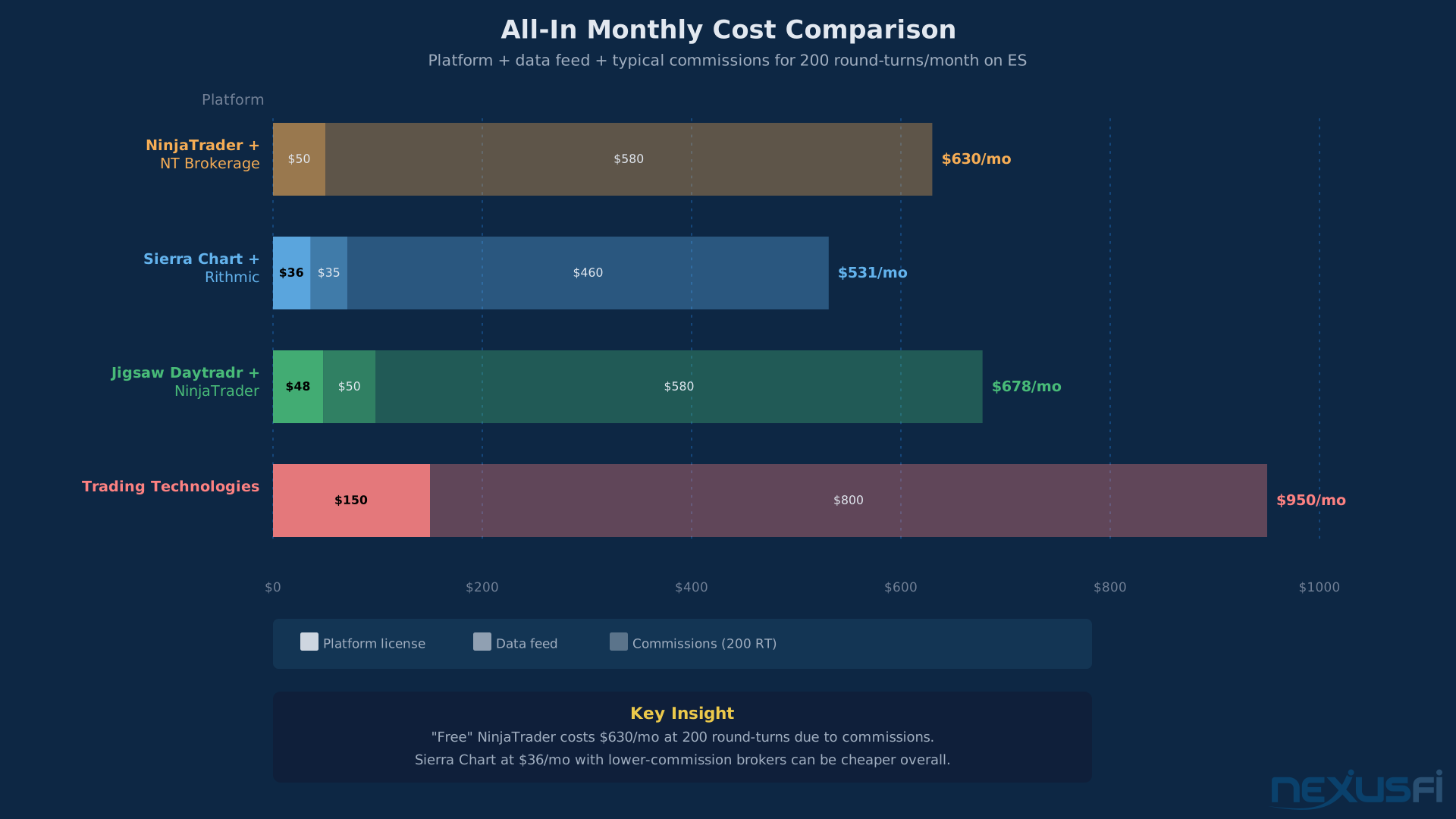
Free isn't always cheapest. NinjaTrader's "free" platform requires NinjaTrader Brokerage, which has its own commission structure. Sierra Chart's $36/month might be cheaper total cost depending on your trade volume and commission rates. Calculate the all-in cost — platform + data + commissions — before deciding.
Web-based DOMs are a trade-off. Browser rendering introduces a layer between you and the exchange that native applications don't have. TT's web migration and platforms like Tradovate offer convenience (trade from any device) at the cost of potential latency. For DOM scalping, most professionals still prefer native applications.
Knowledge Map
Prerequisites
Understand these firstGo Deeper
Build on this knowledgeReferences This Article
Articles that build on this topicCitations
- — Ninja Trader or Sierra Charts (2013) 👍 5“NT has a minimum update time of 100ms, whereas Sierra's is more than 2X lower at 40ms”
- — Sierra vs. Ninja : why I chose ..... (2014) 👍 15“The CHART DOM nobody else has this a great feature, A Static Dom”
- — Is DOM worth using if I only have access to best 5 bid and ask levels? (2022) 👍 3“More than 20 you are probably going to miss out on a lot of opportunities”
- — basic questions about futures (2018) 👍 3“Thick instruments show heavy size while thin instruments have sparse books”
- — Recommendations of DOM platforms (2020) 👍 5“While TT DOM is traditionally the standard, its now web-based”
- — Why does the market move towards the heavier side of the order book? (2011) 👍 11“The DOM is a statement of intent, the Time and Sales represent actual trades”
- — Flipping spoofing (2013) 👍 2“Spoofing is simply submitting limit orders that you will pull before they get filled”
- — In the DOM which side is the buy side and sell side? (2023) 👍 5“Buy side is the Offer side. Sell side is the Bid side.”
- — Trends in CME Disciplinary Notices: 2018-2024 (2025)
- — General Settings: Chart Update Interval (2026)