



Order Flow Heatmap Visualization: Reading Real-Time Limit Order Depth
Overview #
Every trading platform shows you where price has been. Bookmap shows you where the money is — right now, in real time, as it moves.
That's the core pitch, and it's not marketing fluff. Bookmap's signature heatmap transforms raw order book data into a visual terrain of resting liquidity, letting you see exactly where limit orders are stacking, pulling, and getting absorbed. For futures traders who make decisions based on order flow and market microstructure, this is genuinely useful information that you can't get from a candlestick chart.
But here's the honest version: Bookmap is a specialized tool, not a complete trading platform. It does one thing better than anything else on the market — liquidity visualization — and everything else is adequate at best. Whether that one thing is worth the subscription depends entirely on how you trade.
This article breaks down what Bookmap actually does, who it's built for, how it stacks up against the two platforms it gets compared to most often (Jigsaw Daytradr and Sierra Chart), and whether the real-world cost justifies adding it to your workflow.
Key Concepts #
The Heatmap: Bookmap's Defining Feature #
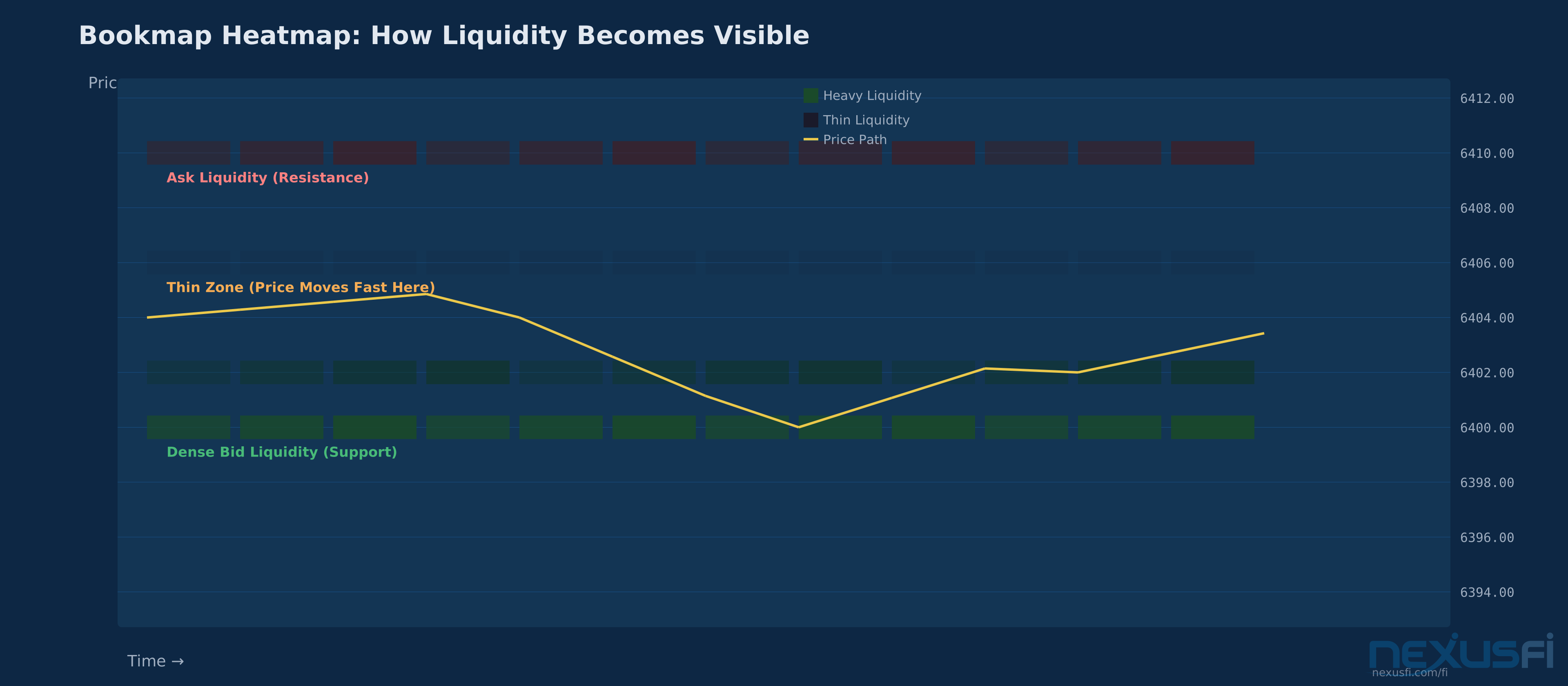
The heatmap is what makes Bookmap different from every other platform. It takes depth-of-market data — the same bid/ask ladder you see on any DOM — and renders it as a color-coded visualization that scrolls in real time alongside price.
Darker or brighter zones indicate more resting orders at specific price levels. As time passes, you can see liquidity:
- Appearing — new orders being placed at a price level
- Holding — persistent liquidity that doesn't move as price approaches
- Getting pulled — orders being canceled before they get hit
- Being absorbed — aggressive market orders eating through resting liquidity without price moving
This creates a historical record of order book behavior that you simply can't see on a standard DOM ladder. A DOM shows you a snapshot — what's there right now. Bookmap shows you the movie — how liquidity has evolved over the last minutes, hours, or the entire session.
Order Flow Bubbles #
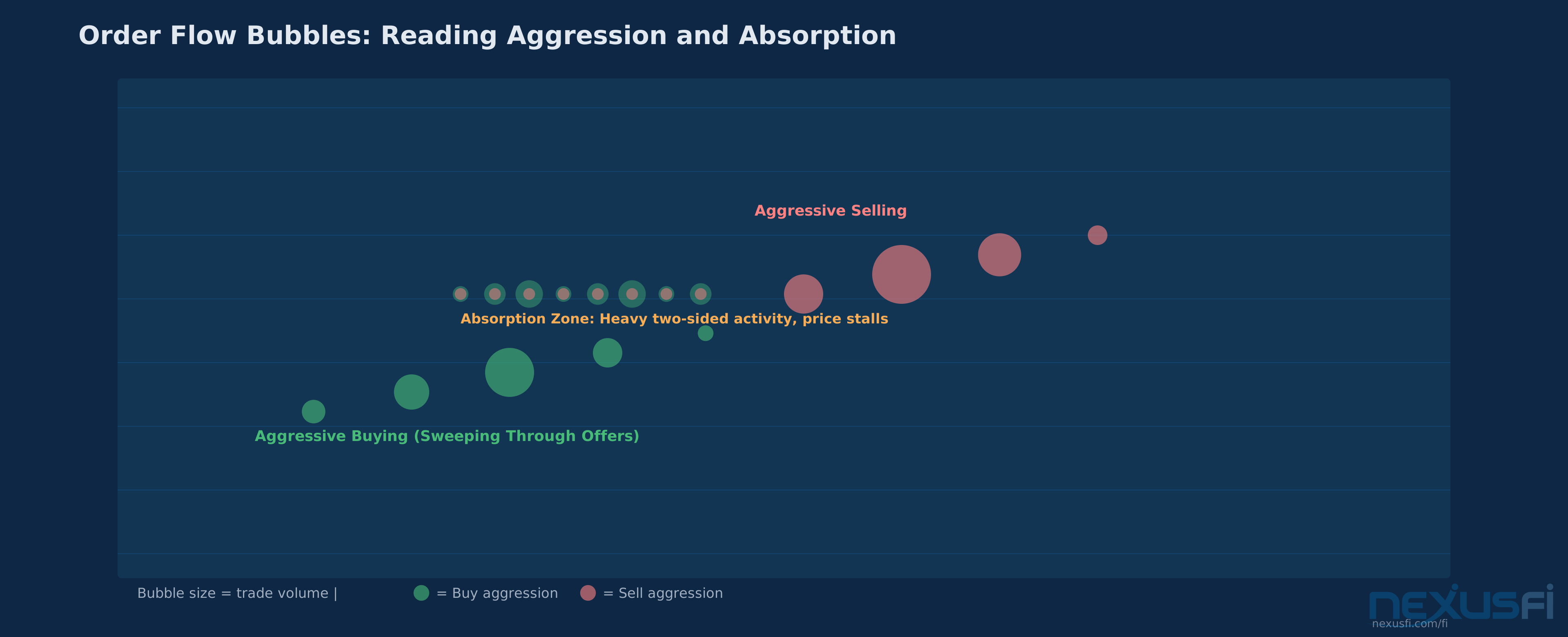
On top of the heatmap, Bookmap renders executed trades as bubbles. Larger bubbles mean larger orders. Color coding distinguishes aggressive buying from aggressive selling. This lets you quickly identify:
- Large sweeps — someone aggressively taking liquidity through multiple price levels
- Absorption — heavy aggression at a price level that isn't producing movement (someone is absorbing the flow)
- Exhaustion — aggressive activity drying up after a move, signaling potential reversal
- Iceberg-like behavior — steady execution at a price level that keeps refilling despite being hit
Depth-of-Market Visualization #
Beyond the heatmap, Bookmap provides tools for analyzing the depth and shape of the order book. You can see:
- Liquidity gaps — thin zones where price will likely move quickly
- Walls — large resting orders that may attract or repel price
- Clustering — multiple levels of concentrated liquidity that create structural support or resistance
- Migration — how liquidity shifts as price moves, revealing whether market participants are repositioning
How It Works #
Data Requirements — This Is the Make-or-Break Factor #
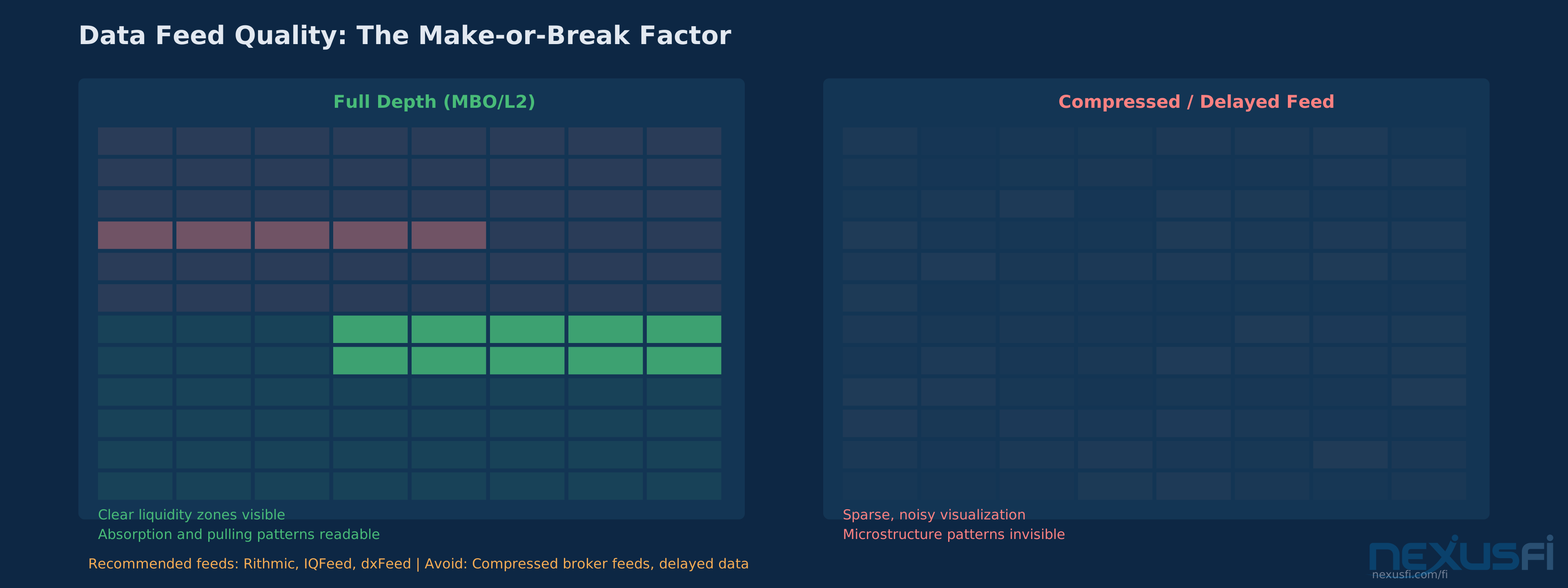
Before anything else: Bookmap is only as good as the data feeding it. This is the single most important practical consideration, and the one that causes the most frustration for new users.
You need full depth-of-market data — Level 2 at minimum, Level 3 (Market by Order / MBO) if you want the full picture. As @matthew28 noted on NexusFi when discussing contract selection, "If using a heatmap style chart, like Bookmap, then definitely chart the NQ (placing orders on an MNQ DOM), as the MNQ heatmap is useless as the size just follows the big contract." That's a practical detail that matters — the heatmap only works well on instruments with genuine resting liquidity.
Recommended data providers for futures: Rithmic, IQFeed, or dxFeed. Compressed or delayed feeds will make the heatmap unreliable. If your broker provides "optimized" market data to reduce costs, you'll see a degraded heatmap that misses the granularity where the real information lives.
This creates a common pain point: traders blame the platform when the actual issue is feed quality or exchange entitlement setup. If the heatmap looks sparse or choppy, check your data before assuming Bookmap is broken.
System Requirements #
Bookmap is resource-intensive. Running multiple heatmaps on high-volume instruments (ES, NQ, CL simultaneously) requires a capable CPU and significant RAM. This isn't a lightweight charting app — it's processing and rendering continuous order book updates across potentially thousands of price levels.
Connecting Brokers and Data Feeds #
Bookmap supports connections to most major futures brokers and data providers. The setup involves:
- Selecting your data feed (Rithmic, IQFeed, CQG, dxFeed, or direct broker connections)
- Subscribing to exchange data (CME Group fees for futures)
- Configuring the heatmap visualization settings for your preferred instruments
- Optionally enabling add-on indicators and overlays
The platform runs on Windows, macOS, and Linux, though Windows has historically received the most polished experience.
Practical Application #
Where Bookmap Provides Genuine Edge #
Scalping and short-horizon execution: When you need to enter within a few ticks of a turning point, seeing the actual liquidity terrain changes the game. You can identify where resting orders are stacked, enter with awareness of immediate absorption potential, and avoid buying directly into a large sell wall.
Breakout confirmation: The difference between a real breakout and a fakeout often lives in the order book. When price approaches a level, you can see whether liquidity is being pulled (clearing the path for continuation) or being reinforced (setting up for rejection). As the Bookmap team explained on NexusFi, "Why not align your strategies with verifiable levels of high liquidity within Bookmap's heatmap and know for sure?"
Fade and reversion setups: When aggressive buying hits a wall of resting sell orders and price doesn't move, that's absorption — and it often precedes a reversal. Bookmap makes this pattern visible in a way that standard candlestick charts can't.
News and event volatility: During high-impact releases, the order book transforms. Liquidity vanishes from nearby levels and either concentrates at key boundaries or disappears entirely. Seeing this in real time helps you avoid getting trapped during fast conditions.
The Spoofing Question #
@matteo83 asked a sharp question on NexusFi that every Bookmap user should consider: "If everyone can see it and act upon, where is the edge? Huge part of liquidity is fake/spoofing. How can you make constructive decisions using visualisation of something that is mostly fake?"
Bruce Pringle from Bookmap responded with a subtle answer: the edge isn't in seeing individual orders — it's in seeing the aggregate behavior and how price interacts with liquidity over time. Spoofed orders tend to disappear before being hit; genuine liquidity holds and absorbs. The heatmap's historical trail makes this distinction visible. A wall that's been sitting at a level for 20 minutes and absorbing aggression is very different from one that appeared 30 seconds ago and will likely be pulled.
That said, this requires experience to read correctly. New users who treat every bright zone as guaranteed support will get burned.
What Bookmap Won't Do #
Bookmap is a decision-support tool, not a signal generator. You still need:
- A coherent trade selection framework
- Risk management rules
- Contextual awareness (macro levels, session structure, time of day)
- Execution discipline
As @jbmiguel put it on NexusFi, "Bookmap with many of the 'Add-On' offerings basically made all the other Retail Trader Indicators Obsolete IMHO. It's now an essential tool." That's the strong case — but "essential tool" is different from "standalone system." The most successful Bookmap users integrate it into a broader workflow rather than relying on it exclusively.
Bookmap vs. Jigsaw Daytradr #
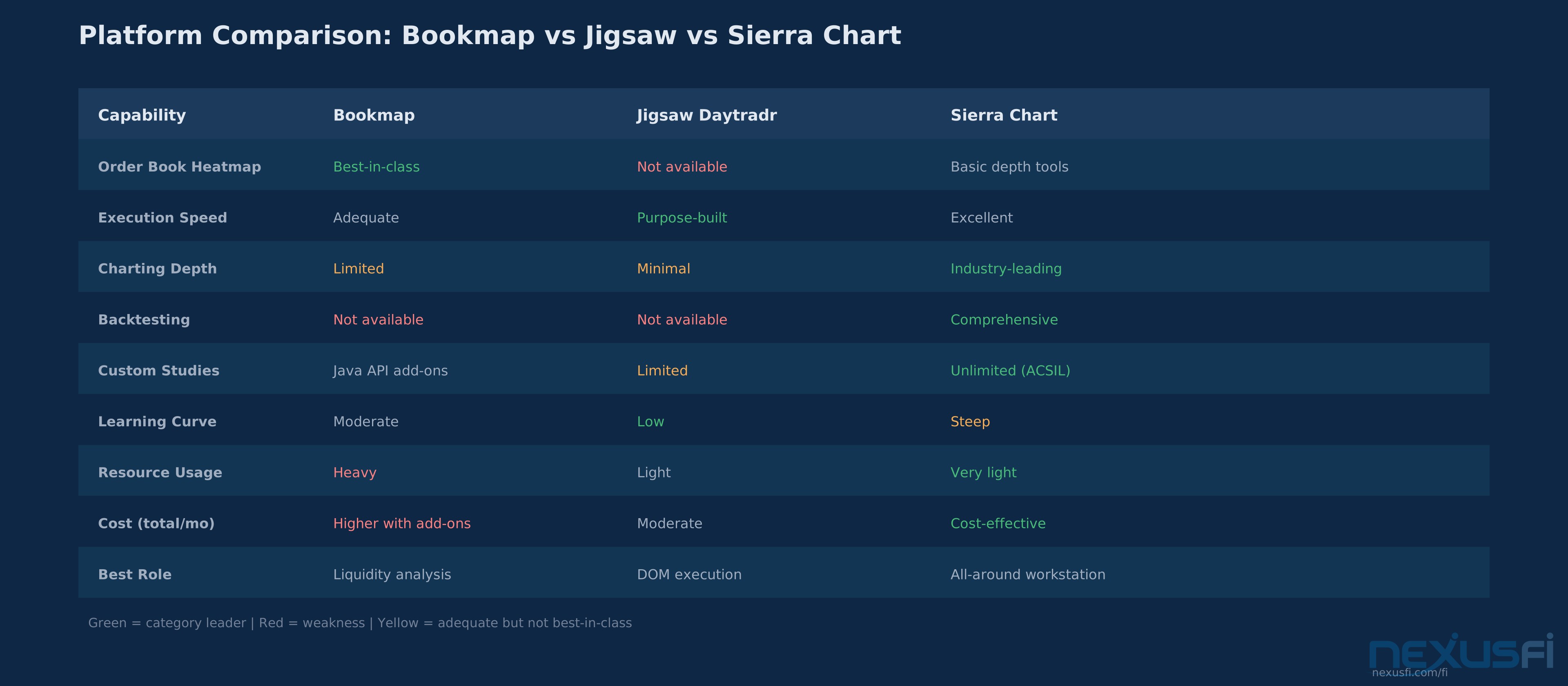
This is the comparison that comes up most often on NexusFi trading forums, and for good reason — both platforms target order flow traders in futures. But they solve different problems.
Where Bookmap Wins #
Visual liquidity analysis: No contest. Bookmap's heatmap gives you a terrain view of the order book that Jigsaw's reconstructed tape and DOM-centric display can't match. If the question is "what is the market trying to do?" — Bookmap answers it faster for most visual learners.
Pattern recognition speed: @Flyer873, who uses both platforms, described their workflow on NexusFi: "I use both. I find Jigsaw is way too easy to place trades and Bookmap is great with seeing a visual of your DOM." That captures the dynamic perfectly — Bookmap for reading, Jigsaw for executing.
Education and learning curve: The heatmap makes microstructure concepts concrete. Absorption, exhaustion, liquidity pulling — these are abstract concepts in a textbook but visible patterns on a heatmap.
Where Jigsaw Wins #
Execution workflow: Jigsaw was built for fast DOM-based execution. If your edge comes from reading the ladder and managing entries with precision — clicking in and out of positions rapidly — Jigsaw's interface is purpose-built for that workflow. Bookmap can handle execution but it's not the primary design focus.
Simplicity of purpose: Jigsaw does fewer things but does them with less friction. For traders who don't need the full heatmap visualization and prefer a streamlined tape-reading environment, Jigsaw has less cognitive overhead.
Trade management: Active position management — scaling in, scaling out, moving stops based on tape activity — tends to feel more direct in Jigsaw's interface.
The Professional Hybrid #
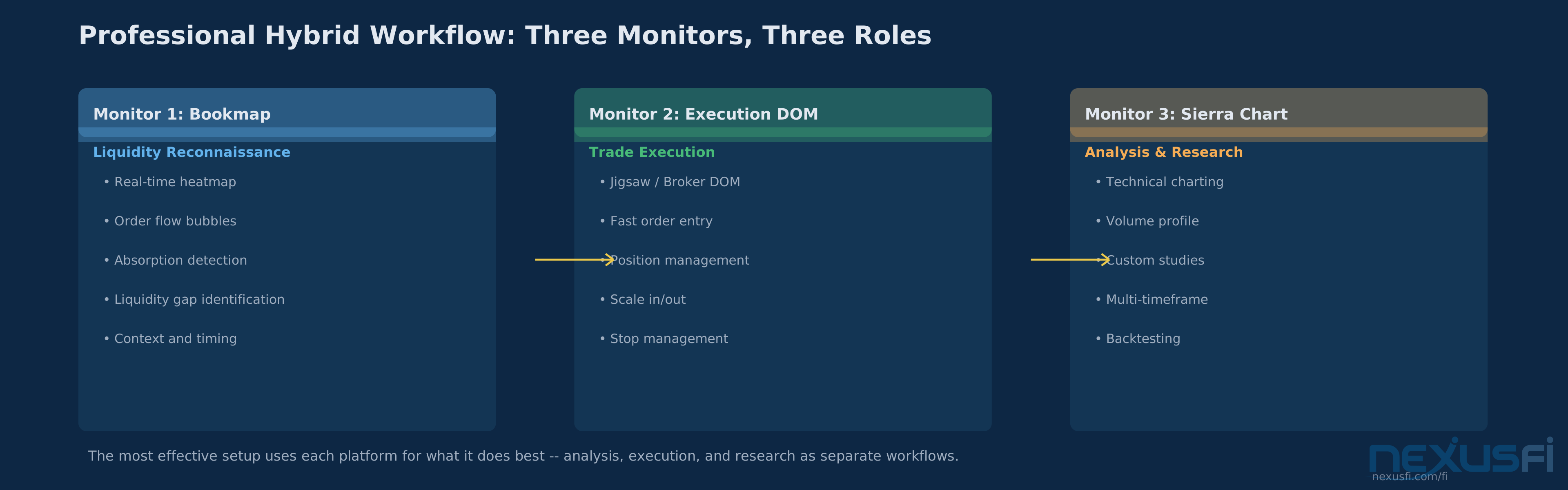
Many serious futures traders don't choose between them. They run Bookmap on one monitor for liquidity analysis and context, then execute through Jigsaw or their broker's native DOM on another. @FuturesTrader71 noted on NexusFi that Bookmap (originally S5 Bookmap) became "my preferred execution tool now because it puts the DOM, prints, depth, my orders and executions all on the same chart." But for pure execution speed, dedicated DOM platforms still have an edge.
Bookmap vs. Sierra Chart #
This comparison is less about direct competition and more about different philosophies.
Where Bookmap Wins #
Order book visualization: Sierra Chart has depth-of-market tools and number bars (footprint), but Bookmap's heatmap remains the more intuitive and information-dense visualization for reading liquidity behavior. It's specialized tooling versus general-purpose capability.
Learning curve for order flow: A trader new to order flow concepts will get value from Bookmap faster than from Sierra Chart's more configurable but more complex toolset.
Where Sierra Chart Wins #
Everything else. Sierra Chart is an extraordinarily deep platform with advanced charting, extensive custom study libraries, strong backtesting, automation, and almost unlimited configurability. It's the better all-around workstation by a wide margin.
Cost efficiency: Sierra Chart is typically more cost-effective over time, especially for power users who would need multiple add-on subscriptions in Bookmap to achieve comparable functionality.
Stability and performance: Sierra Chart is renowned for its lightweight resource footprint and rock-solid reliability. Bookmap's resource demands are much higher.
The Bottom Line #
Bookmap is the better sensemaking tool for understanding liquidity dynamics. Sierra Chart is the better trading workstation for everything else. The most common professional setup uses both — Sierra for charting, research, and primary execution, with Bookmap running as a secondary monitor for real-time liquidity reconnaissance.
Pricing and Total Cost #
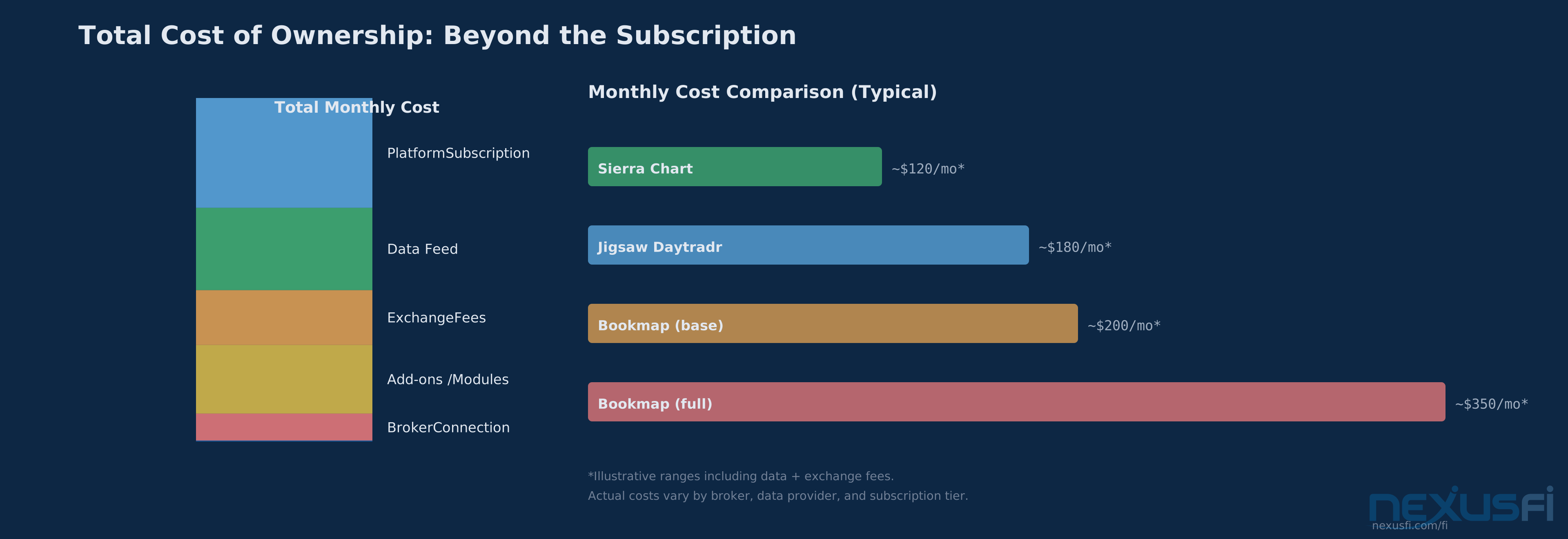
Bookmap's pricing creates confusion because the platform subscription is only one component of total cost. For an active futures trader, the real monthly expense includes:
- Platform subscription — Tiered from a limited free version through professional plans. The features that matter most (full heatmap history, advanced indicators, MBO data support) typically require mid-to-upper tier subscriptions.
- Market data feed — Varies by provider. Rithmic, IQFeed, and CQG each have their own subscription costs.
- Exchange fees — CME Group charges for real-time futures data. This cost exists regardless of platform but adds to the total.
- Add-on modules — Iceberg detection, advanced analytics, volume tools, and educator-created packages often carry additional fees.
- Broker connection — Some broker integrations may have additional costs.
The practical reality: budget-conscious traders should map out the full monthly cost before committing. The base platform price can be attractive, but the total cost with data, exchange fees, and useful add-ons may be two to three times higher than the advertised subscription.
API and Extensibility #
Bookmap provides a Java-based API that allows developers to create custom indicators, automation modules, and external integrations. Practical use cases include:
- Custom iceberg detection algorithms
- Liquidity absorption pattern recognition
- Event-driven alerts when specific order book conditions occur
- Signal routing to external execution systems
- Integration with proprietary research and analytics pipelines
The API is capable but not unlimited. Traders needing a fully open-ended development environment with extensive backtesting infrastructure will find Sierra Chart or dedicated quant stacks more flexible. Bookmap's API is best suited for creating overlays and analytics that improve the visual workflow rather than building complete systematic trading systems.
Institutional vs. Retail Usage #
Retail Traders #
Bookmap democratizes access to order book visualization that was previously available only to institutional desks running proprietary tools. For serious retail futures traders, it provides:
- Institutional-grade liquidity visibility
- A bridge between raw DOM data and actionable insight
- Educational value for understanding how markets interact with liquidity
The risk for retail traders is over-interpretation. Not every liquidity wall is actionable. Displayed orders aren't deterministic. Treating the heatmap as a crystal ball instead of a probability-enhancing tool leads to overtrading and analysis paralysis.
Institutional and Professional Usage #
Professional trading desks and prop firms use Bookmap when discretionary decision-making benefits from rapid liquidity reads. However, institutions typically:
- Run Bookmap as an information layer, not their primary execution platform
- Connect execution through separate OMS and broker infrastructure
- Value stability, integration depth, and auditability alongside visualization
- May prefer custom-built LOB heatmaps integrated into proprietary systems for their core workflow
Bookmap is valuable in institutional settings as a tactical monitor — the "weather radar" for order flow — rather than the primary cockpit.
Getting Started #
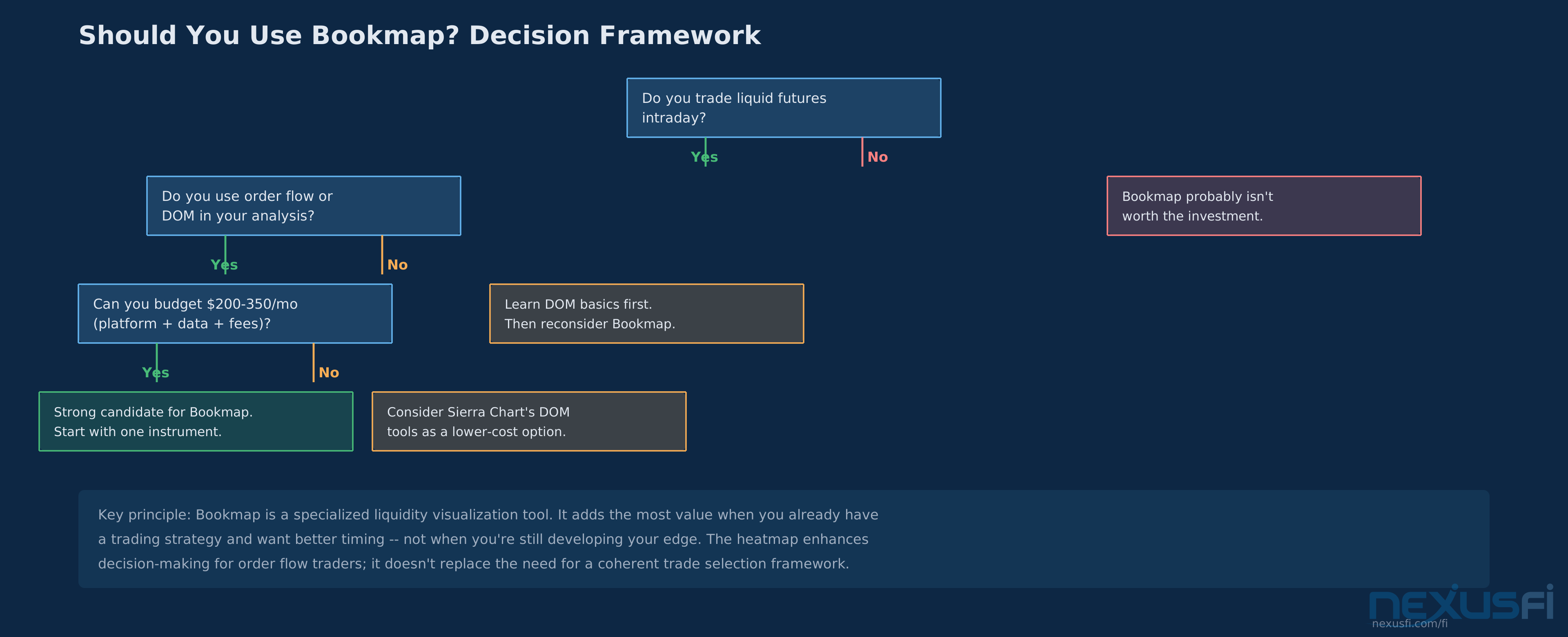
Step 1: Evaluate Your Trading Style #
Bookmap provides the most value for traders who:
- Trade liquid futures (ES, NQ, CL, GC, 6E)
- Make intraday decisions based on order flow dynamics
- Already understand basic DOM and tape concepts
- Want better timing for entries and exits
- Trade discretionary or semi-discretionary strategies
If you primarily trade daily or weekly charts, use fully automated systems, or trade illiquid markets — Bookmap probably isn't worth the investment.
Step 2: Set Up Proper Data #
Don't try to evaluate Bookmap with a subpar data feed. Get a proper Level 2 or MBO subscription from Rithmic, IQFeed, or a comparable provider. The heatmap without quality data is like trying to read a map in the dark.
Step 3: Start with One Instrument #
Don't load up six heatmaps on day one. Pick your primary contract (ES for most futures traders), configure the visualization settings, and spend time learning to read the patterns. Absorption, pulling, sweeps, exhaustion — these are visual patterns that become intuitive with screen time.
Step 4: Use It as Confirmation, Not Primary Signal #
The most effective Bookmap workflow: develop your trade idea from your primary analysis (whether that's volume profile, market structure, or technical levels), then use the heatmap to confirm or deny the setup before entry. This prevents the analysis paralysis that catches traders who try to generate trade ideas purely from order book activity.
Step 5: Consider the Professional Hybrid Workflow #
If budget allows, the most powerful setup for serious futures traders combines:
- Bookmap for real-time liquidity analysis and market microstructure context
- Jigsaw or broker DOM for fast execution and trade management
- Sierra Chart or TradingView for complete charting and technical analysis
This multi-platform approach lets each tool do what it does best rather than forcing one platform to do everything.
Who Should -- and Shouldn't -- Use Bookmap #
Strong Fit #
- Futures scalpers trading ES, NQ, CL, or other liquid contracts
- Discretionary intraday traders who make decisions based on order flow
- Traders who learn visually and want to understand market microstructure
- Advanced retail or prop-style traders looking for institutional-grade tools
- Traders who already have a strategy and want better timing
Poor Fit #
- Long-term investors or swing traders using daily/weekly charts
- Purely systematic traders who need backtesting above all else
- Traders on very tight budgets (total cost adds up quickly)
- Anyone trading illiquid markets where the heatmap provides limited value
- Beginners who don't yet understand basic DOM concepts (learn those first)
The Bottom Line #
Bookmap is the best tool available for visualizing how liquidity behaves in real time across the futures order book. Nothing else matches its heatmap for making microstructure patterns visible and intuitive. For traders whose edge depends on understanding where the money is sitting and how it's moving, it's genuinely valuable.
But it's a specialized tool, not a general-purpose platform. It won't replace your charting software, it won't build you a backtesting pipeline, and it won't generate trade signals. What it will do is give you a layer of market information that most retail traders don't have — and in a zero-sum game, that information asymmetry matters.
The key question isn't whether Bookmap is good (it is). The question is whether your trading style requires the specific information it provides. If you're making intraday decisions in liquid futures based on order flow dynamics — the answer is probably yes.
Knowledge Map
Prerequisites
Understand these firstGo Deeper
Build on this knowledgeReferences This Article
Articles that build on this topicCitations
- — NexusFi Discussion (2020) 👍 3“If using a heatmap style chart, like Bookmap, then definitely chart the NQ”
- — NexusFi Discussion (2020) 👍 5“Why not align your strategies with verifiable levels of high liquidity within Bookmap's heatmap”
- — NexusFi Discussion (2021) 👍 1“If everyone can see it and act upon, where is the edge?”
- — NexusFi Discussion (2021) 👍 2“Liquidity is not always fake or spoofing”
- — NexusFi Discussion (2023) 👍 1“Bookmap with many of the Add-On offerings basically made all the other Retail Trader Indicators Obsolete”
- — NexusFi Discussion (2020) 👍 19“I use both. I find Jigsaw is way too easy to place trades and Bookmap is great with seeing a visual of your DOM”
- — NexusFi Discussion (2016) 👍 2“It is my preferred execution tool now”
- — NexusFi Discussion (2021) 👍 3“BookMap is Nothing but a tool to read the ORDER FLOW”