



Browser-Based Charting for Futures: Cloud Platforms, Pine Script, and the Desktop vs Web Decision
Overview #
Browser-based charting has at the core changed how retail futures traders access professional-grade tools. Ten years ago, serious futures analysis required expensive desktop software, local data feeds, and a dedicated trading workstation. Today, platforms like TradingView put institutional-quality charting in any browser on any device for $30-60/month — and that shift has real implications for how you build your trading workflow.
This article examines TradingView as the dominant cloud charting platform for futures traders. It covers what TradingView does exceptionally well — charting, Pine Script, alerts, cross-device sync — and where it falls short for specific trading styles. If you're a swing trader, chart-based day trader, or new to futures and evaluating platforms, this is the practical breakdown you need. If your edge depends on DOM trading, order flow analysis, or sub-second execution, this article will explain exactly why TradingView alone won't cut it — and what complementary tools the community actually uses.
What TradingView Actually Is -- and What It Isn't #
TradingView is the most widely used charting platform in retail trading. Over 90 million registered users, available in any browser on any device, integrated with 14+ brokers for futures execution. It's the platform that made professional-grade charting accessible to anyone with an internet connection.
But here's what you need to understand before you build your futures trading workflow around it: TradingView is a charting and analysis platform first, execution platform second. It's not a broker. It doesn't clear trades. It doesn't hold your money. It connects to brokers via API integrations, and the quality of your execution depends entirely on which broker you connect and how that integration works.
As @SBtrader82 noted on NexusFi: "Many people use TradingView just for charting and analyzing the market and then they implement their trades on other platforms." That's an accurate summary of how most serious futures traders use it.
This distinction matters more for futures than for stocks. Futures traders — especially day traders working ES, NQ, CL — need execution tools that TradingView doesn't natively provide: DOM (Depth of Market), footprint charts, order flow analysis, microsecond-level execution. If your edge depends on reading the order book, TradingView alone won't cut it. If your edge depends on chart-based analysis, multi-timeframe setups, and systematic strategies with alerts, TradingView might be the best tool you've ever used.
The platform launched in 2011, went public in 2024, and has become the default starting point for anyone learning to trade. As @SBtrader82 noted on NexusFi: "Many people use TradingView just for charting and analyzing the market and then they implement their trades on other platforms." That's an accurate summary of how most serious futures traders use it.
Charting: Where TradingView Dominates #
TradingView's charting engine is genuinely excellent. This isn't marketing — it's the reason the platform has 90+ million users. The charting is fast, fluid, and deep enough for professional analysis while remaining intuitive enough for beginners.
What you get:
- 100+ built-in indicators -- every standard technical indicator plus volume profile (on Plus/Premium plans), market internals, and breadth indicators
- Multi-timeframe layouts -- up to 8 charts on screen simultaneously on Premium, each with independent timeframes and instruments
- Drawing tools -- full set including Fibonacci tools, Gann fans, Elliott Wave markers, and annotation tools that sync across devices
- Custom timeframes -- 3-minute, 7-minute, whatever you want (Plus/Premium only)
- Replay mode -- step through historical data bar by bar to practice pattern recognition
- Cloud-based -- your layouts, drawings, and indicators sync across every device automatically
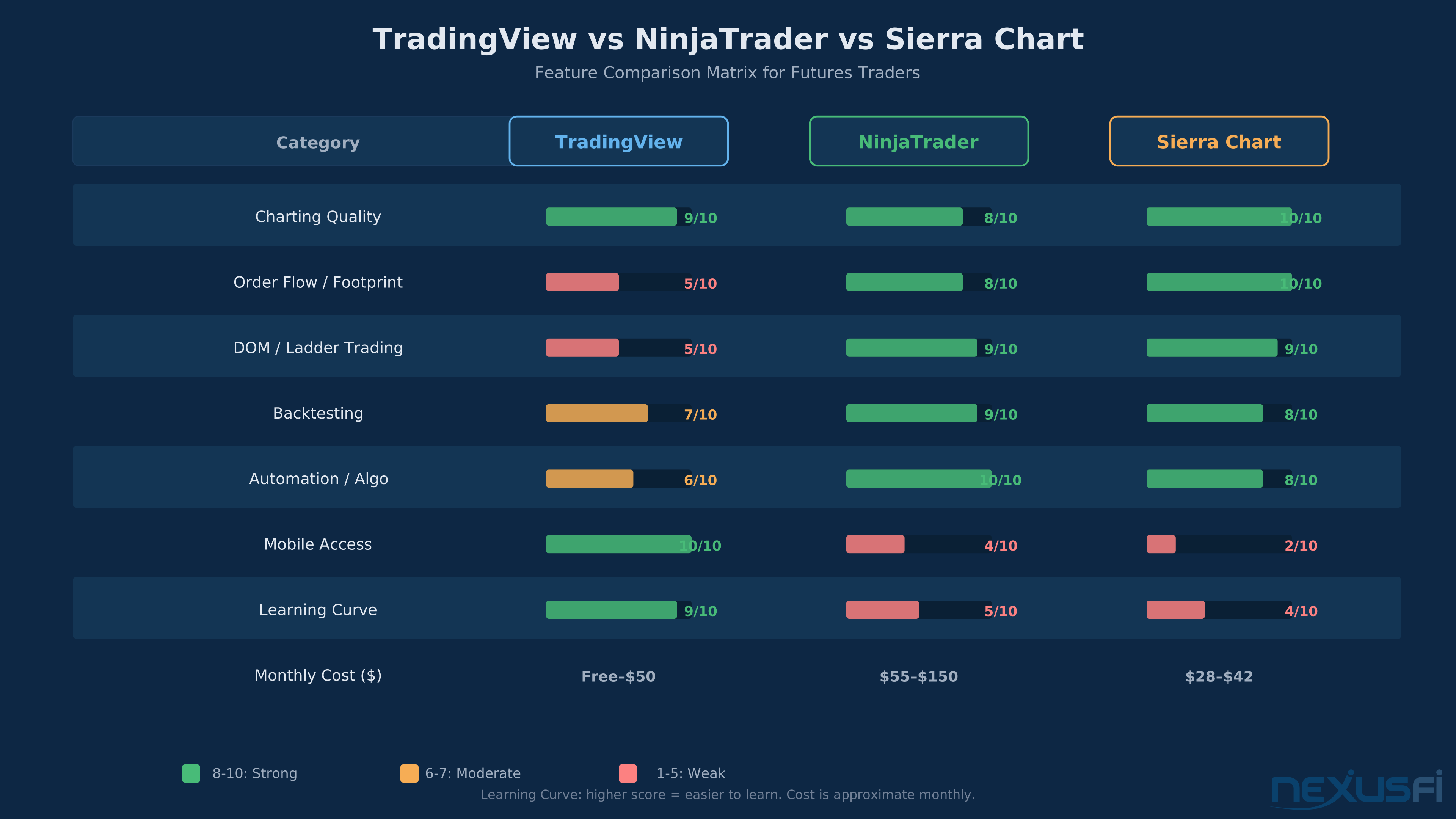
For futures traders specifically, TradingView handles continuous contracts well, supports all major CME/CBOT/NYMEX/COMEX products, and provides session-based charting that correctly delineates regular trading hours from globex sessions. The charting is on par with NinjaTrader and competitive with Sierra Chart for pure visual analysis.
Where it falls short: no native footprint charts, no volumetric bars, no delta divergence overlays. If you're an order flow trader, the charting engine — as good as it is — doesn't give you the microstructure visibility you need. That's not a bug. It's a design choice. TradingView optimized for chart-based technical analysis, not order book analysis.
Pine Script: Build Anything, Backtest Everything (With Caveats) #
Pine Script is TradingView's proprietary programming language, and it's one of the main reasons the platform became dominant. It lets you build custom indicators, create strategy logic, run backtests, and set up alert conditions — all without leaving the browser.
The language is purpose-built for trading. If you've never coded before, Pine Script is probably the most accessible entry point among strategy development languages. If you're a programmer, you'll find it limiting in some ways but impressively productive for rapid prototyping. You can go from idea to backtested strategy in an afternoon.
What Pine Script does well:
- Custom indicators -- build anything from simple moving average crossovers to complex multi-condition scanners
- Strategy backtesting -- define entry/exit logic, set position sizing, run it against historical data with a performance summary
- Alert conditions -- code conditions that trigger real-time alerts via push notification, email, or webhook
- Community library -- thousands of published scripts you can use, modify, and learn from
- Webhook integration -- connect alerts to external automation services or directly to broker APIs
What Pine Script does poorly for futures:
- No contract roll handling -- backtests run on continuous contracts without accounting for roll dates, roll gaps, or the actual mechanics of switching from one contract to the next
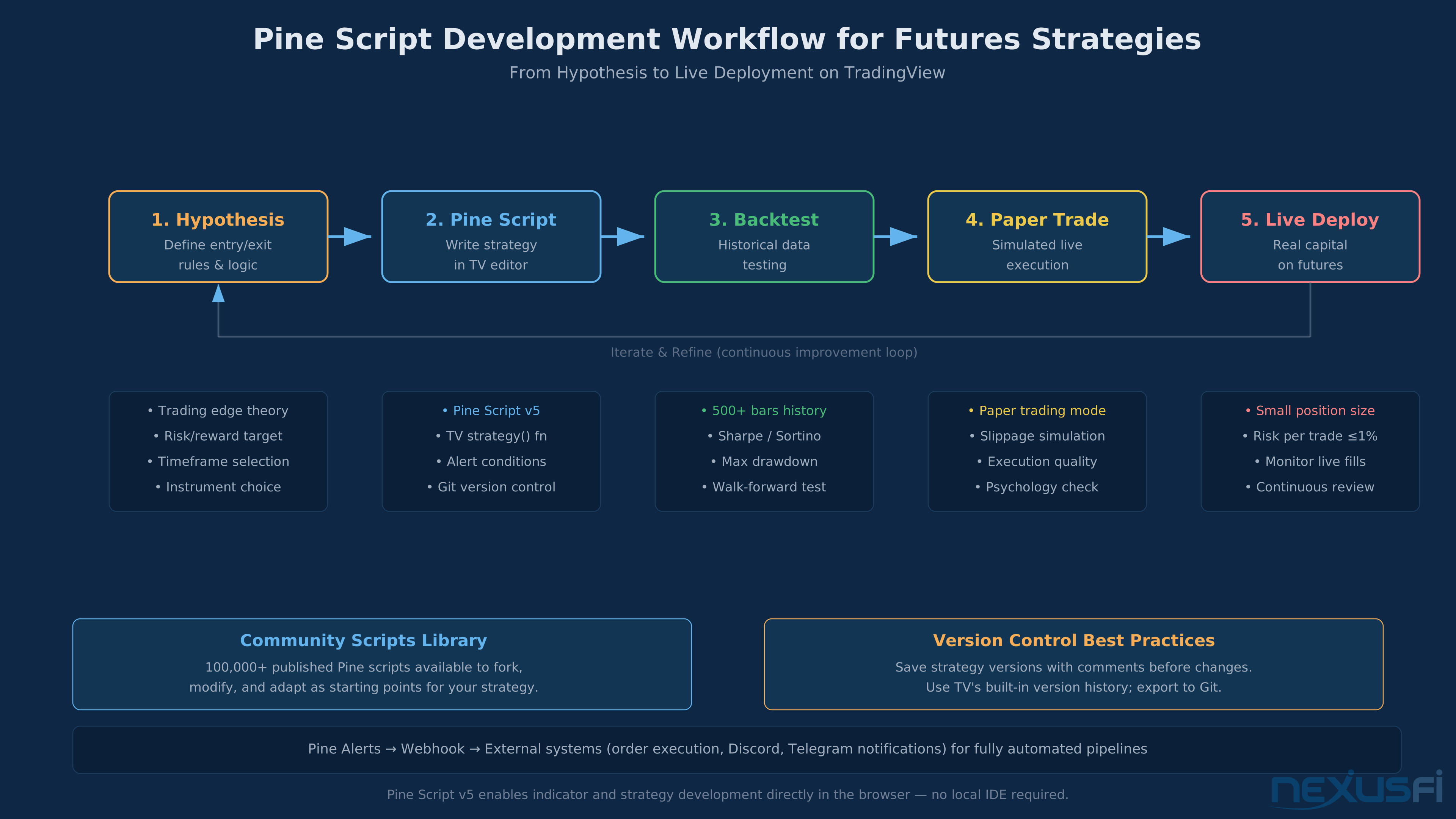
- Simplified fill model -- the backtester assumes your order gets filled at the bar's close (or at your limit price), with no modeling of queue position, partial fills, or the reality that your 10-lot limit order at a popular level might not fill at all
- Limited intrabar resolution -- the backtester processes one bar at a time. If your strategy enters and exits within the same bar, the engine can't tell which happened first. This matters enormously for day trading strategies on higher timeframes
- No exchange fee modeling -- CME fees, NFA fees, clearing fees -- none of these show up in Pine Script performance summaries unless you manually add them to commission settings
- 5,000-20,000 bar limit -- depending on your plan, you can only backtest on a limited number of historical bars. For 1-minute ES data, 20,000 bars is about 83 trading sessions. That's roughly 4 months. Not enough for statistically meaningful futures strategy validation
The bottom line on Pine Script: use it for idea generation, indicator building, and initial screening. Don't trust its backtest results as gospel for futures strategies, especially intraday ones. The gap between Pine Script backtests and live futures execution is wider than most traders realize.
Broker Integrations: How You Actually Trade Futures on TradingView #
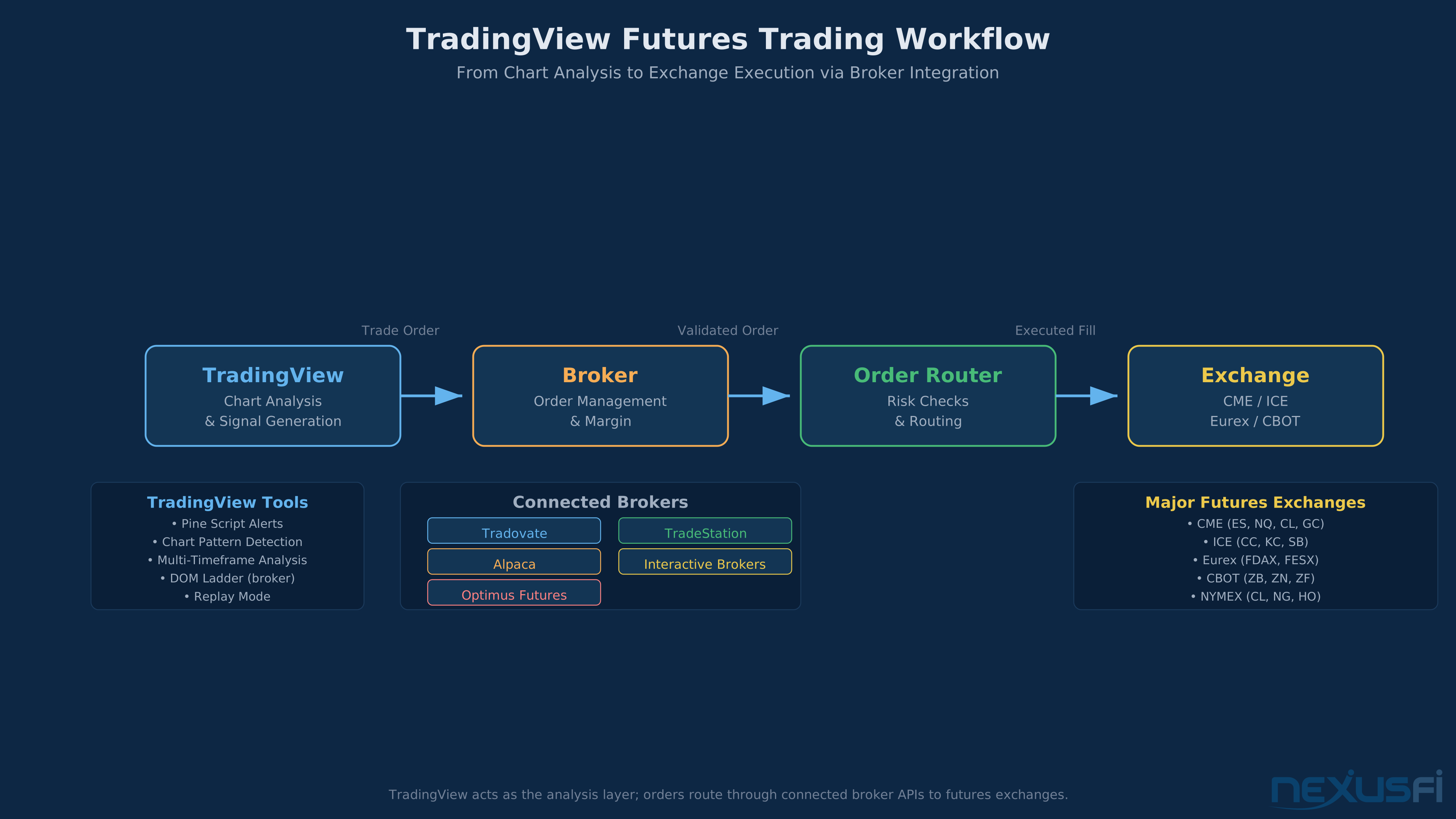
TradingView connects to futures brokers through API integrations. You analyze on TradingView's charts, place orders through TradingView's interface, and those orders route to your broker for execution at the exchange.
Supported futures brokers (as of early 2026) include Tradovate, TradeStation, AMP Global, Interactive Brokers, Optimus Futures, and several others. @forestcall on NexusFi described a common setup: "I connect TradingView to Tradovate and I have 1 monitor for Tradovate and the 2nd monitor with TradingView."
The integration quality varies by broker. Tradovate's integration is the deepest — you can place, modify, and cancel orders directly from TradingView charts with bracket orders, stops, and limits. @ram7os reported trading from TradingView charts using AMP with CQG credentials: "I logged in with my CQG credentials, and was able to place an order."
What works well:
- Chart-based order entry -- click on the chart to place orders at specific price levels
- Bracket orders -- set profit targets and stop losses visually
- Order modification -- drag orders on the chart to adjust levels
- Real-time P&L tracking -- see your position performance overlaid on charts
What doesn't work well (or at all):
- No DOM -- you can't see the order book, can't trade from a price ladder, can't scalp the way platform traders do
- Limited order types -- complex OCO/OTO combinations may not be supported depending on broker
- Execution latency -- orders route through TradingView's servers to the broker's servers to the exchange. For swing traders this is invisible. For scalpers taking 20+ trades per day, the extra hop matters
- Broker-dependent reliability -- if the broker integration has issues, you're stuck. There's no fallback execution path within TradingView itself
Real-Time Data Feeds: What You're Paying For #
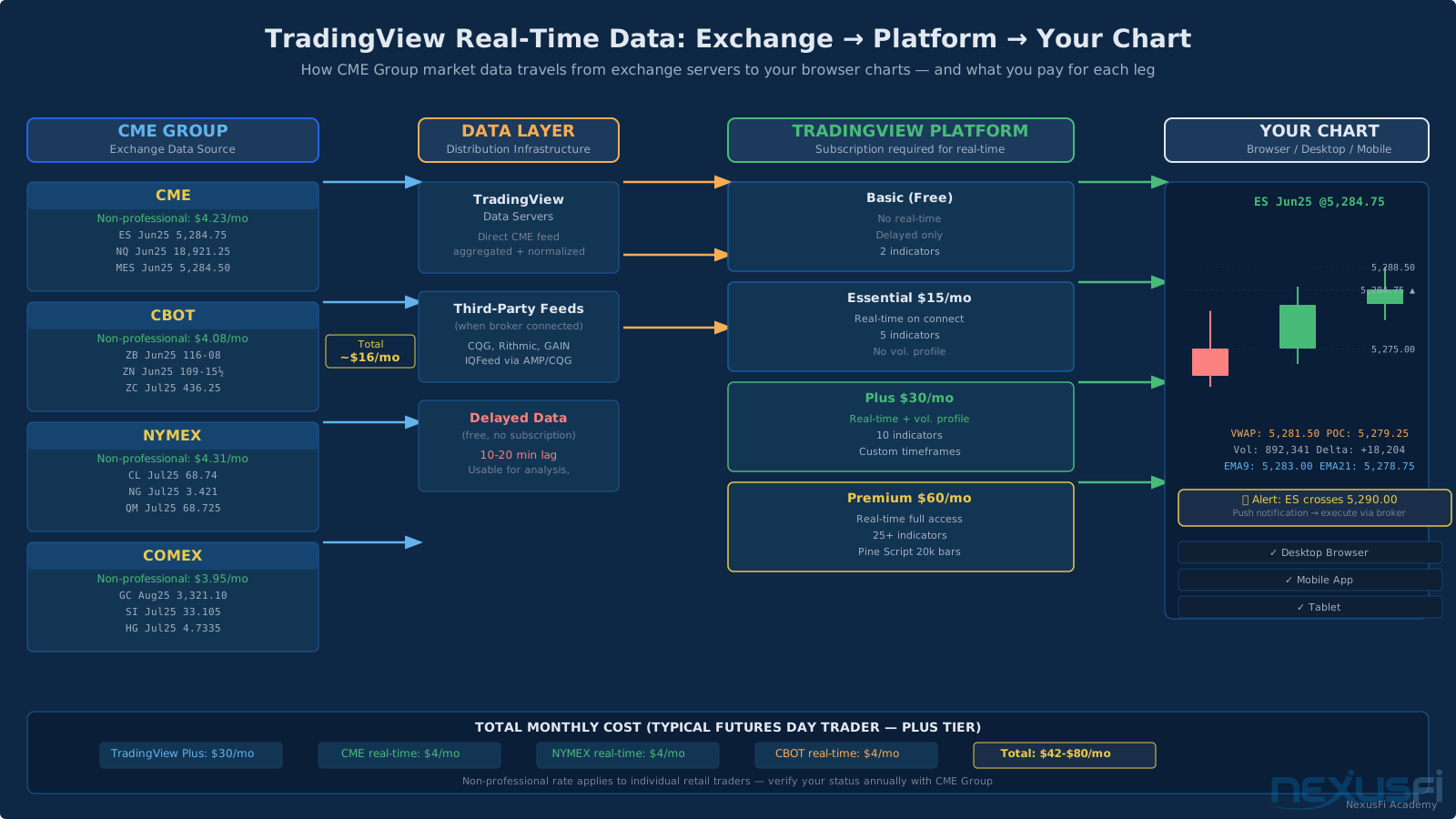
TradingView provides real-time data for CME Group futures (ES, NQ, YM, CL, GC, ZB, 6E, and hundreds more) through exchange data subscriptions. This is separate from your TradingView plan — you pay TradingView for the platform, then pay additional exchange fees for real-time data.
Typical costs:
- CME real-time data: ~$4/month (non-professional rate)
- CBOT real-time data: ~$4/month
- NYMEX real-time data: ~$4/month
- COMEX real-time data: ~$4/month
Most futures traders need at least CME data (for ES, NQ, MES, MNQ) and possibly NYMEX (for CL, NG). Budget roughly $8-16/month for data on top of your platform subscription.
Data quality is reliable for chart-based analysis. Updates are fast enough for swing trading and most day trading approaches. However, as @bobwest pointed out on NexusFi, "TradingView is primarily their own independent platform" — the data feed isn't the same as what you get from CQG or Rithmic through a dedicated futures platform. For most traders, the difference is imperceptible. For microsecond-level scalping, it matters.
Paper Trading: Useful for Workflow, Misleading for Edge #
TradingView includes a built-in paper trading simulator that uses real-time data. You can practice placing, modifying, and closing orders without risking real capital. The simulator tracks your P&L, shows your position on charts, and lets you test your workflow before going live.
Here's the honest assessment: paper trading on TradingView is excellent for learning the platform and terrible for validating whether you can trade profitably.
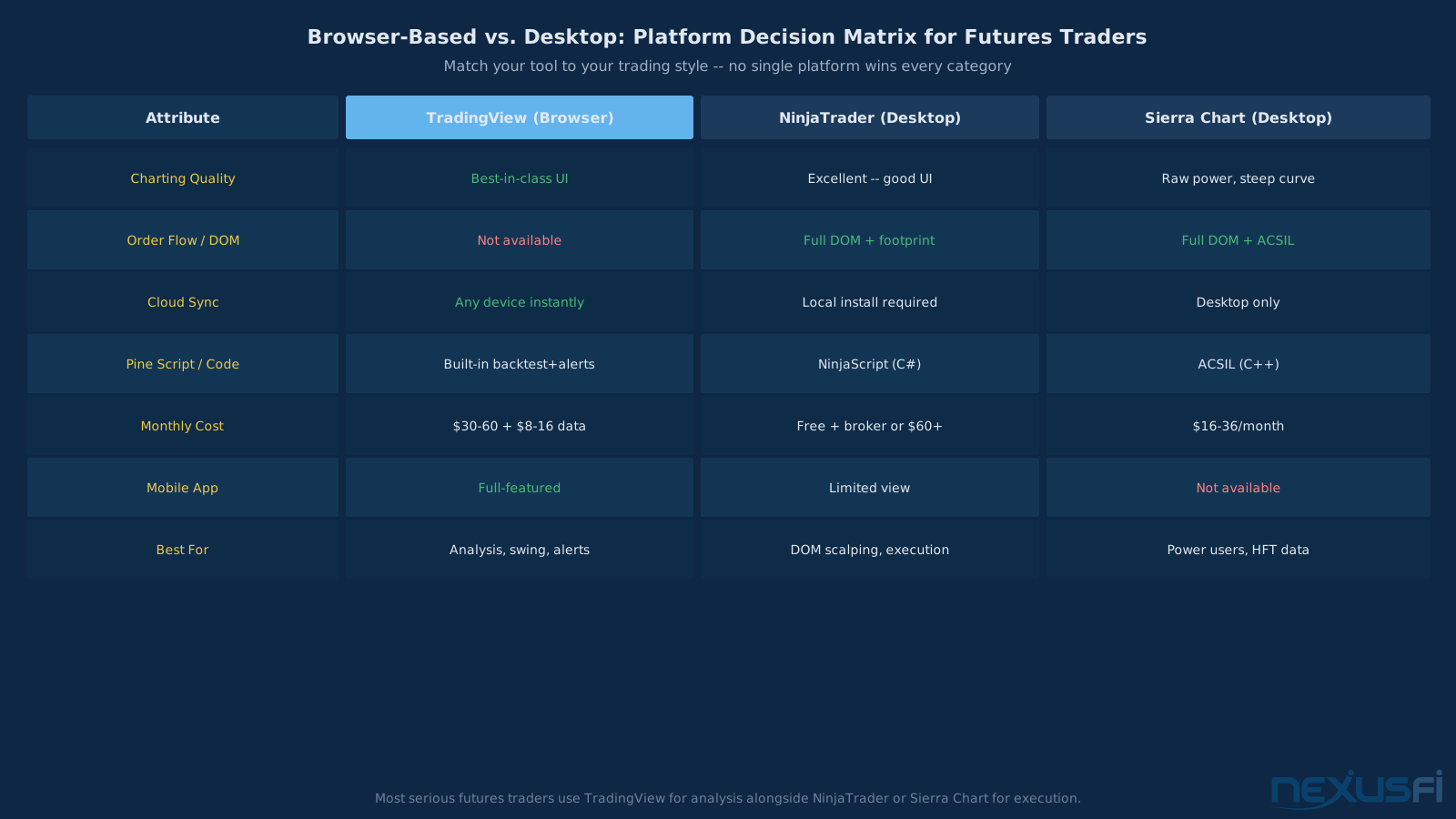
The fills are too good. In live futures trading, your limit order at a popular price level (like the VWAP or a round number) might sit in a queue behind thousands of other orders. On TradingView's simulator, it fills instantly. As @Big_Mike noted on NexusFi about sim trading in general: "Those simulations have stringent rules and severe consequences, neither of which are true for you trading sim on your own platform."
@mattz added: "The negative of paper trading: 1) It will not prepare you emotionally for trading real live funds 2) It could give you a sense of achievement in methods that do not work with real money."
Use paper trading to learn TradingView's interface, test your indicator setups, and practice your order management workflow. Don't use it to decide whether your strategy works.
Subscription Tiers: What Futures Traders Actually Need #
TradingView offers four subscription levels. Here's the honest breakdown for futures traders:
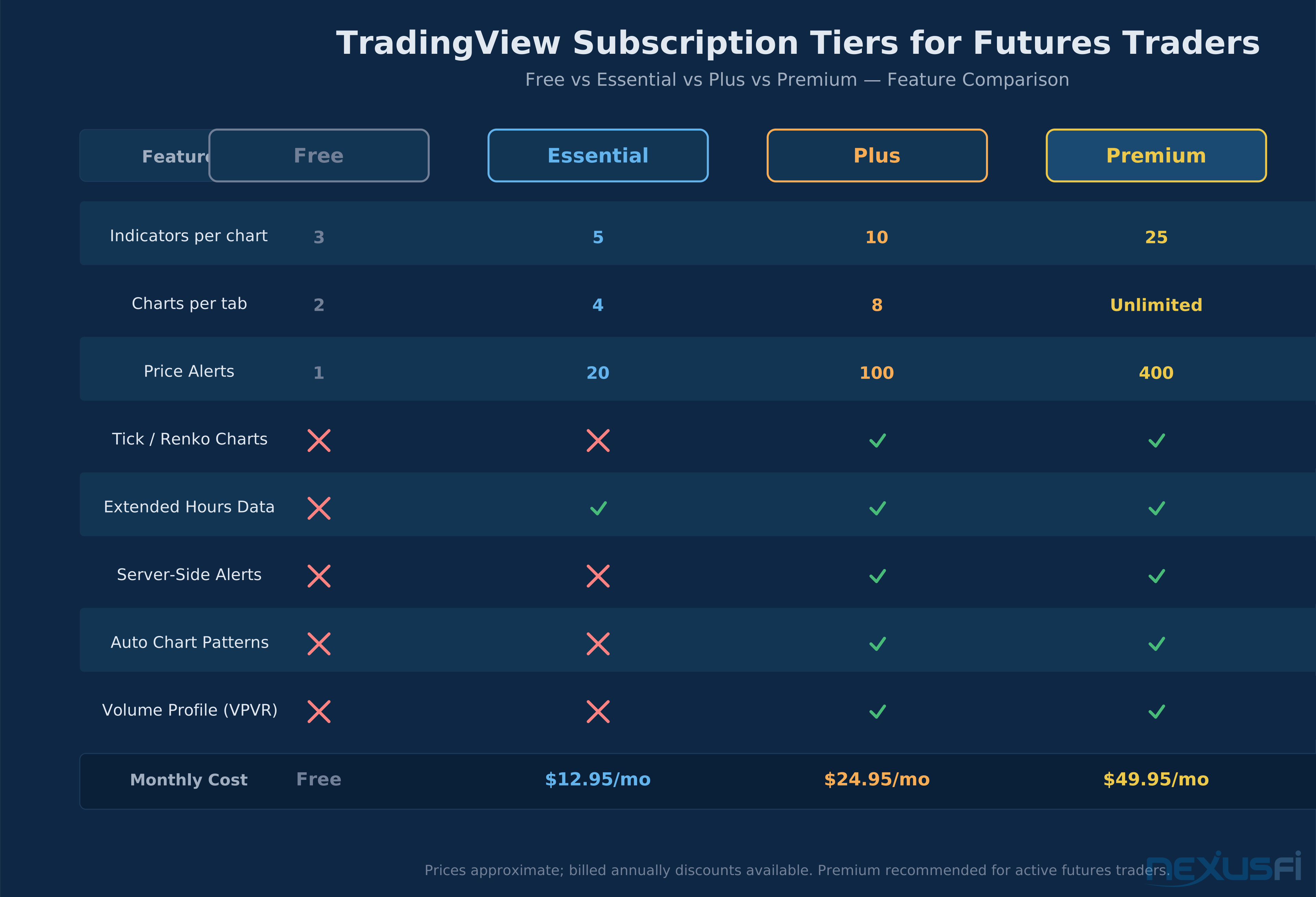
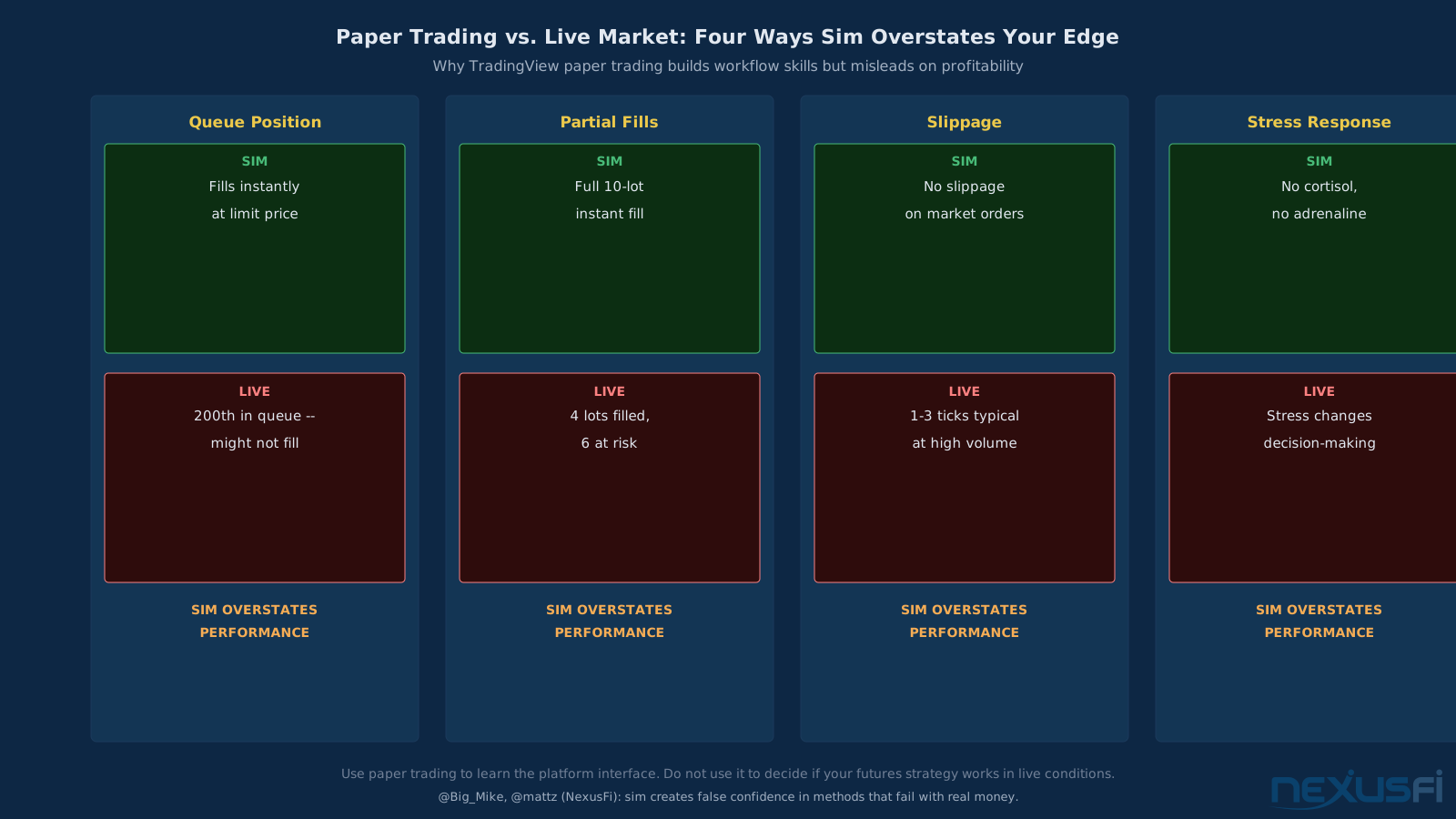
Basic (Free) — One chart, 2 indicators, 1 alert. Usable for casual browsing. Not viable for active trading. You can't even run volume profile.
Essential (~$15/month) — 2 charts, 5 indicators, 20 alerts. Adequate for a single-instrument swing trader who needs basic charting and alerts. Still no volume profile or custom timeframes.
Plus (~$30/month) — 4 charts, 10 indicators, 100 alerts, volume profile, second-based intervals, custom timeframes. This is where TradingView becomes genuinely useful for futures traders. Volume profile alone justifies the upgrade if you trade by value area and POC.
Premium (~$60/month) — 8 charts, 25+ indicators, 400 alerts, 20,000 Pine Script bars. The full package. Worth it if you run multiple monitors, trade multiple instruments, or rely heavily on Pine Script for strategy development.
Most serious futures traders land on Plus or Premium. The free and Essential tiers are too limited for meaningful futures analysis. Add $8-16/month for real-time exchange data, and you're looking at $40-80/month total for TradingView as your charting platform.
For comparison: NinjaTrader is free for charting with a connected broker. Sierra Chart runs $16-36/month. So TradingView at the Plus/Premium level isn't cheap, but it includes cloud sync, mobile access, and the social ecosystem that neither competitor offers.
Day Trading Futures on TradingView: Honest Assessment #
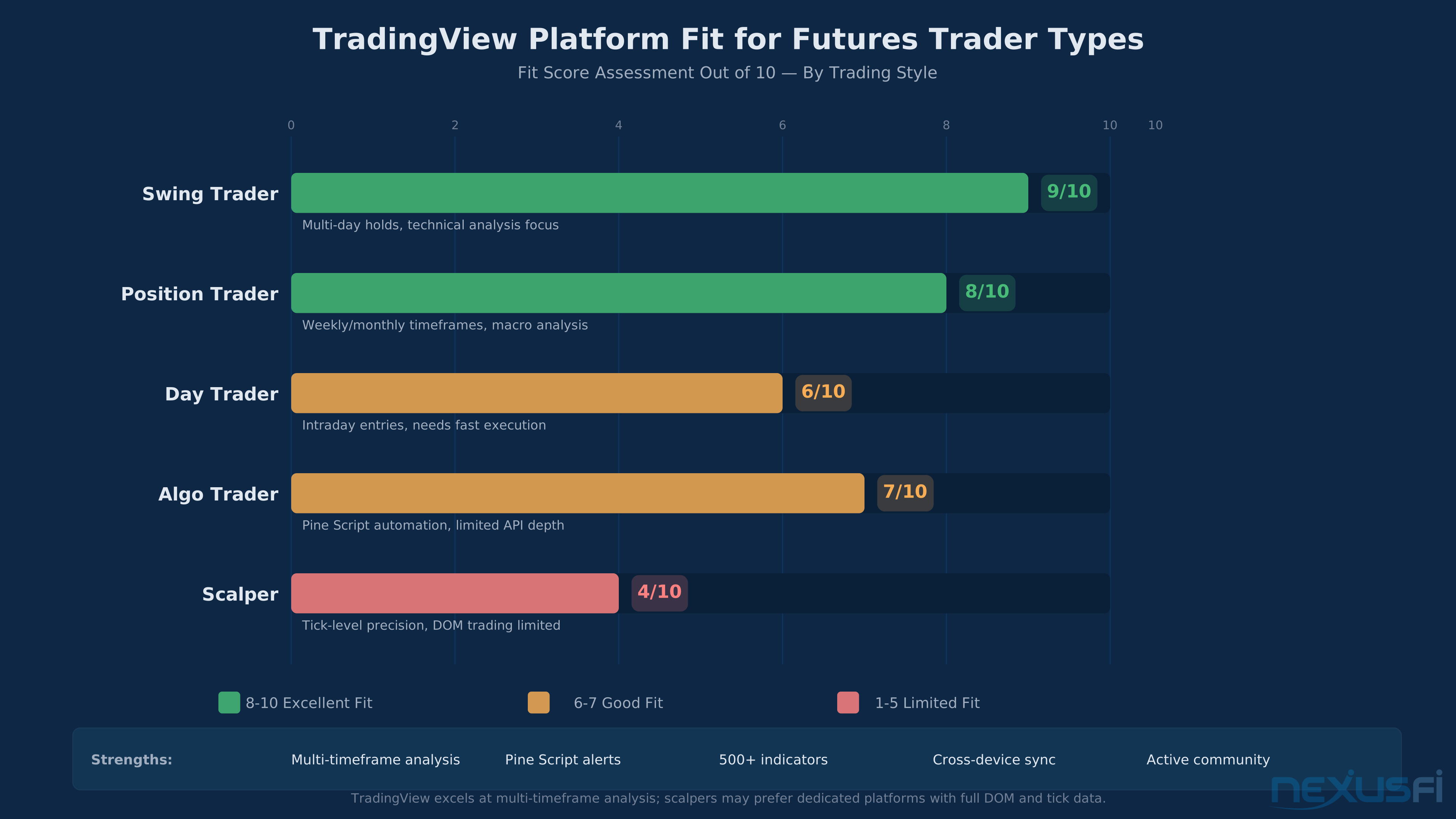
Can you day trade futures on TradingView? Yes. But the question worth answering is how — because the workflow looks different from what you'd build on a dedicated execution platform.
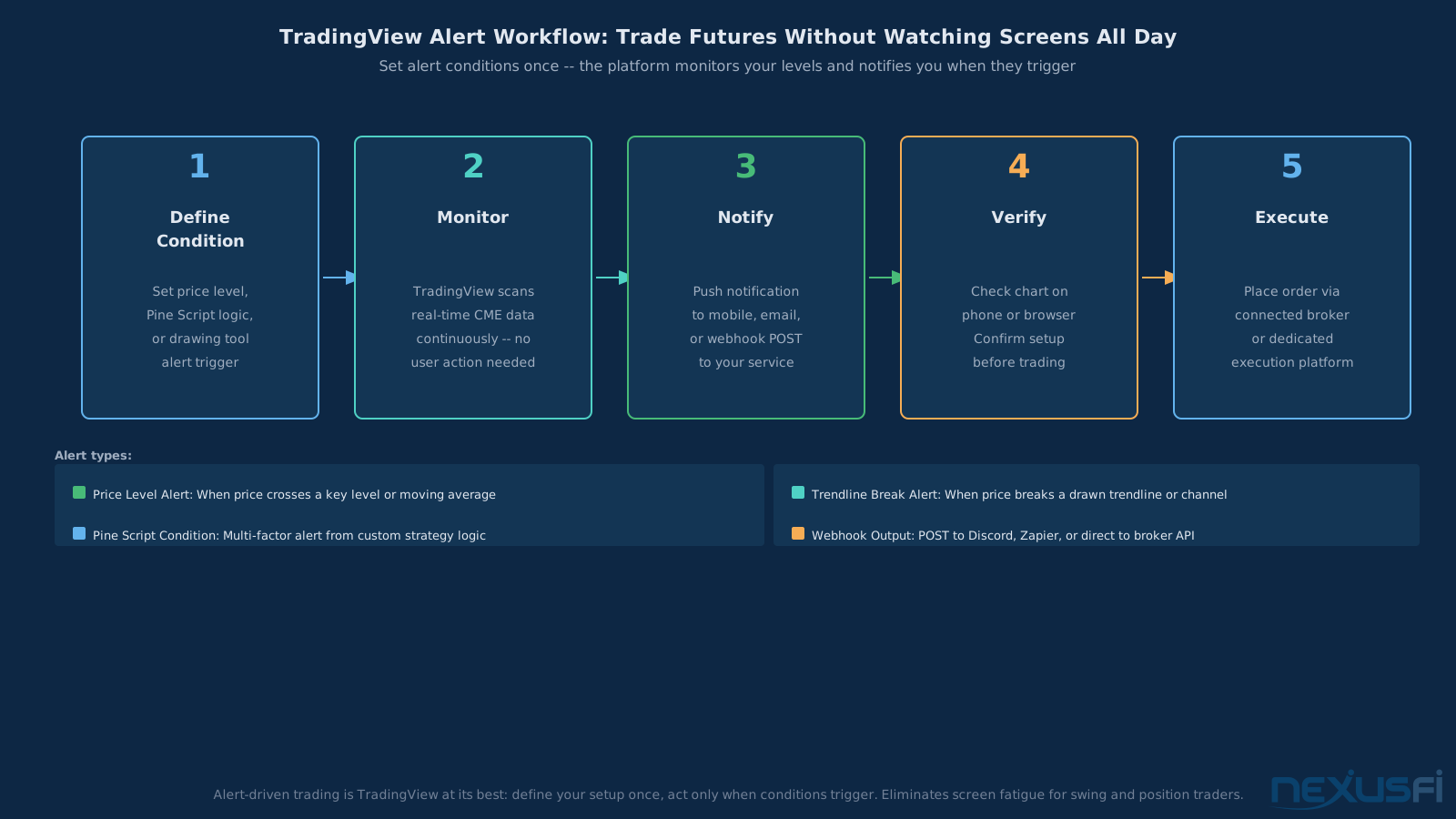
Chart-based day traders benefit from a specific TradingView workflow: run a 3-chart layout with a higher timeframe (30- or 60-minute) for context, a trading timeframe (5-minute) for entries, and a 1-minute for timing exits. Set alert conditions on your key levels so you're not staring at the screen for 6.5 hours — let the platform notify you when price reaches your zone. That alert-driven approach is where TradingView actually adds value over desktop-only platforms.
Scalpers and order flow traders need a different setup entirely. The common community solution: TradingView on one monitor for analysis, NinjaTrader or Jigsaw on the other for execution. This dual-platform approach gives you TradingView's superior charting and alerts alongside proper DOM, tape, and footprint tools. It's more complex than a single-platform setup, but most day traders who've tested both agree the trade-off is worth it.
The practical split: TradingView handles roughly 60% of what a futures day trader needs exceptionally well. The remaining 40% — DOM, order flow, fast execution — requires a complementary tool. Whether TradingView works as your only platform depends on which side of that split your strategy lives on.
Swing Trading Futures on TradingView: Near-Ideal Fit #
For swing traders holding positions for 1-10+ days, TradingView is close to the perfect platform. The reasons are structural: swing trading rewards analysis depth over execution speed, and that's exactly what TradingView optimized for.
The practical swing workflow on TradingView looks like this: set up a weekly/daily chart pair for trend identification, a 4-hour chart for entry timing, and conditional alerts on your trigger levels. Once positioned, manage via the mobile app — adjust trailing stops during Asian session moves, monitor correlated instruments for early warning signs, and use Pine Script screeners to flag the next setup while your current trade develops.
Contract roll management is the one area where swing traders need vigilance. If you're holding a position through a quarterly roll (typically the second Thursday before expiration for ES/NQ), several things happen that TradingView won't automatically handle for you:
- Continuous contract gaps -- TradingView's continuous contract (ESI! or NQ1!) back-adjusts by adding the roll gap to historical data. Your actual entry price doesn't change, but chart levels shift. If you placed a stop at 5600 based on a support level, that level might display differently after the roll adjustment.
- Broker-side roll mechanics -- some brokers auto-roll your position, others require manual action. Check with your specific broker (Tradovate auto-rolls, some others don't). A missed roll means holding an expiring contract with declining liquidity.
- Spread monitoring -- in the 1-2 weeks before roll, watch the calendar spread between front and back month. Unusual widening can signal institutional positioning that affects your directional trade.
Outside of roll management, the platform handles swing trading naturally. The alert infrastructure lets you step away from the screen without missing setups, and daily/weekly timeframe analysis sidesteps the execution-speed concerns that matter for day traders.
How TradingView Compares to Dedicated Futures Platforms #
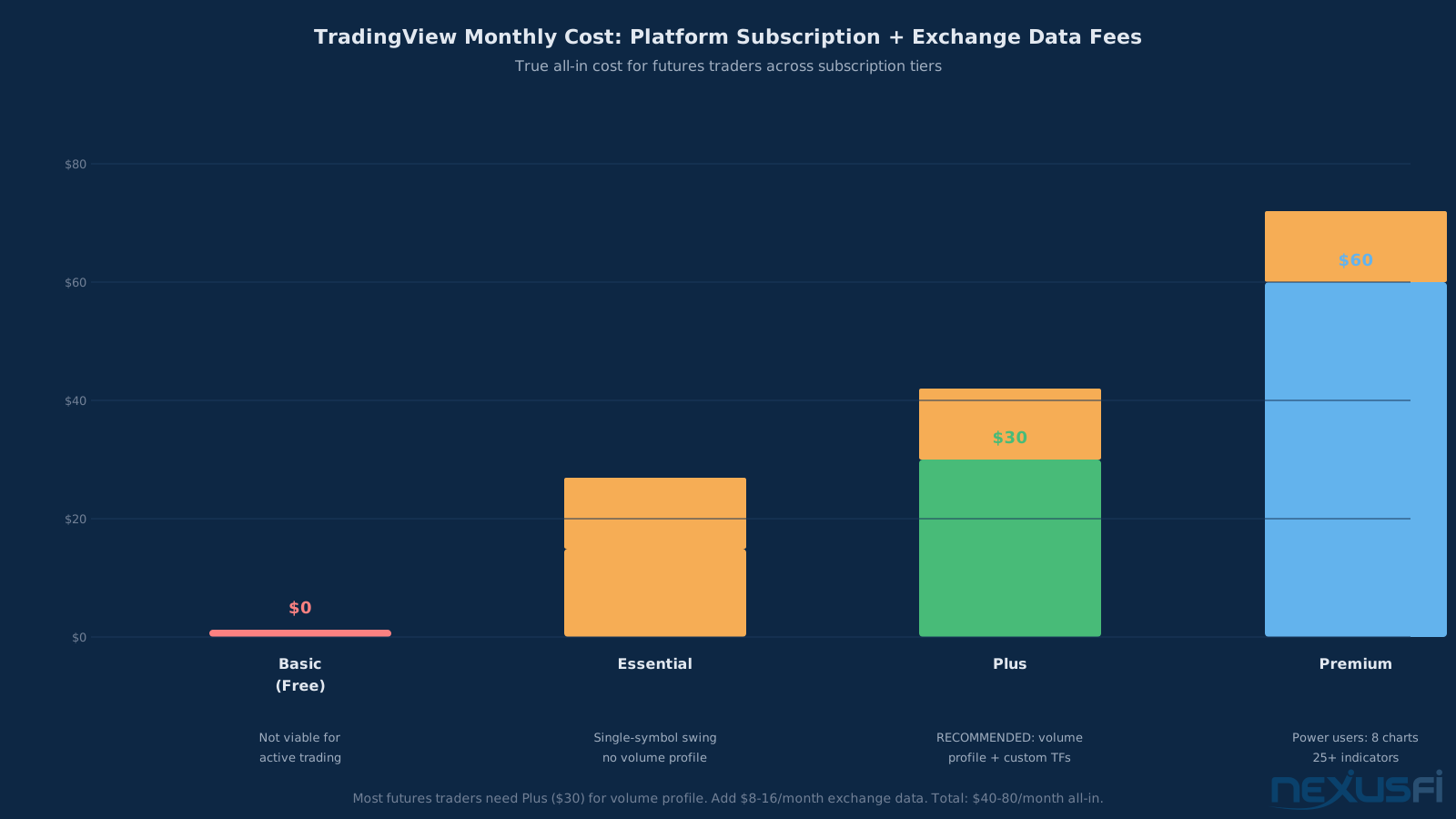
The comparison isn't apples to apples. TradingView is a charting platform that can trade. NinjaTrader and Sierra Chart are trading platforms that can chart. Different starting points, different strengths.
TradingView vs NinjaTrader: NinjaTrader wins on execution (DOM, order flow, bracket management, C# strategy development). TradingView wins on charting UI, cloud sync, mobile access, social features, and accessibility. Many traders use both — TradingView for analysis, NinjaTrader for execution.
TradingView vs Sierra Chart: Sierra Chart wins on raw power — ACSIL (C++) gives unlimited customization, the DOM and order flow tools are best-in-class, and performance on high-tick-rate instruments is unmatched. TradingView wins on usability, learning curve, and the fact that you don't need a CS degree to get started. Sierra's learning curve is steep. TradingView's isn't.
As one NexusFi member noted about Sierra Chart: "No question, it's fast, reliable, powerful and can do just about anything." That's true. But TradingView can do the charting part just as well, with a fraction of the setup time.
The pattern most serious futures traders converge on: TradingView for analysis and alerting, a dedicated platform for execution. This gives you the best of both worlds — TradingView's superior charting and alert infrastructure paired with NinjaTrader's or Sierra Chart's superior execution tools.
Other Browser-Based Charting Options #
TradingView dominates browser-based charting for futures, but several alternatives exist that serve specific needs or complement your primary platform:
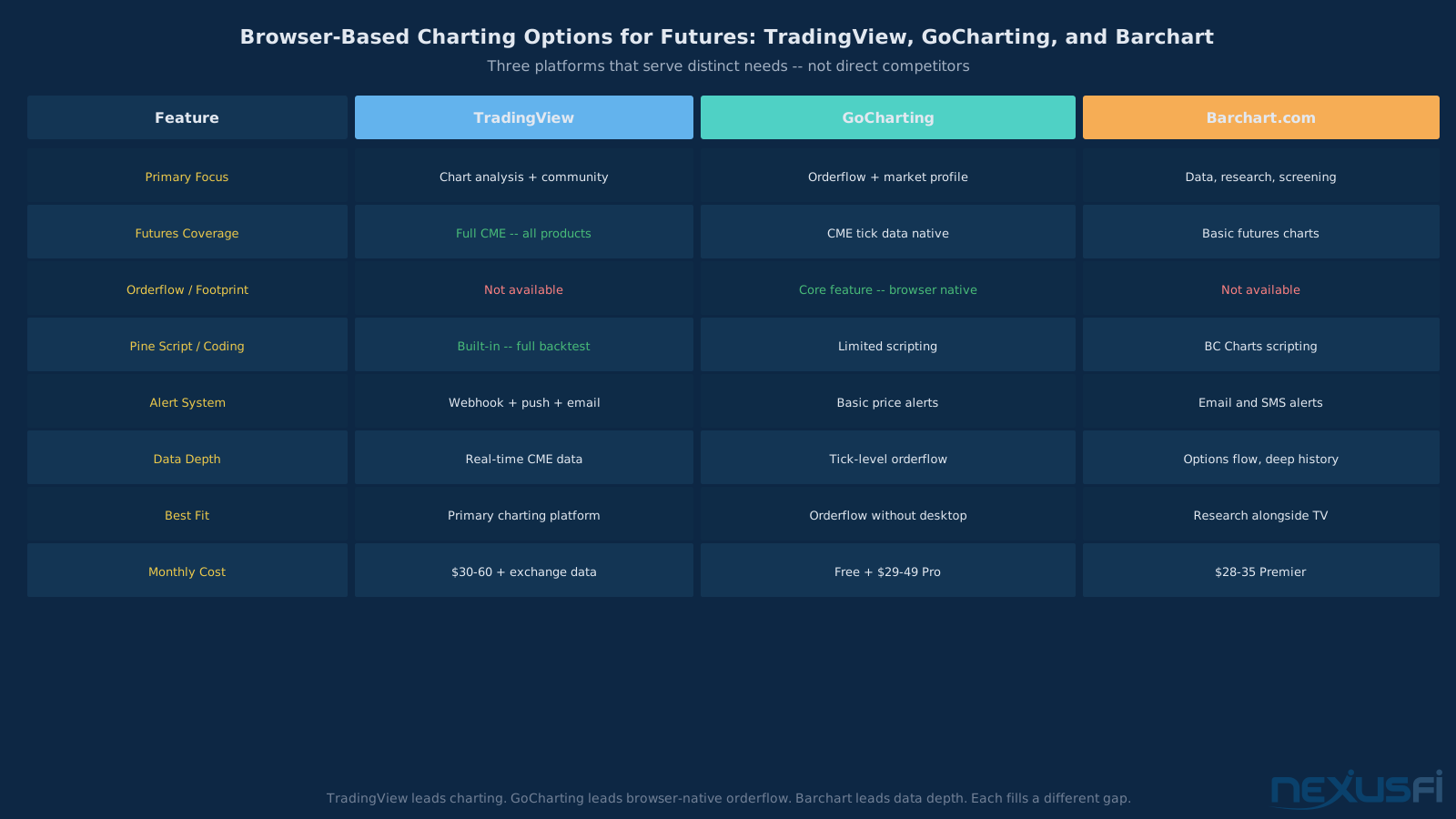
Barchart.com (~$28-35/month) is the strongest data-oriented alternative. As noted in NexusFi community discussion, "Barchart is a data machine. TradingView is a charting machine." Barchart excels at options flow, energy complex data (CL, NG), multi-decade commodity history, and volume-based technical scanners. Its charting is functional but not as deep as TradingView's — use it for research and screening alongside TradingView, not instead of it.
GoCharting is a browser-based platform that addresses the one major gap TradingView leaves for active traders: orderflow and market profile tools built natively in the browser using CME tick data. GoCharting founder Sushant Deb described the approach on NexusFi: "We built our charting library completely from scratch to deliver fast orderflow charts completely in the web and mobile." If you want footprint-style analysis without installing NinjaTrader or Sierra Chart, GoCharting closes that gap.
Finviz is primarily a stock screener. Its charting is minimal, and futures coverage is thin. Useful for macro context and equity sector rotation analysis — not a charting platform for futures trading.
The practical takeaway: TradingView has no serious browser-based competitor for futures charting depth. Barchart adds data and screening breadth; GoCharting adds orderflow and profiling capability. They are complements to TradingView's charting-first focus, not replacements.
Who Should Use TradingView for Futures #
Best fit: Swing traders, chart-based day traders, Pine Script developers, multi-asset traders, and anyone new to futures who wants an accessible starting point with strong community support.
Poor fit: Scalpers needing sub-second execution and DOM-based order management, order flow traders relying on footprint charts and tape reading, and algorithmic traders requiring realistic futures fill models for backtesting.
Getting Started: The Practical Workflow #
If you're setting up TradingView for futures trading, here's the efficient path:
- Start with a free account -- explore the interface, build a watchlist, try the drawing tools. Don't pay anything until you know you want it
- Subscribe to Plus -- this is the minimum viable tier for serious futures analysis. Volume profile, custom timeframes, and 4 simultaneous charts make this the sweet spot
- Add real-time CME data -- about $4/month. Add NYMEX if you trade CL or NG
- Connect your broker -- Tradovate is the most popular integration for futures. If you use AMP, Interactive Brokers, or another supported broker, connect that instead
- Paper trade for a week -- learn the order entry interface, practice bracket orders, understand how modifications work. Don't evaluate profitability. Just learn the workflow
- Start small -- micro futures (MES, MNQ, MCL) are your friend while you validate that the TradingView-to-broker execution chain works for your style
TradingView is the best retail charting platform for futures analysis — not execution. Swing traders can use it as their sole platform. Scalpers and order flow traders need dedicated execution software alongside it. The browser-based alternatives (GoCharting for orderflow, Barchart for data depth) serve different needs rather than competing directly with TradingView's charting engine.
The Bottom Line #
TradingView is the best retail charting platform available for futures trading. Full stop. The charting engine, Pine Script ecosystem, alert infrastructure, and cross-device sync are unmatched in the category.
It is not the best execution platform for futures trading. The lack of DOM, limited order flow tools, and broker-dependent execution quality mean that traders who need fast, precise execution will need a dedicated platform alongside TradingView.
The question isn't whether TradingView is good — it is. The question is whether it's sufficient for your trading style. If you're a swing trader or chart-based day trader, it probably is. If you're a scalper or order flow trader, it's a powerful complement to your execution platform, not a replacement for it.
Don't let anyone tell you TradingView can't do futures. It can. Don't let anyone tell you TradingView is all you need for futures. It might not be. The answer depends on whether your edge lives in the chart or in the order book.
Knowledge Map
Prerequisites
Understand these firstGo Deeper
Build on this knowledgeReferences This Article
Articles that build on this topicCitations
- — Need Trading View Info (2023) 👍 1“Hi, if I understand you question correctly: you have an account with Ninja but online you see thousands of videos of people using trading view, you can't understand why and you can't understand how to connect trading view with the broker.”
- — Tradovate - Im trading Micro E-Mini Futures - Do I need "Market Internals" data feed? (2020) 👍 14“I am happy with Tradovate. What I do is scalp 90% of the trades. I make 75% of my income from Micro Futures day trading and the other 25% I day trade stocks. The data feeds are 50% cheaper than Kinetick or other data feed companies.”
- — Trading from Tradingview charts (2020) 👍 2“I'm using AMP as a broker, and they have a private label link to Tradingview. I logged in with my CQG credentials, and was able to place an order in the chart and move the stop/target. The basic functionality for chart trading seems to be there.”
- — Quickest/Cheapest way to a live futures data feed (2020) 👍 2“I actually gave TradingView a try a few years ago. It is not at all bad as a trading platform, and yes, the initial trial is with live data.”
- — Where I am after 8 months of trading ES (2015) 👍 7“I actually agree with you for once Paige. Sim just creates bad habits and reinforces bad behaviors. I've witnessed countless hundreds of users on this forum stay on sim for long periods of time, radically change their methodologies over and over, and...”
- — Is paper trading good or bad? (2012) 👍 2“I am going to say something that you will find odd but please read this post until the end. Paper Trading is ONLY useful once you have traded real live funds, in my honest opinion.”
- — TradeStation Wins TradingView Broker of the Year -- Plus StockBrokers.com #1 Innovati (2026)“TradeStation Securities was named Broker of the Year in the TradingView 2025 Broker Awards, announced February 12, 2026.”
- — GoCharting AMA (2023) 👍 2“We built our charting library completely from scratch to deliver fast orderflow charts completely in the web and mobile.”
- — barchart.com vs. tradingview.com (2026)“Barchart is a data machine. TradingView is a charting machine. Not much overlap once you dig in.”
Social Features: Discovery Engine, Not Signal Service #
TradingView's social layer is unique among trading platforms. Users publish trade ideas, share custom indicators, comment on charts, and build followings. It's part social media, part collaborative analysis tool.
What's genuinely useful:
What's dangerous:
Treat TradingView's social features as a discovery engine. Use them to find ideas and indicators worth investigating. Don't use them as a substitute for your own analysis.