



Mobile Trading for Futures: Managing Positions, Risk, and Execution Away From Your Desk
Overview #
Mobile Trading for Futures: Managing Positions, Risk, and Execution Away From Your Desk
Every futures trader eventually asks the same question: can I trade from my phone? The honest answer is yes, but with caveats that matter more than the marketing screenshots suggest. Mobile futures trading has matured from a gimmick into a legitimate tool — but the gap between "I can place an order" and "I can trade effectively" is wider on a 6-inch screen than most people expect.
This article breaks down what mobile actually does well for futures traders, where it falls short, and how to build a workflow that uses mobile as a genuine trading asset instead of a liability.
What Mobile Trading Actually Means for Futures #
Mobile trading for futures covers two distinct use cases that get lumped together too often.
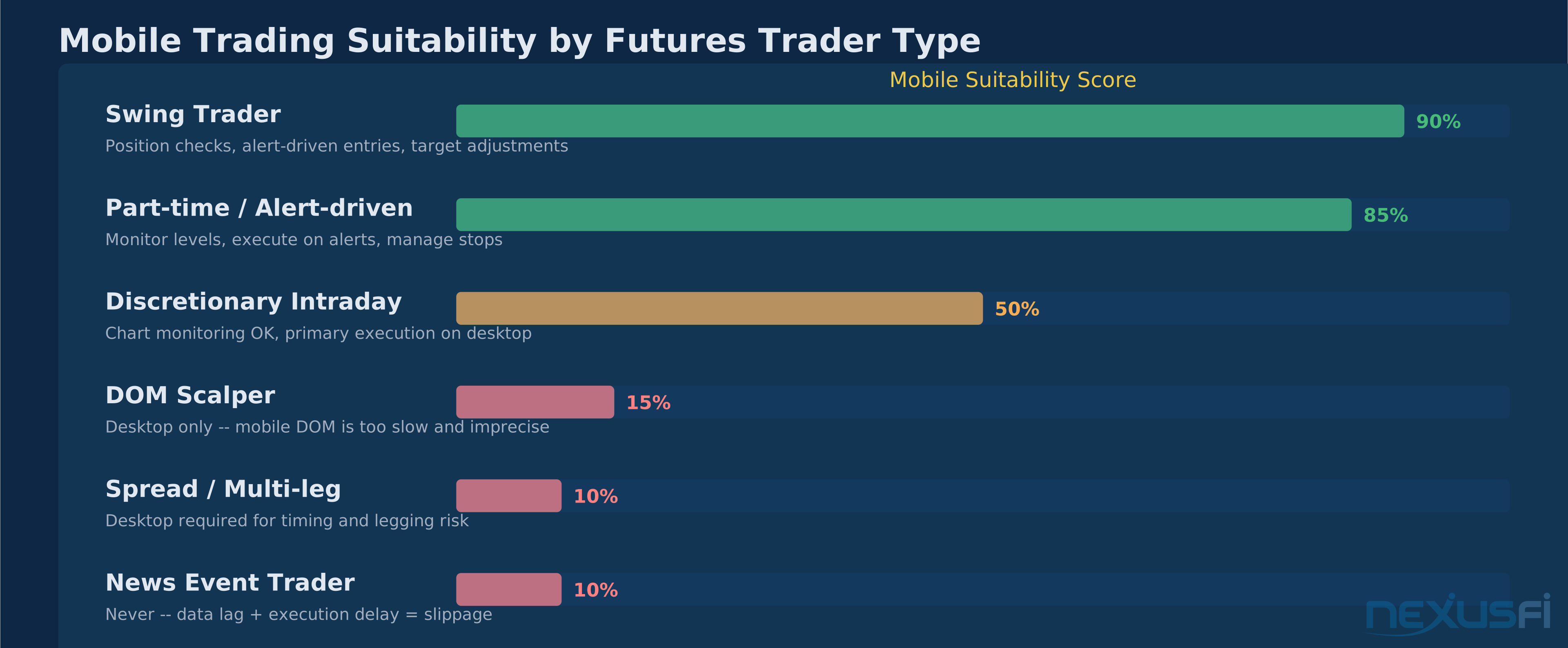
Position management — checking P&L, adjusting stops, flattening positions, monitoring margin — works well on mobile. The data is simple, the actions are discrete, and the stakes of a slightly slower interface are manageable.
Active trading — reading DOM flow, entering multi-bracket orders, managing multiple positions across correlated instruments — is a at the core different story. The screen constraints, input precision, and data refresh limitations create friction that costs money in fast markets.
The distinction matters because most mobile trading apps demo the first use case and imply the second. A clean position monitor screenshot says nothing about trying to modify a bracket order on ES during a 20-handle rip at the FOMC announcement.
Real-time CME and ICE market data costs money at the exchange level — typically $3-15/month depending on products. Any mobile app advertising "free" real-time futures data is either delayed 10-20 minutes, requires a funded broker account where they earn on commissions, or offers a limited trial period.
([NexusFi post] [1]).
Core Features to Evaluate in a Mobile Futures App #
Not all mobile trading apps are built equal. The features that matter most for futures traders differ from what equities or crypto traders need.
Order types and execution controls — At minimum, a futures-capable mobile app needs market, limit, stop, and stop-limit orders with proper time-in-force options (GTC, IOC, DAY). Bracket orders with attached stops and targets are critical — entering a futures position without a protective stop because the app doesn't support brackets is asking for trouble. OCO (One-Cancels-Other) support matters for managing exit scenarios.
Contract handling — The app needs to display the correct contract month, handle rollover periods clearly, and show contract-specific margin requirements. Apps designed primarily for equities that bolt on futures support often fumble contract expiration displays and auto-roll logic.
Margin and risk visibility — Real-time buying power, initial and maintenance margin per contract, current account equity, and day-trade margin (if applicable) need to be visible without drilling through three menu layers. In futures, margin calls aren't academic — they result in forced liquidation.
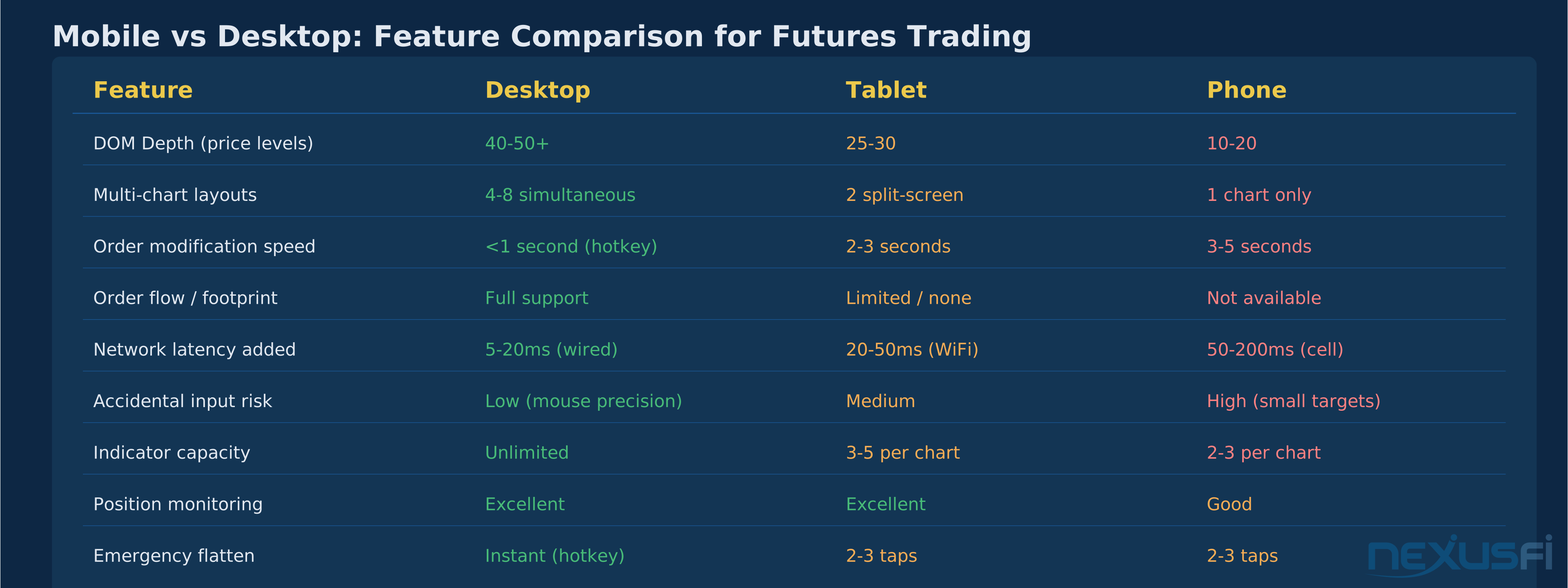
Cancel and modify speed — How fast can you cancel a working order? On desktop with a hotkey, sub-second. On mobile, the workflow is typically: open orders list, tap the order, tap modify or cancel, confirm. That's 3-4 screen interactions taking 2-5 seconds. In a fast market, those seconds matter.
Flatten-all function — A one-tap button to close all open positions and cancel all working orders. This is non-negotiable for futures. Every mobile trading app should have it, but not all implement it with the same reliability. Test this function on paper before you need it for real.
Mobile DOM: Functional but Compromised #
The Depth of Market ladder is where mobile constraints hit hardest. Desktop DOM traders typically see 40-50+ price levels with order quantities at each level, their working orders visually placed on the ladder, and one-click order placement at any price. Mobile DOM shows maybe 10-20 levels on a phone, perhaps 25-30 on a tablet.
That level compression isn't just cosmetic. Futures traders use DOM context to read absorption, spot size clustering, and identify where liquidity sits above and below the current price. Seeing 10 levels of ES when you need to understand where the 2,000-lot offers are stacked 15 handles above the market doesn't give you the picture.
The bigger issue is input precision. On a desktop DOM ladder, clicking a specific price level is pixel-precise with a mouse. On a phone, you're tapping a row that might be 8mm tall. During a fast move when prices are scrolling, the probability of hitting the wrong level — or hitting the bid side when you meant the offer — goes up much. This isn't theoretical: experienced NexusFi members have reported accidentally executing positions 10x intended size due to touch input errors on mobile DOM.
Tablet DOM is meaningfully better than phone DOM. A 10-inch iPad shows enough levels to be genuinely useful, and the tap targets are large enough to reduce mis-entry risk. If you're serious about mobile DOM trading, a tablet is the minimum — phones should be reserved for emergencies.
@numberjuani, a NexusFi Elite Member, summarized a common approach: "TradeStation's mobile app is really good. Has really good charting with tons of indicators, DOM, watchlists" — but also flagged the VPS alternative: getting a remote server and controlling your desktop platform from your iPad gives you the full DOM experience through a remote window ([NexusFi post] [2]).
Charting on Mobile: Good for Monitoring, Poor for Analysis #
Mobile charting has come a long way. TradingView's mobile app, thinkorswim mobile, and TradeStation's app all offer clean candlestick charts with basic indicators — moving averages, RSI, MACD, Bollinger Bands, VWAP. You can zoom, pan, draw support/resistance levels, and switch timeframes.
What you can't do effectively:
Multi-chart layouts — Desktop traders typically run 4-8 charts simultaneously across multiple monitors. On mobile, you get one chart at a time. Switching between ES, NQ, and the VIX to read correlation requires three separate chart loads. The context you build by seeing them all at once — price leading in one, lagging in another, divergence building in real time — evaporates into sequential glances.
Complex indicator stacks — Most mobile apps support 2-3 indicators per chart before the display becomes unreadable. If your desktop setup uses Volume Profile with VWAP, cumulative delta, a TICK overlay, and two moving averages on the same chart, the mobile version will be a compromise.
Drawing tool precision — Drawing a trendline across swing highs with a mouse is precise. Drawing it with your thumb on a phone screen introduces enough imprecision that the line can be off by 2-3 ticks on ES. For traders who use precise levels, this matters.
Order flow visualization — Footprint charts, cluster charts, and time-and-sales analysis are basically desktop-only. No mobile app currently offers the granularity of Sierra Chart's Numbers Bars or Bookmap's heatmap on a phone. This is the single biggest functional gap between mobile and desktop for serious futures traders.
The practical rule: use mobile charts to confirm setups and monitor trades. Use desktop to build trade ideas and perform multi-timeframe analysis.
Execution Quality: Mobile vs Desktop #
In liquid markets during regular trading hours, the execution quality difference between mobile and desktop for simple orders is smaller than most traders expect. A market order to buy 1 ES at 10:30 AM ET fills basically the same whether it comes from your NinjaTrader desktop or your thinkorswim mobile app. The exchange doesn't know or care what device originated the order.
Where the gap opens up:
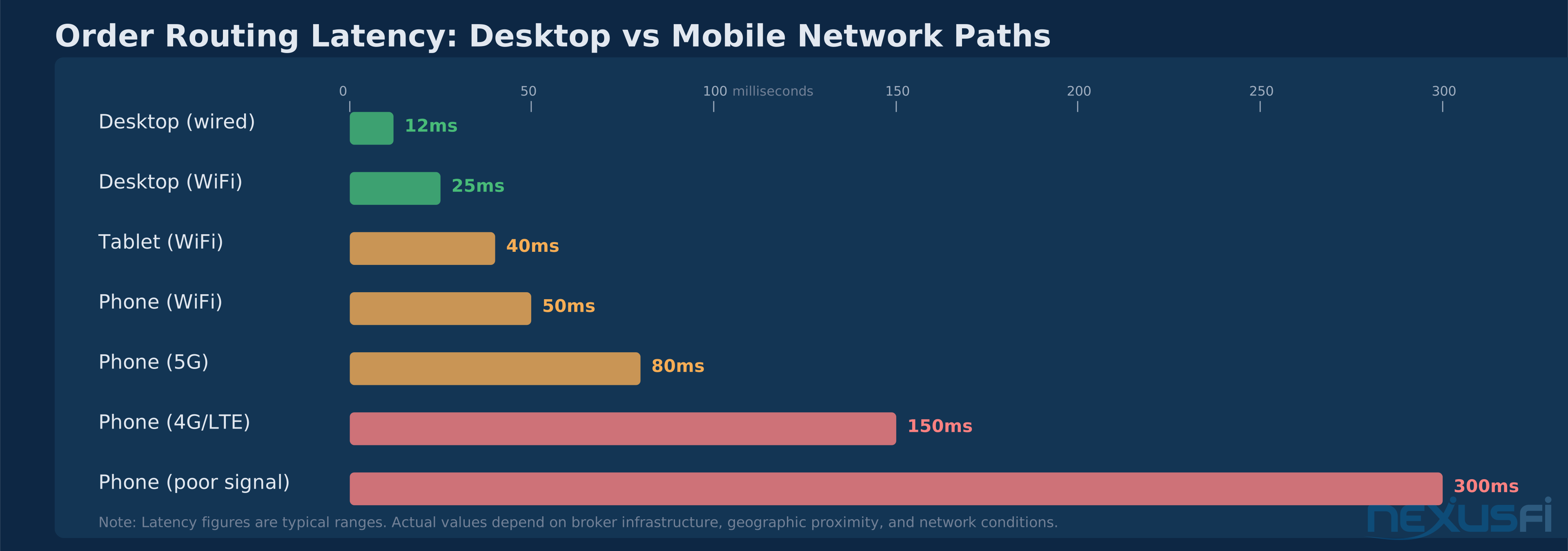
Network latency — A desktop on a wired connection adds perhaps 5-20ms of network latency to order routing. A phone on cellular adds 50-200ms, depending on signal strength and tower congestion. On WiFi, the difference shrinks. For a swing trader holding for hours, this is irrelevant. For a scalper targeting 2-3 tick moves on ES, 150ms of extra latency is real money.
Data throttling — Mobile apps may throttle quote refresh rates to manage bandwidth and battery life. During high-volatility events (FOMC, NFP, CPI), this throttling can mean your price display is 1-3 seconds behind reality. Placing a market order when your screen shows 5450.00 but the market has already moved to 5447.50 produces slippage you didn't see coming.
Order modification speed — The critical performance gap isn't initial order placement — it's modifying working orders. Adjusting a stop-loss from 5440 to 5438 on desktop takes one click and drag. On mobile, it's a multi-step process that takes 3-5 seconds. When price is moving 2 handles per second, those seconds mean you're chasing your own order.
App suspension — Mobile operating systems aggressively manage background apps. If your trading app gets suspended because you switched to check a news alert, reconnecting to the data feed and order session can take 5-15 seconds. Your stops remain working at the exchange level, but your visibility into what's happening disappears.
Risk Management: Where Mobile Gets Dangerous #
Futures leverage means mobile trading mistakes get amplified. A wrong-quantity entry on a stock might cost you $50. A wrong-quantity entry on ES costs $50 per tick per contract. Accidentally entering 50 contracts instead of 5 — a mis-tap that can happen on a small screen — means you're exposed to $250 per tick.
Technical risks specific to mobile:
Connection failures at the worst possible time. Cellular dead zones, battery depletion, and app crashes don't wait for convenient moments. Unlike a desktop with a UPS, dual monitors, and redundant internet connections, a phone is a single point of failure. @steve2222 on NexusFi described keeping CQG Mobile on his phone specifically as a disaster plan: "I don't use it for placing trades, but I would use it if my trading computer or internet connection packed a sad and I needed to flatten or assess where price was... it gives redundancy for my home fibre going down but the mobile network is still up" ([NexusFi post] [3]).
Confirmation fatigue — Mobile apps add confirmation dialogs to prevent accidental orders. After tapping through dozens of these, traders start dismissing them reflexively. The one time the confirmation is warning you about something real — wrong quantity, wrong direction, wrong contract — you're already past it.
Reduced context leading to bad decisions — On desktop, you see the full picture: multiple timeframes, correlated instruments, DOM depth, tick charts, market internals. On mobile, you see a single chart and maybe a position P&L. Trading decisions made with 20% of the information aren't 80% as good — they're often worse than not trading at all.
Practical risk controls to implement:
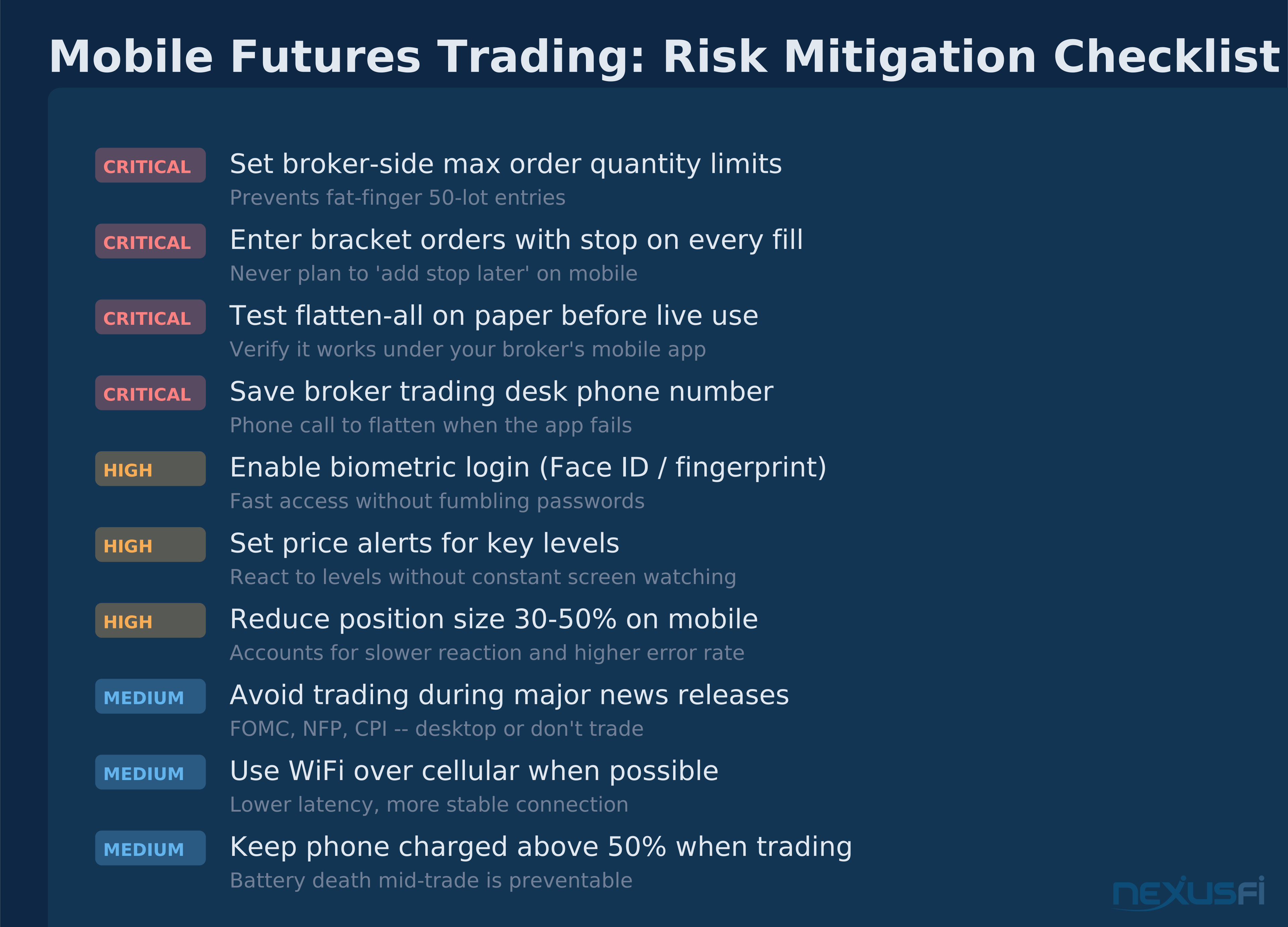
- Set broker-side maximum order quantity limits — don't rely on self-discipline when the interface makes errors easy
- Always enter bracket orders with stops attached on fill — never plan to "add the stop later"
- Use reduce-only or close-only modes when your intent is just to manage existing positions
- Keep your broker's trading desk phone number saved — when the app fails, a phone call to flatten is your backup
- If trading exclusively from mobile, reduce position size by 30-50% compared to your desktop sizing
Smartphone vs Tablet: Different Tools for Different Jobs #
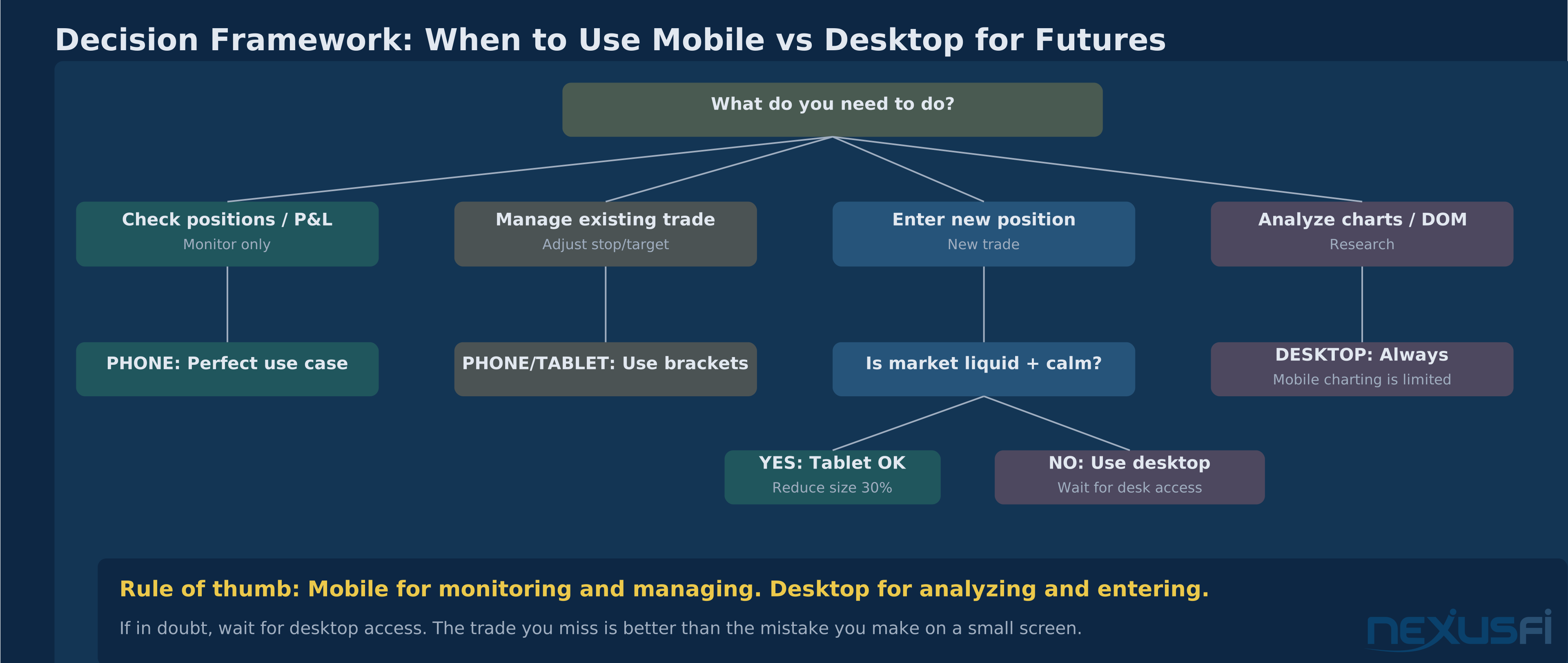
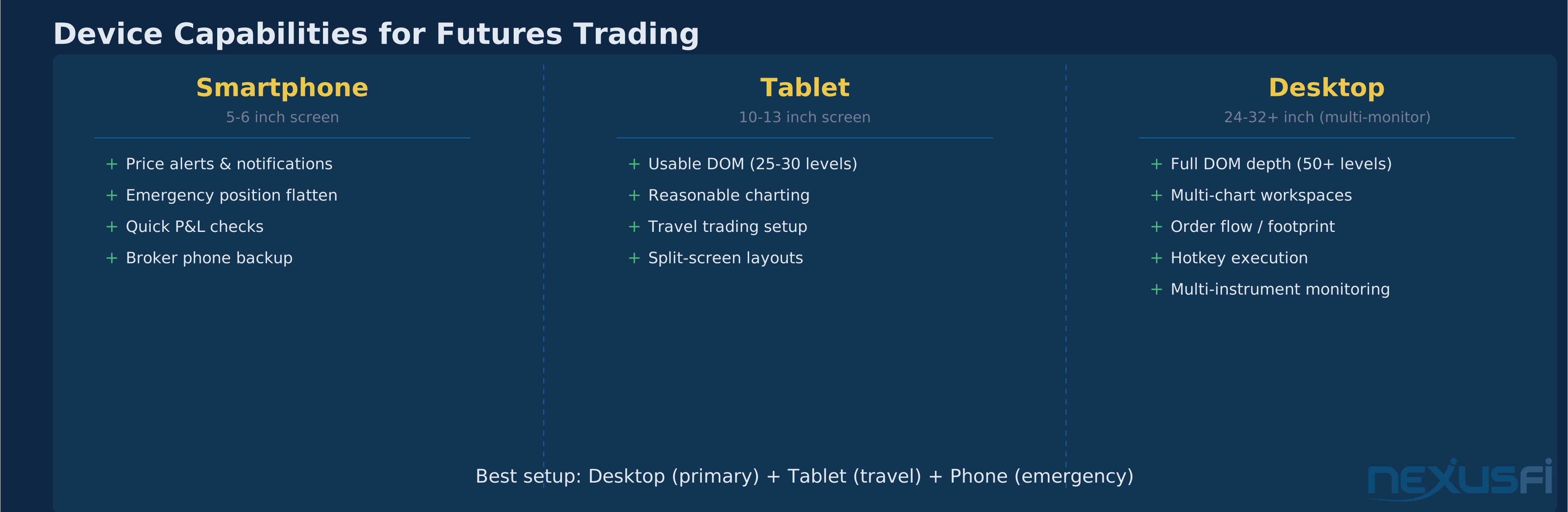
Smartphones are monitoring devices that happen to have trading capability. Use them for checking positions, responding to price alerts, and emergency trade management — closing a position when you get a stop alert at dinner, adjusting a target while away from your desk, flattening everything before an unexpected news event. Don't use them as your primary execution platform.
Tablets are genuinely viable intermediate trading devices. A 10-12 inch tablet with a stylus or keyboard gives you enough screen real estate for useful charts, a readable DOM, and comfortable order entry. Many futures traders use tablets as a travel trading setup — not ideal, but functional enough for their regular strategy with some adjustments.
The sweet spot for most futures traders: desktop as the primary platform with a tablet as the travel backup and phone as the emergency-only safety net.
The Remote Desktop Alternative #
Before investing in mobile trading app fluency, consider whether a remote desktop connection to your actual trading machine is a better fit. Apps like Splashtop, AnyDesk, and RealVNC let you control your desktop platform from a phone or tablet over the internet. As @Blash, a long-time NexusFi member, noted: "I like Splashtop a lot for following along and interacting with my trade machine wherever I am" ([NexusFi post] [4]).
Remote desktop advantages: you get your full platform with all indicators, all charts, full DOM, hotkeys (with keyboard attachment), and your exact workspace. No feature compromises.
Remote desktop disadvantages: latency is higher than a native app, the interface is clunky on a small screen (pinch-zoom required), and if your home internet drops, you lose both the remote connection and your platform's connection to the broker.
A VPS (Virtual Private Server) running your trading platform solves the home-internet-failure problem — your platform stays connected to the broker even if your phone's connection to the VPS drops. The VPS approach costs $30-80/month but provides enterprise-level reliability for traders who need to manage positions remotely.
Building Your Mobile-Desktop Hybrid Workflow #
The best approach to mobile futures trading isn't choosing between mobile and desktop — it's designing a workflow that uses each where it excels.
Desktop handles: chart analysis, trade idea generation, primary execution, DOM-based trading, multi-instrument monitoring, complex order management, and anything during major economic releases.
Mobile handles: position monitoring away from the desk, alert response (price hits your level while you're out), protective order adjustments, emergency flattening, quick market checks between obligations, and simple directional trades in liquid markets when you can't access your desktop.
Setup checklist for mobile readiness:
- Configure your broker's mobile app with the same watchlists and alert settings as desktop
- Pre-set default order quantities to your standard size (prevents size errors)
- Test the flatten-all function on paper before you need it live
- Save your broker's trading desk phone number as a favorite contact
- Enable biometric login (Face ID / fingerprint) for fast access
- Set up price alerts through the mobile app so you're notified of levels without watching
- Reduce position sizing rules for mobile-only trades by at least 30%
- Practice the full order lifecycle on sim — entry, modify, cancel, flatten — until it's muscle memory
The traders who use mobile most effectively aren't trying to replicate their desktop experience on a phone. They've accepted the limitations and built a deliberately constrained mobile workflow — fewer instruments, simpler order types, smaller size, and a bias toward managing existing positions rather than initiating new ones.
Mobile trading for futures is a genuine capability, not a gimmick. But it's a supplementary capability — and treating it as anything more than that is where traders get into trouble.
Knowledge Map
Prerequisites
Understand these firstReferences This Article
Articles that build on this topicCitations
- — Best free mobile app for futures charts (2025)“lightsun47, great question, and the honest answer is that finding the best futures trading app for mobile that's truly free with real-time data is... complicated. Let me break down what actually works.”
- — Mobile futures trading for Apple devices (2019) 👍 1“Tradestations mobile app is really good. Has really good charting with tons of indicators, DOM, watchlists, and works incredible well to move money between your trading account and bank accounts.”
- — The HSI Index Futures Scalping Experiment (2020) 👍 5“Guys ( josh ), I cant add much more because I don't currently subscribe to MJNK data (only HKFE, Eurex and CME). NJNK historically never moved enough for my trading style (probably different in this market - maybe I should look at it again).”
- — Spoo-nalysis ES e-mini futures S&P 500 (2015) 👍 2“I like Splashtop - Top-Performing Remote Desktop and Remote Support a lot for following along and interacting with my trade machine wherever I am from my cell. In this case an iPhone. Or my Samsung tablet with wifi.”
- — futures.io Android and iOS app for mobile viewing (2016) 👍 18“Hi guys, We now have our own app in the Google Play and Apple store, for use with Android, iPhone and iPad. This initial release is likely to have some issues. Please report them in this thread and we will work them out in time.”